









A Claude skill, or Agent Skill, is a folder containing a SKILL.md file: a name and description at the top, then instructions, plus optional scripts and reference files. The agent reads only the name and description until a task matches, then loads the instructions. Anthropic introduced skills on 16 October 2025 and published the format as an open standard.
The first skill most people install is one of Anthropic's document skills, the ones that let Claude create and edit Word, Excel, PowerPoint and PDF files. Open the docx folder and the surprise is how ordinary it is. A Markdown file with instructions, a few Python scripts, and some reference notes. No server, no API, no build step. That's what a skill is, and it's why the format took off so quickly.
We started indexing skills alongside MCP servers because people kept asking the same question: which one do I need? This guide explains what skills are, how an agent decides to use one, where they work beyond Claude, and how they relate to MCP. Our catalog currently has 76,663 skills in it, and you can browse them in the skills directory.
Key takeaways
- A skill is a folder with a
SKILL.mdfile: YAML front matter withnameanddescription, then Markdown instructions.- Agents read only the name and description at startup and load the rest when a task matches, so many skills cost little.
- Skills work in Claude Code, claude.ai, Claude Desktop, Codex, Gemini CLI and more, because the format is an open standard.
- A skill is know-how; an MCP server is access. Most good setups use both.
The short definition
A skill is a folder with a file called SKILL.md in it. The top of that file is a small block of YAML with two required fields: name and description. Below it are instructions in plain Markdown. The folder can also hold scripts the agent can run, reference documents it can read, and assets like templates.
That's the entire format. Anthropic introduced it as Agent Skills on 16 October 2025, described as "folders that include instructions, scripts, and resources that Claude can load when needed", and in December 2025 published it as an open standard so other tools could adopt it. The specification lives at agentskills.io.
You'll see "Claude skills" and "Agent Skills" used for the same thing. Claude skills is what most people search for; Agent Skills is the name of the open format.
How an agent uses a skill
The clever part is how little a skill costs until it's needed.
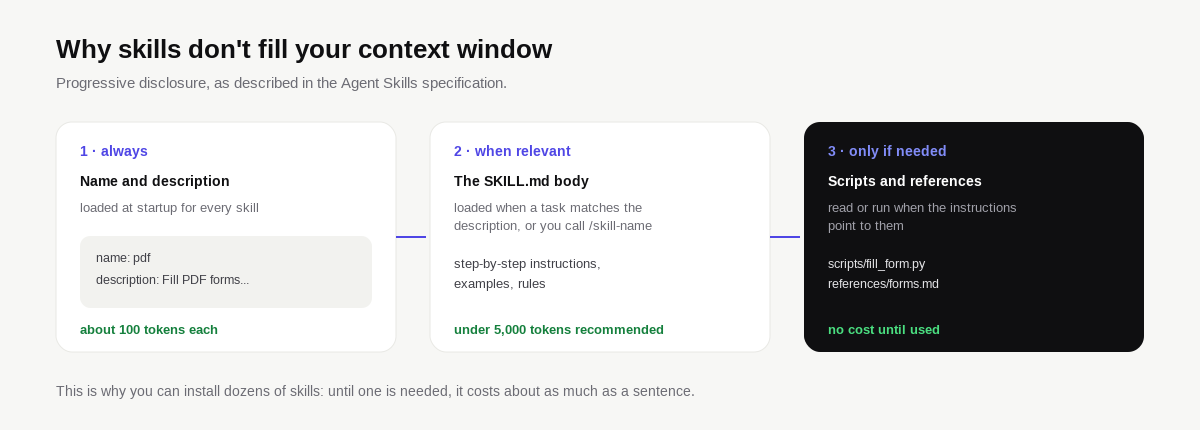
When a session starts, the agent reads only the name and description of each installed skill, roughly a hundred tokens apiece according to the specification. When you ask for something that matches a description, say "fill in this PDF form", the agent loads the full SKILL.md body. The spec recommends keeping that under 5,000 tokens. If the instructions point to a script or a reference file, the agent reads or runs it at that point, and not before.
| Stage | What the agent reads | When | Size |
|---|---|---|---|
| 1 | name and description of every installed skill |
At session start | About 100 tokens per skill |
| 2 | The full SKILL.md body |
When a request matches the description | Recommended under 5,000 tokens |
| 3 | Scripts, references and assets | Only when the instructions point to them | As needed |
The spec calls this progressive disclosure. In practice it means you can install dozens of skills without slowing anything down, which is very different from MCP servers, where every tool definition is loaded up front.
It also means the description does a lot of work. It's the only thing the agent sees when deciding whether a skill applies, so a good one says both what the skill does and when to use it. In our catalog the average skill description is a little over 300 characters, and the clearest ones read like a short instruction: "Use when the user asks to...".
What's inside a real skill
Here's the shape of a typical skill folder:
release-notes/
├── SKILL.md
├── scripts/
│   └── collect_commits.sh
└── references/
    └── style.md
And the start of its SKILL.md:
---
name: release-notes
description: Writes release notes from merged pull requests in our house style. Use when the user asks for release notes, a changelog entry or a summary of what shipped.
---

# Release notes

1. Run `scripts/collect_commits.sh <from-tag> <to-tag>` to list merged PRs.
2. Group them as Added, Changed, Fixed. Follow `references/style.md`.
3. Lead with the change users will notice most...
| Field | Required | Rules |
|---|---|---|
name |
Yes | 1 to 64 characters, lowercase letters, numbers and hyphens; must match the folder name |
description |
Yes | 1 to 1,024 characters; says what the skill does and when to use it |
license |
No | License of the skill's files |
compatibility |
No | Tools or environments the skill expects |
metadata |
No | Extra key-value data |
allowed-tools |
No, experimental | Tools the skill may use without asking |
The specification sets a few rules. The name is 1 to 64 characters of lowercase letters, numbers and hyphens, and must match the folder name. The description is 1 to 1,024 characters. Optional fields include license, compatibility, metadata and an experimental allowed-tools list. Individual tools add their own fields; Claude Code, for instance, supports disable-model-invocation for skills you only want to run by hand.
Across the skills in our catalog, about a third ship as a lone SKILL.md with no other files, and roughly a third declare allowed-tools. A handful fail validation entirely because the front matter is missing a required field or isn't valid YAML; we hide those from listings until they're fixed. Our guide on how to build a skill in Claude covers how to avoid that.
Where skills work
Because the format is a folder of files, it travels well. Each tool reads skills from its own location.
| Tool | Where skills live | How you use one |
|---|---|---|
| Claude Code | ~/.claude/skills/ (personal), .claude/skills/ (project) |
automatically, or /skill-name |
| claude.ai and Claude Desktop | uploaded as a ZIP under Customize, Skills | automatically when relevant |
| Codex | ~/.agents/skills/ (user), .agents/skills/ (repository) |
automatically, or $skill-name |
| Gemini CLI | ~/.gemini/skills/ or ~/.agents/skills/ |
automatically, /skills to manage |
Cursor and other tools have added support too, and the list keeps growing. Our installation guide has the exact commands for each, and every skill page in our directory shows a ready-made install line per tool.
Note
There's one requirement to remember for claude.ai: skills run code, so code execution has to be enabled for your account or organization. In Claude Code, skills you add or edit are picked up during the session without a restart.
Skills vs MCP servers
This is the question we hear most, and the honest answer is that they solve different problems.
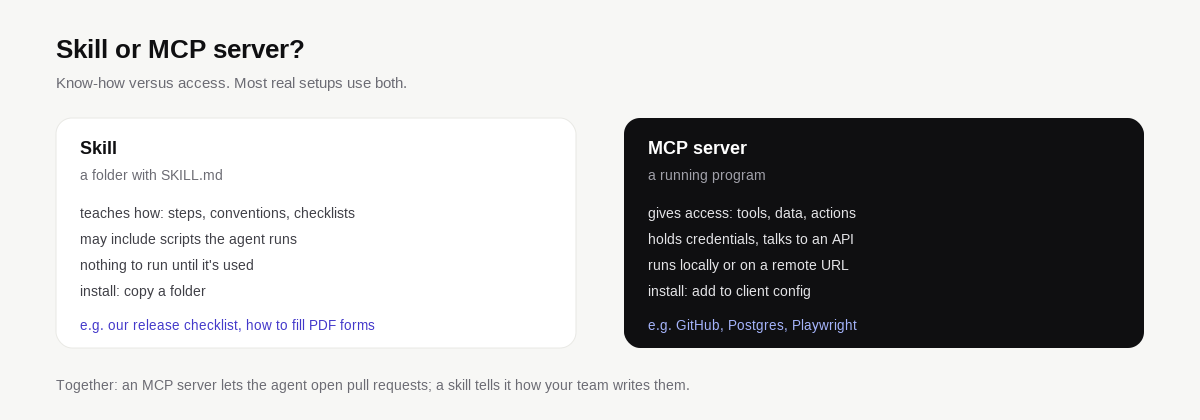
A skill is know-how. It teaches the agent how to do something: your team's release process, how to structure a design review, the steps to fill a PDF form correctly. It may include scripts, but those run with whatever access the agent already has.
An MCP server is access. It's a running program that connects the agent to a system it couldn't reach otherwise, like GitHub, a database or Slack, and holds the credentials for it.
The best setups use both. The GitHub MCP server lets an agent open a pull request; a skill tells it how your team writes pull request descriptions. A Postgres server lets it query the warehouse; a skill tells it which tables are trustworthy and which are deprecated. The line is blurring a little at the edges too: the TypeScript MCP SDK added experimental support in version 2.4.0 for publishing skills over MCP, so a server can ship the know-how for its own tools.
If you're choosing where to start: if the agent can already reach what it needs but keeps doing it wrong, write a skill. If it can't reach the system at all, you need an MCP server. Browse both in our skills directory and server list.
| Skill | MCP server | Plugin | CLAUDE.md or custom instructions |
|
|---|---|---|---|---|
| What it gives the agent | Know-how and scripts | Access to a system | A bundle of skills, commands, agents, hooks and MCP configs | Standing rules |
| Loaded | On demand | Tool list at startup | Whatever it bundles | Always |
| Runs as | Files read by the agent | A separate program | Installed from a marketplace | Text in context |
| Holds credentials | No | Yes | Through its MCP configs | No |
| Best for | Long or occasional procedures | Reaching GitHub, databases, Slack | Sharing a full setup with a team | Short rules for every chat |
Skills vs CLAUDE.md, projects and custom instructions
Claude already had ways to give it standing instructions, so it's fair to ask why skills exist.
CLAUDE.md in a repository, project instructions in claude.ai and custom instructions in your settings are always loaded. They're the right place for things that apply to every conversation: the language your codebase uses, how you like answers formatted, which folders not to touch. The cost is that every word is in context all the time, so they have to stay short.
Skills are loaded on demand. That makes them the right place for anything long or occasional: a twelve-step release process, the rules for writing a security advisory, how to build a quarterly report from three spreadsheets. They can also carry scripts and reference files, which instructions can't.
A useful habit: if you find yourself pasting the same long instructions into chats every few days, or your CLAUDE.md keeps growing a section that only matters for one kind of task, that section wants to be a skill.
Skills, plugins and commands
Two related terms come up in Claude Code.
A plugin is a bundle that can contain skills, slash commands, subagents, hooks and MCP server configs, installed together from a marketplace with /plugin marketplace add and /plugin install. Anthropic's own document skills are distributed this way as well as as plain folders. We list Claude Code plugins with what each one bundles.
Custom slash commands have been merged into skills in Claude Code. A file at .claude/commands/deploy.md still works and creates /deploy, but the docs now treat skills as the main format, since they add a description the model can use to load them automatically.
Skills worth trying first
The most-starred skills in our catalog are a good starting point, because they're widely used and well maintained.
Anthropic's skills repository includes document skills for Word, PDF, PowerPoint and Excel files, a frontend design skill that pushes for distinctive UI rather than generic layouts, a skill creator that helps you write your own, and an MCP builder for writing MCP servers. Beyond Anthropic's set, you'll find skills for testing, data analysis, writing documentation and specific products in our skills directory, sorted by usefulness.
The highest-ranked skills in our catalog right now:
| Skill | Repository | GitHub stars | Files |
|---|---|---|---|
| n8n:community-pr-readiness-check | n8n-io/n8n | 211,379 | 5 |
| frontend-design | anthropics/skills | 192,736 | 2 |
| copilot-cli-quickstart | github/awesome-copilot | 41,038 | 1 |
| review-architecture | pascalorg/editor | 25,443 | 1 |
| let-fate-decide | trailofbits/skills | 8,136 | 98 |
| career-ops | career-ops-hq/career-ops | 82,067 | 1 |
| egm-draft | google/elephant-goldfish-model | 19,172 | 6 |
| skillopt-sleep | microsoft/SkillOpt | 19,040 | 7 |
Watch out
A skill's scripts run with your permissions, the same as a local MCP server. Read the
SKILL.mdand any scripts before you install a skill from someone you don't know. Every skill page on HostedMCP shows the full file list and theSKILL.mdcontent so you can check before installing.
Skills by kind of work
Looking across the skills in our directory, most fall into a few groups, and it helps to know them when you're deciding what to write or install.
Document and file skills teach an agent to produce or edit specific formats correctly: Word, PDF, spreadsheets, slides, diagrams. They usually lean heavily on bundled scripts, because file formats reward exact code more than clever prose.
Engineering workflow skills encode how a team works: code review checklists, commit and pull request conventions, testing strategies, release steps, incident write-ups. These are often a single SKILL.md, since the value is in the steps rather than in code.
Product and tool skills explain how to use a specific product well, such as a design system, a cloud provider's CLI or an internal API. They pair naturally with the MCP server for the same product.
Writing and analysis skills cover research briefs, data analysis routines, SEO checks and editorial style guides. The best ones include short examples of good output, which models follow far more reliably than abstract rules.
When a skill doesn't load
If an installed skill never seems to kick in, the cause is almost always one of these.
| Symptom | Cause | Fix |
|---|---|---|
| The skill never loads by itself | The description does not match how people ask | Rewrite it with "Use when the user asks to..." |
| The tool does not list the skill | The folder is nested too deep or in the wrong directory | Put SKILL.md directly in <skills dir>/<name>/ |
| claude.ai rejects the upload | name differs from the folder name |
Make them identical |
| The skill is skipped silently | Invalid YAML front matter | Check the closing ---, tabs and unquoted colons |
The description doesn't match how you ask. The agent only sees the name and description when deciding, so a description like "Helpers for PDFs" loses to one that says "Use when the user asks to fill, merge, split or extract text from PDF files." Rewrite it in the words people actually use.
The folder is in the wrong place, or nested one level too deep. The SKILL.md must sit directly inside a folder named after the skill, inside the tool's skills directory: ~/.claude/skills/release-notes/SKILL.md, not ~/.claude/skills/my-skills/release-notes/SKILL.md.
The name doesn't match the folder. The spec requires the name field to match the directory name; some tools are strict about it, and claude.ai rejects an upload where they differ.
The front matter is broken. A missing closing ---, a tab instead of spaces, or an unquoted colon in the description makes the YAML invalid, and the skill is skipped. Our listings flag skills with invalid front matter for exactly this reason.
Tip
In Claude Code you can always rule out the loading question by calling the skill directly with
/skill-name. If that works, the skill is fine and the description needs work.
Writing your own
The best skills are often the ones nobody else could write: your team's conventions, your deploy checklist, the way your company formats reports. Writing one takes about ten minutes once you know the rules. We walk through it, including the description patterns that make an agent actually load the skill, in how to build a skill in Claude.
Questions people ask
What are Claude skills?
Folders of instructions, scripts and resources that Claude loads when a task needs them. Each has a SKILL.md with a name and description in YAML front matter, followed by the instructions in Markdown.
Are Claude skills free?
Yes. Skills are plain files, and most published skills are open source. Using them in claude.ai needs a plan with code execution enabled; in Claude Code they work on any plan that runs Claude Code.
Do skills only work with Claude?
No. Agent Skills is an open standard. Claude Code, claude.ai, Codex, Gemini CLI and Cursor support it, each with its own skills folder. A skill written for one usually works in the others.
What is the difference between Claude skills and MCP?
A skill teaches the agent how to do something with instructions and optional scripts. An MCP server gives it access to a system, such as GitHub or a database, through tools. They work well together.
Where is the Claude skills folder?
In Claude Code, personal skills live in ~/.claude/skills/<skill-name>/ and project skills in .claude/skills/<skill-name>/ inside the repository. In claude.ai you upload a skill as a ZIP under Customize, Skills.
How do I use a Claude skill?
Install it, then either ask for something that matches its description and let the agent load it, or call it directly. In Claude Code you type /skill-name.