On 11 November 2026 our crawler had found 57,810 MCP servers. Fewer than one in fifty of them had a hundred stars on GitHub. Most were somebody's weekend project: a few hundred lines of TypeScript or Python that let an AI model talk to one API, pushed to GitHub and never touched again.
That number says more about MCP than any definition. Two years ago almost nobody had heard of it. Now writing a tool integration for AI is so cheap that people do it for fun. This guide explains what made that possible, how the protocol works underneath, what changed in the 2026 revision that most tutorials still miss, and how to try it on your own machine in about five minutes. We'll lean on our own catalog data along the way.
Key takeaways
- MCP is an open protocol that lets any AI app use any tool that publishes an MCP server, so each integration is written once.
- Three parts: the host (the app you type into), one client per server inside it, and the server that does the work.
- Servers offer tools (actions), resources (data) and prompts (templates). Tools do almost all of the work in practice.
- Servers run locally over stdio or remotely over Streamable HTTP with OAuth sign-in.
- The 2026-07-28 revision removed the handshake and sessions. Tutorials from 2025 describe the older design.
What MCP stands for
MCP is short for Model Context Protocol. Each word does some work.
The model is the AI itself, Claude or GPT or Gemini, running inside some application. Context is everything the model needs that it can't know from training: the contents of your repository, a row in your customer table, the ticket your manager filed this morning, what's on the page your browser has open. Protocol is the agreed format for asking for that context and acting on it, so that any app that speaks MCP can work with any tool that speaks MCP.
| Word | What it means here | Example |
|---|---|---|
| Model | The AI that answers you, running inside an app | Claude in Claude Code, GPT in ChatGPT |
| Context | What the model needs but cannot know from training | Your repo, a database row, today's tickets |
| Protocol | The shared format for asking for context and acting on it | JSON-RPC 2.0 messages between client and server |
That last part is the whole idea. MCP doesn't make models smarter. It makes them easier to plug in.
The problem it solves
Picture the world just before MCP. You want Claude to read your GitHub issues. Someone writes a GitHub integration for Claude. Then Cursor wants the same thing, and someone writes a GitHub integration for Cursor, with different code, different auth handling, different bugs. Then VS Code. Then ChatGPT. Repeat for Postgres, Slack, Figma and every other tool people care about.
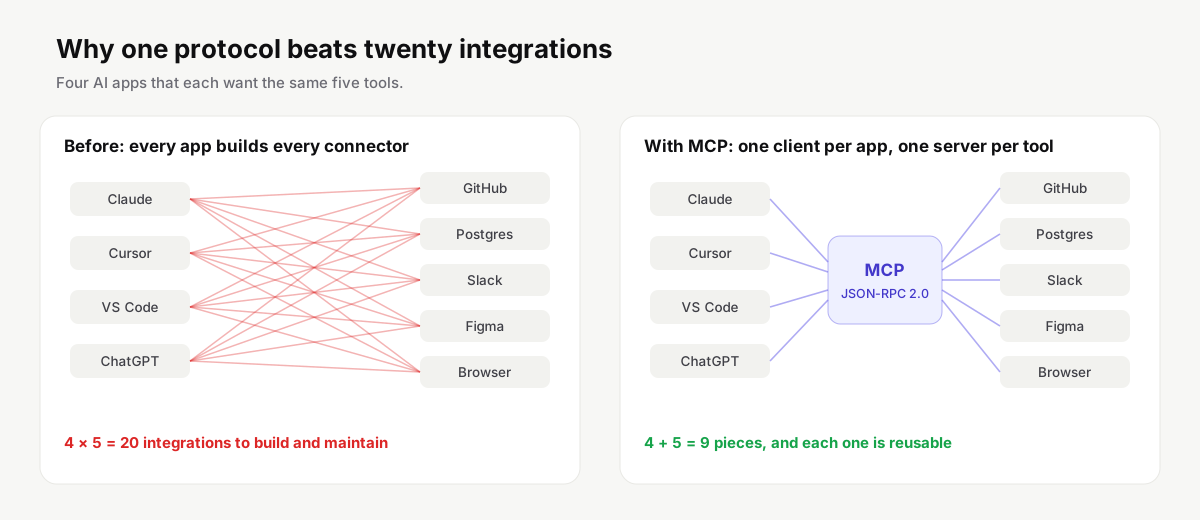
With four apps and five tools that is twenty integrations, and every one of them has to be kept working as APIs change. The people who know GitHub best, the GitHub team, can't help much, because each integration lives inside someone else's app.
MCP turns the grid into two short lists. Each app implements the protocol once, as a client. Each tool implements it once, as a server. Four apps and five tools now need nine pieces instead of twenty, and the GitHub team can ship and maintain the GitHub server themselves. They did: the official GitHub MCP server is one of the most-starred projects in our catalog.
How MCP works
There are three moving parts, and the names matter because the docs use them precisely.
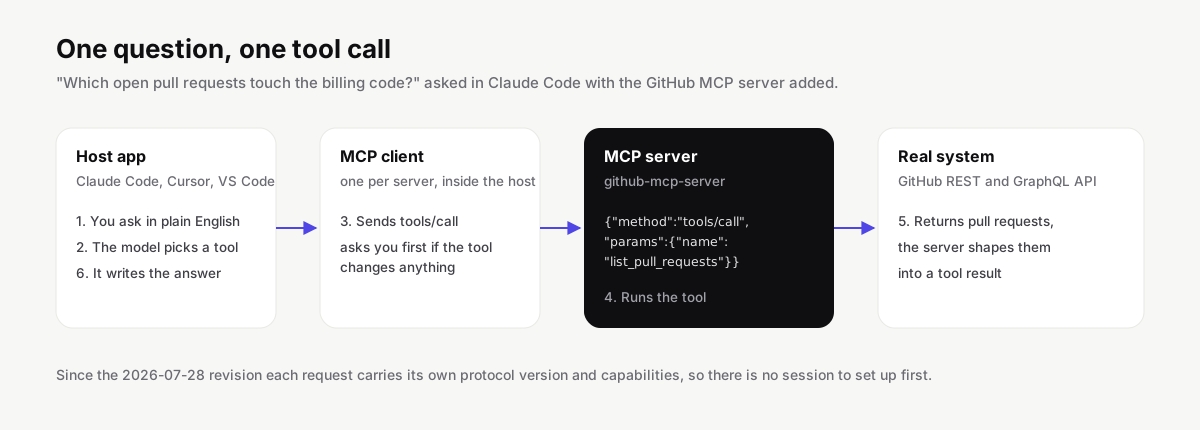
The host is the application you actually type into: Claude Desktop, Claude Code, Cursor, VS Code, ChatGPT, Codex, Gemini CLI. The server is a separate program that knows how to do something useful, like query a database or drive a browser. Between the two, the host creates one client for every server you've added, and that client handles the conversation with its server.
| Part | What it is | Examples |
|---|---|---|
| Host | The application you type into | Claude Code, Claude Desktop, Cursor, VS Code, ChatGPT, Codex, Gemini CLI |
| Client | A connector the host creates for each server you add | One per server, managed by the host |
| Server | A separate program that does the useful work | GitHub, Postgres, Playwright, Figma servers |
When you ask a question that needs outside help, the model sees a list of tools the connected servers have announced, each with a name, a description and an input schema. It picks one and fills in the arguments. The client sends that as a JSON-RPC 2.0 request to the server. The server does the real work, usually by calling some existing API, and sends back a result. The model reads the result and continues. A good host asks for your approval before any tool that can change data runs, and most let you allow a tool permanently once you trust it.
One tool call, step by step:
- The host connects to each server you added and receives its list of tools.
- You ask a question. The model reads the tool names, descriptions and input schemas.
- The model picks a tool and fills in the arguments.
- The client sends a JSON-RPC 2.0 request to the server.
- The server calls the real API or system and returns a result.
- The model reads the result and either answers or calls another tool.
JSON-RPC is a plain, boring format, and that is a feature. It's why we see MCP servers written in TypeScript, Python, Go, Rust, C#, Java and more. In our catalog TypeScript and Python are almost tied, with 4,543 and 4,028 servers, followed by JavaScript, Go and Rust.
Tools, resources and prompts
A server can offer three kinds of things, which the spec calls primitives.
Tools are actions. list_pull_requests, run_query, click, send_message. The model decides when to call them. In practice tools carry almost all the weight: when someone says a server has forty tools, they mean forty separate things the model can do with it.
Resources are data the host can read and put in front of the model, identified by URIs. A Postgres server might expose each table's schema as a resource, so the model can see column names before it writes a query. Resources are chosen by the app or the user rather than the model.
Prompts are reusable templates a user picks from a menu, often surfaced as slash commands. A code review server might offer a "review this diff" prompt that sets up the right instructions in one click.
| Primitive | What it is | Who decides to use it | Example |
|---|---|---|---|
| Tools | Actions the server can perform | The model | query, click, send_message |
| Resources | Data identified by a URI | The app or the user | A table schema, a file, a log |
| Prompts | Reusable templates | The user, from a menu | A "review this diff" slash command |
Here's what that looks like with a real database server. You add a Postgres server pointed at a read-only connection string. The host lists its tools: something like list_tables, describe_table and query. You ask "how many customers signed up last week, by country?". The model calls describe_table on the customers table, sees a created_at column and a country column, writes the SQL, runs it through query, and turns the rows into a short answer. You never wrote SQL and the model never had your password; the server held the connection.
Local servers and remote servers
MCP has two standard ways to carry messages, called transports.
With stdio, the host starts the server as a child process on your machine and they talk over standard input and output. This is how most developer tools run, because they need access to local things: your files, your git checkout, a database on localhost, a browser. It's also why so many install lines look like npx -y @playwright/mcp@latest or uvx some-server.
With Streamable HTTP, the server lives on the internet and each message is an HTTP POST to a single endpoint, usually a URL ending in /mcp. Sign-in happens through OAuth in your browser. This is the natural fit for SaaS products, and it's what companies like Linear, Notion, Sentry and GitHub use for their hosted servers. Nothing to install, nothing to keep updated.
Streamable HTTP arrived in the 2025-03-26 revision, replacing an earlier design that paired HTTP POSTs with a Server-Sent Events stream. That older transport is formally deprecated in 2026-07-28, so if a server's docs still talk about a separate /sse endpoint, it's out of date.
| stdio (local) | Streamable HTTP (remote) | |
|---|---|---|
| Where it runs | On your machine, started by the host | On the vendor's or your own server |
| How you add it | A command such as npx or uvx |
A URL, usually ending in /mcp |
| Sign-in | API keys in environment variables | OAuth in your browser |
| Good for | Files, git, local databases, browsers | SaaS products such as Linear, Notion, Sentry |
| Updates | You update the package | The vendor updates it for everyone |
This is how the servers in our catalog split today, measured on November 16, 2026:
| Transport | Servers | Share |
|---|---|---|
| Local only (stdio) | 20,979 | 32% |
| Remote only | 39,247 | 60% |
| Local and remote | 4,981 | 8% |
The remote share is inflated by companies that publish one endpoint per customer or region, but even allowing for that, hosted servers are no longer the exception. If you'd rather not run anything locally, our list of remote MCP servers filters for them.
What changed in the 2026-07-28 revision
This is the part most explainers get wrong, because most were written in 2025. The revision published on 28 July 2026 is the largest change since launch, and it changes how a connection works.
There is no handshake anymore. Older versions began every connection with an initialize request and an initialized notification, then tracked the conversation with a session ID header. Both are gone. MCP is now stateless: each request carries its own protocol version and capabilities, and a server that needs to remember something between calls hands back an explicit handle the client passes as an ordinary tool argument. If the versions don't match, the server answers with an UnsupportedProtocolVersionError that lists what it does support, and the client retries.
Servers must also implement a new server/discover call, so a client can ask up front which versions and capabilities a server has. Server-initiated requests were reworked too: instead of the server calling back into the client in the middle of a request, it now returns a result marked input_required, and the client sends a new request with the answer.
| Before 2026-07-28 | Since 2026-07-28 | |
|---|---|---|
| Starting a connection | initialize request and initialized notification |
No handshake; every request carries its version |
| Sessions | Session ID header tracked by the server | Stateless; explicit handles passed as tool arguments |
| Version mismatch | Negotiated during the handshake | UnsupportedProtocolVersionError lists supported versions |
| Capability discovery | Exchanged during the handshake | New server/discover call |
| Server asking the client for input | Request sent back mid-call | Result marked input_required, client sends a new request |
Some features are on their way out. Roots, sampling and logging are deprecated, along with the old HTTP+SSE transport and OAuth Dynamic Client Registration, which gives way to Client ID Metadata Documents. Deprecated doesn't mean broken: they still work during the deprecation window, and servers that support both the 2025-11-25 and 2026-07-28 revisions will keep serving older clients. But if you're starting something new, build against the current shape. Our guide to building an MCP server does.
What our catalog says about the ecosystem
Running a directory gives you an unusual view of a protocol. Every hour we pull new entries from the official MCP registry, GitHub and npm, and we check every server's repository, packages and README.

The first thing it shows is the long tail. Of 45,854 servers from individual publishers, only 924 have a hundred or more stars and 207 have a thousand or more. About a quarter saw a commit in the last ninety days. The rest are experiments, forks of tutorials and abandoned prototypes, plus a lot of perfectly good small servers that simply have no audience yet.
The second is that a high star count doesn't guarantee a good server. We've seen popular repos with no install instructions and tiny ones with excellent docs and a clean tool list. That's why our server list ranks by a combined quality score that looks at documentation, recent activity, downloads and stars, rather than stars alone, and why every page shows when each number was measured.
The third is how much duplication there is. The same server often appears in the registry, on npm and on GitHub under slightly different names. We merge those into one listing, but if you search GitHub directly you'll see the same project three times.
What people use MCP for
The most-starred servers in our listings tell you what people actually connect.
Developers connect their editor to the GitHub server to read code, review and open pull requests and check CI, and to a database through Postgres, MySQL or SQLite servers to ask questions in plain language. Playwright and other browser servers let the model check its own UI changes in a real browser, which turns out to catch a surprising number of bugs. Designers and frontend developers pull frames from Figma straight into code. Teams wire up Slack, Jira, Linear and Notion so an agent can file, update and summarize work without anyone copying text between tabs.
| What people want | Servers they add |
|---|---|
| Work with code and pull requests | GitHub, GitLab, Git |
| Ask questions of a database | Postgres, MySQL, SQLite, Supabase |
| Test a UI in a real browser | Playwright, browser servers |
| Turn designs into code | Figma |
| Keep project work moving | Jira, Linear, Notion, Slack |
The most-starred servers from vendors themselves, as of November 16, 2026:
| Server | Maintainer | Transport | Tools | GitHub stars |
|---|---|---|---|---|
| Browser Use | browser-use | Local (stdio), Remote (HTTP) | 7 | 121,037 |
| Servers | modelcontextprotocol | Local (stdio) | — | 92,013 |
| Metabase | metabase | Remote (HTTP) | 24 | 50,350 |
| LibreChat | librechat-ai | — | — | 47,160 |
| CCXT | ccxt | Local (stdio) | 32 | 44,888 |
| MCP MCP | heyputer | Remote (HTTP) | — | 44,171 |
| PostHog MCP Server | posthog | Remote (HTTP) | 1 | 40,796 |
| Playwright | microsoft | Local (stdio) | 25 | 39,690 |
You can browse everything by category or by the product it connects to. Each server page shows its tools, the date of its last commit, and the exact install line for your client.
Try it in five minutes
Pick a client you already use. Claude Code, Cursor, VS Code, Claude Desktop, Codex and Gemini CLI all support MCP, and our client guides show where each one keeps its config and how to check that a server loaded.
Every major client supports local servers; remote support and OAuth differ:
| Client | Config file | Local (stdio) | Remote (HTTP) | OAuth sign-in |
|---|---|---|---|---|
| Claude Code | ~/.claude.json |
Yes | Yes | Yes |
| Cursor | ~/.cursor/mcp.json |
Yes | Yes | Yes |
| VS Code | .vscode/mcp.json |
Yes | Yes | Not documented |
| Claude Desktop | ~/Library/Application Support/Claude/claude_desktop_config.json |
Yes | Not documented | Not documented |
| Codex | ~/.codex/config.toml |
Yes | Yes | Yes |
| Gemini CLI | ~/.gemini/settings.json |
Yes | Yes | Yes |
| Windsurf | ~/.config/devin/mcp_config.json |
Yes | Yes | Yes |
| Devin | ~/.config/devin/mcp_config.json |
Yes | Yes | Yes |
| Antigravity | ~/.gemini/config/mcp_config.json |
Yes | Yes | Yes |
| ChatGPT | No file: added in the ChatGPT UI |
No | Yes | Not documented |
| Zed | settings.json |
Yes | Yes | Yes |
| Cline | cline_mcp_settings.json |
Yes | Yes | Yes |
| Continue | .continue/mcpServers/<name>.yaml |
Yes | Yes | Not documented |
| Goose | ~/.config/goose/config.yaml |
Yes | Yes | Yes |
| JetBrains AI Assistant | Settings | Tools | AI Assistant | Model Context Protocol |
Yes | Yes | Not documented |
Then add one server. In Claude Code it's a single command:
claude mcp add playwright -- npx -y @playwright/mcp@latest
In Cursor you paste a few lines into ~/.cursor/mcp.json:
{
  "mcpServers": {
    "playwright": { "command": "npx", "args": ["-y", "@playwright/mcp@latest"] }
  }
}
Restart the client and ask for something only that server can do: "open example.com and tell me what the main heading says".
Tip
If nothing happens, open the client's MCP panel. A server that failed to start shows up there with an error, and nine times out of ten the cause is a missing runtime, usually Node.js for
npxservers oruvfor Python ones.
Watch out
A local server runs with your user's permissions and can read whatever you can read. Install ones you would trust with that, prefer servers from the vendor whose product they connect to, and read our notes on MCP security before you add a dozen of them.
MCP, function calling, APIs and agents
These get mixed up constantly, so it's worth being precise.
Function calling is a feature of a single model API. You describe some functions in your request, and the model can reply asking you to run one. It's how MCP tools reach the model in the end, but on its own it lives inside one app and one vendor's request format.
An API is the service itself, GitHub's REST API or Stripe's. MCP doesn't replace it. Most MCP servers are thin wrappers over an existing API that describe it in a way a model can discover and use safely. We go through the differences, and when you'd still call the API directly, in MCP vs API.
An agent is the program doing the work, usually a model running in a loop: plan, call a tool, read the result, decide what's next. MCP is how the agent reaches its tools. A related protocol, Agent2Agent or A2A, covers a different job: agents talking to other agents. The A2A docs put it neatly: MCP connects an agent to tools, APIs and data, and A2A connects it to other agents.
| What it is | Scope | |
|---|---|---|
| MCP | A protocol between AI apps and tools | Any app, any tool |
| Function calling | A feature of one model API | One app, one vendor's request format |
| API | The service itself, such as GitHub's REST API | What MCP servers usually wrap |
| Agent | The program that plans and calls tools in a loop | Uses MCP to reach its tools |
| A2A | A protocol between agents | Agent to agent, not agent to tool |
Where MCP came from
MCP was created at Anthropic by David Soria Parra and Justin Spahr-Summers and released as open source on 25 November 2024, with SDKs and a handful of reference servers. Within a year it was built into ChatGPT, Cursor, VS Code, Gemini CLI and most other AI coding tools.
On 9 December 2025 Anthropic donated the protocol to the Agentic AI Foundation, a directed fund under the Linux Foundation that Anthropic co-founded with Block and OpenAI, and said MCP's governance model would stay as it was. The specification is developed in public at modelcontextprotocol.io, revisions are named by date, and there are official SDKs in more than ten languages. | Date | What happened | |---|---| | 25 Nov 2024 | Anthropic releases MCP as open source with SDKs and reference servers | | 26 Mar 2025 | Revision 2025-03-26 introduces Streamable HTTP | | 25 Nov 2025 | Revision 2025-11-25 | | 9 Dec 2025 | MCP is donated to the Agentic AI Foundation under the Linux Foundation | | 28 Jul 2026 | Revision 2026-07-28 makes the protocol stateless |
If you want to go one level deeper, read what an MCP server is next, or skip straight to building your own.