









To build an MCP server, install the official SDK (`@modelcontextprotocol/server` for TypeScript or `mcp` for Python), register one or more tools with a name, a description and an input schema, and start the server on stdio. Test it with the MCP Inspector, then add it to a client such as Claude Code with `claude mcp add`.
Most "build your first MCP server" tutorials you'll find were written against the 2025 SDKs. They start with an initialize handshake, wire a transport by hand, and in Python they import FastMCP. All of that still compiles, which is the trap: a server wired the old way only serves older clients, and the 2026-07-28 revision of the protocol removed the handshake entirely.
So before writing this guide we built the example server twice, once in TypeScript with @modelcontextprotocol/server 2.4.0 and once in Python with mcp 2.3.0, and ran both through the MCP Inspector against modern and legacy clients on 11 November 2026. Everything below is the code that passed. It takes about an hour, and you'll end up with a server you can add to Claude Code, Cursor or VS Code and publish if you want.
Key takeaways
- Decide the tools first, named after tasks people ask for, not after API endpoints.
- Use the current SDKs:
@modelcontextprotocol/server2.4.0 (TypeScript) ormcp2.3.0 (Python).- Test with the MCP Inspector in both the modern and the legacy protocol era before any client sees the server.
- Connect with absolute paths, publish to npm or PyPI, and add OAuth 2.1 before going remote.
| TypeScript | Python | |
|---|---|---|
| Runtime | Node.js 20 or later | Python with uv |
| SDK package | @modelcontextprotocol/server 2.4.0 |
mcp 2.3.0 |
| Input schemas | Zod | Type hints on the function |
| Local test | MCP Inspector CLI | uv run mcp dev server.py |
| People install it with | npx -y your-package |
uvx your-package |
| Remote option | Packages for Node HTTP, Express, Hono, Fastify | --transport streamable-http |
What we're building
A small server with one tool, latest_release, that returns the newest release of any GitHub repository: version tag, date, link and the start of the release notes. It's a good first server for three reasons. It does something genuinely handy in an editor ("what changed in the latest Next.js release?"). It calls a real public API, so you see the wrapping pattern you'll use for most servers. And GitHub's release endpoint works without an API key, so there's nothing to configure.
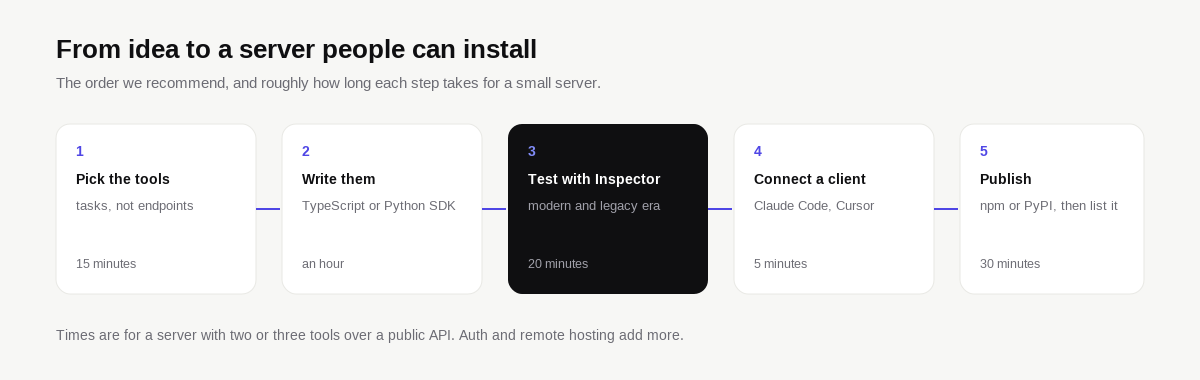
Step 1: decide the tools before writing code
A common first mistake is starting from the API reference and creating one tool per endpoint. A model doesn't think in endpoints, it thinks in tasks, and every extra tool is one more description it has to read before answering anything.
Write down the questions people will ask, then the smallest set of tools that answers them. For our server the question is "what's new in project X?", and one tool covers it. If you later want "show me all releases since v2.0", that's a second tool with its own clear name, not a pile of optional parameters on the first.
Then write the description as advice for the model: what the tool returns and when to use it. Our description says "Use it when someone asks what the newest version of a project is or what changed in it." That sentence is what makes the model pick the tool at the right moment.
Step 2a: the TypeScript version
You need Node.js 20 or later. Create a project and install the SDK and Zod, which the SDK uses for input schemas:
mkdir releases-mcp && cd releases-mcp
npm init -y
npm pkg set type=module scripts.build=tsc
npm install @modelcontextprotocol/server zod
npm install -D @types/node typescript
Add a tsconfig.json:
{
  "compilerOptions": {
    "target": "ES2022",
    "module": "Node16",
    "moduleResolution": "Node16",
    "outDir": "build",
    "rootDir": "src",
    "strict": true,
    "skipLibCheck": true
  }
}
Then the whole server, in src/index.ts:
import { McpServer } from "@modelcontextprotocol/server";
import { serveStdio } from "@modelcontextprotocol/server/stdio";
import { z } from "zod";

interface Release {
  tag_name: string;
  name: string | null;
  published_at: string;
  html_url: string;
  body: string | null;
}

async function fetchRelease(owner: string, repo: string): Promise<Release | null> {
  const res = await fetch(`https://api.github.com/repos/${owner}/${repo}/releases/latest`, {
    headers: { Accept: "application/vnd.github+json", "User-Agent": "releases-mcp" },
  });
  if (res.status === 404) return null;
  if (!res.ok) throw new Error(`GitHub answered ${res.status}`);
  return (await res.json()) as Release;
}

function createServer() {
  const server = new McpServer({ name: "releases", version: "1.0.0" });

  server.registerTool(
    "latest_release",
    {
      description:
        "Get the latest published release of a GitHub repository: version tag, date, link and the first part of the notes. Use it when someone asks what the newest version of a project is or what changed in it.",
      inputSchema: z.object({
        owner: z.string().describe("Repository owner, e.g. modelcontextprotocol"),
        repo: z.string().describe("Repository name, e.g. typescript-sdk"),
      }),
    },
    async ({ owner, repo }) => {
      const release = await fetchRelease(owner, repo);
      if (!release) {
        return { content: [{ type: "text", text: `${owner}/${repo} has no published releases.` }] };
      }
      const notes = (release.body ?? "").slice(0, 1500);
      return {
        content: [
          {
            type: "text",
            text: `${release.tag_name} (${release.published_at.slice(0, 10)})\n${release.html_url}\n\n${notes}`,
          },
        ],
      };
    },
  );

  return server;
}

serveStdio(createServer, {
  onerror: (error) => console.error("releases server error:", error),
});
console.error("releases MCP server running on stdio");
Build it with npm run build, which writes build/index.js.
Three details are worth pointing out. The tool's arguments are validated by the Zod schema before your handler runs, and the .describe() text ends up in the schema the model sees. Logging goes to console.error, never console.log, because standard output is the protocol channel and a stray log line corrupts it. And the server starts with serveStdio(createServer), not server.connect(new StdioServerTransport()).
That last one matters more than it looks.
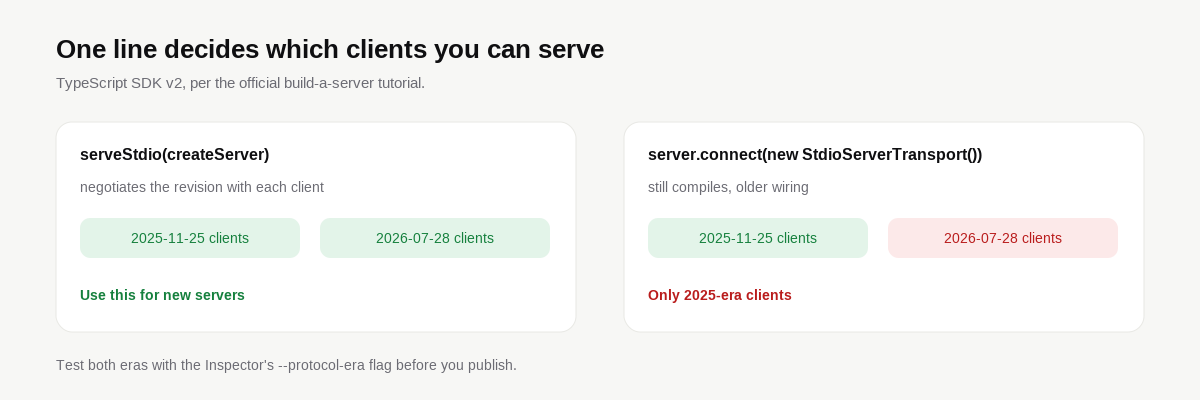
According to the official tutorial, serveStdio negotiates the protocol revision with each client, while a server wired by hand with server.connect still compiles but only serves 2025-era clients. Servers written the old way will need this one-line change as clients move to 2026-07-28.
Step 2b: the Python version
The Python SDK 2.x needs Python 3.10 or later (its README asks for 3.11+, so use that if you can) and works best with uv:
uv init releases-mcp
cd releases-mcp
uv add "mcp[cli]"
Then server.py:
import json
import urllib.request

from mcp.server import MCPServer

mcp = MCPServer("releases")


@mcp.tool()
def latest_release(owner: str, repo: str) -> str:
    """Get the latest published release of a GitHub repository: version tag,
    date, link and the first part of the notes. Use it when someone asks what
    the newest version of a project is or what changed in it.

    Args:
        owner: Repository owner, e.g. modelcontextprotocol
        repo: Repository name, e.g. python-sdk
    """
    req = urllib.request.Request(
        f"https://api.github.com/repos/{owner}/{repo}/releases/latest",
        headers={"Accept": "application/vnd.github+json", "User-Agent": "releases-mcp"},
    )
    try:
        with urllib.request.urlopen(req, timeout=15) as res:
            release = json.load(res)
    except urllib.error.HTTPError as err:
        if err.code == 404:
            return f"{owner}/{repo} has no published releases."
        raise
    notes = (release.get("body") or "")[:1500]
    return f"{release['tag_name']} ({release['published_at'][:10]})\n{release['html_url']}\n\n{notes}"


if __name__ == "__main__":
    mcp.run(transport="stdio")
The decorator turns the function into a tool. Its type hints become the input schema and its docstring becomes the description, including the per-argument lines under Args, so write the docstring for the model the same way you'd write the TypeScript description. We used the standard library for the HTTP call to keep dependencies at zero; in a real server you'd likely use an async HTTP client.
If you've built servers before, note the import. Older examples use FastMCP; the 2.x SDK and the official tutorial use MCPServer from mcp.server.
Step 3: test it before any client sees it
The MCP Inspector lets you list tools and call them from the command line, without involving a model. That separates "my server is broken" from "the model chose not to call my tool", which saves a lot of guessing later.
For the TypeScript build:
npx @modelcontextprotocol/inspector --cli node build/index.js --protocol-era modern --method tools/list
npx @modelcontextprotocol/inspector --cli node build/index.js --protocol-era legacy --method tools/list
Run both. The Inspector defaults to the legacy era, so testing only with the default can hide a server that fails with 2026-07-28 clients. Then call the tool for real:
npx @modelcontextprotocol/inspector --cli node build/index.js --protocol-era modern \
  --method tools/call --tool-name latest_release \
  --tool-arg owner=modelcontextprotocol --tool-arg repo=typescript-sdk
When we ran this, the result came back as v2.4.0 (2026-10-23) with a link to the release and the start of its notes. The Python server works the same way with uv run server.py as the command, and the Python SDK also offers uv run mcp dev server.py, which opens the server in the Inspector.
| Inspector flag | What it checks |
|---|---|
--protocol-era modern |
The server works with 2026-07-28 clients |
--protocol-era legacy |
The server still works with 2025-era clients (the default) |
--method tools/list |
The tools, descriptions and schemas the model will see |
--method tools/call --tool-name ... |
One real call with your arguments |
If tools/list returns nothing, the server probably crashed on start; run the command on its own and read the error. If the call fails, the Inspector shows the exact error your handler threw.
Step 4: connect it to a client
In Claude Code, add the built server with an absolute path:
claude mcp add releases -- node /absolute/path/to/releases-mcp/build/index.js
For the Python version, let uv run it from the project folder:
claude mcp add releases -- uv --directory /absolute/path/to/releases-mcp run server.py
In Cursor, VS Code or Claude Desktop, the same command goes into a JSON config file; our client guides show the exact path and key for each. Then ask "what's in the latest release of vercel/next.js?" and watch the tool get called.
Watch out
Use absolute paths. Desktop apps don't start in your project folder and often don't inherit your shell's
PATH, which is the most common reason a server works in the terminal and fails in the app.
Where each client keeps its config, so you know which file to edit:
| Client | Config file | Local (stdio) | Remote (HTTP) | OAuth sign-in |
|---|---|---|---|---|
| Claude Code | ~/.claude.json |
Yes | Yes | Yes |
| Cursor | ~/.cursor/mcp.json |
Yes | Yes | Yes |
| VS Code | .vscode/mcp.json |
Yes | Yes | Not documented |
| Claude Desktop | ~/Library/Application Support/Claude/claude_desktop_config.json |
Yes | Not documented | Not documented |
| Codex | ~/.codex/config.toml |
Yes | Yes | Yes |
| Gemini CLI | ~/.gemini/settings.json |
Yes | Yes | Yes |
| Windsurf | ~/.config/devin/mcp_config.json |
Yes | Yes | Yes |
| Devin | ~/.config/devin/mcp_config.json |
Yes | Yes | Yes |
| Antigravity | ~/.gemini/config/mcp_config.json |
Yes | Yes | Yes |
| ChatGPT | No file: added in the ChatGPT UI |
No | Yes | Not documented |
| Zed | settings.json |
Yes | Yes | Yes |
| Cline | cline_mcp_settings.json |
Yes | Yes | Yes |
| Continue | .continue/mcpServers/<name>.yaml |
Yes | Yes | Not documented |
| Goose | ~/.config/goose/config.yaml |
Yes | Yes | Yes |
| JetBrains AI Assistant | Settings | Tools | AI Assistant | Model Context Protocol |
Yes | Yes | Not documented |
Step 5: publish it
For TypeScript, add a bin entry pointing at build/index.js with a #!/usr/bin/env node line at the top of the file, then npm publish. People can then run it with npx -y your-package. For Python, publish to PyPI with a console script entry, and people can run it with uvx your-package.
Write the README for two readers. A person needs to know what the server does, what it can access, what environment variables it needs, and the install line for their client. A model, or a directory like ours, needs a clear list of tools. When you submit your server to HostedMCP, we read the repository and README, list the tools, and generate install commands for the major clients, so a clean README turns directly into a better listing. Install tabs cover Claude Code, Cursor, VS Code, Claude Desktop, Codex and Gemini CLI, with guides for more clients.
A publishing checklist:
- A
binentry (npm) or console script (PyPI) so one command starts the server. - A README that lists every tool, every environment variable and what the server can access.
- Install lines for at least Claude Code, Cursor and VS Code.
- Placeholder values only, never a real token.
- A tagged release, so people can pin a version.
You can also register the server in the official MCP registry, which is one of the sources we crawl every hour.
For a sense of what you are competing with, these are the most-starred servers in our catalog right now:
| Server | Maintainer | Transport | Tools | GitHub stars |
|---|---|---|---|---|
| Time | modelcontextprotocol | Local (stdio) | 3 | 92,090 |
| Memory | modelcontextprotocol | Local (stdio) | 9 | 92,090 |
| Git | modelcontextprotocol | Local (stdio) | 14 | 92,090 |
| Fetch | modelcontextprotocol | Local (stdio) | 1 | 92,090 |
| Sequential Thinking | modelcontextprotocol | Local (stdio) | 1 | 92,090 |
| Filesystem | modelcontextprotocol | Local (stdio) | 16 | 92,090 |
| Codacy | codacy | Local (stdio) | 4 | 58 |
| Everything | modelcontextprotocol | Local (stdio) | 13 | 92,090 |
Going remote
A local stdio server is the right start, but if your server wraps a SaaS product, people will eventually want a URL instead of a package.
Remote servers use the Streamable HTTP transport: each message is an HTTP POST to one endpoint, usually /mcp. With the Python SDK you can try it locally with uv run mcp run server.py --transport streamable-http, which serves at http://localhost:8000/mcp. The TypeScript SDK ships separate packages for Node's HTTP server and for Express, Hono and Fastify.
Two things change once you're remote. You need real authentication, which in MCP means OAuth 2.1, with your server accepting only tokens issued for it. And you need to think about every user's data being one request away from every other user's. Read our MCP security guide before you put a server on the internet.
Common mistakes
The same handful of problems shows up again and again in MCP servers, and each one is cheap to avoid.
| Mistake | What happens | Fix |
|---|---|---|
| Logging to stdout | The client drops the connection | Log to stderr |
| Tools named after HTTP verbs | The model cannot tell when to use them | Name tools after tasks |
| Returning raw API JSON | Context fills up, the model misreads fields | Return a short summary and a link |
| Unmarked dangerous tools | Hosts cannot ask before a delete | Clear names plus the destructive hint |
| Real secrets in examples | Leaked tokens | Placeholders and documented variable names |
Logging to standard output. It breaks the stdio stream and the client drops the connection with an unhelpful error. Log to stderr.
Tools named after HTTP verbs. get_data and post_request tell a model nothing. Name tools after what a person wants: latest_release, find_customer, create_invoice.
Returning everything. A tool that returns raw API JSON with sixty fields fills the model's context and makes it more likely to misread the one field that matters. Return a short, readable summary and a link.
No limits on dangerous tools. If a tool can delete or send something, make that obvious in its name and description, mark it with the spec's destructive hint so hosts ask first, and consider leaving it out of version one.
Secrets in the config example. Show YOUR_API_KEY placeholders, document the environment variable names, and never commit a real token to the README.
Where to go next
Once your first tool works, look at a few well-built servers in the same space for patterns, for example the GitHub server or the Postgres servers. If you're still deciding whether you need a server at all, MCP vs API covers that. And when you're ready, submit it so people can find it.
Questions people ask
What language should I use to build an MCP server?
Whichever you know. The official SDKs for TypeScript and Python are the most used and the best documented, and there are official SDKs for Java, Kotlin, C#, Go, Ruby, Rust, Swift and PHP too. In our catalog TypeScript and Python servers are roughly tied.
Do I still need the initialize handshake?
Not in the 2026-07-28 revision, which removed it along with sessions. The current SDKs handle protocol details for you; with the TypeScript SDK, starting the server with serveStdio serves both 2025-era and 2026-07-28 clients.
How do I test an MCP server?
Use the MCP Inspector. For example npx @modelcontextprotocol/inspector --cli node build/index.js --protocol-era modern --method tools/list, then repeat with --protocol-era legacy. Python projects can run uv run mcp dev server.py.
Can I build a remote MCP server?
Yes. Serve it over Streamable HTTP at an /mcp endpoint. The Python SDK can run uv run mcp run server.py --transport streamable-http, and the TypeScript SDK has Node, Express, Hono and Fastify packages for HTTP. Remote servers should use OAuth for user sign-in.
Is FastMCP still the way to build Python servers?
The official Python SDK 2.x uses MCPServer from mcp.server, which the build-a-server tutorial now uses. Older tutorials show FastMCP; follow the current SDK docs for new projects.
How do I get my MCP server listed?
Publish the package to npm or PyPI with a clear README, then submit the repository on HostedMCP. We read the code, describe the tools and generate install commands for every major client.