









To install a Claude skill, copy its folder (the one with SKILL.md) into your tool's skills directory: `~/.claude/skills/` for Claude Code, `~/.agents/skills/` for Codex, `~/.gemini/skills/` for Gemini CLI. One command does it from GitHub: `npx degit owner/repo/path/to/skill ~/.claude/skills/skill-name`. For claude.ai, zip the folder and upload it under Customize, Skills.
Installing a skill is copying a folder. That's the whole trick, and it's why the most common question isn't "how" but "where": every tool keeps its skills somewhere different, and a skill copied into the wrong place, or one level too deep, silently does nothing.
We generate install commands for every skill in our directory, so we've had to get these paths exactly right for each tool. This guide puts them in one place, shows the fastest way to install from GitHub, and covers the fixes for the handful of problems that account for almost every "my skill doesn't work" report.
Key takeaways
- A skill is installed by putting its folder, with
SKILL.mddirectly inside, in the tool's skills directory.npx degit <owner>/<repo>/<path> <skills-dir>/<name>copies one skill from GitHub in seconds.- Claude Code can install whole sets as plugins; claude.ai and Claude Desktop take a ZIP upload.
- Most failures are a folder one level too deep, a name that differs from the folder, or broken YAML.
Where the skills folder is
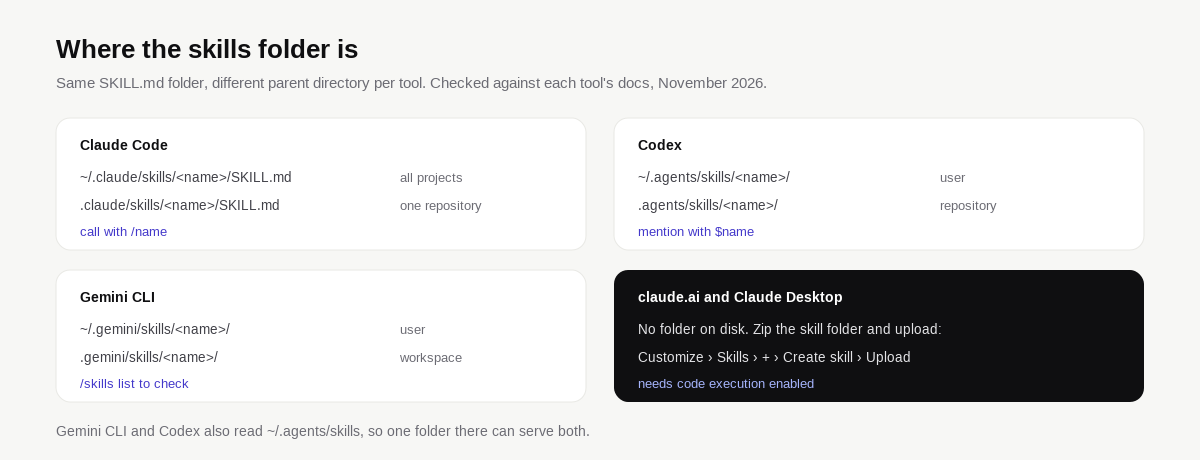
Each tool reads skills from its own directories. The skill itself is the same everywhere: a folder named after the skill, with SKILL.md directly inside.
| Tool | Personal or user folder | Project folder | Other ways in |
|---|---|---|---|
| Claude Code | ~/.claude/skills/<name>/ |
.claude/skills/<name>/ |
Plugins, managed skills |
| Codex | ~/.agents/skills/<name>/ |
.agents/skills/<name>/ |
$skill-installer |
| Gemini CLI | ~/.gemini/skills/<name>/ or ~/.agents/skills/<name>/ |
.gemini/skills/<name>/ |
gemini skills install |
| claude.ai and Claude Desktop | None | None | ZIP upload under Customize, Skills |
For Claude Code, personal skills go in ~/.claude/skills/<skill-name>/ and apply to every project on your machine. Project skills go in .claude/skills/<skill-name>/ inside a repository; commit them and everyone working in that repo gets them. Skills can also come from plugins, and organizations can ship managed skills.
For Codex, user skills live in ~/.agents/skills/ and repository skills in .agents/skills/. Codex scans .agents/skills in every directory from where you're working up to the repository root.
For Gemini CLI, user skills live in ~/.gemini/skills/ and workspace skills in .gemini/skills/. It also reads the ~/.agents/skills/ alias, which means one folder there can serve both Codex and Gemini CLI.
For claude.ai and the Claude Desktop app, there's no folder to copy into. You upload skills as ZIP files from the Customize area, which we cover below.
The fastest way: one command from GitHub
Most skills live in GitHub repositories, often several per repo under a skills/ folder. You don't need to clone the whole repository to get one. With Node.js installed, degit copies a single folder without any git history:
npx degit anthropics/skills/skills/pdf ~/.claude/skills/pdf
That's the command for Anthropic's PDF skill in Claude Code. When we ran it, it took about four seconds and produced exactly what Claude Code expects: ~/.claude/skills/pdf/ containing SKILL.md, two reference files, a license and a scripts/ folder.
Change the destination for other tools:
npx degit anthropics/skills/skills/pdf .claude/skills/pdf        # this project only
npx degit anthropics/skills/skills/pdf ~/.agents/skills/pdf      # Codex
npx degit anthropics/skills/skills/pdf ~/.gemini/skills/pdf      # Gemini CLI
The pattern is always npx degit <owner>/<repo>/<path-to-skill-folder> <skills-dir>/<skill-name>. Every skill page in our skills directory shows these commands already filled in, with a tab per tool, so you can copy the right one without working out the path.
If you'd rather not use degit, plain git works too:
git clone --depth 1 https://github.com/anthropics/skills /tmp/anthropic-skills
cp -R /tmp/anthropic-skills/skills/pdf ~/.claude/skills/pdf
| Method | Best for | Updates |
|---|---|---|
npx degit |
One skill, any tool | Run again with --force |
git clone and copy |
No Node.js, or many skills from one repo | Pull and copy again |
| Claude Code plugin | A set of related skills kept together | Updates with the plugin |
| ZIP upload | claude.ai and Claude Desktop | Upload the new version |
Installing several skills at once with plugins
In Claude Code, a repository can also act as a plugin marketplace, and a plugin can bundle several skills, slash commands, subagents and hooks. This is the easiest way to install a set of related skills and keep them updated together.
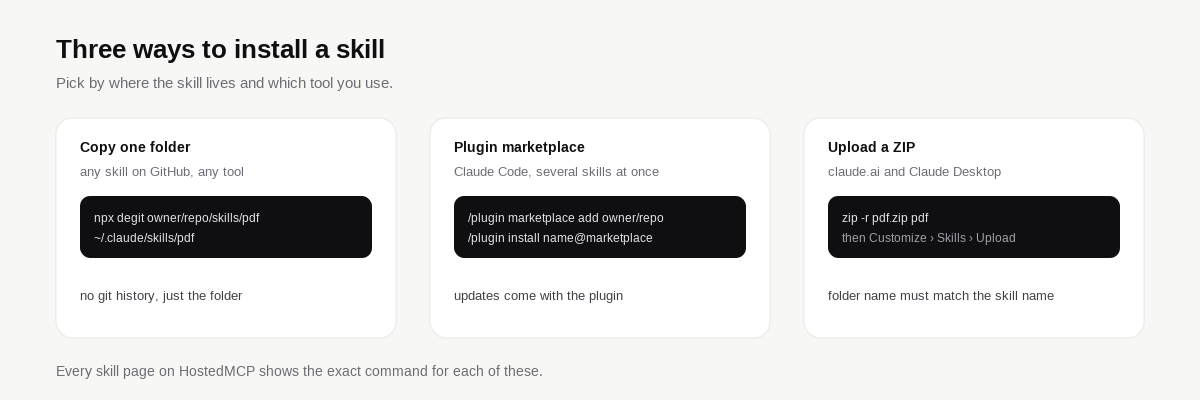
Anthropic's skills repository is set up this way. Inside Claude Code:
/plugin marketplace add anthropics/skills
/plugin install document-skills@anthropic-agent-skills
The first command registers the marketplace from the GitHub repository. The second installs the document-skills plugin, which bundles the Word, PDF, PowerPoint and Excel skills, from the marketplace named anthropic-agent-skills. The part after @ is the marketplace's own name from its marketplace.json, which isn't always the same as the repository name. Our plugin pages show both, along with everything each plugin bundles.
Codex and Gemini CLI shortcuts
Both tools have built-in helpers if you prefer them to copying folders.
In Codex, the bundled $skill-installer skill can fetch and install skills for you; mention it in a prompt, for example $skill-installer linear. Typing $ lets you mention any installed skill directly, and /skills lists them.
Gemini CLI has commands for it:
gemini skills install https://github.com/user/repo.git --consent
gemini skills list --all
Inside a session, /skills list shows what's loaded and /skills reload picks up changes.
Installing in claude.ai and Claude Desktop
claude.ai takes skills as uploads. The steps:
-
Get the skill folder onto your computer, with
degitor a download from GitHub. -
Zip the folder itself, so the ZIP contains
pdf/SKILL.md, not justSKILL.mdat the top level:zip -r pdf.zip pdf -
Open Customize, then Skills (
claude.ai/customize/skills), select the plus button, then Create skill, then Upload a skill, and choose the ZIP.
Note
Skills in claude.ai need code execution enabled. On Free, Pro and Max plans that's in Settings, Capabilities; on Team and Enterprise plans an admin controls it in the organization settings. Claude Desktop manages skills from the same Customize area in its sidebar.
| Upload error | What it means | Fix |
|---|---|---|
| "missing required skill.md file" | The ZIP has an extra folder level, or the file is misnamed | Zip the skill folder itself so the ZIP holds <name>/SKILL.md |
| "skill folder name doesn't match the skill name" | The folder and the name field differ |
Rename the folder to match name |
The two upload errors people hit most are "missing required skill.md file", which usually means the ZIP has an extra folder level or the file is lowercase in an unexpected place, and "skill folder name doesn't match the skill name", which means the folder isn't named exactly like the name field in SKILL.md.
Checking that it worked
In Claude Code, skills you add or change are picked up in the current session without a restart. The quickest check is to call the skill directly by typing /pdf, or whatever the skill is named. If it runs, it's installed.
Then check that it loads on its own, which is the point of a skill. Ask for something that matches its description without naming it, like "pull the tables out of this PDF". Anthropic's PDF skill has a deliberately broad description that starts "Use this skill whenever the user wants to do anything with PDF files", so it triggers on almost any PDF request; most skills are narrower and need you to ask in words close to their description.
When a skill doesn't show up
Almost every problem is one of these five.
| Problem | Example | Fix |
|---|---|---|
| Folder one level too deep | ~/.claude/skills/my-skills/pdf/SKILL.md |
Move it to ~/.claude/skills/pdf/SKILL.md |
| Name and folder differ | name: pdf-tools in a folder called pdf |
Rename the folder |
| Broken front matter | Missing ---, a tab, an unquoted colon |
Fix the YAML block |
| Description does not match the request | /pdf works but the skill never loads alone |
Ask in words closer to the description |
| A requirement is missing | Python, Node.js or a CLI tool | Install what the SKILL.md lists |
The folder is one level too deep. ~/.claude/skills/my-skills/pdf/SKILL.md won't load; it has to be ~/.claude/skills/pdf/SKILL.md. This is the most common mistake after cloning a whole repository into the skills folder.
The name and folder don't match. The specification requires the name field to match the directory name. Rename the folder rather than editing someone else's skill.
The front matter is broken. The file must start with ---, a YAML block, and another ---. An unquoted colon in the description or a tab character is enough to break it. Of the skills we've indexed, a small number fail this check, and we hide them from our directory until they're fixed.
The description doesn't match how you asked. If /skill-name works but the skill never loads by itself, rephrase your request closer to the description, or edit the description for your own copy.
The skill needs something you don't have. Skills with scripts may need Python, Node.js or specific command-line tools. Read the SKILL.md; good skills say what they need near the top.
Updating and removing skills
Skills you copied don't update themselves. To update, run the same degit command again with --force to overwrite, or pull the latest from the repository and copy again. Skills installed through a plugin update with the plugin.
To remove a skill, delete its folder from the skills directory, or uninstall the plugin that provided it in Claude Code with /plugin uninstall <plugin-name>@<marketplace-name>. In claude.ai, remove it from Customize, Skills.
Install with care
Watch out
A skill's instructions steer your agent, and its scripts run with your permissions. Before installing a skill from someone you don't know, open the folder and read the
SKILL.mdand any scripts. It usually takes a minute, and every skill page on HostedMCP shows the full file list and the renderedSKILL.mdso you can do it before installing.
Prefer skills from publishers you can check, such as the vendor of the product the skill is about, or maintainers with a visible track record. And remember that a project skill committed to a repository runs for everyone who opens that repository with an agent, so review changes to .claude/skills/ like you'd review code.
Find skills worth installing
The highest-ranked skills in our catalog right now, each with ready install lines on its page:
| Skill | Repository | GitHub stars | Files |
|---|---|---|---|
| n8n:community-pr-readiness-check | n8n-io/n8n | 211,379 | 5 |
| frontend-design | anthropics/skills | 192,736 | 2 |
| copilot-cli-quickstart | github/awesome-copilot | 41,038 | 1 |
| review-architecture | pascalorg/editor | 25,443 | 1 |
| let-fate-decide | trailofbits/skills | 8,136 | 98 |
| career-ops | career-ops-hq/career-ops | 82,067 | 1 |
| egm-draft | google/elephant-goldfish-model | 19,172 | 6 |
| skillopt-sleep | microsoft/SkillOpt | 19,040 | 7 |
Our skills directory lists skills from public repositories, with install commands for Claude Code, Codex, Gemini CLI and claude.ai on every page. If you're new to skills, what Claude skills are explains how they work, and how to build a skill in Claude shows how to write your own.
Questions people ask
Where is the Claude skills folder?
For Claude Code, personal skills are in ~/.claude/skills/ and project skills in .claude/skills/ inside the repository. Each skill is its own folder with a SKILL.md inside. claude.ai has no folder; you upload skills as ZIP files.
How do I install a Claude skill from GitHub?
Copy the skill's folder into your skills directory. With Node.js installed, npx degit owner/repo/skills/name ~/.claude/skills/name copies just that folder without git history. Or clone the repo and copy the folder by hand.
How do I add skills to Claude Code?
Put the skill folder in ~/.claude/skills/ or the project's .claude/skills/, or install a plugin that bundles skills with /plugin marketplace add and /plugin install. Claude Code picks up new skills in the current session.
How do I install skills in claude.ai?
Zip the skill folder so the ZIP contains the folder with SKILL.md in it, then go to Customize, Skills, select +, Create skill, Upload a skill. Code execution must be enabled for your account.
Why isn't my installed skill working?
Usually the folder is nested too deep, the name in SKILL.md doesn't match the folder name, the front matter is invalid YAML, or the description doesn't match how you asked. Call it directly with /skill-name in Claude Code to check.
Are Claude skills safe to install?
Skills can include scripts that run with your permissions. Read the SKILL.md and any scripts before installing a skill from someone you don't know, and prefer skills from publishers you can verify.