Every page on HostedMCP is about an MCP server, and after indexing a few tens of thousands of them we've learned that most people asking "what is an MCP server?" really want to know three things. What it actually runs on. Whether it's safe to give it access to their stuff. And which one to install for the tool they already use. This guide answers all three, with real servers as examples.
If you haven't read about the protocol itself, our overview of MCP covers the big picture in ten minutes. Here we zoom in on the server side.
Key takeaways
- An MCP server is a program between an AI app and one real system, such as GitHub, a database or a browser.
- It announces a fixed list of tools, runs them when the model asks, and keeps the credentials on its side.
- Local servers run on your machine over stdio; remote servers are a URL with OAuth sign-in.
- Judge a server by who publishes it, recent activity, a focused tool list and clear docs, not by stars alone.
- Most install failures come from a missing runtime, a missing secret, broken JSON or logging to stdout.
The short version
An MCP server is a program that sits between an AI app and one real system. On one side it speaks the Model Context Protocol to an AI client, such as Claude Code, Cursor, VS Code or ChatGPT. On the other side it speaks whatever that system needs: GitHub's REST API, a Postgres wire connection, the filesystem, a headless browser.
Think of it as a translator with a short, fixed vocabulary. It tells the AI exactly which actions exist, what arguments each one takes, and what comes back. The model can only do what the server offers, which is a large part of why MCP is safer than handing a model a raw API key and a shell.
What's inside one
Strip away the details and every server does the same four jobs.
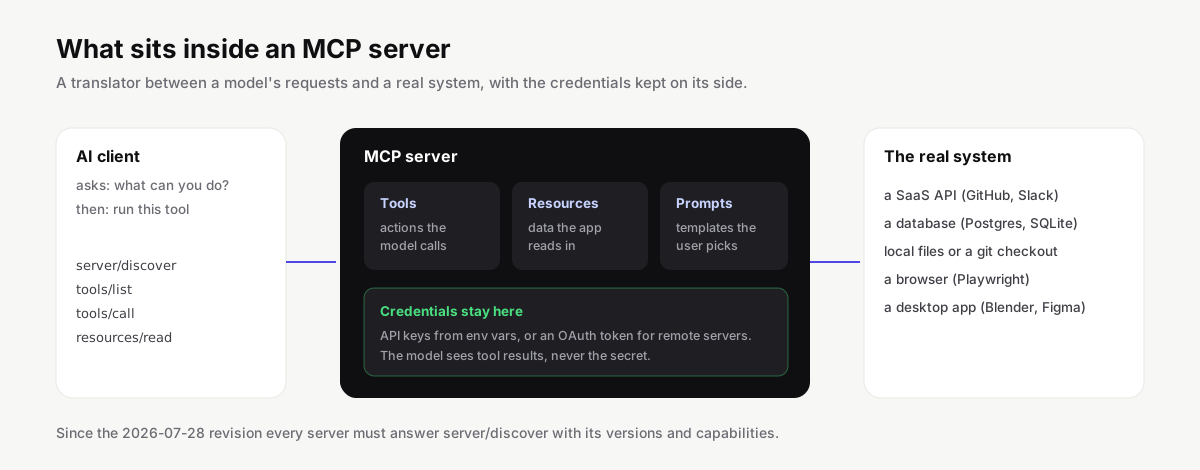
First, it describes itself. Under the 2026-07-28 revision every server must answer a server/discover request with the protocol versions it supports, its capabilities and its identity. Then the client asks for the list of tools, and the server returns each one with a name, a description written for the model, and a JSON Schema for its inputs.
Second, it runs tools. A tool call arrives as a JSON-RPC request with the tool name and arguments. The server validates the arguments, does the work and returns content: usually text, sometimes images or structured data.
Third, it can offer resources and prompts. Resources are data the app reads in by URI, like a table schema or a file. Prompts are templates a user picks from a menu. Plenty of good servers offer only tools, and that's fine.
Fourth, and this is the part people overlook, it holds the credentials. The GitHub token, the database password or the OAuth session lives with the server. The model sends "list open pull requests" and gets pull requests back. It never sees the token, so it can't leak it into a chat or paste it somewhere it shouldn't.
| Job | What the server does | When it happens |
|---|---|---|
| Describe itself | Answers server/discover with versions, capabilities and identity |
When the client first connects |
| List what it offers | Returns tools with names, descriptions and JSON Schemas | Right after discovery |
| Run tools | Validates arguments, calls the real system, returns content | Every time the model picks a tool |
| Hold credentials | Keeps tokens, passwords and OAuth sessions away from the model | The whole time it runs |
Three examples, from simple to involved
A filesystem server is about as simple as it gets. You start it with a list of folders it may touch. It offers tools like read_file, list_directory and write_file, and refuses paths outside the folders you allowed. It runs on your machine because it has to.
The GitHub MCP server is a good example of a vendor-built server. GitHub maintains it, it offers dozens of tools for issues, pull requests, Actions and code search, and you can run it locally with a personal access token or connect to GitHub's hosted version over HTTP with OAuth. In our catalog it's among the most-starred servers we track.
Playwright servers show what tools can do beyond APIs. The server launches a real browser, and the model navigates, clicks and reads pages through tools like browser_navigate and browser_snapshot. Instead of screenshots it works from the page's accessibility tree, which is cheaper and far more reliable for a model to read. Developers use it to let an agent check its own frontend changes.
| Server | Where it runs | How it signs in | Example tools |
|---|---|---|---|
| Filesystem | Your machine (stdio) | None; limited to folders you list | read_file, list_directory, write_file |
| GitHub | Your machine or GitHub's hosted endpoint | Personal access token or OAuth | Issues, pull requests, Actions, code search |
| Playwright | Your machine (stdio) | None | browser_navigate, browser_snapshot |
You'll find servers for most products by name in our product index, from Postgres and Slack to Figma and Blender.
Server, client and host: who does what
The three words get used loosely, so here is the split the specification uses.
The host is the app you work in, such as Claude Desktop, Cursor or VS Code. It owns the conversation, the model and the approval prompts. The client is a component inside the host, one per server, that keeps track of what that server offers and passes requests back and forth. The server is the separate program described in this guide.
In practice you rarely see the client as a separate thing; it's the reason your host can list "3 servers connected, 41 tools" in its settings. It matters when something breaks, though. If the host shows a server as failed, the client couldn't start it or couldn't reach it, and the fix is almost always in the server's command, URL or environment, not in the model.
Local servers and remote servers
Where a server runs decides most of what it can do and how you install it.
A local server runs on your computer. The AI app starts it as a child process and they talk over standard input and output, which the spec calls the stdio transport. Local servers can reach things only your machine can reach: your files, your git checkout, a database on localhost, a desktop app. You install them with a command like npx -y @playwright/mcp@latest, uvx for Python packages, or docker run for container images. They run with your user's permissions, so the trust question matters more here.
A remote server lives on the internet, and you connect by pasting a URL, usually ending in /mcp, then signing in through your browser. That's the Streamable HTTP transport. There's nothing to install or update, and the vendor controls the code. Linear, Notion, Sentry and GitHub all offer hosted servers like this. Remote servers can only reach what the vendor's infrastructure can reach, so they're the natural choice for SaaS products and the wrong choice for anything on your laptop.
| Local server | Remote server | |
|---|---|---|
| Transport | stdio | Streamable HTTP |
| Install | npx, uvx or docker run |
Paste a URL |
| Credentials | Environment variables in your config | OAuth in the browser |
| Can reach | Your files, git, localhost, desktop apps | Only what the vendor's systems can reach |
| Who updates it | You | The vendor |
| Main risk | Runs with your user's permissions | You trust the vendor's hosting |
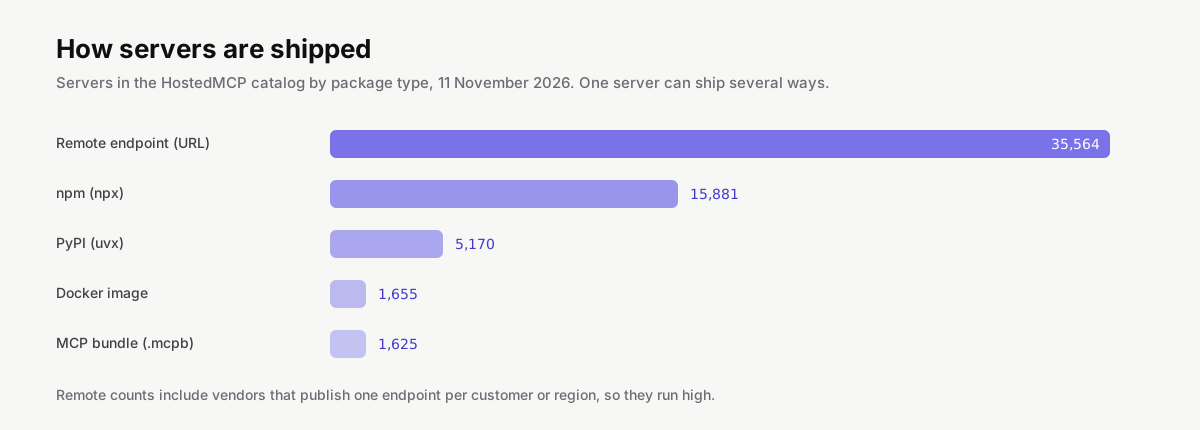
Our catalog shows how both styles have spread. On 11 November 2026, 35,564 servers declared a remote endpoint, 15,881 an npm package, 5,170 a PyPI package, 1,655 a Docker image and 1,625 an MCP bundle, the one-file installer format some desktop clients accept. Remote looks dominant, but that number includes vendors who register one endpoint per customer or region. Among developer tools, npm packages run locally are still the most common way to ship. Our remote server list is the shortcut if you want nothing installed.
How a server gets its permissions
This is where a lot of first installs go wrong, so it's worth a closer look.
Local servers usually read secrets from environment variables you put in the client config. A Postgres server wants a connection string, a Slack server wants a bot token, a search server wants an API key. In our catalog 11,660 servers declare at least one environment variable, and 12,757 of those variables are marked as secrets. Each server page on HostedMCP lists them, with the variable names, so you know what to prepare before you install.
Remote servers use OAuth instead. When you add the URL, your client opens the vendor's sign-in page, you approve the scopes, and the client stores a token. The 2026-07-28 revision tightened how that works: clients identify themselves with Client ID Metadata Documents, and servers must only accept tokens issued for them. That last rule kills a whole class of bugs where a server would pass a user's token straight through to another service.
How servers in our catalog sign in, from the READMEs our enrichment model read (measured November 20, 2026):
| Authentication | Servers | Share |
|---|---|---|
| None | 19,293 | 46% |
| API key or OAuth | 10,730 | 25% |
| API key or token | 9,846 | 23% |
| OAuth | 2,493 | 6% |
Either way, give a server the least access that does the job. A read-only database user, a token scoped to one repository, a folder list that doesn't include your home directory. Our MCP security guide goes further.
How to tell a good server from a bad one
With tens of thousands to choose from, picking matters more than installing. Here's what we look at when we score servers.
Who publishes it. A server from the vendor of the product it connects to will usually be maintained as the product changes. Our pages mark official servers and show the publisher. For community servers, look at the account behind it and whether they maintain other things you recognize.
Whether it's alive. A server with no commit in a year may still work, but APIs drift and protocol revisions land. About 23% of the servers from individual publishers in our catalog had a commit in the last ninety days. Each server page shows the date of the last commit and the last release.
Whether the tools make sense. A good server has a focused list of tools with clear names and descriptions. A server that exposes one giant execute tool, or two hundred tools for a small product, is harder for a model to use well and easier to misuse. You can read every tool's description on its HostedMCP page before installing.
Whether it says what it needs. Good servers document their environment variables, scopes and install steps. If the README doesn't tell you what the server will access, assume the worst.
| Check | Good sign | Red flag |
|---|---|---|
| Publisher | The vendor of the product, or a maintainer you recognize | An unknown account with a copied README |
| Activity | Commits and releases in the last few months | No commit in a year, open issues unanswered |
| Tools | A focused list with clear names and descriptions | One execute tool, or hundreds of tools |
| Documentation | Environment variables, scopes and install steps listed | Nothing about what it will access |
| Package name | Matches the repository and publisher | One letter off a popular package |
Stars help, but less than you'd think. Only 924 of the 45,854 servers from individual publishers we track have a hundred or more stars, and some excellent small servers have none. That's why our server list sorts by a combined score of documentation, activity, downloads and stars by default.
Installing one
Every server page on HostedMCP has a tab per client with the exact command or config. The shape is the same everywhere: tell the client how to start the server, or where to reach it.
For a local npm server in Claude Code, here the reference filesystem server limited to one folder:
claude mcp add files -- npx -y @modelcontextprotocol/server-filesystem ~/projects/site
The same server in VS Code goes in .vscode/mcp.json. Servers that need a secret read it from env, and VS Code can prompt for it with an input instead of storing it in the file:
{
  "servers": {
    "files": {
      "type": "stdio",
      "command": "npx",
      "args": ["-y", "@modelcontextprotocol/server-filesystem", "${workspaceFolder}"]
    }
  }
}
For a remote server in Claude Code, you give the URL instead of a command:
claude mcp add --transport http linear https://mcp.linear.app/mcp
Tip
Keep secrets out of config files you commit. VS Code inputs,
--envflags in Claude Code and environment variables set outside the repository all work.
Where each client keeps its servers, and what it supports:
| Client | Config file | Local (stdio) | Remote (HTTP) | OAuth sign-in |
|---|---|---|---|---|
| Claude Code | ~/.claude.json |
Yes | Yes | Yes |
| Cursor | ~/.cursor/mcp.json |
Yes | Yes | Yes |
| VS Code | .vscode/mcp.json |
Yes | Yes | Not documented |
| Claude Desktop | ~/Library/Application Support/Claude/claude_desktop_config.json |
Yes | Not documented | Not documented |
| Codex | ~/.codex/config.toml |
Yes | Yes | Yes |
| Gemini CLI | ~/.gemini/settings.json |
Yes | Yes | Yes |
| Windsurf | ~/.config/devin/mcp_config.json |
Yes | Yes | Yes |
| Devin | ~/.config/devin/mcp_config.json |
Yes | Yes | Yes |
| Antigravity | ~/.gemini/config/mcp_config.json |
Yes | Yes | Yes |
| ChatGPT | No file: added in the ChatGPT UI |
No | Yes | Not documented |
| Zed | settings.json |
Yes | Yes | Yes |
| Cline | cline_mcp_settings.json |
Yes | Yes | Yes |
| Continue | .continue/mcpServers/<name>.yaml |
Yes | Yes | Not documented |
| Goose | ~/.config/goose/config.yaml |
Yes | Yes | Yes |
| JetBrains AI Assistant | Settings | Tools | AI Assistant | Model Context Protocol |
Yes | Yes | Not documented |
Each client keeps its config somewhere slightly different, and some call the top-level key servers while others call it mcpServers. Our client guides list the exact file and format for fifteen clients, including Cursor, Codex and Windsurf.
When a server won't start
Most install problems we hear about fall into a handful of patterns, and the client's MCP panel or log usually tells you which one.
| Symptom | Likely cause | Fix |
|---|---|---|
"command not found" or ENOENT |
Node.js, uv or Docker is missing, or the app cannot see your PATH |
Install the runtime; use the full path to npx or node |
| Server starts, then exits at once | A required secret is missing or wrong | Set every documented variable in the client's env |
| No servers load at all | Invalid JSON in the config file | Check for trailing commas and missing braces |
| Connection drops after a few calls | The server logs to stdout | Log to stderr instead |
| Unsupported protocol version error | Client and server speak different revisions | Update whichever side is older |
The runtime is missing. A server started with npx needs Node.js, one started with uvx needs uv, and one started with docker needs Docker running. GUI apps such as Claude Desktop don't always inherit the PATH from your terminal, so a command that works in your shell can fail inside the app. Using the full path to npx or node in the config is the usual fix.
A secret is missing or wrong. The server starts, then exits as soon as it tries to authenticate. Check that every environment variable the server documents is set in the config, not just in your shell profile.
The JSON is broken. A trailing comma or a missing brace in mcp.json makes some clients skip the whole file silently. Paste it into any JSON validator before you go looking for anything stranger.
The server writes to standard output. A local stdio server must only print protocol messages to stdout; logging there corrupts the stream and the client drops the connection. Server authors fix this by logging to stderr. If you maintain the server, check for stray print or console.log calls.
The protocol versions don't match. An older client talking to a server that only speaks 2026-07-28, or the reverse, fails with an unsupported version error. Updating whichever side is older solves it, and servers built with the current TypeScript SDK's serveStdio helper handle both eras.
Are MCP servers free?
| What | Usually costs |
|---|---|
| The server code | Nothing; most are open source |
| Running a local server | Nothing beyond your own machine |
| The service behind it | Whatever that product charges, such as a database host or SaaS plan |
| Vendor-hosted remote servers | Included for existing customers of that product |
| The AI app | Nothing extra, though tool results use the model's context window |
Most are. The great majority are open source and cost nothing to run locally. What you might pay for is the service behind the server: a hosted database, a SaaS plan, an API with usage pricing. Vendor-hosted remote servers are usually included with the product for existing customers. Running servers doesn't cost the AI app anything extra either, although every tool result the model reads does use up some of its context window, which is a good reason not to install fifty servers at once.
Building your own
If the server you want doesn't exist, writing one is a reasonable afternoon. The official SDKs handle the protocol, so you mostly write normal functions with typed arguments and a docstring the model can read. The current TypeScript SDK serves both 2025-era and 2026-07-28 clients from the same code, and the Python SDK turns a decorated function into a tool. We walk through both, including how to test with the MCP Inspector, in how to build an MCP server.
And if you do build one, submit it to HostedMCP. We read the repository, describe the tools, and list it with install commands for every major client.