"Why would I use MCP when the service already has an API?" is the question we get most often from developers who look at our directory for the first time. It's a fair question, and the answer turns out to be short: you wouldn't use MCP instead of the API. You'd use it on top of the API, for one specific kind of caller.
That caller is an AI model. Once you see what a model needs that a normal program doesn't, the difference between MCP and an API stops being fuzzy. This guide walks through it with a concrete example, a side-by-side table, and the cases where you should skip MCP entirely.
Key takeaways
- MCP does not replace an API. Most MCP servers are a thin layer over an API that already exists.
- The difference is the caller: an API serves code a developer wrote, MCP serves a model that discovers tools at runtime.
- Function calling is the model-facing half; MCP standardizes how tools are described, found and reached across apps.
- Use the API directly when no model decides, function calling for one feature in one app, MCP when many apps or agents need the tool.
The one-paragraph answer
An API, whether REST, GraphQL or gRPC, is how one piece of software asks another to do something. It assumes the caller already knows which endpoint to hit, what to send, and how to authenticate, because a developer wrote that code. MCP is a protocol for AI apps to discover tools at runtime and call them on a model's behalf. An MCP server publishes a list of tools with plain-language descriptions and input schemas, the model picks one, and the server makes the actual API calls. Most MCP servers you'll find on HostedMCP are exactly that: a thin layer over an API that already existed.
A concrete example: refunds in Stripe
Say you want an AI assistant to handle "refund the last charge for this customer".
With the API alone, someone has to write that integration for the assistant. They define a function schema the model understands, with names and descriptions. They handle the API key. They look up the customer, list charges, pick the latest, create the refund, and turn Stripe's error codes into something the model can act on. Then they ship it inside one app. When the support team wants the same thing in Claude and the developers want it in Cursor, that work happens again, in a different format, in a different codebase.
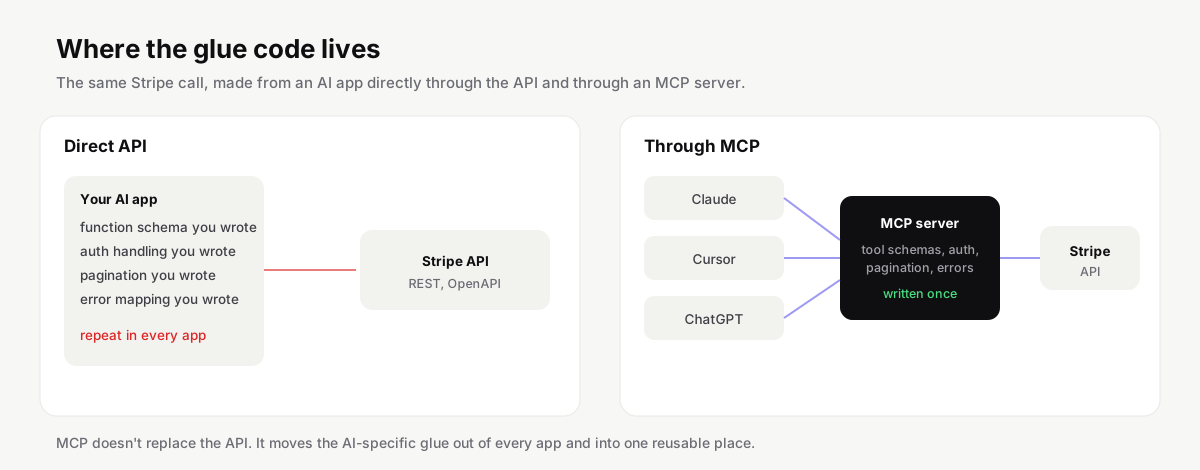
With MCP, that glue moves into one server. It announces tools like list_charges and create_refund, with descriptions written for a model. It holds the key or the OAuth token. Any MCP client, Claude, Cursor, ChatGPT, VS Code, can connect to it and get the same behavior. Stripe's API didn't change at all. What changed is who has to write the AI-specific parts, and how many times.
Side by side
| Traditional API | MCP | |
|---|---|---|
| Who calls it | Code a developer wrote | An AI model, through a host app |
| How the caller learns what exists | Reading docs at build time | Asking the server at runtime (tools/list) |
| Descriptions are written for | Developers | Models: what the tool does and when to use it |
| Message format | Varies: REST, GraphQL, gRPC | JSON-RPC 2.0 for every server |
| Auth | API keys, OAuth, whatever the service chose | Env vars for local servers, OAuth 2.1 for remote ones |
| Scope of actions | Everything the API exposes | Only the tools the server chooses to offer |
| One integration works in | One app | Every MCP client |
| Typical latency | One network hop | One extra hop through the server |
Two rows deserve more attention than they usually get.
Discovery is the real difference. A program calling an API never asks "what can you do?" at runtime; the developer already knew. A model does need to ask, every session, and it needs the answer in words it can reason about. That's why an MCP tool description reads like advice ("Use this to find open pull requests that touch a given path") rather than reference documentation.
Scope is a safety feature. An API key for a service usually grants everything that key is allowed to do. An MCP server decides which actions exist at all. A read-only analytics server can simply not include a delete tool. You can't get the same guarantee by telling a model "please don't delete anything".
MCP vs function calling
Function calling, or tool use as some vendors call it, is a feature of a model API: you list functions in your request, and the model may answer with "call this function with these arguments". It's often confused with MCP because MCP ends up using it.
Here's how the two fit together. Your host app, say Claude Code, connects to MCP servers and collects their tools. When it sends a request to the model, it passes those tools as function definitions. When the model asks to call one, the host routes that call to the right MCP server and feeds the result back. So function calling is the model-facing half, and MCP is the standard for everything on the other side: how tools are described, discovered, authorized and reached, across vendors.
If you're building one feature, in one app, with one model, plain function calling is less work and perfectly fine. MCP pays off when the same tool should work in many apps, or when you want users to bring their own AI client.
| Function calling | MCP | |
|---|---|---|
| What it is | A feature of one model API | A protocol between AI apps and tool servers |
| Where tools are defined | In your app's request to the model | In a separate server any client can connect to |
| Works in | The app you wrote | Every MCP client |
| Discovery | You pass the list each request | The client asks the server at runtime |
| Best for | One feature, one app, one model | Tools shared across apps, agents and vendors |
When an API is the right choice
Skip MCP when no model is involved. A web frontend, a mobile app, a nightly sync job or a partner integration should talk to your API directly. Adding an MCP layer there buys nothing and adds a hop.
Skip it when you need precise control over every call. Payment captures, bulk deletes, anything where you want a human-written code path with tests and audit trails, belongs in normal code that calls the API, even if an AI helped you write that code.
And skip it when the model only needs data you already have in hand. If your app fetches a customer record and pastes it into the prompt, that's not a tool, it's context, and it doesn't need a server.
| Situation | Use |
|---|---|
| A web or mobile frontend calls your backend | The API |
| A nightly sync or partner integration | The API |
| Payments, bulk deletes or anything needing an audit trail | The API, from tested code |
| Your app already has the data and pastes it into the prompt | Neither; that is context, not a tool |
| One AI feature inside one app you control | Function calling |
| A model should decide what to look up or do | MCP |
| Your customers use Claude, Cursor and ChatGPT | MCP, ideally a hosted server |
| Several internal agents need the same system | One shared MCP server |
When MCP is the right choice
Reach for MCP when a model should decide what to do. Agents that look things up, open tickets, query databases or check a deploy need tools, and MCP is the standard way to give them tools.
It's also the right call when you want your product to work in other people's AI tools. If your customers use Claude, Cursor and ChatGPT, one MCP server reaches all of them. That's why companies like GitHub, Linear, Notion and Stripe publish their own. On HostedMCP you can browse official servers by product and see which ones are hosted versus run locally.
And it helps when you run several agents internally. One MCP server per system, shared by every agent, is much easier to secure and update than tool code copied into each agent.

Security is different too
APIs and MCP servers face different threats, mostly because a model is in the loop.
With an API, the caller is your code, and it does what you wrote. With MCP, the caller is a model reading untrusted text: web pages, emails, issue comments. A carefully written issue comment can try to convince the model to call a tool it shouldn't. That's prompt injection, and it's why good hosts ask before running tools that change data, and why servers should expose the smallest useful set of tools.
The MCP specification also takes a firm line on tokens. Under its security best practices, a server must not accept tokens that weren't issued to that server, and must not pass a user's token through to another service. The anti-pattern has a name, token passthrough, and it's one of the first things worth checking in a server's code before you trust it. For remote servers, authorization follows OAuth 2.1, and the 2026-07-28 revision moves client registration to Client ID Metadata Documents. There's more in our MCP security guide.
Watch out
Treat every argument an MCP tool receives as untrusted input. The model that chose it may have read a web page or an issue comment written to steer it.
Performance and cost
People sometimes worry that MCP is slow. A local server adds a call to a process on the same machine, and a remote server adds one HTTP round trip. Both are small next to the seconds a model spends writing its answer.
The cost that actually matters is context. Every tool the host loads comes with a description and a schema the model has to read, and every tool result lands in the conversation. A server with eighty verbose tools can use a noticeable chunk of the context window before you've asked anything. That's one reason we show the full tool list on every server page on HostedMCP: you can see how big a server is before you install it, and pick a smaller one if a focused server does the job.
Turning an API into a good MCP server
The tempting shortcut is to generate one tool per endpoint from an OpenAPI file. Tools exist that do exactly that, and they're useful for a quick prototype. They rarely make a good server. Open a few listings with a few hundred near-identical tools and you'll see the problem: the model has to read every one of them, and most map to an endpoint nobody would ask for in conversation.
A model doesn't think in endpoints. It thinks in tasks. "Find the customer who emailed about invoice 1042 and show me their last three charges" is one task that spans several endpoints. A good server offers tools at that level: find_customer that accepts an email, an invoice number or a name, and recent_charges that returns a short, readable summary rather than the raw JSON with forty fields.
| Endpoint-shaped tool | Task-shaped tool |
|---|---|
GET /customers?email= |
find_customer that accepts an email, invoice number or name |
GET /charges?customer= returning 40 fields |
recent_charges returning a short, readable summary |
| One tool per endpoint, hundreds in total | A handful of tools matching what people ask |
| Descriptions copied from the reference docs | Descriptions that say when to use the tool |
A few habits make a big difference.
-
Write descriptions for the model. Say what the tool is for and when to use it, not just what it returns. "Use this before creating a refund to confirm the charge belongs to the customer" is worth more to a model than a field list.
-
Return less. Trim responses to the fields a person would actually look at, and paginate with a clear cursor. Every extra field costs context and gives the model more to misread.
-
Make dangerous tools obvious. Name them plainly, like
delete_project, and use the read-only and destructive hints the spec provides, so hosts can ask for confirmation. Better still, leave destructive actions out of the first version. -
Validate everything. Arguments come from a model that read untrusted text. Check types, ranges and ownership in the server, the same way you would for any public endpoint.
So which should you build?
If you have no API yet, build the API first. Your own app, scripts and partners will need it regardless, and an MCP server without a solid API underneath tends to turn into a second, worse API.
If you already have an API and want AI tools to use your product, add an MCP server in front of it. Start with a handful of tools that match what people actually ask for, write descriptions for a model rather than for a developer, and offer it both as a local package and as a hosted endpoint if you can. Our guide to building an MCP server walks through it in TypeScript and Python with the current SDKs.
If you only need one AI feature inside one app you control, function calling is enough today, and you can promote those functions to an MCP server later without changing the API underneath.
Where to go from here
To see what this looks like in practice, open a few servers that wrap well-known APIs, such as the GitHub server or any of the Postgres servers, and compare their tool lists with the underlying API docs. You'll notice how much they leave out, on purpose. If you're new to the protocol, start with what MCP is, and if you just want to try one, our client guides show the exact config for your editor.