
Analyzes raw DNA files locally to provide reports on haplogroups, traits, ClinVar health data, and pharmacogenomics.
Also known as codebase/gnomancer
- Stars
- 5
- Tools
- —
- Downloads, 30 days
- 1,013
- Latest version
- 0.5.2
- Last commit
- Nov 10, 2026
- License
- MIT
What is gnomancer MCP?
gnomancer analyzes raw DNA files locally to provide reports on haplogroups, traits, ClinVar health data, and pharmacogenomics.
Summary generated from the project's README
About gnomancer MCP server
Analyzing raw DNA files from services like AncestryDNA, 23andMe, or MyHeritage locally is what gnomancer enables. It transforms raw genotype data into readable reports covering haplogroups, physical traits, and health information without ever uploading your genetic files to the cloud. The processing happens entirely on your own machine, ensuring privacy for your sensitive data.
Developers can connect this server to AI clients like Claude Desktop, Cursor, or LM Studio using the uvx command. Once connected, an AI assistant can query the report results or look up specific genotypes at individual sites. The server provides specialized tools for ClinVar health scans and PharmCAT pharmacogenomics, which are only fetched when requested. This setup allows you to use local models to keep all genetic insights on your hardware or use cloud assistants to generate narrative summaries from your structured results.
What you can do with it
- 1Querying specific genetic traitsAsk your AI assistant to explain what your DNA report says about your ability to process caffeine.
- 2Analyzing family relationshipsProvide multiple DNA files to determine shared segments and likely biological relationships between family members.
- 3Monitoring health data updatesAutomatically check for new ClinVar classifications to see if any previously identified variants have been reclassified.
Written from the project's README. Every use case is checked against a quote from it.
How to install gnomancer MCP
Formats verified 10 Nov 2026Add to CursorAdd to GooseInstall gnomancer MCP in Claude Code
$ claude mcp add gnomancer -- uvx gnomancerInstall gnomancer MCP in Cursor
~/.cursor/mcp.json
{
  "mcpServers": {
    "gnomancer": {
      "command": "uvx",
      "args": [
        "gnomancer"
      ]
    }
  }
}Install gnomancer MCP in VS Code
.vscode/mcp.json
{
  "servers": {
    "gnomancer": {
      "type": "stdio",
      "command": "uvx",
      "args": [
        "gnomancer"
      ]
    }
  }
}Install gnomancer MCP in VS Code CLI
$ code --add-mcp '{"name":"gnomancer","type":"stdio","command":"uvx","args":["gnomancer"]}'Install gnomancer MCP in Claude Desktop
claude_desktop_config.json
{
  "mcpServers": {
    "gnomancer": {
      "command": "uvx",
      "args": [
        "gnomancer"
      ]
    }
  }
}Install gnomancer MCP in Codex
$ codex mcp add gnomancer -- uvx gnomancerInstall gnomancer MCP in Codex config.toml
~/.codex/config.toml
[mcp_servers.gnomancer]
command = "uvx"
args = ["gnomancer"]
Install gnomancer MCP in Gemini CLI
$ gemini mcp add -s user gnomancer uvx -- gnomancerInstall gnomancer MCP in Gemini settings.json
~/.gemini/settings.json
{
  "mcpServers": {
    "gnomancer": {
      "command": "uvx",
      "args": [
        "gnomancer"
      ]
    }
  }
}Automated checks
Ran Nov 13, 2026Full report →Passed our automated checks. That is not a security audit: read the code and give the server the narrowest access it needs. How checks work

- Source repository linked and reachablecodebase/gnomancer is public and reachablegithub.com/codebase/gnomancer ↗Pass
- Package names this repository as its sourcegnomancer names codebase/gnomancer as sourcepypi.org/project/gnomancer/ ↗Pass
- Build provenance (Sigstore attestation)Sigstore attestation for gnomancerpypi.org/project/gnomancer/ ↗Pass
- Open source license (OSI)MITspdx.org/licenses/MIT.html ↗Pass
- Commit or release in the last yearLast commit or release 2026-11-10github.com/codebase/gnomancer ↗Pass
- OpenSSF ScorecardNot checked
- Package name not close to a popular packageNo popular package one edit away from gnomancerPass
- No critical advisory in the package or its dependencies46 resolved dependencies checked; no critical advisoryosv.dev ↗Pass
- No hidden instructions to the model0 tool descriptions and the README read; no override phrases, credential paths or hidden charactersPass
- Destructive tools are labelledNot checked
- Remote endpoint answers the MCP handshakeNot checked
README
View on GitHubTake the raw file you already downloaded from AncestryDNA, 23andMe, MyHeritage, FamilyTreeDNA or LivingDNA (or a VCF) and turn it into one readable report. Everything runs on your computer. Nothing is uploaded.
Quick start
pipx install gnomancer      # Python 3.10+; Java 17+ for the mtDNA haplogroup and PharmCAT steps
gnomancer ~/Downloads/AncestryDNA.zip   # first run fetches the open-source tools and references once (~250 MB)
Open AncestryDNA_analysis/REPORT.html. No Python? curl -fsSL https://gnomancer.com/install.sh | bash sets everything up (macOS and Linux; Windows via WSL).
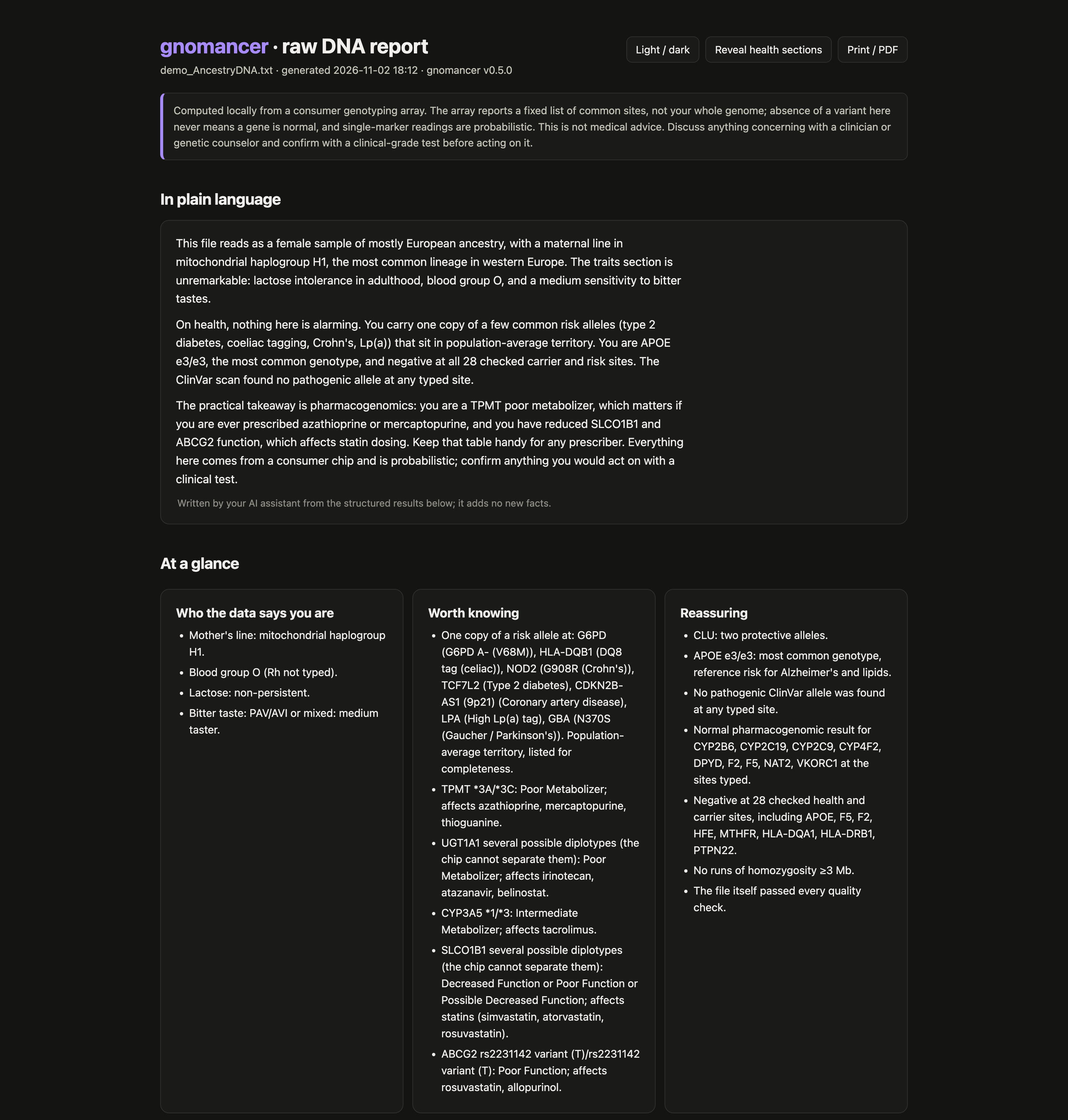
What you get
- Plain language first. An at-a-glance digest, then a narrative your own AI assistant can write from a prompt the run gives you.
- Lineages. Y haplogroup (yhaplo, plus Yleaf on current YFull/FTDNA/ISOGG trees) and mtDNA haplogroup (Haplogrep3), each with population context.
- Traits and ancestry markers. About 110 well-replicated sites: pigmentation, lactose, caffeine, bitter taste, blood group and more.
- Health, carefully. Carrier sites, common risk variants, a ClinVar scan of every typed site with plausibility scoring, and PharmCAT pharmacogenomics. All collapsed by default so nobody sees a result they didn't ask for.
- Family mode.
gnomancer family dad.zip mom.zip me.zipshows shared DNA and the likely relationship for each pair, which lines you share, and which parent each of your alleles came from. - Stays current.
gnomancer watchre-checks ClinVar each month and tells you only what was reclassified at sites you carry. - Honest limits. Every section says what the chip can and cannot tell you.
Use it from your AI assistant
gnomancer is also an MCP server. Connect it and ask "what does my report say about caffeine?"
claude mcp add gnomancer -- uvx gnomancer serve # Claude Code
Any MCP client works the same way: the command is uvx with arguments gnomancer serve. For Claude Desktop, Cursor and LM Studio (for a local model), add it to the client's mcpServers JSON:
{"mcpServers": {"gnomancer": {"command": "uvx", "args": ["gnomancer", "serve"]}}}
For Codex, add it to ~/.codex/config.toml:
[mcp_servers.gnomancer]
command = "uvx"
args = ["gnomancer", "serve"]
Tested with Claude Code and with a generic MCP client; reports from other clients are welcome.
The assistant never gets the raw file. It gets the report's results, and can look up the genotype at a single site when a question needs it; the health tables are separate tools fetched only on request. The repo also works as a Claude plugin (skills/gnomancer/SKILL.md).
Privacy
Your genotype file never leaves your machine. The only network traffic is the one-time download of public tools and references. The optional --ai flag sends the structured results (not the file) to the Anthropic API to write the narrative, and only when you ask. If you connect an AI assistant through the MCP server, it sees what it asks for: the report's results, and the genotype at any single site it looks up. With a cloud assistant those go to its provider; with a local model they stay on your machine.
Not medical advice
A genotyping array reads about 0.02% of the genome at pre-chosen sites, and its calls at rare sites are wrong often enough that a clinical lab found 40% did not confirm. gnomancer tells you what the chip says and how far to trust it. Confirm anything that matters with a clinical-grade test and a clinician or genetic counselor.
More
Discord community · CLI options · vendors and quirks · the marker panel · tools under the hood · development · MCP registry · contributing
MIT licensed. The tools it downloads keep their own licenses; see NOTICE.md for credits.
mcp-name: com.gnomancer/gnomancer
gnomancer MCP questions
How do I add gnomancer MCP to Claude Code?
Run claude mcp add gnomancer -- uvx gnomancer in your terminal. Add --scope user to make it available in every project.
How do I add gnomancer MCP to Cursor?
Open ~/.cursor/mcp.json and add the server under mcpServers, using the Cursor config shown in the install section above.
Is my DNA data uploaded to the cloud?
No, everything runs locally on your computer and your genotype file never leaves your machine.
Which DNA services are supported?
It supports raw files from AncestryDNA, 23andMe, MyHeritage, FamilyTreeDNA, LivingDNA, or VCF files.