
Connects R or Python sessions in RStudio or Positron to LLM agents for interactive data analysis, code execution, and automated manuscript auditing.
Also known as IMNMV/ClaudeR, clauder, clauder-mcp
- Stars
- 371
- Tools
- 41
- Downloads, 30 days
- 5,790
- Latest version
- 0.16.1
- Last commit
- Nov 11, 2026
- License
- —
What is ClaudeR MCP?
ClaudeR connects R or Python sessions in RStudio or Positron to LLM agents for interactive data analysis, code execution, and automated manuscript auditing. It exposes 41 tools, such as execute_r, execute_r_with_plot, get_r_info.
Summary generated from the project's README
About ClaudeR MCP server
ClaudeR connects live R or Python sessions within RStudio or Positron to MCP-compatible LLM agents such as Claude Code or Codex. This setup allows an AI agent to interact directly with your active workspace, meaning it can read objects in your environment, view plots you have drawn, and edit files currently open in your editor. It is designed for researchers who need an agent to work where their cleaned data and fitted models already reside.
Users can orchestrate multi-agent workflows by having several agents share a single session or by running separate sessions side by side to keep datasets isolated. The server provides a record of every line of code an agent executes, offering transparency similar to paid research AI tools while keeping the work within your own local session. Setup involves installing the package via devtools and using specific commands like install_clauder for Claude Desktop or install_cli for Claude Code.
What you can do with it
- 1Interactive Data AnalysisAn AI agent can perform analysis by accessing the specific data objects and models currently loaded in your active R or Python environment.
- 2Automated Manuscript AuditingResearchers can use the server to automate the process of auditing manuscripts through specialized toolsets.
- 3Large Scale Data AnnotationYou can delegate row-by-row labeling tasks to an agent while maintaining control over instruction costs and error handling.
- 4Multi-Agent OrchestrationDevelopers can divide complex research tasks by assigning different agents to work together in one session or separately in multiple sessions.
Written from the project's README. Every use case is checked against a quote from it.
How to install ClaudeR MCP
Formats verified 10 Nov 2026Add to CursorAdd to GooseInstall ClaudeR MCP in Claude Code
$ claude mcp add clauder -- uvx clauder-mcpInstall ClaudeR MCP in Cursor
~/.cursor/mcp.json
{
  "mcpServers": {
    "clauder": {
      "command": "uvx",
      "args": [
        "clauder-mcp"
      ]
    }
  }
}Install ClaudeR MCP in VS Code
.vscode/mcp.json
{
  "servers": {
    "clauder": {
      "type": "stdio",
      "command": "uvx",
      "args": [
        "clauder-mcp"
      ]
    }
  }
}Install ClaudeR MCP in VS Code CLI
$ code --add-mcp '{"name":"clauder","type":"stdio","command":"uvx","args":["clauder-mcp"]}'Install ClaudeR MCP in Claude Desktop
claude_desktop_config.json
{
  "mcpServers": {
    "clauder": {
      "command": "uvx",
      "args": [
        "clauder-mcp"
      ]
    }
  }
}Install ClaudeR MCP in Codex
$ codex mcp add clauder -- uvx clauder-mcpInstall ClaudeR MCP in Codex config.toml
~/.codex/config.toml
[mcp_servers.clauder]
command = "uvx"
args = ["clauder-mcp"]
Install ClaudeR MCP in Gemini CLI
$ gemini mcp add -s user clauder uvx -- clauder-mcpInstall ClaudeR MCP in Gemini settings.json
~/.gemini/settings.json
{
  "mcpServers": {
    "clauder": {
      "command": "uvx",
      "args": [
        "clauder-mcp"
      ]
    }
  }
}Started by HostedMCP on 16 Nov 2026
We ran this command for clauder-mcp 0.16.1 in an isolated container with no network and no keys. It answered and listed 41 tools.
ClaudeR MCP tools 41
Read from the server with tools/listexecute_rActionExecute R code and return the output
execute_r_with_plotActionExecute R code that generates a plot
get_r_infoRead-onlyGet a summary of the R environment. Returns package count (not full list), first 20 variables, and R version. Use requireNamespace('pkg') to check for specific packages.
get_active_documentRead-onlyRead the focused RStudio editor BUFFER (not the file on disk). Returns the content, the document path, and 'unsaved_changes' telling you whether the buffer differs from disk. Use this as the source of truth while editing; read_file reports the DISK state, which will be stale until the edit is saved. Errors loudly if no document is open or focused.
modify_code_sectionActionRegex find-and-replace in an RStudio editor document. Saves to disk by default (save=false stages the edit in the buffer only). Pass 'path' to target a specific file instead of whatever happens to be focused. The replacement may change the number of lines. Returns 'saved_to_disk' so you know whether read_file will reflect the change.
insert_textActionInsert text into an RStudio editor document at the cursor, or at a given line/column. Saves to disk by default (save=false leaves it unsaved in the buffer). Pass 'path' to target a specific file rather than whatever is focused.
suggest_editActionPropose an edit for the user to APPROVE before it is applied, instead of writing it directly. Uses rstudioapi::showEditSuggestion() when the RStudio build provides it; otherwise stages the change in the editor buffer and deliberately does NOT save, so the user accepts by saving or rejects with Undo. Use this when the user asked to review changes first. After calling it, STOP and wait for the user's decision.
create_task_listActionCreate a task list for the current analysis
update_task_statusActionUpdate the status of a task and optionally add notes
clean_error_logActionClean a ClaudeR session log by removing error blocks and their duplicates. Parses the log, finds errors, checks if a fix follows each error, removes the error blocks and any duplicate code blocks that preceded them. Returns a report of what was found and removed.
execute_r_asyncActionExecute long-running R code in a separate background R process. Returns a job ID immediately and the main session stays fully responsive. Use this for code that may take longer than 25 seconds (e.g., model fitting, simulations, large data processing). TWO MODES: 1. Auto-marshaled (recommended). Pass `inputs` (object names from the main session to copy into the background) and `outputs` (object names the background code creates that should be loaded back into the main session). The tool handles all saveRDS/readRDS plumbing. Inputs are snapshotted at submit time, so changes in the main session after submit do not affect the running job. Outputs are auto-loaded into the main session when get_async_result returns complete. 2. Manual. Omit `inputs` and `outputs` and write self-contained code that uses saveRDS()/readRDS() to pass data in and out yourself. Backwards-compatible with existing patterns. The background process never has access to the main session's environment except via the marshaled `inputs`. Connection objects (DB connections, open file handles) cannot be marshaled. The background process must `library()` any packages it needs. You can continue executing other code with execute_r while the job runs. Use get_async_result to check status when ready.
get_async_resultRead-onlyCheck the result of an async R job. Waits ~10 seconds before checking to avoid excessive polling. If the job is still running, call this again.
Show all 41 toolsShow fewer tools
cancel_async_jobActionTerminate a running execute_r_async job. Sends SIGTERM (then SIGKILL after a brief grace period) to the background R process and cleans up any marshaled input/output tempfiles. Use this when an async job is hung, taking far longer than expected, or you realized the code has a bug. Safe to call on jobs that have already finished — returns 'not_found' in that case.
list_sessionsRead-onlyList available RStudio sessions that this agent can connect to. Shows session name, port, and PID for each active session.
connect_sessionActionConnect to a specific RStudio session by name. Use list_sessions first to see available sessions. Subsequent tool calls will be routed to this session.
read_fileRead-onlyRead the contents of a file from disk. Handles plain text (R scripts, logs, CSVs) and manuscripts: .docx and .pdf are transparently extracted as structured text with headings prefixed by #s and table cells emitted row-wise as '[Table k, row j] cell | cell | cell', so table content is never lost or concatenated. Returns numbered lines; supports pagination via start_line/end_line for large files. To modify and save changes back, use execute_r with writeLines().
search_project_codeRead-onlySearch for a regex pattern across project source files (.R, .Rmd, .qmd). Returns matching file, line number, and code snippet. Uses base R grep — safe to use even with system() blocked.
probe_scriptsRead-onlySource one or more R scripts in a clean background session and report what objects are created (names, classes, dimensions). Does NOT affect the main R session. With capture_output=true it also returns the statistics the script prints when run — a clean-room evaluation that stale objects in the live session cannot contaminate. Use that mode to build the ground-truth corpus for reconcile_values and for final audit verdicts.
verify_referencesRead-onlyVerify academic references by looking up DOIs in the CrossRef API. Extracts DOIs from a manuscript or references file, queries CrossRef for each, and returns metadata (title, authors, year, journal) for comparison against manuscript claims. References without DOIs are flagged for manual web search verification. Can be used standalone or as part of a Reviewer Zero audit.
get_viewer_contentRead-onlyGet HTML content from the RStudio Viewer pane (HTML widgets like plotly, DT, leaflet). Returns paginated chunks. Call with offset to get more.
get_session_historyRead-onlyGet execution history for the current R session. Can filter by agent to see what a specific agent has done.
run_annotation_jobActionAnnotate a CSV dataset using a fresh subprocess (or Ollama HTTP call) per row, with no context bleed between rows. Each row is scored by a brand-new claude, codex, gemini, agy (Antigravity), qwen, or ollama process that sees only that row. Runs in the background; returns a job ID immediately. Use get_annotation_job_status to check progress and cancel_annotation_job to stop. The original CSV is never modified; results go to {name}_annotating.csv. Resumable: rows already annotated are skipped automatically.
get_annotation_job_statusRead-onlyCheck the status of a running or completed annotation job started with run_annotation_job.
cancel_annotation_jobActionCancel a running annotation job. The current row finishes before stopping. Already-saved rows are kept and the job is resumable.
load_annotation_dataActionLoad a CSV file for annotation. Creates a working copy (original is never modified), reads the '_schema' column to determine annotation fields, and displays the first unannotated row. Resumes from where it left off if the working copy already exists. After calling this, use the `annotate` tool to annotate each row.
annotateActionAnnotate the current row. Pass each schema field as a key inside the 'annotations' object. Validates values against the schema, saves to the working CSV, then automatically loads the next row. When all rows are done, returns 'Annotation complete'. If validation fails, returns an error describing the expected format — read it and retry.
checkpoint_sessionActionSave a snapshot of the R global environment to disk so it can be rolled back later with restore_session. Use this BEFORE risky operations: overwriting or removing objects, destructive data transformations, or loading files into existing names. Checkpoints survive R restarts; only the 10 most recent are kept.
restore_sessionActionRoll the R global environment back to a checkpoint created with checkpoint_session. Restores the most recent checkpoint unless one is named. The current state is saved as a 'pre_restore' checkpoint first, so the restore itself is undoable. Objects created after the checkpoint are removed.
list_checkpointsRead-onlyList saved R session checkpoints (file, time, size MB) for the current session, newest last.
screening_reportActionSummarize systematic-review screening passes produced by run_annotation_job: decision counts, exclusion reasons, and PRISMA flow numbers. With two passes from DIFFERENT model families, also computes percent agreement and Cohen's kappa between the screeners and assigns the conflict set to 'screening_conflicts' in the R session, so the human only adjudicates disagreements. Run ClaudeR::screening_prompt() first for the full protocol.
set_agent_nameActionSet this agent's working identity for the rest of the session. Call this FIRST in any multi-agent work, before executing code or sending messages, so execution history, message attribution, presence, and your read cursor all carry your working name (e.g. 'Claude-Stasis') instead of a random per-connection id. Critical when several agents or personas share one MCP connection (subagents), where the default id cannot tell them apart. Pick a short name unique to you and reuse it across sessions. For a permanent name, set the CLAUDER_AGENT_ID environment variable in the MCP server registration instead. A second rename to a different name is refused unless force is true, because that pattern usually means personas sharing one connection, who should pass as_agent per call instead.
send_messageActionSend a typed message to other agents on this session's coordination log. Prefer typed signals over prose for anything machine-checkable: type='signal' with body={'name': 'KIT_READY', 'tile': '3094,3493'} beats hoping the other agent greps your prose. Works even while the R session is busy (the log is a shared file, not R state), and survives restarts.
check_messagesActionRead unread coordination events addressed to you (or to all), then advance your read cursor. Each agent has its own cursor; reading never mutates shared state, so agents cannot clobber each other.
wait_for_messageActionBlock until a matching coordination event arrives, or the timeout passes. Use this instead of repeated polling: it returns the instant another agent writes, which removes coordination latency, crossed messages, and the need for a human to schedule polls. Does not touch the R session, so the other agent can keep executing code while you wait. Filter by sender and/or type for rendezvous ('wait until beta sends signal HANDOFF_READY').
coordination_rosterRead-onlyList agents seen on this session's coordination log with last-seen times and staleness. Presence is stamped by every write, so liveness does not depend on manual heartbeats.
check_cross_referencesActionCheck a manuscript's internal cross-references: inventories declared tables, figures, theorems/lemmas, appendices, and numbered sections, then verifies every in-text mention ('see Table 4', 'Figures 2 and 3') against that inventory. Flags dangling references (mentioned but nonexistent) and tables/figures never referenced in the text. Classes whose numbering does not survive Word extraction are reported as unverifiable rather than false-flagged. Assigns crossref_registry to the R global environment. Part of Referee Mode; also useful standalone after any manuscript revision.
reconcile_valuesActionAudit backbone: extract EVERY numeric value from a manuscript (.docx/.pdf/text; docx tables cell-separated) and reconcile each against the corpus of numbers in the given source files (analysis logs, generated tables, script outputs, CSVs). Matching respects displayed precision (5038.5 matches 5038.46; 0.967 matches 0.9668), handles commas, percents (also checked as proportions), scientific notation, and thresholds like '< .001'. Assigns a per-value 'values_registry' data.frame to the R global environment; every 'unmatched' row must then be adjudicated (recompute it with execute_r, or record why it cannot come from the sources) before an audit may conclude. Completeness by construction: do not rely on reading carefully.
generate_codebookActionGenerate a codebook / reproducibility README for a project: scans scripts for library() calls, data-read sites, and saved outputs; reads each data file (.csv/.tsv/.txt/.rds); and writes markdown with a versioned package list, script inventory, per-variable codebook (name, class, n, missingness, summary), and outputs produced. This is the codebook OSF and many journals require alongside shared data.
generate_notebookActionTransform a ClaudeR session log into a Quarto lab notebook (.qmd): each executed block becomes a runnable chunk with its timestamp and agent, errored blocks are preserved as non-evaluated chunks, and rendering re-runs the code so outputs and plots regenerate. The generated file contains '<!-- TODO: narration -->' markers: AFTER calling this tool, read the .qmd and replace every marker with a short explanation of what was tried and why (use read_file + execute_r with writeLines, or your own file tools). Then optionally render with quarto to produce the final HTML notebook.
search_citationsRead-onlySearch the OpenAlex scholarly index for works matching a free-text query (title fragments, topic + author, etc.). Returns candidate citations with title, authors, year, venue, DOI, and citation count. Use this to find the correct reference for a claim instead of writing one from memory, then call get_bibtex with the chosen DOI.
get_bibtexRead-onlyFetch the canonical BibTeX entry for a DOI via doi.org content negotiation. This returns the registered metadata, not a reconstruction — use it to insert citations after finding the right work with search_citations or verify_references.
Automated checks
Ran Nov 16, 2026Full report →Passed our automated checks. That is not a security audit: read the code and give the server the narrowest access it needs. How checks work · What to fix for more points

- Source repository linked and reachableimnmv/clauder is public and reachablegithub.com/imnmv/clauder ↗Pass
- Package names this repository as its sourceNot checked
- Build provenance (Sigstore attestation)No build attestation published for this releaseNot checked
- Open source license (OSI)No licenseFinding
- Commit or release in the last yearLast commit or release 2026-11-11github.com/imnmv/clauder ↗Pass
- OpenSSF ScorecardNot checked
- Package name not close to a popular packageNo popular package one edit away from clauder-mcpPass
- No critical advisory in the package or its dependencies30 resolved dependencies checked; no critical advisoryosv.dev ↗Pass
- No hidden instructions to the model41 tool descriptions and the README read; no override phrases, credential paths or hidden charactersPass
- Destructive tools are labelledexecute_r has no destructiveHintFinding
- Remote endpoint answers the MCP handshakeNot checked
README
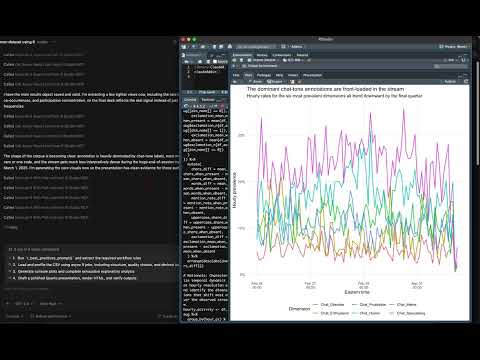
View on GitHubClaudeR connects MCP-configured LLM agents, like Claude Code or Codex, to the R session you are already working in. The agent runs code where your cleaned data and fitted models actually are, sees the plots it draws, reads the objects in your environment, and can edit the file open in your editor. A companion Python package does the same for a live Python session, and both work in RStudio and Positron.
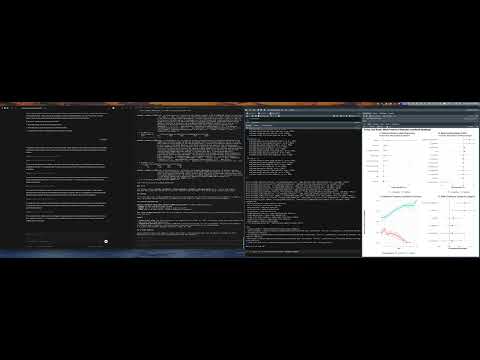
Several agents can share one session and divide the work between them, or you can run separate sessions side by side so each agent works on its own dataset without touching the others.
It covers much of what a paid research AI tool does, with the work happening in your own session and a record of every line an agent ran.
Quick Start
# Install
if (!require("devtools")) install.packages("devtools")
devtools::install_github("IMNMV/ClaudeR")

# Set up your AI tool
library(ClaudeR)
install_clauder()          # For Claude Desktop / Cursor
install_cli(tools = "claude")  # For Claude Code CLI

# Start the server in RStudio
claudeAddin()
AI agents: See llms-install.md for automated setup instructions.
Demo
| Single agent via Claude Desktop App | Multi-agent: Codex + Claude Code via CLI | GPT 5.4 Codex: Data analysis + Quarto report |
|---|---|---|
 |
 |
 |
-
The first agent message reaches the log, and plot capture tidies up after itself (R 0.16.5). Found during a two-agent demo. When the coordination log started empty, the addin treated the first message of the run as old history, so it never reached the console or the session log. It now skips only what was already in the log when you pressed Start Server, and a log you clear mid-run is shown from its first message. Separately, when copying a plot for the agent failed, the hidden image device the copy had opened stayed open. It is now always closed, and your current graphics device is left as it was.
-
Annotation instructions given once (clauder-mcp 0.16.4). From a user's run. Task instructions had to go in a column copied onto every row, which bloated the file and repeated them for every row in a batch.
run_annotation_jobnow takesinstructionsonce and gives them to every call ahead of the rows. Claude gets them as a system prompt, so long instructions can be reused from call to call instead of paid for in full each time. The instructions are recorded at the top of the raw replies file. -
Gemini CLI removed (R 0.16.4 / clauder-mcp 0.16.3). Google shut Gemini CLI down on June 18, 2026, and Antigravity (
agy) replaced it.install_cli(tools = "gemini")and thegeminioption ofrun_annotation_jobare gone, and both now point you toagyinstead. -
Labelling calls see only the row (clauder-mcp 0.16.3).
run_annotation_jobnow starts each Claude call with no tools, MCP servers, hooks, CLAUDE.md or slash commands, from an empty folder, so the model labelling a row sees nothing but that row (installed plugins are still listed but have nothing to run through). Older Claude Code versions get whichever of these options they have. Codex calls also start from an empty folder. Every reply is kept word for word in{name}_annotating_raw.jsonl. A reply that isn't valid JSON or doesn't fit the schema is asked again, up to three tries. Hitting your plan's usage limit stops the job with every saved row kept, and running it again picks up where it stopped. Two new options:no_api_key = trueremoves API keys from each call so the CLI uses your subscription login, andbatch_sizesends several rows per call for very large jobs (the default stays 1, so no row can influence another). A crash no longer leaves a job reading "running" forever, and the working file is never left half written. -
The exported script reruns, and checkpoints restore by name (R 0.16.4). Found rehearsing a demo. When an agent's code failed, the exported clean script kept that code as live code, so rerunning the script stopped at the same error; it now appears once, commented out.
restore_session("before_filter")failed with "checkpoint not found" because only the stamped file name was accepted; the label a checkpoint was saved with now works, and a miss lists the checkpoints that exist. -
Console logging turns on when it says it is on (R 0.16.3). From a user report. "Also log my own console commands" is remembered between sessions and the box comes back ticked, but after restarting R nothing was being recorded until the box was unticked and ticked again. It now starts with the server. Calling
start_console_logging()before starting a session also said logging was on while writing nowhere; it now says commands are recorded once a session starts, and they are. Starting a session prints where its log is, and your commands are no longer appended to the previous session's log while the server is stopped. -
Fewer check-ins on long jobs, nothing lost from long output, a quieter Agents panel (R 0.16.2 / clauder-mcp 0.16.2).
get_async_resultnow waits for the job and returns the moment it finishes (up towait_sseconds, default 300), so a 20-minute model fit takes a handful of calls instead of about 120. When output is too long to send in full, the whole thing is saved to a file and the agent is told where, so it can read the part that was cut instead of running the code again. The addin's Agents panel now hides agents not seen in a day, likecr_roster()already did, so a freshly opened session no longer lists agents from weeks ago. -
Console logging from the addin fixed (R 0.14.2). Ticking "Also log my own console commands" in the addin armed nothing on 0.14.1, while calling
start_console_logging()in the console worked. Cause:globalCallingHandlers()(used to observe warnings and messages) can only be called with an empty handler stack, and inside the Shiny observer that handles the checkbox it errors, which aborted the function before the console callback was registered. The callback is now registered first and unconditionally; the handlers are installed only when logging is started from the console, and otherwise warnings are read fromlast.warningafter each command. Started from the addin,message()output is the one thing not captured, and the addin says so. -
Control what reaches the agent, and stop sending plots nobody saw (R 0.15.0 / clauder-mcp 0.15.0). From two user requests. A new AGENT CONTEXT panel in the addin does two things. "Send plots to the agent automatically" can be turned off: the agent is told a plot was drawn and asks for it with
execute_r_with_plot, saving roughly 4,500 tokens per image when you mostly want text. Your Plots pane is unaffected either way. "Tools available to the agent" hides whole groups you are not using (editor, session, coordination, background jobs, manuscript audit); all 41 tools cost about 8,600 tokens of schema on every request, and a programming-only session needs about 1,200 of that. Both settings are per session and take effect without a restart, though some MCP clients only notice a changed tool list on reconnect. Separately, a bug fix:p <- ggplot(...)returned a full image to the agent even though assignment displays nothing, so the agent was sent plots that never appeared in your Plots pane. Capture now requires the plot to have actually been shown. -
Logging fixes (R 0.14.1). Two problems from a user report. Agent output was never written to the log, only the code, because the entry was written before the code ran; the log now records what each call printed. And the output capture added in 0.14.0 could stop console logging entirely: it opened its own output sink before registering the console callback, so if that sink could not be opened, nothing was logged at all. Opening it is now optional and failing back to logging commands and their values, the sink is restored if another execution unwinds it, and an agent run no longer pops a sink it did not open. Logged output lines are marked so that replay, history and notebook export skip them.
-
Console logging now captures output, not just results (R 0.14.0). From follow-up on the logging request. The log recorded the value a command returned, so anything printed as a side effect was missing:
cat(), progress output, andprint()called inside a function. Runningf()showed the call but not whatf()printed, which is exactly the context an agent needs when you hand it an error you hit yourself. Standard output is now teed to the log and grouped under the command that produced it, alongside the warnings, messages, and errors already captured. Your console still shows everything as normal. -
Windows session-liveness fix (R 0.13.2). Checking whether a recorded R session was still alive used
tools::pskill(pid, signal = 0). That is the standard idiom on Unix, but on Windowspskillalways callsTerminateProcessregardless of signal, so the check killed the session it was asking about, then reported it as alive and left the stale discovery file in place. Starting a server could therefore terminate another RStudio session and leave agents routed to a dead port. Liveness is now probed without signalling. Separately, registering a session whose name is already held by a different live session now warns instead of silently overwriting its discovery file, which had left agents holding the wrong port and token. -
Unified console logging (R 0.13.0). The session log recorded what the agent ran, but not what you ran, so asking an agent to explain an error you hit in the console meant re-running the work through it. Tick "Also log my own console commands" under Logging and your console activity joins the same file, tagged by who ran what: the command, its printed result, and any warnings, messages, or errors. "Read the last 100 lines of the log" is now enough for an agent to see both sides of the session. Off by default; toggle it in the addin or call
start_console_logging()/stop_console_logging(). -
Editor tools fixed, plus approve-before-apply edits (R 0.12.5 / clauder-mcp 0.14.4). From two user reports.
modify_code_sectionandinsert_textnow save to disk by default and reportsaved_to_disk, so an agent no longer believes it wrote a file when the change sat unsaved in the buffer. Bounded replacements may change the line count (the old equality constraint is gone). Both tools accept apathto target a specific file, open and focus it, and refuse to edit a different document instead of failing silently.get_active_documentnow reports the path, the document id, and whether the buffer differs from disk, so buffer state and file state stop being confused for each other. Newsuggest_edittool: the agent proposes a change and waits for the user to approve it, usingrstudioapi::showEditSuggestion()when the installed rstudioapi provides it, and otherwise staging the edit unsaved so the user accepts by saving or rejects with undo. -
Reviewer Zero now reasons, not just reconciles (R 0.12.4). Added a mandatory Pass 5 (content reasoning) to the base auditing protocol. The deterministic tools (reconcile_values, verify_references, check_cross_references, probe_scripts) find numeric, reference, cross-reference, and code defects, but they do not reason about meaning, and a manuscript can clear every one of them and still be wrong. Pass 5 is a gated, equal-weight pass with eight checks the tools cannot do: instrument and source attribution, whether each reported test is computable from the data that exists, whether each cited figure or table actually contains the claimed evidence, magnitude wording, convergence across studies, causal and generality framing, data existence for descriptive claims, and supplement and appendix integration (every supplement cited, and no body claim resting on an uncited one). In a controlled benchmark on a synthetic manuscript with a known defect set, this raised detection from below a native-tools baseline (16.8 of 24) to clearly above it (21.3 of 24), recovering exactly the reasoning defects the old tool-led protocol was missing, with no rise in false positives.
-
Shared-connection identity, coordination visibility, and a stale-session guard (R 0.12.2 / clauder-mcp 0.14.2). Three fixes from a live three-persona field session. (1) Personas sharing one MCP connection were renaming each other, because
set_agent_namechanges the identity of the whole connection. Newas_agentparameter onsend_message,check_messages, andwait_for_messageacts as a named persona for one call, with a separate read cursor per name. The bridge now enforces the pattern: a secondset_agent_namewith a different name is refused unless forced, every send confirmation echoes the name it was sent as, and the agent intro states where the current identity came from. (2) Coordination messages bypass R by design, so the console and the Agents panel showed nothing while agents talked. The addin now echoes each new coordination event to the console in full (no truncation), appends it to the session log, and shows a live coordination roster with last-seen ages. (3) A bridge still pointed at a dead R session used to report "success" while writing to a coordination log no live agent reads. Coordination calls now fail loudly when no live session exists, and announce it when the connection re-binds to a different live session. Also from pilot 2:check_cross_referencesunderstands S-prefixed supplement numbering, and the audit protocol documentsunname()for htest fields and author-plus-year citation matching. -
Agent identity and cross-restart history (R 0.11.0 / clauder-mcp 0.13.0). Built from field reports of a multi-day, three-agent session. New
set_agent_nametool: an agent sets its working name (for example "Claude-Stasis") once, and execution history, message attribution, presence, and its read cursor all carry that name. This fixes the case where several agents or personas share one MCP connection and collapse into a single random id.get_session_historygainsinclude_past: it parses prior session log files on disk, so the audit of who ran what now survives R restarts. The coordination protocol now makes identity the first step of check-in. -
Researcher workflow release (R 0.10.0 / clauder-mcp 0.12.0). Three workflows that paid tools charge for, built on machinery ClaudeR already had. (1) Systematic review screening: two independent AI screeners from different model families judge every abstract against your criteria, and the new
screening_reporttool computes agreement, Cohen's kappa, PRISMA flow counts, and the conflict set, so the human reads only the disagreements. (2) Grant Panel Mode:grant_panel_prompt(rubric = "nih")convenes a mock study section, one reviewer per criterion, anchored weaknesses, and a ranked list of revisions that would move the score. (3) Response to Reviewers:reviewer_response_prompt()parses a decision letter into a point-by-point registry, reruns analyses so answers carry real computed numbers, gates until every point is answered, and exports the response letter withexport_response_letter()plus Word comments in the manuscript. -
Coordination v2 + consensus gate (R 0.9.0 / clauder-mcp 0.11.0). The multi-agent board is now a typed, append-only event log on disk, designed from field reports of real multi-hour multi-agent sessions: typed signals instead of prose-grepping, per-agent read cursors (the shared-dataframe race is structurally impossible), reply threading, lease-based task claims, a fact store for shared state, auto-stamped presence, and a
wait_for_messagetool that blocks until a partner's event arrives, without touching the busy R session. New consensus gate: afterpropose_plan(), every execution response carries an agreement banner until all agents runconfirm_agreement()with the required sentence verbatim. Only then is the plan marked approved. Plusreferee_prompt(stance = "reviewer2"): a hostile-but-fair Reviewer 2 that opens with an unprimed three-sentence read (central claim, and would a strong venue accept it?) and ranks findings fatal / must-fix / minor, each tagged to the study it concerns. -
Referee Mode v2: configurable reviewers (R 0.8.0).
referee_prompt()now takeslenses(run any subset),reviewers_per_lens(2 = adversarial prosecutor + verifier pairs, 3 adds a backwards reader),model(a tier for all subagents, e.g."haiku"for quick passes or"opus"for submission-grade, or a named per-lens vector), andcross_vendor = TRUEto dispatch logic/methods reviewers to a different model vendor via codex/agy/qwen one-shots. Anti-collapse rules are now mandatory in the protocol: reviewer prompts must be written from scratch per lens and stance, the consistency lens reads back-to-front, and every finding carries a corroboration count across independent reviewers. -
Referee Mode (R 0.7.0 / clauder-mcp 0.10.0). The substantive manuscript review that paid services charge ~$50 a pass for, running free on the subscription you already have, and delivered where it belongs: as Word comments in your manuscript.
reviewer_zero_prompt(referee = TRUE)(or standalonereferee_prompt()) runs five content-only review lenses (argument logic, methods, internal consistency, evidence presentation, framing) as parallel subagents where the CLI supports them. Every finding must anchor to a verbatim quote and survive an independent verification pass before it lands in the document, severities are kept honest, and a clean report on a sound paper is a valid outcome. Alongside it, the newcheck_cross_referencestool deterministically catches dangling references ("see Table 4" when Table 4 no longer exists) and tables or figures the text never mentions. -
Value-first auditing (R 0.6.0 / clauder-mcp 0.9.0). Built from field feedback after a full manuscript+supplement audit.
read_filenow transparently extracts.docx/.pdf(previously returned raw bytes), and the extractor preserves structure: headings marked, table cells emitted row-wise with separators (they were previously dropped entirely). Newreconcile_valuestool: enumerates every number in a manuscript and reconciles each against the corpus your code produced, respecting displayed precision (5038.5 matches 5038.46), commas, percents, scientific notation, and< .001thresholds. The per-valuevalues_registrymakes numeric completeness a construction, not a diligence hope. Reviewer Zero now sets audit-clean print options (no more tibble 3-sig-fig false alarms), gates on the value sweep, and takes final verdicts from clean-room runs viaprobe_scripts(capture_output = TRUE). CrossRef lookups retry with backoff instead of silently truncating the reference check on 429s. -
Researcher toolkit release (R 0.5.0 / clauder-mcp 0.8.0). Five additions aimed at getting papers out the door. (1) Reviewer Zero write-back:
reviewer_zero_prompt(writeback = TRUE)turns every flagged claim into a native Word comment in a copy of the manuscript, via the newannotate_manuscript(). (2) Citation upgrades:verify_referencesnow flags retracted/corrected papers using Crossref update notices, resolves arXiv IDs (with a cite-the-published-version check), and bibliographically matches DOI-less references. Newsearch_citations(OpenAlex) andget_bibtex(doi.org) tools mean agents look up citations instead of inventing them. (3)generate_notebook: session logs become narrated Quarto lab notebooks that re-run the analysis when rendered. (4)generate_codebook: one call produces the variable-level codebook plus package/script/output inventory that OSF and journals require. (5) All wired into CI. -
Session checkpoints (R 0.4.0 / clauder-mcp 0.7.0). Three new MCP tools:
checkpoint_sessionsnapshots the R global environment to disk,restore_sessionrolls it back (saving the current state first, so restores are undoable), andlist_checkpointsshows what's available. Agents are briefed to checkpoint before risky operations. Users can always recover from the console withClaudeR::restore_session(). -
Reviewer Zero: preregistration audits and robustness checks.
reviewer_zero_prompt(prereg_path = ...)appends a Pass 5 that audits the executed analysis against the preregistered plan and produces a complete deviation report.reviewer_zero_prompt(robustness = TRUE)appends a Pass 6 that runs a specification-curve analysis on the primary claims: defensible alternative specs fan out through background jobs and come back as a sensitivity table plus a specification curve. -
Deep-dive audit release (R 0.3.1 / clauder-mcp 0.6.2). 20+ bug fixes across the addin, bridge, and Lab Mode: reopened addin UIs now share live state with the running server (settings toggles work again after closing/reopening the UI), plot capture is device-aware (
png(); plot(); dev.off()can no longer resend a stale on-screen figure),modify_code_sectionno longer corrupts replacements containing backslashes, async job results are idempotent and survive bridge timeouts, error responses include everything printed before the error, one agent's long computation no longer tells other agents the addin is down, and Lab Mode's Round-2+ re-verification gate actually fires. Session tokens now come from OS entropy. Logging is on by default. CI (GitHub Actions) now guards every push: R functional checks plus a real MCP stdio handshake against the built bridge. -
mcp SDK pinned to 1.x. The MCP 2026-07-28 spec release shipped
mcp2.0.0 to PyPI, which removes the server API the bridge is built on.clauder-mcp>= 0.6.1 pinsmcp<2. If your bridge broke, runuvx --refresh clauder-mcp. SDK 2.0 migration (and the new Tasks extension for async tools) is planned. -
AI-Driven Data Annotation. Two new MCP tools (
load_annotation_data,annotate) le
ClaudeR MCP questions
How do I add ClaudeR MCP to Claude Code?
Run claude mcp add clauder -- uvx clauder-mcp in your terminal. Add --scope user to make it available in every project.
How do I add ClaudeR MCP to Cursor?
Open ~/.cursor/mcp.json and add the server under mcpServers, using the Cursor config shown in the install section above.
What tools does ClaudeR MCP provide?
It exposes 41 tools, including execute_r, execute_r_with_plot, get_r_info, get_active_document, modify_code_section.
What environments does ClaudeR support?
It works with live R or Python sessions within RStudio or Positron.
Can multiple AI agents work on the same data?
Yes, several agents can share a single session to divide tasks, or you can run separate sessions to keep datasets isolated.
How do I install ClaudeR in R?
You can install it using devtools by running devtools::install_github("IMNMV/ClaudeR").
Does the agent see my plots?
Yes, the agent can see the plots it draws and you can configure whether it receives plots automatically to save tokens.