An AI agent that works in a browser today mostly does what a new employee does on day one: it looks at the screen, guesses which button does what, and clicks. It reads the page from screenshots or the accessibility tree, and every redesign breaks it a little. WebMCP is the proposal to stop the guessing. The page itself says which actions exist, what each one needs as input, and then runs them in its own JavaScript.
Most of what is written about WebMCP was written in the first months of 2026, and the API has changed under it since. navigator.modelContext became document.modelContext, provideContext() is gone, registerTool() now returns a promise, and the HTML form attributes left the spec. We read the specification and its commit history on 16 November 2026, tested each API call below in Chrome 157, and shipped four WebMCP tools on hostedmcp.org the same day. This guide is what we learned.
What WebMCP is
WebMCP is a JavaScript API, drafted in the W3C Web Machine Learning Community Group by two editors from Google and two from Microsoft, that lets a page register tools for agents. A tool is a function plus the three things a language model needs to use it: a name, a plain-language description, and a JSON Schema for the input.
Here is the smallest useful one:
await document.modelContext.registerTool({
  name: "search_products",
  description: "Search this shop's catalog by keyword and return the first matches with prices.",
  inputSchema: {
    type: "object",
    properties: { query: { type: "string", description: "What the user is looking for" } },
    required: ["query"]
  },
  annotations: { readOnlyHint: true },
  async execute({ query }) {
    const res = await fetch(`/api/search?q=${encodeURIComponent(query)}`);
    return res.json();
  }
});
When an agent attached to the browser looks at this tab, it sees search_products in its tool list next to whatever else it has. When the model decides to call it, the browser runs execute inside the page, with the page's cookies and logged-in session, and hands the return value back to the model as text.
That last part is the point. The spec describes pages that use WebMCP as MCP servers "that implement tools in client-side script instead of on the backend". The site does not need a new server, OAuth for agents, or a public API. It needs a few functions that call code it already has.
WebMCP and MCP are different things
The name suggests WebMCP is MCP running in a browser. It is closer to a cousin. The tool format is the same idea, and that is about where the overlap stops.
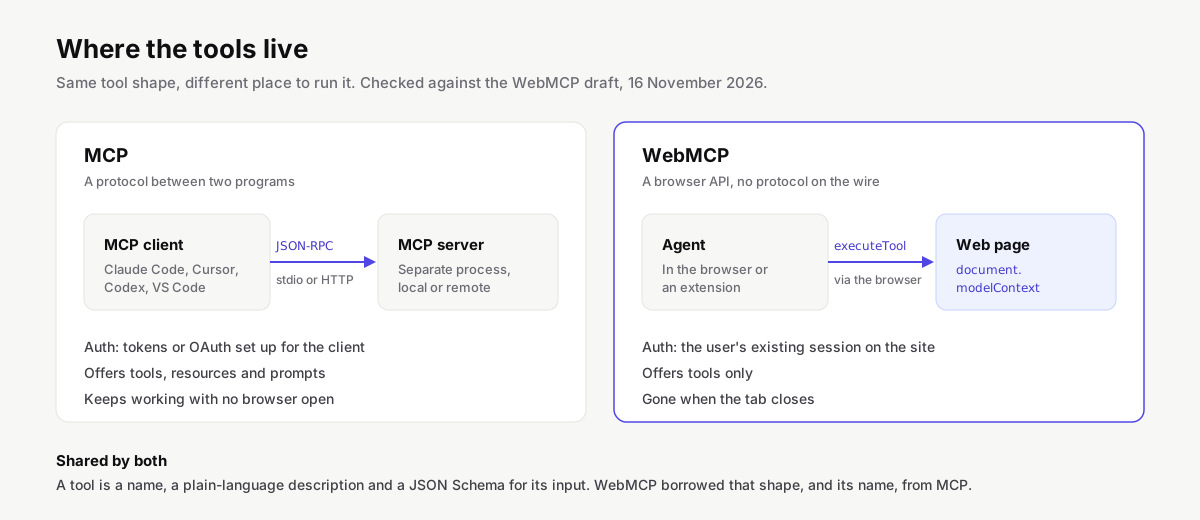
| MCP | WebMCP | |
|---|---|---|
| Where the tools run | A server process: local over stdio, or remote over Streamable HTTP | JavaScript inside an open web page |
| Wire protocol | JSON-RPC 2.0 messages | None; a browser API |
| Who calls the tools | An MCP client (Claude Code, Cursor, Codex, VS Code and others) | An agent in the browser, a browser extension, or script in the page |
| Authentication | Tokens or OAuth set up for the client | The user's existing session on the site |
| What it offers | Tools, resources, prompts, and more | Tools only |
| Works when the tab is closed | Yes | No |
| Status | Published specification with dated revisions | Community Group draft, origin trials |
If you are wondering which one your product needs, the question is where the user is. A developer in a terminal asking Claude Code to set up a database talks to MCP servers. A shopper on your site asking the browser's assistant to find a size 42 in blue is on a web page, and that is where WebMCP fits. Our longer explainers on what MCP is and what an MCP server does cover the server side.
The API as of November 2026
The current draft is small. document.modelContext is a ModelContext object with three methods and three events.
| Member | What it does |
|---|---|
registerTool(tool, { signal, exposedTo }) |
Adds a tool. Returns a promise that rejects on a duplicate name, an empty name or description, a name with characters outside A-Z a-z 0-9 _ - ., or a name longer than 128 characters |
getTools() |
Lists the tools visible to this document, including ones that iframes in the same tab exposed to it |
executeTool(tool, input) |
Runs a tool and resolves with its result as a JSON string |
toolchange event |
Fires when a tool is added or removed |
toolactivated, toolcancel events |
Fire when an agent starts a tool or cancels one |
A tool definition takes name, description and execute, which are required, plus optional title (a label for the browser's interface, ideally in the user's language), inputSchema, outputSchema and annotations. The annotations are four booleans, all false by default:
readOnlyHint: the tool only reads.untrustedContentHint: the result contains text the site did not write, such as reviews, emails or README files, and the agent should treat it as data.consequentialHint: the tool does something hard to undo, like paying or sending, and the agent should ask the user first.debugging: the tool exists for developers.
Removing a tool has no method of its own. You pass an AbortSignal when you register and abort it later:
const controller = new AbortController();
await document.modelContext.registerTool(cartTool, { signal: controller.signal });
controller.abort();
Access is gated by a permissions policy called tools, which defaults to self. Top-level pages and same-origin iframes may register tools; a cross-origin iframe needs allow="tools" on its <iframe> element.
What changed since the early guides
This is the section we wish we had found first. The ideas in a February 2026 blog post still hold; the code mostly does not run.
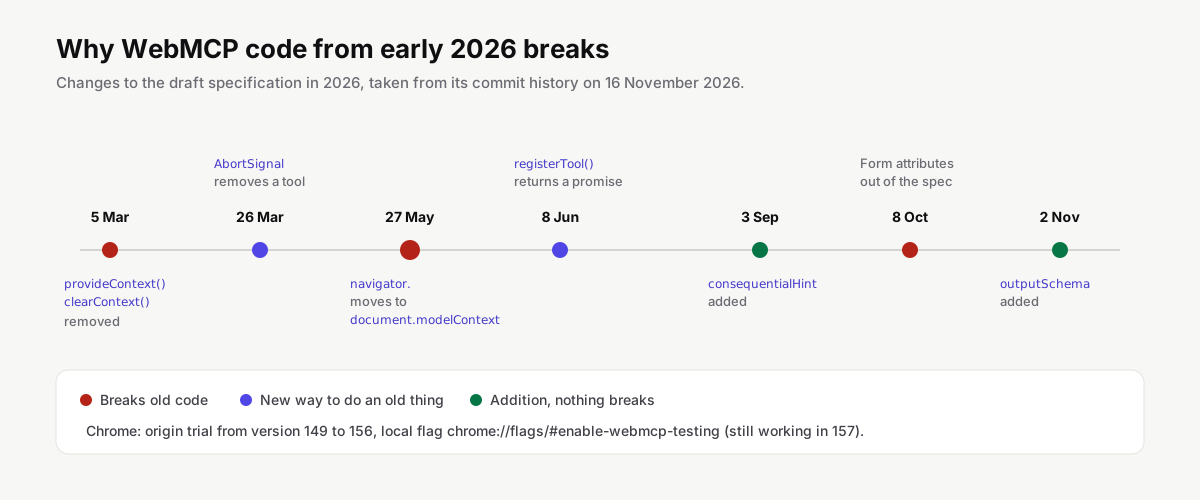
| Early 2026 guides | Current draft |
|---|---|
navigator.modelContext or window.agent |
document.modelContext |
provideContext({ tools: [...] }) replaces the whole tool set |
Removed on 5 March 2026; call registerTool() once per tool |
clearContext() |
Removed; abort each tool's signal |
unregisterTool("name") |
Not in the spec; abort the AbortSignal from registration |
registerTool() returns nothing |
Returns a promise; await it to catch rejections |
execute returns { content: [{ type: "text", text }] } |
Return any JSON-serializable value; the caller receives it as a JSON string |
Form attributes toolname, tooldescription |
Removed from the spec on 8 October 2026; kept in a separate explainer |
| No way to flag risky tools | consequentialHint (3 September) and untrustedContentHint (23 April) |
We tried the old entry point on purpose. In Chrome 157.0.8103.51 with the testing flag on, typeof navigator.modelContext was "undefined" and typeof document.modelContext was "object", with registerTool, getTools and executeTool on its prototype. A snippet that starts with navigator.modelContext.provideContext( fails with a TypeError before it registers anything. If you must support an older build, check both and prefer the new one:
const mc = document.modelContext ?? navigator.modelContext;
How to try it in Chrome
Chrome has two ways in. For local development, open chrome://flags/#enable-webmcp-testing, set it to Enabled and relaunch. To ship to real visitors, register your origin for the WebMCP origin trial, which Chrome Platform Status lists from Chrome 149 to 156, and serve the trial token. Edge runs its own origin trial from version 150.
With the flag on, the console is the quickest test bench. Register a tool, then play the agent yourself:
const [tool] = await document.modelContext.getTools();
const result = await document.modelContext.executeTool(tool, { query: "postgres" });
JSON.parse(result);
To see how a model actually picks your tools, Google publishes two extensions: the Model Context Tool Inspector on the Chrome Web Store, which needs a Gemini API key, and an example agent extension on GitHub (GoogleChromeLabs/webmcp-extension) that runs a local Node server. Outside Chrome, the project's status page lists ChatGPT Desktop as supporting WebMCP, Brave adding it to its Leo assistant in version 1.102.2 (expected 5 January 2027), and Meta's display glasses calling document.modelContext.registerTool() tools from web apps soon. Firefox and Safari have open standards-position issues and no implementation.
What we shipped on hostedmcp.org
We run a catalog of MCP servers and agent skills, and it already has a remote MCP endpoint with read-only tools for searching and installing. On 16 November 2026 we registered the same tools with WebMCP, so an agent working in a browser tab on any hostedmcp.org page can use them without anyone adding a server to a config file.
| Tool | Input | Returns | Annotations |
|---|---|---|---|
search_servers |
query, optional transport, limit |
Servers ranked best first, with install hints | read-only, untrusted content |
get_server |
owner, name |
Packages, tools, environment variables, checks, FAQs | read-only, untrusted content |
get_install_config |
owner, name, client |
The config snippet, the file it goes in, setup steps | read-only |
search_skills |
query, optional limit |
Agent Skills matching the query | read-only, untrusted content |
A few decisions behind that table, each one learned while building it:
The code loads only when the API exists. A tiny component checks for modelContext after the page loads. Only then does it import the module with the tool definitions, so visitors on browsers without WebMCP download nothing extra.
Summaries are marked untrusted. Our server summaries are written from third-party READMEs, and READMEs are a known place to hide instructions for agents. Three of the four tools set untrustedContentHint. The install config is generated by our own code from package metadata, so it does not.
Errors are returned, not thrown. Our first version threw an Error when the API answered 404 or 422. Through executeTool() in Chrome 157 that arrived as UnknownError: Tool was executed but the invocation failed, with our message gone. An agent cannot fix a wrong client name from that. Now the tool returns { "error": "client must be one of claude-code, cursor, vscode, ...", "status": 400 }, which the model can read and act on. The spec lists OperationError for a rejected tool, so this may change; returning the error as data works either way.
Registration is cleaned up. Every tool shares one AbortController. In our test, aborting it took getTools() from four tools to zero, and toolchange fired eight times: once for each registration and once for each removal.
We also checked the failure cases against the spec. Registering search_servers a second time rejected with InvalidStateError, and so did a tool named bad name!. A tool whose execute resolved with the number 42 came back from executeTool() as the string "42". A slow tool that waited 400 ms returned in 403 ms, so the call path itself adds almost nothing.
The tools call our public API at api.hostedmcp.org/v1 from the page, which meant one change to our Content-Security-Policy: adding that host to connect-src. The API's limit of 60 requests a minute per IP applies to agents too, and the 429 message reaches the model as data like any other error.
Writing tools agents can use
The spec repository carries a best-practices section, and Chrome publishes a longer guide. These points made the biggest difference for us:
- Few tools, each with one job. Every tool's name, description and schema go into the model's context on every turn. Our four definitions serialize to 2,473 characters of JSON, roughly 600 tokens; forty tools would crowd out the user's actual request. Register tools for the state the page is in and remove them when that state ends.
- Describe outcomes, with an example. Our descriptions say what comes back and end with a sample input such as
{"owner": "github", "name": "github-mcp-server", "client": "cursor"}, the same format our MCP endpoint has used since launch. A concrete example leaves the model less to infer from the schema. - Plain enum values.
transport: "remote"beatstransport: 2. Let the model pass what a person would say and normalize it inexecute. - Validate in code, loosely in the schema. A schema is a hint to the model. Check inputs again in
execute, because the page may have changed between the moment the model read the tool list and the call. - Return errors the model can act on. Say what was wrong and what would be valid.
- Mark consequences. If a tool spends money, sends a message or deletes data, set
consequentialHintand let the agent confirm with the user. The spec treats this as the main defence against an agent doing something the user did not mean.
Security
WebMCP inherits the problem every agent tool has: the model reads text and some text is hostile. The spec's security section sorts prompt injection into three kinds. A malicious site can put instructions in its own tool descriptions. A site can return attacker-written content in tool results, such as a product review that says "ignore your instructions". And a user's data can leak through tool parameters if a site asks for more than it needs.
The mitigations it defines are modest and you should use all of them:
- Mark results that contain third-party text with
untrustedContentHint, so the agent can isolate or hide that part. - Mark irreversible actions with
consequentialHint. - Send
Permissions-Policy: tools=()on pages that should never expose tools, for example an admin area. The browser then blocks the API before any script runs, which also stops a compromised dependency from registering tools there. - Expose tools to cross-origin iframes only on purpose. Both sides must opt in: the
allow="tools"attribute and theexposedToorigin list inregisterTool().
None of this replaces normal web security. A WebMCP tool runs with the user's session, so it must check authorization exactly as the button it mirrors does. Our own tools are read-only and call a public API, which kept the risk small. The same thinking applies to MCP servers, and our MCP security guide and the measured security report for the catalog go further.
The form-based API
The declarative idea is attractive: add toolname="search-flights" and tooldescription="..." to an existing <form>, toolparamdescription to each input, and the browser turns the form into a tool with a generated schema. A toolautosubmit attribute would let the agent submit without the user checking, and SubmitEvent.respondWith() would send a result back to the agent without a page load.
On 8 October 2026 this was taken out of the specification "for now". It survives as a separate explainer, the algorithm that turns form fields into JSON Schema is still marked to-do, and how a form sends its result back is an open issue. Chromium is testing a loose version. We would not build on it yet.
Should you add WebMCP to your site?
It is cheap to add and harmless where unsupported, so the real question is whether an agent would want to act on your pages. Some cases where we would:
- Search, filtering and lookups that are tedious to click through: catalogs, docs, listings.
- Multi-step forms where the agent can fill structured fields far better than it can find them: bookings, applications, settings.
- Web apps where users already ask assistants for help in a side panel.
And cases where it adds little: content sites with nothing to act on, and products whose users live in desktop agents, who are better served by an MCP server.
On our side the cost was about 150 lines of TypeScript and one CSP entry, and the tools reuse an API that already existed. We will watch how agents use them and report it here, with numbers, once there are numbers to report.