
Showntask MCP server
Commit Oct 30, 2026Allows AI agents to record screen areas and voice to automatically generate tasks with screenshots and file them to project management boards.
Also known as ZazaGdev/Showntask
- Stars
- 0
- Tools
- 8
- Downloads, 30 days
- —
- Latest version
- —
- Last commit
- Oct 30, 2026
- License
- MIT
What is Showntask MCP?
Showntask allows AI agents to record screen areas and voice to automatically generate tasks with screenshots and file them to project management boards. It exposes 8 tools, such as list_recordings, get_recording, get_transcript.
Summary generated from the project's README
Showntask MCP tools 8
Detected from the READMElist_recordingsget_recordingget_transcriptlist_candidatesget_contact_sheetsuggest_framessearch_transcriptsget_instructions
| list_recordings | — | |
| get_recording | — | |
| get_transcript | — | |
| list_candidates | — | |
| get_contact_sheet | — | |
| suggest_frames | — | |
| search_transcripts | — | |
| get_instructions | — |
Automated checks
Ran Nov 15, 2026Full report →Not verified yet. A server needs a score of 80, no serious finding, and enough data for us to check. How checks work · What to fix for more points

- Source repository linked and reachablezazagdev/showntask is public and reachablegithub.com/zazagdev/showntask ↗Pass
- Package names this repository as its sourceNot checked
- Build provenance (Sigstore attestation)Not checked
- Open source license (OSI)MITspdx.org/licenses/MIT.html ↗Pass
- Commit or release in the last yearLast commit or release 2026-10-30github.com/zazagdev/showntask ↗Pass
- OpenSSF ScorecardNot checked
- Package name not close to a popular packageNot checked
- No critical advisory in the package or its dependenciesNot checked
- No hidden instructions to the model8 tool descriptions and the README read; no override phrases, credential paths or hidden charactersPass
- Destructive tools are labelledNo tool named like delete, drop or execPass
- Remote endpoint answers the MCP handshakeNot checked
README
View on GitHubShowntask
Record your screen and talk. Your own AI agent turns it into tasks, with screenshots.
Showntask records an area of the screen and your voice, transcribes it on your PC with Whisper, and keeps candidate frames from the video. It is also an MCP server, so Claude Code, Codex, Cursor, Claude Desktop or any MCP client can read the recording, look at the frames, write the tasks and file them on your board (GitHub Issues, Linear, Jira, Trello, Asana, Azure DevOps) through the connectors you already have.
No API keys, no account, no cloud. Showntask never calls an AI model; your agent does the work on your own subscription.
Free and open source (MIT). Windows 10 and 11 for now.
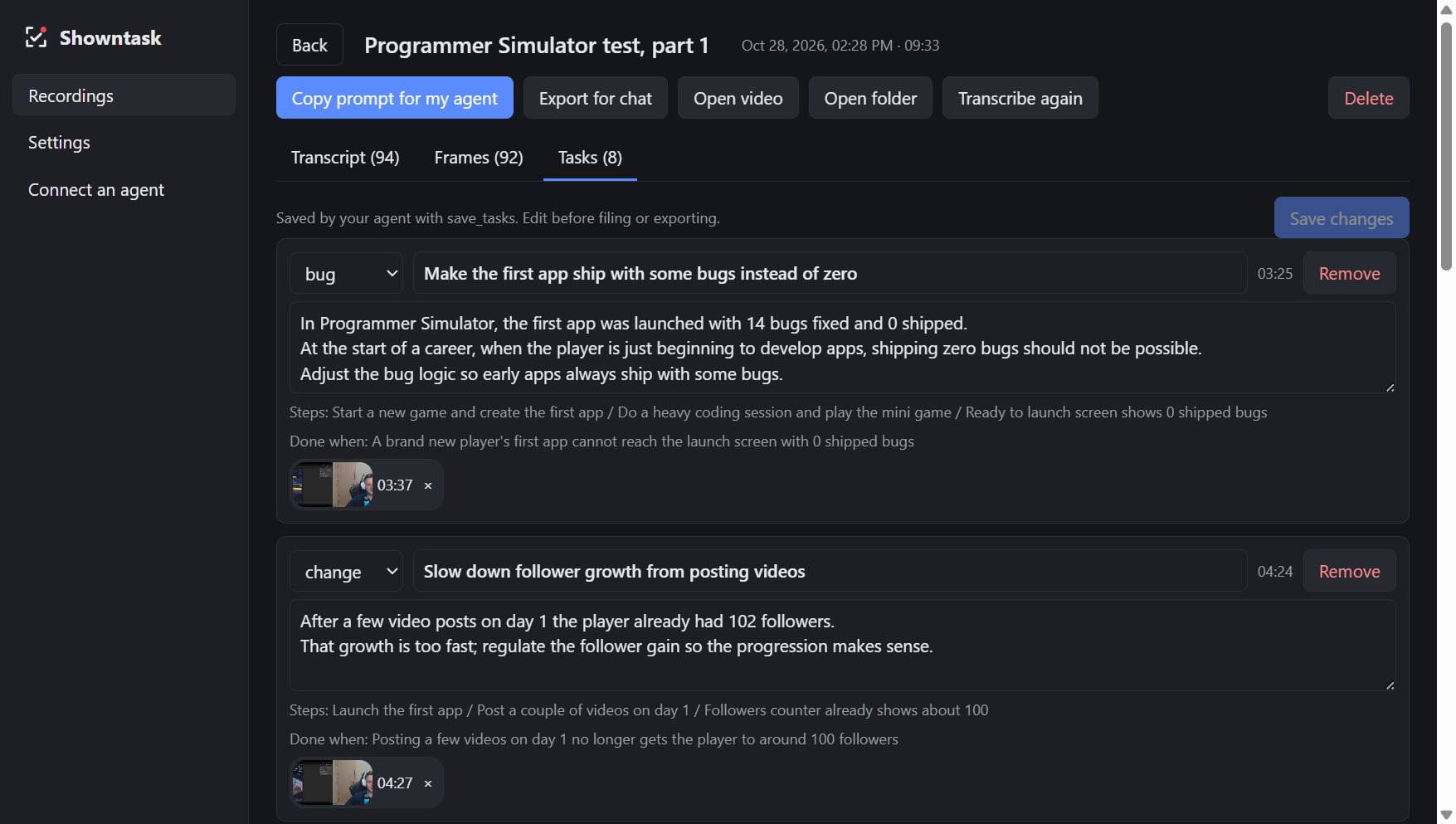
Quick start
- Install from Releases.
- Connect your agent once: open Connect an agent in the app, copy the line for Claude Code, Codex, Cursor, Claude Desktop or VS Code, and run or paste it (details below).
- Press Ctrl+Alt+T, drag over an area, talk through what you see, press Ctrl+Alt+T again.
- Ask your agent: "make tasks from my last Showntask recording".
Install
Download Showntask-Setup-<version>.exe from
Releases and run it. The installer is not signed
yet, so Windows SmartScreen shows "Windows protected your PC": click More info, then
Run anyway.
On first use Showntask downloads whisper.cpp (about 9 MB) and a Whisper model (about 190 MB by
default) into %APPDATA%\Showntask\speech. If you already have whisper.cpp and a model, point
Settings at that folder instead.
Use
- Press Ctrl+Alt+T (or Record), drag over the area to record, press Record. Talk while you work. Press Ctrl+Alt+K to mark a moment that must become a task.
- Press Ctrl+Alt+T again to stop. Showntask pulls out the sound, transcribes it and picks candidate frames in the background.
- Ask your agent: "make tasks from my last Showntask recording", or run the
make-tasksprompt (in Claude Code:/mcp__showntask__make-tasks). It reads the transcript, looks at contact sheets of the frames, picks the ones that show each point, shows you the list and saves it. - Then "file them on GitHub" (or run
file-tasks): your agent creates the issues with your own connector and Showntask remembers what went where.
Import a video you already have (OBS, Loom, a phone) from the Recordings page.
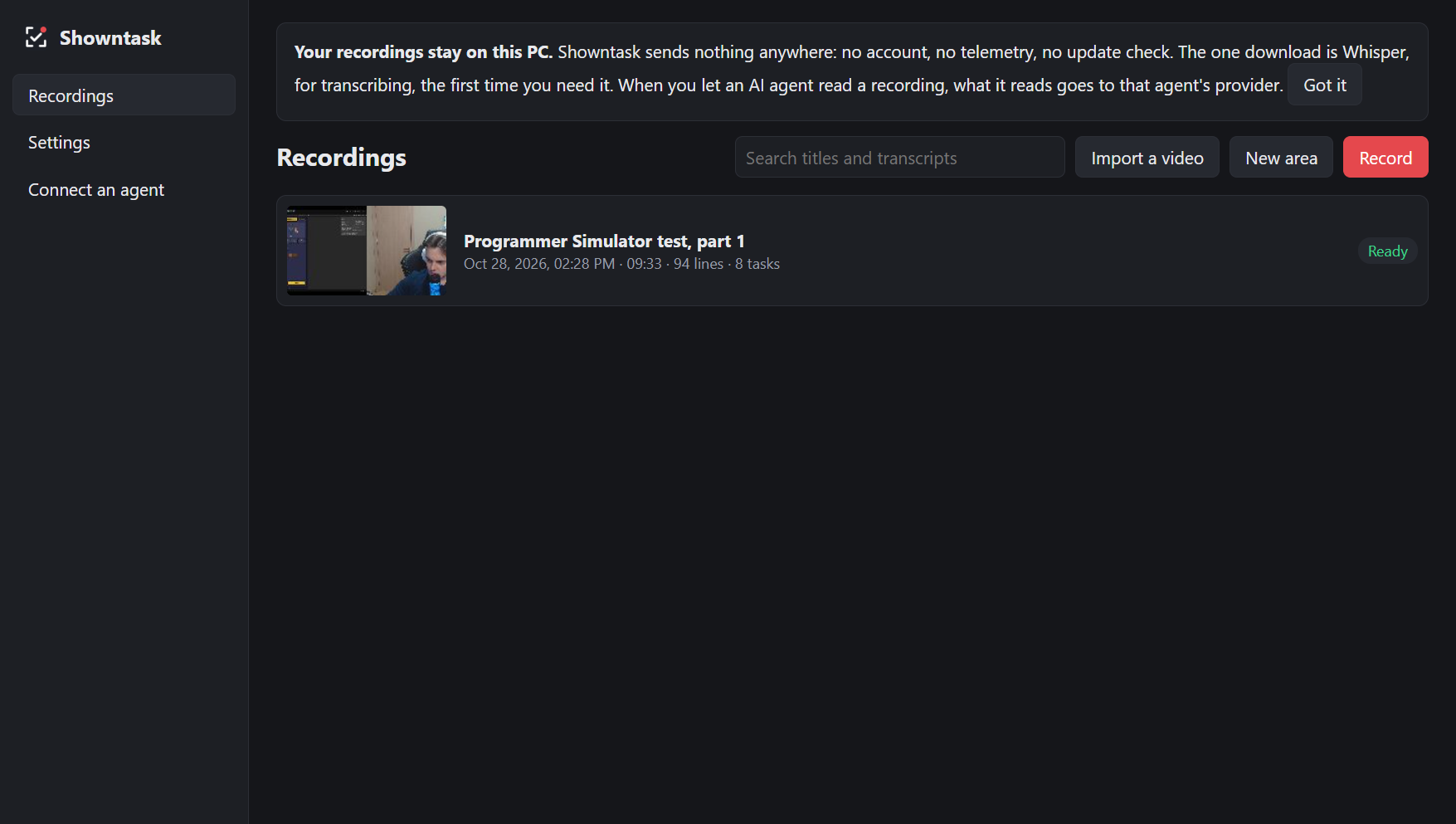
Connect an agent
The Connect page in the app shows the exact line for each agent, with a copy button. For Claude Code:
claude mcp add --scope user showntask -- "C:\Users\<you>\AppData\Local\Programs\Showntask\Showntask.exe" --mcp
Codex (%USERPROFILE%\.codex\config.toml):
[mcp_servers.showntask]
command = 'C:\Users\<you>\AppData\Local\Programs\Showntask\Showntask.exe'
args = ['--mcp']
Cursor, Claude Desktop and VS Code take the same command and --mcp in their mcp.json.
No MCP? Every recording's folder (%USERPROFILE%\Showntask\<date-time>) holds
transcript.md, the frames and MAKE-TASKS.md. Tell any agent that can read files: "Read
<folder>\MAKE-TASKS.md and do what it says". For claude.ai or ChatGPT in a browser, use
Export for chat and upload the zip.
MCP tools
| Tool | What it gives |
|---|---|
list_recordings |
Your recordings: id, title, length, line and task counts |
get_recording |
Metadata and the timed transcript |
get_transcript |
Part of a transcript, for long recordings |
get_frame, get_frames |
Frames as images, nearest the seconds asked |
list_candidates |
The candidate frames in a span and why each was picked |
get_contact_sheet |
One image of a span's candidates, labelled |
suggest_frames |
The best candidates ranked without looking, for agents without vision |
search_transcripts |
Lines matching words across recordings |
get_tasks, save_tasks, mark_filed |
The task list in the recording's folder |
get_instructions |
The prompts as text, for clients without prompts |
Prompts: make-tasks, file-tasks, summarise-recording. Resources:
showntask://recordings/<id>/transcript.md, meta.json, tasks.json, frames/<mmss>.jpg.
Boards
| Field | GitHub Issues | Linear | Jira | Trello | Asana | Azure DevOps |
|---|---|---|---|---|---|---|
| title | title | title | summary | card name | task name | Title |
| description, steps, done when | body | description | description | card description | notes | Description / Repro Steps |
| kind | label | label or type | issue type | label | tag | work item type |
| frames | image in body | attachment | attachment | attachment | attachment | attachment |
Many connectors cannot upload local images; then the agent writes each frame's path into the item and tells you which ones to drag in.
Privacy
- Nothing leaves your PC from Showntask: no telemetry, no account, no update check. The only download is Whisper, once.
- Once your agent reads a recording, its transcript and the frames it looks at go to that agent's AI provider, under your terms with them.
- Frames can show secrets. Delete a frame, or everything said and shown in a span, from the recording's page before an agent sees it. Showntask's own windows are kept out of the video.
- Old recordings can be deleted automatically (Settings).
- The MCP server only reads the recordings folder and never runs commands.
Cost
Showntask is free. Your agent's work runs on your own subscription: a long talk is a long transcript, and each contact sheet or frame is an image (Claude bills about width x height / 750 tokens per image, so 1,200 tokens for a 1280x720 frame). The make-tasks prompt tells the agent to look at sheets first and fetch only the frames it keeps. Turn frame viewing off in Settings to pick frames without looking.
Build from source
npm install
npm test          # unit tests
npm run smoke     # hidden end-to-end run: records a painted canvas, never your screen
npm start
npm run dist      # dist\Showntask-Setup-<version>.exe
Plain JavaScript, Electron, no build step. No ffmpeg: WebM, MKV and MP4 are read by Showntask's own readers and decoded with WebCodecs.
Licence
MIT. whisper.cpp (MIT) is downloaded at first use, not bundled.
Showntask MCP questions
What tools does Showntask MCP provide?
It exposes 8 tools, including list_recordings, get_recording, get_transcript, list_candidates, get_contact_sheet.
Does Showntask use any cloud services?
No, Showntask is local-first with no account, no telemetry, and no cloud. It only downloads Whisper once.
Which project management tools can it connect to?
It can file tasks to GitHub Issues, Linear, Jira, Trello, Asana, and Azure DevOps.
Is Showntask free to use?
Yes, the software is free and open source under the MIT license.
What operating systems are supported?
It currently supports Windows 10 and 11.