
ContextLib MCP server
Commit Sep 26, 2026Provides an append-only, tamper-evident long-term memory for AI agents using plain Markdown files.
Also known as willykeenan/agentbrain-contextlib, agentbrain-contextlib
- Stars
- 1
- Tools
- —
- Downloads, 30 days
- —
- Latest version
- 0.1.0
- Last commit
- Sep 26, 2026
- License
- Apache-2.0
What is ContextLib MCP?
ContextLib provides an append-only, tamper-evident long-term memory for AI agents using plain Markdown files.
Summary generated from the project's README
About ContextLib MCP server
Maintaining a persistent knowledge base for AI agents across different sessions is what ContextLib enables. It provides a long-term memory system that stores decisions, requirements, facts, and lessons as plain Markdown files within organized project folders. Because the source of truth resides in files rather than a private database, humans can read and manage the project history using standard tools like Finder or a text editor.
Developers use this system via a command line interface or as a stdio MCP server using the context_* tools. It is compatible with clients like Claude Code, Cursor, and Codex. The server requires a library path, which can be set via an environment variable or a command line argument, and can even be hosted on an external SSD for portability. The system uses a SQLite search index that is rebuilt from the Markdown files, ensuring that the data remains accessible even if the index is lost.
What you can do with it
- 1Store project decisionsAn AI agent can record a specific architectural choice to ensure it is remembered in future sessions.
- 2Manage proposed knowledgeA developer can review and approve new information that an agent has proposed for the project library.
- 3Retrieve project summariesAn AI client can quickly pull a condensed summary of a project to gain immediate context.
Written from the project's README. Every use case is checked against a quote from it.
How to install ContextLib MCP
Formats verified 10 Nov 2026Add to CursorAdd to GooseInstall ContextLib MCP in Claude Code
$ claude mcp add agentbrain-contextlib -- docker run -i --rm ghcr.io/willykeenan/agentbrain-contextlib:0.1.0Install ContextLib MCP in Cursor
~/.cursor/mcp.json
{
  "mcpServers": {
    "agentbrain-contextlib": {
      "command": "docker",
      "args": [
        "run",
        "-i",
        "--rm",
        "ghcr.io/willykeenan/agentbrain-contextlib:0.1.0"
      ]
    }
  }
}Install ContextLib MCP in VS Code
.vscode/mcp.json
{
  "servers": {
    "agentbrain-contextlib": {
      "type": "stdio",
      "command": "docker",
      "args": [
        "run",
        "-i",
        "--rm",
        "ghcr.io/willykeenan/agentbrain-contextlib:0.1.0"
      ]
    }
  }
}Install ContextLib MCP in VS Code CLI
$ code --add-mcp '{"name":"agentbrain-contextlib","type":"stdio","command":"docker","args":["run","-i","--rm","ghcr.io/willykeenan/agentbrain-contextlib:0.1.0"]}'Install ContextLib MCP in Claude Desktop
claude_desktop_config.json
{
  "mcpServers": {
    "agentbrain-contextlib": {
      "command": "docker",
      "args": [
        "run",
        "-i",
        "--rm",
        "ghcr.io/willykeenan/agentbrain-contextlib:0.1.0"
      ]
    }
  }
}Install ContextLib MCP in Codex
$ codex mcp add agentbrain-contextlib -- docker run -i --rm ghcr.io/willykeenan/agentbrain-contextlib:0.1.0Install ContextLib MCP in Codex config.toml
~/.codex/config.toml
[mcp_servers.agentbrain-contextlib]
command = "docker"
args = ["run", "-i", "--rm", "ghcr.io/willykeenan/agentbrain-contextlib:0.1.0"]
Install ContextLib MCP in Gemini CLI
$ gemini mcp add -s user agentbrain-contextlib docker -- run -i --rm ghcr.io/willykeenan/agentbrain-contextlib:0.1.0Install ContextLib MCP in Gemini settings.json
~/.gemini/settings.json
{
  "mcpServers": {
    "agentbrain-contextlib": {
      "command": "docker",
      "args": [
        "run",
        "-i",
        "--rm",
        "ghcr.io/willykeenan/agentbrain-contextlib:0.1.0"
      ]
    }
  }
}Configuration
CONTEXTLIB_ROOT
Automated checks
Ran Nov 14, 2026Full report →Not verified yet. A server needs a score of 80, no serious finding, and enough data for us to check. How checks work · What to fix for more points

- Source repository linked and reachablewillykeenan/agentbrain-contextlib is public and reachablegithub.com/willykeenan/agentbrain-contextlib ↗Pass
- Package names this repository as its sourceNot checked
- Build provenance (Sigstore attestation)Not checked
- Open source license (OSI)Apache-2.0spdx.org/licenses/Apache-2.0.html ↗Pass
- Commit or release in the last yearLast commit or release 2026-09-26github.com/willykeenan/agentbrain-contextlib ↗Pass
- OpenSSF ScorecardNot checked
- Package name not close to a popular packageNot checked
- No critical advisory in the package or its dependenciesNot checked
- No hidden instructions to the model0 tool descriptions and the README read; no override phrases, credential paths or hidden charactersPass
- Destructive tools are labelledNot checked
- Remote endpoint answers the MCP handshakeNot checked
README
View on GitHubContextLib
A project library that outlives every agent session.
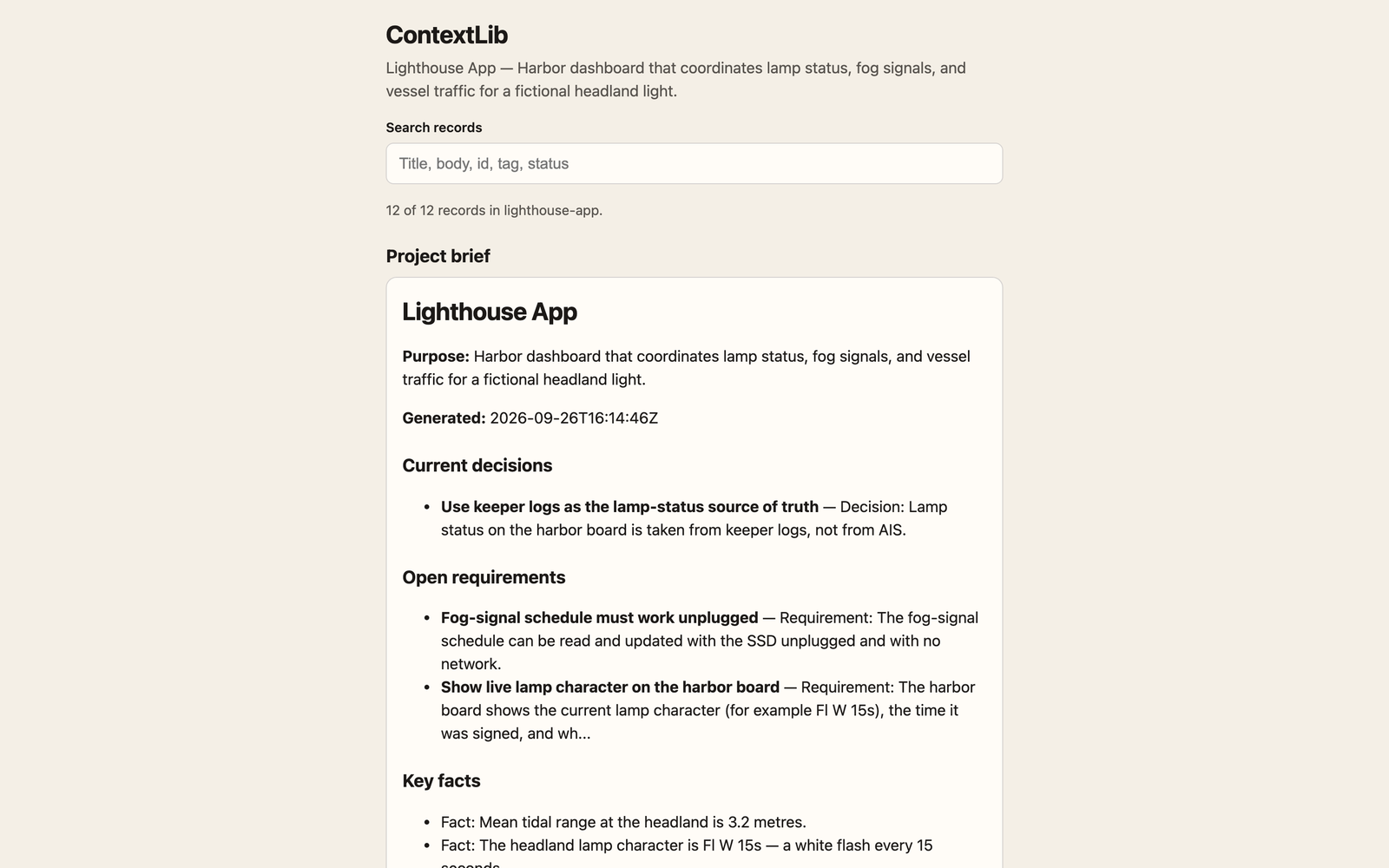
Real screenshot of the sample library (an invented project).
Each project's knowledge — decisions, requirements, facts, lessons, glossary, sources and returned work — is stored as plain Markdown files with a small front-matter block, in one folder per project. The folders can sit on an external SSD. A person can understand a project from Finder alone. Agents read and write the same files through a CLI (ctxlib) and an MCP server (context_* tools). Any database is a search index rebuilt from the files, never the source of truth.
It is the open core of the context plugin of AgentBrain.
The Python package is agentbrain_contextlib. The CLI is ctxlib. Python 3.9+, standard library only. Git is optional.
Why
Agent sessions end. Chat logs drift. A store that only a model can parse is a dead end the first time you open Finder on an airplane.
ContextLib keeps the durable layer as files you can read, diff, copy, and take to another Mac. The search index is disposable. The Markdown is the product.
60-second quickstart
pip install "git+https://github.com/willykeenan/agentbrain-contextlib"

ctxlib init ~/ContextLib --project lighthouse-app \
  --name "Lighthouse App" \
  --purpose "Harbor dashboard for lamp status, fog signals, and traffic"

ctxlib add lighthouse-app decision "Use keeper logs as lamp status" \
  --body "**Decision:** Lamp status comes from keeper logs, not AIS." \
  --author mara \
  --tag lamp --tag keeper-log

ctxlib brief lighthouse-app
ctxlib doctor lighthouse-app --ten-minute
The library path is --library PATH, else env CONTEXTLIB_ROOT, else ~/ContextLib.
A finished sample you can open in Finder without installing anything lives at examples/sample-library/. Start at that README, then the project BRIEF, then decisions/INDEX.md.
Full walkthrough: docs/QUICKSTART.md.
CLI (ctxlib)
ctxlib [--library PATH] COMMAND
| Command | What it does |
|---|---|
init PATH [--project SLUG --name NAME --purpose TEXT] |
Create a library (and optionally the first project) |
project add SLUG NAME [--purpose] |
Add a project folder |
project list |
List projects |
add PROJECT TYPE TITLE (--body TEXT | --body-file F) --author ID [options] |
Write a record (--evidence, --tag, --review-by, --approved-by) |
get PROJECT ID |
Print one record, with evidence state and supersession chain |
search PROJECT QUERY [--type] [--all] |
Search the rebuildable index |
brief PROJECT |
Print the always-loaded summary (≤ 8192 bytes) |
supersede PROJECT OLD NEW --reason TEXT --author ID |
Mark old superseded, move the file, keep the body hash |
review PROJECT ID confirm|retire --note TEXT --author ID |
Confirm or retire a record |
inbox PROJECT |
List proposed records |
accept PROJECT ID --author ID |
Move inbox → current |
reject PROJECT ID --reason TEXT --author ID |
Move inbox → rejected |
due PROJECT |
Records whose review_by is due |
regen PROJECT|--all |
Rewrite BRIEF, INDEX, GLOSSARY, TIMELINE, README |
rebuild |
Rebuild the SQLite search index from files |
capture PROJECT RESULT.json |
Turn a result file into a return (and proposed lessons) |
import-md PROJECT FILE --type TYPE --author ID |
Markdown file → record |
export PROJECT OUT_DIR [--include-private] |
Zip a project |
import BUNDLE |
Import a zip |
doctor [PROJECT] [--ten-minute] |
Plain-English health check |
sync |
git pull / git push when the library is a git repo; otherwise a no-op with a message |
mcp --identity ID |
Stdio MCP server; the identity is fixed for the process |
Types: decision, requirement, fact, lesson, glossary, source, return, brief-note.
MCP (context_* tools)
ctxlib mcp --identity ID is a stdio JSON-RPC server. Protocol versions: 2024-11-05, 2025-03-26, 2025-06-18.
Tools: context_brief, context_search, context_get, context_record, context_supersede, context_review_due, context_review, context_capture, context_export, context_import, context_status.
The identity is fixed at start. Tools cannot write as another identity. Errors come back as isError results.
Claude Code
{
  "mcpServers": {
    "contextlib": {
      "command": "ctxlib",
      "args": ["mcp", "--identity", "claude:project"],
      "env": { "CONTEXTLIB_ROOT": "/Volumes/SSD/ContextLib" }
    }
  }
}
Codex
{
  "mcpServers": {
    "contextlib": {
      "command": "ctxlib",
      "args": ["mcp", "--identity", "codex:project"],
      "env": { "CONTEXTLIB_ROOT": "/Volumes/SSD/ContextLib" }
    }
  }
}
Cursor
In .cursor/mcp.json (project) or ~/.cursor/mcp.json (user):
{
  "mcpServers": {
    "contextlib": {
      "command": "ctxlib",
      "args": ["mcp", "--identity", "cursor:project"],
      "env": { "CONTEXTLIB_ROOT": "/Volumes/SSD/ContextLib" }
    }
  }
}
Details: docs/MCP.md.
Record format
A record is UTF-8 Markdown. It starts with a YAML-like front-matter block (scalars, quoted strings, lists of scalars, lists of flat maps) and a Markdown body. The body hash is stored in the front-matter; bodies are not rewritten.
---
id: dec-20260926-7f3a
type: decision
title: Use plain files as the source of truth
status: current
project: lighthouse-app
scope: {lane: workstream, team: owner}
created: 2026-09-26T14:03:00Z
author: mara
approved_by: mara — "files first, database is only an index"
evidence:
  - {ref: "project:BRIEF.md"}
  - {ref: "url:https://example.com/x"}
supersedes: []
superseded_by: null
review_by: 2027-03-25
tags: [storage, library]
sensitivity: normal
body_sha256: "…"
---
**Decision:** …
**Why:** …
**Consequences:** …
**How to verify:** …
Evidence refs are project:<relative path>, ssd:<relative path>, room:<name>#<seq>, url:<https url>, or note:<text>. Absolute home paths and secrets are refused at write time.
Ids: <prefix>-<YYYYMMDD>-<4 hex> with prefixes dec, req, fact, les, glo, src, ret, note.
Files: <YYYY-MM-DD>_<title-slug>_<id-suffix>.md. Superseded records move to superseded/ with the body hash still valid.
Library layout
<library root>/
├── README.md              how to read this in 10 minutes
├── INDEX.md               one line per project
├── library.json           {"format": "contextlib/1", "library_id", "created"}
└── projects/<slug>/
    ├── README.md BRIEF.md GLOSSARY.md TIMELINE.md project.json
    ├── decisions/ requirements/ facts/ lessons/ glossary/ sources/ returns/
    │   ├── INDEX.md
    │   ├── <YYYY-MM-DD>_<title-slug>_<id-suffix>.md
    │   └── superseded/
    ├── inbox/             proposed records
    ├── exports/
    └── .contextlib/       ledger + rebuildable index.sqlite
Keeping the library on an SSD, using it unplugged, and moving it between Macs: docs/SSD.md.
Develop
PYTHONPATH=src python3 -m unittest discover -s tests
python3 tools/check.py packaging
Python 3.9+, standard library only. See CONTRIBUTING.md and CHANGELOG.md.
Apache-2.0, copyright KE Studios. SECURITY.md for reports.
ContextLib is the open library layer of AgentBrain (agentrooms.io).
Run with Docker
The image is published at ghcr.io/willykeenan/agentbrain-contextlib for Apple silicon and Intel. Mount your library at /library:
claude mcp add contextlib -- docker run -i --rm --user "$(id -u):$(id -g)" -v ~/ContextLib:/library ghcr.io/willykeenan/agentbrain-contextlib mcp --identity you
ContextLib MCP questions
How do I add ContextLib MCP to Claude Code?
Run claude mcp add agentbrain-contextlib -- docker run -i --rm ghcr.io/willykeenan/agentbrain-contextlib:0.1.0 in your terminal. Add --scope user to make it available in every project.
How do I add ContextLib MCP to Cursor?
Open ~/.cursor/mcp.json and add the server under mcpServers, using the Cursor config shown in the install section above.
How is project knowledge stored?
Knowledge is stored as plain Markdown files with a small front-matter block, organized into one folder per project.
Can I use this without a database?
Yes, the Markdown files are the source of truth; any database used is simply a search index rebuilt from those files.
What are the system requirements for ContextLib?
It requires Python 3.9 or higher and uses only the standard library.
How can I use ContextLib with Claude Code or Cursor?
You can configure it as an MCP server by running the 'ctxlib mcp' command with a specific identity in your MCP settings.