
visp-memory MCP server
Commit Nov 6, 2026Provides coding assistants with persistent project memory, including decisions, warnings, and history with source citations.
Also known as visplabs/visp-memory
- Stars
- 1
- Tools
- —
- Downloads, 30 days
- —
- Latest version
- —
- Last commit
- Nov 6, 2026
- License
- Apache-2.0
What is visp-memory MCP?
visp-memory provides coding assistants with persistent project memory, including decisions, warnings, and history with source citations.
Summary generated from the project's README
About visp-memory MCP server
Maintaining project context and technical decisions across coding sessions is what visp-memory enables for developers using AI assistants. It provides a persistent memory store that captures decisions, warnings, and project history with source citations. This allows an assistant to retrieve relevant context and understand why specific information was matched during a retrieval task.
Users can deploy the system using a Docker image or via Python 3.10+ installations. The setup includes a local dashboard for managing memories, reviewing notes, and scheduling cleanup tasks. While it primarily uses SQLite and keyword search for local operation without external models, an optional Neo4j backend is available in beta. Developers interact with the system through command line tools like visp-memory init, decision, recall, and brief to manage their repository's knowledge base.
What you can do with it
- 1Documenting architectural decisionsRecord a specific technical choice and its reasoning so the assistant can reference it later.
- 2Retrieving historical project contextAsk the assistant to find information regarding local database implementations within the project history.
- 3Generating task briefs from memoryCreate a summary of requirements for a new task based on existing project knowledge.
- 4Managing memory quality and duplicatesUse the dashboard to clean up exact-duplicate entries and review expired notes.
Written from the project's README. Every use case is checked against a quote from it.
README
View on GitHubVisp Memory
Project memory for coding assistants. Keep decisions, warnings, and useful history across sessions. Retrieve relevant context with source citations, inspect why it matched, and maintain the store from a local dashboard.
SQLite and keyword search work without a model or an external database. An optional Neo4j backend is available as an opt-in beta.
flowchart LR
    A["Project history"] --> B["Memory store
Sources and notes"]
    B --> C["Cited context"]
    C --> D["Assistant"]
    D -->|"Records outcomes"| A
Your assistant owns execution and completion decisions. Memory supplies context; it does not grant permission or certify that work is finished.
Start with the dashboard
Run the published Linux amd64 image with persistent storage:
docker run -d --name visp-memory \
  -p 127.0.0.1:8000:8000 \
  -v visp-memory-data:/data \
  -e VISP_MEMORY_EMBEDDING_PROVIDER=noop \
  ghcr.io/djkeshawa/visp-memory:0.9.0
docker logs visp-memory
Open the dashboard. On a fresh store, use the one-use setup link in the logs to create your administrator account. There is no shared default password. See installation for Compose, upgrades, Python, and standalone downloads.
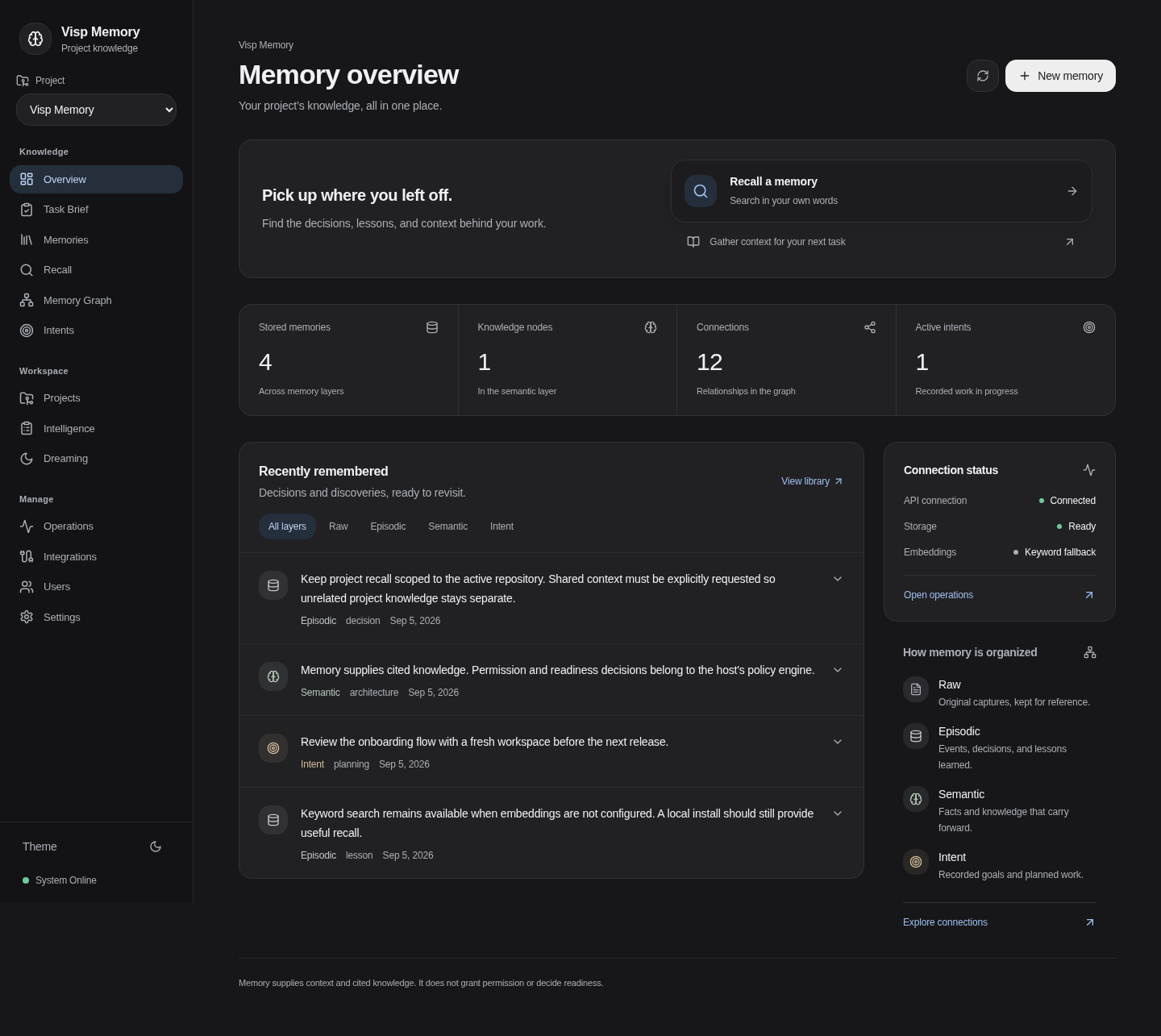
Dashboard overview with sample data. The dashboard starts in dark mode; use the sidebar theme control to switch appearance.
Use it from your project
Requires Python 3.10+. Run these commands in your repository:
pip install "visp-memory[mcp,capture]"
visp-memory init
visp-memory decision "Use SQLite locally" "No database service needed"
visp-memory recall "local database"
visp-memory brief "implement local storage"
init creates project configuration and imports selected Git history. Connect
your assistant separately using the MCP and hooks guide.
Use visp-memory doctor to inspect configuration and integration problems. To
try capture and recall without touching your project, run visp-memory demo.
What you can do
- Recall project knowledge: search decisions and history, or prepare a cited task brief.
- Understand results: inspect matching words, retrieval method, sources, and quality flags.
- Maintain memories: preview dreaming cycles, schedule exact-duplicate cleanup, and review related or expired notes. Applied changes can be undone.
- Follow task progress: receive explicit completion reports from your assistant or workflow, with evidence and history.
- Keep control of data: use local storage, scoped access, and backup and restore.
The supported path is one developer working in one local repository. Dashboard/API and some integrations are still early; team and graph features are frozen. Check feature status for the limits of each surface.
Documentation
Start with the documentation index, or go directly to:
| Learn | Configure | Integrate |
|---|---|---|
| Architecture and data flow | Installation | MCP and hooks |
| Trust and privacy | Accounts and tokens | Workflow reports |
| Dreaming | Storage and embeddings | Machine contracts |
Evidence and limits
Benchmarks describe deterministic selection and poisoning fixtures, including missed memories and other negative results. They do not establish better coding outcomes or superiority over another memory product. Published selection figures are checked against measured output by tests/docs/test_published_figures.py.
Contribute and license
See Contributing for development and submission requirements. Licensed under Apache 2.0; contributions require a DCO sign-off and the Contributor License Agreement.
visp-memory MCP questions
Does it require an external database?
No, SQLite and keyword search work without an external database, though an optional Neo4j backend is available in beta.
How can I manage the memory store?
You can maintain and inspect the memory store using a local dashboard.
Can I use it with my existing Git history?
Yes, the init command can import selected Git history into your project configuration.
Is there a default password for the administrator account?
No, there is no shared default password; you must use the one-use setup link found in the logs to create an account.