
Kika MCP server
Commit Oct 29, 2026Provides shared project memory for AI agents and humans to track decisions, blockers, promises, and technical experiments.
Also known as usekika/kika-plugin, kika-plugin
- Stars
- 0
- Tools
- —
- Downloads, 30 days
- —
- Latest version
- 0.2.4
- Last commit
- Oct 29, 2026
- License
- MIT
What is Kika MCP?
Kika provides shared project memory for AI agents and humans to track decisions, blockers, promises, and technical experiments.
Summary generated from the project's README
About Kika MCP server
Kika provides a shared memory layer for AI agents and human developers to track project decisions, blockers, and technical experiments. It functions as an MCP server that allows agents to use tools like get_brief, search_memory, remember, update_memory, and close_loop to maintain a persistent record of what has been decided and why. This memory exists outside the code repository, ensuring that context which cannot be inferred from files remains accessible to everyone on the project.
The system includes a unique capture hook that automatically records important information at the end of a conversation turn without requiring manual agent intervention. Users can install it via the Claude Code plugin marketplace or configure it for CI environments using an Authorization header with a bearer token. The setup is designed to be project-agnostic, creating a new memory space automatically the first time something significant is recorded in a repository. It uses OAuth for authentication on macOS and local credential files on other platforms to keep the experience integrated with existing developer workflows.
What you can do with it
- 1Track project blockers and decisionsAn AI agent can retrieve a summary of current project risks and past decisions to avoid repeating failed experiments.
- 2Automate context captureThe capture hook automatically writes down important conclusions from a conversation turn so the agent does not have to remember to do it.
- 3Collaborate across a teamDevelopers can invite teammates to a project so they can read and write to the same shared memory space.
Written from the project's README. Every use case is checked against a quote from it.
How to install Kika MCP
Formats verified 10 Nov 2026Add to CursorAdd to GooseInstall Kika MCP in Claude Code
$ claude mcp add --transport http kika-plugin https://api.getkika.app/mcpInstall Kika MCP in Cursor
~/.cursor/mcp.json
{
  "mcpServers": {
    "kika-plugin": {
      "url": "https://api.getkika.app/mcp"
    }
  }
}Install Kika MCP in VS Code
.vscode/mcp.json
{
  "servers": {
    "kika-plugin": {
      "type": "http",
      "url": "https://api.getkika.app/mcp"
    }
  }
}Install Kika MCP in VS Code CLI
$ code --add-mcp '{"name":"kika-plugin","type":"http","url":"https://api.getkika.app/mcp"}'Install Kika MCP in Codex
$ codex mcp add kika-plugin --url https://api.getkika.app/mcpInstall Kika MCP in Codex config.toml
~/.codex/config.toml
[mcp_servers.kika-plugin]
url = "https://api.getkika.app/mcp"
Install Kika MCP in Gemini CLI
$ gemini mcp add -s user --transport http kika-plugin https://api.getkika.app/mcpInstall Kika MCP in Gemini settings.json
~/.gemini/settings.json
{
  "mcpServers": {
    "kika-plugin": {
      "url": "https://api.getkika.app/mcp",
      "type": "http"
    }
  }
}Automated checks
Ran Nov 15, 2026Full report →Not verified yet. A server needs a score of 80, no serious finding, and enough data for us to check. How checks work · What to fix for more points

- Source repository linked and reachableusekika/kika-plugin is public and reachablegithub.com/usekika/kika-plugin ↗Pass
- Package names this repository as its sourceNot checked
- Build provenance (Sigstore attestation)Not checked
- Open source license (OSI)MITspdx.org/licenses/MIT.html ↗Pass
- Commit or release in the last yearLast commit or release 2026-10-29github.com/usekika/kika-plugin ↗Pass
- OpenSSF ScorecardNot checked
- Package name not close to a popular packageNot checked
- No critical advisory in the package or its dependenciesNot checked
- No hidden instructions to the model0 tool descriptions and the README read; no override phrases, credential paths or hidden charactersPass
- Destructive tools are labelledNot checked
- Remote endpoint answers the MCP handshakeHTTPS endpoint answered 401 (sign-in required)Pass
README
View on GitHubKika for Claude Code
Kika gives a project one memory that every agent and every person on it reads. What was decided and why, what is blocked, what was promised and by when, what was already tried and dropped. None of that is in the repository, and an agent cannot infer it from the code.
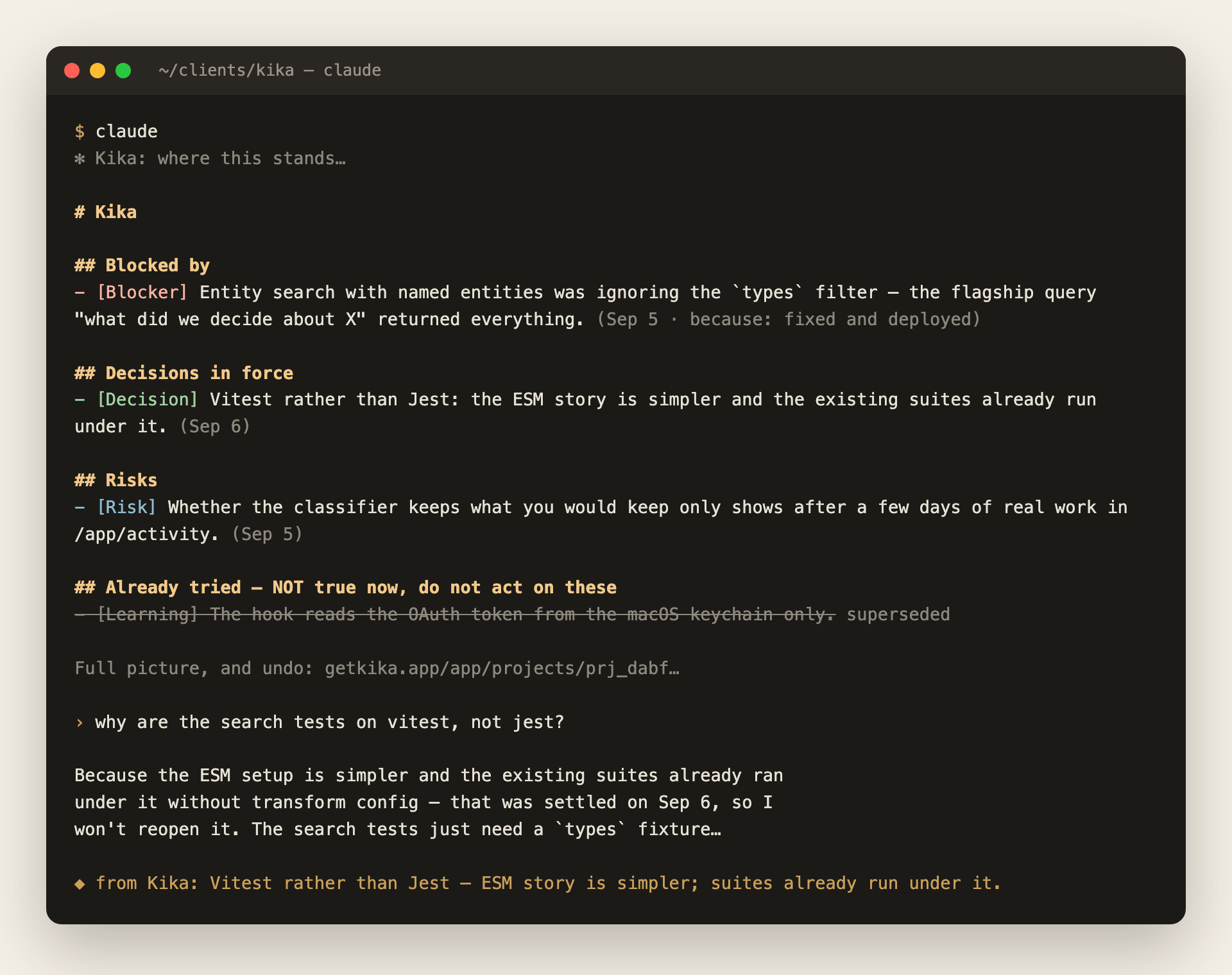
One install gives you both halves:
- the MCP server —
get_brief,search_memory,remember,update_memory,close_loop, so an agent can read the project's memory and add to it; and - the capture hook — which records what a turn settled without the agent having to remember to.
The hook is the part no other memory product has. A handshake that says "write things down when they matter" is advice, and a model under load ignores advice. A hook is not advice.
Install
/plugin marketplace add usekika/kika-plugin
/plugin install kika@kika
Then /mcp, choose kika, and approve in the browser.
That is the whole install. The plugin carries both halves, so there is nothing to clone, no script to run, and no second credential: the hook reads the OAuth token Claude Code already holds for this server and keeps refreshed.
Projects create themselves the first time something worth remembering is said in a repository. There is nothing to set up per project.
With a token instead
For CI, or a machine with no browser. Get one at getkika.app/app/connect:
claude mcp add --scope user --transport http kika https://api.getkika.app/mcp \
  --header "Authorization: Bearer kika_mcp_…"
--scope user matters: without it the server is bound to the one project you
happened to be in. The hook reads that same header out of your MCP
configuration, so it is still one credential.
Platform note
The OAuth path is verified on macOS, where Claude Code keeps the token in the
login keychain. Elsewhere the hook looks for ~/.claude/.credentials.json
first, which may or may not be where your build stores it. If capture is silent
on Linux or Windows, use the --header form above.
For a teammate
They install the same way and sign in as themselves. What they do in their own repositories is their own memory.
To put them on a project of yours, add them at getkika.app/app/projects — the project, then People, then the email address they sign in with. They do not need an account first; the invitation waits and is claimed the first time they sign in.
From then on their checkout of that repository resolves to your project rather than a second copy of it: what they decide, you read, and every fact shows who recorded it and from which branch. Everyone on a project can read and write its memory; only the owner decides who else is on it.
Until you add them, a repository that already belongs to a project is refused rather than duplicated. The agent is told the project exists, that they are not on it, and that whoever set it up can add them.
What leaves your machine
When a finished turn looks like it settled something, the hook posts to
https://api.getkika.app/hooks/turn:
- the last assistant message (at most 8,000 characters) and the last message you typed (at most 4,000), keeping the end of each rather than the beginning
- the working directory, and
git remote get-url originfor it - the Claude Code session id
It does not send your source code, your environment, or any other conversation. Most turns are discarded on your machine before any request is made at all.
Once per project, when Kika first creates the project for a repository, it
asks for that repository's docs so the project starts with an overview rather
than an empty page. The hook then posts to https://api.getkika.app/hooks/bootstrap:
- up to 12 committed markdown files from the top two levels of the
repository (README, CLAUDE.md, AGENTS.md, architecture docs first), at most
8,000 characters each. Only files
git ls-fileslists — never untracked files, never anything under a dot-directory - the subjects and dates of the last 60 commits (at most 4,000 characters)
- the working directory, git remote and branch
This happens once per project and never again.
It reads a credential in one of four places, in this order: the Authorization
header you configured on the MCP server, the OAuth access token Claude Code
holds for this server (macOS keychain, or ~/.claude/.credentials.json),
~/.kika/token, or ~/.kika/hooks-key. It never reads a credential belonging
to any other server.
~/.kika/hooks-key exists because an OAuth access token lasts an hour and only
the agent renews it — so without it, capture stopped an hour into any session
where the agent did not happen to call Kika. While your OAuth sign-in is fresh,
the session-start hook asks for a capture-only key once per machine and saves
it there, readable only by you. The server accepts that key on the hooks and
refuses it on the MCP tools, so it cannot search or read your memory beyond the
session brief, and it cannot mint another key. It is listed at
getkika.app/app/connect as "capture only", and revoking it there works like
any key. With
none of them present, capture exits immediately and sends nothing.
What it does say: once a day, at the start of a session, if no credential is found or the server rejects the one it has, you see one line — "Kika is not signed in … nothing from this session will be remembered". Capture that is off should never look like capture with nothing to save. That check runs on your machine and sends nothing but the request it was going to make anyway.
The hook runs after your turn ends and never blocks it. It exits quietly in every path, including failure: a hook that interrupts you is a hook you disable.
Seeing and undoing what it saved
getkika.app/app/trail shows every turn the hook saw, including the ones it saved nothing from and why, and what each cost you.
Anything recorded this way is marked agent-written and unverified. It can never overwrite something from one of your meetings, it never reaches your meeting notes, and every entry is listed at getkika.app/app/activity with an Undo that removes it.
Turning it off
Remove the plugin. Removing only the MCP server (claude mcp remove kika)
leaves the hooks installed with no token to find: nothing is sent, and the
once-a-day "not signed in" line appears until the plugin is removed too.
Kika MCP questions
How do I add Kika MCP to Claude Code?
Run claude mcp add --transport http kika-plugin https://api.getkika.app/mcp in your terminal. Add --scope user to make it available in every project.
How do I add Kika MCP to Cursor?
Open ~/.cursor/mcp.json and add the server under mcpServers, using the Cursor config shown in the install section above.
How does Kika record information without manual input?
It uses a capture hook that automatically records what a turn settled without the agent having to remember to.
Does Kika send my source code to its servers?
No, it does not send your source code or environment. It only sends specific message snippets and repository metadata like the working directory and git remote.
How do I add teammates to a project memory?
You can add them via the Kika web app by navigating to your project, selecting People, and entering their sign-in email address.
Can I undo information that was automatically recorded?
Yes, you can view recorded activity and use the Undo feature to remove entries.