
Uploads markdown files to a web service to generate shareable links with various permission levels.
Also known as urbanmorph/mdshare, mdshare-mcp
- Stars
- 9
- Tools
- —
- Downloads, 30 days
- —
- Latest version
- 1.7.0
- Last commit
- Nov 14, 2026
- License
- MIT
What is mdshare MCP?
mdshare uploads markdown files to a web service to generate shareable links with various permission levels.
Summary generated from the project's README
About mdshare MCP server
mdshare provides a way to turn local markdown files into web-based documents with shareable links. It is designed for developers and writers who need to distribute content quickly without requiring a login. Users can host their documents on the mdshare.live service, which uses Cloudflare Workers and D1 to manage data.
This MCP server allows AI clients like Claude, ChatGPT, Gemini, Cursor, and Windsurf to interact with your local files. By running the server via npx mdshare-mcp, the AI can read files directly from your disk to upload them. This method is efficient for large files because it avoids passing the entire text through the chat conversation.
The service offers four distinct permission levels for every document: Admin, Edit, Comment, and View. You can manage these links by setting optional expiry dates or revoking access entirely. Each document is subject to a limit of 50 links. The platform also supports real-time collaboration through WebSockets and includes a WYSIWYG editor for manual adjustments.
What you can do with it
- 1Upload local files via AIInstruct an AI client to take a specific markdown file from your computer and host it online.
- 2Distribute content with specific permissionsCreate different access links to allow others to only view, comment, or edit your markdown document.
- 3Share notes from ObsidianRight-click a file within your Obsidian vault to instantly copy an admin URL to your clipboard.
- 4Manage document access securitySet expiration dates on your shared links or cancel access to a document immediately.
Written from the project's README. Every use case is checked against a quote from it.
How to install mdshare MCP
Formats verified 10 Nov 2026Add to CursorAdd to GooseInstall mdshare MCP in Claude Code
$ claude mcp add mdshare -- npx -y mdshare-mcpInstall mdshare MCP in Cursor
~/.cursor/mcp.json
{
  "mcpServers": {
    "mdshare": {
      "command": "npx",
      "args": [
        "-y",
        "mdshare-mcp"
      ]
    }
  }
}Install mdshare MCP in VS Code
.vscode/mcp.json
{
  "servers": {
    "mdshare": {
      "type": "stdio",
      "command": "npx",
      "args": [
        "-y",
        "mdshare-mcp"
      ]
    }
  }
}Install mdshare MCP in VS Code CLI
$ code --add-mcp '{"name":"mdshare","type":"stdio","command":"npx","args":["-y","mdshare-mcp"]}'Install mdshare MCP in Claude Desktop
claude_desktop_config.json
{
  "mcpServers": {
    "mdshare": {
      "command": "npx",
      "args": [
        "-y",
        "mdshare-mcp"
      ]
    }
  }
}Install mdshare MCP in Codex
$ codex mcp add mdshare -- npx -y mdshare-mcpInstall mdshare MCP in Codex config.toml
~/.codex/config.toml
[mcp_servers.mdshare]
command = "npx"
args = ["-y", "mdshare-mcp"]
Install mdshare MCP in Gemini CLI
$ gemini mcp add -s user mdshare npx -- -y mdshare-mcpInstall mdshare MCP in Gemini settings.json
~/.gemini/settings.json
{
  "mcpServers": {
    "mdshare": {
      "command": "npx",
      "args": [
        "-y",
        "mdshare-mcp"
      ]
    }
  }
}Automated checks
Ran Nov 13, 2026Full report →Passed our automated checks. That is not a security audit: read the code and give the server the narrowest access it needs. How checks work

- Source repository linked and reachableurbanmorph/mdshare is public and reachablegithub.com/urbanmorph/mdshare ↗Pass
- Package names this repository as its sourcemdshare-mcp names urbanmorph/mdshare as sourcenpmjs.com/package/mdshare-mcp ↗Pass
- Build provenance (Sigstore attestation)No build attestation published for this releaseNot checked
- Open source license (OSI)MITspdx.org/licenses/MIT.html ↗Pass
- Commit or release in the last yearLast commit or release 2026-11-13github.com/urbanmorph/mdshare ↗Pass
- OpenSSF ScorecardNot checked
- Package name not close to a popular packageNo popular package one edit away from mdshare-mcpPass
- No critical advisory in the package or its dependencies99 resolved dependencies checked; no critical advisoryosv.dev ↗Pass
- No hidden instructions to the model0 tool descriptions and the README read; no override phrases, credential paths or hidden charactersPass
- Destructive tools are labelledNot checked
- Remote endpoint answers the MCP handshakeinitialize answered with protocol 2025-06-18 in 134 msPass
README
View on GitHubmdshare
Share markdown instantly. Free. No login required.




mdshare.live | API Docs | VS Code | Obsidian
Quick Start
Paste markdown at mdshare.live, start from a blank page, or upload via curl:
curl -X POST https://mdshare.live/api/documents \
  -H "Content-Type: text/markdown" \
  --data-binary @your-file.md
You get back an admin URL. Share it, or generate links with different permissions.
Features
- Four permission levels -- Admin, Edit, Comment, View -- each with its own shareable link
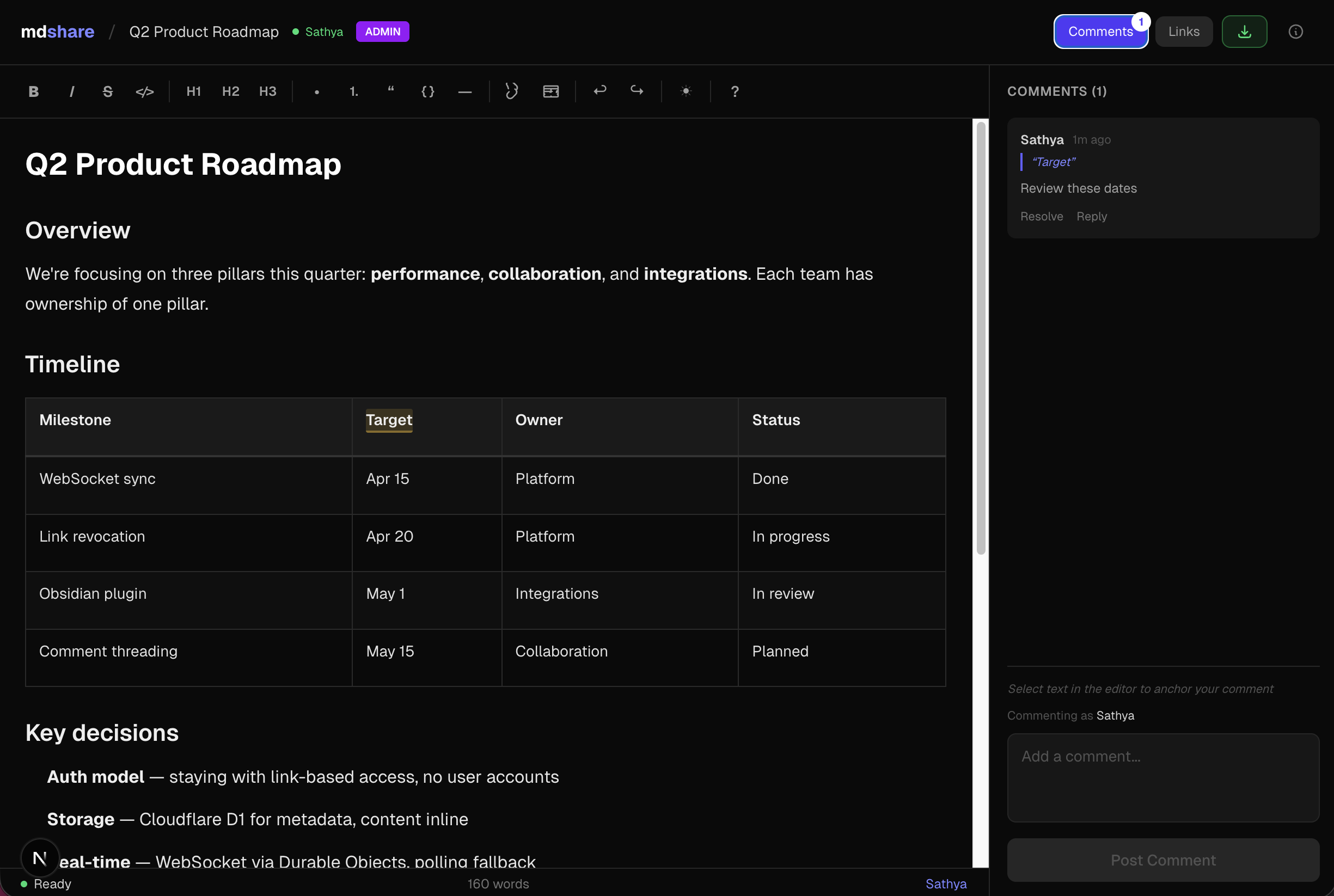
- WYSIWYG editor -- formatting toolbar, tables, code blocks, keyboard shortcuts
- Inline comments -- anchor comments to specific text, reply, and resolve
- Real-time sync -- WebSocket collaboration, live presence indicators
- Link management -- revoke links instantly, optional expiry, 50-link cap per document
- VS Code & Obsidian plugins -- share markdown directly from your editor
- API & MCP -- REST API + MCP server for Claude, ChatGPT, Gemini, Cursor, and Windsurf
MCP Server
npx mdshare-mcp
Say "upload my-notes.md to mdshare" in any MCP-compatible AI tool. The MCP server reads files directly from disk (no echoing through the conversation), so it's fast even for large markdown files. Setup guide
Claude Code Plugin
/plugin marketplace add urbanmorph/mdshare
/plugin install mdshare@urbanmorph
Wraps the MCP server above with a single skill — Claude reaches for it on phrases like "share this markdown". Setup guide · source
Cursor Plugin
Listed on Cursor Directory — click "Add to Cursor" on the listing page. Same MCP server, same skill as the Claude Code plugin. Source
Obsidian Plugin
Listed in the Obsidian Community Plugins directory — install via Settings → Community Plugins → Browse → search "mdshare". Right-click any .md file in your vault to share it; admin URL is copied to your clipboard. Source
Tech Stack
| Component | Technology |
|---|---|
| Framework | Astro 5 |
| UI | React (as Astro islands) |
| Hosting | Cloudflare Workers (native) |
| Database | Cloudflare D1 (SQLite) |
| Real-time | Cloudflare Durable Objects (WebSocket) |
| Editor | Tiptap + tiptap-markdown |
| Styling | Tailwind CSS v4 |
| CI/CD | GitHub Actions |
Local Development
git clone https://github.com/urbanmorph/mdshare.git
cd mdshare
npm install

# Create a .dev.vars file with your Cloudflare API token
echo "CLOUDFLARE_API_TOKEN=your_token" > .dev.vars

# Apply local D1 migrations
npx wrangler d1 migrations apply mdshare-db --local

# Start dev server
npm run dev -- -p 3737
Contributing
Issues and PRs welcome. Please open an issue first to discuss significant changes.
License
MIT
mdshare MCP questions
How do I add mdshare MCP to Claude Code?
Run claude mcp add mdshare -- npx -y mdshare-mcp in your terminal. Add --scope user to make it available in every project.
How do I add mdshare MCP to Cursor?
Open ~/.cursor/mcp.json and add the server under mcpServers, using the Cursor config shown in the install section above.
How do I share markdown using an AI tool?
You can use the MCP server by saying "upload my-notes.md to mdshare" in any MCP-compatible AI tool.
Does mdshare require a user account?
No, the service allows you to share markdown instantly without needing to log in.
What permission levels are available for shared links?
There are four permission levels: Admin, Edit, Comment, and View.