
An AI video editor that lets agents edit timelines by transcript, add b-roll and music, and verify renders by transcribing the output.
Also known as tydude001/proofcut
- Stars
- 4
- Tools
- —
- Downloads, 30 days
- 296
- Latest version
- 0.45.0
- Last commit
- Nov 10, 2026
- License
- —
What is proofcut MCP?
proofcut is an AI video editor that lets agents edit timelines by transcript, add b-roll and music, and verify renders by transcribing the output.
Summary generated from the project's README
About proofcut MCP server
Automating the tedious bookkeeping of video editing is what proofcut enables for developers and AI agents. It allows an agent to manage a video timeline by addressing specific words in a transcript rather than manual timestamps. This system works locally on Linux, macOS, or Windows, using tools like ffmpeg and auto-editor to perform renders on your own machine without uploading footage to a cloud service.
Users can drive the editing process through a terminal, a Claude Code plugin, or an agentic workspace. The server provides specialized tools like cut, music, and captions to build a finished film. What sets this apart is the verification process; the system transcribes the final render and compares the spoken words against the original edit to ensure no lines were dropped or incorrectly kept during the export process.
What you can do with it
- 1Automated video cuttingAn agent can remove retakes and asides from a recording by targeting specific word indices.
- 2B-roll synchronizationAn AI can select appropriate footage by describing the content of video clips and matching them to the narration.
- 3Render quality assuranceDevelopers can verify that a rendered video file accurately reflects the intended transcript edits.
- 4Audio masteringThe system can automatically level music under a voiceover and master the final export to a specific loudness target.
Written from the project's README. Every use case is checked against a quote from it.
How to install proofcut MCP
Formats verified 10 Nov 2026Add to CursorAdd to GooseInstall proofcut MCP in Claude Code
$ claude mcp add proofcut -- uvx proofcutInstall proofcut MCP in Cursor
~/.cursor/mcp.json
{
  "mcpServers": {
    "proofcut": {
      "command": "uvx",
      "args": [
        "proofcut"
      ]
    }
  }
}Install proofcut MCP in VS Code
.vscode/mcp.json
{
  "servers": {
    "proofcut": {
      "type": "stdio",
      "command": "uvx",
      "args": [
        "proofcut"
      ]
    }
  }
}Install proofcut MCP in VS Code CLI
$ code --add-mcp '{"name":"proofcut","type":"stdio","command":"uvx","args":["proofcut"]}'Install proofcut MCP in Claude Desktop
claude_desktop_config.json
{
  "mcpServers": {
    "proofcut": {
      "command": "uvx",
      "args": [
        "proofcut"
      ]
    }
  }
}Install proofcut MCP in Codex
$ codex mcp add proofcut -- uvx proofcutInstall proofcut MCP in Codex config.toml
~/.codex/config.toml
[mcp_servers.proofcut]
command = "uvx"
args = ["proofcut"]
Install proofcut MCP in Gemini CLI
$ gemini mcp add -s user proofcut uvx -- proofcutInstall proofcut MCP in Gemini settings.json
~/.gemini/settings.json
{
  "mcpServers": {
    "proofcut": {
      "command": "uvx",
      "args": [
        "proofcut"
      ]
    }
  }
}Automated checks
Ran Nov 14, 2026Full report →Passed our automated checks. That is not a security audit: read the code and give the server the narrowest access it needs. How checks work · What to fix for more points

- Source repository linked and reachabletydude001/proofcut is public and reachablegithub.com/tydude001/proofcut ↗Pass
- Package names this repository as its sourceproofcut names tydude001/proofcut as sourcepypi.org/project/proofcut/ ↗Pass
- Build provenance (Sigstore attestation)No build attestation published for this releaseNot checked
- Open source license (OSI)No licenseFinding
- Commit or release in the last yearLast commit or release 2026-11-10github.com/tydude001/proofcut ↗Pass
- OpenSSF ScorecardNot checked
- Package name not close to a popular packageNo popular package one edit away from proofcutPass
- No critical advisory in the package or its dependencies30 resolved dependencies checked; no critical advisoryosv.dev ↗Pass
- No hidden instructions to the model0 tool descriptions and the README read; no override phrases, credential paths or hidden charactersPass
- Destructive tools are labelledNot checked
- Remote endpoint answers the MCP handshakeNot checked
README
View on GitHub


An AI video editor that proves its cuts. Your recordings in, a finished, mastered film out: cut by transcript, with b-roll, cards, music and captions, and every step an agent can call. proofcut renders on your own machine, then transcribes the render and checks that it says what the edit says.
https://github.com/user-attachments/assets/4153d180-3d7c-4c70-af5f-54d63d0a8bd5
An agent cutting a demo video, unattended, from a goal and no steps.
Silent, because the recorder took frames only; the voice is in the film the agent cut. The workspace (2:26) and Claude Code with the proofcut plugin (3:09).
Runs on Linux, where it is developed. macOS and Windows pass the test suite on CI; how far each has gone by hand is § Help wanted.
Quickstart
With uv installed:
uvx proofcut doctor          # only looks: what is missing, and the fix for each
uvx proofcut setup --plan    # what an install would fetch, and its size; touches nothing
uvx proofcut setup           # installs it for you alone, no sudo; --uninstall reverses it
Then make the two-minute demo, or give an agent the tools with the Claude Code plugin. § Try it walks all of it.
Why it exists
Most of the work in a narrated video, whether an essay, a tutorial, a screencast or a talk, is bookkeeping. Find the retakes and cut them clean. Put the right footage under each line. Level the music under the voice, caption it, end on a card, render it, master it. An agent can do that bookkeeping now, given an editor it can drive.
What an agent cannot do on its own is know that the file it rendered is the film it meant. ffmpeg, melt and auto-editor all exit 0 on some failures, so a render can drop a line, keep a retake, add a frame of black or carry no captions and still report success. Every check that reads the project rather than the file agrees with it. The usual way to find out is to watch the whole thing.
proofcut is an editor built around that gap. You, or an agent, edit a timeline addressed by the words in it. proofcut renders it on your machine, then transcribes the render, counts its frames, and says where the file and the edit disagree.
Here it is on the demo project. The retake is cut from the edit, and
verify is pointed at a render made before the cut:
proofcut -C proj cut vo 11:23 --pad 0.1
proofcut -C proj verify stale.mp4
"expected_words": 34,
"heard_words": 47,
"similarity": 0.84,
"diff": ["--- timeline", "+++ render", "@@ -10,4 +10,17 @@",
         " video", " editor",
         "+every", "+cut", "+you", "+make", "+names", "+a", "+um", "+no",
         "+let", "+me", "+try", "+that", "+again",
         " every", " cut"]
The file still says the thirteen words the edit took out, and verify names
them. A render of the edit as it stands hears all 34
(DEMO.md
step 7).
Run, not staged
TRIAL.md scores three unattended runs, each handed a goal and no steps, and each passed every one of its checks:
- The demo cut, the one above.
- Real footage. 96 seconds of narration with its fluffed takes left in, plus four clips of film footage. The agent cut it to 45 seconds, chose footage by what each line was about, burned captions, and checked its own render: all 123 expected words heard back.
- A whole film. The demo material plus a score, briefed as a finished film ready to upload. In 192 seconds and $2.27 the agent cut it, laid the music under the voice, ended on a card, mastered it to −16 LUFS, and checked it. The score, the level and the end card were each measured in the delivered file, not taken from the project.
How it compares
COMPETITORS.md reads every entry from its source, most recently on 2026-10-11, and the closed products from their sites, most recently on 2026-11-04. In short:
- Transcript editors (the Descript model, and its open-source re-implementations) cut by deleting words, for a person's hands. None of the open ones has an agent surface, and none checks its render.
- Agent editors over MCP let an agent drive the edit. The nearest render checks among them compare the duration within a tolerance, or transcribe short windows around suspect seams. None diffs the whole render's words against the cut.
- NLEs (Kdenlive, Resolve, Premiere) are where a person finishes by hand,
and DaVinci Resolve 21.1 now ships an MCP server of its own. proofcut
exports to them rather than replacing them, and, with the trim brought back
by
import-edit,verifychecks what they deliver. - auto-editor removes silences headlessly. proofcut uses it as a render backend.
What proofcut lacks that others have: a check for frozen or silent spans in a render.
Claude Code, alone and with proofcut
Agent editors have begun comparing themselves to Claude Code on its own (Kino's comparison page, read 2026-11-04). On its own, Claude Code cuts video with ffmpeg and the scripts it writes as it goes, and checks a render by opening the file. Here is what it has with proofcut instead:
| Claude Code alone | Claude Code with proofcut | |
|---|---|---|
| The edit | ffmpeg commands and scripts, one per change | one OpenTimelineIO timeline, addressed by the words in it, with undo |
| Checking the cut | render, open the file, watch it | the render is transcribed and its words diffed against the edit, and its frames are counted |
| Where footage goes | your disk | your disk; proofcut uploads nothing, and whisper, the vision model and the face detector run locally. What reaches a model is what your agent reads in its own context |
| Where it runs | a terminal | a terminal, the plugin, or the workspace with its agent pane; every tool is also a CLI command, and no window has to stay open |
| Finishing elsewhere | exports it writes by hand | .kdenlive or OTIO to Kdenlive, Resolve or Premiere, and verify on what comes back |
| What it costs | your Claude plan | your Claude plan; proofcut meters nothing and is free under PolyForm Shield |
What Kino has that proofcut does not, as its pages read that day: a
multiplayer timeline, review links where a teammate comments on a frame, a
media library shared across machines, and native BRAW and R3D. proofcut's
review round is proofcut review serve, a page a phone reaches with a
verdict that lands in the project. What its pages do not say is that its
agent checks a render; its MCP server is the desktop app itself, which must
stay open, and the free plan is 100 tool calls a week. The trial films
above took 30, 76 and 42. The full read is
COMPETITORS.md § Closed products read from their sites.
What it can do
Every stage from the first import to the delivered file is a proofcut command. No NLE finishes the film, and nothing else touches the render. Each row links the manual section that walks it.
| Stage | Command |
|---|---|
| Bring in the voiceover and footage, and transcribe | import, transcribe |
| Cut retakes and asides by naming their words | cut vo 111:114 |
| Hang b-roll and cards off the lines they belong to | cue add, card new |
| Open cold on a scene, end on a card | head, tail |
| Play the footage's own lines in a gap, or under the narration | hold add, hold under |
| Score it: placed passages, crossfaded, levelled under the voice | music |
| Pull breaths down without cutting them | attenuate |
| Render and master to a loudness target | export --render --loudness -16 |
| Burn in captions, words fading or blurring in, spelled your way | captions --burn, caption-style --reveal, lexicon add |
| Check the render says what the edit says | verify, frames, hold check |
Two video essays of five to six minutes, first finished in Kdenlive, have been rebuilt with these commands alone and measured against the delivered files. One came out the same length to the frame. The other matched all 63 of its voiceover ranges to the millisecond, with the voice aligned to the sample. Both master at the original's −16 LUFS. The measurements are in HISTORY.md.
Beyond those stages:
- Cuts stay addressable. A word's index never renumbers, so
cut vo 111:114names the same words however many cuts came before it, and a cue hung off a phrase stays addressed through every cut around it. - An agent that can look.
shot-sheetdraws the whole picture track as one labelled grid, andfootage-sheetbrowses a clip you haven't cut yet. Both return the image itself over MCP, not a path the agent can't open. - B-roll by description.
describewrites what is on screen in each ~10-second window of footage, so an agent can choose a clip by what a line is about. - Transcript self-checks. Retake seams, invented words, swallowed repeats
and suspect durations are reported when a transcript is attached, and
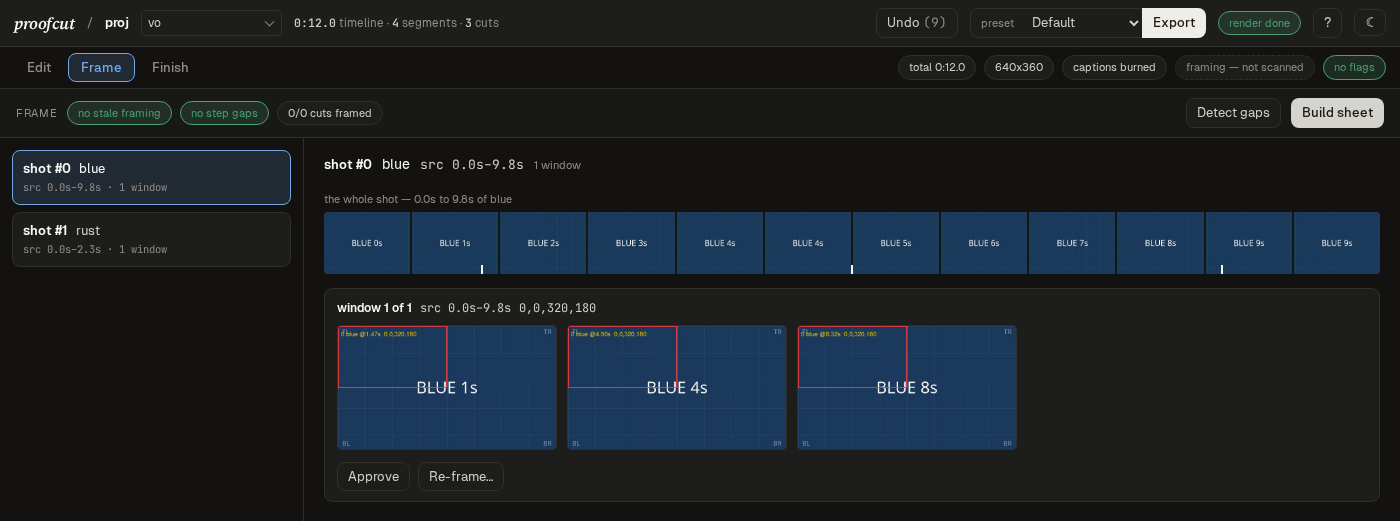
unspokenlets the render itself testify to words nobody said. - Reframing for another aspect. Per-shot crop windows, face-aware
proposals (
reframe-detect), a review sheet, and stacked splits for two speakers. Cards are redrawn at the new frame size, never stretched. - Screen recordings. Named instants (
events) that a crop, a sound or a speed change can hang off, a clip inset into the recording, and a retime for the slow parts. - Animated graphics. A web page, written by an agent or filled from a template (typing, a highlighter sweep, a letter build, chips), captured frame by frame and placed over a span of words. It animates in, holds for the span, and animates out, so a cut never breaks one. A page can show the project's own footage, exact to the frame, and saved graphics carry across projects.
- Stills and stickers. Photos and cut-outs go in once, upright, and play full frame or ride over the film: placed, sized, turned, framed as a photo card, popping or sliding in. Paste one into the agent's prompt and it is added.
- Built for agents. 132 MCP tools with typed inputs, structured returns and read/write annotations, so Claude Code, Codex or your own agent can drive it and a permission layer can tell a look from a change.
- No lock-in. The timeline is OpenTimelineIO, the manifest is JSON, and
the render is ffmpeg's and MLT's. Export a
.kdenliveor OTIO file and finish anywhere.
How people use it
Tell an agent what film you want. In Claude Code, install the plugin and describe the film: which recording is the voice, what the b-roll is, where the music goes, what it ends on. The agent imports, transcribes, cuts the retakes, hangs footage off the lines it belongs to, scores, masters and checks the render, using proofcut's tools and nothing else. It can look at the picture track as a labelled grid while it works, so it sees what it placed rather than a filename. Every MCP client runs the same server; the plugin is the one that needs no setup (§ In Claude Code).
Cut from a shell, by naming words. Every tool is also a proofcut
subcommand printing JSON, so a cut is a script you can read, re-run and
diff. --plan prints what a range says before anything changes, and undo
walks it back.
uv run proofcut -C myproject cut vo 111:114 --plan
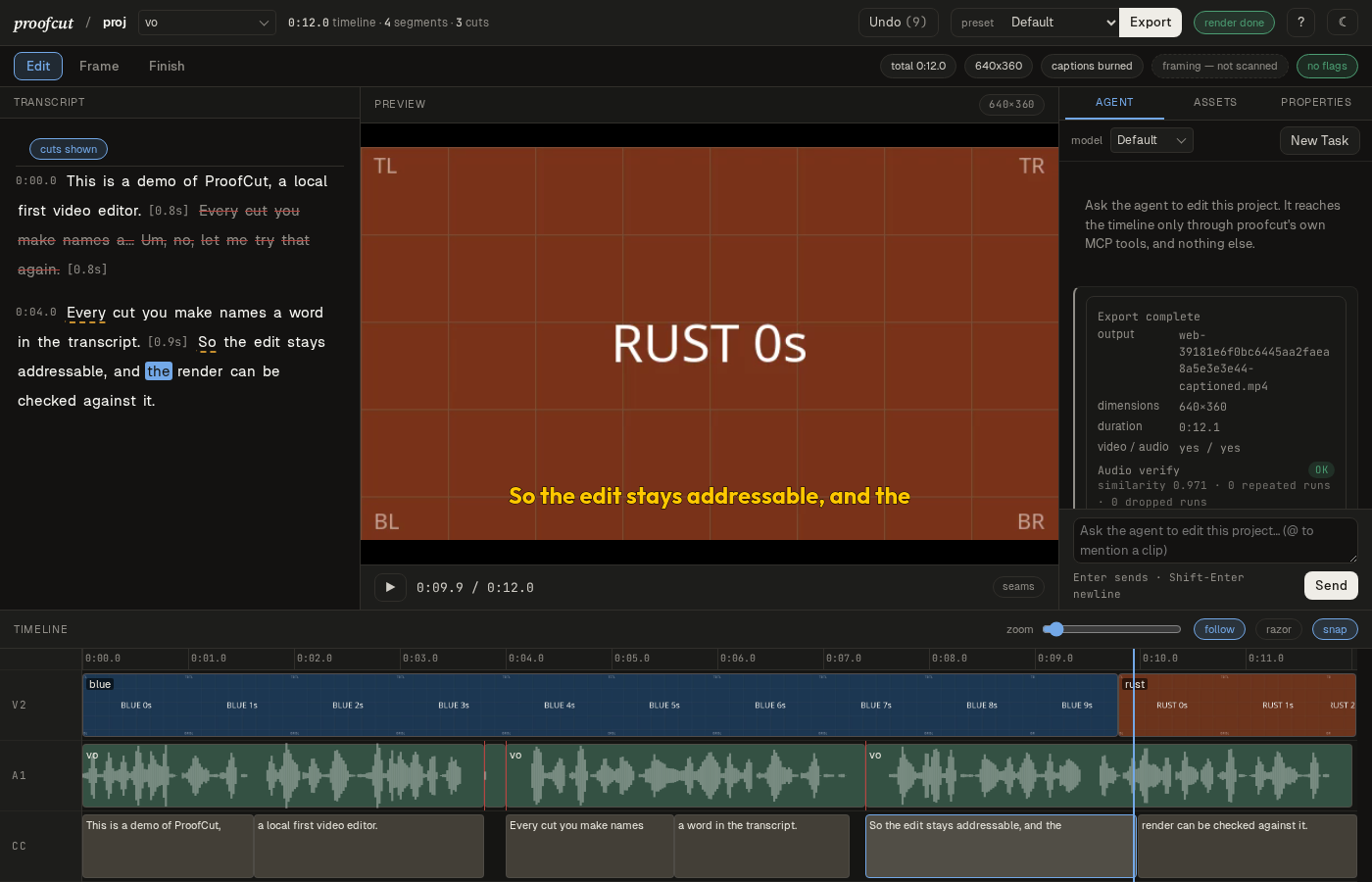
Edit by hand in the workspace. Strike words in the transcript, drag-trim and razor on the timeline, review every crop in place, and export from Finish. It plays the source through the edit, so seeing a cut costs no render, and the truth strip warns while you edit if the film would ship wrong. The agent sits in a side rail of the same window.
uv run proofcut -C myproject open
Finish elsewhere, and still prove the file. Rough-cut here, export a
.kdenlive or OpenTimelineIO file, finish in Kdenlive, Resolve or Premiere,
and bring the trim back with import-edit. Then point verify at the
delivered file, and a retake left in is caught before anyone watches.
uv run proofcut -C myproject verify final.mp4
Cut a vertical teaser from the film. reel copies a span of the finished
film into a second project at another canvas, so the film itself is never
reshaped to take one render. It names every picture the teaser will not
have and pins the ones it keeps to the frames the film showed, so the
teaser shows what the film showed. Frame mode then reviews each crop on
the source's own frames.
uv run proofcut -C myproject reel ../teaser 1:32+44 --canvas 1080x1920
Split a pile of recordings into shorts. Seed every recording as one
timeline, cut the retakes once, then split it by first and last word. Each
short becomes its own project beside the pile, holding only the recordings
it uses, and any stretch no short took is named rather than lost.
uv run proofcut -C dump seed reel1 reel2 reel3
uv run proofcut -C dump split intro=reel1:0..reel1:46 demo=reel2:0..reel3:88
The first three are walked in § Try it; the reel, the split and the round-trip are in the manual.
What it holds to
- The file is the evidence. A check reads the render, never the project.
What
verify,framesandhold checkreport is measured off the delivered file, because a project can say captions are burned, or a line is in, about a file that has neither. - Your recordings, cut, not invented. proofcut makes no footage and writes no script. It takes what you recorded to a film, in an order you or your agent chose. It is not a text-to-video generator.
- Your machine, no meter. Commercial AI editors are apps around a metered cloud service. proofcut transcribes, edits and renders locally: no account, no per-minute billing, and no cloud service of its own. The only thing that talks to a model provider is the agent you choose to run, and your footage stays where it is.
- Nothing an agent does is out of your reach. The MCP server, the command
line and the workspace call the same operations, and a test holds every
tool to a matching command printing JSON. Changes take
--planto show what they would do first, anything addressed by word echoes the words it resolved to, andundo --steps Nwalks back an agent's whole turn. - Say what is not measured. The design record is public: the plans, and a dated history of what shipped and what the evidence said, failures included. Where only a CI runner has done something, the docs say a runner did it, not a person; where a check is a model's reading of a picture, it is reported and never gates.
Try it
Nothing below installs anything until you say so, and every step prints what it would do first. § What it puts on your machine is the whole footprint and how to reverse it.
Check your machine, before cloning anything. proofcut doctor probes every
tool proofcut uses (§ Requirements has the list) and prints
the fix for anything missing. It only looks, and writes nothing. With
uv installed:
uvx proofcut doctor
That first run downloads Python 3.13 if uv has none, plus proofcut's
dependencies. That is about 230 MB, all of it inside uv's own cache, which
uv cache clean empties.
Then read what an install would do. On Linux, Windows and either kind of
Mac, proofcut setup --plan prints every piece it would fetch, its size, and
which doctor row asked for it, then stops without touching anything:
uvx proofcut setup --plan
proofcut setup — installs into /home/you/.local/share/proofcut/deps

Will install
  ffmpeg — n8.1.2 (BtbN autobuild-2026-08-31-13-27), about 126 MB
      because: ffmpeg is not on PATH. ffprobe is not on PATH.
  whisper — openai-whisper (uv tool, Python 3.12, cpu torch), about 1.9 GB
      because: whisper is not on PATH.
  auto-editor — 31.6.0, about 46 MB
      because: auto-editor is not on PATH.
  melt — Shotcut 26.8.1 (melt 7.41.0), about 155 MB
      because: melt is not on PATH.
  total: about 2.2 GB
That is a bare machine. Yours will be shorter, because setup installs nothing doctor passed, so a working ffmpeg or melt of your own is never touched. With an NVIDIA GPU the whisper row is CUDA torch and the total is about 5.8 GB.
Drop --plan to go ahead. It reprints the plan, asks once, and installs for
you alone, with no sudo or administrator rights; proofcut setup --uninstall
removes exactly what it added, and nothing you already had.
uvx proofcut setup
The demo and your own recordings run from a checkout:
git clone https://github.com/tydude001/proofcut && cd proofcut
uv sync
The two-minute demo
No footage needed. docs/DEMO.md makes a voiceover with a real retake, b-roll and a score, then walks a whole small film: cut the retake by naming its words, hang b-roll off a phrase, lay the score under the voice, render and master it, end on a card, and check the render against the timeline.
uv run python scripts/make_demo.py ~/proofcut-demo
In Claude Code
The plugin registers proofcut's MCP server, so every tool is available with no setup of your own:
/plugin marketplace add tydude001/proofcut
/plugin install proofcut@proofcut
The first start downloads about 175 MB of Python dependencies, and Claude
Code gives a server 30 seconds to connect. On a slow connection, start that
first session as MCP_TIMEOUT=300000 claude, or reconnect proofcut in /mcp
once the download has finished.
Any other MCP client runs the same server, from a checkout or with no checkout at all:
uv run --project /path/to/proofcut proofcut mcp
uvx proofcut mcp
On your own recording
uv run proofcut init myproject
uv run proofcut -C myproject import VO.wav --clip-id vo
uv run proofcut -C myproject transcribe vo                  # whisper, word-timed
uv run proofcut -C myproject seed vo                        # auto-editor strips silences
uv run proofcut -C myproject transcript vo --search "here's the thing"
uv run proofcut -C myproject cut vo 111:114 --plan          # what do those indices say?
uv run proofcut -C myproject cut vo 111:114 --pad 0.1       # inclusive word range
uv run proofcut -C myproject export final.mp4 --render      # or a .kdenlive to finish in an NLE
uv run proofcut -C myproject verify final.mp4               # did the render say what you edited?
To watch the edit instead, open the workspace:
uv run proofcut -C myproject open        # server plus an app window
uv run proofcut -C myproject web --open  # the same page in a browser tab
proofcut is 0.x software. A project from an older version is refused rather
than guessed at, and proofcut migrate brings it forward.
proofcut MCP questions
How do I add proofcut MCP to Claude Code?
Run claude mcp add proofcut -- uvx proofcut in your terminal. Add --scope user to make it available in every project.
How do I add proofcut MCP to Cursor?
Open ~/.cursor/mcp.json and add the server under mcpServers, using the Cursor config shown in the install section above.
How does proofcut verify a video edit?
It renders the project on your machine, then transcribes the resulting render and compares the words and frame counts against the original edit to find discrepancies.
Can an AI agent use proofcut to edit videos?
Yes, proofcut provides an agent surface where an agent can call tools to cut footage, add b-roll, music, and captions, and verify the final film.
Does proofcut upload my video files to the cloud?
No, it is a local-first editor where transcription, vision models, and face detection run locally on your machine.
What operating systems are supported?
It is developed on Linux, but the test suite passes on macOS and Windows via CI.