
X-Ray MCP server
Commit Nov 10, 2026Scans MCP server configs, codebases, and live servers for security issues and produces SARIF reports for CI/CD.
Also known as traceforce/mcp-xray
- Stars
- 92
- Tools
- —
- Downloads, 30 days
- —
- Latest version
- —
- Last commit
- Nov 10, 2026
- License
- Apache-2.0
What is X-Ray MCP?
X-Ray scans MCP server configs, codebases, and live servers for security issues and produces SARIF reports for CI/CD.
Summary generated from the project's README
About X-Ray MCP server
Auditing Model Context Protocol servers for security problems from a command line is what MCP X-Ray handles, whether the target is a config file, a live server or your own repository. It ships as a Go binary called mcpxray, built from source with make all after make install-dependencies, so it runs locally rather than as a hosted service. Three subcommands cover the work: config-scan checks MCP configs, including the known paths for Cursor, Claude Desktop and Windsurf via --scan-known-configs; pentest makes real tool calls against a server using an LLM-generated or custom YAML test plan; and repo-scan inspects source code.
Detection spans TLS certificate validation, unsafe localhost exposure, OAuth 2.0 configuration checks, exposed credentials and API keys, and tool description analysis for arbitrary execution, injection, authorization bypass and information disclosure. Repository scans combine dependency checks through the OSV API, secrets detection, and taint analysis driven by an optional OpenGrep engine, with CodeQL adding cross-file analysis when installed. Engine activation is by installation, and CodeQL scans carry a 600s per-language budget raised with --codeql-timeout.
Tool analysis defaults to a rule-based token analyzer that needs no API keys; the LLM analyzer accepts Anthropic, OpenAI or AWS Bedrock models through ANTHROPIC_API_KEY, OPENAI_API_KEY or standard AWS credentials. Pentests require an LLM. Every command emits SARIF, and results can be uploaded to Traceforce Atlas with --upload using TRACEFORCE_CLIENT_ID and TRACEFORCE_CLIENT_SECRET.
What you can do with it
- 1Baseline configs before pentestHave the agent run config-scan over the Cursor, Claude Desktop and Windsurf config files to spot exposed keys and unsafe endpoints before any deeper testing.
- 2Probe a server before releasePoint pentest at a staging MCP server so the agent generates and executes a test plan covering SSRF, path traversal and authorization bypass before production deployment.
- 3Trace tool input to sinksRun repo-scan on a TypeScript or Go codebase to follow MCP handler inputs into command injection, SSRF or SQL injection sinks.
- 4Deep description review with a modelSwitch config-scan to the LLM analyzer with a Claude or GPT model to get a semantic reading of risky tool descriptions.
Written from the project's README. Every use case is checked against a quote from it.
Configuration
ANTHROPIC_API_KEYAWS_ACCESS_KEY_IDAWS_REGIONAWS_SECRET_ACCESS_KEYOPENAI_API_KEY
| Name | Description | |
|---|---|---|
| ANTHROPIC_API_KEY | — | |
| AWS_ACCESS_KEY_ID | — | |
| AWS_REGION | — | |
| AWS_SECRET_ACCESS_KEY | — | |
| OPENAI_API_KEY | — |
Automated checks
Ran Nov 14, 2026Full report →Not verified yet. A server needs a score of 80, no serious finding, and enough data for us to check. How checks work · What to fix for more points

- Source repository linked and reachabletraceforce/mcp-xray is public and reachablegithub.com/traceforce/mcp-xray ↗Pass
- Package names this repository as its sourceNot checked
- Build provenance (Sigstore attestation)Not checked
- Open source license (OSI)Apache-2.0spdx.org/licenses/Apache-2.0.html ↗Pass
- Commit or release in the last yearLast commit or release 2026-11-10github.com/traceforce/mcp-xray ↗Pass
- OpenSSF ScorecardNot checked
- Package name not close to a popular packageNot checked
- No critical advisory in the package or its dependenciesNot checked
- No hidden instructions to the model0 tool descriptions and the README read; no override phrases, credential paths or hidden charactersPass
- Destructive tools are labelledNot checked
- Remote endpoint answers the MCP handshakeNot checked
README
View on GitHubMCP X-Ray
[!NOTE] Looking to secure AI agent skills? Check out Skill X-Ray, an open-source static security scanner that analyzes skill packages for malicious or risky behavior before installation, without executing them.
Overview
MCP X-Ray is a unified open-source security scanning and penetration testing solution for Model Context Protocol (MCP) servers. It generates production-ready SARIF reports for seamless integration with security tooling and CI/CD pipelines. Scan results can be optionally uploaded to Traceforce Atlas for centralized security management and tracking. Atlas has over 600 MCPs in its registry, providing a comprehensive security assessment database for the MCP ecosystem.
Installation
Prerequisites
Build from Source
# Clone the repository
git clone https://github.com/traceforce/mcp-xray
cd mcp-xray

# Install required dependencies (buf, etc.)
make install-dependencies

# Build everything (generates protobuf code and builds the binary)
# The binary will be created as `mcpxray` in the current directory
make all
Usage
Configuration Scan
Scan MCP configs for security issues; run before pentest to baseline your setup.
# Scan a specific MCP config file (uses token analyzer by default)
./mcpxray config-scan /path/to/mcp/config.json

# Scan all known MCP config paths automatically for Cursor, Claude and Windsurf.
# Known config locations (relative to home directory):
#   ~/.cursor/mcp.json (Cursor)
#   ~/Library/Application Support/Claude/claude_desktop_config.json (Claude Desktop)
#   ~/.codeium/windsurf/mcp_config.json (Windsurf)
./mcpxray config-scan --scan-known-configs

# Use LLM analyzer for more extensive and deepr analysis
./mcpxray config-scan /path/to/mcp/config.json --analyzer-type llm --llm-model claude-3-5-sonnet-20241022

# Specify custom output file
./mcpxray config-scan /path/to/mcp/config.json --output custom-report.sarif.json
Detection Capabilities:
- Connection Security: Validates TLS certificates, detects unsafe localhost/loopback exposure, and validates OAuth 2.0 configuration (PRM/ASMD)
- Secrets Detection: Scans for exposed credentials, API keys, and sensitive information
- Tool Analysis: Analyzes tool descriptions using Token Analyzer (default) or LLM Analyzer for risks including arbitrary execution, injection vulnerabilities, authorization bypass, and information disclosure
Pentest
Execute security test plans by making actual tool calls against MCP servers. LLMs are required to run the pentest. Run this before actual deployment in production.
# Run pentest with auto-generated test plan (requires LLM model)
./mcpxray pentest /path/to/mcp/config.json --llm-model claude-sonnet-4-5

# Use a custom test plan YAML file
./mcpxray pentest /path/to/mcp/config.json --test-plan /path/to/test-plan.yaml --llm-model claude-sonnet-4-5
Detection Capabilities: Code execution, SSRF, path traversal, authorization bypass, input injection, information disclosure, and DoS vulnerabilities
Repository Scan
Scan the codebase for vulnerabilities; use when you own or can change the code.
# Scan current directory
./mcpxray repo-scan

# Scan a specific repository
./mcpxray repo-scan /path/to/repository

# Specify custom output file
./mcpxray repo-scan --output custom-report.sarif.json
Detection Capabilities:
- SCA: Detects vulnerable dependencies using OSV API
- SAST: Taint analysis that traces MCP tool/handler inputs (sources) to dangerous sinks — command injection, code injection, path traversal, SSRF, and SQL injection — plus the existing unsafe-command pattern rules
- Secrets Detection: Scans for hardcoded secrets and credentials
The taint SAST uses the OpenGrep engine. Install
the pinned, SHA-verified binary with make install-opengrep (Linux x86_64/arm64, macOS
arm64/x86_64). On other platforms, install opengrep yourself and set
MCPXRAY_OPENGREP_BIN. Taint analysis activates by installation: repo-scan runs it
whenever the pinned engine is resolvable, and when the engine is absent it skips taint
and still runs SCA, secrets, and the unsafe-command rules.
For cross-file, interprocedural taint on Go and TypeScript (and Python), install the CodeQL engine. It activates by installation too, and its findings are merged with OpenGrep's:
make install-codeql                        # pinned CodeQL bundle (Linux x86_64, macOS, Windows)
./mcpxray repo-scan <repo>                 # every installed engine runs; results merged
CodeQL builds a database per language, so a scan takes noticeably longer once the bundle is
installed; that cost is the price of cross-file analysis. To drop back to the fast intra-file
pass, uninstall the engine the way you installed it: remove the bundle from make install-codeql
(it lives next to the binary), or unset MCPXRAY_CODEQL_BIN if you pointed it at one. Python and
TypeScript extract build-free (the target is never executed). Go has no build-free mode, so CodeQL
compiles the target; that step runs only with --codeql-allow-build and is otherwise skipped with
a warning; the scan never blocks on a prompt.
Each language gets a time budget covering database create plus analyze — 600s by default.
A target that exceeds it contributes nothing, so raise it for large repositories with
--codeql-timeout <seconds> (or MCPXRAY_CODEQL_TIMEOUT); the flag wins when both are set.
Exceeding the budget is reported as timed out after Ns, never as a clean zero.
Output Format
MCP X-Ray generates reports in SARIF (Static Analysis Results Interchange Format) format, which is widely supported by security tools and CI/CD platforms.
Uploading Results to Traceforce
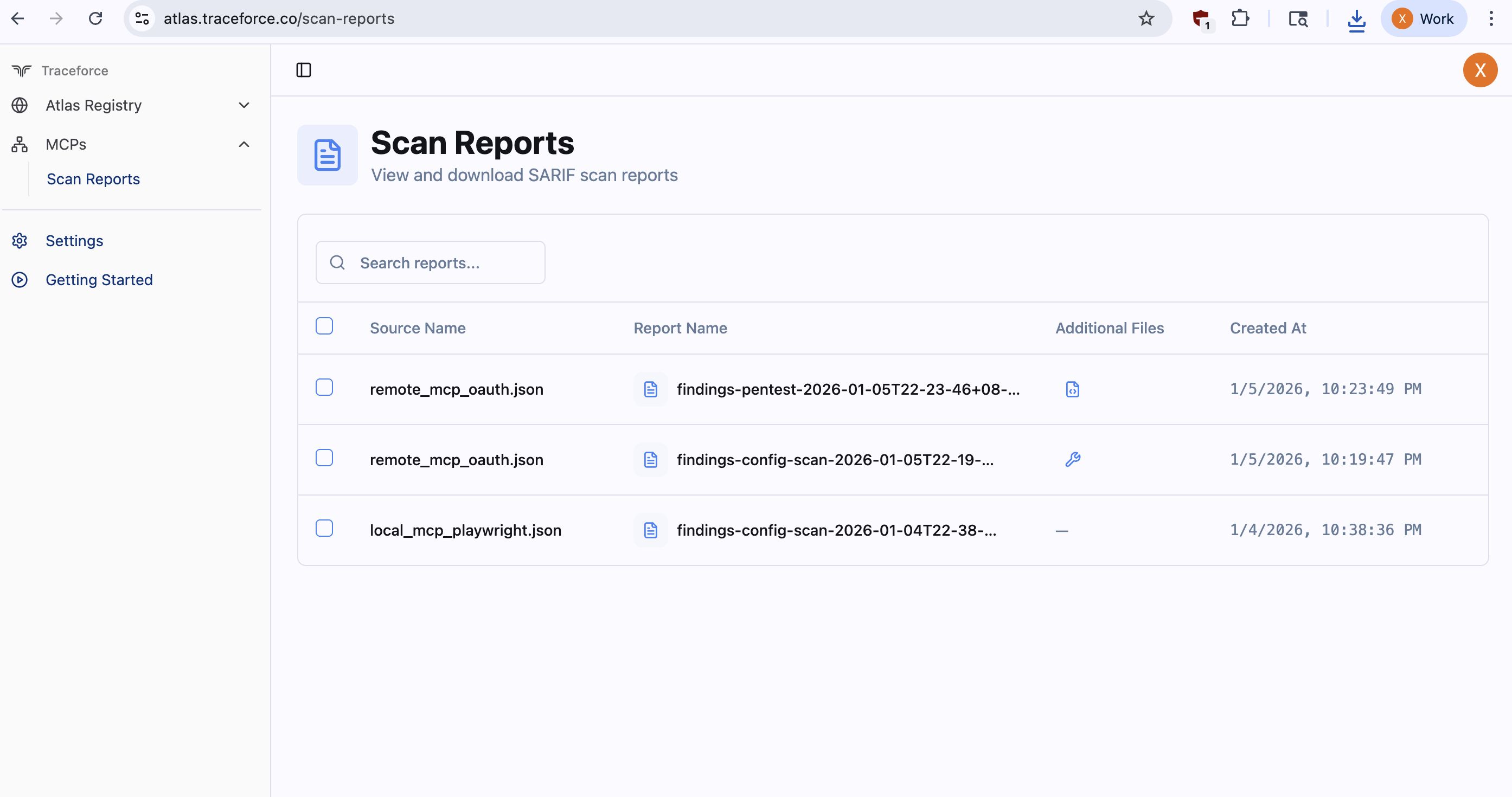
Upload scan results to Traceforce Atlas for centralized security management, reporting, and tracking over time. Add the --upload flag to any scan command. Use --clean-up to remove generated files after successful upload.
Environment variables required:
TRACEFORCE_CLIENT_IDTRACEFORCE_CLIENT_SECRET
These credentials can be downloaded from the settings page on the Atlas UI.
# Upload config scan results
./mcpxray config-scan /path/to/mcp/config.json --upload

# Upload with cleanup
./mcpxray config-scan /path/xia-add-registry-imageto/mcp/config.json --upload --clean-up

# Upload pentest results
./mcpxray pentest /path/to/mcp/config.json --llm-model claude-sonnet-4-5 --upload
Examples
Example scan outputs are available in examples/findings/.
Example MCP configuration files are available in the examples/mcp_configs/ directory.
An example MCP Server is available in the examples/mcp_server/ directory:
mcp_server.py: FastMCP server using streamable-http transportmcp.json: Configuration file for connecting to the serverREADME.md: Instructions for setting up and scanning the server
Configuration
Tool Analysis Methods
MCP X-Ray provides two methods for analyzing tool security:
Token Analyzer (Default)
The token analyzer uses rule-based pattern matching to quickly detect security issues in tool descriptions. It's fast, doesn't require API keys, and works offline. Token analyzer uses two types of rules:
- Token rules are defined in
internal/configscan/tokenanalyzer/token_rules.yaml. Each rule specifies:- Pattern matching criteria (tokens and phrases)
- Severity level (low, medium, high, critical)
- Security category and reason
- YARA rules are defined in
internal/yararules/unsafe_patterns.yar. These rules detect unsafe system command patterns.
Usage:
mcpxray config-scan --analyzer-type token
LLM Analyzer
The LLM analyzer uses large language models for deep semantic analysis of tool descriptions, providing more comprehensive security insights.
Usage:
mcpxray config-scan --analyzer-type llm --llm-model <model-name>
Pentest Configuration
By default, the pentest tool uses an LLM to automatically generate test plans based on the available tools from MCP servers. Test plans can also be customized and provided as YAML files. Test plans are YAML files containing test cases with input arguments and expected outputs.
Default behavior (LLM-generated test plan):
./mcpxray pentest /path/to/mcp/config.json --llm-model claude-sonnet-4-5
Custom test plan:
./mcpxray pentest /path/to/mcp/config.json --test-plan /path/to/test-plan.yaml --llm-model claude-sonnet-4-5
Supported Models
MCP X-Ray supports the following LLM providers for tool analysis:
Anthropic (Claude)
- Examples:
claude-sonnet-4-5 - Requires:
ANTHROPIC_API_KEYenvironment variable
OpenAI (GPT)
- Examples:
gpt-5 - Requires:
OPENAI_API_KEYenvironment variable
AWS Bedrock (Meta Llama)
- Meta Llama inference profile ARNs starting with
arn:aws:bedrock:and containingllama - Example:
arn:aws:bedrock:<region>:<account-id>:inference-profile/us.meta.llama3-2-1b-instruct-v1:0 - Requires: AWS credentials configured via AWS SDK (environment variables, IAM role, or credentials file)
Environment Variables
For LLM-based tool analysis, configure your LLM API credentials:
Anthropic
export ANTHROPIC_API_KEY=your-api-key
OpenAI
export OPENAI_API_KEY=your-api-key
Each provider requires its own specific environment variable. The tool automatically detects which provider to use based on the model name.
AWS Bedrock
For AWS Bedrock models, configure AWS credentials using one of the standard AWS SDK methods:
# Option 1: Environment variables
export AWS_ACCESS_KEY_ID=your-access-key
export AWS_SECRET_ACCESS_KEY=your-secret-key
export AWS_REGION=us-east-1

# Option 2: AWS credentials file (~/.aws/credentials)
# Option 3: IAM role (when running on EC2/ECS/Lambda)
MCP X-Ray uses AWS SDK that will automatically load credentials from the environment, credentials file, or IAM role.
Contributing
Contributions are welcome! Please ensure that:
- Code follows Go best practices
- Tests and examples are included for new features
- Documentation is updated
References
X-Ray MCP questions
What does MCP X-Ray do?
It is an open-source security scanning and penetration testing tool for MCP servers that generates SARIF reports for CI/CD integration.
What output format does the scanner produce?
Reports are written in SARIF, which is supported by many security tools and CI/CD platforms.
How do I scan MCP config files for Cursor, Claude, and Windsurf?
Run config-scan with the --scan-known-configs flag to check all known config paths automatically.
Does the pentest need an LLM?
Yes, pentest runs require an LLM; pass a model with --llm-model and set the provider's API key environment variable.
Can I upload scan results to Traceforce Atlas?
Yes, add the --upload flag along with the TRACEFORCE_CLIENT_ID and TRACEFORCE_CLIENT_SECRET environment variables.