
ESAB MCP server
Commit Nov 10, 2026Connects AI agents to engineering software like SAP2000, ETABS, Abaqus, and AutoCAD to automate modeling, analysis, and reporting.
Also known as TopNetizen/esab
- Stars
- 3
- Tools
- —
- Downloads, 30 days
- —
- Latest version
- —
- Last commit
- Nov 10, 2026
- License
- MIT
What is ESAB MCP?
ESAB connects AI agents to engineering software like SAP2000, ETABS, Abaqus, and AutoCAD to automate modeling, analysis, and reporting.
Summary generated from the project's README
About ESAB MCP server
Automating structural analysis and engineering modeling from within AI agents is what ESAB enables for engineers. By connecting clients like Claude Desktop, Cursor, or WorkBuddy to locally installed and licensed engineering software, it allows an agent to drive complex tools through a unified interface. The server supports 15 different products including SAP2000, ETABS, Abaqus, Tekla Structures, and various CAD applications like AutoCAD and Rhino.
Users can operate the server in bridge mode to aggregate existing MCP servers or in runtime mode to access a persistent Python session. This runtime mode provides tools like python_executor and use_skill, which allow the agent to inspect object models and execute scripts across different software packages. While the bridge itself is cross-platform, adapters using COM or .NET require a Windows environment. The system relies on the engineer to manage all software licensing and ensure design responsibility.
What you can do with it
- 1Automate structural modelingInstruct an AI agent to create or modify geometric models within structural analysis software.
- 2Execute persistent engineering scriptsRun complex Python code that maintains variable states across multiple engineering tasks.
- 3Bridge multiple engineering MCP serversConsolidate various specialized engineering tools into a single unified agent interface.
- 4Access product-specific API documentationHave an agent read technical documentation and skill files to understand how to use a specific software's API.
Written from the project's README. Every use case is checked against a quote from it.
Configuration
ESAB_TOKEN
Automated checks
Ran Nov 14, 2026Full report →Not verified yet. A server needs a score of 80, no serious finding, and enough data for us to check. How checks work · What to fix for more points

- Source repository linked and reachabletopnetizen/esab is public and reachablegithub.com/topnetizen/esab ↗Pass
- Package names this repository as its sourceNot checked
- Build provenance (Sigstore attestation)Not checked
- Open source license (OSI)MITspdx.org/licenses/MIT.html ↗Pass
- Commit or release in the last yearLast commit or release 2026-11-10github.com/topnetizen/esab ↗Pass
- OpenSSF ScorecardNot checked
- Package name not close to a popular packageNot checked
- No critical advisory in the package or its dependenciesNot checked
- No hidden instructions to the model0 tool descriptions and the README read; no override phrases, credential paths or hidden charactersPass
- Destructive tools are labelledNot checked
- Remote endpoint answers the MCP handshakeNot checked
README
View on GitHubESAB — Engineering Software Agent Bridge


工程结构通用智能体插件 · 简体中文
ESAB is a Model Context Protocol server. It connects Cursor, WorkBuddy, Claude Desktop, or any agent that supports MCP or can load MCP plugins/connectors, to engineering software that is already installed and licensed on the machine:
SAP2000 · ETABS · STAAD.Pro · MIDAS GEN NX · Abaqus · Tekla Structures · Rhino · AutoCAD / GstarCAD / ZWCAD / BricsCAD · SketchUp · PKPM · PKPM-CAE · SAUSG · PlantS · BIMBase · GBP
15 products, 22 bundled API skills. The agent issues the calls, the installed program runs its own solver, and design responsibility stays with the engineer.
        ┌───────────────────────────────┐
        │  MCP client (agent)           │
        └───────────────┬───────────────┘
                        │ MCP / stdio or token-guarded HTTP
        ┌───────────────▼───────────────┐
        │  ESAB                         │
        │  ├─ python_executor (persistent session)
        │  ├─ use_skill   (per-product API skills)
        │  └─ adapters    (15 connection entries)
        └───┬───────────┬───────────┬───┘
            │ COM       │ SDK       │ MCP / REST
     ┌──────▼─────┐ ┌───▼──────┐ ┌──▼──────────────────────┐
     │ SAP2000    │ │ Abaqus   │ │ PKPM · PKPM-CAE · SAUSG  │
     │ ETABS      │ │ Tekla    │ │ PlantS · BIMBase · GBP   │
     │ STAAD      │ │ SketchUp │ │ MIDAS GEN NX             │
     │ AutoCAD    │ │ Rhino    │ │                          │
     │ GstarCAD   │ │          │ │                          │
     │ ZWCAD      │ │          │ │                          │
     └────────────┘ └──────────┘ └──────────────────────────┘
ESAB ships no modelling or solving of its own and does not handle licensing. The agent models and solves by driving the installed software: ESAB forwards the calls to each program's own automation interface and checks what comes back.
Supported software
15 products, across structural analysis, FEA, detailing, drafting, plant and BIM:
| Product | Category | Interface | Adapter |
|---|---|---|---|
| SAP2000 | Structural analysis | COM (SAP2000v1.Helper) |
connect_sap2000 |
| ETABS | Structural analysis | COM (ETABSv1.Helper) |
connect_etabs |
| STAAD.Pro | Structural analysis | openstaadpy |
connect_staad |
| MIDAS GEN NX | Structural analysis | REST + MAPI-Key |
connect_midas |
| Abaqus | FEA | Official Python module over TCP | connect_abaqus |
| Tekla Structures | Detailing / BIM | .NET (pythonnet) |
connect_tekla |
| Rhino | Modelling | COM, attach-first | connect_rhino |
| AutoCAD / GstarCAD / ZWCAD / BricsCAD | Drafting | COM with product resolution | connect_cad |
| SketchUp | Modelling | Ruby bridge over TCP | connect_sketchup |
| PKPM (main / STS / JCCAD) | Chinese structural suite | Local MCP server | connect_structural_pm |
| PKPM-CAE | FEA | Local MCP server | connect_structural_cae |
| SAUSG | Nonlinear analysis | Local MCP server | connect_sausg |
| PlantS | Plant structure design | Local MCP server | connect_plants |
| BIMBase | Parametric BIM | Local MCP server | connect_bimbase |
| GBP | Green building / carbon | Local MCP server | connect_gbp |
connect_cad resolves the CAD product at runtime: it probes AutoCAD.Application first, then
GstarCAD.Application / GCAD.Application / ZWCAD.Application / BricsCAD.Application when the
generic ProgID is absent. A GstarCAD install has no AutoCAD.Application at all, so a hard-coded ProgID
returns REGDB_E_CLASSNOTREG on a machine where the software is running normally.
Install
pip install esab
Windows adapters need extra dependencies:
pip install "esab[win32]"          # comtypes, pywin32, pyautocad — COM products
pip install "esab[win32,tekla]"    # adds pythonnet for Tekla
Python 3.11+. The bridge itself is cross-platform; COM-based adapters are Windows-only by nature.
Running
ESAB has two modes.
1. Bridge mode — aggregate upstream MCP servers
Use this when the software ships its own MCP server (PKPM, CAE, SAUSG, PlantS, BIMBase, GBP), or when you have a fixture you want to test transport against.
esab stdio --config bridge.json
// bridge.json
{
  "servers": [
    {
      "id": "pkpmmcp",
      "enabled": true,
      "transport": "streamable_http",
      "url": "http://127.0.0.1:PORT/mcp",   // from the diagnostic script, never guess
      "notes": "PKPM main module"
    }
  ]
}
Register it in your client (examples/cursor.mcp.json, examples/claude_desktop.mcp.json):
{
  "mcpServers": {
    "esab": {
      "command": "esab",
      "args": ["stdio", "--config", "/path/to/bridge.json"]
    }
  }
}
Upstream tools are forwarded as <server id>__<tool name>, so two servers exposing draw_line do not
collide.
2. Runtime mode — skills + a persistent Python session
Use this for COM/SDK products. The agent gets a long-lived Python process with connect_to_server,
connect_cad, function_search and use_skill already injected, so it can connect, inspect the real
object model, and iterate without reconnecting on every call.
esab agent --skills-root ./skills
Tools exposed in this mode:
| Tool | Purpose |
|---|---|
python_executor |
Run code in a session-persistent Python process. Variables survive across calls. |
use_skill |
Read a product's SKILL.md verbatim, or run a script shipped with the skill. |
cancel_execution |
Kill the session's Python process. Does not cancel work already submitted to the target program. |
list_software_adapters |
All 15 connection entries, with evidence and live-verification status. |
HTTP mode
Streamable HTTP is available but never binds to a non-loopback address without both an explicit flag and a bearer token:
export ESAB_TOKEN=$(openssl rand -hex 32)
esab http --host 127.0.0.1 --port 47331 --token "$ESAB_TOKEN"
# remote binding also requires: --allow-remote
What a connection result contains
Every connection entry returns a ConnectResult with ok, live_verified, evidence and a diagnostic
message.
live_verified is only set after a round trip answered by the target program:
| Interface | Required round trip |
|---|---|
| COM | Read a real property back (app.Version, GetConnectionStatus()). Constructing the object does not count — pyautocad and pythonnet both construct lazily. |
| MCP | initialize and list_tools both succeed against a discovered port. |
| TCP / REST | The response body is validated; a 200 with an empty body is not a connection. |
When the target is closed, the result names the cause — REGDB_E_CLASSNOTREG,
ConnectionRefusedError: 10061, "no running pkpmmcp process" — rather than returning an empty tool
list. Tool schemas are forwarded from the upstream server unchanged, so a product that is not running
exposes no tools.
Skills
Each supported product ships a skill: SKILL.md plus reference material and helper scripts, in plain
Markdown and Python. A skill documents the object model, worked examples, and the error codes that
occur in practice.
The larger products ship a searchable API index (data/skills/*/references/*.db) built from the
vendor's own API documentation: Tekla, Abaqus (2024/2025/2026), MIDAS, SAP2000, ETABS, Rhino, SketchUp.
These indexes account for ~95 MB of the repository; they are committed rather than downloaded so a
clone works offline.
Included skills: SAP2000, ETABS, STAAD.Pro, MIDAS, Abaqus, Tekla, Rhino, SketchUp, AutoCAD, PKPM, PKPM-CAE, SAUSG (SSG), PlantS, BIMBase, GBP, plus Word, Excel, PPT and PDF authoring.
Audit tooling
The audit tools used to validate the adapters ship with the repository and can be re-run on any machine:
python tools/adapter_audit.py        # calls all 15 connection entries, 45 s timeout each
python tools/false_positive_probe.py # four experiments that try to make the bridge report a false success
tools/adapter_audit.json is the raw record from the reference machine: 14 entries returned ok=False
with a specific cause, and 1 (CAD) connected for real.
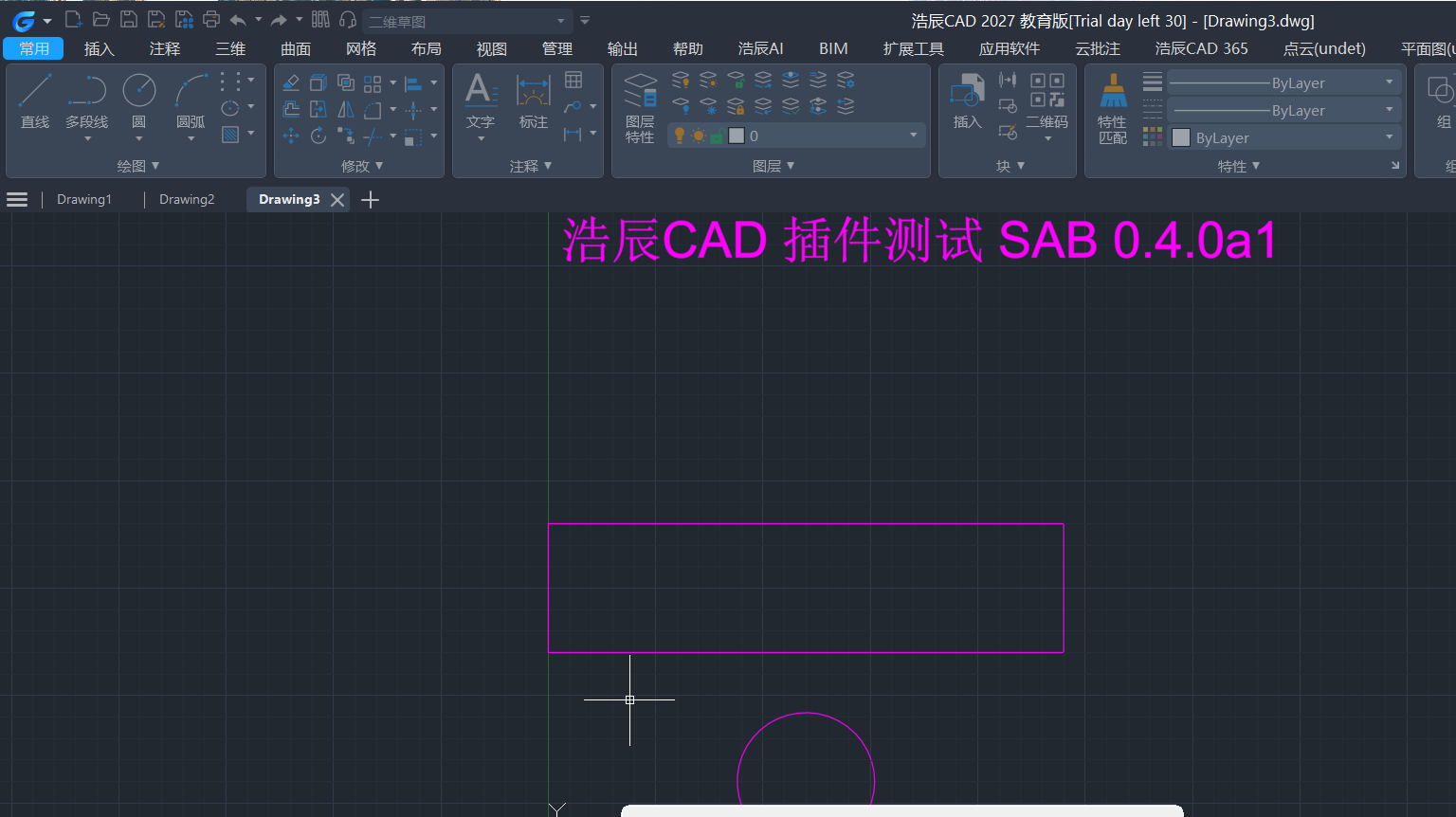
docs/cad-integration-report.md contains the full record — an end-to-end GstarCAD 2027 session (draw line / circle / polyline / text / dimension, read the geometry back, reuse the COM session), the six preconditions that must all hold for a CAD connection, and the eight defects found and fixed along the way, three of which reported success without one:
connect_cad()returnedok=Truebecause pyautocad constructs lazily and never touched COM;connect_official()treated a returned error string as success;- the PlantS wrapper reported
connected: Truefrom a process name alone, with no MCP handshake.
Known limitations
- Licensing and login are yours to handle. ESAB attaches to a running, licensed session. It never automates activation and never works around a license check.
- SAP2000 / ETABS, STAAD and MIDAS criteria are unverified on the reference machine. Those products
were not installed during the audit, so their connect criteria are graded "requires on-site
re-check"; the report documents the exact steps.
live_verifiedfrom those three is unproven. - Windows-only adapters. COM and .NET paths do not exist on macOS or Linux. Only the MCP/REST adapters and the bridge itself run there.
- No code compliance checking. Structural results and code conformance remain the responsibility of a qualified engineer.
- YJK (盈建科) and 3D3S are not covered. There is no adapter and no skill for them, so a request involving either returns a diagnostic. Adding YJK requires a connection entry that can verify a live session; the vendor's automation interface is the missing piece.
PKPM-Link/SKILL.mdreferencesRunPKPMAnalyse, which does not exist inpkpm_calc.py. That skill line raisesImportError.
Development
git clone https://github.com/TopNetizen/esab && cd esab
python -m venv .venv && . .venv/bin/activate
pip install -e ".[test]"
pytest tests -q          # 23 passed
Layout:
src/esab/            bridge, runtime, adapters, skill loader
src/esab_shim/       pyautocad-compatible shims and software_link_kit wrappers
src/esab/data/       skills and API indexes (shipped as package data)
tests/               unit and end-to-end tests
tools/               adapter audit and controlled false-positive experiments
docs/                integration report
scripts/             Windows install / acceptance PowerShell scripts
CONTRIBUTING.md lists what a new adapter has to do before it is merged.
License
MIT. See LICENSE.
ESAB is an independent project. It is not affiliated with, endorsed by, or supported by Autodesk, GstarCAD, ZWCAD, BricsCAD, CSI, Bentley, Dassault Systèmes, Trimble, McNeel, MIDAS, PKPM or any other vendor named above. Product names are trademarks of their respective owners and are used only to describe interoperability.
ESAB MCP questions
Does ESAB handle software licensing?
No, ESAB does not handle licensing or activation; it connects to software that is already installed and licensed on your machine.
Can I use ESAB on macOS or Linux?
The bridge itself is cross-platform, but COM and .NET based adapters are only available on Windows.
Does ESAB perform code compliance checking?
No, the responsibility for structural results and code conformance remains with the qualified engineer.