
Simple Balance MCP server
Commit Nov 13, 2026Allows an AI agent to perform bookkeeping, file transactions, and manage budgets through a double-entry ledger system.
Also known as thtmnisamnstr/simple-balance, simple-balance
- Stars
- 0
- Tools
- —
- Downloads, 30 days
- —
- Latest version
- 1.0.2
- Last commit
- Nov 13, 2026
- License
- AGPL-3.0
What is Simple Balance MCP?
Simple Balance allows an AI agent to perform bookkeeping, file transactions, and manage budgets through a double-entry ledger system.
Summary generated from the project's README
About Simple Balance MCP server
Managing personal finances and bookkeeping through an AI agent is what Simple Balance enables. This system uses a double-entry ledger to track accounts like savings, credit cards, investments, and crypto wallets across different currencies. Users can host their own instance using Docker and Node, or use the hosted version, providing a private way to handle sensitive financial data without direct bank connections. Instead, users import transaction data via CSV files.
Developers can connect AI clients to the MCP endpoint using OAuth for secure access. You can control exactly what an agent is allowed to do by assigning specific scopes: ledger:read for viewing data, ledger:stage for proposing entries for your review, or ledger:write for committing transactions directly. This setup allows an agent to perform tasks like filing transactions, managing budgets, and cleaning up entries while maintaining a full audit log of every action taken.
What you can do with it
- 1Automated transaction filingAsk an AI agent to process and record new financial entries into your ledger.
- 2Reviewing proposed budget changesHave an agent prepare transaction entries that you must manually approve before they are finalized.
- 3Importing bank statementsUse the system to map columns and categorize transactions from a downloaded bank CSV.
- 4Auditing financial historyTrace any specific balance back to the individual postings that created it.
Written from the project's README. Every use case is checked against a quote from it.
How to install Simple Balance MCP
Formats verified 10 Nov 2026Add to CursorAdd to GooseInstall Simple Balance MCP in Claude Code
$ claude mcp add --transport http simple-balance https://app.smpl.money/mcpInstall Simple Balance MCP in Cursor
~/.cursor/mcp.json
{
  "mcpServers": {
    "simple-balance": {
      "url": "https://app.smpl.money/mcp"
    }
  }
}Install Simple Balance MCP in VS Code
.vscode/mcp.json
{
  "servers": {
    "simple-balance": {
      "type": "http",
      "url": "https://app.smpl.money/mcp"
    }
  }
}Install Simple Balance MCP in VS Code CLI
$ code --add-mcp '{"name":"simple-balance","type":"http","url":"https://app.smpl.money/mcp"}'Install Simple Balance MCP in Codex
$ codex mcp add simple-balance --url https://app.smpl.money/mcpInstall Simple Balance MCP in Codex config.toml
~/.codex/config.toml
[mcp_servers.simple-balance]
url = "https://app.smpl.money/mcp"
Install Simple Balance MCP in Gemini CLI
$ gemini mcp add -s user --transport http simple-balance https://app.smpl.money/mcpInstall Simple Balance MCP in Gemini settings.json
~/.gemini/settings.json
{
  "mcpServers": {
    "simple-balance": {
      "url": "https://app.smpl.money/mcp",
      "type": "http"
    }
  }
}Configuration
TEST_DATABASE_URL
Automated checks
Ran Nov 14, 2026Full report →Not verified yet. A server needs a score of 80, no serious finding, and enough data for us to check. How checks work · What to fix for more points

- Source repository linked and reachablethtmnisamnstr/simple-balance is public and reachablegithub.com/thtmnisamnstr/simple-balance ↗Pass
- Package names this repository as its sourceNot checked
- Build provenance (Sigstore attestation)Not checked
- Open source license (OSI)AGPL-3.0spdx.org/licenses/AGPL-3.0.html ↗Pass
- Commit or release in the last yearLast commit or release 2026-11-13github.com/thtmnisamnstr/simple-balance ↗Pass
- OpenSSF ScorecardNot checked
- Package name not close to a popular packageNot checked
- No critical advisory in the package or its dependenciesNot checked
- No hidden instructions to the model0 tool descriptions and the README read; no override phrases, credential paths or hidden charactersPass
- Destructive tools are labelledNot checked
- Remote endpoint answers the MCP handshakeHTTPS endpoint answered 401 (sign-in required)Pass
README
View on GitHubSimple Balance
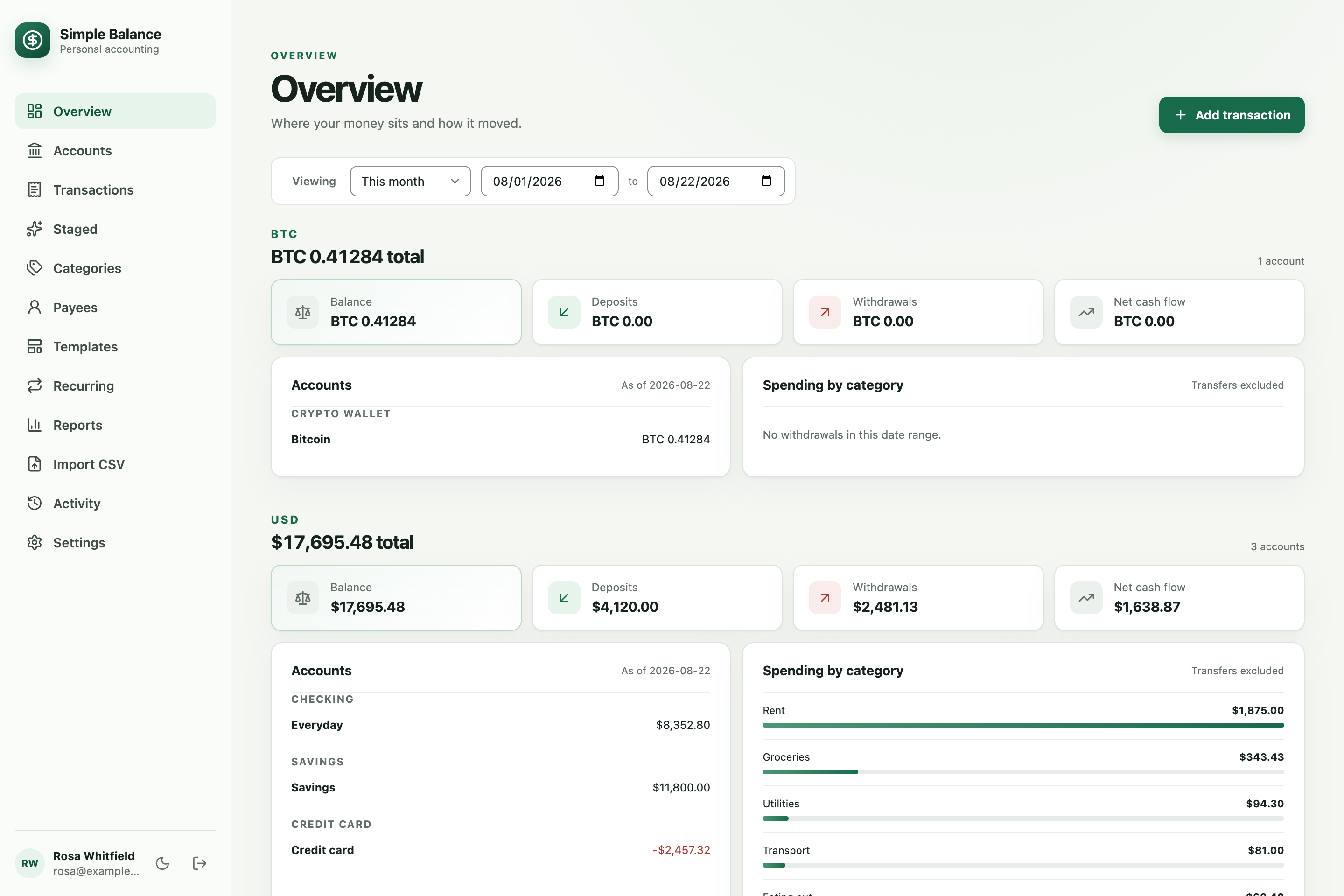
Simple Balance is a free budget app and spending tracker. Every account is on one page, and any figure you doubt opens into the entries that produced it. Use it in your browser at app.smpl.money, or run your own copy. Its website and docs are at smpl.money. There is no bank connection today: you download a CSV from your bank and import it.
- Numbers you can follow back. Every account has a register: each posting with the balance before and after it, so a total that looks wrong has a row you can point at. Corrections are appended rather than written over the top, so what a figure used to say survives the fix.
- Every account, one page. Checking, savings, credit cards, cash, loans, investments and crypto wallets, each in its own currency, with balances as of any date you ask for.
- Statements, without retyping them. Point it at a bank CSV and it works out the format, maps the columns, and sorts the categories and payees. It flags anything that looks like a transaction you already have, and nothing counts until you say so. Nothing arrives from your bank on its own — there is no connection to one, and the import is a file you downloaded.
- Nothing to remember. Rent, a salary, a subscription: set it up once and it proposes itself when it is due, with an email if you want one.
- Reports that add up. Net worth, income against expense, spending by category, cash flow, a balance sheet and a trial balance — over any range, and never added across currencies, because there are no exchange rates here to add them with.
Underneath it is real double-entry bookkeeping, which is what lets every figure on every page trace back to the entries that made it. It also ships a full MCP server, so an AI agent can do the filing and the cleanup as far as you allowed it to; one allowed only to propose leaves every entry for you to check. That is a capability rather than a reason to choose this — the market caught up during 0.2.0, and the roadmap says so in the same words it used before it was true.
Run it yourself and there is no plan, no limit and no advertising, because there is nobody to bill you. Where an operator configures billing, a free plan keeps three accounts in use and carries ads, and the paid plan lifts both; monetization is the whole of it.
Everything else it does
- Deposits, withdrawals, and transfers, including conversions between currencies that keep the sent and received amounts apart
- One receipt split across several categories, each attributed on its own
- A duplicate opened beside the entry it resembles, so you can fix either side and drop the spare
- Templates for the transactions you enter over and over, with a reminder on any of them
- Change or delete up to 10,000 rows at once, from any view, after seeing what it will touch
- A register for any account: every posting with the balance before and after it, for when a figure is wrong and you need the row it went wrong on
- A budget per category, per group, or per period — standing or set for one month, compared against what was actually spent, including what a refund gave back. It carries what a period did not spend into the next one if you want it to, saves up for something with a date, works its own amount out from what you usually spend or what came in, says what a short month funds first, and projects the balances forward from what is already scheduled
- Categories and payees that match case-insensitively, flag near-duplicates, and merge
- An audit log of everything you or an agent did
- Email and password, Google, or both, and any number of people on one deployment, each with their own separate books
How to use it is the step-by-step manual, budgeting included; the guide explains the decisions behind it.
Run it locally
You need Node 22.22.2 or newer, npm 11 or newer, Docker, and nothing else.
npm install
docker compose -f compose.dev.yml up -d
npm run dev
In a second terminal:
npm run dev:client
Open http://localhost:5173. Development needs no environment variables and no configuration. The first visit asks you to create an account; after that it is the email and password you chose. Both servers stay on loopback.
Code reloads as you edit it. After changing dependencies, run npm install and
restart both commands. docker compose -f compose.dev.yml stop stops the
database and keeps its data; docker compose -f compose.dev.yml down -v removes
the containers and deletes it.
Run the tests
npm run verify
That is typecheck, lint, the formatter's check, unit tests, and both builds. The integration suite needs
PostgreSQL, which compose.dev.yml already gave you along with a separate
database for it:
TEST_DATABASE_URL='postgresql://postgres:postgres@127.0.0.1:5432/simple_balance_test' \
  npm run test:integration
Host it
docker pull ghcr.io/thtmnisamnstr/simple-balance:latest
latest follows the newest final release. A prerelease tag publishes only its own
version. To build it yourself instead, docker build -t simple-balance . from a
clone.
Everything is configured through environment variables. Copy the example and fill it in:
install -m 0600 .env.example .env
install -m 0600 rather than cp, because the file will hold the database
password and the signing secret, and a copy would be readable by every user on
the machine. DATABASE_URL and AUTH_SECRET are required, and APP_BASE_URL
must be your public HTTPS origin in production. Point DATABASE_URL at a
PostgreSQL 15 or newer server and Simple Balance handles the rest on startup: it
creates the database if the server does not have it, builds the schema if the
database is empty, and does nothing if it is already current. Generate the
secret with openssl rand -base64 32 and keep it — changing it signs everyone
out.
docker run -d --name simple-balance --restart unless-stopped \
  --read-only --tmpfs /tmp:rw,noexec,nosuid,size=16m \
  --cap-drop=ALL --security-opt=no-new-privileges \
  --stop-timeout 30 \
  --env-file .env -p 127.0.0.1:3000:3000 \
  ghcr.io/thtmnisamnstr/simple-balance:latest
The container runs as a non-root user, never writes to its own filesystem, drops every Linux capability and cannot gain a privilege it did not start with. A Node server binding port 3000 as a non-root user needs none of them, so those two flags cost nothing and close the two routes a container escape usually takes. Everything it keeps is in PostgreSQL. Leave it bound to loopback and put a reverse proxy or a private network in front, rather than publishing the port.
Watch it come up with docker logs -f simple-balance, and check
curl -f http://127.0.0.1:3000/health/ready. Readiness answers once the
database is reachable. Nothing is listening until the migrations have finished,
so a container answering at all is one that got through them.
Claim the instance. The logs print a one-time setup code on first run. Enter
it on the account-creation screen. Set SETUP_TOKEN yourself if you would rather
choose it. Either way the code stops working once an account exists, so nobody can
claim an instance just because they found it.
Give it a mail server. With SMTP_HOST and MAIL_FROM, people can reset a
forgotten password, a new account has to confirm its address, and the scheduled
reminders can be delivered. Without one, none of that happens and a lost password
means editing the database, so put it in a password manager. Whether those
messages arrive also depends on SPF, DKIM, DMARC and a PTR record in your DNS;
"Getting mail delivered" in deployment says what each one
is and who sets it.
Decide who else may register, with ALLOWED_EMAILS. Leave it unset and nobody
can, which keeps the deployment yours alone. List addresses (you@example.com),
whole domains (example.com), or * for anybody, and those people get accounts of
their own. They cannot see yours and you cannot see theirs.
Watch it, if you want to. METRICS_ENABLED=true makes it answer
GET /metrics in Prometheus' format: requests, agent tool calls, ledger writes,
the connection pool, and the schedule's own ticks and mail. It is off until you
ask, no label names a person or an amount, and METRICS_TOKEN puts a bearer
token in front of it where the port is reachable by anything you do not control.
The deployment profiles in deploy/ can also run a collector that reads it,
and the machines it runs on, and sends both to New Relic or any backend that
takes OTLP or Prometheus remote write — which backend is two settings, and
"Metrics" in deployment has them.
To move to a newer image, pull it, stop and remove the container, and start it again with the same command. Your database is untouched, and migrations run at startup. See upgrades.
Every setting, reverse proxies, TLS to the database, mail providers, backups, and running the pieces as separate containers are all in deployment.
Sign-in modes
AUTH_MODE |
What it does | Also needs |
|---|---|---|
local (default) |
Email and password | Nothing. Add ALLOWED_EMAILS to let others register |
google |
Google accounts ALLOWED_EMAILS admits |
GOOGLE_CLIENT_ID, GOOGLE_CLIENT_SECRET, ALLOWED_EMAILS |
both |
Either, and both on one account | The same three |
With Google enabled, register the callback as
https://YOUR-DOMAIN/api/auth/callback/google.
Connect an agent
The MCP endpoint is /mcp, protected by OAuth. Point a client at your origin and
it discovers the rest. The client asks for its scopes and the consent screen
lists them before you allow it: ledger:read lets an agent look, ledger:stage
lets it queue work for your review, and ledger:write lets it commit. Allow
ledger:write only if you want it to commit, and deny a client that asks for
more than you want it to have. Settings lists what you have approved, and
revoking an agent there cuts it off on its next call rather than whenever its
token happens to expire.
An agent can do everything you can: the whole ledger, imports, templates,
recurrences, mass edits, and your own settings. Three things stay yours alone:
deleting the account, setting a password, and, where the deployment sells
plans, starting, changing or canceling one. The first two are account management
rather than bookkeeping. The third spends your money, which is a different kind
of authority from writing a transaction and one no scope on a token handed to a
program stands in for. An agent gets the plan, its limit and how much of it is
used from whoami, and nothing that buys. It cannot get around your sign-in,
the scopes you allowed, or the duplicate checks, and an agent without
ledger:write cannot commit anything. See MCP.
Security
One deployment holds many people and none of them can see another's books: every read and write is scoped to whoever is signed in, and a record that is not yours comes back as not found rather than as forbidden. Put TLS in front of it; deployment says how.
If you find a hole, SECURITY.md says how to report it privately, and asks you not to open a public issue for it.
Contributing
Whether a change is taken is the owner's call, and there is no promise here that one will be. What this section can tell you is what a change has to look like before that question is worth asking.
AGENTS.md holds the invariants — what the books guarantee, and
what breaking one costs. docs/standards/ holds how
the interfaces behave and docs/standards/code/
how the source is written; read the one for the surface you are touching. Every
rule in both says how it is checked, so a rule you have not broken is one you
can prove you have not.
Six procedures that repeat are written down in .claude/skills/,
each holding the order its steps go in and the traps in them. They cite the
guides rather than restating them, so the rules still live in one place.
Before a pull request merges
Run release-prep. It is the one step, because it runs the others itself,
in an order that matters — a later phase can change what an earlier one
checked. It reads what the branch changed and what that change reaches, not
the whole product, and reads each part once:
- It audits the branch for anything that would break an upgrade, and fixes a break that redesigns something before going further.
guides-updatebrings the guides,AGENTS.md,CHANGELOG.mdanddocs/upgrades.mdtrue for the branch, so the sweep after it holds the code to rules that describe it.guides-complysweeps what the branch changed and reached against those guides, hunting for defects in the same reading, and fixes each finding it can reproduce, with a test, recording the ones it cannot.design-reviewphotographs the pages the branch changed and compares them with every other page indocs/product/screenshots/. It is skipped, and the report says so, only when the branch changed no page.- It removes dead code, then
product-kitrebuilds the screenshots and feature list indocs/product/that the marketing site reads. - The guides' measured numbers are recounted, all three test tiers run, and it commits, pushes, and waits for every check to go green.
It never merges and never cuts a version. Merge the pull request yourself once every check is green.
Each can also be run alone, and alone guides-comply and design-review cover
the whole product: run them so every few releases, or after changing something
every page or service uses. None needs to be run beside release-prep.
cut-release comes after the merge, from main, and only when you decide to
ship a version and name it. It settles open Dependabot pull requests, sets the
version everywhere, dates the changelog, freezes the release's migrations, then
tags and publishes.
npm run verify is typecheck, lint, format, tests and build, and it has to pass.
Add a test for the behavior you changed: this repository tests heavily and a
change with no test is a change nobody can keep. If you touched anything with a
database behind it, run npm run test:integration against a throwaway
PostgreSQL, and if you touched the browser app, npm run test:browser.
Do not cut a version. Releases are the owner's.
Not built yet
Bank sync, account sharing, attachments, and reconciliation. What is planned, in what order, and the evidence behind each is in the roadmap, which also says what is deliberately not planned and why, market prices among it. Tags are neither built nor planned.
More
- How to use it: step-by-step instructions, from the first account to a full budget
- Guide: every feature, and the decisions behind the ones that are not obvious
- Architecture: how it fits together, and what the ledger guarantees
- Deployment: every setting, reverse proxies, backups
- Upgrades: moving between versions
- MCP: scopes, tools, and what an agent can do
- Roadmap: what is planned, in order, and the evidence for it
- Changelog
- Security: reporting a vulnerability
- Agent and contributor guide: the rules this codebase holds itself to
- Ralph build loop
Built with
One TypeScript package: React and Vite in the browser, Hono on Node for the API, auth, MCP, and static files, Better Auth for local and Google sign-in and for MCP OAuth, Drizzle for PostgreSQL and its migrations, and Zod contracts shared by both sides of every boundary.
License
GNU Affero General Public License v3.0 only (AGPL-3.0-only).
Run it, change it, and share it freely. What the Affero clause adds to the GPL is section 13: offer a modified version to people over a network, and those people are entitled to that version's source. Self-hosting it for yourself, your household, or your company changes nothing about how you use it.
Every version up to and including 0.1.3 was published under the LGPL and stays available under it. This applies from 0.1.4 onward.
Simple Balance MCP questions
How do I add Simple Balance MCP to Claude Code?
Run claude mcp add --transport http simple-balance https://app.smpl.money/mcp in your terminal. Add --scope user to make it available in every project.
How do I add Simple Balance MCP to Cursor?
Open ~/.cursor/mcp.json and add the server under mcpServers, using the Cursor config shown in the install section above.
Can an AI agent commit transactions automatically?
Yes, if you grant the agent the 'ledger:write' scope, it can commit entries; otherwise, it can only propose them for your review.
Does this app connect directly to my bank?
No, there is no direct bank connection; you must download a CSV from your bank and import it into the application.
How is the data stored?
All data is kept in a PostgreSQL database.
What are the available MCP scopes?
The available scopes are ledger:read for viewing, ledger:stage for queuing work for review, and ledger:write for committing entries.