
Deskdrop MCP server
Commit Nov 15, 2026An Android keyboard that integrates local and cloud AI to rewrite text, process clipboard content, and control smart home devices via MCP.
Also known as SvReenen/Deskdrop
- Stars
- 61
- Tools
- —
- Downloads, 30 days
- —
- Latest version
- —
- Last commit
- Nov 15, 2026
- License
- GPL-3.0
What is Deskdrop MCP?
Deskdrop is an Android keyboard that integrates local and cloud AI to rewrite text, process clipboard content, and control smart home devices via MCP.
Summary generated from the project's README
About Deskdrop MCP server
Rewriting text, processing clipboard content, and managing smart home devices directly from an Android keyboard is what Deskdrop enables. This keyboard, built on HeliBoard, allows users to integrate artificial intelligence into any text field through toolbar buttons, voice commands, or inline syntax. It is designed for privacy-conscious users who want to choose their own backend, supporting local setups like Ollama, LM Studio, or vLLM, as well as cloud providers such as OpenAI, Anthropic, and Gemini.
Developers and power users can connect the keyboard to custom tool servers via MCP, including Home Assistant for smart home control. The system includes 17 built-in tools for tasks like weather updates, calendar management, and web searches. For those requiring offline capabilities, it supports on-device ONNX inference. Security is prioritized through AES-256-GCM encryption for API keys and strict opt-in requirements for sensitive device actions.
What you can do with it
- 1Refine text toneUse the AI Toner feature to rewrite selected text with a single tap.
- 2Automate smart home tasksControl your connected home devices using MCP support for Home Assistant.
- 3Manage schedules via chatCreate or update calendar appointments using natural language commands.
- 4Process clipboard dataSend copied text to an AI model to summarize or transform it.
Written from the project's README. Every use case is checked against a quote from it.
Automated checks
Ran Nov 14, 2026Full report →Not verified yet. A server needs a score of 80, no serious finding, and enough data for us to check. How checks work · What to fix for more points

- Source repository linked and reachablesvreenen/deskdrop is public and reachablegithub.com/svreenen/deskdrop ↗Pass
- Package names this repository as its sourceNot checked
- Build provenance (Sigstore attestation)Not checked
- Open source license (OSI)GPL-3.0spdx.org/licenses/GPL-3.0.html ↗Pass
- Commit or release in the last yearLast commit or release 2026-11-13github.com/svreenen/deskdrop ↗Pass
- OpenSSF ScorecardNot checked
- Package name not close to a popular packageNot checked
- No critical advisory in the package or its dependenciesNot checked
- No hidden instructions to the model0 tool descriptions and the README read; no override phrases, credential paths or hidden charactersPass
- Destructive tools are labelledNot checked
- Remote endpoint answers the MCP handshakeNot checked
README
View on GitHubDeskdrop


Deskdrop is an Android keyboard with AI built in. Use Ollama, any OpenAI-compatible server, or a cloud API key. Built on HeliBoard.
Demo
AI Toner - Rewrite selected text with one tap. All buttons are fully configurable in settings.
https://github.com/user-attachments/assets/635d2ac9-3637-4e7c-8e4c-513b09e0f57f
Clipboard AI - Process clipboard content through AI
https://github.com/user-attachments/assets/3f13accb-59d9-4568-9e50-cf3405665bd4
Inline // syntax - Type instructions directly after your text
https://github.com/user-attachments/assets/9aed41b8-5524-41ef-9fa7-33618d7fcd84
Conversation + Tools - Ask about the weather, it calls the tool automatically
https://github.com/user-attachments/assets/0aabddb6-1162-40e5-a43c-ae75edd0239c
Calendar - Create appointments through natural language
https://github.com/user-attachments/assets/1827cb16-48af-412b-a9a3-d87413f054cb
MCP (Home Assistant) - Control your smart home from your keyboard
https://github.com/user-attachments/assets/5d807877-a171-4389-a132-8fe65f53ee20
Why Deskdrop
- Your backend, your choice. Ollama, LM Studio, vLLM, llama.cpp, KoboldCpp, or a cloud API key (Groq, Gemini, OpenRouter, Anthropic, OpenAI).
- Built for self-hosted setups. MCP support for Home Assistant and custom tool servers. Primary plus LAN/Tailscale fallback URL.
- Built on HeliBoard. Themes, layouts, dictionaries, clipboard history, glide typing, one-handed mode, split keyboard. All preserved.
- No telemetry. No analytics. Password fields blocked. API keys encrypted (AES-256-GCM). Clipboard and device actions opt-in.
- Use it where you already type. Toolbar buttons, inline
//commands, voice, home-screen widget, Quick Settings tile, share sheet, Android text selection menu.
Features
AI in every text field
- Rewrite, translate, summarize, or adjust tone without leaving the app you're in
- Inline
//commands with chaining (e.g.//formal,//grammar,//shorten) - Configurable toolbar shortcuts with per-slot model and instruction
- Clipboard context: copy a message, type your reply, AI uses the context automatically
- Preview panel: see results before applying, with retry, copy, and dismiss
- Undo: tap again after AI processing to restore original text
Your backend, your choice
- Ollama, LM Studio, vLLM, llama.cpp, KoboldCpp, or any OpenAI-compatible server
- Cloud providers optional (Groq, Gemini, OpenRouter, Anthropic, OpenAI)
- Primary + fallback URL for LAN/Tailscale setups
- Cloud fallback: when your local server goes down, shortcuts automatically switch to a cloud model and revert when it's back
- On-device ONNX inference (T5) for fully offline use
Voice
- Google Speech Recognition or self-hosted Whisper
- Custom voice modes and prompts
- Supports
{voice_input}and{clipboard}placeholders
Conversation
- Full multi-turn chat interface
- Model picker per conversation
- Reminder system with notifications that reopen the exact conversation
Tools and automation
- 17 built-in AI tools (weather, calendar, navigation, SMS, contacts, and more)
- MCP support for Home Assistant and custom tool servers
- Streamable HTTP and Legacy SSE transport
- Per-server bearer token authentication
| Tool | What it does |
|---|---|
calculator |
Evaluate arithmetic expressions |
get_datetime |
Current date, time, timezone |
unit_convert |
Convert between units (length, mass, temperature, etc.) |
battery_info |
Battery percentage and charging state |
device_info |
Phone model, Android version, free storage |
read_clipboard |
Read clipboard contents |
fetch_url |
Fetch and read a web page |
web_search |
Search via Brave/Tavily |
weather |
Current weather via wttr.in |
set_timer |
Start a countdown timer |
open_app |
Launch an app by name |
set_reminder |
Schedule a notification reminder |
calendar |
Read, add, update, delete calendar events |
navigate |
Open turn-by-turn navigation |
phone_call |
Open dialer with number |
send_sms |
Open SMS app with message |
contact_lookup |
Search contacts by name |
Home screen widget
- Quick access bar with Voice, Chat, and Execute buttons
Getting started
Install the APK, open Deskdrop, and the setup wizard walks you through everything.
Quick Start
- Install the APK and open Deskdrop
- Tap Try it now
- Choose Quick Start
- Turn on Deskdrop in your keyboard settings
- Switch to Deskdrop as your active keyboard
- Get a free API key from Groq and paste it (watch guide)
- Done. You can start using AI right away
Advanced Setup
Choose Advanced Setup if you want to connect your own models or use a specific cloud provider.
Cloud path (Groq / Gemini)
- Choose Cloud on the setup screen
- Get a free API key from Groq or Gemini (watch guide)
- Paste your key and continue
- The AI demo lets you test your connection before finishing
Local path (Ollama)
-
Make sure Ollama is running on your computer
-
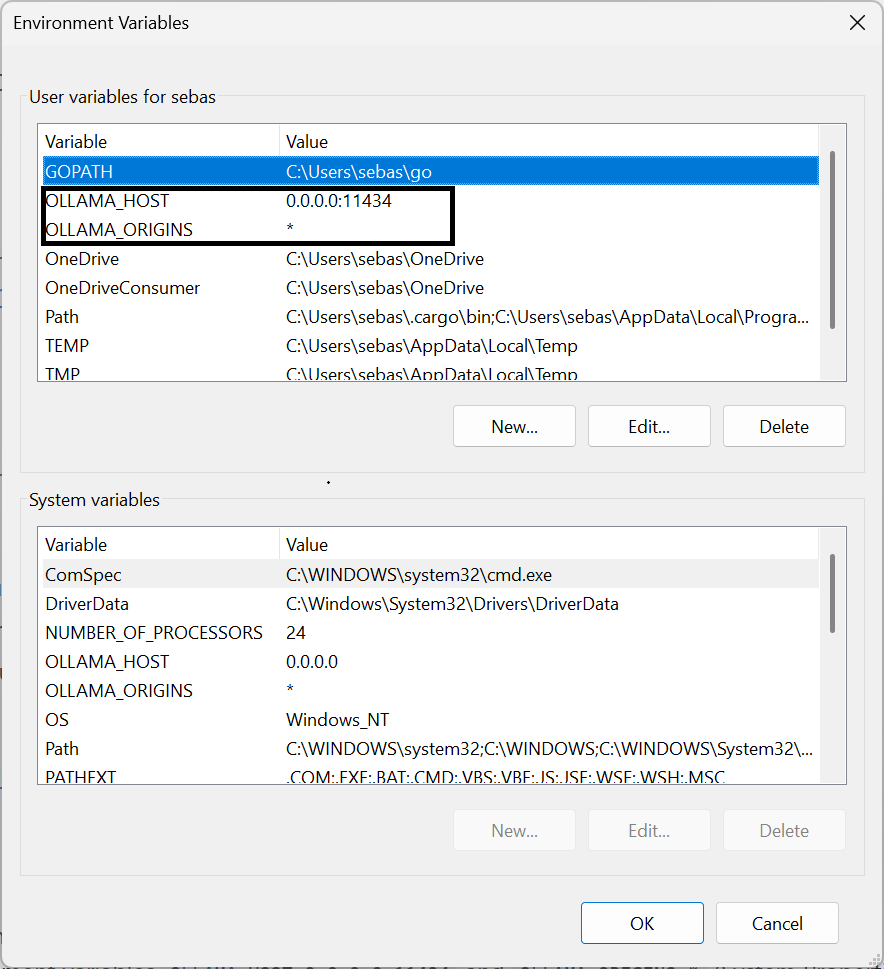
Set Ollama to accept connections from your phone:
- Windows: set environment variables
OLLAMA_HOST=0.0.0.0:11434andOLLAMA_ORIGINS=*(System Properties > Environment Variables), then restart Ollama - Mac/Linux:
OLLAMA_HOST=0.0.0.0 OLLAMA_ORIGINS=* ollama serve
- Windows: set environment variables
-
Choose Local on the setup screen
-
Enter your computer's IP address (e.g.
http://192.168.1.100:11434) -
Tap Test connection to verify
-
Pick a model from the list
-
Optional: set an alternate connection for Tailscale or LAN access
-
The AI demo lets you test your setup before finishing
Supported backends
| Backend | Type | Setup |
|---|---|---|
| Ollama | Local | Server URL |
| LM Studio | Local | Server URL (OpenAI-compatible) |
| vLLM / llama.cpp / KoboldCpp | Local | Server URL (OpenAI-compatible) |
| ONNX (T5) | On-device | Import model files |
| Gemini | Cloud | API key (free tier available) |
| Groq | Cloud | API key (free tier available) |
| OpenRouter | Cloud | API key (free models available) |
| Anthropic | Cloud | API key |
| OpenAI | Cloud | API key |
Security
Deskdrop takes security seriously. A keyboard has access to everything you type, so trust matters.
- API key encryption - All keys stored with AES-256-GCM via Android EncryptedSharedPreferences. Never logged, only held in memory during use.
- SSRF protection -
fetch_urlblocks requests to private/internal IP ranges (loopback, link-local, site-local), preventing prompt injection attacks from scanning your local network. - Prompt injection mitigation - Clipboard reading and device actions (calendar, calls, SMS, navigation) are gated behind explicit user opt-in. Both off by default.
- No data backup -
allowBackup="false"prevents ADB or cloud export of app data. - Audio cleanup - Whisper WAV files are deleted immediately after transcription.
- Streaming OOM prevention - Per-line 1MB character limit on streaming responses. Non-streaming responses capped at 10MB download, 20,000 characters to model context.
- Password field protection - All AI shortcuts are blocked in password fields.
- Destructive action confirmation - Calendar update/delete requires two-step confirmation: the AI first shows a preview, asks the user to confirm, then executes only after explicit approval.
- Input validation - Phone numbers validated against format regex. All URI parameters encoded. All ContentResolver queries use parameterized selection arguments (no SQL injection).
- Contact data minimization - Contact lookups return max 3 contacts with max 2 phone numbers and 1 email each.
- Tool loop cap - Maximum 5 tool calls per AI turn, preventing runaway tool execution.
- Exported component protection - All exported Android services require system-level bind permissions (
BIND_INPUT_METHOD,BIND_TEXT_SERVICE,BIND_QUICK_SETTINGS_TILE).
For a complete technical reference of all settings, shortcuts, and internals, see DESKDROP_REFERENCE.md.
Requirements
- Android 9.0 (API 28) or higher
- For local AI: an Ollama or OpenAI-compatible server reachable from your phone (Tailscale recommended)
- For cloud AI: an API key from any supported provider
- For voice (Whisper): a Whisper-compatible server (e.g. Speaches)
FAQ
Is this on the Play Store? Not yet. Keyboard apps that access network services face a stricter review path, so for now it's distributed as an APK via GitHub Releases.
Does Deskdrop send my typing anywhere? Only when you explicitly trigger an AI action (Assist, Tone, Voice, Conversation, etc.). Normal typing stays local. If you pick a local backend, nothing leaves your network.
Do I need Ollama? No. You can use any OpenAI-compatible server, on-device ONNX inference, or a cloud provider. Ollama is the default because it's the easiest to set up.
Does it work offline? Typing, themes, layouts, clipboard history, and glide typing all work offline. AI features need either a local server on your network or a cloud provider. ONNX runs fully on-device.
Is there a desktop companion? In development. The idea is cross-device conversation sync over Tailscale, with the keyboard and a Windows app sharing the same chat history. Not released yet.
Why a fork of HeliBoard? HeliBoard is a mature open-source keyboard with a privacy-focused feature set. Forking gives a solid keyboard foundation so the AI layer can be built on top instead of reinventing input handling.
Based on
Deskdrop is built on HeliBoard, an open-source privacy-focused keyboard for Android. All original HeliBoard features (themes, layouts, dictionaries, clipboard history, glide typing, one-handed mode, split keyboard) are fully preserved.
License
Deskdrop is licensed under GNU General Public License v3.0, as a fork of HeliBoard/OpenBoard.
Since the app is based on Apache 2.0 licensed AOSP Keyboard, an Apache 2.0 license file is also provided.
Credits
- HeliBoard by Helium314
- OpenBoard
- AOSP Keyboard
Deskdrop MCP questions
Is this on the Play Store?
No, it is currently distributed as an APK via GitHub Releases because keyboard apps with network access face strict review paths.
Does Deskdrop send my typing anywhere?
Typing only leaves your device when you explicitly trigger an AI action; normal typing stays local.
Do I need Ollama to use it?
No, you can use any OpenAI-compatible server, cloud providers, or on-device ONNX inference.
Does it work offline?
Standard keyboard features work offline, but AI features require a local network server, a cloud provider, or on-device ONNX inference.