
cliphou.se MCP server
Commit Oct 19, 2026Turns software releases into social media videos by identifying selling points, writing copy, and applying brand assets.
Also known as sunmer/cliphouse, cliphouse
- Stars
- 1
- Tools
- —
- Downloads, 30 days
- —
- Latest version
- 1.6.2
- Last commit
- Oct 19, 2026
- License
- MIT-0
What is cliphou.se MCP?
cliphou.se turns software releases into social media videos by identifying selling points, writing copy, and applying brand assets.
Summary generated from the project's README
About cliphou.se MCP server
Transforming software updates into social media content is what developers achieve using cliphou.se. This tool automates the creation of marketing videos by identifying key selling points from your code, writing captions, and applying your specific brand colors and logos. It works through an MCP server connection or as a skill for coding agents like Claude Code, Codex, and Cursor, as well as chat applications like ChatGPT.
Users can connect via a remote MCP URL without needing an API key. The system provides animated previews and a dedicated editor link for final adjustments. While basic previews are available without an account, downloading MP4 files or accessing more than three gallery templates requires a free Google sign-in. The server includes specialized tools like search for finding templates by marketing goals, logo management for branding, and tailor for rendering multiple template options with your project assets.
What you can do with it
- 1Generate release videosAsk your coding agent to create a video for a new software version to share on social media.
- 2Create vertical changelogsRequest a vertical video format to showcase the latest weekly updates to your followers.
- 3Adapt content for specific platformsConvert an API release announcement into a widescreen video suitable for LinkedIn or X.
- 4Automate brand applicationUpload your project logo so it automatically appears on release and developer templates.
Written from the project's README. Every use case is checked against a quote from it.
How to install cliphou.se MCP
Formats verified 10 Nov 2026Add to CursorAdd to GooseInstall cliphou.se MCP in Claude Code
$ claude mcp add --transport http cliphouse https://cliphou.se/mcpInstall cliphou.se MCP in Cursor
~/.cursor/mcp.json
{
  "mcpServers": {
    "cliphouse": {
      "url": "https://cliphou.se/mcp"
    }
  }
}Install cliphou.se MCP in VS Code
.vscode/mcp.json
{
  "servers": {
    "cliphouse": {
      "type": "http",
      "url": "https://cliphou.se/mcp"
    }
  }
}Install cliphou.se MCP in VS Code CLI
$ code --add-mcp '{"name":"cliphouse","type":"http","url":"https://cliphou.se/mcp"}'Install cliphou.se MCP in Codex
$ codex mcp add cliphouse --url https://cliphou.se/mcpInstall cliphou.se MCP in Codex config.toml
~/.codex/config.toml
[mcp_servers.cliphouse]
url = "https://cliphou.se/mcp"
Install cliphou.se MCP in Gemini CLI
$ gemini mcp add -s user --transport http cliphouse https://cliphou.se/mcpInstall cliphou.se MCP in Gemini settings.json
~/.gemini/settings.json
{
  "mcpServers": {
    "cliphouse": {
      "url": "https://cliphou.se/mcp",
      "type": "http"
    }
  }
}Automated checks
Ran Nov 14, 2026Full report →Not verified yet. A server needs a score of 80, no serious finding, and enough data for us to check. How checks work · What to fix for more points

- Source repository linked and reachablesunmer/cliphouse is public and reachablegithub.com/sunmer/cliphouse ↗Pass
- Package names this repository as its sourceNot checked
- Build provenance (Sigstore attestation)Not checked
- Open source license (OSI)MIT-0spdx.org/licenses/MIT-0.html ↗Pass
- Commit or release in the last yearLast commit or release 2026-10-19github.com/sunmer/cliphouse ↗Pass
- OpenSSF ScorecardNot checked
- Package name not close to a popular packageNot checked
- No critical advisory in the package or its dependenciesNot checked
- No hidden instructions to the model0 tool descriptions and the README read; no override phrases, credential paths or hidden charactersPass
- Destructive tools are labelledNot checked
- Remote endpoint answers the MCP handshakeinitialize answered with protocol 2025-06-18 in 219 msPass
README
View on GitHubcliphou.se
You ship it. Cliphouse shows it off.
Your coding agent turns every release into a video for your socials. It finds the selling points, picks the angle, writes the copy, and uses your brand colors and logo. Free skill and MCP server for Claude Code, Codex, Cursor, Claude, and ChatGPT.
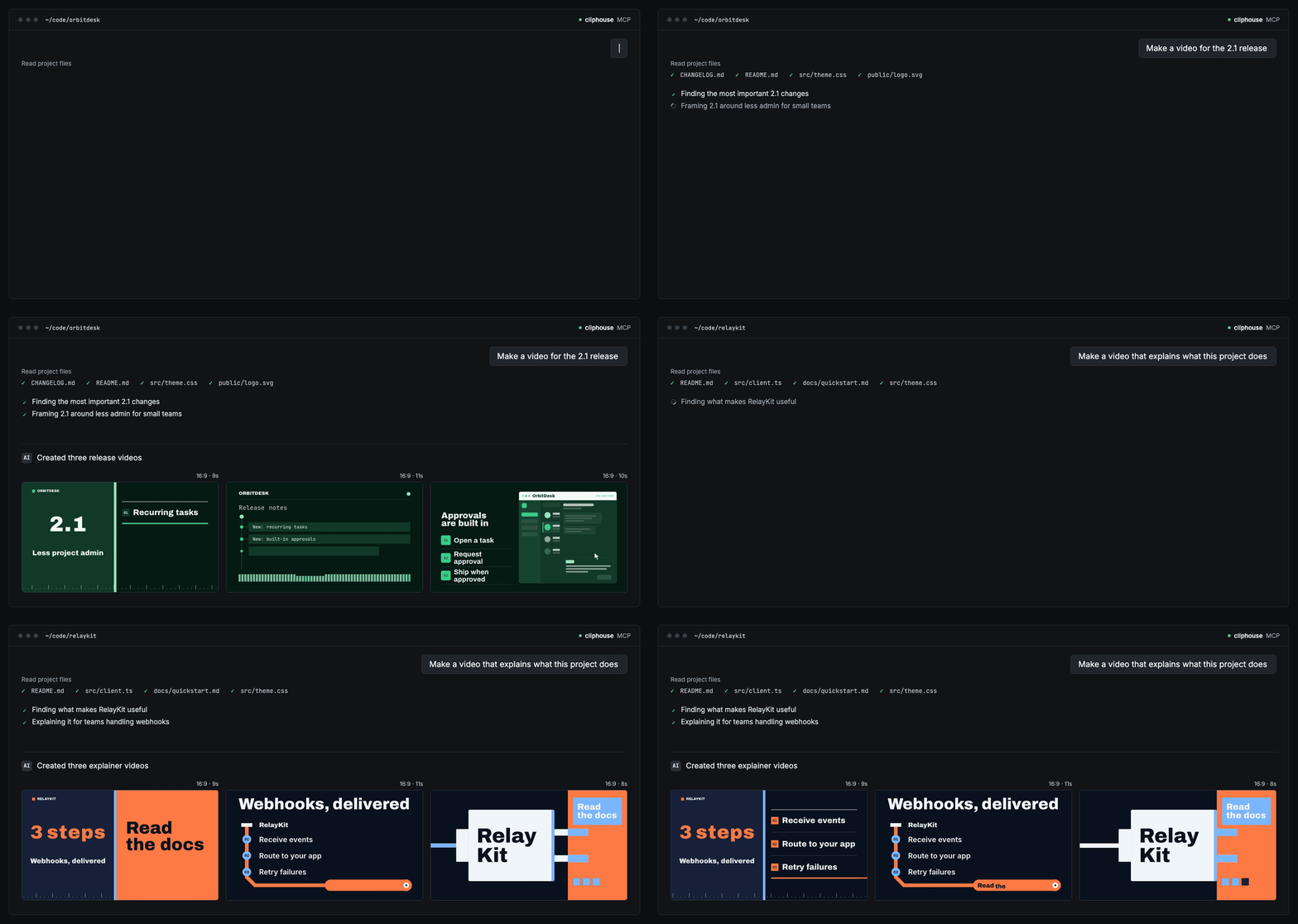
You can preview and edit without an account. MP4 download and editing more than 3 gallery templates need a free Google sign-in.
Install
npx skills add sunmer/cliphouse
Installs the cliphouse skill. It needs Node 18 or later, has no dependencies, and runs no commands besides its own helper.
In Codex you can also run $skill-installer install https://github.com/sunmer/cliphouse/tree/main/skills/cliphouse.
MCP server URL, no key needed:
https://cliphou.se/mcp
Add to Cursor · Add to VS Code
Claude.ai and ChatGPT: add a custom connector with the URL above.
Claude Code with MCP instead of the skill:
claude mcp add --transport http cliphouse https://cliphou.se/mcp
Codex with MCP, in ~/.codex/config.toml:
[mcp_servers.cliphouse]
url = "https://cliphou.se/mcp"
GitHub does not open cursor:// and vscode: links from a README in every browser. If a link does nothing, add the MCP server URL manually.
Try it
Open your project and ask:
Let's ship 2.1. Btw we need a release video for our socials.
Make a vertical changelog video for this week's updates.
Turn this API release into a 16:9 video for X and LinkedIn.
In Codex, type $cliphouse to call the skill directly.
Status
| Feature | Status |
|---|---|
| Template grid in the chat that already shows your product, with short animated previews | Available |
| Filling the template from your repo, and editing it by prompt | Available. You get a cliphou.se editor link, where you export the MP4. |
| A preview of your own product in the picked template | Available as a 4-second animated loop, with a poster image as a fallback. |
| Posting to X from the agent | Coming soon. Today the agent writes the caption and opens the X post window for you to attach the MP4. |
Skills in this repo
| Skill | Does | Install |
|---|---|---|
cliphouse |
Search, preview, fill from your repo, editor link, share. Reads public cliphou.se data only. | npx skills add sunmer/cliphouse |
cliphouse-render (optional) |
Renders the MP4 in your project, or lets the agent change layout, motion, and timing in code. Asks before it downloads or installs anything. | npx skills add sunmer/cliphouse --skill cliphouse-render |
How it works
skills/cliphouse/scripts/cliphouse.mjs talks to the public cliphou.se catalog over HTTPS. Search uses the cliphou.se MCP server, so the skill and the MCP tools rank templates the same way.
Goals: launch-product, announce-feature, share-update, grow-waitlist, announce-integration, announce-pricing, celebrate-milestone, share-social-proof, promote-event, introduce-brand, run-promotion, and hire-team.
The cliphou.se deploy checks this skill against its MCP contract. If the installed skill is older than the server, search returns a warning with the update command.
| Command | Does |
|---|---|
search --goal <goal> "<query>" [--aspect 9:16] [--max-seconds 20] [--inline] |
Finds templates for a marketing goal. --inline caches the preview MP4s and prints a Markdown grid. |
logo [file] |
Uploads the project's logo (found automatically, or the file you name) and adds it to cliphouse/brand.json. Release and developer templates show it in place of the brand name. |
fit <id>... --brand <brand.json> or fit <id> <props.json> |
Checks your copy against each template's text limits before rendering, and lists the fields that are too long. |
tailor <id>... --brand <brand.json> |
Renders up to 4 templates with your brand on the server, writes cliphouse/<id>.props.json for each, and prints a Markdown grid of 4-second animated loops. --fast prints the posters first. |
spec <id> |
Prints the editable text, colors, and limits. |
preview <id> <props.json> |
Renders an animated loop and a poster of your product in the template on the server, and prints the editor link. |
link <id> <props.json> |
Validates the edit and prints a cliphou.se editor link. |
pick <id>... |
Writes a side-by-side preview page for terminals and prints its path. The agent asks before opening it. |
What the default skill does not do:
- It does not run
npm,curl,tar, or any command from a downloaded spec. - It does not download source packages into your repo.
- It does not open your browser on its own.
It caches stock previews only from https://cliphou.se/previews/ and personalized posters and loops only from https://cliphou.se/p/<hash>.jpg and .webp, in ~/.cache/cliphouse. Set CLIPHOUSE_ORIGIN to use another host.
In the Codex picker, a click on a tile sends one fixed message: $cliphouse: use template <id> and fill it for this project. It is sent only on your click, and the id must match ^[a-z0-9-]+$.
cliphouse-render uses fixed render commands written in its SKILL.md. It checks each package against source.packageSha256 before it extracts it into .cliphouse/<id>/, and asks before it adds .cliphouse/ to .gitignore or installs dependencies.
Links
- MCP docs: install options, tools, limits, and the workflow video
- MCP Registry entry (
se.cliphou/templates) - llms.txt
- Gallery
License
MIT-0. Templates rendered locally use Remotion or HyperFrames, which have their own licenses.
cliphou.se MCP questions
How do I add cliphou.se MCP to Claude Code?
Run claude mcp add --transport http cliphouse https://cliphou.se/mcp in your terminal. Add --scope user to make it available in every project.
How do I add cliphou.se MCP to Cursor?
Open ~/.cursor/mcp.json and add the server under mcpServers, using the Cursor config shown in the install section above.
Does it require an account to use?
You can preview and edit without an account, but a free Google sign-in is required for MP4 downloads and editing more than three gallery templates.