
SUNGLASSES MCP server
Commit Nov 14, 2026Scans text, files, and tool calls for security threats and credential leaks to act as an input firewall for AI agents.
Also known as sunglasses-dev/sunglasses
- Stars
- 11
- Tools
- —
- Downloads, 30 days
- 2,831
- Latest version
- 0.6.23
- Last commit
- Nov 14, 2026
- License
- MIT
What is SUNGLASSES MCP?
SUNGLASSES scans text, files, and tool calls for security threats and credential leaks to act as an input firewall for AI agents.
Summary generated from the project's README
About SUNGLASSES MCP server
SUNGLASSES acts as an open source input firewall designed to protect AI agents from security threats and credential leaks. It functions as a local scanner that inspects text, files, PDFs, images, QR codes, audio, and video. Developers can use it via a CLI, a Python library, an MCP server, or a GitHub Action to verify data before it reaches an agent or a tool.
The system uses 1,513 patterns across 117 categories to identify risks. A unique feature is the local MCP proxy, which mediates communication between a client and a server. This proxy can refuse tool requests until a human provides approval at an interactive terminal. Once approved, the proxy monitors the credential lane to block sensitive information in tool calls and results. It operates under a 10 second timeout to ensure agent responsiveness while maintaining security boundaries.
What you can do with it
- 1Block malicious instructionsPrevent an AI agent from following harmful commands hidden within a document.
- 2Prevent credential leakageStop sensitive API keys or passwords from being sent to a tool or returned to a client.
- 3Secure MCP tool accessRequire manual human intervention before allowing an AI client to interact with a new MCP server.
Written from the project's README. Every use case is checked against a quote from it.
How to install SUNGLASSES MCP
Formats verified 10 Nov 2026Add to CursorAdd to GooseInstall SUNGLASSES MCP in Claude Code
$ claude mcp add sunglasses -- uvx sunglassesInstall SUNGLASSES MCP in Cursor
~/.cursor/mcp.json
{
  "mcpServers": {
    "sunglasses": {
      "command": "uvx",
      "args": [
        "sunglasses"
      ]
    }
  }
}Install SUNGLASSES MCP in VS Code
.vscode/mcp.json
{
  "servers": {
    "sunglasses": {
      "type": "stdio",
      "command": "uvx",
      "args": [
        "sunglasses"
      ]
    }
  }
}Install SUNGLASSES MCP in VS Code CLI
$ code --add-mcp '{"name":"sunglasses","type":"stdio","command":"uvx","args":["sunglasses"]}'Install SUNGLASSES MCP in Claude Desktop
claude_desktop_config.json
{
  "mcpServers": {
    "sunglasses": {
      "command": "uvx",
      "args": [
        "sunglasses"
      ]
    }
  }
}Install SUNGLASSES MCP in Codex
$ codex mcp add sunglasses -- uvx sunglassesInstall SUNGLASSES MCP in Codex config.toml
~/.codex/config.toml
[mcp_servers.sunglasses]
command = "uvx"
args = ["sunglasses"]
Install SUNGLASSES MCP in Gemini CLI
$ gemini mcp add -s user sunglasses uvx -- sunglassesInstall SUNGLASSES MCP in Gemini settings.json
~/.gemini/settings.json
{
  "mcpServers": {
    "sunglasses": {
      "command": "uvx",
      "args": [
        "sunglasses"
      ]
    }
  }
}Automated checks
Ran Nov 13, 2026Full report →Not verified yet. A server needs a score of 80, no serious finding, and enough data for us to check. How checks work · What to fix for more points

- Source repository linked and reachablesunglasses-dev/sunglasses is public and reachablegithub.com/sunglasses-dev/sunglasses ↗Pass
- Package names this repository as its sourcesunglasses names sunglasses-dev/sunglasses as sourcepypi.org/project/sunglasses/ ↗Pass
- Build provenance (Sigstore attestation)Sigstore attestation for sunglassespypi.org/project/sunglasses/ ↗Pass
- Open source license (OSI)MITspdx.org/licenses/MIT.html ↗Pass
- Commit or release in the last yearLast commit or release 2026-11-13github.com/sunglasses-dev/sunglasses ↗Pass
- OpenSSF ScorecardOpenSSF Scorecard 5.6 / 10; weakest: Code-Review 0, CII-Best-Practices 0, Signed-Releases 0scorecard.dev/viewer/?uri=github.com/sunglasses-dev/sunglass ↗Partial 8/15
- Package name not close to a popular packageNo popular package one edit away from sunglassesPass
- No critical advisory in the package or its dependenciesthe package checked; no critical advisoryosv.dev ↗Pass
- No hidden instructions to the modelInstruction aimed at the model found in the description or READMEFinding
- Destructive tools are labelledNot checked
- Remote endpoint answers the MCP handshakeNot checked
README
View on GitHubSUNGLASSES






Open source input firewall for AI agents, beta. A local scanner checks text, code, PDFs, images, QR codes, audio and video with 1,513 patterns that carry a matcher (1,584 are listed) across 117 listed categories and reports findings and incomplete scans. A Claude Code hook blocks secret material in tool calls and the paths and hosts your policy lists, before a tool runs, best effort under its 10 second timeout.
What works today
- Scan text, files, PDFs, images and QR codes from the CLI or from Python
- An MCP server your agent calls, and a GitHub Action that scans every pull request
- A Claude Code hook that blocks the credential paths and policy violations your policy lists, before a tool runs
- A local MCP proxy that refuses every
tools/listandtools/calluntil a person approves the server at an interactive terminal. Once approved, it withholds a credential in a tool call or in a tool result, which is the credential lane and not general inspection of everything a tool returns. Installing it is not protection on its own. See What the proxy enforces. - Outside that lane this reads input, so a clean result is a confidence floor and not a guarantee
Sunglasses is a local, open-source scanner for text and supported files. It reports what it matched and what it could not read, so you can decide what to pass onward. It produces findings and an exit status; a CI job, a Claude Code hook or your own code acts on that result.
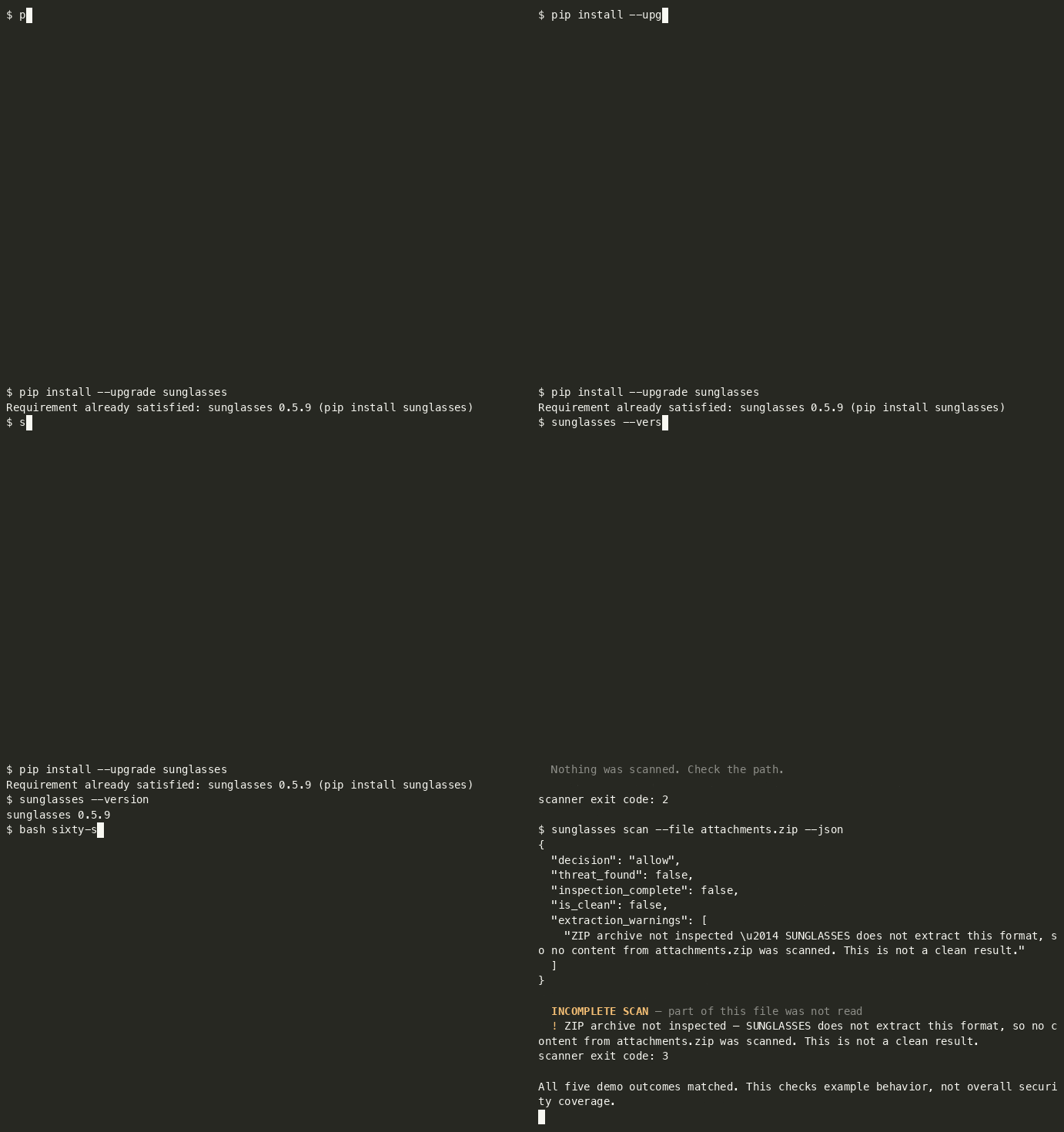
Sixty seconds
python3 -m venv .venv && source .venv/bin/activate
python -m pip install --upgrade sunglasses
curl -fsSL -o sixty-seconds.sh https://raw.githubusercontent.com/sunglasses-dev/sunglasses/main/demo/sixty-seconds.sh && bash sixty-seconds.sh
An activated virtualenv keeps the install and the sunglasses your shell resolves in the
same environment, and --upgrade matters if you already have an older version. curl -fsSL
fails on an HTTP error instead of saving the error page, so the script only runs if the
download actually succeeded.
The script writes three fixture files into a temp directory, and deliberately scans a fourth path that does not exist, five scanner invocations in total, because the archive is scanned twice (human output and JSON). The script's own commands execute; scanned content stays data (it is never executed, and the ZIP is not extracted).
Abbreviated output, recorded on 0.5.6. Finding rows 2-5 are omitted below; timings and presentation are not shown because they vary:
$ sunglasses scan --file notes.md            # ordinary sprint notes
  PASS — No threats detected.
scanner exit code: 0

$ sunglasses scan --file vendor-brief.md     # a vendor brief with an instruction buried in it
  BLOCK [HIGH] — 6 threat(s) found:
  1. [HIGH] Ignore previous instructions            GLS-PI-001
  … findings 2-5 omitted …
  6. [HIGH] Data exfiltration to sink (mechanism)   GLS-MECH-003
scanner exit code: 1

$ sunglasses scan --file attachments.zip     # an archive we do not extract
  INCOMPLETE
  No findings in the inspected scope. Part of this input was not read, so this is
  not a clean result.
scanner exit code: 3

$ sunglasses scan --file missing.md
  File not found: missing.md — Nothing was scanned. Check the path.
scanner exit code: 2
And the same archive as JSON. Selected fields from the scan document, not the whole of it:
{
  "decision": "not_inspected",
  "threat_found": false,
  "inspection_complete": false,
  "is_clean": false,
  "extraction_warnings": [
    "ZIP archive not inspected — SUNGLASSES does not extract this format, so no content from attachments.zip was scanned. This is not a clean result. It lists 2 members, 33 bytes declared by the archive (brief.txt, notes/summary.txt); the member names were scanned."
  ]
}
decision: not_inspected with is_clean: false. The archive's table of contents was read and its
member names were scanned; the members themselves were not, and when no member name matches a pattern
the decision says so itself (before 0.6.17 it said allow beside is_clean: false).
A caller that tests decision == "allow" stops here; one that tests decision != "allow"
should read threat_found before treating this as a threat. The document exposes the
distinction; acting on it is the caller's job.
Timings and presentation vary. The demo checks the exit statuses and the ZIP coverage fields; report a mismatch against your installed version.
⭐ If this is useful, consider starring the repository.
🕶 Or try it in your browser, no install: sunglasses.dev/scan (scan text, GitHub repos, or images). Image OCR runs locally in your browser; the image never leaves your device.
What the proxy enforces
python -m sunglasses.proxy -- <your server command> runs a real MCP server as
a child process and mediates the stdio session between it and your client.
What it does depends entirely on whether that server has been approved, and
the two states are very different.
Before approval, your client's tool requests are refused
Out of the box, every tools/list and tools/call from your client is
refused. The client receives a typed JSON-RPC error like this one.
{"jsonrpc":"2.0","id":3,"error":{"code":-32070,"message":"SUNGLASSES_WITHHELD",
 "data":{"reason_code":"APPROVAL_REQUIRED","rule":"S4",
         "status":"not_run","inspection_complete":false,
         "inspected_utf8_bytes":0,
         "server_id":"40ed892fc0f0b8819c294778c492dbd0",
         "snapshot_sha256":"26aeeb2f7c5b61aa33523967171d46c0d248cd13d612cef913b089daccae4c64"}}}
server_id and snapshot_sha256 are the two values the approve command
needs, and the refusal is where you get them. You do not have to look inside
the state directory to find out what to approve.
status: not_run and inspected_utf8_bytes: 0 describe your client's
request. It is not forwarded to the server and its arguments are not scanned.
The proxy does read the server's own tool list first. It fetches every
tools/list page from the server and scans the descriptors to build the
snapshot you approve. A page with a finding is refused on that finding before
any approval is looked up. Installing the proxy does not protect anything by
itself.
Approval is a deliberate human step and it requires an interactive terminal.
$ python -m sunglasses.proxy approve <server_id> --snapshot <snapshot_sha256>
approving records that a human viewed this capture, and this is not an
interactive terminal, so nobody did          # exits 1, nothing is recorded
It prints the tool names and the first 16 characters of each descriptor digest, then asks. It records that someone at an interactive terminal answered yes to that list. From a pipe it refuses. Run it at a real terminal and answer the prompt.
An approval belongs to one server, not to a tool list. The snapshot hash
covers the descriptors, and two different servers exposing the same tools have
the same snapshot_sha256, but they get different server_ids, and the
approval is stored against the server_id. Measured: two servers whose
captures both read snapshot_sha256 26aeeb2f7c5b61aa… carry the ids
8740fa6360ce72946fa5a99e86974e01 and 0096972d2543ec556ad9eefe9c144b05, and
approving the first left the second refusing with APPROVAL_REQUIRED until it
was approved at its own terminal prompt.
So changing the command behind a familiar tool list does not inherit the approval you already gave. A server that presents the same descriptors as one you trust is still a server you have not approved.
After approval (both directions, in the credential lane)
With the snapshot approved, the mediator inspects messages in both directions and withholds one whose content the engine blocks, returning the reason code, the rule, the bytes inspected and the rule ids that fired:
{"jsonrpc":"2.0","id":3,"error":{"code":-32070,"message":"SUNGLASSES_WITHHELD",
 "data":{"reason_code":"PROHIBITED_CONTENT","rule":"S2","status":"complete",
         "inspection_complete":true,"inspected_utf8_bytes":87,
         "rule_ids":["GLS-SD-001-API","GLS-SD-003-API"]}}}
- A credential in a tool RESULT is withheld from your client. The
-APIrules are the tool-result channel. A tool result is theapi_responsechannel: from the shell,sunglasses scan --channel api_responseruns those rules, and--channel tool_outputruns them too. Releases up to 0.6.19 declared none of the credential rules ontool_output. A test pins this wording and the facts behind it (see the CHANGELOG entry). GLS-SD-010is line-anchored, and that is a limit in every channel. It matches an assignment at the start of a line, so aKEY=valuethat is indented by any whitespace, or sits inside a JSON string, or sits behind a quote, is not matched on any channel, not in a tool result, and not in a file or a message either, which are channels it does declare. Indentation alone is enough, which makes this wider than it sounds: a config block, a YAML mapping or an indented snippet all miss. Note the assignment's POSITION is what matters and not the quoting of its value.PASSWORD="hunter2"at a line start is matched,"PASSWORD=hunter2"is not. When the value is in a known credential format theGLS-SD-001family still catches it everywhere (GLS-SD-001on file, message and web content,GLS-SD-001-APIin a tool result), so what is actually uncovered is an assignment whose value has no recognisable shape (a password, a DSN, an internal token) once it is embedded. Closing it needs a different anchor, which is a new rule with its own fixtures rather than a channel added to this one.- A credential in a tool CALL does not reach the server. Verified by reading the receiving server's own input, not by asking the proxy.
- Ordinary traffic passes.
tools/listreturns the real list and a benign call returns its real result.
Ctrl-C while the proxy is serving no longer aborts the interpreter. Once shutdown finishes, the process exits with status 130. Shutdown waits on the server, so a server that has stopped reading its input can hold it open.
What this is not
This is the credential lane on tool results and tool calls. It is not general inspection of everything a tool returns, and no comparison with any other tool is claimed. See Not claimed in this release in CHANGELOG.md.
Four exit statuses, deliberately different signals:
| exit | meaning |
|---|---|
0 |
inspection completed in the supported scope, and nothing matched |
1 |
threat found (the inspection may still have been incomplete, and that is reported alongside) |
3 |
incomplete, nothing matched in the part that was inspected; some component was not |
2 |
usage or operational error |
0 and 3 never collapse into each other. "Everything I support reading here was read,
and nothing matched" and "this format was not inspected" are different facts, and the second
one is where agents get hurt. Exit 0 is not a guarantee that a file is safe, only that the
supported scope was covered and no pattern fired. In JSON the same split is explicit:
is_clean is not threat_found and inspection_complete.
Try the proxy in two minutes
You do not need an MCP client for this. The package ships a tiny server,
sunglasses/proxy/echo_server.py, bundled for the proxy self test; it works as a sample server, it is not a supported surface.
It has one tool, echo. Run all
of it from one empty folder, with the python3 that has SUNGLASSES installed.
Nothing outside that folder and ~/.sunglasses/ is touched.
1. Wrap it. install needs an existing .mcp.json to edit, so write one first.
cat > .mcp.json <<'EOF'
{
  "mcpServers": {
    "echo": {
      "command": "python3",
      "args": ["-m", "sunglasses.proxy.echo_server"]
    }
  }
}
EOF
sunglasses install echo
2. Be the client. A client speaks newline delimited JSON-RPC on stdin. Put five lines in a file, an initialize, its notification, a tool list, a harmless call and a call that carries an AWS example key.
cat > calls.jsonl <<'EOF'
{"jsonrpc":"2.0","id":1,"method":"initialize","params":{"protocolVersion":"2025-06-18","capabilities":{},"clientInfo":{"name":"try","version":"1"}}}
{"jsonrpc":"2.0","method":"notifications/initialized"}
{"jsonrpc":"2.0","id":2,"method":"tools/list"}
{"jsonrpc":"2.0","id":3,"method":"tools/call","params":{"name":"echo","arguments":{"text":"hello from the two minute try"}}}
{"jsonrpc":"2.0","id":4,"method":"tools/call","params":{"name":"echo","arguments":{"text":"my key is AKIAIOSFODNN7EXAMPLE"}}}
EOF
python3 -m sunglasses.proxy -- python3 -m sunglasses.proxy.echo_server < calls.jsonl
The proxy answers the initialize, then refuses ids 2, 3 and 4 with code
-32070, SUNGLASSES_WITHHELD and reason APPROVAL_REQUIRED. That is the
gate working, and it is the expected first result. Each refusal carries two
values in its data object, server_id and snapshot_sha256. Read them from
your own output. The server_id is computed from the command, its arguments and
the folder you ran it in, so yours will differ from anyone else's, and a
different folder gives a different one. Approval is stored against that id, so
stay in the same folder for the rest of this page.
3. Approve it as a person. This has to run at a real terminal. It is refused when its input is a pipe.
sunglasses proxy approve <server_id> --snapshot <snapshot_sha256>
# the same command, spelled as the module
python3 -m sunglasses.proxy approve <server_id> --snapshot <snapshot_sha256>
Both spellings run the same code. sunglasses --help lists proxy.
4. Run the same file again.
python3 -m sunglasses.proxy -- python3 -m sunglasses.proxy.echo_server < calls.jsonl
The tool list comes back and the harmless call returns its echo. The call
carrying the key is withheld with PROHIBITED_SECRET and never reaches the
server. A credential in a result is withheld the same way with
PROHIBITED_CONTENT. The checks behind this are the credential lane described
under What the proxy enforces, and this run is not
evidence beyond that lane.
5. Put it back. sunglasses uninstall echo restores your .mcp.json
byte for byte. The approval is kept on purpose, so it applies again if you wrap
the same command from the same folder. To revoke every approval on this machine,
remove the approvals folder.
sunglasses uninstall echo
rm -r ~/.sunglasses/proxy/approvals
What is SUNGLASSES?
Most AI agent attacks don't look like attacks. They hide inside normal-looking content (emails, web pages, images, audio, PDFs, QR codes) and try to hijack your agent's behavior.
SUNGLASSES is a free, open-source input inspection layer. It does not sit invisibly in front of your agent and sanitise everything it reads (nothing does). It gives you three surfaces you invoke deliberately:
sunglasses scan, inspect a file, a repo or a string on demand, in CI or at the terminal. Reports what it found and what it could not read.- The Claude Code firewall hook, inspects tool calls before they run and can block them. It is best-effort under load: the hook has a 10-second timeout, since v0.6.6 its optional pattern lane stops itself at 7 seconds and answers ask, and a default install (v0.6.10 and later) sets
onFailure: "block"so a hook that times out or cannot start refuses the call on Claude Code 2.1.295 and later (init --fail-openopts out; seeKNOWN_VERSION_GAPS.md). - The MCP server, exposes scanning to an agent as a tool it can call.
It flags; it does not silently strip. Content it cannot inspect (an archive, an image whose OCR is unavailable, a file over the size cap) is reported as not inspected, never as clean. Inside opened files, coverage is per format; see the PDF note.
What it scans:
- Text: emails, messages, files, APIs, web content, logs
- Images: OCR visible text, EXIF metadata, hidden text regions
- Audio: speech-to-text transcription, audio metadata tags
- Video: subtitle tracks, audio transcription, video metadata
- PDFs: page text, document metadata, annotations
- QR Codes: decode QR codes and barcodes, scan content
What it catches:
- Prompt injection (English-first; dedicated non-English patterns in 13 languages, two patterns each, see Language coverage)
- Credential exfiltration
- Command injection
- Memory poisoning
- Social engineering & authority spoofing
- Unicode evasion, RTL obfuscation, leetspeak, Base64-encoded attacks, homoglyph substitution
What it doesn't do:
- Doesn't touch authentication (OAuth, cookies, tokens, headers)
- Doesn't monitor agent behavior (that's SHIELD, coming later)
- Scans on your machine with no cloud, no API keys and no telemetry. Nothing is sent anywhere unless you pass
scan --report-to, which sends that scan's result to the URL you name (below). Text, image, PDF and QR scanning needs no network. Audio and video scanning downloads the Whisper speech model when a scan needs it and no intact copy is cached, and reuses an intact cached copy after that
Email screening: A real client sends a real email. But their PC is infected, malware injected hidden attack instructions before it left. The sender doesn't know. Without SUNGLASSES, your agent follows the hidden instructions. With SUNGLASSES, scanner.scan_email(body, attachments) returns a scan document (the findings, the three axes, and a named list of anything it could not read) and your code decides whether to pass the mail on, quarantine it or ask a human. Nothing is silently rewritten or stripped: SUNGLASSES flags, you act. An attachment that needs a DEEP scan is reported as not yet inspected rather than counted as clean.
We're Not the Only Ones, And That's OK
Tools like Lakera Guard, LLM Guard, NVIDIA NeMo Guardrails, and Azure Prompt Shields also protect AI agents from prompt injection. They're good at what they do, especially ML-based detection of novel attacks.
We built SUNGLASSES for a different use case: local-only, offline, zero-cost, no LLM needed. Your data stays on your machine unless you run scan --report-to URL, which sends that scan's result to the URL you name (details). No API keys. No cloud calls otherwise, apart from the optional audio extra, which downloads its Whisper model when a scan needs it and no intact copy is cached (details). Works air-gapped (cache the model first if you scan audio or video).
Use SUNGLASSES alone, or use it alongside cloud tools. We even built an adapter system to connect with other security tools in the same pipeline. Security is layers, we're the local foundation layer.
Privacy
This section is about the MCP server, python -m sunglasses.mcp, the process an agent or a Claude plugin starts.
The server reads only the text you pass to scan_text and the file you name in scan_file. The scan runs on your machine. The server opens no network connection and sends nothing anywhere, except that a deep audio or video scan downloads its Whisper model when the scan needs it and no intact copy is cached. It keeps no copy of what it scans. It collects no data, so there is nothing to store, share or retain.
Audio and video are the one exception, and only with an optional extra. If you install sunglasses[audio], sunglasses[video] or sunglasses[all] and ask for a DEEP scan, the Whisper library downloads its speech model when the model file is not in Whisper's cache folder (about 145 MB for the default base model, from openaipublic.azureedge.net). Before that download starts, Sunglasses tries to print fetching whisper model base from openaipublic.azureedge.net to stderr; the notice is best effort and is missing when stderr is unavailable or the model load takes a compatibility path. An intact model file in the cache folder is reused with no download, and with no notice unless the model load takes a compatibility path. A cached file that is damaged or incomplete is downloaded again by Whisper, without that notice. The notice is made by Sunglasses when it loads the model. Code of your own that calls Whisper directly is not coordinated with it: during a Sunglasses model load, such a call can be announced under Sunglasses's model name. A video scan also writes the sound track or subtitle track to a temporary file on your machine and deletes it once the track is read. What you scan still stays on your machine. Without those extras nothing is downloaded.
What the server sends back goes to your MCP client. A response can quote the matched part of your input. That quote can include a string that looks like a credential. Treat scan results as sensitive content.
The proxy is a separate process with its own state. It keeps the approvals you grant and its capture files on your machine, as What the proxy enforces describes.
Quick Start
# Install
pip install sunglasses              # text scanning — zero dependencies
pip install 'sunglasses[media]'     # + images (OCR/EXIF), PDFs, QR codes
pip install 'sunglasses[all]'       # + audio & video scanning (installs Whisper)
pip install 'sunglasses[fast]'      # + faster keyword search (Python 3.10+; a prebuilt wheel where one exists, otherwise a C compiler)
# Keep the quotes. zsh reads [ ] as a file pattern and stops with "no matches found".
# OCR needs tesseract, QR codes need zbar, audio and video need ffmpeg.

# Check what's installed on your system
sunglasses check

# Scan text
sunglasses scan "some text to check"

# Scan a file — text and code always; images/PDFs/QR need sunglasses[media]
# (without the extra, SUNGLASSES says so and exits 3 — never a silent clean pass)
sunglasses scan --file document.pdf

# Scan audio/video (needs sunglasses[all] + ffmpeg)
sunglasses scan --file podcast.mp3 --deep

# Scan with JSON output (for integration)
sunglasses scan --json "some text to check"

# Scan from stdin (pipe from other tools)
echo "check this" | sunglasses scan --stdin

# Run the demo (10 examples, 9 attacks and 1 clean message)
sunglasses demo
SUNGLASSES MCP questions
How do I add SUNGLASSES MCP to Claude Code?
Run claude mcp add sunglasses -- uvx sunglasses in your terminal. Add --scope user to make it available in every project.
How do I add SUNGLASSES MCP to Cursor?
Open ~/.cursor/mcp.json and add the server under mcpServers, using the Cursor config shown in the install section above.
What can SUNGLASSES scan?
It can scan text, code, PDFs, images, QR codes, audio, and video using over 1,500 patterns.
How does the MCP proxy work?
The proxy mediates the session between the client and the server, refusing tool requests until a human manually approves the server via an interactive terminal.
Is the scan result a guarantee of safety?
No, a clean result provides a confidence floor but is not a guarantee of absolute safety.