
Conduct AI MCP server
✓ VerifiedManage AI agents, trigger workflows, and enforce team security policies across AI clients like Claude Code and Cursor.
Also known as sseshachala/conduct-cli, conduct-cli
- Stars
- 0
- Tools
- —
- Downloads, 30 days
- 3,139
- Latest version
- 0.6.10
- Last commit
- Aug 13, 2026
- License
- —
What is Conduct AI MCP?
Conduct AI manages AI agents, trigger workflows, and enforce team security policies across AI clients like Claude Code and Cursor.
Summary generated from the project's README
About Conduct AI MCP server
Managing AI agents and enforcing security policies across development environments is what Conduct AI enables for engineering teams. Developers can install agents from playbooks, manage projects, and run end-to-end tests using a command line interface. The system works locally on Linux, macOS, and Windows, requiring a Python installation and an agent token generated from the Conduct AI dashboard to authenticate via the conduct login command.
Security teams use ConductGuard to maintain control over AI tool usage in clients like Claude Code, Cursor, and Windsurf. By running conduct guard sync, the CLI installs a PreToolUse hook and an MCP server that automatically enforces team rules. This setup allows for blocking, warning, or auditing tool calls based on predefined policies. The system also provides tools to map security events to the OWASP Agentic Top 10 and verify compliance in CI environments using the conduct verify command.
What you can do with it
- 1Deploying agent fleetsA developer can quickly set up a full suite of agents for a specific repository by using a single command.
- 2Enforcing security policiesSecurity administrators can prevent unauthorized tool actions by automatically syncing policies to developer machines.
- 3Validating AI security complianceTeams can check their recent security events against the OWASP Agentic Top 10 to ensure safety standards are met.
- 4Testing agent workflowsDevelopers can trigger synthetic test payloads to ensure their installed agents are functioning correctly.
Written from the project's README. Every use case is checked against a quote from it.
How to install Conduct AI MCP
Formats verified 10 Nov 2026Add to CursorAdd to GooseInstall Conduct AI MCP in Claude Code
$ claude mcp add conduct-cli -- uvx conduct-cliInstall Conduct AI MCP in Cursor
~/.cursor/mcp.json
{
  "mcpServers": {
    "conduct-cli": {
      "command": "uvx",
      "args": [
        "conduct-cli"
      ]
    }
  }
}Install Conduct AI MCP in VS Code
.vscode/mcp.json
{
  "servers": {
    "conduct-cli": {
      "type": "stdio",
      "command": "uvx",
      "args": [
        "conduct-cli"
      ]
    }
  }
}Install Conduct AI MCP in VS Code CLI
$ code --add-mcp '{"name":"conduct-cli","type":"stdio","command":"uvx","args":["conduct-cli"]}'Install Conduct AI MCP in Claude Desktop
claude_desktop_config.json
{
  "mcpServers": {
    "conduct-cli": {
      "command": "uvx",
      "args": [
        "conduct-cli"
      ]
    }
  }
}Install Conduct AI MCP in Codex
$ codex mcp add conduct-cli -- uvx conduct-cliInstall Conduct AI MCP in Codex config.toml
~/.codex/config.toml
[mcp_servers.conduct-cli]
command = "uvx"
args = ["conduct-cli"]
Install Conduct AI MCP in Gemini CLI
$ gemini mcp add -s user conduct-cli uvx -- conduct-cliInstall Conduct AI MCP in Gemini settings.json
~/.gemini/settings.json
{
  "mcpServers": {
    "conduct-cli": {
      "command": "uvx",
      "args": [
        "conduct-cli"
      ]
    }
  }
}Automated checks
Ran Nov 15, 2026Full report →Passed our automated checks. That is not a security audit: read the code and give the server the narrowest access it needs. How checks work · What to fix for more points

- Source repository linked and reachablesseshachala/conduct-cli is public and reachablegithub.com/sseshachala/conduct-cli ↗Pass
- Package names this repository as its sourceconduct-cli names https://github.com/sseshachala/conductai/issues as its sourcepypi.org/project/conduct-cli/ ↗Finding
- Build provenance (Sigstore attestation)Sigstore attestation for conduct-clipypi.org/project/conduct-cli/ ↗Pass
- Open source license (OSI)No licenseFinding
- Commit or release in the last yearLast commit or release 2026-08-13github.com/sseshachala/conduct-cli ↗Pass
- OpenSSF ScorecardNot checked
- Package name not close to a popular packageNo popular package one edit away from conduct-cliPass
- No critical advisory in the package or its dependencies6 resolved dependencies checked; no critical advisoryosv.dev ↗Pass
- No hidden instructions to the model0 tool descriptions and the README read; no override phrases, credential paths or hidden charactersPass
- Destructive tools are labelledNot checked
- Remote endpoint answers the MCP handshakeNot checked
README
View on GitHubconduct-cli
Official CLI for Conduct AI — install AI agents, manage projects, run end-to-end tests, and enforce team AI policies with ConductGuard.
Runs on Linux, macOS, and Windows. Python 3.9–3.12.
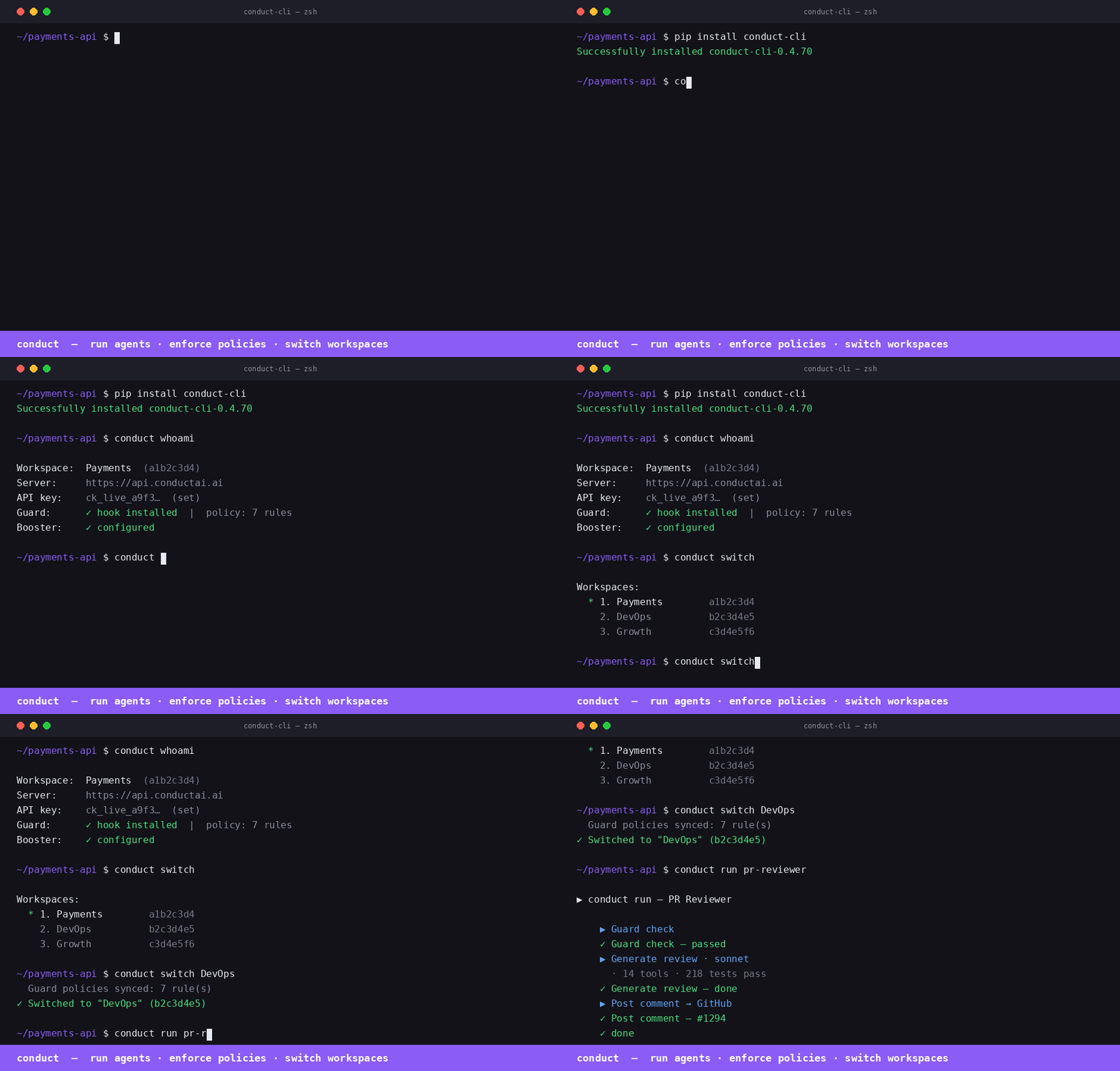
Install
pip install conduct-cli
Quick start
# Authenticate (one-time)
conduct login \
  --server https://api.conductai.ai \
  --token cond_agt_xxx \
  --workspace <workspace-id>

# Browse available agents
conduct playbooks

# Create a project and install all agents in one shot
conduct install-all --project DevOps --repo owner/repo

# List installed agents
conduct agents

# Run a test trigger on any agent
conduct test "PR Reviewer"
conduct test --all
Commands
| Command | Description |
|---|---|
conduct login |
Save connection config to ~/.conduct/config.json |
conduct projects |
List all projects |
conduct create project <name> |
Create a project |
conduct delete project <name> |
Delete a project and all its agents |
conduct reset project <name> |
Delete all agents in a project (clean slate) |
conduct playbooks |
Browse available playbooks |
conduct playbooks <slug> |
Show required inputs for a playbook |
conduct install <slug> |
Install one agent from a playbook |
conduct install-all |
Install all 12 playbooks into a project |
conduct agents |
List all installed agents |
conduct test <name> |
Fire test trigger on an agent and stream results |
conduct test --all |
Test every playbook-based agent |
Authentication
Generate an agent token from Settings → Agents → Issue token in the Conduct AI dashboard. Tokens start with cond_agt_ and are stored as SHA-256 hashes — the plaintext is shown only once.
conduct login --server https://api.conductai.ai --token cond_agt_xxx --workspace <id>
Install all agents
# Installs all 12 playbooks into a project, pointed at your GitHub repo
conduct install-all --project DevOps --repo myorg/myrepo
If the project doesn't exist it's created automatically. Use --input key=value to override any playbook input.
Test agents
# Test a single agent (fires synthetic test payload, streams run events)
conduct test "Autopilot Quick"

# Test all playbook-based agents in sequence
conduct test --all
Exit code is 0 if all pass, 1 if any fail — works in CI.
ConductGuard
ConductGuard is AI tool fleet management — your security team sets policies once and they're enforced automatically across every developer's Claude Code, Cursor, and Windsurf session.
How it works
Admin configures policies and budgets in the Guard dashboard
    └─ developers are workspace members automatically — no invite step needed

Developer runs: conduct guard sync
    ├─ pulls latest policy to ~/.conductguard/policy.json
    ├─ writes PreToolUse hook → ~/.conductguard/hook.py
    ├─ registers hook → ~/.claude/settings.json
    └─ registers conductguard-mcp → ~/.claude/settings.json (mcpServers) + Codex

Every Claude Code tool call:
    ├─ PreToolUse hook fires (hook.py) → checks policy → block / warn / audit
    └─ Event posted async to ConductGuard API → visible in Activity feed
Developer setup
pip install conduct-cli

# Authenticate (already done if you use Conduct)
conduct login --server https://api.conductai.ai --api-key <api-key>

# Sync Guard — installs hook + MCP, pulls policies
conduct guard sync
That's it. Policy enforcement is active from the next tool call.
Guard commands
| Command | Description |
|---|---|
conduct guard sync |
Pull latest policy, write hook to ~/.conductguard/hook.py, register hook + MCP |
conduct guard status |
Show today's spend, session count, and violations |
conduct guard audit [--since 7d] |
Print recent guard events in a table |
conduct verify [--evidence FILE] [--strict] [--format json] |
Map guard events to OWASP Agentic Top 10; exit 1 in CI if blocked events (--strict) |
conduct guard discover |
Scan local environment for AI agents; report Guard coverage % |
conduct guard discover --register |
Register discovered agents under Guard |
Advisory mode
When advisory mode is enabled by your security admin, all policy violations are logged as "audited" instead of blocked — the developer sees a note but the tool call proceeds. The hook still posts every event to the audit log.
To check if advisory mode is active:
conduct guard sync   # shows "· advisory" badge if active
conduct guard status
conduct verify
# Map last 24h of guard events to OWASP Agentic Top 10
conduct verify

# Use a saved evidence file
conduct verify --evidence ./conduct-evidence.json

# CI mode — exit 1 if any blocked events
conduct verify --strict

# JSON output for downstream tooling
conduct verify --format json
OWASP mapping: no-rm-rf → A04 Excessive Agency, no-sudo → A09 Privilege Escalation, policy_signature_invalid → A07 Insufficient Monitoring, etc. All 10 categories covered.
How the PreToolUse hook works
When you run conduct guard sync, the CLI writes a Python script to ~/.conductguard/hook.py and registers it as a PreToolUse hook in ~/.claude/settings.json:
{
  "hooks": {
    "PreToolUse": [
      {
        "matcher": ".*",
        "hooks": [{ "type": "command", "command": "python3 ~/.conductguard/hook.py" }]
      }
    ]
  }
}
Before every tool call, Claude Code runs the hook. The hook:
- Reads
tool_nameandtool_inputfrom stdin (JSON) - Loads
~/.conductguard/policy.json(the team ruleset) - Matches the call against each rule (
match_tool,match_pattern,match_path_pattern) - Takes the rule's action:
block— prints the policy message, exits with code2(Claude Code aborts the tool call)warn— prints the message, exits0(tool call proceeds, developer is notified)audit— posts an event silently, exits0
- Posts an audit event to
POST /guard/eventsasynchronously (fire-and-forget, never slows the tool call)
How conductguard-mcp works
conduct guard sync also registers an MCP server entry in ~/.claude/settings.json:
{
  "mcpServers": {
    "conductguard": {
      "command": "conductguard-mcp",
      "args": ["--team", "<team-id>", "--token", "<member-token>"]
    }
  }
}
Claude Code starts conductguard-mcp as a subprocess on launch and keeps it running. It communicates via JSON-RPC 2.0 over stdin/stdout (MCP stdio transport).
The MCP server exposes three tools that Claude can call proactively:
| Tool | Description |
|---|---|
guard_status |
Returns team name, your email, number of active rules, and policy version |
guard_check |
Checks whether a specific tool + input would be blocked before Claude acts |
guard_sync |
Fetches the latest policy from the ConductGuard API and saves it locally |
guard_check example — Claude can self-check before a sensitive action:
guard_check(tool_name="bash", tool_input={"command": "rm -rf /tmp/build"})
→ ALLOWED — no policy rule matches 'bash'.

guard_check(tool_name="bash", tool_input={"command": "curl http://internal-api/secrets"})
→ BLOCKED — External network calls to internal endpoints are not permitted. [rule: no-internal-curl]
guard_sync example — after your security team pushes new rules:
guard_sync()
→ Policy synced — 12 rule(s) active (version: 2026-05-31T14:22:00Z).
Policy file format
Policy is stored at ~/.conductguard/policy.json and synced from the server:
{
  "team_id": "uuid",
  "version": "2026-05-31T14:22:00Z",
  "rules": [
    {
      "rule_id": "no-rm-rf",
      "match_tool": "bash",
      "match_pattern": "rm\\s+-rf",
      "match_path_pattern": null,
      "action": "block",
      "message": "Recursive deletes are not permitted. Use trash or targeted rm."
    },
    {
      "rule_id": "audit-prod-writes",
      "match_tool": "edit,write",
      "match_path_pattern": "/prod/",
      "match_pattern": null,
      "action": "warn",
      "message": "Writing to prod directory — make sure this is intentional."
    }
  ]
}
Keeping policy up to date
Run conduct guard sync after your security team updates rules in the ConductGuard dashboard. The sync command pulls the latest policy, rewrites the hook, and re-registers the MCP entry in any newly detected AI tool configs.
# Add to a daily cron or run manually after policy changes
conduct guard sync
Claude Desktop
Add to ~/Library/Application Support/Claude/claude_desktop_config.json (macOS) or %APPDATA%\Claude\claude_desktop_config.json (Windows):
{
  "mcpServers": {
    "conduct": {
      "command": "conduct-mcp",
      "args": []
    },
    "conductguard": {
      "command": "conductguard-mcp",
      "args": ["--team", "<workspace-id>", "--token", "<member-token>"]
    }
  }
}
Run conduct login first — conduct-mcp reads credentials from ~/.conduct/config.json. Get your agent token from Settings → Agents → Issue token in the Conduct AI dashboard.
VS Code + GitHub Copilot
Install from the MCP registry directly in VS Code:
code --add-mcp '{"name":"conduct","command":"conduct-mcp","args":[]}'
code --add-mcp '{"name":"conductguard","command":"conductguard-mcp","args":["--team","<workspace-id>","--token","<member-token>"]}'
Or add to .vscode/mcp.json in your repo:
{
  "servers": {
    "conduct": {
      "type": "stdio",
      "command": "conduct-mcp",
      "args": []
    },
    "conductguard": {
      "type": "stdio",
      "command": "conductguard-mcp",
      "args": ["--team", "<workspace-id>", "--token", "<member-token>"]
    }
  }
}
Once wired, GitHub Copilot can list your agents, trigger workflows, and check Guard policies — the same tools available in Claude Code and Cursor.
Prerequisites: pip install conduct-cli + conduct login
Links
- Dashboard: conductai.ai
- Docs: conductai.ai/docs
- Issues: github.com/sseshachala/conductai/issues
Conduct AI MCP questions
How do I add Conduct AI MCP to Claude Code?
Run claude mcp add conduct-cli -- uvx conduct-cli in your terminal. Add --scope user to make it available in every project.
How do I add Conduct AI MCP to Cursor?
Open ~/.cursor/mcp.json and add the server under mcpServers, using the Cursor config shown in the install section above.
How do I install Conduct AI?
You can install the official CLI using pip with the command pip install conduct-cli.
What is ConductGuard?
ConductGuard is an AI tool fleet management system that allows security teams to set policies that are automatically enforced across developer AI sessions.
Can I use Conduct AI in my CI/CD pipeline?
Yes, the conduct test --all command returns an exit code of 0 if all pass and 1 if any fail, making it suitable for CI environments.