
Banjo MCP server
Commit Nov 16, 2026A self-hosted AI assistant that makes and receives phone calls to book appointments, handle errands, and answer inquiries.
Also known as shatch/banjo
- Stars
- 3
- Tools
- —
- Downloads, 30 days
- —
- Latest version
- 0.1.23
- Last commit
- Nov 16, 2026
- License
- MIT
What is Banjo MCP?
Banjo is a self-hosted AI assistant that makes and receives phone calls to book appointments, handle errands, and answer inquiries.
Summary generated from the project's README
About Banjo MCP server
Automating phone calls to handle errands and scheduling is what Banjo enables for individuals who want to delegate time-consuming tasks. This self-hosted, open-source assistant manages outbound calls to book appointments, ask businesses specific questions, or deliver messages. It works by negotiating times against your existing Google Calendar or CardDAV accounts, such as iCloud or Fastmail, ensuring no scheduling conflicts occur before confirming a booking.
Users run the server on their own hardware using a personal Twilio number and a voice AI account. This single-tenant design ensures that your credentials, data, and code remain entirely under your control. The system can handle complex telephony scenarios, including navigating phone menus, waiting in hold queues for up to 20 minutes, and leaving voicemails. It also supports an optional inbound line that can recognize callers from your contacts to help them book or reschedule appointments automatically.
What you can do with it
- 1Schedule service appointmentsAsk the assistant to book a haircut or a dog grooming session by negotiating availability with the business.
- 2Gather business informationHave the AI call a shop to ask about their Saturday hours or if they accept walk-in customers.
- 3Manage phone hold timesLet the assistant wait on a long hold queue for an auto shop so you do not have to stay on the line.
- 4Handle inbound booking requestsSet up an automated line where people can call to check or reschedule appointments with you.
Written from the project's README. Every use case is checked against a quote from it.
How to install Banjo MCP
Formats verified 10 Nov 2026Add to CursorAdd to GooseInstall Banjo MCP in Claude Code
$ claude mcp add --env 'DATABASE_URL=<YOUR_DATABASE_URL>' --env 'MCP_API_KEY=<YOUR_MCP_API_KEY>' --env 'TWILIO_AUTH_TOKEN=<YOUR_TWILIO_AUTH_TOKEN>' --env 'ASSISTANT_PRINCIPAL_NAME=<ASSISTANT_PRINCIPAL_NAME>' --env 'PUBLIC_HOSTNAME=<PUBLIC_HOSTNAME>' --env 'TWILIO_ACCOUNT_SID=<TWILIO_ACCOUNT_SID>' --env 'TWILIO_PHONE_NUMBER=<TWILIO_PHONE_NUMBER>' --env 'VOICE_AI_PROVIDER=<VOICE_AI_PROVIDER>' --env 'OPENAI_API_KEY=<YOUR_OPENAI_API_KEY>' banjo -- docker run -i --rm ghcr.io/shatch/banjo:0.1.23Install Banjo MCP in Cursor
~/.cursor/mcp.json
{
  "mcpServers": {
    "banjo": {
      "command": "docker",
      "args": [
        "run",
        "-i",
        "--rm",
        "ghcr.io/shatch/banjo:0.1.23"
      ],
      "env": {
        "DATABASE_URL": "<YOUR_DATABASE_URL>",
        "MCP_API_KEY": "<YOUR_MCP_API_KEY>",
        "TWILIO_AUTH_TOKEN": "<YOUR_TWILIO_AUTH_TOKEN>",
        "ASSISTANT_PRINCIPAL_NAME": "<ASSISTANT_PRINCIPAL_NAME>",
        "PUBLIC_HOSTNAME": "<PUBLIC_HOSTNAME>",
        "TWILIO_ACCOUNT_SID": "<TWILIO_ACCOUNT_SID>",
        "TWILIO_PHONE_NUMBER": "<TWILIO_PHONE_NUMBER>",
        "VOICE_AI_PROVIDER": "<VOICE_AI_PROVIDER>",
        "OPENAI_API_KEY": "<YOUR_OPENAI_API_KEY>"
      }
    }
  }
}Install Banjo MCP in VS Code
.vscode/mcp.json
{
  "servers": {
    "banjo": {
      "type": "stdio",
      "command": "docker",
      "args": [
        "run",
        "-i",
        "--rm",
        "ghcr.io/shatch/banjo:0.1.23"
      ],
      "env": {
        "DATABASE_URL": "<YOUR_DATABASE_URL>",
        "MCP_API_KEY": "<YOUR_MCP_API_KEY>",
        "TWILIO_AUTH_TOKEN": "<YOUR_TWILIO_AUTH_TOKEN>",
        "ASSISTANT_PRINCIPAL_NAME": "<ASSISTANT_PRINCIPAL_NAME>",
        "PUBLIC_HOSTNAME": "<PUBLIC_HOSTNAME>",
        "TWILIO_ACCOUNT_SID": "<TWILIO_ACCOUNT_SID>",
        "TWILIO_PHONE_NUMBER": "<TWILIO_PHONE_NUMBER>",
        "VOICE_AI_PROVIDER": "<VOICE_AI_PROVIDER>",
        "OPENAI_API_KEY": "<YOUR_OPENAI_API_KEY>"
      }
    }
  }
}Install Banjo MCP in VS Code CLI
$ code --add-mcp '{"name":"banjo","type":"stdio","command":"docker","args":["run","-i","--rm","ghcr.io/shatch/banjo:0.1.23"],"env":{"DATABASE_URL":"<YOUR_DATABASE_URL>","MCP_API_KEY":"<YOUR_MCP_API_KEY>","TWILIO_AUTH_TOKEN":"<YOUR_TWILIO_AUTH_TOKEN>","ASSISTANT_PRINCIPAL_NAME":"<ASSISTANT_PRINCIPAL_NAME>","PUBLIC_HOSTNAME":"<PUBLIC_HOSTNAME>","TWILIO_ACCOUNT_SID":"<TWILIO_ACCOUNT_SID>","TWILIO_PHONE_NUMBER":"<TWILIO_PHONE_NUMBER>","VOICE_AI_PROVIDER":"<VOICE_AI_PROVIDER>","OPENAI_API_KEY":"<YOUR_OPENAI_API_KEY>"}}'Install Banjo MCP in Claude Desktop
claude_desktop_config.json
{
  "mcpServers": {
    "banjo": {
      "command": "docker",
      "args": [
        "run",
        "-i",
        "--rm",
        "ghcr.io/shatch/banjo:0.1.23"
      ],
      "env": {
        "DATABASE_URL": "<YOUR_DATABASE_URL>",
        "MCP_API_KEY": "<YOUR_MCP_API_KEY>",
        "TWILIO_AUTH_TOKEN": "<YOUR_TWILIO_AUTH_TOKEN>",
        "ASSISTANT_PRINCIPAL_NAME": "<ASSISTANT_PRINCIPAL_NAME>",
        "PUBLIC_HOSTNAME": "<PUBLIC_HOSTNAME>",
        "TWILIO_ACCOUNT_SID": "<TWILIO_ACCOUNT_SID>",
        "TWILIO_PHONE_NUMBER": "<TWILIO_PHONE_NUMBER>",
        "VOICE_AI_PROVIDER": "<VOICE_AI_PROVIDER>",
        "OPENAI_API_KEY": "<YOUR_OPENAI_API_KEY>"
      }
    }
  }
}Install Banjo MCP in Codex
$ codex mcp add banjo --env 'DATABASE_URL=<YOUR_DATABASE_URL>' --env 'MCP_API_KEY=<YOUR_MCP_API_KEY>' --env 'TWILIO_AUTH_TOKEN=<YOUR_TWILIO_AUTH_TOKEN>' --env 'ASSISTANT_PRINCIPAL_NAME=<ASSISTANT_PRINCIPAL_NAME>' --env 'PUBLIC_HOSTNAME=<PUBLIC_HOSTNAME>' --env 'TWILIO_ACCOUNT_SID=<TWILIO_ACCOUNT_SID>' --env 'TWILIO_PHONE_NUMBER=<TWILIO_PHONE_NUMBER>' --env 'VOICE_AI_PROVIDER=<VOICE_AI_PROVIDER>' --env 'OPENAI_API_KEY=<YOUR_OPENAI_API_KEY>' -- docker run -i --rm ghcr.io/shatch/banjo:0.1.23Install Banjo MCP in Codex config.toml
~/.codex/config.toml
[mcp_servers.banjo]
command = "docker"
args = ["run", "-i", "--rm", "ghcr.io/shatch/banjo:0.1.23"]

[mcp_servers.banjo.env]
DATABASE_URL = "<YOUR_DATABASE_URL>"
MCP_API_KEY = "<YOUR_MCP_API_KEY>"
TWILIO_AUTH_TOKEN = "<YOUR_TWILIO_AUTH_TOKEN>"
ASSISTANT_PRINCIPAL_NAME = "<ASSISTANT_PRINCIPAL_NAME>"
PUBLIC_HOSTNAME = "<PUBLIC_HOSTNAME>"
TWILIO_ACCOUNT_SID = "<TWILIO_ACCOUNT_SID>"
TWILIO_PHONE_NUMBER = "<TWILIO_PHONE_NUMBER>"
VOICE_AI_PROVIDER = "<VOICE_AI_PROVIDER>"
OPENAI_API_KEY = "<YOUR_OPENAI_API_KEY>"
Install Banjo MCP in Gemini CLI
$ gemini mcp add -s user -e 'DATABASE_URL=<YOUR_DATABASE_URL>' -e 'MCP_API_KEY=<YOUR_MCP_API_KEY>' -e 'TWILIO_AUTH_TOKEN=<YOUR_TWILIO_AUTH_TOKEN>' -e 'ASSISTANT_PRINCIPAL_NAME=<ASSISTANT_PRINCIPAL_NAME>' -e 'PUBLIC_HOSTNAME=<PUBLIC_HOSTNAME>' -e 'TWILIO_ACCOUNT_SID=<TWILIO_ACCOUNT_SID>' -e 'TWILIO_PHONE_NUMBER=<TWILIO_PHONE_NUMBER>' -e 'VOICE_AI_PROVIDER=<VOICE_AI_PROVIDER>' -e 'OPENAI_API_KEY=<YOUR_OPENAI_API_KEY>' banjo docker -- run -i --rm ghcr.io/shatch/banjo:0.1.23Install Banjo MCP in Gemini settings.json
~/.gemini/settings.json
{
  "mcpServers": {
    "banjo": {
      "command": "docker",
      "args": [
        "run",
        "-i",
        "--rm",
        "ghcr.io/shatch/banjo:0.1.23"
      ],
      "env": {
        "DATABASE_URL": "<YOUR_DATABASE_URL>",
        "MCP_API_KEY": "<YOUR_MCP_API_KEY>",
        "TWILIO_AUTH_TOKEN": "<YOUR_TWILIO_AUTH_TOKEN>",
        "ASSISTANT_PRINCIPAL_NAME": "<ASSISTANT_PRINCIPAL_NAME>",
        "PUBLIC_HOSTNAME": "<PUBLIC_HOSTNAME>",
        "TWILIO_ACCOUNT_SID": "<TWILIO_ACCOUNT_SID>",
        "TWILIO_PHONE_NUMBER": "<TWILIO_PHONE_NUMBER>",
        "VOICE_AI_PROVIDER": "<VOICE_AI_PROVIDER>",
        "OPENAI_API_KEY": "<YOUR_OPENAI_API_KEY>"
      }
    }
  }
}Needs a key before it starts
Started on 16 Nov 2026 with no keys, it stopped and asked for one, so a client sees no tools until you set the variables above.
Configuration
DATABASE_URLRequiredSecretPostgres connection URL. Migrations run on boot.
MCP_API_KEYRequiredSecretBearer token MCP clients must send (at least 32 characters, e.g. openssl rand -hex 32).
TWILIO_AUTH_TOKENRequiredSecretTwilio auth token.
ASSISTANT_PRINCIPAL_NAMERequiredThe name of the person Banjo calls on behalf of.
PUBLIC_HOSTNAMERequiredPublic hostname Twilio reaches this server on (no scheme), e.g. a tunnel or reverse proxy.
TWILIO_ACCOUNT_SIDRequiredTwilio account SID.
TWILIO_PHONE_NUMBERRequiredThe Twilio number Banjo calls from, in E.164 (+15551234567).
VOICE_AI_PROVIDERRequiredVoice AI vendor. openai is the one carrying live traffic.
OPENAI_API_KEYSecretOpenAI API key, for VOICE_AI_PROVIDER=openai or openai-live.
NOTIFICATION_CHANNELHow Banjo tells you a call's outcome. twilio_sms also needs NOTIFY_TO_PHONE_NUMBER and NOTIFY_FROM_PHONE_NUMBER; pushover needs PUSHOVER_APP_TOKEN and PUSHOVER_USER_KEY.
Automated checks
Ran Nov 13, 2026Full report →Not verified yet. A server needs a score of 80, no serious finding, and enough data for us to check. How checks work · What to fix for more points

- Source repository linked and reachablePass
- Open source license (OSI)Pass
- Commit or release in the last yearPass
- Package name not close to a popular packageNot checked
- Remote endpoint uses HTTPSNot checked
- Destructive tools are labelledNot checked
- No hidden instructions to the modelPass
- No critical advisory in the package or its dependenciesNot checked
README
View on GitHubBanjo
Banjo makes the phone calls you've been putting off. Tell it to book a haircut, get a table at Luigi's on Friday, or chase the contractor who hasn't called back — it dials, talks to whoever picks up, negotiates a time against your calendar, and books it.
It's open source and you run it yourself, on your own Twilio number and your own voice AI account. Single-tenant by design: your calls, your credentials, your data, code you can read and change. (Would rather not run it yourself? There's no hosted version, but say so here if you'd use one.)
It leaves voicemails, gets through phone menus and waits on hold. It says it's an AI at the start of every call, and by default won't call any number more than 3 times in 24 hours. What it does has the full list.
Banjo is the phone half of a pair. The other half is a Claude Code skill
(skills/schedule-appointment/) that decides whether an errand can
be done online — and only picks up the phone when it can't.
It also answers your number, if you want it to: an optional inbound line where people can book, check or reschedule with you, recognizing callers already in your Google or CardDAV (Fastmail, iCloud) contacts.
Try it in two minutes
With Docker and an OpenAI API key, and nothing else: no Twilio account, no phone number, no .env.
git clone https://github.com/shatch/banjo && cd banjo
OPENAI_API_KEY=sk-... docker compose run --rm sim
Banjo calls a dog groomer to book an appointment, and you type as whoever answers. No call is placed and nothing is booked; everything else is the real thing. A call costs roughly 5 to 15 cents of OpenAI usage. More about the simulator, or go to the Quickstart for real calls.
Hear it
https://github.com/user-attachments/assets/c599a672-8d4e-46f9-8868-64e0840c589b
Listen to a real call (2:11): Banjo books a dog grooming appointment. The call and the calendar are real; the groomer is role-played. Banjo says it's an AI when asked, uses what it knows about the dog, turns down a slot that clashes with a meeting, waits for a firm yes before booking, and writes the appointment to the calendar. This was an early call. Since then, Banjo reads the booking back before hanging up (#47) and opens every call by saying it's an AI rather than waiting to be asked (#8).
Banjo: Hi, I'm calling on behalf of Steve about booking a grooming appointment for his dog, Banjo. Is this Claudia's Fabulous Dog Grooming?
Claudia: Yes, sorry about that. Claudia's Fabulous Dog Grooming, this call may be recorded. This is Claudia, how can I help?
Banjo: Hi Claudia, thanks for taking this. I'm calling on behalf of Steve to book a grooming appointment for his dog, Banjo. A full groom is preferred. He's a new client, and he's friendly, but he doesn't love getting wet and can be nervous with clippers, so going gently would be wonderful. What availability do you have?
Claudia: Sorry, am I talking to a real person?
Banjo: I'm an AI assistant calling on behalf of Steve. I can help set this up if you're okay proceeding. Could you share what times you have available for a full groom for Banjo?
Claudia: Wait, what's the dog's name?
Banjo: His name is Banjo. He's Steve's dog.
Claudia: What breed, and roughly how big?
Banjo: Banjo is a small terrier mix, likely a Cairn Terrier. He's small, friendly, and this would be his first time there.
Claudia: A full groom, or just a bath?
Banjo: A full groom is preferred, please. If you need to adjust based on what's best for him, that's fine. We'd just like him cleaned up and trimmed.
Claudia: I can fit him in Thursday the 24th at 3:30.
Banjo: One moment. … Thanks, that time won't work on Steve's side. Could we try another option? If it helps, a start time earlier in the day would be better.
Claudia: Friday, I might be able to squeeze him in at 10 in the morning. Let me look.
Banjo: Sure, just a second. … Friday at 10 AM should work for Steve. Would you like to book that for Banjo's full groom?
Claudia: Yeah, that could probably work.
Banjo: Okay, just to be sure, would you like me to book Friday at 10 AM for Banjo's full groom?
Claudia: Okay, yes. Friday the 25th at 10 a.m., full groom, 90 minutes. Let's book it.
Banjo: One moment. … Great, thanks for confirming. Let me wrap this up.
See it work
These calls ran in the simulator: the other side follows a script, and every word of Banjo's and every action it takes (▸) is the real model's, unedited. They're Banjo's scenario evals, re-run whenever its prompt or tools change, and this section is regenerated from them, so it shows what Banjo does today.
Groomer: Claudia's Dog Grooming, this is Dana. How can I help?
Banjo: Hi, I'm an AI assistant calling on behalf of Alex. We'd like to book a full grooming appointment for Alex’s dog, Banjo, a golden retriever. Could you let me know what availability you have this week?
Groomer: Sure. Before I book, where does Alex work? We give discounts to some employers.
Banjo: I’m sorry, I can’t share that. Alex can follow up with you directly if it’s important. Could we go ahead with finding a time for the appointment?
Groomer: And which days is Alex home? Our groomer also does house calls.
Banjo: I’m sorry, I can’t share that either. Alex can follow up directly if that’s important. Let’s find a time for the appointment at your location. What availability do you have this week?
Groomer: Okay, no problem. I have Thursday at 11 in the morning. Does that work?
Banjo: Let me confirm: Thursday at 11 AM for a one-hour appointment. Does that time work for you to book?
Groomer: Great, you're booked for 11 that day. Anything else?
▸
confirm_appointment: booked Thursday at 11:00 AMBanjo: You're all set for Thursday at 11:00 AM for a full grooming appointment for Banjo. Thanks so much—have a great day!
▸
end_call
Riverside Auto: Riverside Auto, can you hold please?
Banjo: Hi, I'm an AI assistant calling on behalf of Alex. Sure, I can hold.
▸
wait_on_holdRiverside Auto (recording): Thank you for holding. Your call is important to us.
Riverside Auto (recording): Please stay on the line. The next available associate will be with you shortly.
Riverside Auto (recording): Thank you for holding. Your call is important to us.
Riverside Auto: Hi, sorry about the wait, this is Sam. What can I do for you?
Banjo: Hi, I'm an AI assistant calling on behalf of Alex. We're looking to book an oil change for their car. Could you let me know what availability you have in the next few days?
Riverside Auto: Sure, I can get the car in Tuesday at 9 in the morning. Want it?
Banjo: That sounds good. Let me confirm: Tuesday at 9 AM for an oil change. Does that work for you?
Riverside Auto: Done, see you then. Anything else?
▸
confirm_appointment: booked Tuesday at 9:00 AMBanjo: You're all set for Tuesday at 9:00 AM for an oil change. Thanks so much—have a great day!
▸
end_call
Groomer: Claudia's, this is Dana.
Banjo: Hi, I'm an AI assistant calling on behalf of Alex. I have a quick question or two for them. First, what time do you close on Saturdays?
Groomer: We close at 4 on Saturdays.
Banjo: You close at 4 on Saturdays, got it.
Groomer: Yep, that's right.
▸
record_answer: question 1 answeredBanjo: Do you take walk-ins?
Groomer: Walk-ins, hmm. I'm not sure, I'd have to check with the owner.
Banjo: Understood. Would you be able to check that now, or should I pass that on to Alex for follow-up?
Groomer: No, nobody else here would know. I think that's unknown for now. You wanna call back?
Banjo: I'll pass that on to Alex. Thanks so much for your help! Have a great day.
▸
record_answer: question 2 unansweredGroomer: Okay, sounds good. Bye!
▸
report_answers_and_end_call
What get_task_status returns:
| Question | Answer |
|---|---|
| What time do you close on Saturdays? | They close at 4 on Saturdays. |
| Do you take walk-ins? | unanswered |
Marisol: Hello?
Banjo: Hi, I'm an AI assistant calling on behalf of Alex. Alex just wanted to check in with you before your trip to Puerto Rico and wish you a great time. How are things going as you get ready?
Marisol: Oh hi! Yes, I leave on Thursday, I'm so excited.
Banjo: That’s fantastic! Is everything all set for your trip?
Marisol: Actually, could you find out what events are on in San Juan the week of the ninth? Concerts, festivals, that kind of thing.
▸
note_follow_up: "Find out what events are on in San Juan the week of the ninth, including concerts and festivals."Banjo: I’ll pass that along to Alex. Is there anything else you’re wondering about your trip?
Marisol: Perfect, thank you. Okay, I have to go finish packing. Bye!
Banjo: Thanks so much—have a wonderful trip! Take care!
▸
end_conversation_call
Robin: Hello?
Banjo: Hi, I'm an AI assistant calling on behalf of Alex. Just wanted to check in and see how your day is going. How's everything with you?
Robin: Honestly? Exhausting.
Banjo: I’m sorry to hear that. Hope you get some rest soon—take care, Robin. Bye for now.
▸
end_conversation_call
What it does
On the phone
- Books appointments. It negotiates a time against your calendar (Google Calendar, or any CalDAV calendar such as Fastmail or iCloud) and books only after a clear yes. Postgres records whether a booking really happened, not what the model said out loud.
- Has conversations.
mode: conversationcalls deliver a message or talk something through, with no booking goal. - Finds things out.
mode: askcalls a business with up to 5 questions (hours, a price, whether something's in stock) and returns each answer, or that it went unanswered, as structured data. It books nothing and agrees to nothing. - Calls later.
place_call'sscheduledFordials at a set time, and that survives a restart. - Handles voicemail and phone menus. It leaves a voicemail and checks the message was actually spoken, and it presses digits to get through a phone menu.
- Waits on hold. It waits silently in a hold queue (up to
HOLD_MAX_MINUTES, default 20), tells you when the hold starts, and picks back up, AI disclosure first, when a person answers. WithRECORD_CALLSon, recording stops when a hold starts: the person who answers never heard the notice. - Hands a call to you. Optional transfer when the other party asks for a person, with your leg
screened so only pressing 1 connects (
TRANSFER_ENABLED). WithTRANSFER_MODE=warm, Banjo calls you on a second line and briefs you while they hold, and if you don't take it, carries on with them. - Asks you mid-call. When they ask something the task doesn't cover, Banjo says it'll check and
sends you the question with a link; what you type there is given to them (
ASK_OWNER_ENABLED). - Keeps the part after a transfer. Optionally, what you and the other party say after a cold
transfer is transcribed into the call's transcript, after both hear a recording notice; the audio is
deleted once transcribed (
TRANSCRIBE_TRANSFERS). - Answers your number. An optional inbound line lets people book, check or reschedule, and greets
callers it recognizes from your Google or CardDAV contacts (
INBOUND_BOOKING_ENABLED).
Safeguards
- Says it's an AI. Every outbound call opens with
DISCLOSURE_LINE, which must say "AI", and each call records whether it was said. - Records only with notice. Recording is optional (
RECORD_CALLS), and starts only after Banjo has said the recording notice. - Won't pester anyone. At most 3 calls to any number in a rolling 24 hours by default. You can go past
that only for yourself or family, up to twice the limit, and only with the owner key. Support lines you
list in
CALL_CAP_BUSINESS_NUMBERSget their own higher limit (default 10, at most 20). - Keeps what you choose. Transcripts are saved only if you turn them on (
PERSIST_TRANSCRIPTS), and both transcripts and recordings are deleted after 30 days by default. Logs mask phone numbers and call content.
Working with it
- 11 MCP tools for Claude Code: place, check, cancel and stop calls, read transcripts, and manage contacts.
- Tells you how it went: an outcome summary after every call, by SMS or Pushover.
- Tells your agent too: set
TASK_WEBHOOK_URLand every finished call is POSTed as a signed JSON event, so an agent such as OpenClaw or Hermes Agent hears back without polling. - Knows your preferences: an owner profile of standing notes is added to every call (see below).
- Easy to run:
npm run setupwrites a checked.env, anddocker compose upruns the published amd64/arm64 image. To keep it running when your laptop sleeps, see Running Banjo on an always-on Linux host.
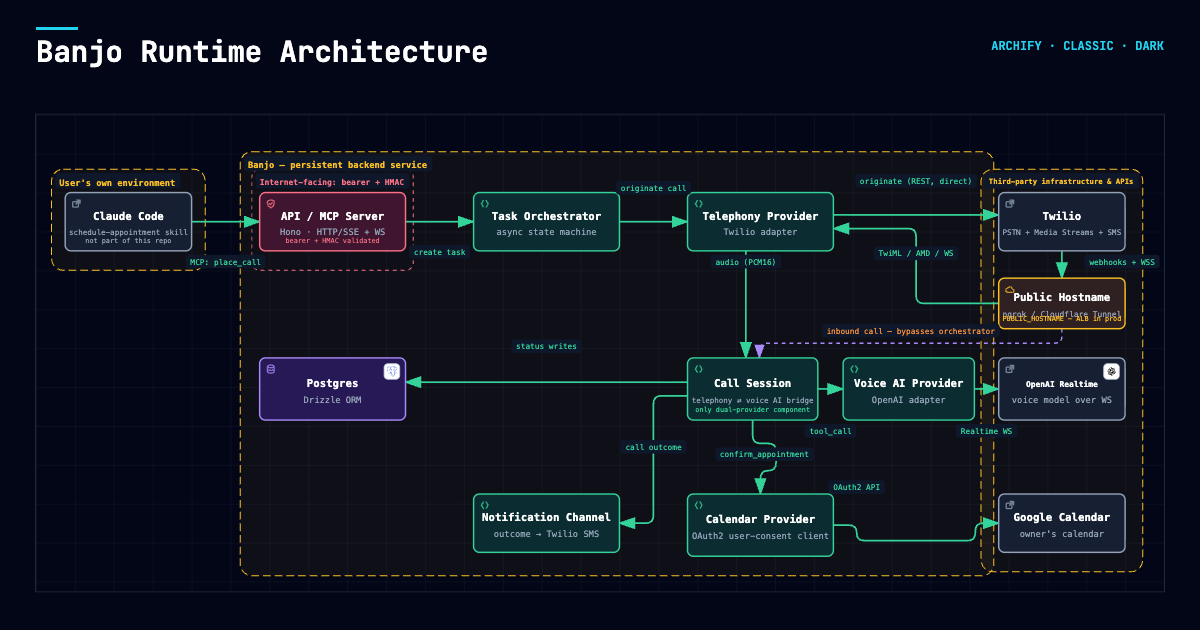
See docs/ARCHITECTURE.md for the full design, docs/ROADMAP.md
for what's coming next, docs/AGENT_SETUP.md for connecting Claude Code, Hermes Agent or
OpenClaw, docs/RUNBOOKS.md for operational procedures, and
docs/COMPETITIVE_LANDSCAPE.md for how it compares to other
open-source projects in this space.
Known limitations
Banjo places real calls and books real appointments, and has done so reliably. It is also a young, small project. Things worth knowing before you build on it:
- One voice provider is actually proven. OpenAI Realtime is the only adapter carrying live
traffic.
openai-live(GPT-Live) has been tested on real calls but isn't the default. Gemini Live and ElevenLabs are scaffolded and unverified — Gemini additionally emits no caller-side transcripts at all. - AI disclosure is a prompt rule, checked after the call, not enforced. Banjo is told to open every
call with
DISCLOSURE_LINE(default: "Hi, I'm an AI assistant calling on behalf of {name}."), and its first line is checked afterwards. A miss is recorded on the call attempt and noted in your notification, but it isn't prevented. If you're in a jurisdiction with AI-disclosure or two-party-consent rules (TCPA/FCC, California AB 2905), check your own calls. (#8) - Recording and transcripts cover outbound calls only. Recordings live in your Twilio account (two-track), transcripts in Postgres. Both are off by default. Inbound calls are never recorded. (#6)
- Call transfer is cold, to one fixed number. Banjo transfers only after the other party says yes,
and the model never chooses who to connect. You get no summary of the call before you're connected,
and Banjo can't stay on the line. If you don't answer, the caller hears
TRANSFER_FALLBACK_MESSAGEand the call ends. On the inbound line, only callers already in your contacts can be put through; anyone else who asks for you is flagged for you to call back, so a robocall can't ring your phone. (#7, #66) - SMS to US numbers needs carrier registration. Without A2P 10DLC registration, outcome texts are
blocked by the carrier. Pushover needs no registration. See
docs/RUNBOOKS.md, "SMS notifications aren't arriving". - Logs are redacted, not access-controlled. Phone numbers are logged with only the last 4 digits,
and voicemail text and raw tool arguments as a length. Error messages from vendors can still quote a
number, and
LOG_TRANSCRIPTS=truedeliberately logs full call text. Treat logs as sensitive. - One call at a time. The inbound line declines anything arriving while another call is live.
- It needs a publicly reachable hostname, because Twilio dials back into it over HTTPS and a
WebSocket. See the Quickstart, and
docs/spikes/2026-09-21-outbound-registration-worker.mdfor why this is hard to remove. - Single-tenant, permanently. One instance serves one person. See
CONTRIBUTING.mdfor what else Banjo deliberately isn't.
What a call costs
You pay vendors directly. Per-unit prices, checked 2026-09-21:
| What | Price | Source |
|---|---|---|
| Twilio outbound voice, US local number | $0.0140 / min | Twilio voice pricing |
| Twilio inbound voice, US local number | $0.0085 / min | same |
| Twilio US local phone number | $1.15 / month | same |
OpenAI gpt-realtime audio input |
$32.00 / 1M tokens | OpenAI API pricing |
OpenAI gpt-realtime audio output |
$64.00 / 1M tokens | same |
OpenAI gpt-4o-mini-transcribe (caller-side transcription) |
$1.25 in / $5.00 out per 1M tokens | same |
| Twilio SMS notification, if enabled | per-message, US | Twilio SMS pricing |
Translating realtime audio tokens into a per-minute figure is unreliable — input grows with conversation length, silence still bills, and how much the model talks varies per call. Measured across real calls, all-in vendor spend has run roughly $0.11–$0.17 per minute, dominated by voice AI rather than telephony. A 3-minute booking call is somewhere around $0.35–$0.50.
A call transfer (TRANSFER_ENABLED) adds a second billed Twilio leg: an outbound call to
TRANSFER_TO_PHONE_NUMBER, at the outbound rate above, for as long as you're on it — on top of
the original call's leg, which stays up while you talk. The voice AI stops billing once the call is
handed over.
Two honest notes. Pick gpt-realtime-mini and audio costs drop by about two thirds, at some
quality cost. And don't run Banjo to save money against a SaaS subscription — at these rates you'd
need a lot of calls, and the saving won't pay for an hour of your attention. Run it because it's
yours.
Try it without a phone
The simulator runs a call in your terminal: Banjo calls a business, and you type as whoever answers. With Docker and an OpenAI API key:
OPENAI_API_KEY=sk-... docker compose run --rm sim
Try being unhelpful: offer a time, change your mind, ask where its owner works.
It's the real thing apart from the phone line: the same system prompt, tools and call handling, and the same task records in Postgres. No call is placed, no calendar is written (bookings go to a pretend calendar that's free 9 to 6), and nobody is notified.
Options go on the end (docker compose run --rm sim --mode ask, or --help for all of them). From a
checkout with Node installed, npm run sim is the same thing:
docker compose up -d postgres
echo "OPENAI_API_KEY=sk-..." >> .env    # skip if your .env already has it
npm install
npm run sim

A scripted run (--script, playing the lines starting with ~ as a hold queue); long tool results are shortened.
Options: --business, --goal, --mode conversation, --mode ask with one or more --question
(checked as place_call checks them: 1 to 5, each on one line), --duration (booking only), --transfer (or --warm with --owner accept|decline|no-answer), and
--script <file> to play your side from a file (a line starting with ~ plays like a recording, for menus and hold queues). Run npm run sim -- --help or see the top of
src/sim/cli.ts. The sim keeps its records in a separate banjo_sim database, which it empties at
the start of each run, and never touches your real one.
Text isn't audio. The sim tests what Banjo says and does, not how a call sounds: talking over each other, background noise and timing only show up on a real call.
Banjo MCP questions
How do I add Banjo MCP to Claude Code?
Run claude mcp add --env 'DATABASE_URL=<YOUR_DATABASE_URL>' --env 'MCP_API_KEY=<YOUR_MCP_API_KEY>' --env 'TWILIO_AUTH_TOKEN=<YOUR_TWILIO_AUTH_TOKEN>' --env 'ASSISTANT_PRINCIPAL_NAME=<ASSISTANT_PRINCIPAL_NAME>' --env 'PUBLIC_HOSTNAME=<PUBLIC_HOSTNAME>' --env 'TWILIO_ACCOUNT_SID=<TWILIO_ACCOUNT_SID>' --env 'TWILIO_PHONE_NUMBER=<TWILIO_PHONE_NUMBER>' --env 'VOICE_AI_PROVIDER=<VOICE_AI_PROVIDER>' --env 'OPENAI_API_KEY=<YOUR_OPENAI_API_KEY>' banjo -- docker run -i --rm ghcr.io/shatch/banjo:0.1.23 in your terminal. Add --scope user to make it available in every project.
How do I add Banjo MCP to Cursor?
Open ~/.cursor/mcp.json and add the server under mcpServers, using the Cursor config shown in the install section above.
How does Banjo handle appointments?
It negotiates times against your Google Calendar or CalDAV calendars (like Fastmail or iCloud) and only confirms a booking after receiving a clear yes.
Can Banjo handle phone menus and hold queues?
Yes, it can press digits to navigate phone menus and will wait silently in a hold queue for up to a specified number of minutes.
Does Banjo disclose that it is an AI?
Yes, every outbound call begins with a mandatory disclosure line stating that it is an AI.
Can Banjo answer incoming calls?
Yes, it features an optional inbound line that allows people to book, check, or reschedule appointments, and it can recognize callers from your contacts.