
Provides AI agents with local memory and context by managing tasks, notes, and documents as Markdown files on your disk.
Also known as rgdevment/mcp-plugins, tisty-mcp
- Stars
- 1
- Tools
- —
- Downloads, 30 days
- —
- Latest version
- —
- Last commit
- Nov 14, 2026
- License
- Apache-2.0
What is Tisty MCP?
Tisty provides AI agents with local memory and context by managing tasks, notes, and documents as Markdown files on your disk.
Summary generated from the project's README
About Tisty MCP server
Giving AI agents a persistent memory through local Markdown files is what mcp-plugins enables. By using the Tisty plugin, developers can prevent assistants from forgetting context between sessions. The system manages tasks with specific steps, dated journals, and subject-based documents directly on your Windows or macOS disk. This setup ensures that every stage of an agent's work, from initial planning to final decisions, is recorded in an auditable format rather than being lost in a chat history.
To use this, you need the Tisty app and Node.js installed on your computer. You can connect via Claude Code, Gemini CLI, or Cursor. The Tisty plugin uses a small launcher to connect your assistant to the local app, ensuring the server always matches your data. It functions without accounts, subscriptions, or telemetry, keeping all information private on your own hardware. The agent can read long documents by section, file tasks into folders, and manage sticky notes in Brainstorm to organize ideas.
What you can do with it
- 1Maintaining long-term project contextAsk your AI agent to retrieve information from previous sessions by accessing stored Markdown documents.
- 2Managing structured task workflowsHave an assistant break down complex work into specific steps and track progress using dated tasks.
- 3Efficiently reading large filesInstruct an agent to analyze specific parts of a document instead of processing the entire file at once.
- 4Organizing spontaneous ideasUse the Brainstorm feature to capture quick thoughts that can later be converted into formal tasks or documents.
Written from the project's README. Every use case is checked against a quote from it.
How to install Tisty MCP
Formats verified 10 Nov 2026Add to CursorAdd to GooseInstall Tisty MCP in Claude Code
$ claude mcp add mcp-plugins -- npx -y tisty-mcpInstall Tisty MCP in Cursor
~/.cursor/mcp.json
{
  "mcpServers": {
    "mcp-plugins": {
      "command": "npx",
      "args": [
        "-y",
        "tisty-mcp"
      ]
    }
  }
}Install Tisty MCP in VS Code
.vscode/mcp.json
{
  "servers": {
    "mcp-plugins": {
      "type": "stdio",
      "command": "npx",
      "args": [
        "-y",
        "tisty-mcp"
      ]
    }
  }
}Install Tisty MCP in VS Code CLI
$ code --add-mcp '{"name":"mcp-plugins","type":"stdio","command":"npx","args":["-y","tisty-mcp"]}'Install Tisty MCP in Claude Desktop
claude_desktop_config.json
{
  "mcpServers": {
    "mcp-plugins": {
      "command": "npx",
      "args": [
        "-y",
        "tisty-mcp"
      ]
    }
  }
}Install Tisty MCP in Codex
$ codex mcp add mcp-plugins -- npx -y tisty-mcpInstall Tisty MCP in Codex config.toml
~/.codex/config.toml
[mcp_servers.mcp-plugins]
command = "npx"
args = ["-y", "tisty-mcp"]
Install Tisty MCP in Gemini CLI
$ gemini mcp add -s user mcp-plugins npx -- -y tisty-mcpInstall Tisty MCP in Gemini settings.json
~/.gemini/settings.json
{
  "mcpServers": {
    "mcp-plugins": {
      "command": "npx",
      "args": [
        "-y",
        "tisty-mcp"
      ]
    }
  }
}Automated checks
Ran Nov 14, 2026Full report →Passed our automated checks. That is not a security audit: read the code and give the server the narrowest access it needs. How checks work

- Source repository linked and reachablergdevment/mcp-plugins is public and reachablegithub.com/rgdevment/mcp-plugins ↗Pass
- Package names this repository as its sourcetisty-mcp names rgdevment/mcp-plugins as sourcenpmjs.com/package/tisty-mcp ↗Pass
- Build provenance (Sigstore attestation)Sigstore attestation for tisty-mcpnpmjs.com/package/tisty-mcp/v/1.3.1#provenance ↗Pass
- Open source license (OSI)Apache-2.0spdx.org/licenses/Apache-2.0.html ↗Pass
- Commit or release in the last yearLast commit or release 2026-11-12github.com/rgdevment/mcp-plugins ↗Pass
- OpenSSF ScorecardNot checked
- Package name not close to a popular packageNo popular package one edit away from tisty-mcpPass
- No critical advisory in the package or its dependenciesNot checked
- No hidden instructions to the model0 tool descriptions and the README read; no override phrases, credential paths or hidden charactersPass
- Destructive tools are labelledNot checked
- Remote endpoint answers the MCP handshakeNot checked
README
View on GitHubmcp-plugins
Plugins that connect assistants to apps by rgdevment. Each plugin brings an app's MCP server and a skill that teaches the assistant how to work with it. The apps run on your own computer; the plugins only tell your assistant how to reach them.
Install
Claude Code, in one step:
/plugin install tisty --marketplace rgdevment/mcp-plugins
Or add the marketplace first and install from it:
/plugin marketplace add rgdevment/mcp-plugins
/plugin install tisty@rgdevment
Gemini CLI:
gemini extensions install https://github.com/rgdevment/mcp-plugins
Cursor: install from the Cursor Directory, or add this repository as a plugin source in Cursor's settings.
Plugins
Tisty
Local memory and context for you and your AI agent. Your agent forgets everything when the session ends; Tisty keeps it. Tasks with steps and a dated journal, and documents one per subject, as plain Markdown on your own disk, for Windows and macOS. Ideas caught on the fly wait as sticky notes in Brainstorm, to become a task or go into a document later. No account, no subscription, no telemetry, no server. With the plugin, your assistant picks up where it left off by asking what moved since last time, reads a long document by its outline and one section instead of the whole file, files tasks with steps and dates, sets reminders, writes and edits documents passage by passage, files them into folders, jots and sorts ideas with you and searches open and archived work. It never closes or deletes anything: it says a task is done and you confirm it.
Your agents' work, in the open. Through Tisty, an agent plans in documents and works in tasks: it writes the plan, what it found and what it decided as Markdown, breaks the work into tasks with steps and ticks them off as it goes. Nothing stays buried in a chat: every stage lands in Tisty, on your computer, where you can follow it as it happens and audit it later. When it says a task is done, you are the one who closes it.
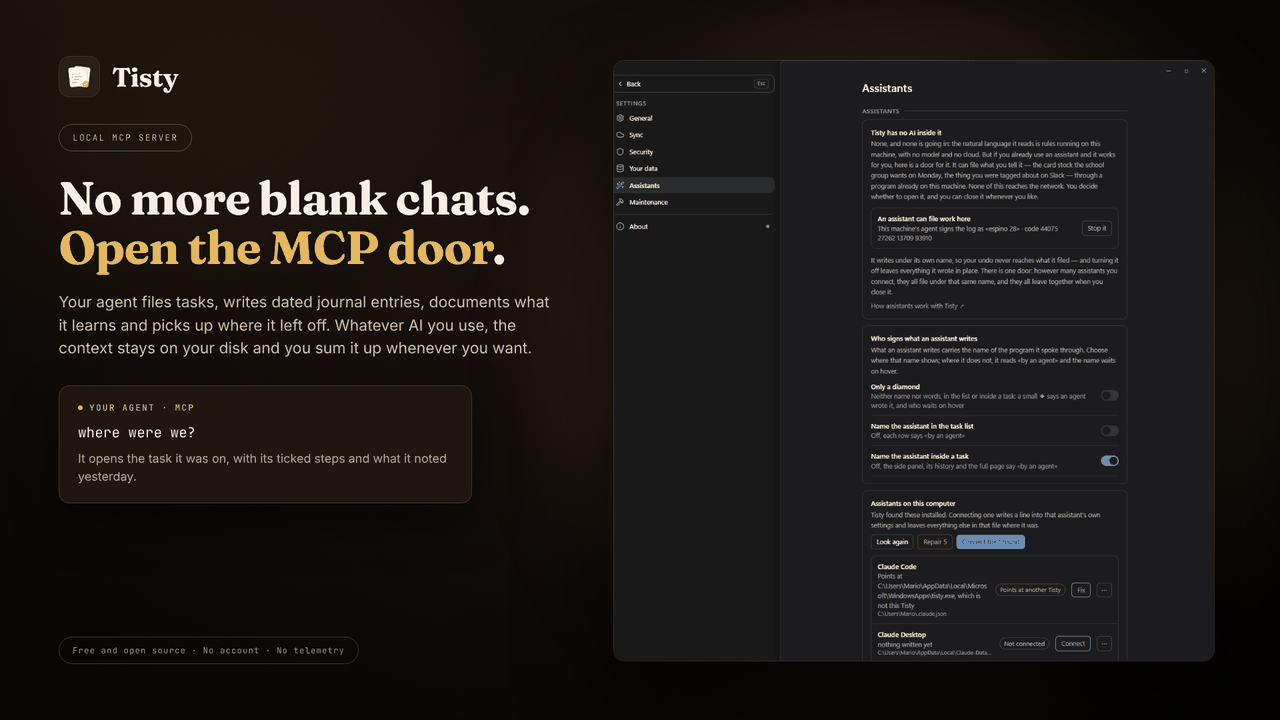
Requires the Tisty app and Node.js. A small launcher finds the Tisty
installed on your computer and starts its own MCP server, so the server always
matches the app and your data. Without Tisty, it tells your assistant how to
install it. Other assistants, such as GitHub Copilot in VS Code, take the same
launcher from npm: npx -y tisty-mcp. More in the plugin's readme.
| Install Tisty | |
|---|---|
| Windows | Microsoft Store or winget install rgdevment.Tisty |
| macOS | brew tap rgdevment/tap && brew trust rgdevment/tap && brew install --cask tisty |
| Every way | Installation guide |
If your assistant does not see Tisty's tools, restart it after installing Tisty. Connect Tisty either with this plugin or from Tisty's Settings › Assistants, not both, so the assistant does not run Tisty's server twice.
| Learn more | |
|---|---|
| Website | https://www.tisty.app/ |
| Documentation | https://www.tisty.app/docs/ |
| Assistants and MCP | https://www.tisty.app/docs/assistants-and-mcp/ |
| What an assistant may do | https://www.tisty.app/docs/mcp-permissions/ |
| MCP tools | https://www.tisty.app/docs/mcp-tools/ |
| Writing in Tisty | https://markdown.tisty.app |
| Privacy | https://www.tisty.app/privacy/ |
| Official MCP Registry | io.github.rgdevment/tisty |
| Source | https://github.com/rgdevment/Tisty |
| Issues | https://github.com/rgdevment/Tisty/issues |
Layout
.claude-plugin/marketplace.json   Claude Code marketplace
.cursor-plugin/marketplace.json   Cursor marketplace
gemini-extension.json             Gemini CLI extension (the Tisty plugin)
plugins/<app>/                    one folder per plugin, with each host's manifest,
                                  its MCP config, its skills and its launcher
test/                             tests for the launchers
listings/                         manifests some directories publish from
Licence
Apache-2.0. Each app keeps its own licence: Tisty is AGPL-3.0. Report a problem with an app in that app's own issues.
Tisty MCP questions
How do I add Tisty MCP to Claude Code?
Run claude mcp add mcp-plugins -- npx -y tisty-mcp in your terminal. Add --scope user to make it available in every project.
How do I add Tisty MCP to Cursor?
Open ~/.cursor/mcp.json and add the server under mcpServers, using the Cursor config shown in the install section above.
How does Tisty handle privacy and data?
Tisty operates locally on your computer with no account, no subscription, no telemetry, and no server.
What are the system requirements for Tisty?
Using the Tisty plugin requires the Tisty app to be installed on your computer and Node.js.
Can I use Tisty with VS Code?
Yes, other assistants like GitHub Copilot in VS Code can use the Tisty launcher via npm.