
OpenPlod MCP server
Commit Nov 15, 2026Lets an AI client access a local-first audio vault, transcripts, and structured Markdown documents from Plaud Note Pro recordings.
Also known as RemiPelloux/OpenPlod
- Stars
- 43
- Tools
- —
- Downloads, 30 days
- —
- Latest version
- —
- Last commit
- Nov 15, 2026
- License
- MIT
What is OpenPlod MCP?
OpenPlod lets an AI client access a local-first audio vault, transcripts, and structured Markdown documents from Plaud Note Pro recordings.
Summary generated from the project's README
About OpenPlod MCP server
Accessing your local audio recordings and transcripts from inside an AI client is what OpenPlod enables for users of the Plaud Note Pro. This desktop-first workspace for macOS, Linux, and Windows manages a durable audio vault, allowing you to transform recordings into structured Markdown documents. It functions as a local-first system where you can import audio via Bluetooth or an Android companion app to maintain a private collection of files and transcripts.
Developers and professionals can use the server to interact with transcription profiles that utilize providers like OpenAI, Deepgram, AssemblyAI, or local whisper.cpp. The system supports complex workflows including batch document generation, hybrid search with local embeddings, and automated task exports to tools like Notion or Todoist. By connecting your AI client to this local vault, you can perform source-linked conversations that reference specific segments of your recorded meetings, interviews, or lectures.
What you can do with it
- 1Search through recorded knowledgeUse hybrid search to find specific topics or details across your entire collection of audio transcripts.
- 2Automate transcription workflowsSet up rules to automatically transcribe new recordings and organize them into specific folders.
- 3Sync tasks to external toolsSend reviewed action items and tasks extracted from your transcripts directly to your project management software.
Written from the project's README. Every use case is checked against a quote from it.
Configuration
OPENPLOD_URL
Automated checks
Ran Nov 14, 2026Full report →Not verified yet. A server needs a score of 80, no serious finding, and enough data for us to check. How checks work · What to fix for more points

- Source repository linked and reachableremipelloux/openplod is public and reachablegithub.com/remipelloux/openplod ↗Pass
- Package names this repository as its sourceNot checked
- Build provenance (Sigstore attestation)Not checked
- Open source license (OSI)MITspdx.org/licenses/MIT.html ↗Pass
- Commit or release in the last yearLast commit or release 2026-10-15github.com/remipelloux/openplod ↗Pass
- OpenSSF ScorecardNot checked
- Package name not close to a popular packageNot checked
- No critical advisory in the package or its dependenciesNot checked
- No hidden instructions to the model0 tool descriptions and the README read; no override phrases, credential paths or hidden charactersPass
- Destructive tools are labelledNot checked
- Remote endpoint answers the MCP handshakeNot checked
README
View on GitHubOpenPlod brings recording, playback, transcription, and export into one desktop-first workspace. The desktop app owns the durable audio vault on macOS, Linux, and Windows; the Android companion pairs over your private network and can extract directly from an enrolled Note Pro. Keep recordings on your Plaud, keep a copy on your computer, and work with transcripts as documents.
[!IMPORTANT] 1.0.0 implements the whole 1.0 roadmap, with documented support boundaries. Direct Bluetooth extraction has been verified on one authorized Plaud Note Pro; other devices and firmware are not established, and the recorder still refuses audio until this computer holds a Plaud-minted identity. Provider, connector, and Android paths are covered by automated tests but were not exercised against live accounts or a physical phone for this release, and release signing needs your keys. The vault, microphone, imports, transcripts, profiles, documents, automation, and backups work without a Plaud identity. See the 1.0.0 status.
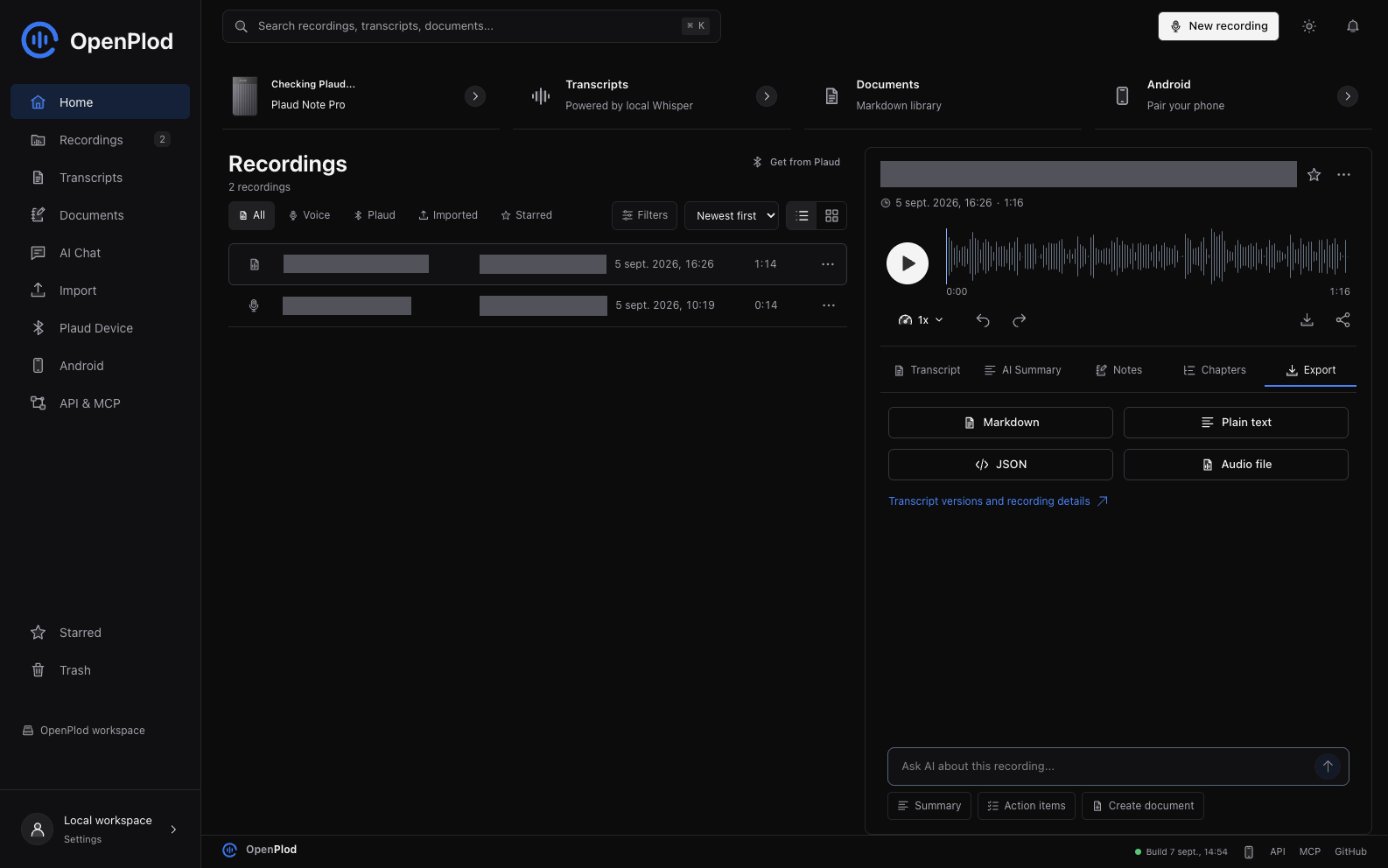
Actual application and local vault, with the Export tab selected. Private recording titles and tags are masked; no mock records or fabricated processing results are shown.
New in 1.0.0
Transcription profiles — tell the model what it is listening to. A profile is a context prompt and a vocabulary for one kind of recording, optionally pinned to a provider, model, and language. Start from eight presets (Team meeting, Réunion en français, Medical consultation, Legal discussion, Lecture, Interview, Engineering standup, Customer call) or write your own, set one as the default, and pick another per recording in the Transcribe dialog, where you can also add one-off context ("Dr Martin and a patient discuss amoxicillin").
| Provider | Context prompt | Vocabulary | How it is sent |
|---|---|---|---|
OpenAI (whisper-1, gpt-4o-transcribe, gpt-4o-mini-transcribe) |
Yes | Yes | prompt |
| whisper.cpp (local) | Yes | Yes | --prompt, with a glossary line |
| Deepgram (Nova-2, Nova-3) | No | Yes | keywords (Nova-2), keyterm (Nova-3) |
| AssemblyAI | No | Yes | word_boost |
| Mistral Voxtral | No | No | — |
A profile written for any provider leaves out what the chosen one cannot take, tells you before the job runs, and records it in the transcript's provenance. A profile never rewrites text.
A guided first run. A five-step setup guide: local-only or chosen providers, a transcription model and key with a connection check, a profile, and where to bring recordings in from. Skip it, or run it again from Settings or the command palette. See Getting started.
Also in 1.0.0: the rest of the roadmap.
- AI providers:
- Spending limits with estimates and confirmation.
- Long recordings split and merged automatically.
- Gemini and a restricted OpenAI-compatible endpoint.
- Fallback order per task, and provenance for every summary and document.
- Transcript Studio:
- Saved chapters, decisions and action items.
- Server-side PDF export.
- Batch document generation.
- Side-by-side comparison of two transcription providers.
- Knowledge:
- Recording collections.
- Export attachments and a folder picker.
- Pinned chat sources, project context and suggested follow-ups.
- Hybrid search with local embeddings, plus recording title, tag and topic suggestions.
- Automation:
- Signed webhooks, with retries and full history.
- Opt-in rules ("Plaud meeting → transcribe → minutes → folder"), with preview and history.
- Reviewed task exports to Todoist, Linear, Notion or calendar files.
- Android and sync:
- Separate credentials for each paired phone, with revocation.
- Resumable uploads and an offline outbox.
- A sync change feed with conflict detection.
- Release signing from your own keystore.
- Safety:
- Crash-safe imports and complete purge.
- Encrypted full-vault backups with a restore wizard.
- Keys and secrets encrypted at rest, and an auto-updater.
- A 10,000-recording benchmark.
- French and English throughout, and automated accessibility checks.
- Smaller additions: a ⌘K command palette with quick actions, AI title and tag suggestions for documents, and the 0.7.0 knowledge workspace (tags, saved views, backlinks, Obsidian export, conversation management).
Every item is listed in the changelog.
Previously in 0.6.0
Transcript Studio — a new Studio mode on the recording page, with five tabs:
- Edit — speaker rename/merge, segment split/merge, and find/replace with match-case, whole-word and per-speaker scoping. Preview before applying; undo restores the previous version.
- Versions — a word-level diff that labels each change as your correction, a regeneration, your own revision, or model output replacing your edit. Promotion never discards the replaced version.
- AI cleanup — punctuation, paragraphs, optional filler removal and headings, shown as a diff and saved only when you accept. Translation is stored as its own lineage and never replaces the original.
- Structure — chapters, decisions, action items and open questions, with SRT/VTT subtitles and Markdown, CSV, JSON and print-ready exports.
- Actions — save an instruction once and re-run it on any transcript.
Also: playback following with word-level highlighting where a provider supplies word timings, seven document templates (notes, meeting minutes, interview, lecture, brief, PRD, follow-up email), and batch transcription with per-item status, cancellation and retry-failed-only.
What it refuses to do is the point. Models are never allowed to emit a timestamp — they cite a segment index and the time is read from your own data, so an invented citation produces no link rather than a convincing-looking time. An unstated owner or due date stays unknown instead of being guessed. Subtitles are refused, with the reason, when a provider returned no real timing. Nothing is written on a first click, and a batch tells you what it will run before it runs it.
Not verified: the 0.6.0 exit gate — real-audio acceptance across multiple speakers, French and English, silence, noise and a long recording — has not been run, and no AI path has been exercised against a live provider. See the 0.6.0 changelog for the full list.
Earlier releases (0.5.1 cross-platform Bluetooth, 0.5.0 multi-provider AI, 0.4.x workspace) are described in the changelog.
Beyond 1.0.0
Every roadmap item is implemented. The 1.0.0 status lists the evidence that only a device owner can add: real-audio runs with live provider accounts, a physical Android phone, one real Plaud capture to confirm the transfer checksum, signing keys, and the benchmark on the reference Mac. After 1.0: live captions, two-way Obsidian sync, more Plaud models, and iOS.
Download
| Platform | Package | Notes |
|---|---|---|
| macOS Apple Silicon | OpenPlod_1.0.0_aarch64.dmg | Built by CI. Ad-hoc signed and not notarized until signing secrets are configured. |
| Windows x64 | Installer (.exe) or .msi | Built by CI, unsigned. Bluetooth extraction on Windows is not verified on hardware. |
| Linux x64 | .deb or .rpm | Built by CI. Declares its BlueZ, D-Bus, and ffmpeg dependencies. |
| Android ARM64 | Build instructions | Native, SDK-free direct Bluetooth adapter. Release signing uses your own keystore; no public APK. |
| Source | v1.0.0 source and release notes | Frontend, backend, native adapters, API, MCP, and tests. |
Download SHA256SUMS.txt from the same release and verify your download with shasum -a 256 -c SHA256SUMS.txt --ignore-missing. On macOS, open the DMG and drag OpenPlod.app to Applications. macOS may require explicit approval in Privacy & Security because the build is not notarized. Verify the source and checksum before approving it; do not disable Gatekeeper system-wide.
Upgrade safely: quit OpenPlod, back up the full vault, and replace only the application bundle. Do not delete its Application Support directory. Android development updates use an in-place install with the same application ID and signing key; uninstalling first can erase phone-local data.
From Audio to a Document
- Capture or import. Record in OpenPlod, import an audio file, transfer from the paired phone, or use Get from Plaud with an authorized Note Pro.
- Keep a durable copy. OpenPlod stores the audio in the desktop vault before acknowledging a mobile transfer. Direct Plaud imports retain the source session on the device.
- Transcribe. Select a speech provider and, optionally, a transcription profile in Settings or the recording's Transcribe dialog. Choose from Mistral, local whisper.cpp, Deepgram, OpenAI, and AssemblyAI. Processing failure does not delete the recording.
- Create a document. Open a transcript, select Create document, choose structured notes, meeting minutes, or a project brief, and add optional instructions.
- Review and organize. Your selected document provider returns Markdown for review. Saving creates an independent document with source references; move it into a folder, edit it, or restore a prior revision.
- Export or connect. Download Markdown/JSON, send a saved document to a configured destination, or let a trusted MCP client read it.
The source transcript, generated document, and original audio are separate resources. Editing the document does not rewrite the source recording.
What You Can Do
- Get recordings from Plaud. Open Get from Plaud in Library or New Recording, connect, select recordings, and import them. Filter New/Saved, sort by size, cancel the remaining batch, retry, restore a saved item from Trash, or open it in the library.
- Keep your audio. Import files, capture microphone audio, or receive recordings from the paired mobile app. The vault tracks stable recording IDs, content fingerprints, and source provenance.
- Work in Markdown. Browse the Transcripts tab, read and edit documents, inspect generated and manual versions, and export Markdown, plain text, or JSON. Reprocessing adds a generated version without silently replacing a manual edit.
- Organize your notes. Create nested folders in Notes, import Markdown files, edit/preview documents, star notes, restore history, and recover notes from Trash. Use Create document on a transcript to generate structured notes, meeting minutes, or a project brief with your selected document provider, review the Markdown, and save it with source provenance.
- Connect your tools. Use the versioned REST API and read-only-by-default MCP server. Send saved documents to explicitly configured webhook destinations, or export/share Markdown using the native platform controls.
- Listen and organize. Play and seek audio, rename recordings, edit metadata, tags, context, and notes, and use Trash to restore deleted items during the 30-day retention period.
- Choose processing. Configure speech and text providers separately, with explicit fallback and local-only options. See provider support and limits. Optional OpenWhistle forwarding is blocked in local-only mode.
- Use the same workspace on Android. QR pairing, microphone capture, audio share/import, transcript views, and the shared Plaud import dialog are included. Mobile transfers retain local audio until the desktop acknowledges storage.
The shared React interface uses shadcn-style Radix controls, original custom SVG icons, light/dark themes, accessible dialogs, keyboard navigation, a real audio timeline, and reduced-motion support. Recordings, Transcripts, and Documents are separate workspaces rather than competing status tabs.
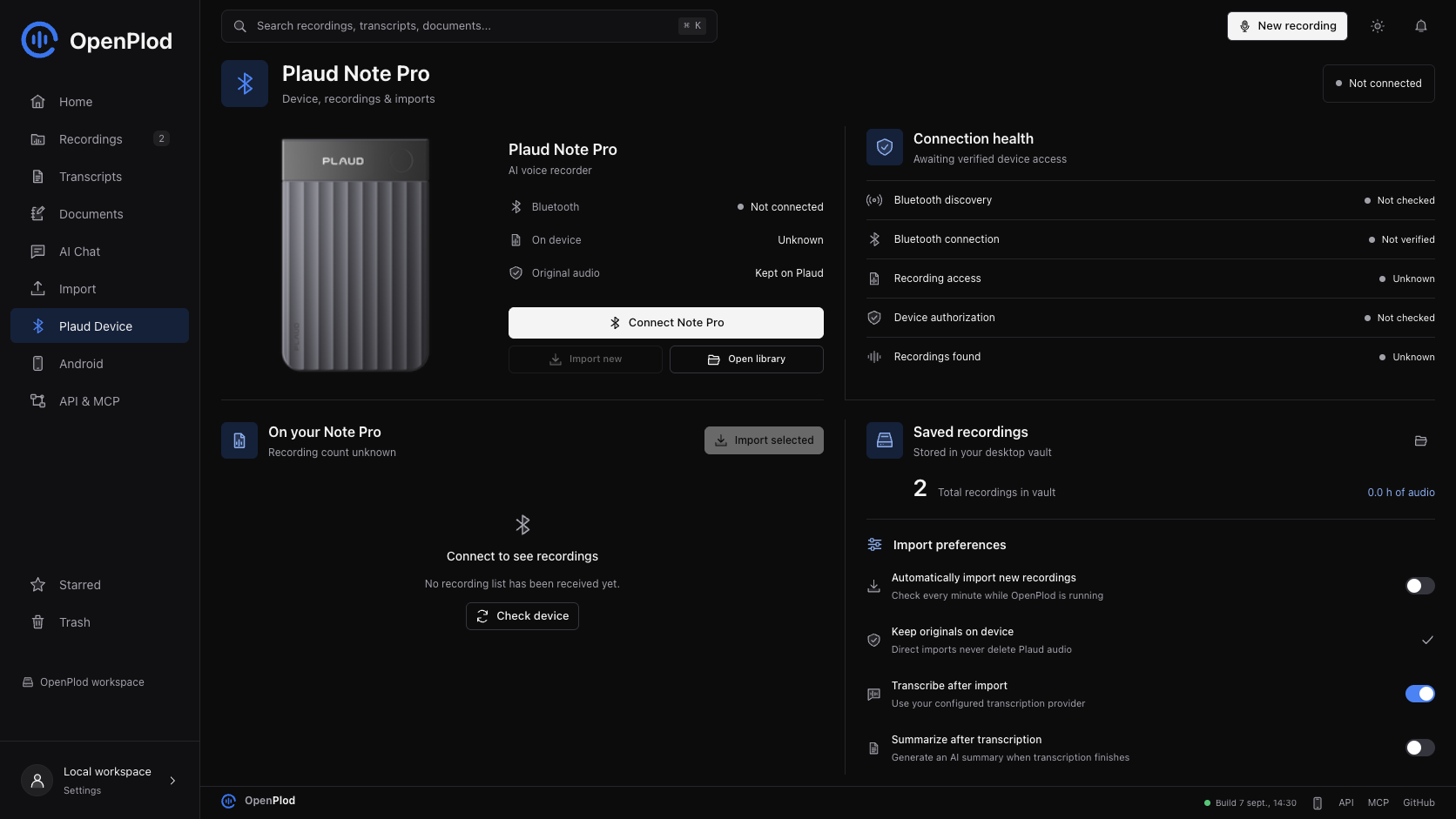
Real local-vault capture. Bluetooth was not connected during this UI check, so device counts are shown as unknown, not invented.
Current Support
| Capability | Status in 1.0.0 (hardware evidence from 0.5.x unless noted) |
|---|---|
| macOS desktop vault | Built and tested on Apple Silicon |
| Linux desktop vault | Builds and runs on Arch/Omarchy (Hyprland); BLE discovery and connection verified against a real Note Pro over BlueZ |
| Mac / Linux -> Note Pro Bluetooth download | Real recording listed, downloaded, decoded, imported, and played on macOS; the same bridge transport runs on Linux |
| Account-free initial authorization | Not verified; the successful test used existing account authorization for device keys |
| Android -> Note Pro | Direct encrypted Bluetooth listing, download, playable Opus, and source retention verified on one authorized Note Pro |
| Android device authorization | One-time encrypted enrollment approved on the already-authorized Mac; subsequent extraction works without the Mac |
| Android native-library alignment | APK ZIP and ARM64 libraries pass 16 KB alignment checks; runtime on a 16 KB device still unverified |
| Windows desktop vault | The bridge builds for WinRT, but extraction is not verified on hardware |
| iOS direct extraction | Not supported; only the macOS, Linux, and Android clients talk to the device directly |
| Signed store-ready distribution | Not available; Mac ZIP is ad-hoc signed and not notarized |
Get Started
Build the Mac App
Install Bun, Rust, Apple's Xcode Command Line Tools, and the Tauri macOS prerequisites. Direct extraction also needs ffmpeg and ffprobe available to the app process; these are not bundled. Since 0.5.1 the bundled plaud-bridge binary handles CoreBluetooth, so swift is no longer required at runtime.
xcode-select --install
brew install ffmpeg

git clone https://github.com/RemiPelloux/OpenPlod.git
cd OpenPlod
bun install --frozen-lockfile
bun install --cwd web --frozen-lockfile
bun run install:mac --launch
Quit OpenPlod before updating. The installer builds and verifies the app, replaces /Applications/OpenPlod.app, and archives generated duplicate bundles so macOS has one launch target. Recoverable ZIP backups and their manifest are kept in ~/Library/Application Support/OpenPlod-install-archives/; recordings in the vault are not modified. The sidebar and Settings > About OpenPlod show the build date. This build is ad-hoc signed, not notarized. Grant Bluetooth access when macOS asks; microphone capture needs its own permission.
For a build without installation, use bun run tauri:build --bundles app. To install that build without rebuilding, use bun run install:mac --no-build --launch.
The native app starts its own Bun service on port 3487. Do not run a second backend on that port at the same time.
Build the Linux App
The desktop vault and its Bluetooth bridge build on Linux. Install Bun, Rust, the Tauri Linux prerequisites (webkit2gtk-4.1, javascriptcoregtk-4.1, libsoup-3.0, gtk+-3.0, librsvg), plus ffmpeg, ffprobe, bluez, and dbus.
git clone https://github.com/RemiPelloux/OpenPlod.git
cd OpenPlod
bun install --frozen-lockfile
bun install --cwd web --frozen-lockfile
bun run tauri build --no-bundle
./src-tauri/target/release/openplod
bun run build:sidecar compiles both the Bun service and the cross-platform plaud-bridge (Rust + btleplug) into src-tauri/binaries/. At runtime the app points the service at the bridge with OPENPLOD_BLE_BRIDGE; the same binary is used on macOS and Windows. Bluetooth goes through BlueZ, so the user must be able to reach the system bus (a normal desktop session already can).
Check Your Setup
Direct transfer needs five separate things to be true. bun run doctor checks each one and names the fix for your platform:
bun run doctor          # readable report; exits non-zero when something blocks transfer
bun run doctor --json   # same report as JSON, for bug reports
bun run device:doctor   # the bridge's own host check, without the vault
bun run device:scan     # scan for an advertising recorder
OpenPlod host check — linux x64 (7.2.3-arch1-3)
Bluetooth backend: bluez · bridge: native
Adapter: hci0 (usb:v1D6Bp0246d0557)

  ok  Desktop platform: linux x64 — Bluetooth via bluez.
  ok  Bluetooth bridge: plaud-bridge found at src-tauri/plaud-bridge/target/release/plaud-bridge.
  ok  Bluetooth adapter: Bluetooth adapter is available and powered on.
  ok  Audio tools: ffmpeg and ffprobe are installed.
 !!  Recorder authorization: No recorder identity at data/plaud-device.json.
       → Authorize this recorder with a Plaud sign-in token on the Plaud connection page.
The desktop app shows the same report in the This computer panel on the Plaud page, and GET /api/plaud/environment returns it as JSON.
Get Recordings From Plaud
- Authorize the Note Pro for this computer. The current adapter reads a private
plaud-device.jsonfrom the vault directory; see device authorization. - Wake the Plaud and keep it near your computer. Disconnect other clients that may be holding its Bluetooth connection.
- Open Library or New Recording, then Get from Plaud.
- Select Connect to read the actual device list. A failed or unavailable query is an error, not a claim that there are zero recordings.
- Select completed recordings and choose Import. Progress counts completed recordings, not transferred bytes.
- Open the saved recording to play it, edit its details, transcribe it, or export a document.
Audio travels directly from the device over Bluetooth. The verified extraction did not download audio from Plaud's cloud or transfer it through a phone. The adapter checks transfer framing, size, authenticated decryption, decoded Ogg integrity, and playable duration. It preserves device bytes and decoded audio alongside an M4A playback copy, then checks that the source session is still listed on the Plaud. The device's transfer-tail checksum is retained but its algorithm is not yet validated.
The extraction command set excludes force-clear, ownership reset, and device-file deletion. The folder-import setting for deleting source files is separate from direct Bluetooth imports.
Device Authorization
The successful hardware test used the device owner's existing binding credential and signed identity. Bluetooth discovery alone does not grant recording access.
The private identity contains the peripheral identifier, device serial, binding token, signed authorization, and RSA key pair. Its default location is platform-specific:
~/Library/Application Support/com.openplod.vault/plaud-device.json   # macOS
~/.local/share/com.openplod.vault/plaud-device.json                  # Linux
%APPDATA%/com.openplod.vault/plaud-device.json                       # Windows
The file must be private to the current user with permissions 0600. For a source-run backend, OPENPLOD_DEVICE_IDENTITY can select an absolute path. The identity is portable: on Linux and Windows the bridge matches the recorder by its advertised Plaud service or name when the stored identifier is a CoreBluetooth UUID that does not appear in the platform's own address space. No identity, account password, embedded vendor secret, or APK is distributed in this repository. Generating a random token or using Android developer credentials does not provision this desktop identity.
Fresh-install limitation: obtaining this identity is not yet a supported in-app onboarding flow. Until that is implemented, a new user can use the recording vault and file imports but should not expect plug-and-play Plaud extraction. Do not reset or rebind a device to work around authorization errors.
OpenPlod MCP questions
Is the MCP server read-only?
Yes, the MCP implementation is read-only by default.
What transcription models are supported?
OpenPlod supports OpenAI (Whisper, GPT-4o), local whisper.cpp, Deepgram, AssemblyAI, and Mistral Voxtral.
Can I import audio directly from a Plaud device?
Yes, you can use the 'Get from Plaud' feature with an authorized Note Pro via direct Bluetooth extraction.