
Google Trends Scraper MCP server
Commit Oct 10, 2026Retrieves Google Trends data including interest over time, regional popularity, and rising related queries for multiple keywords on a single scale.
Also known as RalfIJ/google-trends-api, google-trends-api
- Stars
- 1
- Tools
- 5
- Downloads, 30 days
- —
- Latest version
- 1.0.0
- Last commit
- Oct 10, 2026
- License
- MIT
What is Google Trends Scraper MCP?
Google Trends Scraper retrieves Google Trends data including interest over time, regional popularity, and rising related queries for multiple keywords on a single scale. It exposes 5 tools, such as get-actor-run, get-dataset-items, get-key-value-store-record.
Summary generated from the project's README
About Google Trends Scraper MCP server
Analyzing search interest and market trends for dozens of keywords at once is what this server enables. It provides access to Google Trends data including interest over time, regional popularity, top and rising related queries, and specific metrics like peak interest dates or busiest months. While the standard Google Trends website limits comparisons to a small number of terms, this scraper allows you to compare 10, 50, or even over 100 keywords on a single shared scale by chaining requests through group leaders.
Developers can integrate this tool into AI clients like Claude, Cursor, or VS Code by using the Apify MCP URL. The server operates via a hosted scraper on Apify, which manages session cookies and rate limits to avoid the errors common in older libraries. To use it, you must provide an Apify API token or sign in through the client. Usage is billed to your Apify account, where a free plan provides enough credit to cover approximately 2,500 keywords per month.
Written from the project's README. Every use case is checked against a quote from it.
How to install Google Trends Scraper MCP
Formats verified 10 Nov 2026Add to CursorAdd to GooseInstall Google Trends Scraper MCP in Claude Code
$ claude mcp add --transport http google-trends-api 'https://mcp.apify.com/?tools=ralfij/google-trends-scraper'Install Google Trends Scraper MCP in Cursor
~/.cursor/mcp.json
{
  "mcpServers": {
    "google-trends-api": {
      "url": "https://mcp.apify.com/?tools=ralfij/google-trends-scraper"
    }
  }
}Install Google Trends Scraper MCP in VS Code
.vscode/mcp.json
{
  "servers": {
    "google-trends-api": {
      "type": "http",
      "url": "https://mcp.apify.com/?tools=ralfij/google-trends-scraper"
    }
  }
}Install Google Trends Scraper MCP in VS Code CLI
$ code --add-mcp '{"name":"google-trends-api","type":"http","url":"https://mcp.apify.com/?tools=ralfij/google-trends-scraper"}'Install Google Trends Scraper MCP in Codex
$ codex mcp add google-trends-api --url 'https://mcp.apify.com/?tools=ralfij/google-trends-scraper'Install Google Trends Scraper MCP in Codex config.toml
~/.codex/config.toml
[mcp_servers.google-trends-api]
url = "https://mcp.apify.com/?tools=ralfij/google-trends-scraper"
Install Google Trends Scraper MCP in Gemini CLI
$ gemini mcp add -s user --transport http google-trends-api 'https://mcp.apify.com/?tools=ralfij/google-trends-scraper'Install Google Trends Scraper MCP in Gemini settings.json
~/.gemini/settings.json
{
  "mcpServers": {
    "google-trends-api": {
      "url": "https://mcp.apify.com/?tools=ralfij/google-trends-scraper",
      "type": "http"
    }
  }
}Google Trends Scraper MCP tools 5
Read from the server with tools/listget-actor-runRead-onlyGet detailed information about a specific Actor run. Returns run result: status, storages (datasets/keyValueStores alias map), stats, summary, nextStep. - summary describes the past (e.g. "SUCCEEDED in 22s. 47 items; 3 fields available."). - nextStep prescribes one primary follow-up action with identifiers interpolated (e.g. "Use get-dataset-items with datasetId=..."). - waitSecs (0–45, default 30) waits up to that many seconds for terminal status before returning. USAGE: - Use to check the status of a run started by any Actor-running tool. - Pass waitSecs > 0 to block until terminal (or until the cap elapses). USAGE EXAMPLES: - user_input: Show details of run y2h7sK3Wc - user_input: Wait for run y2h7sK3Wc to finish
get-dataset-itemsRead-onlyGet items (rows) from a dataset — the output/results produced by an Actor run. Returns the rows themselves, not dataset metadata, counts, or a schema. When the user provides a datasetId and asks to retrieve results, output, data, or rows, call this tool directly. Default limit is 20. Use clean=true to skip empty items and hidden fields. USAGE: - Use when you need to read data from a dataset (all items or only selected fields). USAGE EXAMPLES: - user_input: Retrieve results from dataset abc123 - user_input: Get only metadata.url and title from dataset username~my-dataset
get-key-value-store-recordRead-onlyGet the value stored under a specific key in a key-value store — a single record, not a listing of all keys. Requires the exact key name. The response preserves the original Content-Encoding; most clients handle decompression automatically. A record over 262144 bytes is returned as a link to download it, not as its value. USAGE: - Use when you need to retrieve a specific record (JSON, text, or binary) from a store. USAGE EXAMPLES: - user_input: Get record INPUT from store abc123 - user_input: Get record data.json from store username~my-store
abort-actor-runActionAbort an Actor run that is currently starting or running. For runs with status SUCCEEDED, FAILED, ABORTING, ABORTED, or TIMED-OUT, this call has no effect. The results will include the updated run details after the abort request. USAGE: - Use when you need to stop a run that is taking too long or misconfigured. USAGE EXAMPLES: - user_input: Abort run y2h7sK3Wc - user_input: Gracefully abort run y2h7sK3Wc
ralfij--google-trends-scraperActionThis tool calls the Actor "ralfij/google-trends-scraper" and retrieves its output results. Actor description: Google Trends for many keywords per run: interest over time, by region, related queries, and trend metrics (rising or falling, change %, peak, busiest month). Compare any number of keywords on one shared scale.
Configuration
APIFY_TOKEN
Automated checks
Ran Nov 16, 2026Full report →Not verified yet. A server needs a score of 80, no serious finding, and enough data for us to check. How checks work · What to fix for more points

- Source repository linked and reachableralfij/google-trends-api is public and reachablegithub.com/ralfij/google-trends-api ↗Pass
- Package names this repository as its sourceNot checked
- Build provenance (Sigstore attestation)Not checked
- Open source license (OSI)MITspdx.org/licenses/MIT.html ↗Pass
- Commit or release in the last yearLast commit or release 2026-10-10github.com/ralfij/google-trends-api ↗Pass
- OpenSSF ScorecardNot checked
- Package name not close to a popular packageNot checked
- No critical advisory in the package or its dependenciesNot checked
- No hidden instructions to the model5 tool descriptions and the README read; no override phrases, credential paths or hidden charactersPass
- Destructive tools are labelledNo tool named like delete, drop or execPass
- Remote endpoint answers the MCP handshakeinitialize answered with protocol 2025-11-25 in 4834 ms; tools/list returned 5 tools (HostedMCP test account)Pass
README
View on GitHubGoogle Trends API for Python (a pytrends alternative)
Get Google Trends data into Python: interest over time, interest by region, top and rising related searches, and simple trend metrics. You can also compare 10, 50 or 100+ keywords on one scale. The Google Trends website stops at 8 (5 in classic Explore).
pytrends was archived in April 2025 and often fails with 429 Too Many Requests. Google announced an official Trends API in July 2025, but it is an alpha with limited, application-based access. These examples use a hosted scraper instead, the Google Trends Scraper on Apify, which deals with Google's session cookies and rate limits for you.
Tutorial: Google Trends in Python without pytrends, and how to compare more keywords than Google allows. It covers the two endpoints behind the website, the trick for linking comparisons, and what the data looks like.
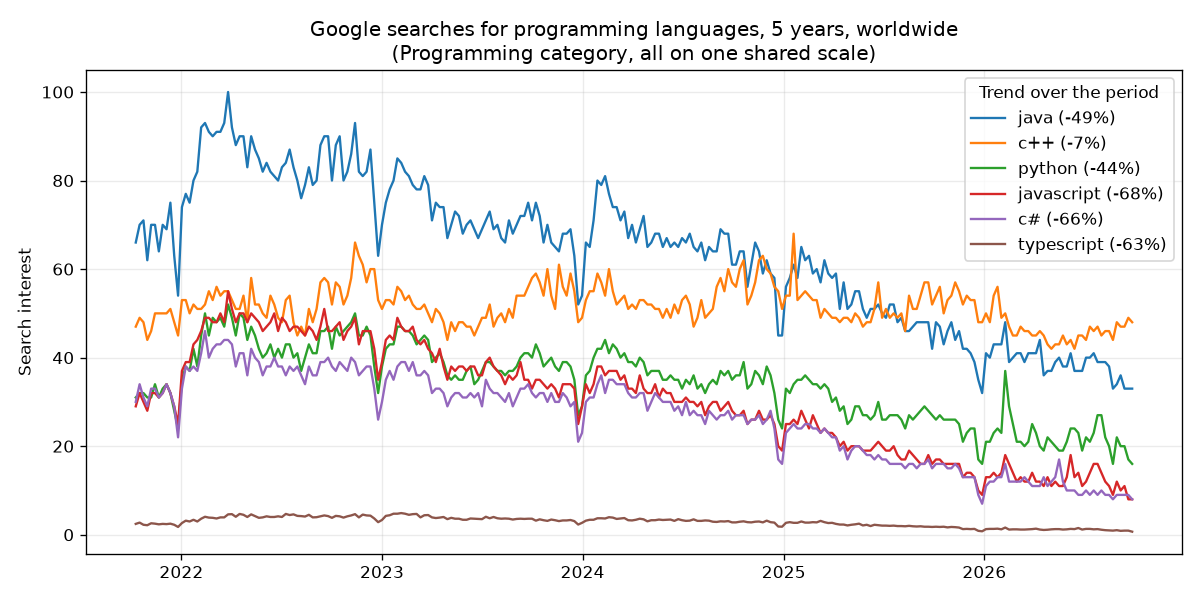
Example output: search interest in the Programming category fell 40-68% for most languages between 2021 and 2026. Made with examples/compare_keywords.py and matplotlib.
Quick start
- Create a free Apify account. The free plan includes $5 of credit every month, which covers about 2,500 keywords. No credit card needed.
- Copy your API token from Settings > API & Integrations in Apify Console.
- Run an example:
pip install -r requirements.txt
export APIFY_TOKEN=your-token        # Windows: set APIFY_TOKEN=your-token
python examples/compare_keywords.py
keyword       share %  average  trend
java             29.4     63.7  falling (-48.8%)
c++              23.8     51.6  stable (-7.1%)
python           15.8     34.3  falling (-43.7%)
...
Examples
| File | What it does |
|---|---|
examples/compare_keywords.py |
Compares 10 keywords on one shared scale, prints share of search and trend, and saves a CSV |
examples/keyword_report.py |
Trend, peak, busiest month, top regions and rising searches per keyword |
examples/plot_trends.py |
Plots interest over time for several keywords with matplotlib |
examples/raw_endpoints.py |
The two JSON endpoints behind trends.google.com, with no library at all. Good for a few keywords. |
sample-output/programming-languages-5y.csv shows the CSV from compare_keywords.py.
What you get per keyword
interestOverTime: the full time series (0-100), with the unfinished last week or day markedpartialinterestByRegion: countries, states or regions where the keyword is most popularrelatedQueriesTopandrelatedQueriesRising, including breakoutsaverageInterest,latestInterest,peakInterest,peakDatetrend(rising, falling or stable) andtrendChangePercent: the last quarter of the period against the first quarterbusiestMonthfor periods of about a year or longershareOfSearchwhen you compare keywords on one shared scale
How comparing many keywords works
Google's Trends API compares at most 5 keywords per request (the website shows up to 8) and scales each request so its highest point is 100. To compare more, the scraper:
- requests the keywords in groups of 5;
- compares the most searched keyword of each group (the group "leader") with the other leaders, 5 at a time with one leader of overlap, so any number of groups can be chained;
- rescales every group through its leader, then rescales everything so the highest point overall is 100.
Google rounds to whole numbers, so a tiny keyword next to a huge one can still show as 0. Compare keywords of a similar size for the best precision.
Use it from AI assistants (MCP)
To let Claude, Cursor, VS Code or another MCP client look up Google Trends for you, add this MCP server URL: https://mcp.apify.com/?tools=ralfij/google-trends-scraper. Sign in to Apify when the client asks, or send your Apify API token as Authorization: Bearer <token>. Runs are billed to your own Apify account.
Notes
- I built the Google Trends Scraper used in these examples, so keep that in mind.
raw_endpoints.pyshows how to do it yourself. - Pricing is per keyword with no subscription; see the actor page. More ready-made searches are on its example tasks.
- Not affiliated with, endorsed by or sponsored by Google. Google Trends is a trademark of Google LLC.
License
MIT
Google Trends Scraper MCP questions
How do I add Google Trends Scraper MCP to Claude Code?
Run claude mcp add --transport http google-trends-api 'https://mcp.apify.com/?tools=ralfij/google-trends-scraper' in your terminal. Add --scope user to make it available in every project.
How do I add Google Trends Scraper MCP to Cursor?
Open ~/.cursor/mcp.json and add the server under mcpServers, using the Cursor config shown in the install section above.
What tools does Google Trends Scraper MCP provide?
It exposes 5 tools, including get-actor-run, get-dataset-items, get-key-value-store-record, abort-actor-run, ralfij--google-trends-scraper.
How many keywords can I compare at once?
You can compare 10, 50, or even 100+ keywords on one scale, bypassing the limits of the standard Google Trends website.
What specific data points are returned for each keyword?
The scraper provides interest over time, interest by region, top and rising related searches, average and peak interest, and trend direction.
How much does it cost to use?
Pricing is based on the number of keywords used rather than a subscription, and you can use a free Apify account which includes $5 of monthly credit.