
tmpmail MCP server
Commit Nov 13, 2026Generates throwaway email addresses and retrieves verification codes for testing, scripts, and AI agents.
Also known as qorvyx/tmpmail
- Stars
- 1
- Tools
- —
- Downloads, 30 days
- —
- Latest version
- —
- Last commit
- Nov 13, 2026
- License
- GPL-3.0
What is tmpmail MCP?
tmpmail generates throwaway email addresses and retrieves verification codes for testing, scripts, and AI agents.
Summary generated from the project's README
About tmpmail MCP server
Automating the creation of disposable email addresses and the retrieval of verification codes is what tmpmail enables for developers and testers. This tool works through a command-line interface or a desktop application, making it suitable for manual use, shell scripts, continuous integration pipelines, and AI agents. It functions by connecting to various free public mail services like mail.tm, DropMail, and Guerrilla Mail, automatically switching providers if one becomes unavailable.
Users can generate random addresses, specify custom usernames or domains, and manage multiple labeled inboxes. The system allows for waiting on specific incoming messages to extract one-time passwords using the otp command or finding verification links. Because it supports JSON output and specific exit codes for timeouts or service failures, it integrates easily into automated workflows. The tool is compatible with Linux, macOS, and Windows, providing a terminal UI for browsing mail or a desktop app for a graphical experience with attachment support.
What you can do with it
- 1Automated signup testingA developer can script the creation of a new email address and immediately use it in a signup flow.
- 2Extracting verification codesAn AI agent can wait for an incoming email and automatically print the numeric code needed for authentication.
Written from the project's README. Every use case is checked against a quote from it.
Configuration
TMPMAIL_PROVIDER
Automated checks
Ran Nov 15, 2026Full report →Not verified yet. A server needs a score of 80, no serious finding, and enough data for us to check. How checks work · What to fix for more points

- Source repository linked and reachableqorvyx/tmpmail is public and reachablegithub.com/qorvyx/tmpmail ↗Pass
- Package names this repository as its sourceNot checked
- Build provenance (Sigstore attestation)Not checked
- Open source license (OSI)GPL-3.0spdx.org/licenses/GPL-3.0.html ↗Pass
- Commit or release in the last yearLast commit or release 2026-11-13github.com/qorvyx/tmpmail ↗Pass
- OpenSSF ScorecardNot checked
- Package name not close to a popular packageNot checked
- No critical advisory in the package or its dependenciesNot checked
- No hidden instructions to the model0 tool descriptions and the README read; no override phrases, credential paths or hidden charactersPass
- Destructive tools are labelledNot checked
- Remote endpoint answers the MCP handshakeNot checked
README
View on GitHubtmpmail
Throwaway email addresses from your terminal. Make an address, use it to sign up somewhere, and get the verification code back, in one line of shell. Made for scripts, tests, CI and AI agents, with a terminal UI and a desktop app for everyone else.




addr=$(tmpmail new -q)                   # quickfox605@maxxspace.com
./signup.sh "$addr"                      # anything that sends a mail to it
tmpmail otp --wait --include-existing    # waits for the mail, then prints 482913
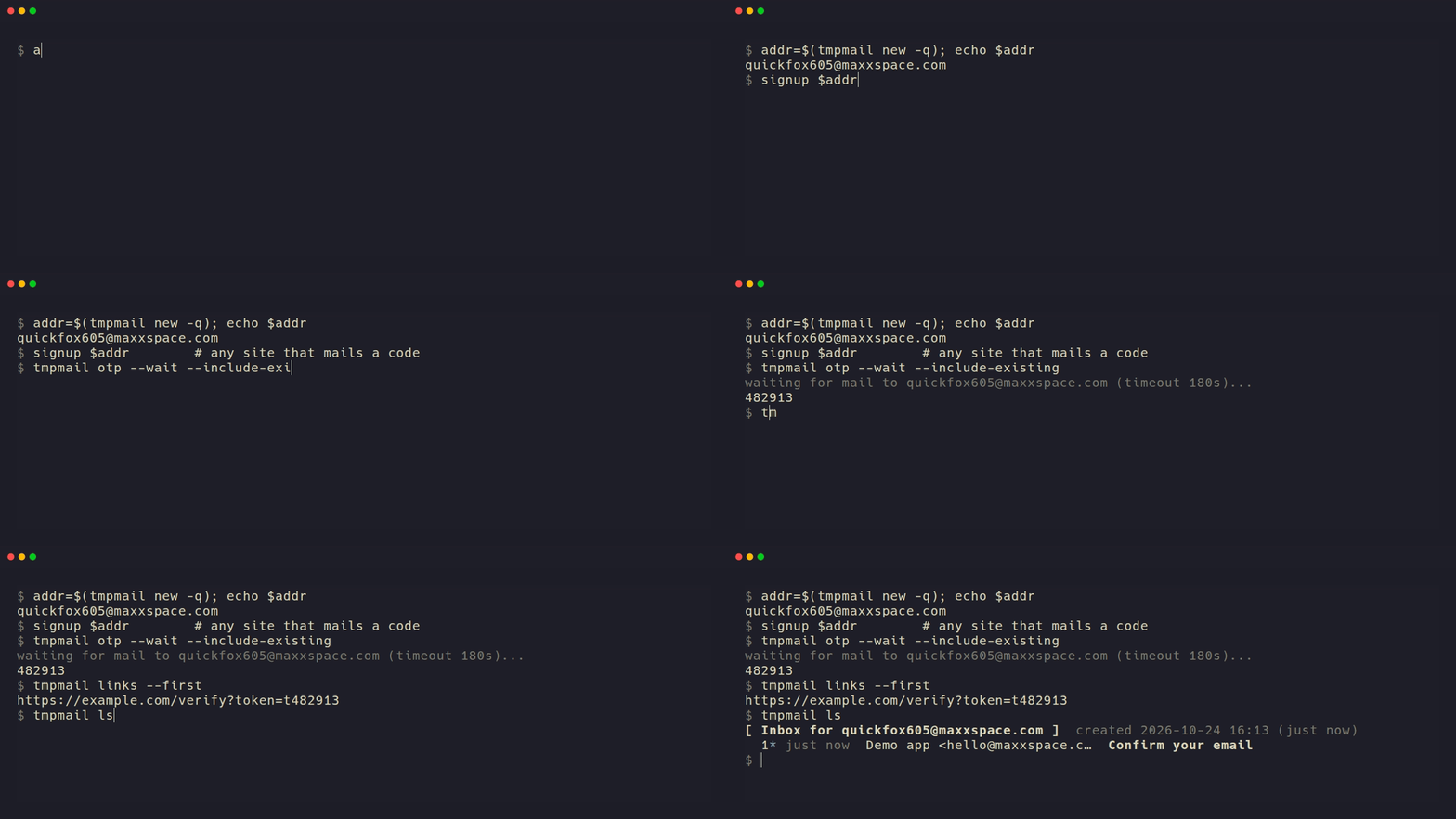
It uses free public mail services (mail.tm, DropMail, Guerrilla Mail and others). If one is down, tmpmail uses the next one.
Contents
- Install
- Quick start
- Desktop app
- Guide
- Scripts and CI
- AI agents
- Providers
- Reference
- Privacy and security
Install
tmpmail works on Linux (Fedora, Debian, Ubuntu, Arch and others), macOS and Windows. There are two parts: the command-line tool (with the full-screen view and the AI agent server) and the desktop app. Install one or both; they share the same inboxes.
Command-line tool
It is one file with nothing else to install.
| System | How to install |
|---|---|
| Linux | brew install qorvyx/tap/tmpmail, cargo install --locked tmpmail, or the download below |
| macOS | brew install qorvyx/tap/tmpmail or cargo install --locked tmpmail |
| Windows | cargo install --locked tmpmail, or download the .zip from the releases page, unzip it, and put tmpmail.exe in a folder on your PATH |
With Homebrew, use the full name qorvyx/tap/tmpmail: Homebrew's own tmpmail is a
different program. With cargo-binstall,
cargo binstall tmpmail downloads the ready-made program instead of compiling it.
Download on Linux (x86_64; for ARM use aarch64 in place of x86_64):
curl -LO https://github.com/qorvyx/tmpmail/releases/download/v0.3.4/tmpmail-0.3.4-x86_64-unknown-linux-musl.tar.gz
tar xzf tmpmail-0.3.4-x86_64-unknown-linux-musl.tar.gz
install -D -t ~/.local/bin tmpmail-0.3.4-x86_64-unknown-linux-musl/tmpmail
Each release has a SHA256SUMS file, and every file has a GitHub build attestation proving
it was built from this repository:
gh attestation verify tmpmail-0.3.4-x86_64-unknown-linux-musl.tar.gz --repo qorvyx/tmpmail \
  --signer-workflow qorvyx/tmpmail/.github/workflows/release.yml
Optional: a few commands use tools you probably have already. copy uses wl-copy,
xclip or xsel on Linux (pbcopy on macOS, clip.exe on Windows); read --html opens your
browser; watch --notify uses notify-send on Linux; long messages open in less.
Desktop app
Download the desktop app (version 0.1.3),
then pick the file for your system. (The release GitHub marks "Latest" is the command-line
tool's, which has no .deb, .rpm, .AppImage, .dmg or .exe.)
| System | File | How to install |
|---|---|---|
| Windows 10/11 | tmpmail-desktop-VERSION-x64-setup.exe |
Run it. When Windows says "Windows protected your PC", click More info, then Run anyway. |
| macOS 10.15+ | tmpmail-desktop-VERSION-universal.dmg |
Open it and drag tmpmail to Applications. Open tmpmail once (macOS refuses), then go to System Settings → Privacy & Security and click Open Anyway. |
| Debian, Ubuntu | tmpmail-desktop-VERSION-amd64.deb |
sudo apt install ./tmpmail-desktop-VERSION-amd64.deb |
| Fedora and other RPM systems | tmpmail-desktop-VERSION-x86_64.rpm |
sudo dnf install ./tmpmail-desktop-VERSION-x86_64.rpm |
| Other Linux (Arch and others) | tmpmail-desktop-VERSION-x86_64.AppImage |
chmod +x the file and run it. |
- The app isn't signed with a paid certificate, so Windows and macOS warn once.
- On Windows, the installer installs for your user only (no admin prompt) and fetches WebView2 if it's missing. Smart App Control blocks unsigned apps completely; it can only be turned off as a whole.
- On macOS 15 and later, Control-click → Open no longer skips the warning. From a
terminal,
xattr -dr com.apple.quarantine /Applications/tmpmail.appdoes the same as Open Anyway.
- The AppImage may need
libfuse2. Without FUSE, run it with--appimage-extract-and-run(details). It adds no menu entry by itself; AppImageLauncher or Gear Lever add one (or by hand). - On NVIDIA, if the window stays blank, start it with
WEBKIT_DISABLE_DMABUF_RENDERER=1. - Uninstalling keeps your settings and inboxes, since the command-line tool shares them. How to remove everything.
- If you use the command-line tool too, use version 0.3.0 or later.
- Each release has
SHA256SUMSand build attestations (gh attestation verify FILE --repo qorvyx/tmpmail --signer-workflow qorvyx/tmpmail/.github/workflows/gui-release.yml). - To run it from source (Rust 1.90+, Node 24, pnpm):
cd gui && pnpm install && pnpm tauri dev.
Quick start
tmpmail new            # make an address
tmpmail                # list the mail that arrived
tmpmail read 1         # read the newest message
tmpmail otp --wait     # wait for a mail with a code and print the code
tmpmail tui            # or browse everything in a full-screen view
The address you made last is the active one; every command uses it unless you pick another.
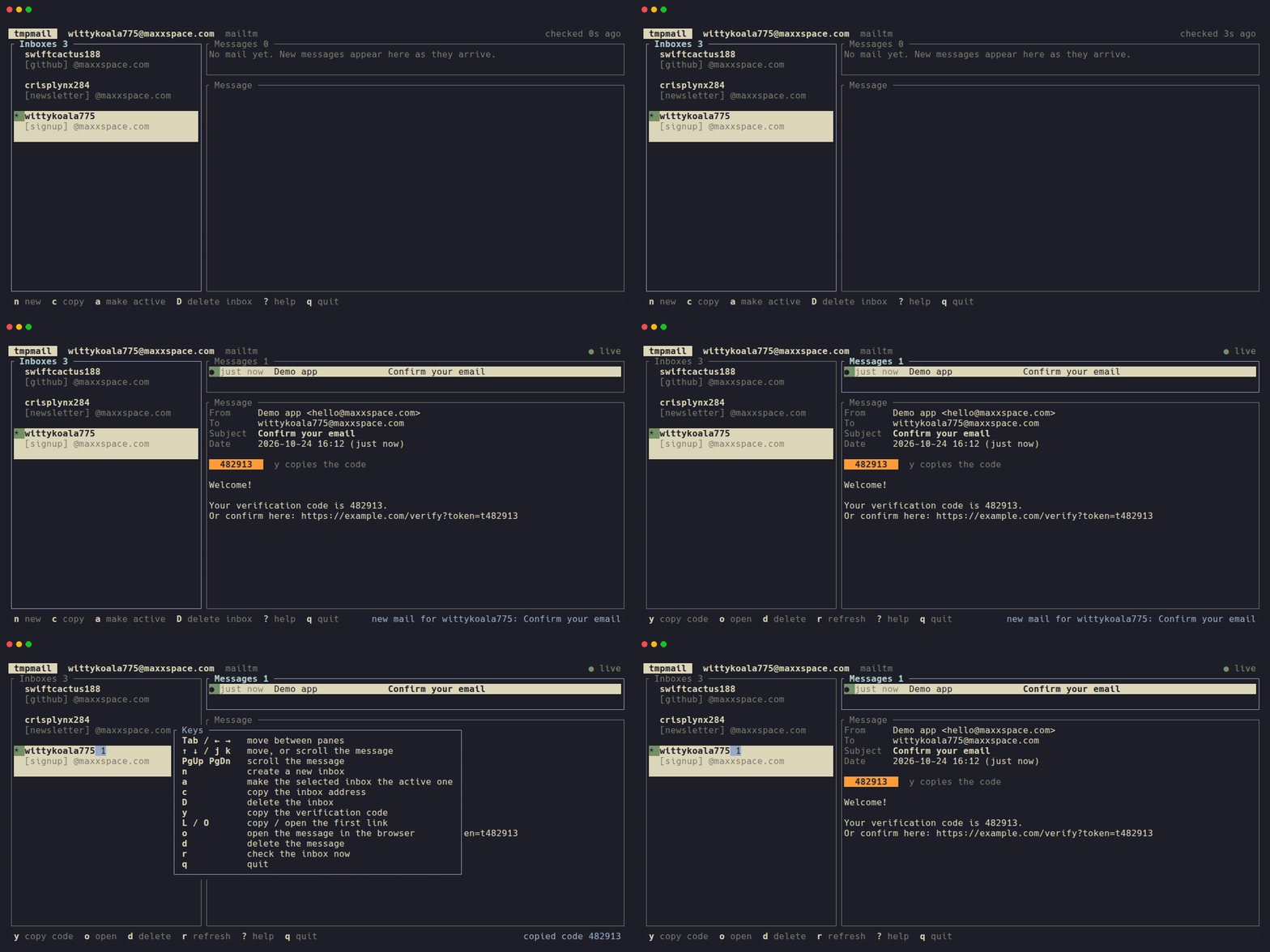
In the full-screen view (tmpmail tui), mail shows up as it arrives, the code is
highlighted, and y copies it. Press ? for the keys.
The desktop app
Rather have a window? The desktop app does the same with the same inboxes: it shows your mail live, puts the code in a big banner with a Copy button, shows HTML mail safely (light or dark), saves attachments, notifies you of new mail, and can stay in the tray. More about the app.
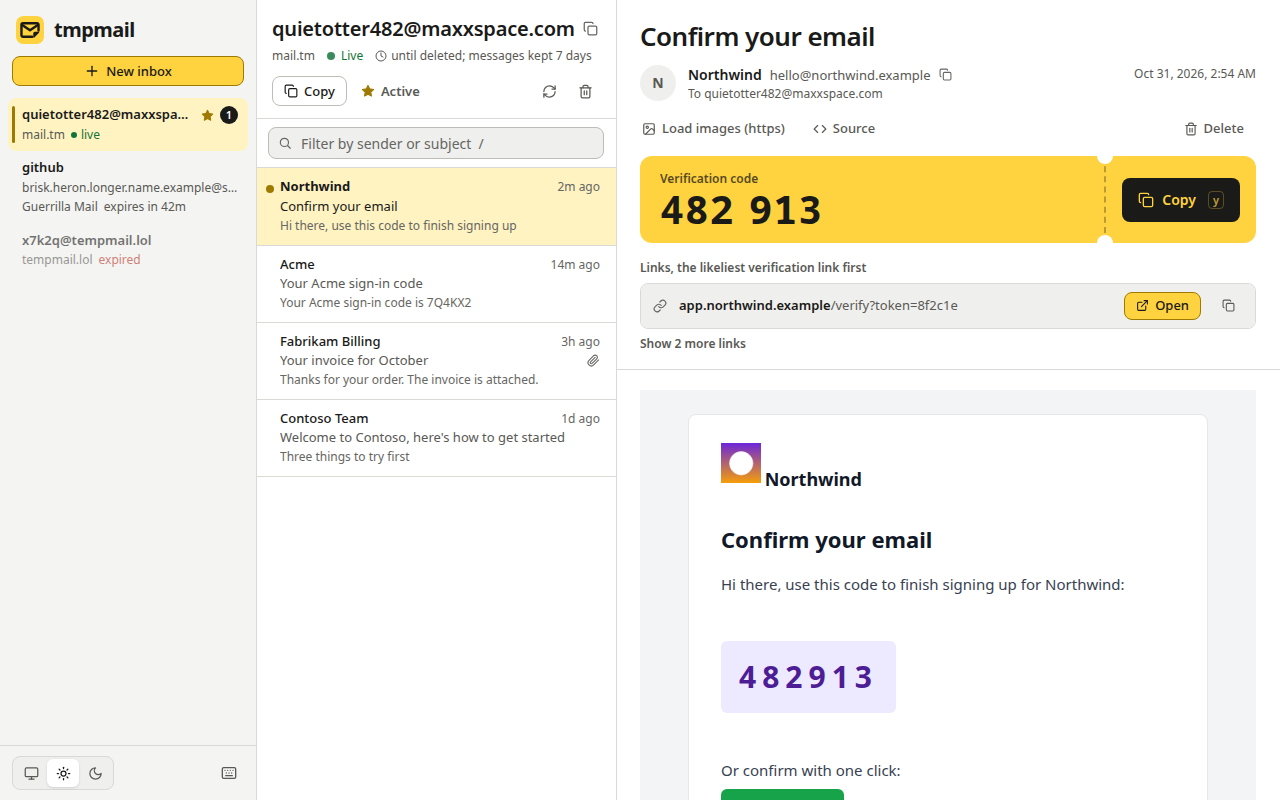
To install it, see Install → Desktop app.
Guide
Each part is a short explanation and the commands for it. Not every service supports every feature; the provider table shows which do.
Create an address
tmpmail new              # a random, readable address, e.g. quickfox605@maxxspace.com
tmpmail new -c           # the same, and copy it to the clipboard
tmpmail whoami           # show it again later
Choose the username or the domain
tmpmail new -u otter42                 # your own name before the @
tmpmail new otter42@maxxspace.com      # or the whole address
tmpmail domains                        # the domains on offer
tmpmail domains -p dropmail            # DropMail's (about 20)
tmpmail new -d yomail.info             # an address on that domain
If a site refuses one disposable domain, try another. Your own username works on mail.tm, mail.gw, Guerrilla Mail and Maildrop.
Choose the provider
tmpmail new tries the services in this order and uses the first one that works:
mailtm, dropmail, guerrilla, tempmail_lol, mailgw. To pick one, or change the order:
tmpmail new -p guerrilla               # only Guerrilla Mail
tmpmail providers --check              # which ones are up right now
TMPMAIL_PROVIDER=dropmail,mailtm tmpmail new
The order can also be set in the config file. Maildrop is never picked
unless you ask for it (-p maildrop), because its inboxes are public.
Read your mail
tmpmail                  # list messages, newest first (same as tmpmail ls)
tmpmail read 1           # read the newest; long ones open in a pager
tmpmail read 1 --html    # the HTML version in your browser, made safe, no remote images
A message can be named by its number in the list or by its id (or the start of it). With no number, commands use the newest message.
Wait for a code or link
tmpmail otp --wait                    # wait for a new mail with a code, print the code
tmpmail wait --link --from github     # wait for a mail from GitHub, print its best link
tmpmail otp 1                         # the code in a message you already have
tmpmail links 1                       # every link in it, verification links first
Waiting stops after 180 seconds (change it with -t) and exits with code 2. It only counts
mail that arrives after you start; add --include-existing if the mail may already be
there. --from, --subject and --body pick the right mail.
With mail.tm and DropMail, new mail shows up within about a second (the service tells tmpmail right away). The others are checked every 5 seconds.
Attachments
tmpmail attachments 1                 # list them
tmpmail save 1 -o ~/Downloads         # download all of them
tmpmail save 1 invoice.pdf            # or just one
Existing files are never overwritten.
Several inboxes
Give inboxes labels and switch between them:
tmpmail new -l github
tmpmail new -l shop
tmpmail inboxes                       # all of them; * marks the active one
tmpmail -i github ls                  # one command on another inbox
tmpmail use shop                      # make it the active one
tmpmail ls -a                         # mail in every inbox
tmpmail otp --wait -a                 # a code arriving at any of them
Each label belongs to one inbox. Inboxes can also be named by address or by the part
before @.
Log back in
mail.tm and mail.gw inboxes are real accounts that last until you delete them. Set a password to use one on their website too, or log in to one you made there:
tmpmail new -p mailtm --password 'correct horse'
tmpmail login otter42@maxxspace.com --password 'correct horse'
DropMail and Guerrilla Mail come back to the same address by themselves (mail from an expired
session is gone). Maildrop inboxes are public, so tmpmail login name@maildrop.cc needs no
password.
Clean up
tmpmail delete 1                      # delete one message
tmpmail delete --all                  # every message in the inbox
tmpmail drop                          # delete the inbox and forget it
tmpmail rotate                        # swap the active address for a fresh one
tmpmail watch --rotate 30m            # a fresh address every 30 minutes
tmpmail inboxes --prune               # forget inboxes that have expired
In a script or CI
Every command takes --json, and the exit code tells a timeout (2) from a service that is
down (3):
addr=$(tmpmail new -q)
./signup.sh "$addr"
code=$(tmpmail otp --wait --include-existing --from 'acme' --timeout 120)
link=$(tmpmail wait --link --include-existing --subject 'confirm')
tmpmail --json ls | jq -r '.messages[0].subject'
Use --include-existing when the mail might arrive before wait starts. Then the newest
matching mail wins, so an old code doesn't beat a resent one.
In GitHub Actions:
- name: Install tmpmail
  run: |
    mkdir -p ~/.local/bin && cd "$RUNNER_TEMP"
    curl -sSfL -O https://github.com/qorvyx/tmpmail/releases/download/v0.3.4/tmpmail-0.3.4-x86_64-unknown-linux-musl.tar.gz \
      -O https://github.com/qorvyx/tmpmail/releases/download/v0.3.4/SHA256SUMS
    sha256sum -c --ignore-missing SHA256SUMS
    tar xzf tmpmail-0.3.4-x86_64-unknown-linux-musl.tar.gz --strip-components=1 \
      -C ~/.local/bin tmpmail-0.3.4-x86_64-unknown-linux-musl/tmpmail
    echo "$HOME/.local/bin" >> "$GITHUB_PATH"

- name: Sign-up test
  run: |
    addr=$(tmpmail new -q)
    curl -sSf https://staging.example.com/signup -d "email=$addr"
    code=$(tmpmail otp --wait --include-existing --timeout 120)
    curl -sSf https://staging.example.com/verify -d "email=$addr" -d "code=$code"
A daily check makes sure the services work from GitHub's Linux, macOS and Windows runners.
With an AI agent
tmpmail mcp is an MCP server, so an AI agent can make
an inbox, sign up somewhere and read the code by itself:
claude mcp add tmpmail -- tmpmail mcp
Other clients take { "command": "tmpmail", "args": ["mcp"] }. Anyone can send mail to a
throwaway address, so the agent should treat that mail as untrusted: tmpmail removes hidden
characters, shortens very long fields and marks mail as untrusted_content.
Tools and details.
Coming from the original tmpmail
sdushantha/tmpmail was a shell script whose only
service, 1secmail, has shut down. This is a rewrite, and its old flags still work:
tmpmail -g [ADDR], tmpmail, tmpmail -r, tmpmail ID, -d, -c, -t.
How the old flags map.
Providers
| Provider | Lifetime | Own username | Pick domain | Attachments | Instant | Delete | Raw source | Log back in |
|---|---|---|---|---|---|---|---|---|
mail.tm mailtm |
until deleted; mail kept 7 days | ✓ | ✓ | ✓ | ✓ | ✓ | ✓ | password |
DropMail.me dropmail |
renewed while used | ✓ | ✓ | ✓ | ✓ | automatic | ||
Guerrilla Mail guerrilla |
mail kept 60 min | ✓ | ✓ | ✓ | ✓ | automatic | ||
tempmail.lol tempmail_lol |
1 hour | |||||||
mail.gw mailgw |
until deleted; mail kept 7 days | ✓ | ✓ | ✓ | ✓ | ✓ | password | |
Maildrop maildrop |
24 h without mail | ✓ | ✓ | ✓ | by name |
- Maildrop is public: anyone who guesses the name can read the inbox, so it is only used when you ask for it.
- tempmail.lol is the last resort: it has no attachments.
- Many sites block known disposable domains; another domain or provider usually gets through.
Thanks to mail.tm for its free API; as its terms ask, this program links back to it.
Reference
| Command | What it does |
|---|---|
new [ADDR] [-u USER] [-d DOMAIN] [-p PROVIDER] [-l LABEL] [-c] |
Create an inbox (alias generate) |
ls [-a] |
List messages, newest first, * = unread; -a = every inbox |
read [ID|N] [--recent] [--html [--images]] [--raw] [--no-pager] |
Show a message |
wait [-a] [--from RE] [--subject RE] [--body RE] [--timeout S] [--otp|--link] [--delete] |
Wait for a matching message |
otp [ID] [--regex RE] [--wait ...] |
Print a verification code |
links [ID] [--match RE] [--first] [--open] |
Print links, verification links first |
watch [-a] [--notify] [--rotate 30m] |
Print new messages as they arrive |
attachments ID, save ID [ATT...] [-o DIR] |
List / download attachments |
delete ID, delete --all |
Delete messages |
whoami, copy, qr |
Show / copy / show as QR code the active address |
inboxes [--prune], use ADDR, -i ADDR |
Manage several inboxes |
login ADDR --password PW |
Use an existing mail.tm / mail.gw account |
rotate [--keep] |
Replace the active address with a fresh one |
domains [-p PROVIDER], providers [--check] |
Domains, and which services are up |
tui |
Full-screen view, updated live |
mcp |
MCP server for AI agents |
completions bash|zsh|fish, man [-o DIR] |
Shell completions, man pages |
Every option is explained in docs/usage.md, and the --json output in
docs/json.md.
| Code | Meaning |
|---|---|
| 0 | success |
| 1 | other error |
| 2 | wait timed out (rate limits are waited out until then) |
| 3 | the service failed (down, rate limited, login refused, bad answer) |
| 4 | nothing found (no inbox, no such message, no code in the message) |
| 64 | usage error (bad flag, or an option this service doesn't support) |
With --json, errors are printed as {"error":{"kind":"...","message":"..."}}.
~/.config/tmpmail/config.toml (or $TMPMAIL_CONFIG), all optional:
providers = ["mailtm", "guerrilla"]   # order for `new`
browser = "firefox"                   # for --html and links --open
clipboard_cmd = "wl-copy"
pager = "less"                        # for long messages (default $PAGER, else less)
poll_interval = 5                     # seconds between checks
timeout = 180                         # default wait timeout
push = true                           # instant new mail from mail.tm/DropMail
http_timeout = 20                     # seconds per request to a service
An unknown key is ignored with a warning. A bad value is an error.
Environment: TMPMAIL_PROVIDER (comma list), TMPMAIL_TIMEOUT, TMPMAIL_POLL_INTERVAL,
TMPMAIL_PUSH, TMPMAIL_HTTP_TIMEOUT, TMPMAIL_INBOX, TMPMAIL_PASSWORD,
TMPMAIL_STATE_DIR, TMPMAIL_DROPMAIL_TOKEN, PAGER, NO_COLOR.
Privacy and security
- No telemetry. tmpmail only talks to the mail service you use.
- Your inboxes stay private. Addresses and their passwords are kept in
~/.local/state/tmpmail/state.json, readable only by you. - Mail can't take over your terminal. Hidden characters and terminal control codes are removed before anything is shown, so a sender can't change your screen or fake a name.
- HTML mail is made safe.
read --htmland the desktop app remove scripts, forms and anything that could cover the mail, and block remote images (tracking pixels) unless you allow them (--images). Links only open if they are real web addresses. - Attachments are saved safely. Names can't leave the folder you chose, existing files are never overwritten, and on Windows and macOS saved files are marked as downloaded.
- AI agents: anyone can mail a throwaway address, so treat what an agent reads there as untrusted.
The details are in docs/usage.md and the app's security model.
Development
cargo test                  # unit tests + provider tests against a mock server
cargo clippy --all-targets
./scripts/smoke.sh          # a live check against the real services
vhs assets/demo/demo.tape   # re-record the demo
CI checks Cargo.lock against the RustSec advisory database on every push and every week
(audit workflow; accepted advisories are listed with their
reasons in deny.toml).
The crate is also a library: tmpmail = { version = "0.3", default-features = false }
gives the providers, inbox storage, watcher and mail cleaning without the command-line
parts. Its API isn't stable yet. The desktop app is in gui/, with its own
gui-v* releases.
License
GPL-3.0-or-later. See LICENSE.
tmpmail MCP questions
How do I get a verification code from an email?
You can use the 'otp --wait' command to wait for a new email and print the code automatically.
Which email providers does it use?
It utilizes free public services like mail.tm, DropMail, Guerrilla Mail, and others, automatically switching if one is down.