
cronstable MCP server
Commit Nov 13, 2026Lets an AI agent inspect jobs and debug cron schedules, and optionally control them, from a cronstable scheduler.
Also known as ptweezy/cronstable
- Stars
- 139
- Tools
- —
- Downloads, 30 days
- —
- Latest version
- —
- Last commit
- Nov 13, 2026
- License
- MIT
What is cronstable MCP?
cronstable lets an AI agent inspect jobs and debug cron schedules, and optionally control them, from a cronstable scheduler.
Summary generated from the project's README
About cronstable MCP server
Debugging scheduled tasks and inspecting job histories from within an AI client is what cronstable enables. This MCP server provides an interface for AI agents to examine job statuses, troubleshoot complex cron schedules, and manage workflows. It is designed for developers and operators who use the cronstable scheduler to orchestrate commands via YAML or classic crontab files.
Users can connect the server to their local or remote cronstable instance to perform read-only inspections or grant the agent permission for active control. The server allows an agent to utilize schedule introspection to explain why a job did or did not run at a specific time. It also supports monitoring job outcomes, reviewing run history, and managing tasks within a directed acyclic graph. This setup works across various platforms including Linux, macOS, and Windows, supporting everything from single machines to large clusters.
What you can do with it
- 1Troubleshoot scheduling errorsAsk an AI agent to explain why a specific job failed to trigger at its expected time.
- 2Monitor job execution historyHave an AI agent review the recent history and logs of scheduled tasks to identify patterns of failure.
- 3Manage workflow tasksInstruct an AI to oversee complex task dependencies and directed acyclic graphs.
Written from the project's README. Every use case is checked against a quote from it.
Configuration
CRONSTABLE_WEB_TOKEN
| Name | Description | |
|---|---|---|
| CRONSTABLE_WEB_TOKEN | — |
Automated checks
Ran Nov 13, 2026Full report →Not verified yet. A server needs a score of 80, no serious finding, and enough data for us to check. How checks work · What to fix for more points

- Source repository linked and reachablePass
- Open source license (OSI)Pass
- Commit or release in the last yearPass
- Package name not close to a popular packageNot checked
- Remote endpoint uses HTTPSNot checked
- Destructive tools are labelledNot checked
- No hidden instructions to the modelPass
- No critical advisory in the package or its dependenciesNot checked
README
View on GitHub












/ kraahn-stuh-bl /
cronstable is a feature-rich job scheduler and simple workflow orchestrator for anything from a single machine to a cluster, built with efficiency, security, and stability in mind. It runs your commands on a schedule, defined in YAML or loaded from an existing crontab, and adds retries, alerts, saved run history, workflows, and dashboards for the web, the terminal, and iOS.
Live demo · Quick start · Installation · Documentation · iOS app
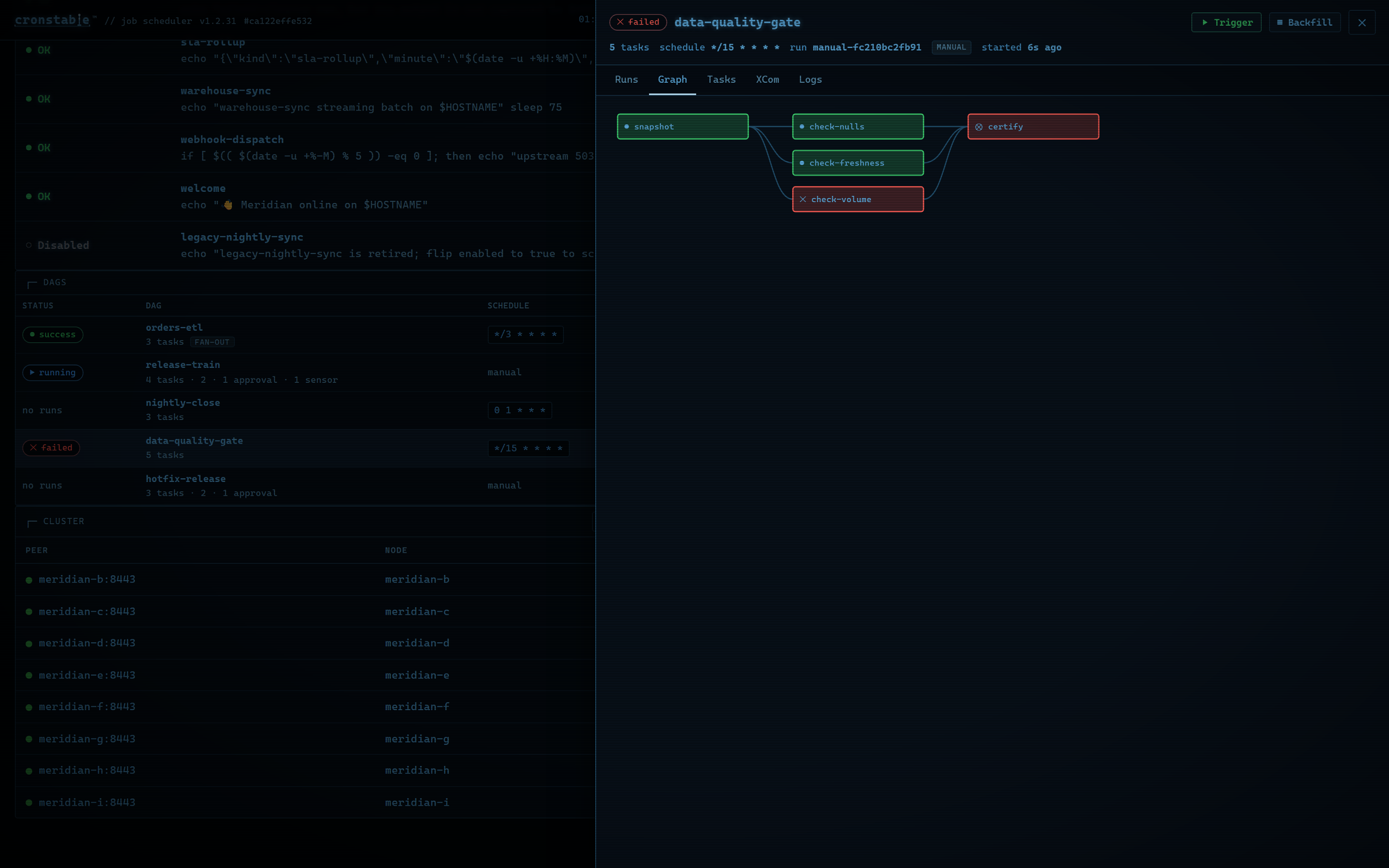
A tour of the web dashboard. To try it in your browser, open the live demo.
Why cronstable?
Scheduling
- YAML and classic crontab files: define jobs in YAML, or load an existing crontab (see classic crontab files).
- Business-day and hashed schedules: run on the last weekday of the month
or the third Friday, and spread a fleet's jobs across the hour with
H(see schedules). - Second-level schedules and time zones: run jobs as often as every second, and evaluate each job's schedule in any time zone (see second-level schedules and time zones).
- iCal calendar export: subscribe to upcoming runs in your calendar app, or view them in the dashboard's week calendar (see calendar export).
- Schedule introspection: ask why a job did or didn't run at a given moment, and get a field-by-field answer from the scheduler's own match test. Collision heatmaps, duplicate detection, and slot suggestions help you place new jobs (see schedule introspection).
- Schedule linting: catch schedules that can never run, uneven intervals, and times that daylight saving time skips or repeats (see schedule linting).
Failure handling
- Retries with backoff: retry failed runs with exponential backoff, and choose whether a nonzero exit status or output on stderr or stdout counts as a failure (see failure detection and retries).
- Result verification: check a job's output before recording success or starting downstream tasks (see result verification).
- Alerts: report failures through Sentry, email, Slack-compatible webhooks, shell commands, and the Windows Event Log (see reporting).
- End-to-end encrypted push notifications: send alerts to the iOS app that only paired devices can decrypt (see push notifications).
- Late-run detection: alert when a run is missing, late, or running too long, and mark the job as overdue in the dashboards (see late-run detection).
Durability and orchestration
- Opt-in durable state: keep run history and pending retries across restarts, catch up missed runs, and give job commands shared storage, locks, and idempotency keys (see durable state).
- Durable workflows: run tasks as a directed acyclic graph (DAG) with dependencies, data sharing, dynamic fan-out, sensors, and approval gates (see workflow orchestration).
- Selective workflow recovery: retry failed tasks or replay failed dates while reusing successful results (see workflow recovery).
- Shared resource pools: limit capacity across jobs and workflow tasks, with priority queues and deadlines (see resource pools).
Observability and control
- Web, terminal, and iOS dashboards: follow live logs, review history, control jobs and workflows, and monitor the cluster.
- HTTP API: read job status and history, and start, cancel, or pause jobs (see HTTP API).
- Status badges: show a job's live status in a README or wiki with an SVG badge (see status badges).
- Runtime pause and resume: pause scheduled runs for maintenance without editing configuration (see pausing jobs).
- Prometheus and statsd metrics: track outcomes, durations, retries, and cluster health (see metrics).
- Per-job resource monitoring: track CPU time and peak memory across each job's process tree (see resource monitoring).
- Per-job resource limits: cap each run's CPU, memory, and process count with cgroup v2 on Linux and Job Objects on Windows (see resource limits).
- Built-in TLS: serve the API over HTTPS, optionally require client certificates, and rotate certificates without a restart (see TLS and client certificates).
- MCP server: let AI agents inspect jobs and debug schedules, read-only by default, with optional control (see MCP).
Fleets
- Opt-in clustering and leader election: coordinate which replica runs scheduled jobs through a Kubernetes Lease, an etcd lease, a shared filesystem, or mutual TLS between peers (see clustering and leader election).
- Job-set ID: compare configuration fingerprints to detect drift between replicas (see job-set ID).
Deployment
- Prebuilt releases: container images in eight variants, and self-contained binaries for Linux, macOS, Windows, FreeBSD, OpenBSD, NetBSD, and illumos (see installation).
- Built for restricted containers: run as a non-root user with a read-only root filesystem and restricted Kubernetes security settings (see production container deployment).
- Native Windows support: run as a Windows service, install with WinGet or an MSI, and import Task Scheduler tasks (see Windows).
Quick start
Install cronstable with pipx, or with
pip install cronstable inside a virtual environment. For Docker, Homebrew,
WinGet, and standalone binaries, see installation.
pipx install cronstable
Create a cronstable.yaml file with your first job:
jobs:
  - name: hello
    command: echo hello from cronstable
    schedule: "* * * * *"        # every minute
    captureStdout: true

web:
  listen:
    - http://127.0.0.1:8080      # optional: the REST API and dashboard
Start the scheduler. It runs in the foreground:
cronstable -c cronstable.yaml
Open http://127.0.0.1:8080/ to watch the hello job's output in the
dashboard. The job runs once a minute, and schedules use UTC
unless a job sets a time zone. cronstable picks up changes to
the file within a minute, so you can add jobs without restarting it.
Four short tutorials build on this configuration:
- Retry failed jobs, and alert when the retries fail.
- Survive restarts and catch up missed runs.
- Chain tasks into a durable workflow with an approval gate.
- Coordinate two replicas with leader election.
To follow your jobs from a phone, pair the iOS app from the dashboard. To see every feature at once, start the nine-node grand tour from a clone of this repository:
docker compose -f example/grand-tour/docker-compose.yml up --build
To run an existing crontab exported with crontab -l, pass the file to -c:
cronstable -c my.crontab. A system crontab such as /etc/crontab has an
extra user column, so convert its entries to YAML (see
classic crontab files).
Installation
cronstable aims to run on as many platforms and CPU architectures as possible. Every release publishes Linux container images, standalone binaries for Linux, macOS, Windows, FreeBSD, OpenBSD, NetBSD, and illumos, packages for Linux and FreeBSD, and Windows installers. If your platform or architecture is missing, open an issue or send a pull request (see CONTRIBUTING.md).
Run with Docker
Every release publishes multi-architecture images to the GitHub Container
Registry (ghcr.io/ptweezy/cronstable) and Docker Hub (ptweezy/cronstable).
Mount your configuration file and start the container:
docker run --rm -p 8080:8080 \
  -v "$PWD/cronstable.yaml:/etc/cronstable.d/cronstable.yaml:ro" \
  ghcr.io/ptweezy/cronstable:latest
Inside a container, the dashboard must listen on all interfaces, so change the
quick start's listener to http://0.0.0.0:8080. Before you expose it beyond
your machine, set an authentication token.
The default image is based on Debian slim and supports seven Linux platforms:
amd64, arm64, 386, arm/v7, ppc64le, s390x, and riscv64. It runs
as a non-root user and reads its configuration from /etc/cronstable.d. Each
release also publishes Alpine, Ubuntu, RHEL (UBI), Fedora, openSUSE, Amazon
Linux, and distroless variants, tagged with a -<distro> suffix such as
latest-alpine. Every variant also has -amd64v3 tags, such as
latest-amd64v3, for x86-64-v3 CPUs. For each
variant's platforms, see
installation in the
wiki.
In production, pin a release version instead of latest. For a hardened
Kubernetes or Docker setup, see
production container deployment.
Install using pip
cronstable requires Python 3.11 or later. Install it in a virtual environment:
pip install cronstable
Or let pipx create an isolated environment for you:
pipx install cronstable
Optional extras install the dependencies of specific features: push for
push notifications, discovery for
LAN discovery,
kubernetes for the official Kubernetes client library, and speedups for
uvloop, orjson, and isal. For example, run pip install "cronstable[push]". On a
system with an older Python, use a
standalone binary.
Install using Homebrew or WinGet
Homebrew and WinGet install prebuilt releases, so you don't need Python. On macOS or Linux, use Homebrew:
brew install ptweezy/tap/cronstable
On Windows, use WinGet:
winget install ptweezy.cronstable
Upgrade later with brew upgrade cronstable or
winget upgrade ptweezy.cronstable.
WinGet runs a signed setup program that installs the per-machine MSI. Approve
the administrator prompt, then open a new shell so that cronstable is on your
PATH. The installer registers the Windows service without starting it, and
creates a configuration directory that only SYSTEM and Administrators can
write. The service starts at the next boot and runs no jobs until you add
configuration. For catalog availability and how to switch from a portable
install, see the
WinGet installation guide.
Install a standalone binary
Every release attaches self-contained binaries that embed Python, so the target
system doesn't need it. Download one from the
releases page, or use
curl:
# For an x86-64 Linux CPU with glibc. Use amd64v3 instead of amd64 on
# x86-64-v3 CPUs, and append -musl on Alpine.
curl -fsSL -o cronstable \
  https://github.com/ptweezy/cronstable/releases/latest/download/cronstable-linux-amd64
chmod +x cronstable
./cronstable --version
Releases include these builds:
- Linux: glibc and musl builds for
amd64,amd64v3,arm64,i686,armv7,armv6,ppc64le,s390x,riscv64, andloong64, plus glibc builds formips64leandarmel - macOS:
amd64,amd64v3, andarm64, signed and notarized by Apple - Windows:
amd64,amd64v3,arm64, andi686 - FreeBSD:
amd64,amd64v3, andarm64 - OpenBSD, NetBSD, and illumos:
amd64andamd64v3 - Packages:
.deb,.rpm, Alpine.apk, and FreeBSD.pkg
The amd64, amd64v3, arm64, and s390x glibc builds need only glibc 2.17,
so they run on RHEL 7 and later. The ppc64le build needs glibc 2.28 (RHEL 8
and later). The .deb and .rpm packages also install a systemd unit and a
starter configuration in /etc/cronstable.d. They don't start the service;
run systemctl enable --now cronstable when your configuration is ready.
Windows builds come in four formats:
cronstable-windows-<arch>-setup.exe: a signed setup program foramd64,amd64v3, andarm64that installs the MSI. WinGet runs this setup.cronstable-windows-<arch>.exe: a single-file executable.cronstable-windows-<arch>.zip: a one-directory build that extracts to a singlecronstablefolder and can host the Windows service.cronstable-windows-<arch>.msi: a machine-wide installer that registers the service, for deployment through Group Policy, Intune, or SCCM (see Windows MSI).
At startup, a standalone binary unpacks its embedded Python runtime into a
temporary directory, so on a read-only root filesystem it needs a small
writable, executable temporary mount. The container images, pip installs, and
the Windows .zip and .msi builds don't unpack anything at startup. For a
tmpfs or emptyDir recipe, the full asset table, and the other install
methods (ubi, mise, and Nix), see
installation in the
wiki.
Choose an x86-64 build
Every x86-64 binary, package, and Docker image comes in two builds:
amd64v3(recommended for compatible CPUs): uses an optimized embedded Python runtime and requires the full x86-64-v3 feature set, as on Intel Haswell and newer Core and Xeon CPUs, or AMD Excavator and Zen.amd64(compatibility build): runs on any x86-64 CPU. Choose it when the CPU or VM doesn't expose x86-64-v3, or when you're unsure.
Homebrew and WinGet install the amd64 builds. For the exact feature list,
see
CPU requirements.
Web dashboard
The daemon serves the built-in web dashboard at / on each http:// and
https:// listener. It's one self-contained page, with no build step and no
external requests, served under a strict Content Security Policy. To turn it
on, add a web listener, as in the quick start:
web:
  listen:
    - http://127.0.0.1:8080
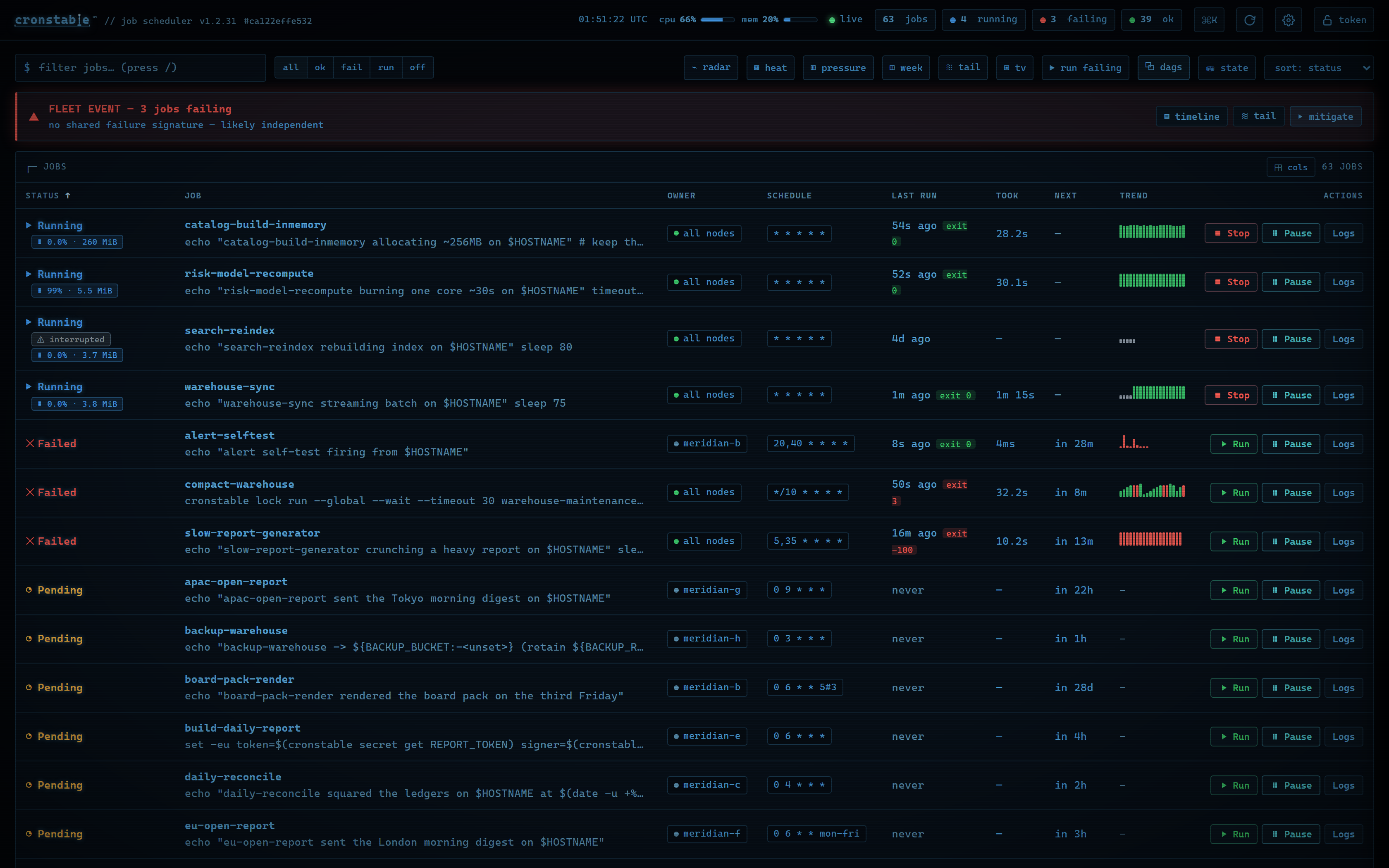
The overview shows each job's status, upcoming runs, recent outcomes, and, when monitoring is on, resource usage. Open a job to follow its logs, review its run history, or inspect its schedule. You can also:
- Trigger workflows, follow their task graphs, and approve or reject approval gates.
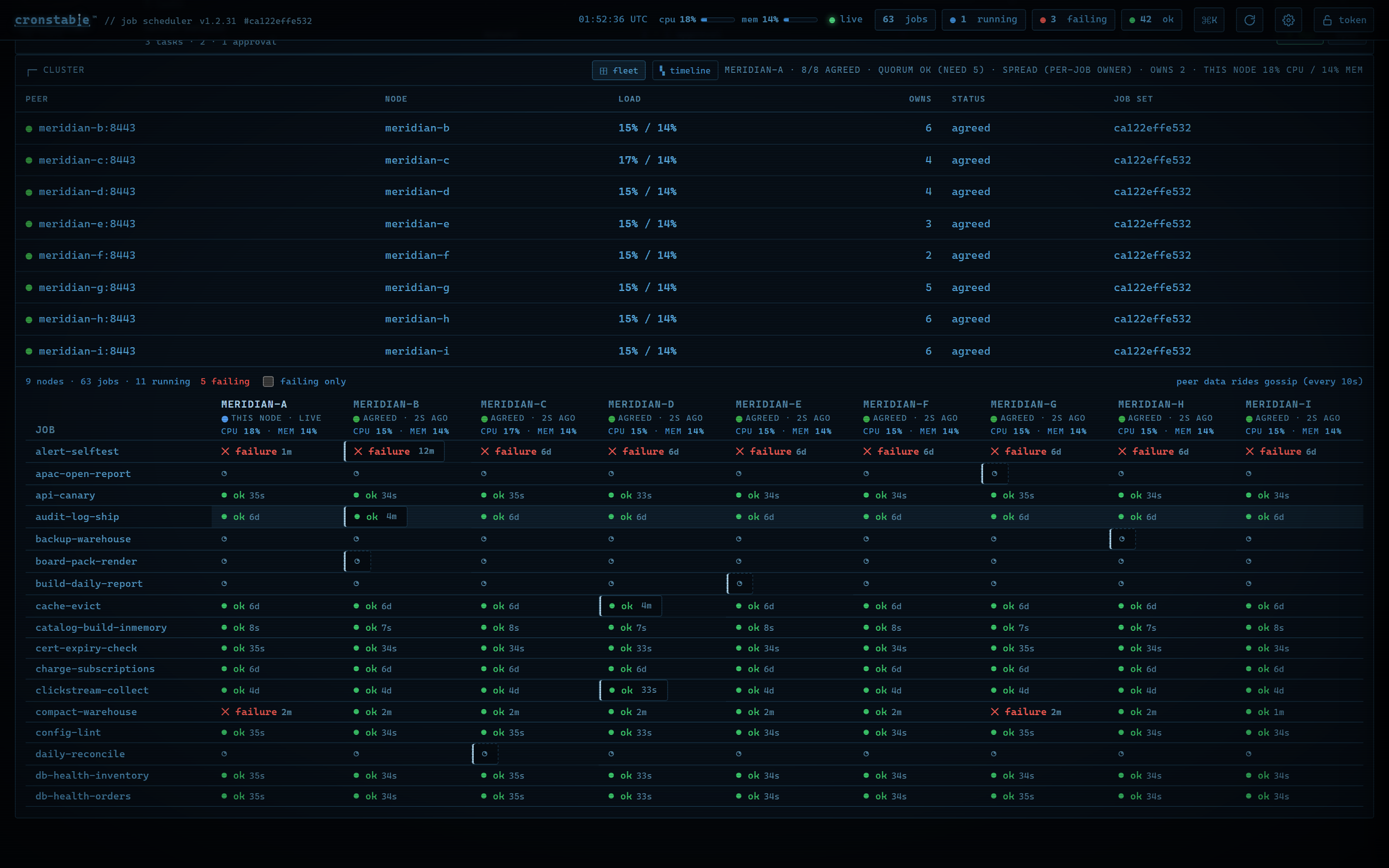
- Inspect cluster health and compare each job's runs across nodes.
- Investigate failures with an incident timeline and merged live logs.
- Use the wallboard, the activity heatmap, and the durable state inspector.
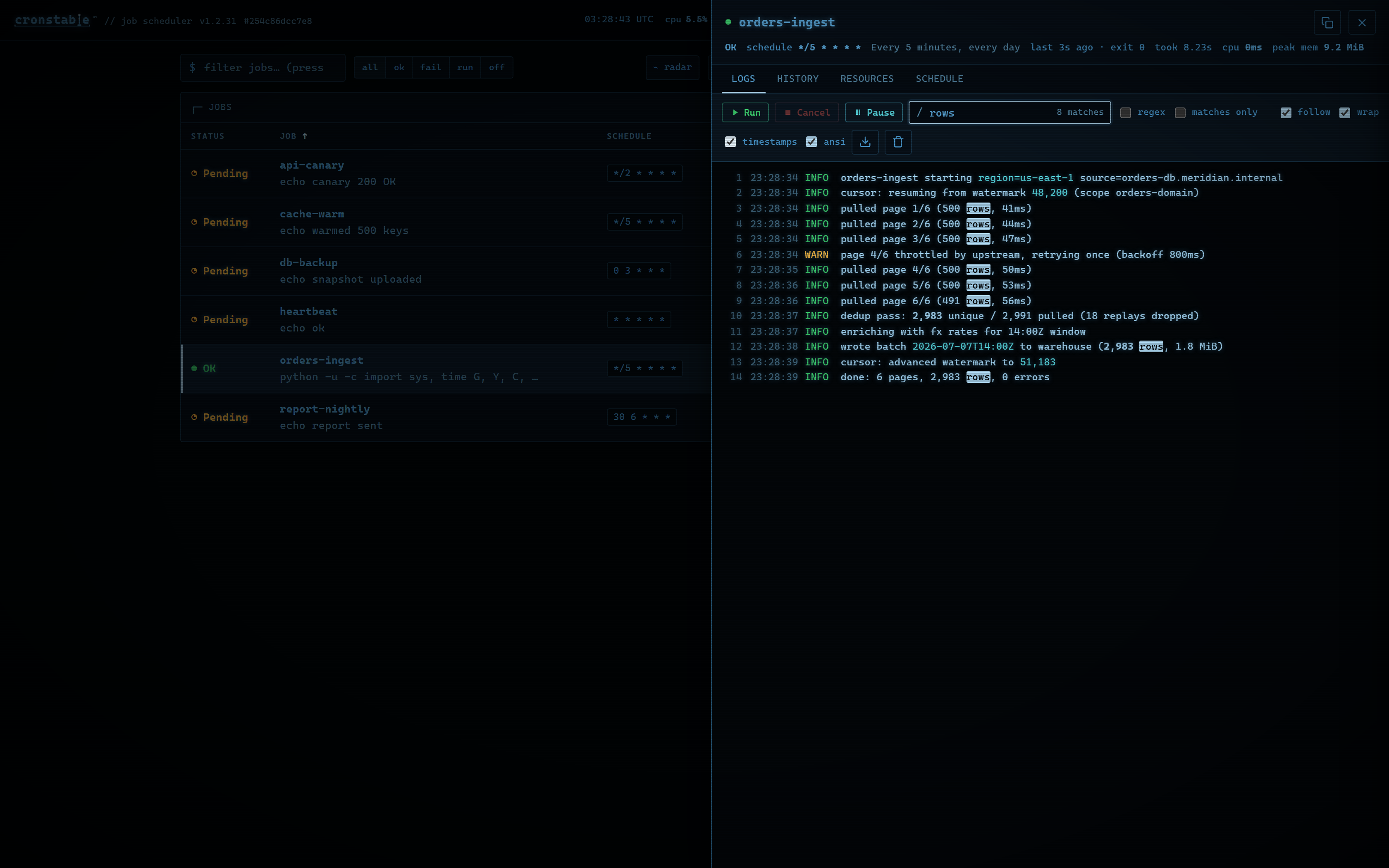
| Live logs | Workflow task graph | Fleet view |
|---|---|---|
 |
 |
 |
Press Ctrl-K or ⌘K for the command palette, ? for shortcuts, or Enter
to open the selected job. The dashboard has ten themes, adjustable fonts and UI
scale, color-vision-safe palettes, and reduced-motion support. It shows status
with text and symbols as well as color.
Run history and captured output stay in memory unless you enable the
durable state store,
which keeps run history across restarts. To also keep each run's captured
output, set archiveOutput: true on the job or under defaults:. For every
panel, shortcut, and setting, see the
web dashboard guide.
To try the dashboard without installing anything, open the live demo. It's a public board that all visitors share, and it needs no account or token. You can start, cancel, pause, and resume its sample jobs, trigger its workflows, and approve or reject their gates.
For a demo board on your own machine with a varied set of jobs, run this command from a clone of this repository, and then open http://localhost:8080/:
docker compose up
The example gallery has larger setups, including a three-node cluster and the nine-node grand tour.
Terminal dashboard
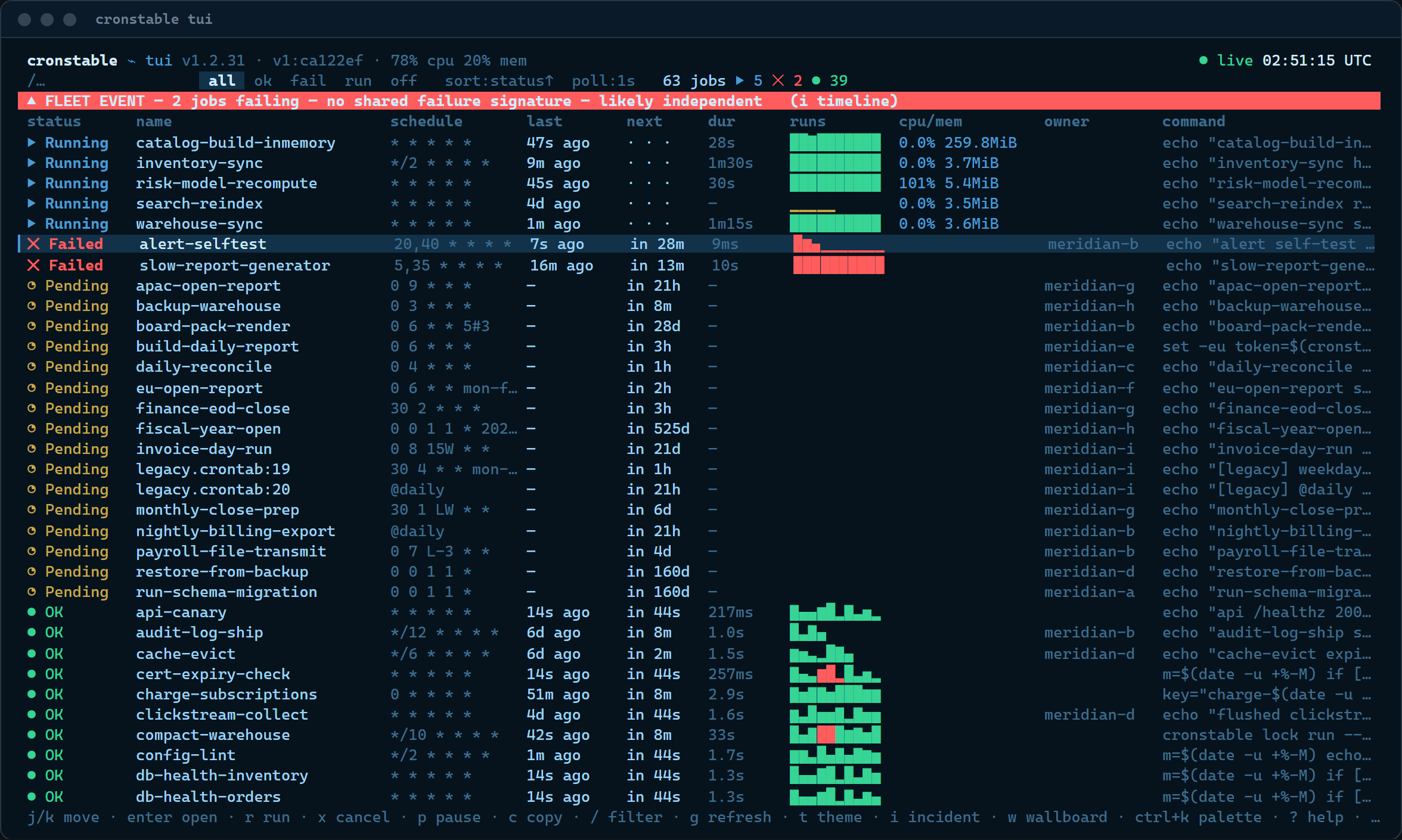
The cronstable tui command brings the dashboard to your terminal, including
over SSH and in tmux. It's a client of the same HTTP API, uses the web
dashboard's keyboard shortcuts, and has job logs, history, workflows, cluster
views, and incident tools.
cronstable tui                              # local daemon on port 8080
cronstable tui --url http://prod-node:8080  # remote daemon
cronstable tui --tv                         # open the wallboard
If the daemon requires a token, set the
CRONSTABLE_WEB_TOKEN environment variable, or name another variable with
--token-env. Use --job to open a job's details at startup, or --ascii
when your terminal font lacks the status symbols. For all options, panels, and
themes, see the
terminal dashboard guide.
cronstable MCP questions
What can an AI agent do with the cronstable MCP server?
It can inspect jobs and debug schedules; control features are opt-in since access is read-only by default.
Does the cronstable MCP server require extra setup to allow changes?
By default it is read-only, so control must be explicitly enabled.
How are jobs defined in cronstable?
Jobs are defined in YAML or loaded from an existing crontab file.
Can cronstable retry failed jobs and send alerts?
Yes, it retries failed runs with exponential backoff and reports failures via Sentry, email, webhooks, shell commands, and the Windows Event Log.