
Allows AI agents to compose lofi music by drawing strokes on a canvas that translate into melodies and rhythmic patterns.
Also known as pinkpixel-dev/haku, @pinkpixel/haku
- Stars
- 1
- Tools
- —
- Downloads, 30 days
- —
- Latest version
- —
- Last commit
- Nov 1, 2026
- License
- Apache-2.0
What is Haku MCP?
Haku allows AI agents to compose lofi music by drawing strokes on a canvas that translate into melodies and rhythmic patterns.
Summary generated from the project's README
About Haku MCP server
Composing lofi music through visual gestures is what Haku enables for developers and AI agents. By translating drawn strokes on a canvas into melodies and rhythmic patterns, the system creates cozy tracks featuring warm keys, round bass, and brushed drums. Users can select specific moods like rainy study or sunny café to automatically set the tempo, key, and instrumentation, including instruments such as Wurlitzer, vibraphone, and nylon guitar.
This MCP server allows AI agents to interact with the music engine using the same tools as the web interface. Agents can work live on an open browser tab or manipulate project files directly to render audio offline. The setup requires Node 22.18 or newer and can be run via the haku CLI or by pointing an MCP client to the local server. The system supports exporting MIDI for external use or rendering high-quality WAV files with characteristic lofi textures like vinyl crackle and tape wobble.
What you can do with it
- 1Generate melodic lofi loopsAn AI agent can draw specific shapes on a canvas to create melodies that automatically snap to the correct musical scale.
- 2Create atmospheric musical moodsA developer can instruct an agent to set a specific emotional tone by selecting predefined environmental presets.
- 3Automate music file productionAgents can programmatically create new music projects and render them into audio files without manual interaction.
- 4Visualizing musical compositionsAn AI can capture a visual representation of the musical data it has generated for review.
Written from the project's README. Every use case is checked against a quote from it.
How to install Haku MCP
Formats verified 10 Nov 2026Add to CursorAdd to GooseInstall Haku MCP in Claude Code
$ claude mcp add haku -- npx -y @pinkpixel/hakuInstall Haku MCP in Cursor
~/.cursor/mcp.json
{
  "mcpServers": {
    "haku": {
      "command": "npx",
      "args": [
        "-y",
        "@pinkpixel/haku"
      ]
    }
  }
}Install Haku MCP in VS Code
.vscode/mcp.json
{
  "servers": {
    "haku": {
      "type": "stdio",
      "command": "npx",
      "args": [
        "-y",
        "@pinkpixel/haku"
      ]
    }
  }
}Install Haku MCP in VS Code CLI
$ code --add-mcp '{"name":"haku","type":"stdio","command":"npx","args":["-y","@pinkpixel/haku"]}'Install Haku MCP in Claude Desktop
claude_desktop_config.json
{
  "mcpServers": {
    "haku": {
      "command": "npx",
      "args": [
        "-y",
        "@pinkpixel/haku"
      ]
    }
  }
}Install Haku MCP in Codex
$ codex mcp add haku -- npx -y @pinkpixel/hakuInstall Haku MCP in Codex config.toml
~/.codex/config.toml
[mcp_servers.haku]
command = "npx"
args = ["-y", "@pinkpixel/haku"]
Install Haku MCP in Gemini CLI
$ gemini mcp add -s user haku npx -- -y @pinkpixel/hakuInstall Haku MCP in Gemini settings.json
~/.gemini/settings.json
{
  "mcpServers": {
    "haku": {
      "command": "npx",
      "args": [
        "-y",
        "@pinkpixel/haku"
      ]
    }
  }
}Automated checks
Ran Nov 14, 2026Full report →Not verified yet. A server needs a score of 80, no serious finding, and enough data for us to check. How checks work · What to fix for more points

- Source repository linked and reachablepinkpixel-dev/haku is public and reachablegithub.com/pinkpixel-dev/haku ↗Pass
- Package names this repository as its source@pinkpixel/haku names pinkpixel-dev/haku as sourcenpmjs.com/package/@pinkpixel/haku ↗Pass
- Build provenance (Sigstore attestation)No build attestation published for this releaseNot checked
- Open source license (OSI)Apache-2.0spdx.org/licenses/Apache-2.0.html ↗Pass
- Commit or release in the last yearLast commit or release 2026-11-01github.com/pinkpixel-dev/haku ↗Pass
- OpenSSF ScorecardNot checked
- Package name not close to a popular packageNo popular package one edit away from @pinkpixel/hakuPass
- No critical advisory in the package or its dependenciesNot checked
- No hidden instructions to the model0 tool descriptions and the README read; no override phrases, credential paths or hidden charactersPass
- Destructive tools are labelledNot checked
- Remote endpoint answers the MCP handshakeNot checked
README
View on GitHubHaku
Draw on a canvas, get a cozy lofi track.
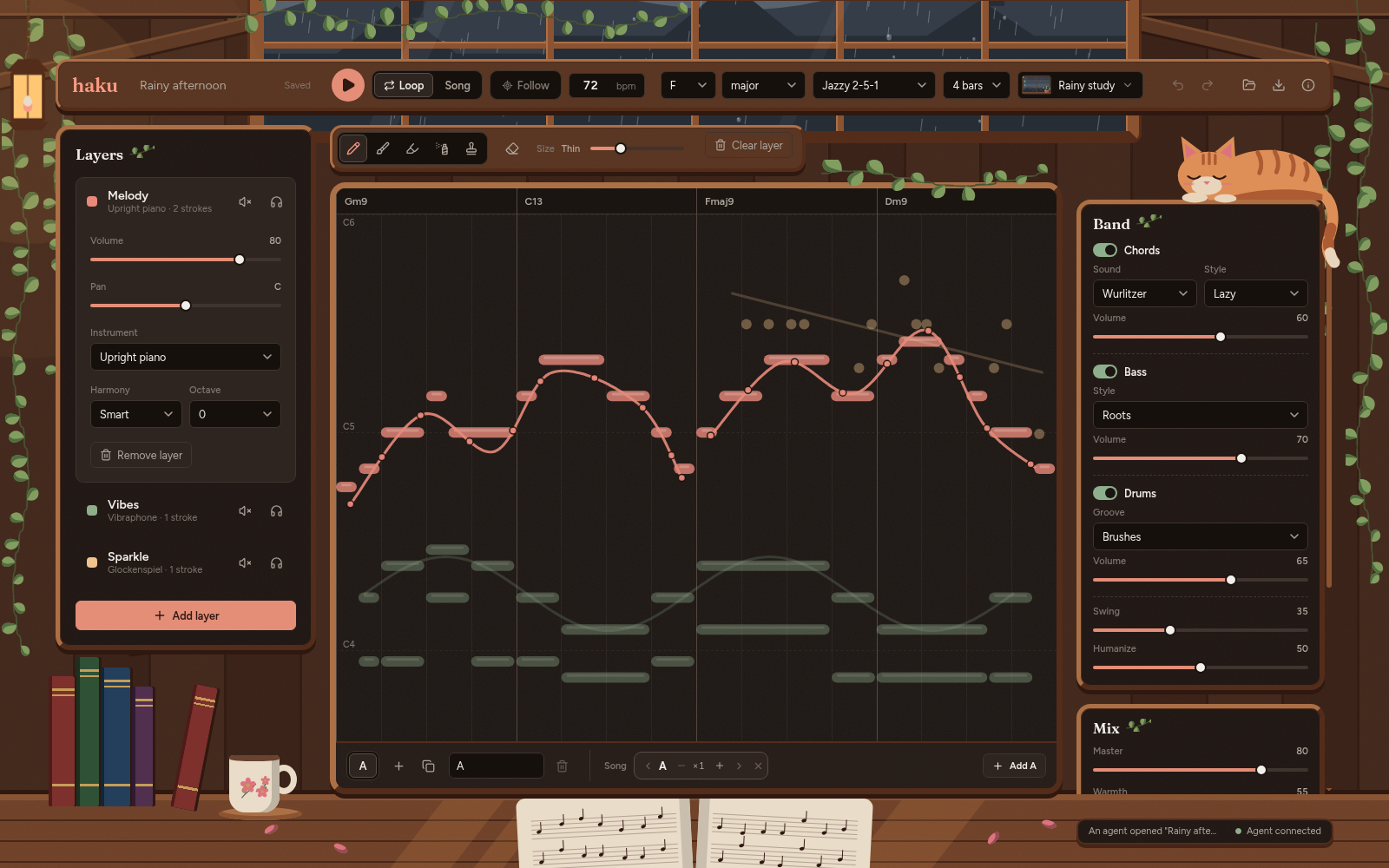
You sketch a line and Haku reads it as a melody: left to right is time, up and down is pitch. Every note gets nudged onto the chords, so whatever you draw fits. Underneath, a little backing band (warm keys, a round bass, brushed drums) follows the progression, and the whole thing gets the usual lofi treatment of swing, vinyl crackle, tape wobble, and rain on the window.
There's also a CLI and an MCP server, so AI agents can draw music with the same tools you use.
What it does
- Turns strokes into notes. Pencil for eighth-note melodies, brush for long soft notes, chalk for two-note harmonies, spray for sparkles, stamp for one hit per step.
- Keeps everything in tune. Notes on strong beats land on chord tones, and the rest stay in the key. You can also pick plain scale, pentatonic, chord-only, or chromatic snapping per layer.
- Reads a few gestures. Tap for a single note, a short vertical line strums the chord, a tight zigzag plays a trill, a quick flick adds a grace note.
- Plays a backing band. Voice-led jazzy chords (7ths, 9ths, 13ths) with six comping styles, including rolled chords and rootless shells. Roots, walking, or dub bass. Seven drum grooves, from dusty boom bap and a jazzy ride to a kick that drags behind the beat.
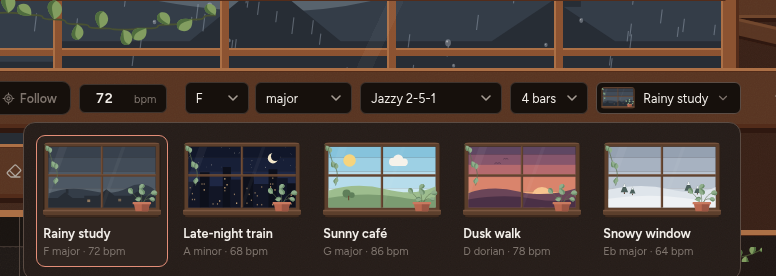
- Comes with moods. Rainy study, late-night train, sunny café, dusk walk, and snowy window. Each one sets the tempo, key, chords, band, and mix.
- Sounds like lofi. Sampled upright piano, Wurlitzer, glock, vibraphone, marimba, kalimba, harp, and nylon guitar, synth keys, pads, plucks, celesta, music box, and bass, and a real drum kit, all run through tape warmth, wobble, reverb, vinyl crackle, and rain.
- Exports MIDI with a track per layer, and renders WAV offline (the browser and Node use the same audio code, so they sound the same).
- Lets agents draw too. The
hakuCLI and the MCP server have a tool for every command, plus snapshots, analysis, playback, and export. They work on project files, or live on the tab you have open.
Running it
The quickest way is the hosted app at https://haku.pinkpixel.dev. In Chrome or Edge you can install it from the address bar, and it keeps working offline once it's loaded.
The hosted app is just the app, though. AI agents can only work live on Haku running on your own machine (see Agents and the CLI), and projects are saved per address, so the hosted app and a local copy keep separate project lists.
To run it from the repo, you'll need Node 22.18 or newer and pnpm. Rebuilding the samples also needs ffmpeg with libvorbis.
pnpm install
pnpm --filter @haku/web dev
Then open http://localhost:5178, draw on the canvas, and press play (or Space). The number keys 1 to 5 pick brushes and E switches to the eraser.
A few more things worth knowing:
- Your loop saves on its own in the browser, and it's still there when you come back. The folder button in the top bar lists your projects, starts new ones, and saves or imports
.haku.jsonfiles. - Ctrl+Z undoes and Ctrl+Shift+Z (or Ctrl+Y) redoes.
- Scenes live under the canvas. Add or duplicate one, then build the song in the strip next to them. Switch the top bar from Loop to Song to hear the whole thing. Turn on Follow if you want the canvas to switch to whichever scene is playing.
- The download button exports WAV or MIDI, for the current scene or the whole song.
- The mood button in the top bar shows a little window for each mood. The big window at the top of the room follows the mood, but you can pick a different view outside under Ambience in the Mix panel whenever you want.
To run the tests and typecheck everything:
pnpm test
pnpm typecheck
pnpm render renders every mood with a little demo melody to ./renders and prints the peak, RMS, and loudness of each. It's mostly there for tuning the mix. Add --mood sunny-cafe for just one, or --project path/to/project.json to render a saved project.
The processed samples are already in assets/samples/. To rebuild them from the original recordings:
pnpm samples:fetch   # downloads about 450 MB into assets/sources/ (needs 7z for the guitar)
pnpm samples:build   # makes assets/samples/ again
The two rain recordings come from Freesound, which needs a login, so those get downloaded by hand. Grab Soft rain on roof window and January rain on a window and save them into assets/sources/freesound/ with their original names (235827__metadex__soft-rain-on-roof-window.wav and 333510__mmorgaine__january-rain-on-a-window.aiff).
Agents and the CLI
Haku comes with a CLI and an MCP server, so an AI agent (or you, from a terminal) can draw music with the same commands the canvas uses. Point your MCP client at the server:
claude mcp add haku -- node /absolute/path/to/haku/apps/agent/src/cli.ts mcp
The CLI is also on npm, so you can skip the repo entirely: npx @pinkpixel/haku mcp runs the server, and npm install -g @pinkpixel/haku gives you the haku command. The npm package carries the whole web app too, so haku web opens Haku in your browser with no clone needed. In Chrome or Edge you can install it from there (the install icon in the address bar), and it gets its own window and keeps working even when haku web isn't running.
With Haku open in a browser, the agent works live on that tab. You hear and see every change, and Ctrl+Z still works. If a tool needs the tab and nothing's open, Haku starts haku web in the background and opens it for you. Pass a .haku.json file instead and tools work on that file and render audio offline. A quick taste from the terminal:
pnpm haku new-project -f lofi.haku.json --mood rainy-study
pnpm haku draw-shape -f lofi.haku.json --shape wave --x 0 --y 0.5 --width 1 --height 0.4 --cycles 2
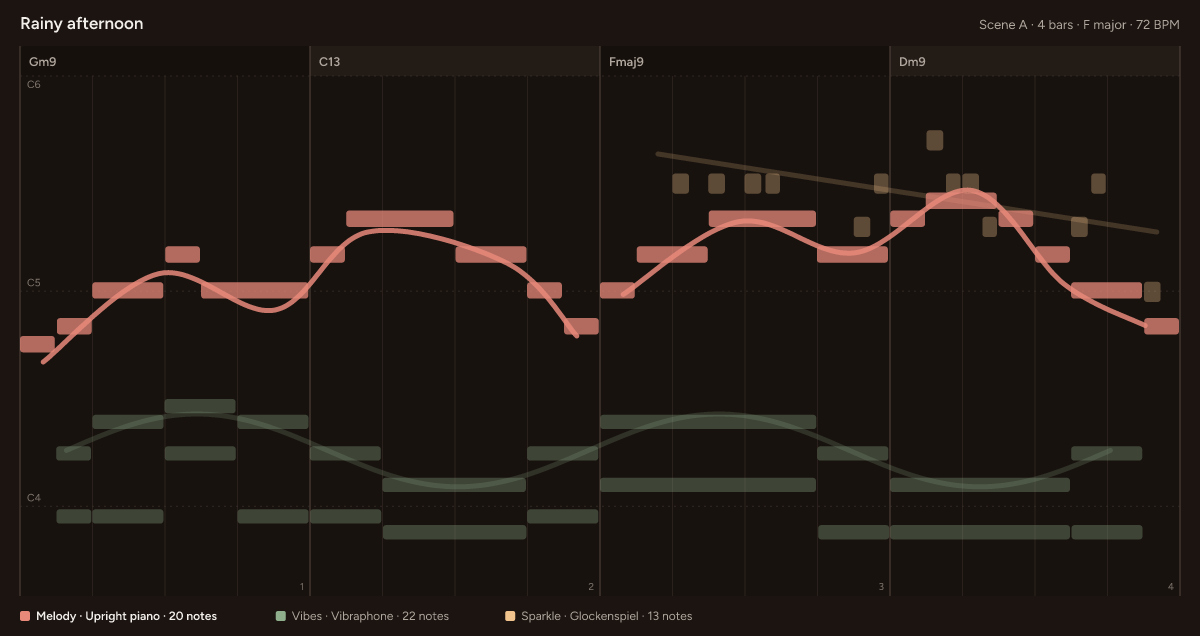
pnpm haku snapshot -f lofi.haku.json --out lofi.png
pnpm haku play -f lofi.haku.json
snapshot gives the agent a picture of what it drew, chords and all:
The package README covers the setup, the browser link, environment variables, and every tool.
Using the engine from code
Everything goes through commands, the same ones the CLI and MCP server use:
import { createProject, buildSceneScore, describeProject } from '@haku/core';
import { execute } from '@haku/protocol';

let project = createProject({ mood: 'rainy-study' });
project = execute(project, {
  type: 'draw_curve',
  points: [{ x: 0, y: 0.6 }, { x: 0.3, y: 0.3 }, { x: 0.6, y: 0.5 }, { x: 1, y: 0.4 }],
}).project;

console.log(describeProject(project)); // chords, layers, and a little piano roll
const score = buildSceneScore(project); // every note, in beats
The canvas is 0 to 1 on both axes. x spans the whole scene and y = 0 is the top (the highest notes).
Credits
The sounds come from VSCO 2 CE, VCSL (vibraphone, kalimba, shaker, and cabasa), the FreePats Spanish classical guitar, Big Rusty Drums, Greg Sullivan's Wurlitzer EP200, and two rain recordings from Freesound. The Wurlitzer is CC-BY 3.0, and everything else is CC0. Snapshots use the Figtree font (SIL Open Font License). The Credits button in the app lists every source with links, and so does the package README.
License
Apache 2.0. See LICENSE.
Made with 💖 by Pink Pixel
Haku MCP questions
How do I add Haku MCP to Claude Code?
Run claude mcp add haku -- npx -y @pinkpixel/haku in your terminal. Add --scope user to make it available in every project.
How do I add Haku MCP to Cursor?
Open ~/.cursor/mcp.json and add the server under mcpServers, using the Cursor config shown in the install section above.
Can AI agents use Haku?
Yes, Haku includes an MCP server and CLI that allow AI agents to draw music, take snapshots, analyze projects, and export audio using the same tools as the canvas.
How does drawing translate to music?
The system reads strokes where the horizontal axis represents time and the vertical axis represents pitch, automatically snapping notes to chords and scales.
What file formats can I export?
You can export your compositions as MIDI files or render them as WAV files.
Does the music sound the same in the browser and the CLI?
Yes, the browser and Node.js use the same audio code to ensure consistent sound.