
Allows AI clients to search clipboard history, pull items into context, and save outputs to pinboards locally on macOS.
Also known as pasteapp/paste-mcp, paste-mcp, @pasteapp/mcp
- Stars
- 3
- Tools
- —
- Downloads, 30 days
- —
- Latest version
- 0.1.3
- Last commit
- Oct 1, 2026
- License
- MIT
What is Paste MCP?
Paste allows AI clients to search clipboard history, pull items into context, and save outputs to pinboards locally on macOS.
Summary generated from the project's README
About Paste MCP server
Accessing your Mac clipboard history and pinboards directly from AI clients is what this local MCP server enables. It allows developers using tools like Claude, Codex, Cursor, or VS Code to search through previously copied items and pull specific content into their active conversation context. You can also instruct your assistant to save generated outputs directly to a pinboard for later retrieval.
This server runs entirely on your macOS device, bridging your AI application to the Paste on-device server. Because it operates locally, your clipboard data stays on your machine and only reaches the specific AI apps you authorize. To set it up, you need macOS, Paste version 6.6 or higher, and Node.js 18 or above. You can connect it to your preferred environment using the add-mcp command or by selecting your application within the Paste settings menu.
What you can do with it
- 1Retrieve historical clipboard dataAsk your AI assistant to find a specific snippet of code or text you copied earlier in your session.
- 2Organize AI outputsHave the AI save its generated responses or summaries directly to a local pinboard.
- 3Integrate clipboard history with IDEsUse your clipboard history as context while coding in Cursor or VS Code.
Written from the project's README. Every use case is checked against a quote from it.
How to install Paste MCP
Formats verified 10 Nov 2026Add to CursorAdd to GooseInstall Paste MCP in Claude Code
$ claude mcp add paste-mcp -- npx -y @pasteapp/mcpInstall Paste MCP in Cursor
~/.cursor/mcp.json
{
  "mcpServers": {
    "paste-mcp": {
      "command": "npx",
      "args": [
        "-y",
        "@pasteapp/mcp"
      ]
    }
  }
}Install Paste MCP in VS Code
.vscode/mcp.json
{
  "servers": {
    "paste-mcp": {
      "type": "stdio",
      "command": "npx",
      "args": [
        "-y",
        "@pasteapp/mcp"
      ]
    }
  }
}Install Paste MCP in VS Code CLI
$ code --add-mcp '{"name":"paste-mcp","type":"stdio","command":"npx","args":["-y","@pasteapp/mcp"]}'Install Paste MCP in Claude Desktop
claude_desktop_config.json
{
  "mcpServers": {
    "paste-mcp": {
      "command": "npx",
      "args": [
        "-y",
        "@pasteapp/mcp"
      ]
    }
  }
}Install Paste MCP in Codex
$ codex mcp add paste-mcp -- npx -y @pasteapp/mcpInstall Paste MCP in Codex config.toml
~/.codex/config.toml
[mcp_servers.paste-mcp]
command = "npx"
args = ["-y", "@pasteapp/mcp"]
Install Paste MCP in Gemini CLI
$ gemini mcp add -s user paste-mcp npx -- -y @pasteapp/mcpInstall Paste MCP in Gemini settings.json
~/.gemini/settings.json
{
  "mcpServers": {
    "paste-mcp": {
      "command": "npx",
      "args": [
        "-y",
        "@pasteapp/mcp"
      ]
    }
  }
}Automated checks
Ran Nov 14, 2026Full report →Passed our automated checks. That is not a security audit: read the code and give the server the narrowest access it needs. How checks work

- Source repository linked and reachablepasteapp/paste-mcp is public and reachablegithub.com/pasteapp/paste-mcp ↗Pass
- Package names this repository as its source@pasteapp/mcp names pasteapp/paste-mcp as sourcenpmjs.com/package/@pasteapp/mcp ↗Pass
- Build provenance (Sigstore attestation)Sigstore attestation for @pasteapp/mcpnpmjs.com/package/@pasteapp/mcp/v/0.1.3#provenance ↗Pass
- Open source license (OSI)MITspdx.org/licenses/MIT.html ↗Pass
- Commit or release in the last yearLast commit or release 2026-10-01github.com/pasteapp/paste-mcp ↗Pass
- OpenSSF ScorecardNot checked
- Package name not close to a popular packageNo popular package one edit away from @pasteapp/mcpPass
- No critical advisory in the package or its dependencies99 resolved dependencies checked; no critical advisoryosv.dev ↗Pass
- No hidden instructions to the model0 tool descriptions and the README read; no override phrases, credential paths or hidden charactersPass
- Destructive tools are labelledNot checked
- Remote endpoint answers the MCP handshakeNot checked
README
View on GitHubPaste MCP


Local MCP server for Paste. Give Claude, Codex, Cursor, and other AI tools access to your Mac's clipboard history and pinboards — without anything leaving your device.
Your assistant can search your clipboard items, pull one into context, or save its output to a pinboard.
Install
Use add-mcp to connect Paste to all your installed AI apps:
npx add-mcp @pasteapp/mcp
The first time an app uses Paste, it'll ask you to authenticate and allow access.
Alternatively, connect Paste to each app manually:
Claude Code
claude mcp add paste -- npx -y @pasteapp/mcp
Codex
codex mcp add paste -- npx -y @pasteapp/mcp
Cursor

VS Code

Connect from Paste
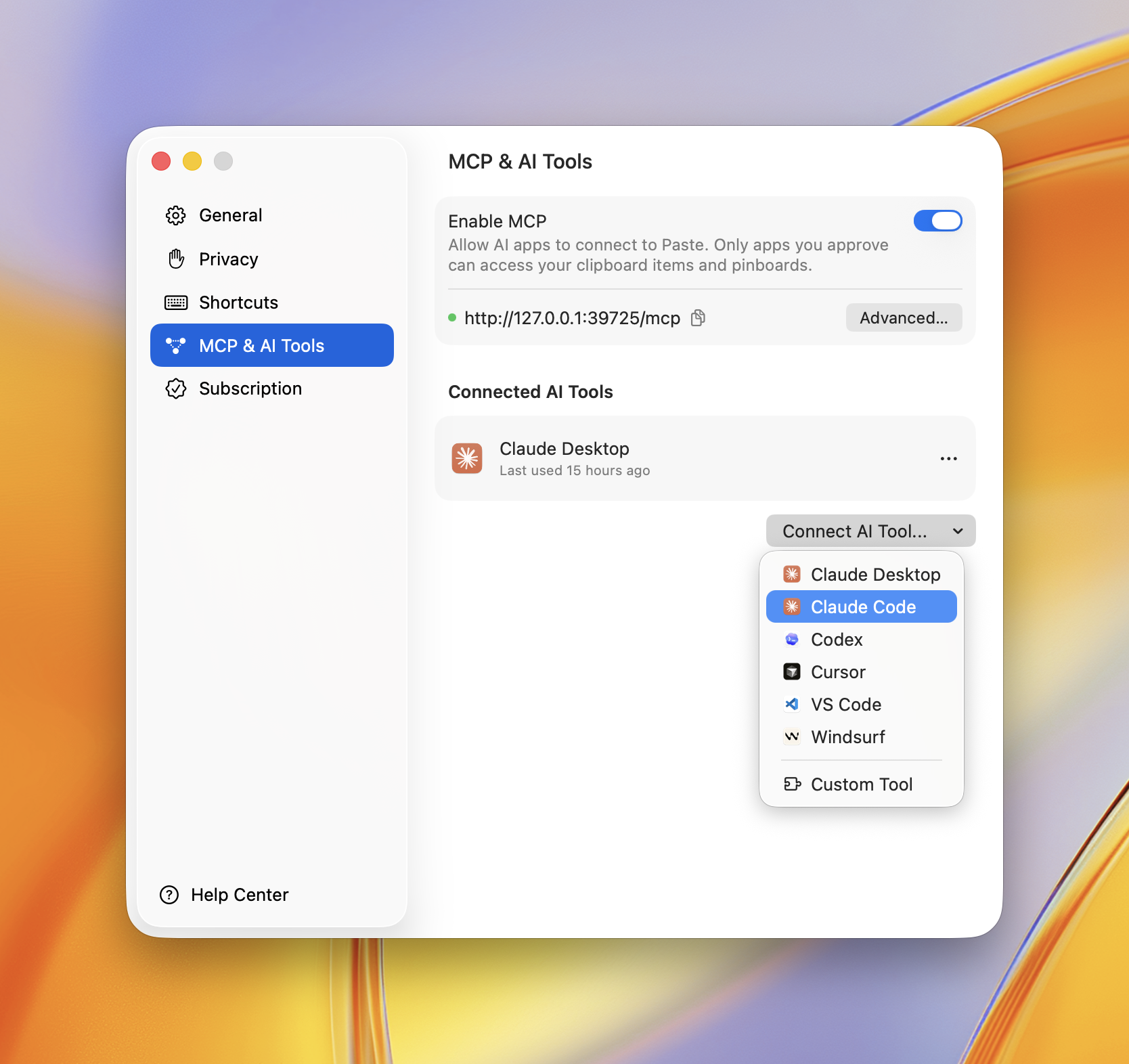
You can also connect any app right inside Paste. Open Settings → MCP & AI Tools, click Connect AI Tool, and choose your app — Paste does the rest.
Privacy Policy
Paste MCP runs locally on your Mac — it bridges your AI app to Paste's on-device server and sends nothing to Paste's own servers. Your clipboard items only reach the AI apps you approve, and you can revoke access anytime in Settings → MCP & AI Tools.
Full policy — what data is processed, how it's stored, sharing, retention, and contact: https://pasteapp.io/privacy.
Troubleshooting
The AI tool says Paste isn't available. Make sure Paste is running and MCP is enabled in Settings → MCP & AI Tools.
Tools don't show up after connecting. Fully quit and reopen your AI app so it relaunches the server.
npx errors or "command not found".
Confirm Node.js 18+ is installed: node --version.
Requirements
Contributing
Issues and pull requests welcome — see the issue tracker.
License
Paste MCP questions
How do I add Paste MCP to Claude Code?
Run claude mcp add paste-mcp -- npx -y @pasteapp/mcp in your terminal. Add --scope user to make it available in every project.
How do I add Paste MCP to Cursor?
Open ~/.cursor/mcp.json and add the server under mcpServers, using the Cursor config shown in the install section above.
Is my data private when using Paste MCP?
Yes, the server runs locally on your Mac and sends nothing to Paste's servers; data only reaches the AI apps you approve.
What should I do if the AI tool says Paste isn't available?
Ensure that the Paste application is running and that MCP is enabled in the Settings menu.