
Build and maintain Thunderstore mod packs by searching mods, resolving dependencies, and exporting r2modman profiles.
Also known as packwarden-dev/packwarden, @packwarden-dev/thunderstore-mcp
- Stars
- 0
- Tools
- 5
- Downloads, 30 days
- —
- Latest version
- 0.1.0
- Last commit
- Oct 26, 2026
- License
- MIT
What is PackWarden MCP?
PackWarden builds and maintain Thunderstore mod packs by searching mods, resolving dependencies, and exporting r2modman profiles. It exposes 5 tools, such as list_communities, search_mods, resolve_dependencies.
Summary generated from the project's README
About PackWarden MCP server
Building and maintaining Thunderstore mod packs for games like Lethal Company, Risk of Rain 2, or Valheim is what Packwarden enables for developers using AI assistants. This MCP server connects to the public Thunderstore API to help users find mods, manage complex dependency trees, and audit existing mod lists for issues like outdated versions or missing files. It functions locally via Node.js for Claude Desktop and Cursor, or can be run as a remote service using a streamable HTTP mode.
Users interact with specific tools such as search_mods to find content by owner or category and resolve_dependencies to calculate a full transitive dependency closure. The server can also check_pack_health to identify conflicts or deprecated packages. Once a pack is ready, export_r2modman_profile generates an .r2z file for use in r2modman or the Thunderstore Mod Manager. The system uses a local cache to improve speed, though large communities like Lethal Company require significant initial memory and time to load.
What you can do with it
- 1Resolve complex dependenciesCalculate every required package and version needed to make a specific mod work.
- 2Audit mod list healthCheck a list of mods to find outdated versions, missing dependencies, or duplicate entries.
- 3Search for community contentLocate mods within a specific game community using keywords, owners, or categories.
Written from the project's README. Every use case is checked against a quote from it.
How to install PackWarden MCP
Formats verified 10 Nov 2026Add to CursorAdd to GooseInstall PackWarden MCP in Claude Code
$ claude mcp add packwarden -- npx -y @packwarden-dev/thunderstore-mcpInstall PackWarden MCP in Cursor
~/.cursor/mcp.json
{
  "mcpServers": {
    "packwarden": {
      "command": "npx",
      "args": [
        "-y",
        "@packwarden-dev/thunderstore-mcp"
      ]
    }
  }
}Install PackWarden MCP in VS Code
.vscode/mcp.json
{
  "servers": {
    "packwarden": {
      "type": "stdio",
      "command": "npx",
      "args": [
        "-y",
        "@packwarden-dev/thunderstore-mcp"
      ]
    }
  }
}Install PackWarden MCP in VS Code CLI
$ code --add-mcp '{"name":"packwarden","type":"stdio","command":"npx","args":["-y","@packwarden-dev/thunderstore-mcp"]}'Install PackWarden MCP in Claude Desktop
claude_desktop_config.json
{
  "mcpServers": {
    "packwarden": {
      "command": "npx",
      "args": [
        "-y",
        "@packwarden-dev/thunderstore-mcp"
      ]
    }
  }
}Install PackWarden MCP in Codex
$ codex mcp add packwarden -- npx -y @packwarden-dev/thunderstore-mcpInstall PackWarden MCP in Codex config.toml
~/.codex/config.toml
[mcp_servers.packwarden]
command = "npx"
args = ["-y", "@packwarden-dev/thunderstore-mcp"]
Install PackWarden MCP in Gemini CLI
$ gemini mcp add -s user packwarden npx -- -y @packwarden-dev/thunderstore-mcpInstall PackWarden MCP in Gemini settings.json
~/.gemini/settings.json
{
  "mcpServers": {
    "packwarden": {
      "command": "npx",
      "args": [
        "-y",
        "@packwarden-dev/thunderstore-mcp"
      ]
    }
  }
}PackWarden MCP tools 5
Detected from the READMElist_communitiessearch_modsresolve_dependenciescheck_pack_healthexport_r2modman_profile
| list_communities | — | |
| search_mods | — | |
| resolve_dependencies | — | |
| check_pack_health | — | |
| export_r2modman_profile | — |
Configuration
TEST_COMMUNITYTSMCP_EXPORT_DIR
| Name | Description | |
|---|---|---|
| TEST_COMMUNITY | — | |
| TSMCP_EXPORT_DIR | — |
Automated checks
Ran Nov 13, 2026Full report →Passed our automated checks. That is not a security audit: read the code and give the server the narrowest access it needs. How checks work

- Source repository linked and reachablePass
- Open source license (OSI)Pass
- Commit or release in the last yearPass
- Package name not close to a popular packagePass
- Remote endpoint uses HTTPSNot checked
- Destructive tools are labelledPass
- No hidden instructions to the modelPass
- No critical advisory in the package or its dependenciesPass
README
View on GitHubPackWarden — Thunderstore Mod-Pack MCP Server (v0.1.0)
PackWarden is not affiliated with or endorsed by Thunderstore. "Thunderstore" is used only to describe compatibility. Mod data comes from the public Thunderstore API (https://thunderstore.io).
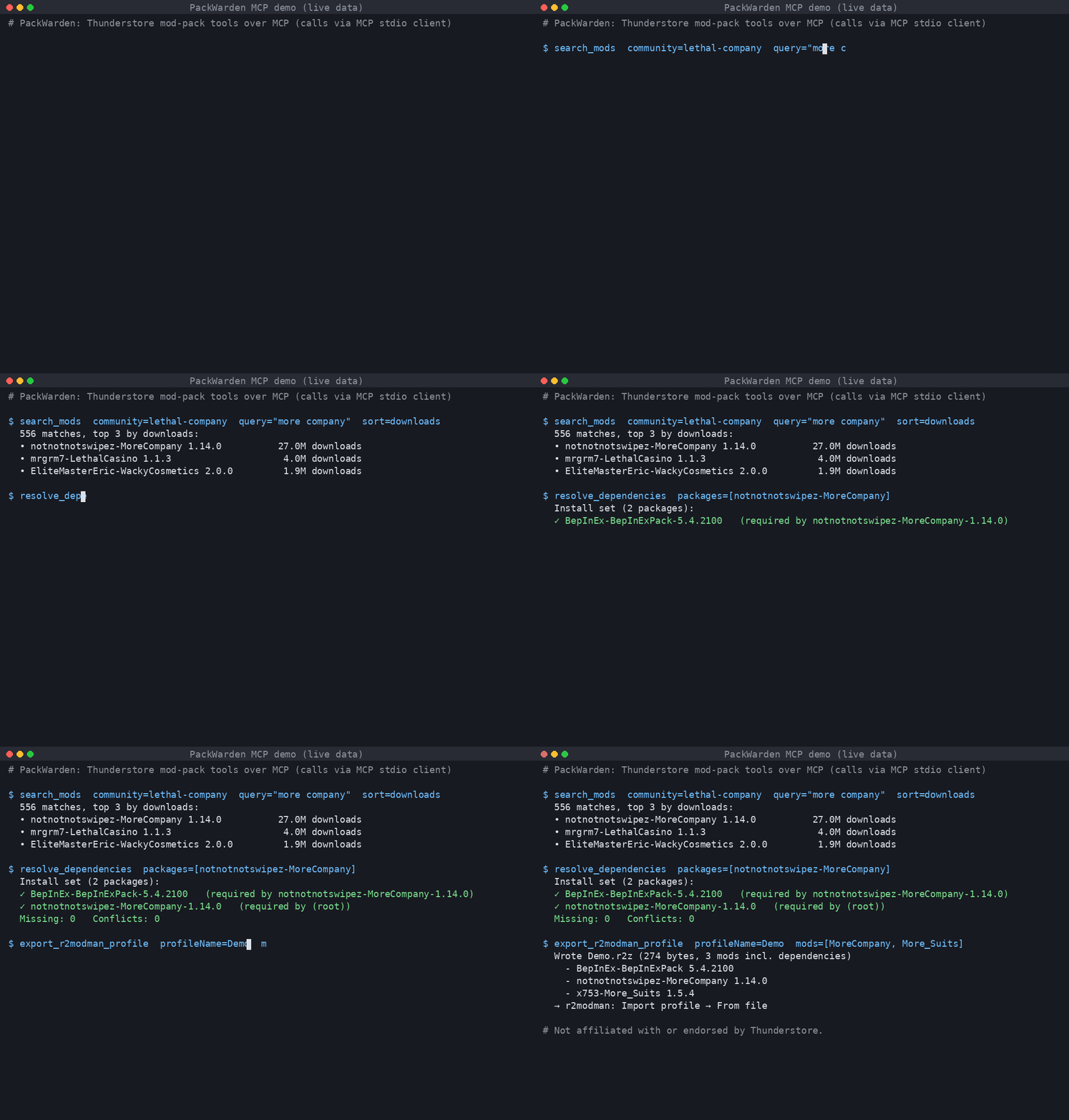
Live output: searching Lethal Company mods, resolving MoreCompany's dependencies, and exporting an r2modman .r2z profile.
An MCP server that helps AI assistants build and maintain Thunderstore mod packs (Lethal Company, Risk of Rain 2, Valheim, and every other Thunderstore community).
Tools
| Tool | What it does |
|---|---|
list_communities |
List Thunderstore game communities (identifier + name). |
search_mods |
Search a community by name/owner/description/category; sort by relevance, downloads, rating, updated. |
resolve_dependencies |
Full transitive dependency closure for one or more packages/versions; final install set, missing deps, multi-version pins, optional tree. |
check_pack_health |
Audit a mod list: not found, removed version, deprecated, outdated, missing deps, dependency version conflicts, duplicates, NSFW. |
export_r2modman_profile |
Write an .r2z profile (r2modman / Thunderstore Mod Manager "Import profile → From file"), optionally with deps and config files. Nothing is uploaded. |
Mods are referenced as Owner-Name (latest) or Owner-Name-1.2.3.
Install
Requires Node.js ≥ 18.17.
git clone <repo> thunderstore-mcp && cd thunderstore-mcp
npm install && npm run build
Claude Desktop
Edit claude_desktop_config.json (macOS: ~/Library/Application Support/Claude/, Windows: %APPDATA%\Claude\):
{
  "mcpServers": {
    "thunderstore": {
      "command": "node",
      "args": ["/absolute/path/to/thunderstore-mcp/dist/main.js"],
      "env": { "TSMCP_EXPORT_DIR": "/absolute/path/for/profiles" }
    }
  }
}
Restart Claude Desktop.
Cursor
~/.cursor/mcp.json (global) or .cursor/mcp.json (project):
{
  "mcpServers": {
    "thunderstore": {
      "command": "node",
      "args": ["/absolute/path/to/thunderstore-mcp/dist/main.js"]
    }
  }
}
Streamable HTTP (remote / self-hosted)
npm run start:http            # http://127.0.0.1:3333/mcp
PORT=8080 HOST=0.0.0.0 node dist/main.js --http
Cursor: { "mcpServers": { "thunderstore": { "url": "http://127.0.0.1:3333/mcp" } } }.
The HTTP mode is stateless (POST-only, JSON responses) and has no auth. Put it behind a reverse proxy with TLS and auth before exposing it.
Configuration (env)
| Var | Default | Meaning |
|---|---|---|
TSMCP_CACHE_DIR |
~/.cache/thunderstore-mcp |
Slim package-index cache |
TSMCP_LIST_TTL_MS |
3600000 (1h) |
Package-list freshness |
TSMCP_MIN_INTERVAL_MS |
1000 |
Minimum gap between outbound requests |
TSMCP_EXPORT_DIR |
./exports |
Where .r2z files are written |
TSMCP_CONTACT |
support@packwarden.dev |
Contact put in the User-Agent. Override if you run your own copy. |
TSMCP_BRAND |
PackWarden |
Brand in server name/User-Agent |
TSMCP_BASE_URL |
https://thunderstore.io |
API base |
Be a good API citizen
- One full package list download per community per TTL, then conditional requests (
If-Modified-Since). Results are cached on disk as a slim index. - Outbound requests are serialized (concurrency 1) and spaced ≥1s apart. On 429/5xx the client backs off and honours
Retry-After. - Identifying User-Agent with a contact address.
- If the network fails, the server keeps serving stale cache.
Tests (live API)
npm test                         # default community: valheim
TEST_COMMUNITY=valheim npm test
Tests cover stdio and streamable HTTP end-to-end against the live Thunderstore API.
Limitations
- Large communities are heavy. The first load of Lethal Company is about 330 MB of JSON, takes about 14 s, and uses about 1.4 GB of RAM. After that, loads from cache take about 3 s.
- Resolution follows r2modman behaviour (highest requested version wins). It does not do semver range solving, because Thunderstore pins exact versions.
- No profile code sharing, which would need an upload to Thunderstore. Only file export is supported.
- Search is local keyword scoring, not Thunderstore's own search ranking.
PackWarden MCP questions
How do I add PackWarden MCP to Claude Code?
Run claude mcp add packwarden -- npx -y @packwarden-dev/thunderstore-mcp in your terminal. Add --scope user to make it available in every project.
How do I add PackWarden MCP to Cursor?
Open ~/.cursor/mcp.json and add the server under mcpServers, using the Cursor config shown in the install section above.
What tools does PackWarden MCP provide?
It exposes 5 tools, including list_communities, search_mods, resolve_dependencies, check_pack_health, export_r2modman_profile.
What games does PackWarden support?
It supports any Thunderstore community, including Lethal Company, Risk of Rain 2, and Valheim.
How do I export my mod list?
The server can write an .r2z profile that can be imported into r2modman or the Thunderstore Mod Manager.
What are the hardware requirements for large communities?
Loading large communities like Lethal Company can require approximately 1.4 GB of RAM and take about 14 seconds on the first load.