
OwnMemory MCP server
Commit Oct 17, 2026Lets Claude remember you across chats and devices using encrypted storage hosted in your own Cloudflare account or Google Drive.
Also known as ownmemoryhq/ownmemory
- Stars
- 1
- Tools
- 9
- Downloads, 30 days
- —
- Latest version
- 0.2.2
- Last commit
- Oct 17, 2026
- License
- Apache-2.0
What is OwnMemory MCP?
OwnMemory lets Claude remember you across chats and devices using encrypted storage hosted in your own Cloudflare account or Google Drive. It exposes 9 tools, such as load_core_memories, search_memories, list_memories.
Summary generated from the project's README
About OwnMemory MCP server
OwnMemory provides a way for Claude users to maintain persistent memory across different chats and devices. It functions as a remote MCP server that you host yourself within your own Cloudflare account or via Google Drive. By running the server in your own infrastructure, you maintain control over your data while allowing Claude to access personal preferences, profiles, and recent work through official web and mobile applications.
Security is handled through client-side encryption where your passphrase never leaves your browser. The system uses AES-256-GCM to encrypt every memory before storage, ensuring that your storage provider only sees ciphertext. You can manage your data through a dedicated web interface to browse, edit, or delete entries. The server includes built-in safety filters to block sensitive information like passwords or credit card numbers from being saved.
Developers can choose between a D1 database on Cloudflare or an OwnMemory folder in Google Drive for storage. The server supports semantic search using Cloudflare Workers AI, though this can be disabled to keep memory text away from embeddings. Tools like save_memory, search_memories, and import_memories allow the AI to manage your information effectively.
What you can do with it
- 1Sync preferences across devicesAsk the AI to remember your specific work preferences and profile details to use in future conversations.
- 2Bulk import existing dataTransfer all the facts currently held in Claude's built-in memory into your private encrypted storage.
- 3Search for specific informationFind past details using natural language queries even if the exact words are not used.
- 4Maintain data sovereigntyDownload your entire memory history as Markdown files to ensure you are never locked into a specific platform.
Written from the project's README. Every use case is checked against a quote from it.
How to install OwnMemory MCP
OwnMemory gives each account its own endpoint, so there is no address to copy here. Get yours from the provider, put it in place of the part in braces, and add it to your client as a remote server.
https://{server_address}/mcp
OwnMemory MCP tools 9
Detected from the READMEload_core_memoriessearch_memorieslist_memoriessave_memoryimport_memoriesupdate_memorydelete_memoryreview_memoriesset_memory_mode
| load_core_memories | — | |
| search_memories | — | |
| list_memories | — | |
| save_memory | — | |
| import_memories | — | |
| update_memory | — | |
| delete_memory | — | |
| review_memories | — | |
| set_memory_mode | — |
Automated checks
Ran Nov 14, 2026Full report →Not verified yet. A server needs a score of 80, no serious finding, and enough data for us to check. How checks work · What to fix for more points

- Source repository linked and reachableownmemoryhq/ownmemory is public and reachablegithub.com/ownmemoryhq/ownmemory ↗Pass
- Package names this repository as its sourceNot checked
- Build provenance (Sigstore attestation)Not checked
- Open source license (OSI)Apache-2.0spdx.org/licenses/Apache-2.0.html ↗Pass
- Commit or release in the last yearLast commit or release 2026-10-17github.com/ownmemoryhq/ownmemory ↗Pass
- OpenSSF ScorecardNot checked
- Package name not close to a popular packageNot checked
- No critical advisory in the package or its dependenciesNot checked
- No hidden instructions to the model9 tool descriptions and the README read; no override phrases, credential paths or hidden charactersPass
- Destructive tools are labelledNot checked
- Remote endpoint answers the MCP handshakeEndpoint did not answer initialize: unreachableFinding
README
View on GitHubOwnMemory lets Claude remember you across chats and devices, with the memories stored encrypted under a key only you hold, in storage you own.
Claude calls a remote MCP server running in your own Cloudflare account. The server encrypts each memory and stores it in a D1 database in that account (the one-click default) or in an OwnMemory folder in your Google Drive. It works in the official Claude apps on the web, iPhone and Android.
Get started: create a free Cloudflare account and connect GitHub to it first (steps), then click the button above, choose a random owner code of 12+ characters, and open your server's address to follow its four setup steps. About 5 minutes, on a free Cloudflare account. Full guide, including Google Drive storage: docs/setup.md.
Status: early (v0.2). Built and tested for Claude: on the web, iPhone and Android, and in Claude Code. Other MCP clients that support remote servers with OAuth should be able to connect, but are untested.
How your memories stay yours
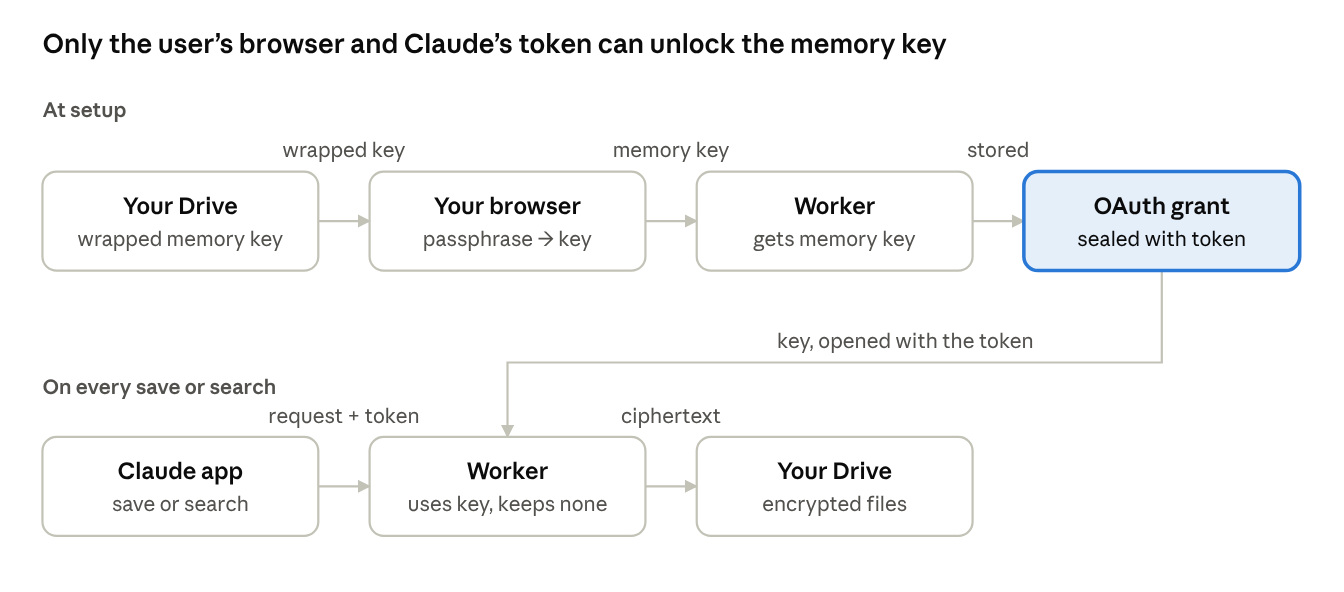
- Your passphrase never leaves your browser. When you connect Claude, the passphrase page turns it into a key that unlocks a random 256-bit memory key. Only the locked copy of that key is stored, in your storage (
keyinfo.json). - Every memory is encrypted (AES-256-GCM) before it is stored, in a file with a random name. Your storage provider and anyone with the files see only ciphertext.
- The server keeps no key at rest. The memory key and your Google token live only inside the OAuth grant, which is encrypted with Claude's access token. The MCP handler is stateless: nothing is written to Durable Objects or logs.
- Hard rules in code. Blocked categories, a pause switch, and a filter that refuses passwords, API keys and card numbers, whatever the AI decides.
- Search by meaning, still private. Embeddings come from Cloudflare Workers AI in your own account and are stored encrypted like the memories. Set the
SEMANTIC_SEARCHsecret tooffto keep memory text away from it; search then uses keywords only. - See and fix what it remembers. Your server's
/memoriespage lets you browse, search, edit, add and delete memories, decrypted only in your browser. - No lock-in. Download all on the memories page gives you every memory as Markdown, and ownmemory.app/decrypt decrypts a downloaded copy in your browser, even without your server.
The one unavoidable exposure: the server and Anthropic see a memory's text while a save or search runs, because Claude sends plain text. Running the server yourself is the safeguard.
Who else could get at your memories, person by person, and how to keep them out: docs/security-model.md.
Tools Claude gets
| Tool | What it does |
|---|---|
load_core_memories |
Called at the start of a chat: returns the memory mode, any message for you, and (in OwnMemory-only mode) your profile, preferences and recent work |
search_memories |
Search by meaning and keywords, English, Chinese or mixed (finds "What do I like to drink?" without shared words) |
list_memories |
Most recent memories, optionally by category |
save_memory |
Saves one fact, after the hard rules allow it; points out facts already saved, even when worded differently |
import_memories |
Saves up to 50 facts at once, for example everything Claude's built-in memory knows |
update_memory |
Changes a fact, keeping the previous wording as dated history |
delete_memory |
Deletes a memory; it stays 30 days in D1, or in the Drive trash |
review_memories |
Finds memories with the same wording or meaning, to merge |
set_memory_mode |
Records how you use OwnMemory alongside Claude's memory: ramp-up, OwnMemory only, or keep both |
Repository layout
| Path | What's there |
|---|---|
server/src/ |
The Cloudflare Worker: OAuth and sign-in flow (auth.ts), passkey and authenticator sign-in on one-click servers (gate.ts, factors.ts), the memories page's API (memories.ts), MCP tools (tools.ts), storage backends D1 and Drive (storage.ts, google.ts), encrypted memory store (store.ts), memory format, search and duplicate checks (format.ts), memory modes and ramp-up (settings.ts), pages (pages.ts) |
server/public/unlock.js, home.js, memories.js, gate.js |
Scripts for the passphrase page, the setup wizard, the memories page and the passkey / authenticator sign-in step |
server/public/keys.js, memory-file.js, zip.js |
Encryption, the memory file format and the zip builder, shared by the browser, the Worker, the decrypt tool and site/public/decrypt.html (copies; npm run sync-site), so the format can't drift |
site/ |
The ownmemory.app landing page and the decrypt page: static files, no data collected |
server/scripts/decrypt.mjs |
Local export to plain Markdown |
server/test/ |
Unit tests (npm test) and a recall evaluation against real embeddings (npm run eval) |
docs/ |
Setup guide, "Who can read your memories" and the key-flow diagram |
design/logo/ |
Logo sources from the design canvas and PNG/SVG exports |
Contributing, security and license
- Contributions are welcome; see CONTRIBUTING.md. Contributors sign a short contributor license agreement.
- Found a security problem? Please report it privately: SECURITY.md.
- Licensed under the Apache License 2.0. "OwnMemory" and the OwnMemory logo are trademarks of the project and are not covered by the license; forks need a different name.
OwnMemory MCP questions
What tools does OwnMemory MCP provide?
It exposes 9 tools, including load_core_memories, search_memories, list_memories, save_memory, import_memories.
Where are my memories stored?
Memories are stored in a D1 database within your Cloudflare account or in an OwnMemory folder in your Google Drive.
Is my data private?
Yes, every memory is encrypted using AES-256-GCM before storage, and your passphrase never leaves your browser.
Can I export my memories?
Yes, you can download all your memories as Markdown files from the memories page.
Does it support semantic search?
Yes, it supports searching by meaning using Cloudflare Workers AI embeddings, though you can disable this to keep text away from embeddings.