
Enables AI assistants to research US import duties, identify HTS codes, and calculate landed cost components using official USITC data.
Also known as opsloft/tariff-resolver
- Stars
- 3
- Tools
- 5
- Downloads, 30 days
- —
- Latest version
- 1.1.0
- Last commit
- Sep 7, 2026
- License
- MIT
What is tariff-resolver MCP?
tariff-resolver enables AI assistants to research US import duties, identify HTS codes, and calculate landed cost components using official USITC data. It exposes 5 tools, such as search_hs_candidates, calculate_tariff_scenario, watch_tariff_changes.
Summary generated from the project's README
About tariff-resolver MCP server
Researching US import duties and identifying HTS codes from within an AI assistant is what this server enables. It provides access to over 35,000 tariff lines from official USITC data to help users calculate landed cost components, including base MFN/FTA rates, Chapter 99 additional duties like Section 301 or 232, and MPF/HMF fees. It is designed for developers and importers who need to move beyond simple searches to complex duty scenario modeling.
The server runs locally on your machine using Node.js and does not collect any telemetry or usage data. You can add it to Claude Desktop via a one-click installation or configure it in any MCP client using npx. It uses a bundled local dataset to ensure privacy and speed, making no network requests during standard runtime operations.
Users can utilize specific tools like search_hs_candidates to find product matches with CBP CROSS ruling links, or calculate_tariff_scenario to generate structured JSON estimates based on origin and value. It also includes a watchlist feature via watch_tariff_changes to track rate revisions over time.
What you can do with it
- 1Identify HTS codes from descriptionsFind potential Harmonized Tariff Schedule codes and related legal rulings by providing a plain text product description.
- 2Monitor tariff rate changesTrack specific HTS codes to see how rates differ between different official schedule revisions.
Written from the project's README. Every use case is checked against a quote from it.
How to install tariff-resolver MCP
Formats verified 10 Nov 2026Add to CursorAdd to GooseInstall tariff-resolver MCP in Claude Code
$ claude mcp add tariff-resolver -- npx -y tariff-resolverInstall tariff-resolver MCP in Cursor
~/.cursor/mcp.json
{
  "mcpServers": {
    "tariff-resolver": {
      "command": "npx",
      "args": [
        "-y",
        "tariff-resolver"
      ]
    }
  }
}Install tariff-resolver MCP in VS Code
.vscode/mcp.json
{
  "servers": {
    "tariff-resolver": {
      "type": "stdio",
      "command": "npx",
      "args": [
        "-y",
        "tariff-resolver"
      ]
    }
  }
}Install tariff-resolver MCP in VS Code CLI
$ code --add-mcp '{"name":"tariff-resolver","type":"stdio","command":"npx","args":["-y","tariff-resolver"]}'Install tariff-resolver MCP in Claude Desktop
claude_desktop_config.json
{
  "mcpServers": {
    "tariff-resolver": {
      "command": "npx",
      "args": [
        "-y",
        "tariff-resolver"
      ]
    }
  }
}Install tariff-resolver MCP in Codex
$ codex mcp add tariff-resolver -- npx -y tariff-resolverInstall tariff-resolver MCP in Codex config.toml
~/.codex/config.toml
[mcp_servers.tariff-resolver]
command = "npx"
args = ["-y", "tariff-resolver"]
Install tariff-resolver MCP in Gemini CLI
$ gemini mcp add -s user tariff-resolver npx -- -y tariff-resolverInstall tariff-resolver MCP in Gemini settings.json
~/.gemini/settings.json
{
  "mcpServers": {
    "tariff-resolver": {
      "command": "npx",
      "args": [
        "-y",
        "tariff-resolver"
      ]
    }
  }
}tariff-resolver MCP tools 5
Detected from the READMEsearch_hs_candidatescalculate_tariff_scenariowatch_tariff_changescheck_tariff_updatesdataset_info
| search_hs_candidates | — | |
| calculate_tariff_scenario | — | |
| watch_tariff_changes | — | |
| check_tariff_updates | — | |
| dataset_info | — |
Automated checks
Ran Nov 14, 2026Full report →Passed our automated checks. That is not a security audit: read the code and give the server the narrowest access it needs. How checks work

- Source repository linked and reachableopsloft/tariff-resolver is public and reachablegithub.com/opsloft/tariff-resolver ↗Pass
- Package names this repository as its sourcetariff-resolver names opsloft/tariff-resolver as sourcenpmjs.com/package/tariff-resolver ↗Pass
- Build provenance (Sigstore attestation)No build attestation published for this releaseNot checked
- Open source license (OSI)MITspdx.org/licenses/MIT.html ↗Pass
- Commit or release in the last yearLast commit or release 2026-09-07github.com/opsloft/tariff-resolver ↗Pass
- OpenSSF ScorecardNot checked
- Package name not close to a popular packageNo popular package one edit away from tariff-resolverPass
- No critical advisory in the package or its dependencies99 resolved dependencies checked; no critical advisoryosv.dev ↗Pass
- No hidden instructions to the model5 tool descriptions and the README read; no override phrases, credential paths or hidden charactersPass
- Destructive tools are labelledNo tool named like delete, drop or execPass
- Remote endpoint answers the MCP handshakeNot checked
README
View on GitHubtariff-resolver







An MCP server that turns your AI assistant into a US import duty research tool — built on official USITC Harmonized Tariff Schedule data (US Government public domain, 35,000+ tariff lines).
- 🔍 HTS code candidates from plain product descriptions, with CBP CROSS ruling links
- 🧮 Landed-cost components: MFN/FTA base rates + Chapter 99 additional duties (IEEPA / Section 301 / 232) + MPF/HMF fees
- 📡 Tariff change tracking: watchlist your HTS codes, diff rates between HTS revisions
- 🤖 AI-optimized, hallucination-resistant: returns the actual Chapter 99 rule text with parsed rates, so your LLM reasons over real exception chains instead of inventing 2024-era numbers
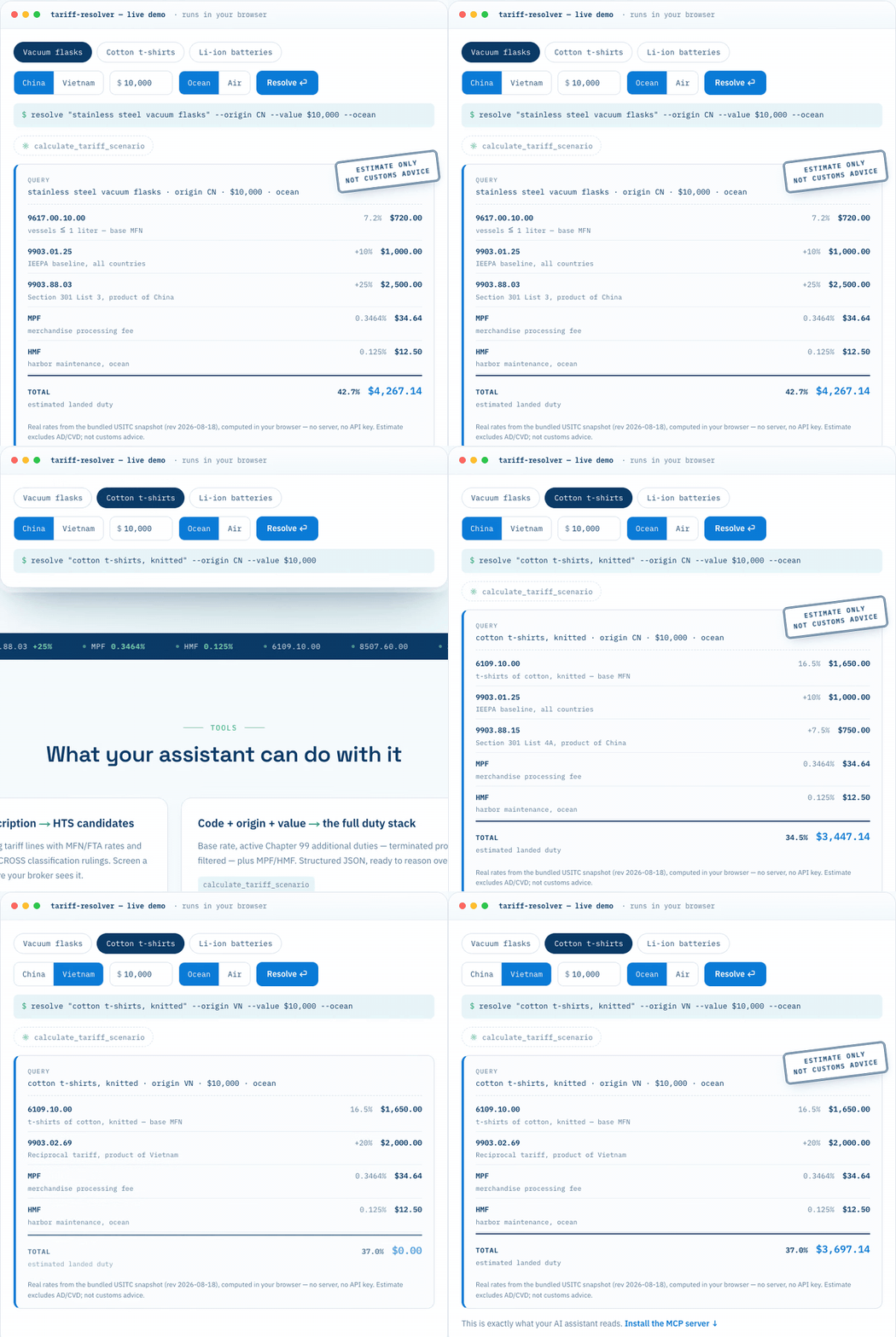
Why now: since the de minimis exemption ended (Aug 29, 2025), every US-bound shipment needs an HTS code and duty payment — and 2025–26 rates keep changing by executive order.
Not affiliated with any government agency. Outputs are candidates/estimates for pre-broker screening — not customs, legal, or tax advice. Estimates exclude AD/CVD duties.
Install
Requires Node.js ≥ 18.
claude mcp add tariff-resolver -- npx -y tariff-resolver
Or in any MCP client config:
{ "mcpServers": { "tariff-resolver": { "command": "npx", "args": ["-y", "tariff-resolver"] } } }
Claude Desktop (one-click): download tariff-resolver-<version>.mcpb from Releases and double-click it — no terminal needed.
💡 Try these prompts
- Basic search: "Find the HTS code for a men's 100% cotton t-shirt."
- Full scenario: "Calculate the tariff scenario for HTS 6109.10.00, origin China, customs value $5,000, ocean freight."
- Sourcing decision: "I'm importing $10k of stainless steel vacuum flasks. Compare landed cost if I source from China vs Vietnam."
- Stay current: "Watch tariff changes for my catalog: 6109.10.00, 8507.60.00, 9617.00.10."
Tools
| Tool | What it does |
|---|---|
search_hs_candidates |
Product description → top HTS candidates with rates + CBP CROSS ruling links |
calculate_tariff_scenario |
HTS code + origin + value (+ weight) → structured JSON: base MFN/FTA rate, candidate Chapter 99 layers with per-layer match/confidence, sourced possibly_expired bucket, MPF/HMF |
watch_tariff_changes |
Register HTS codes to a local watchlist |
check_tariff_updates |
Diff current vs previous HTS revision — see exactly which rates changed |
dataset_info |
Data revision date, row counts, source, license |
Design
The server does the retrieval; your LLM does the reasoning. Chapter 99 rules are returned verbatim (with parsed adder_pct where applicable) so the model reads the actual exception chains instead of trusting a black-box calculation. Rates for 10-digit statistical suffixes inherit from their parent rate line. Headings the schedule marks as dead — terminated, suspended, expired — are filtered out and counted, and the USITC's own compiler_note rides along with any rule that carries one.
Status overrides. data/status_overrides.json is a short, sourced list of Chapter 99 headings whose collection has stopped, expired, or been suspended even though the schedule still prints them. A layer matching an entry is returned under possibly_expired with the entry's status, reason, source URL and as_of date instead of in layers. Every entry carries a CBP, Federal Register or USITC source; pull requests adding entries must include one.
What the data cannot tell you. The published schedule is wrong in both directions at any given moment, so every result carries a stacking_warning and the snapshot date. Provisions whose collection has already stopped keep printing with no end date — IEEPA and Section 122 headings are the recurring case — and newly proclaimed actions appear in the schedule days after they take effect. Totalling every layer the schedule prints yields a rate nobody is charged. Treat the layers as candidates, and verify collection status against CBP CSMS messages before relying on a stack.
One core, two front doors. All duty logic lives in tariff-resolver/core (pure TypeScript, no filesystem or network): resolveDuty(dataset, { hts, origin, value_usd?, ocean? }) — origin takes an ISO-3166 alpha-2 code or an English country name — returns the base line, separate MPF/HMF, every candidate Chapter 99 layer with match and confidence, a sourced possibly_expired bucket, and the snapshot date. The MCP tool calls it; so can any Node or edge runtime. A country name that is not recognised returns the ORIGIN_UNKNOWN error rather than a partial match, so a misspelled origin can never quietly resolve to a thinner stack of layers.
Data
Ships with a full HTS snapshot, fetched from USITC's official JSON API (US Government public domain). Refresh anytime:
python3 scripts/fetch_hts.py # ~2 min, fails hard rather than write a partial dataset
dataset_info reports the revision date your queries run against.
Privacy Policy
tariff-resolver runs entirely on your machine and collects nothing:
- Data collection: none. No queries, telemetry, analytics, or usage data are collected or transmitted.
- Usage and storage: your watchlist is stored in a local JSON file on your machine; all lookups run against the bundled local dataset.
- Third-party sharing: none. The server makes no network requests at runtime. (The optional
scripts/fetch_hts.pyrefresh script contacts only the official USITC API.) - Data retention: nothing to retain — delete the local watchlist file at any time.
- Contact: tom@opsloft.dev
Full policy: https://opsloft.dev/privacy
License
MIT. Tariff data is a work of the US Government (public domain).
tariff-resolver MCP questions
How do I add tariff-resolver MCP to Claude Code?
Run claude mcp add tariff-resolver -- npx -y tariff-resolver in your terminal. Add --scope user to make it available in every project.
How do I add tariff-resolver MCP to Cursor?
Open ~/.cursor/mcp.json and add the server under mcpServers, using the Cursor config shown in the install section above.
What tools does tariff-resolver MCP provide?
It exposes 5 tools, including search_hs_candidates, calculate_tariff_scenario, watch_tariff_changes, check_tariff_updates, dataset_info.
Is this tool providing legal or tax advice?
No, the outputs are candidates and estimates for pre-broker screening and do not constitute customs, legal, or tax advice.
Does the tool include AD/CVD duties in its calculations?
No, the estimates provided by the tool exclude AD/CVD duties.
How does the server handle privacy and data collection?
The server runs entirely on your machine and does not collect any queries, telemetry, analytics, or usage data.
Can I track changes to specific HTS codes?
Yes, you can register HTS codes to a local watchlist and check for differences between HTS revisions.