
Lets AI clients automate cloud FinOps workflows such as cost optimization, tagging, budgeting, allocation, and reporting.
Also known as openops-cloud/openops
- Stars
- 1,082
- Tools
- —
- Downloads, 30 days
- —
- Latest version
- —
- Last commit
- Nov 13, 2026
- License
- —
What is OpenOps MCP?
OpenOps lets AI clients automate cloud FinOps workflows such as cost optimization, tagging, budgeting, allocation, and reporting.
Summary generated from the project's README
About OpenOps MCP server
Automating cloud financial operations and cost optimization workflows is what OpenOps enables for FinOps teams, engineers, and finance departments. This platform connects directly to major cloud providers including AWS, Azure, and Google Cloud to manage budgeting, tagging, and resource allocation. It bridges the gap between identifying cost-saving opportunities and actually implementing them through automated actions.
Users can deploy this as a managed cloud service or via a docker-compose installation for local or cloud-based environments. The system includes OpenOps Tables for Excel-like data management and OpenOps Analytics for visualization. It features a no-code workflow editor that allows for custom automation while providing human-in-the-loop controls to ensure critical approvals are handled through various communication channels. Every action remains traceable through versioning and logs to maintain oversight of all automated cloud changes.
What you can do with it
- 1Automate cloud cost optimizationAsk the AI to execute pre-built workflows for reducing cloud spend and managing idle resources.
- 2Implement human-approved automationSet up workflows that require manual confirmation before performing critical infrastructure changes.
- 3Connect multi-cloud environmentsConsolidate optimization opportunities from different providers into a single management interface.
Written from the project's README. Every use case is checked against a quote from it.
Automated checks
Ran Nov 14, 2026Full report →Not verified yet. A server needs a score of 80, no serious finding, and enough data for us to check. How checks work · What to fix for more points

- Source repository linked and reachableopenops-cloud/openops is public and reachablegithub.com/openops-cloud/openops ↗Pass
- Package names this repository as its sourceNot checked
- Build provenance (Sigstore attestation)Not checked
- Open source license (OSI)No licenseFinding
- Commit or release in the last yearLast commit or release 2026-11-13github.com/openops-cloud/openops ↗Pass
- OpenSSF ScorecardNot checked
- Package name not close to a popular packageNot checked
- No critical advisory in the package or its dependenciesNot checked
- No hidden instructions to the model0 tool descriptions and the README read; no override phrases, credential paths or hidden charactersPass
- Destructive tools are labelledNot checked
- Remote endpoint answers the MCP handshakeNot checked
README
View on GitHubOpenOps





😎 What is OpenOps?
OpenOps is a No-Code FinOps automation platform that helps organizations reduce cloud costs and streamline financial operations.
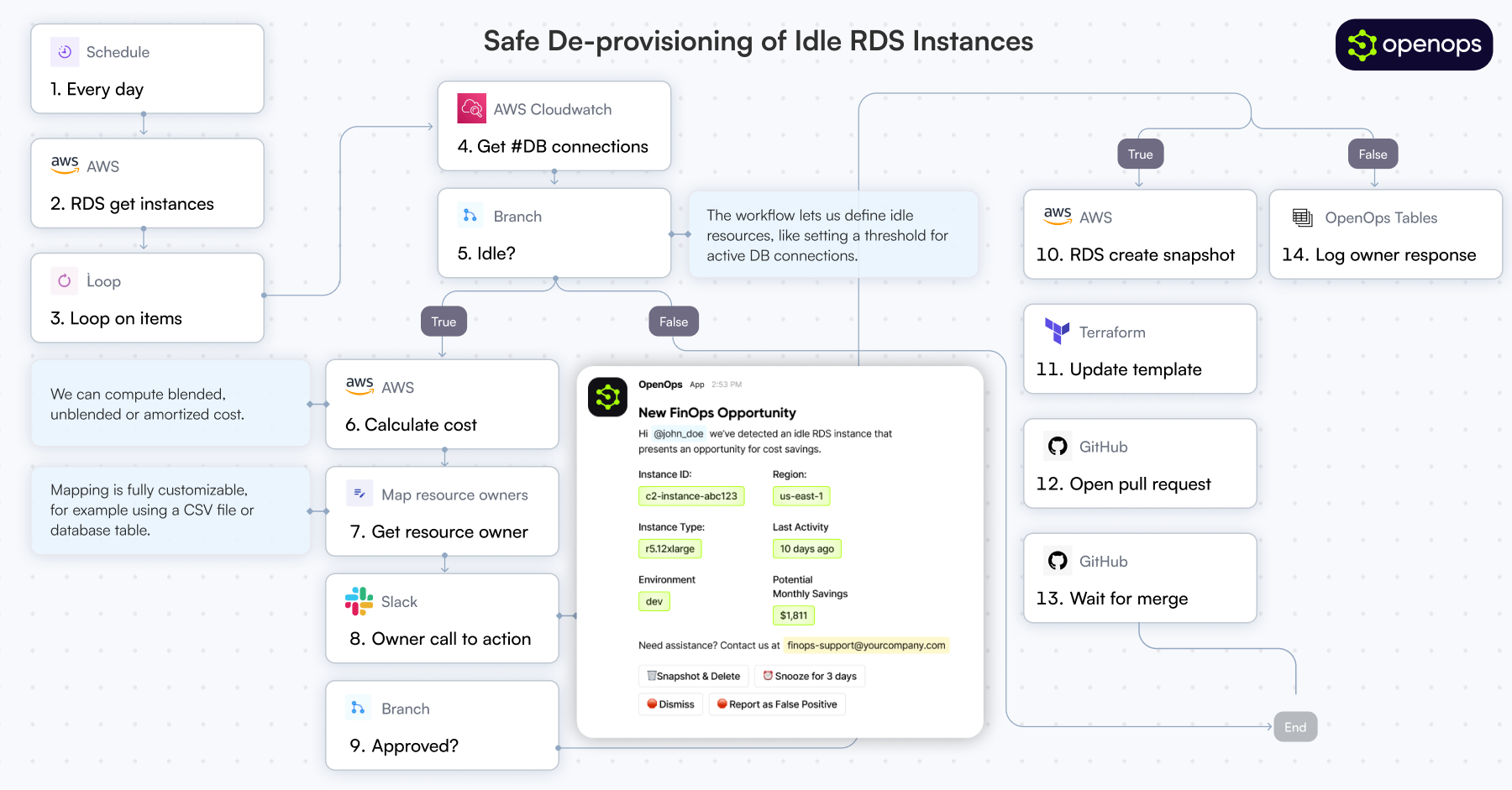
It provides customizable workflows to automate key FinOps processes like allocation, unit economics, anomaly management, workload optimization, safe de-provisioning and much, much more.
It also comes bundled with its own Excel-like database (OpenOps Tables) and its own visualization system (OpenOps Analytics).
At the same time, OpenOps enables collaboration between FinOps teams, engineers, DevOps, finance, and leadership, ensuring that cost-saving measures are not just identified but effectively implemented.
OpenOps integrates seamlessly with major cloud providers, many third-party FinOps tools, various communication platforms and a handful of project management tools.
🏁 Just want to get started? Click here.
🚀 Key Features
- Pre-Built FinOps Workflows – A library of best-practice workflows designed with input from FinOps leaders. Covers cost optimization, tagging, budgeting, allocation, and reporting.
- No-Code Experience – Approachable for non-technical practitioners, but allows "dropping into" code when needed.
- Flexible Workflow Editor – Use OpenOps's dedicated No-Code editor to build workflows from scratch or customize existing ones.
- Deep Integrations – OpenOps natively connects with cloud providers, databases, analysis tools, communication platforms, and project management systems.
- Human-in-the-Loop Controls – OpenOps comes with HITL controls - across multiple channels - for critical approval workflows.
- Workflow Versioning & Traceability – Test workflow steps, maintain workflow versions, and track every action inside a workflow with logs.
- Centralized Management – Log and process opportunities with tables that allow approvals, dismissals, false-positive marking, and snoozing.
🌟 Why OpenOps?
FinOps practitioners struggle with visibility tools that surface cost-saving opportunities but lack implementation capabilities. Traditional automation tools, whether custom-built or off-the-shelf, fail to balance flexibility and maintainability.
OpenOps solves these challenges by:
- Consolidating optimization opportunities from native and third-party FinOps visibility tools.
- Suggesting practical optimization actions.
- Enabling customization of pre-built optimizations or authoring new ones.
With OpenOps, organizations can automate cloud cost optimization, ensuring that FinOps processes are efficient, actionable, and aligned with business goals.
OpenOps integrates with a broad range of platforms, including cloud providers, databases, FinOps tools, communication platforms, and task management services.
⛅️ Cloud Providers
- AWS
- Azure
- Google Cloud
⚙️ System Requirements
OpenOps is available as:
- A managed cloud service (learn more)
- No infrastructure requirements
- Automatic updates and maintenance
- Premium support and SLAs
- A free, ready-to-install,
docker-compose-based installation (can be installed locally or in the cloud)
📚 Documentation
For detailed documentation, visit our documentation portal.
🤝 Contributing
We welcome contributions to OpenOps! See our contributing guide for details.
📄 License
OpenOps is licensed under the Apache License 2.0.
💬 Community
OpenOps has a Slack community - feel free to join here.
📬 Contact
- Website: https://openops.com
- Email: support@openops.com
OpenOps MCP questions
What is OpenOps used for?
OpenOps is a no-code FinOps automation platform for reducing cloud costs and streamlining financial operations. It automates processes like allocation, unit economics, anomaly management, and workload optimization.
Which cloud providers does OpenOps integrate with?
OpenOps natively connects with AWS, Azure, and Google Cloud, along with databases, FinOps tools, communication platforms, and project management systems.
How can I install OpenOps?
OpenOps is available as a managed cloud service or as a free docker-compose-based installation that can run locally or in the cloud.
Does OpenOps support approval workflows?
Yes, OpenOps includes human-in-the-loop controls across multiple channels for critical approval workflows.
What license is OpenOps released under?
OpenOps is licensed under the Apache License 2.0.