
Occasio MCP server
✓ VerifiedProvides a local-first audit chain and identity gate to monitor, control, and cryptographically verify AI coding agent actions.
Also known as occasiolabs/occasio, @occasiolabs/occasio
- Stars
- 10
- Tools
- —
- Downloads, 30 days
- —
- Latest version
- 0.10.0
- Last commit
- Jun 24, 2026
- License
- Apache-2.0
What is Occasio MCP?
Occasio provides a local-first audit chain and identity gate to monitor, control, and cryptographically verify AI coding agent actions.
Summary generated from the project's README
About Occasio MCP server
Occasio acts as a local proxy for AI coding agents like Claude Code or Cline, sitting between the agent and your LLM endpoint. It provides a local-first audit chain and an identity gate to monitor and control agent actions without sending data to any third party. By routing tool calls through a human-readable policy file, you can prevent unauthorized access to secrets or sensitive system commands.
Developers use this tool to ensure agents do not silently assume identities like root or ssh access. Instead, the agent must request permission, which a human must approve via the terminal. The system creates a tamper-evident, hash-chained log that allows for offline verification of agent behavior. This is particularly useful for compliance and CI environments where you must prove exactly what an agent did during a specific run.
Setup requires Node.js and involves initializing a policy, such as the strict template, to govern tool usage. You can inspect real-time outbound traffic through the eyes browser UI or use commands like scan and preflight simulate to test security postures before execution.
What you can do with it
- 1Verify agent actions in CIGenerate a portable evidence file that a third party can verify offline to prove an agent's behavior.
- 2Prevent unauthorized identity assumptionBlock an agent from using ssh or sudo commands unless a human provides a single-use approval.
Written from the project's README. Every use case is checked against a quote from it.
How to install Occasio MCP
Formats verified 10 Nov 2026Add to CursorAdd to GooseInstall Occasio MCP in Claude Code
$ claude mcp add occasio -- npx -y @occasiolabs/occasioInstall Occasio MCP in Cursor
~/.cursor/mcp.json
{
  "mcpServers": {
    "occasio": {
      "command": "npx",
      "args": [
        "-y",
        "@occasiolabs/occasio"
      ]
    }
  }
}Install Occasio MCP in VS Code
.vscode/mcp.json
{
  "servers": {
    "occasio": {
      "type": "stdio",
      "command": "npx",
      "args": [
        "-y",
        "@occasiolabs/occasio"
      ]
    }
  }
}Install Occasio MCP in VS Code CLI
$ code --add-mcp '{"name":"occasio","type":"stdio","command":"npx","args":["-y","@occasiolabs/occasio"]}'Install Occasio MCP in Claude Desktop
claude_desktop_config.json
{
  "mcpServers": {
    "occasio": {
      "command": "npx",
      "args": [
        "-y",
        "@occasiolabs/occasio"
      ]
    }
  }
}Install Occasio MCP in Codex
$ codex mcp add occasio -- npx -y @occasiolabs/occasioInstall Occasio MCP in Codex config.toml
~/.codex/config.toml
[mcp_servers.occasio]
command = "npx"
args = ["-y", "@occasiolabs/occasio"]
Install Occasio MCP in Gemini CLI
$ gemini mcp add -s user occasio npx -- -y @occasiolabs/occasioInstall Occasio MCP in Gemini settings.json
~/.gemini/settings.json
{
  "mcpServers": {
    "occasio": {
      "command": "npx",
      "args": [
        "-y",
        "@occasiolabs/occasio"
      ]
    }
  }
}Automated checks
Ran Nov 15, 2026Full report →Passed our automated checks. That is not a security audit: read the code and give the server the narrowest access it needs. How checks work

- Source repository linked and reachableoccasiolabs/occasio is public and reachablegithub.com/occasiolabs/occasio ↗Pass
- Package names this repository as its source@occasiolabs/occasio names occasiolabs/occasio as sourcenpmjs.com/package/@occasiolabs/occasio ↗Pass
- Build provenance (Sigstore attestation)No build attestation published for this releaseNot checked
- Open source license (OSI)Apache-2.0spdx.org/licenses/Apache-2.0.html ↗Pass
- Commit or release in the last yearLast commit or release 2026-06-24github.com/occasiolabs/occasio ↗Pass
- OpenSSF ScorecardNot checked
- Package name not close to a popular packageNo popular package one edit away from @occasiolabs/occasioPass
- No critical advisory in the package or its dependencies99 resolved dependencies checked; no critical advisoryosv.dev ↗Pass
- No hidden instructions to the model0 tool descriptions and the README read; no override phrases, credential paths or hidden charactersPass
- Destructive tools are labelledNot checked
- Remote endpoint answers the MCP handshakeNot checked
README
View on GitHubOccasio
Local-first audit chain and identity gate for AI coding agents. Your prompts, your tool calls, your audit log; all on your machine, cryptographically verifiable later — and an agent may request an identity (ssh / cloud / root), not silently assume one.
Occasio is a local proxy that sits between your AI coding agent (Claude Code, Cline, or anything that talks to the Anthropic API) and whichever LLM endpoint you configured. Every tool call passes through one human-readable policy file you control. You can see what is leaving your machine in real time, block what should not happen, and end up with a tamper-evident hash-chained log that a third party can verify offline months later if you ever need to prove what your agent did.
Nothing about Occasio sends data to a third party. There is no Occasio cloud, no Occasio account, no telemetry. Read docs/WHY-LOCAL.md for the architecture, docs/COMPARE.md for how this differs from cloud-hosted AI observability tools, and docs/SUSTAINABILITY.md for how a local-first product is funded under Apache 2.0.
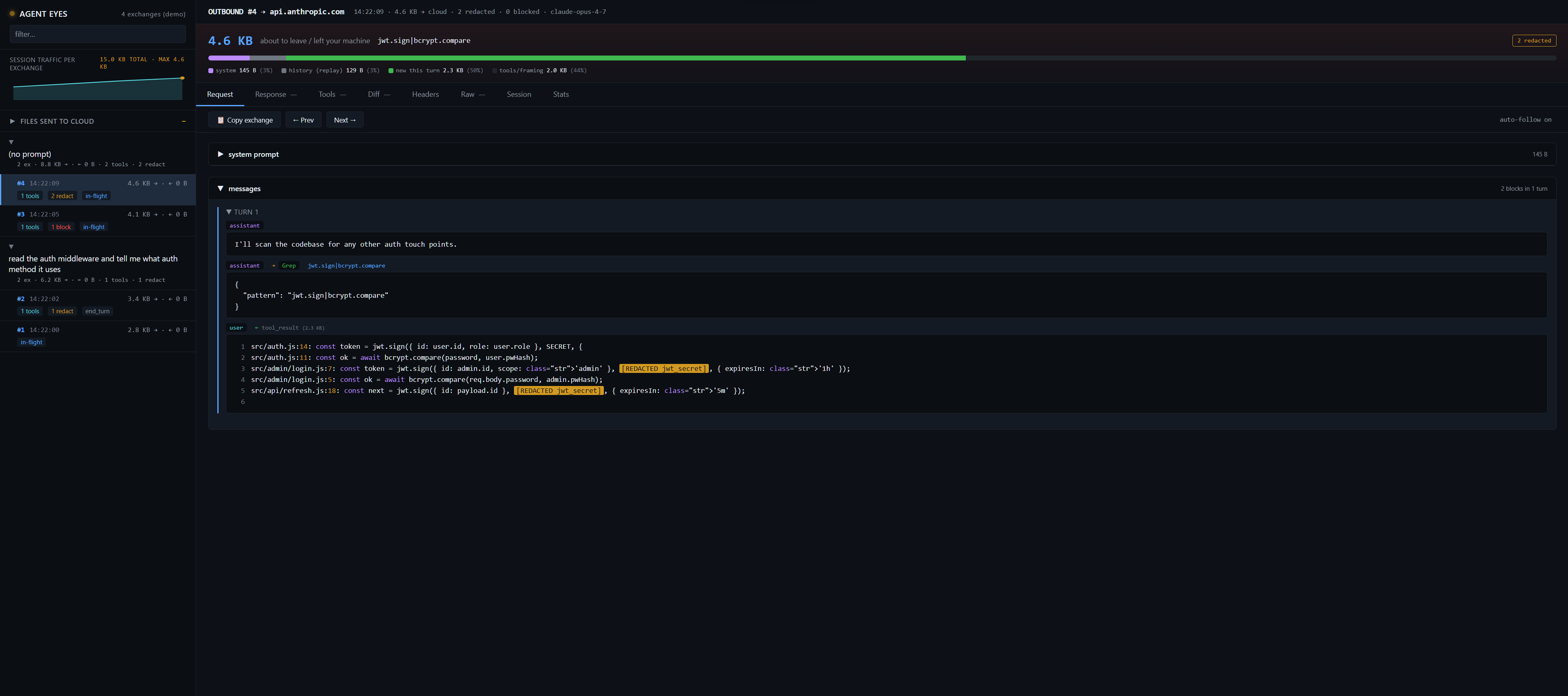
Screenshot: occasio eyes --demo against synthetic data — no real paths, no real traffic. The "(demo)" badge top-left is always shown in demo mode.
npm install -g @occasiolabs/occasio

occasio demo audit       # Auditor scenario: signed attestation + cross-verifier proof (10s, no API key)
occasio demo attest      # End-to-end attestation pipeline against a synthetic chain
occasio demo anomalies   # Live EDR detection on a synthetic adversarial chain
occasio harness          # Real Claude Code attacking a denied path — defense holds
The first three demos run against synthetic data so you can see the full pipeline in seconds with no external dependencies. The fourth spawns a real Claude Code subordinate under your Anthropic login (bundled auth — no API key required) and proves the defense end-to-end. Start with demo audit — it answers the only question that actually matters: "prove what your AI agent did in CI."
Identity gate — request, don't assume
The incident this was built for: an agent is asked only for a deploy command, but on its own it sshes into the server and reads env. The strict policy stops exactly that — an AI agent may request an identity, it may not silently assume one.
- Exfiltration is denied, tool-agnostically.
printenv,cat .env,/proc/self/environ, private-key reads,grep-for-secret-names — blocked no matter which command or tool reads them; the output never reaches the model. - Identity borrows need a human.
ssh/scp,az/ the cloud control plane,sudo/systemctl— a fail-closed BLOCK with a "requires human approval" refusal the agent cannot satisfy on its own. - The handshake distinguishes who is who. The agent requests; you authorize once, out-of-band, from your own terminal:
occasio init --template strict          # the identity-gated posture
# agent runs `ssh deploy@host`  →  BLOCKED, pending apr_…
occasio approvals approve apr_… --once  # you, single-use, short TTL
# the agent's retry passes through once — then it's blocked again
The agent cannot self-approve: the approval control plane is in its deny-zone and the token is HMAC-signed. The chain records actor=ai_agent · delegator=you · approved_by=you. A second, non-proxied enforcement point — a PreToolUse hook (occasio hook --install) — covers execution that doesn't pass through the proxy.
Full design, threat model, and the honest residuals (runtime indirection, egress): docs/identity-gate.md.
Two ways to use it
Most people land here for one of these — pick the column that fits and skim accordingly.
| Daily dev work | CI / compliance | |
|---|---|---|
| Question you're asking | "What is the agent actually sending to Anthropic, and what's it costing me?" | "Prove what the agent did during this run." |
| Main commands | occasio eyes, occasio dashboard, --budget N, --eyes, occasio scan, occasio preflight simulate |
occasio attest, occasio bundle → occasio verify, occasio policy lock/diff, occasio anomalies, occasio audit verify |
| What you get | Live browser UI on 127.0.0.1 — every outbound payload, byte breakdown, redactions in the clear; plus a preview of what your policy would allow/block |
One portable evidence file a third party verifies offline in one command, a signed/approved policy lock, and per-round volume limits |
| Jump to | Live visibility · Scanner & preflight | Evidence workflow · Policy workflow |
Both views read the same underlying log. You don't have to pick one — running the proxy gives you both for free.
Quickstart
New here? The 5-minute Getting Started guide walks the identity-gate flow end to end — install →
init --template strict→ run your agent → approve a borrow → verify the log. Every command in it is tested against the published release.
Requires Node.js ≥ 18. Works on Windows, macOS, Linux.
npm install -g @occasiolabs/occasio   # Install
occasio doctor                          # Verify setup (Node, claude CLI, port, profile)
occasio init                            # Write ~/.occasio/policy.yml (dev-default)
occasio init --template strict          # …or the identity gate: deny secrets, gate ssh/cloud/root behind approval
occasio register                        # Add 'claude' shell alias (one-time)
claude "read package.json and tell me the version"
After the alias is registered, every claude invocation routes through Occasio transparently. Audit-chain rows accumulate at ~/.occasio/pipeline-events.jsonl.
Inspect the run:
occasio status                  # Session totals
occasio replay --detail         # Run-level audit
occasio audit verify            # Re-walk the hash chain end-to-end
occasio anomalies               # Run EDR detectors over the last 15 minutes
occasio attest --run-id <uuid>  # Build a behavioral attestation for one session
occasio explain <event-id>      # Why was this blocked? — the matched policy rule + how to unblock
Command matrix
Grouped by what you're doing. (stable) = load-bearing with test coverage; (beta) = works end-to-end, narrower; (alpha) = scaffold. Full list: occasio help.
| Command | Purpose | |
|---|---|---|
claude [args] |
Start Claude Code through the local proxy | (stable) |
status · ledger · replay · boundary · inspect |
Inspect cost / tokens / per-run audit / cloud boundary | (stable) |
eyes · dashboard |
Live browser/terminal view of outbound traffic | (beta) |
scan --file|--stdin |
Explainable secret scan (prefix/jwt/env-key/entropy), exit 1 on findings | (stable) |
preflight simulate |
Predict allow/block for candidate actions vs the active policy | (stable) |
preflight |
Backward-looking miner of past opening-move patterns | (beta) |
audit verify · attest [verify] |
Verify the hash chain · build/verify a signed attestation | (stable) |
bundle --run <id> → verify <file> |
Pack one run into a portable evidence file · verify it offline | (stable) |
policy show/validate/lock/diff |
Inspect · lint · record the approved policy · detect drift | (stable) |
explain <event-id> |
Connect a BLOCK to the rule that caused it + how to unblock | (stable) |
anomalies |
Windowed EDR over the chain | (beta) |
doctor [--paranoid] |
Setup health · local-first self-audit | (stable) |
Evidence workflow
Produce one file an auditor or CI receives and checks in a single command:
occasio attest --run-id <uuid> --sign          # behavioral attestation (Sigstore optional)
occasio bundle --run <uuid> --out run.occasio.json   # pack attestation + chain slice + policy + manifest
occasio verify run.occasio.json                 # 6 offline checks; exit ≠ 0 on tamper
verify checks the schema, the manifest hashes, the chain slice integrity, the
policy binding, the git-state vs chain cross-check, and the Sigstore signature
when present — all against data embedded in the file (never the producer's
machine). The run is bound to the concrete code it touched via git_state rows
(HEAD + diff hash + changed files). Signing is optional; an unsigned bundle still
verifies everything else. Bundles embed absolute producer paths — an
internal-audit artifact; review before sharing publicly. → docs/VERIFY.md
Policy workflow
~/.occasio/policy.yml governs the Occasio-controlled path: secret handling,
deny_paths/allow_paths, custom deny_patterns, per-round limits, and tool
routing. Approve it and pin against drift:
occasio policy init                              # starter policy.yml
occasio policy validate                          # lint before you rely on it
occasio policy lock --sign --out policy.lock.json   # record the approved policy
occasio policy diff --since policy.lock.json     # CI gate: exit 1 if the policy drifted
Scanner & preflight
occasio scan --file .env                         # explainable secret findings (masked, exit 1)
occasio preflight simulate --read ~/.ssh/id_rsa --bash "npm test" --strict   # would the policy block this?
scan never prints the secret in plaintext (masked snippet + SHA-256). preflight simulate runs candidate actions through the same policy engine the runtime
uses and shows the matched rule + how to unblock for anything it would block.
→ docs/SCAN.md · docs/PREFLIGHT.md
Verify the local-first claim
occasio doctor --paranoid
Scans the installed source for every outbound network primitive, classifies each callsite, checks for telemetry SDK signatures, and surfaces the audit chain status. Exits non-zero if any critical finding appears. JSON output via --paranoid --json. See docs/WHY-LOCAL.md for the architecture this verifies.
Where Occasio sits alongside SLSA Provenance and CycloneDX AI-BOM: docs/SUPPLY-CHAIN-TRIANGLE.md. Occasio is the runtime behavioral leg.
Live visibility — for developers
The audit chain and signed attestations answer "what did the agent do, prove it" — the auditor's question. Sometimes you also want the simpler one: "what is the agent doing right now?" What is leaving your machine in this HTTP request. Which files have already gone to Anthropic in this session. What the system prompt looks like. What got redacted before it shipped.
occasio eyes is a local browser UI on http://127.0.0.1:3002 that shows exactly that. Capture is opt-in via --eyes on the proxy; nothing leaves the machine, all storage stays under ~/.occasio/eyes/.
occasio eyes --demo            # synthetic data, no proxy needed (10-second tour)
occasio claude --eyes          # then in another terminal:
occasio eyes                   # browser tab opens automatically
What you see:
- Sidebar grouped by user prompt — one "read the readme" expands into the 3–6 HTTP round-trips it actually took (Claude Code's agentic loop made visible).
- Session sparkline + per-file aggregate — outbound size over time, which files have been sent to the cloud and how often.
- Per-exchange byte-decomposition — stacked bar showing system / history (replay) / new-this-turn / tools-framing. The "small" request that's 124 KB is suddenly explainable: 108 KB of it is the same system prompt every time.
- Tabs: Request · Response · Tools (full local tool outputs — Read/Glob/Grep/Bash bytes that the interceptor handled locally and never sent up) · Diff (pre-transform vs sent — see the literal secrets that were redacted, in the clear, locally) · Headers · Raw SSE bytes · Stats.
- Live flash overlay when a new outbound lands — useful both for understanding and for demos.
Screencast-safe view — --sanitize
Recording a demo or screenshot of occasio eyes against a real session normally
leaks your identity: home path (C:\Users\<you>\...), OS username, git email,
real name, hostname. The --sanitize flag replaces those with deterministic
pseudonyms in the display only — disk contents under ~/.occasio/eyes/ are
unchanged so your audit trail stays real.
occasio claude --eyes --sanitize    # capture as normal
occasio eyes --sanitize             # view with identity scrubbed
In the browser UI a cyan dot and (sanitized) badge confirm it's active.
Paths like C:\Users\<you>\Desktop\proj become /home/user-7c/Desktop/proj,
stable within a session.
What --sanitize covers: $HOME paths, OS username, git user.email /
user.name, hostname, and identity-carrying env vars (USER, USERNAME,
LOGNAME, HOME, USERPROFILE).
What it does not cover — review before sharing:
- Project paths outside
$HOME(e.g.D:\Work\Acme\…) - Git remote URLs in tool outputs (
github.com:org/repoleaks the org name) - File contents — your name in a comment, commit message, or README is not auto-detected. Sanitize keys off identity values it can discover from the OS and git, not arbitrary substrings.
- The Claude Code TUI banner ("Welcome back X", organization line) — that prints before any HTTP traffic and bypasses Eyes entirely. Crop it from the screencast manually.
The flag is a display filter, not a recording mode. The same Eyes capture
can be replayed unsanitized later (just run occasio eyes without the flag).
Dashboard vs. Eyes
Both run as local browser UIs but answer different questions:
occasio dashboard (3001) |
occasio eyes (3002) |
|
|---|---|---|
| Focus | Session-level metrics: cost, savings, tokens | Per-exchange traffic: what went out, what came back |
| Granularity | Aggregate counters + per-request summary table | Full HTTP bodies, decoded SSE, local tool outputs |
| Capture needed | No — reads session.json + daily logs |
Yes — pass --eyes to the proxy (opt-in) |
| Data scope | Metadata only | Full payload bytes (kept locally under ~/.occasio/eyes/) |
| Best for | "How much have I spent today?" | "What did the agent actually send to Anthropic?" |
Both live on 127.0.0.1 only. No CORS, no auth, no external network.
Commands
| Command | What it does |
|---|---|
occasio (no args) |
Unified live snapshot of the active run |
occasio claude [args] |
Start Claude Code with Occasio proxy active |
occasio register |
Register claude shell alias |
occasio doctor |
Setup health-check |
occasio doctor --paranoid |
Anti-SaaS proof scan (--watch <s>, --sign, --json) |
occasio live |
Terminal watcher on the active session (Ctrl-C to exit) |
occasio status |
Session totals + savings breakdown |
occasio explain <event_id> |
Show what a single chain event records and why |
occasio replay |
Run-level audit (--detail, --run <id>, --attribute) |
occasio inspect |
Per-request cloud-boundary manifest |
occasio boundary |
Three-column view: produced / re-entered / prevented |
occasio ledger |
Per-request token ledger |
occasio distill |
Inspect distilled tool outputs |
occasio dashboard |
Live browser dashboard at http://localhost:3001 (session metrics) |
occasio eyes |
Browser UI at http://127.0.0.1:3002 (per-exchange traffic, capture opt-in via --eyes) |
occasio audit verify |
Re-walk the SHA-256 audit chain end-to-end |
occasio audit repair --file <path> |
Truncate a crash-partial trailing line (writes .bak) |
occasio report |
Governance summary export (--days N, --format csv) |
occasio anomalies |
EDR detection over the audit chain (--window 15m, --json) |
occasio attest --run-id <uuid> |
Build a behavioral attestation predicate v1 |
occasio attest --sign |
Sigstore-sign via GitHub Actions OIDC |
occasio attest verify <file> |
Re-verify a signed attestation end-to-end |
occasio receipt [--run <id>] [--sign] |
Small shareable run summary (--out file, --json) |
occasio bom export [--run <id>] |
CycloneDX 1.6 ML-BOM from a run slice (--out file) |
occasio compliance export [--run <id>] |
Auditor bundle: chain + receipt + BOM + framework mapping |
occasio policy [show | validate | init | doctor] |
Policy authoring + diagnosis |
occasio harness |
Run scripted adversarial scenarios against your policy |
occasio redteam |
Autonomous tester-LLM probes a subject Claude Code session |
occasio computer-use --dry-run |
Apply a Computer-Use policy to synthetic tool_use blocks |
occasio demo attest |
End-to-end attestation pipeline against a synthetic chain |
occasio demo anomalies |
EDR smoke test: synthetic adversarial chain → all 4 detectors |
occasio selftest |
In-process governance self-checks on a scratch chain |
occasio baseline [learn | compare] |
Per-project behavior baseline + drift detection |
occasio preflight |
Read-only mine of recent activity for policy suggestions |
Session-level overrides on top of policy.yml:
| Flag | Effect |
|---|---|
--preset strict |
Forces block_secrets_in_tool_results on for the session |
--preset off |
Pure passthrough, log only |
--budget <N> |
Hard cap: HTTP 402 once session cost reaches $N |
--hardened |
Routes Read/Glob/Grep through unified runtime + distill + secret scan |
--eyes |
Capture outbound + inbound payloads for occasio eyes browser UI |
What it does, in four layers
Under the hood, four layers do the work — Layers 1–2 every run, Layers 3–4 when you ask for an attestation or run the detectors.
Layer 1 — Tool-call interception. A local proxy sits between the agent and the Anthropic API. Read, Glob, Grep, TodoRead/TodoWrite run in-process on your machine; the file bytes never enter the outbound request. A curated set of read-only shell commands (git status, git log --oneline -N, with or without git -C <path>, plus echo / cd cwd-prefix chains) are also executed in-process. Other shell reads (cat <file> and similar) are policy-analyzed for embedded read paths so deny_paths enforces consistently, but the command itself executes server-side via the Bash tool.
Layer 2 — Policy enforcement. Every tool call hits one decision: LOCAL / PASS / BLOCK / TRANSFORM, driven by policy.yml. deny_paths is enforced on the realpath-resolved absolute path so symlinks and traversal variants resolve to the same denial. block_secrets_in_tool_results redacts API keys and JWTs out of any tool output before it re-enters the prompt. Hot-reload: edits to policy.yml take effect on the next call, with a policy_loaded row written to the audit chain. The strict template adds the identity gate — deny_commands block exfiltration behaviours (env dumps, secret-name greps) and identity_approval gates identity borrows (ssh / az / sudo) behind a single-use, human-approved token (see Identity gate).
Layer 3 — Behavioral attestation. occasio attest --run-id <uuid> produces a self-contained JSON predicate that commits to the full audit-chain slice for one agent session: every tool call, every block, every transform, every redacted secret, plus the active policy's SHA-256 hash and rules digest. --sign wraps it in an in-toto Statement v1 and Sigstore-signs it using GitHub Actions OIDC (no key management). The predicate type URI is agent-attestation/v1. Two independent reference verifiers ship — Node (occasio attest verify) and Python (docs/attest_verify.py) — and the test suite asserts they agree byte-for-byte on the same payload.
Layer 4 — Anomaly detection (EDR). occasio anomalies runs four detectors over a time window of the audit chain: deny-rate spike, file-read-volume burst, previously-unseen tool-input shape, secret-redaction-rate spike. Severity escalates against your historical baseline — roughly a ×10–×20 ratio above normal triggers HIGH at the detector level; against a sparse normal baseline the observed multipliers in practice land between ×100 and ×1000. See docs/edr-demo.md for the reproducible defense-in-depth walkthrough.
Architecture
agent (Claude Code / Cline / MCP / Computer Use)
  │
  ▼  tool call
┌──────────────────────────────────────────────────────────────┐
│  Occasio proxy                                            │
│                                                              │
│  Layer 1: adapter parse → canonical event                    │
│  Layer 2: policy decision (LOCAL / PASS / BLOCK / TRANSFORM) │
│  Layer 2: deny_paths + deny_patterns + secret redaction      │
│  Layer 2: native dispatch for LOCAL/TRANSFORM tools          │
│           ──► row appended, SHA-256-chained                  │
│  Layer 4: anomaly detectors (windowed, on-demand or live)    │
└──────────────────────────────────────────────────────────────┘
  │
  ▼  cloud-bound: only PASS calls, with shaped result if TRANSFORM
Anthropic API

End of session
  │
  ▼  occasio attest --run-id … --sign
Layer 3: signed in-toto Statement → Sigstore bundle → GitHub Check Run
  │
  ▼  independent verifier
Node / Python / cosign — all must agree
Occasio MCP questions
How do I add Occasio MCP to Claude Code?
Run claude mcp add occasio -- npx -y @occasiolabs/occasio in your terminal. Add --scope user to make it available in every project.
How do I add Occasio MCP to Cursor?
Open ~/.cursor/mcp.json and add the server under mcpServers, using the Cursor config shown in the install section above.
Does Occasio send my data to a third party?
No, nothing about Occasio sends data to a third party; there is no cloud or telemetry.
How can I prove what my AI agent did in a CI environment?
You can use the attest and bundle commands to create a portable, signed evidence file that a third party can verify offline.
What happens if an agent tries to access a sensitive file like .env?
The strict policy blocks exfiltration tool-agnostically, ensuring the output never reaches the model.