
Forge MCP server
Commit Nov 10, 2026An integrated local studio for creating, organizing, and iterating on game assets including image, audio, video, 3D, and motion workflows.
Also known as monstercameron/Game-Development-Studio
- Stars
- 0
- Tools
- —
- Downloads, 30 days
- —
- Latest version
- —
- Last commit
- Nov 10, 2026
- License
- MIT
What is Forge MCP?
Forge is an integrated local studio for creating, organizing, and iterating on game assets including image, audio, video, 3D, and motion workflows.
Summary generated from the project's README
About Forge MCP server
Managing game assets like 3D models, audio, and video from a single local interface is what Forge enables for game developers. This studio provides a React-based workspace that organizes project folders and integrates various creative workflows into a unified render queue. It is designed to run locally on Windows, specifically optimized for NVIDIA GPU inference on systems like the RTX Spark N1X, though it requires manual installation of model weights, native engines, and companion applications to function fully.
Users can interact with the studio through a web browser or a dedicated Windows desktop window. The system supports diverse tasks including procedural vegetation growth via SeedThree, voice generation using Qwen3-TTS or Fish Audio Drama 3, and image creation with Qwen Image 2.1. Developers can connect AI agents through HTTP and MCP to control engine toggles and manage the render queue. The platform also includes a Megascans portal for browsing local caches of 3D models and a diagnostic suite to monitor local engine health and memory estimates.
What you can do with it
- 1Automate asset generation workflowsQueue multiple image, audio, or motion jobs to be processed sequentially by the local render queue.
- 2Manage local 3D model librariesBrowse and download Quixel Megascans 3D models directly into your local project cache.
- 3Control studio behavior via AI agentsUse MCP tools to adjust engine settings and manage the status of the render queue.
Written from the project's README. Every use case is checked against a quote from it.
README
View on GitHubForge — Game Development Studio
Create, organize and iterate on game assets in one local studio.

Forge brings image, music, sound, video, voice, 3D, vegetation, world and motion workflows into a React interface backed by a durable render queue. Keep each game's assets together, inspect local engine health, review what the studio is doing, and connect agents through HTTP and MCP.
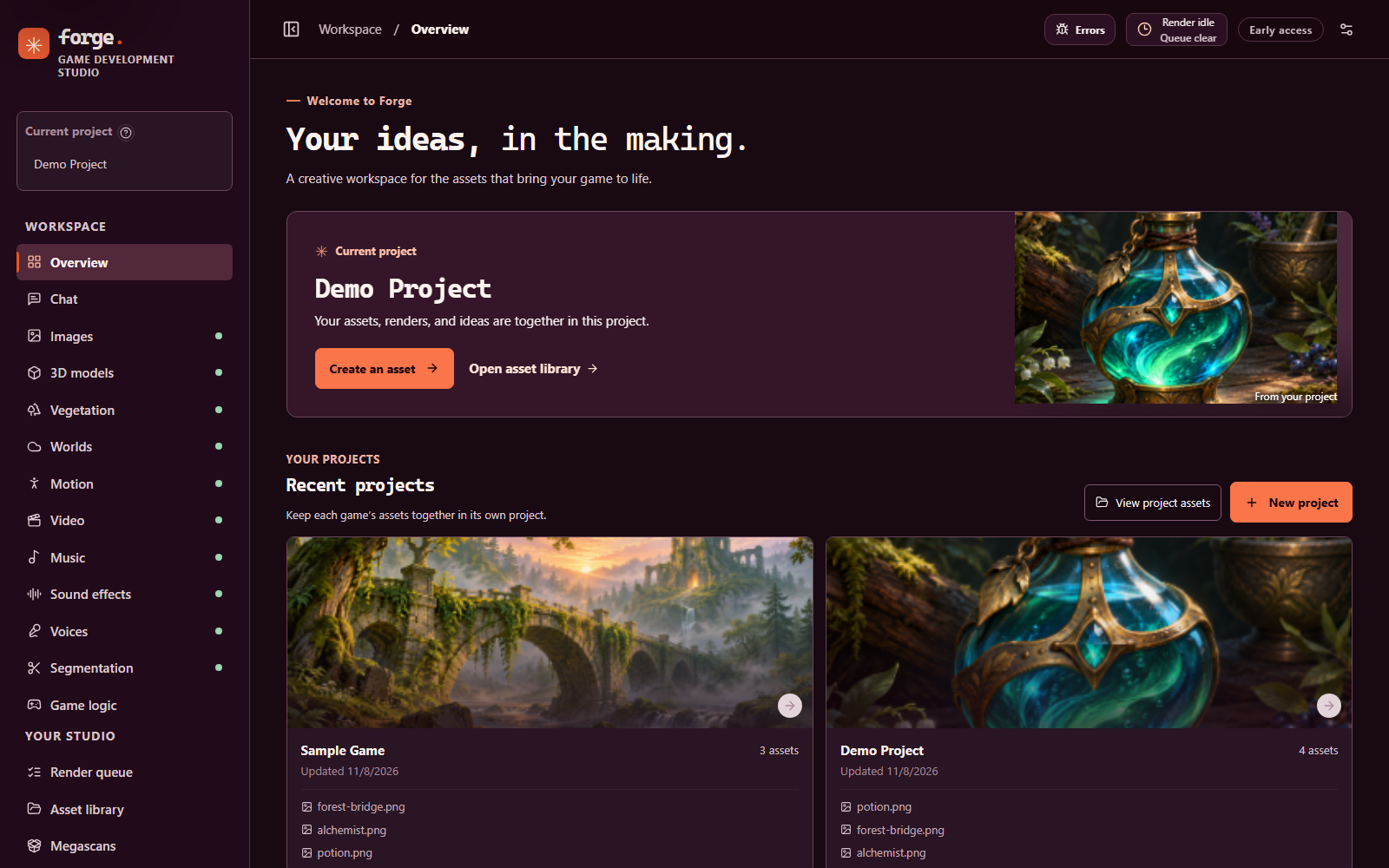
The Forge overview with two demo projects and the bundled sample artwork.
Forge is an early-stage integration project. The app and queue can start without model weights, but rendering requires separately installed models, native engines and, for some adapters, companion applications. A fresh clone is not a complete one-command AI environment. The existing local setup targets native Windows ARM64 and NVIDIA GPU inference; other platforms and hardware have not been validated to the same level.
Get started · Capabilities · Models and engines · API and MCP · Development · Documentation
Built on NVIDIA RTX Spark
Forge is developed and tested on an NVIDIA RTX Spark N1X system: a Blackwell GPU with 6,144 cores and 96 GiB of GPU memory (98,304 MiB as reported by the driver), running Windows 11 on ARM64 natively, with no WSL and no CPU inference. That one-machine setup is where every "tested" status in these docs was measured, and its memory limits shape how Forge loads models one at a time. Other hardware has not been validated to the same level.
NVIDIA, RTX and RTX Spark are trademarks of NVIDIA Corporation. Forge is an independent project and is not affiliated with, sponsored by or endorsed by NVIDIA.
Get started
Requirements
- Node.js 24 or later and npm, on Windows for the supported local setup.
- An NVIDIA GPU and compatible drivers for local model inference. Memory and storage needs depend on the model and selected settings.
- Model weights, native runtimes, credentials and any required companion apps, installed separately. Some model repositories require access approval.
See the installation guide before setting up model engines. It covers prerequisite checks, staged downloads and what still requires manual installation. Model origins and licenses are in the model source guide.
Install and launch
From PowerShell in the cloned repository:
npm ci
npm run build
powershell -NoProfile -ExecutionPolicy Bypass -File .\start-server.ps1
Open http://127.0.0.1:5173. To open the Windows
desktop window instead, run start-desktop.cmd after the build. The desktop
window uses the same local Studio service and its Windows notification-area
controls. To stop the service, run:
powershell -NoProfile -ExecutionPolicy Bypass -File .\stop-server.ps1
The stop script asks the Studio to shut down in an orderly way first (it closes its databases and records a clean stop) and terminates it only if it does not answer within a few seconds.
The launcher does not load model weights just by starting the Studio. Engines can start or load when requested, subject to their configuration and memory checks. To inspect local prerequisites without downloading anything:
powershell -NoProfile -ExecutionPolicy Bypass -File .\install.ps1 -CheckOnly
powershell -NoProfile -ExecutionPolicy Bypass -File .\install.ps1 -ListModels
Shell launchers are also included, but macOS and Linux model integration has not been verified end to end. See installation for platform details and alternate ports.
Capabilities
- Projects and assets: create project folders; search, filter, preview, download, rename, rate and keep assets. Deleted project assets go to recoverable trash until it is cleared.
- Creation panels: queue supported image, audio, video, speech, segmentation, shape, motion, world and vegetation jobs. Select compatible project assets as inputs and iterate on supported results.
- Expressive voices: the Voices page includes an experimental Fish Audio Drama 3 Q4 option alongside Qwen3-TTS. Tune its audio-token limit, temperature, top-p and seed, then queue speech for the current project. An isolated Studio queue test produced non-silent audio on the reference Windows CUDA machine; subjective audio quality has not yet been evaluated.
- One render queue: sequential jobs persist across restarts; uncertain submissions pause for review instead of being resubmitted. Reorder waiting jobs, chain a finished result into the next render, and read estimates that can be unknown or approximate.
- Crash and power-loss recovery: outputs are staged, flushed and then renamed into place, databases are checked when they open and backed up every 15 minutes, and after an unclean stop a Recovery report lists what was interrupted. The recovery logic is covered by failure-injection tests; a real power cut and a real Windows shutdown have not been exercised. See Resilience.
- Megascans portal: browse a local cache of the free Quixel Megascans 3D models on Fab, download the files you choose (two at a time, after you confirm Fab's license once) or import your own, with source and license recorded. A real end-to-end download through the current code has not been verified. See Megascans.
- Vegetation: grow procedural trees, shrubs and cacti with the linked SeedThree generator. It is alpha software that runs on the CPU and needs no model; Forge links to it and does not vendor it. An optional "Describe it" assistant can use OpenAI or the local chat model. See Vegetation.
- Engine control and diagnostics: see service status, model storage and memory estimates, request supported idle offloads, and copy errors. Engines are isolated from the Studio host where supported.
- Studio log: one searchable log for the host, queue, engines, MCP bridge and
browser, stored in
.forge-runtime/logs.sqliteand reviewed under Diagnostics. It records ids, states, counts and durations; prompts, typed text, file contents, paths and keys are designed not to reach it. See Studio log. - Error review: captured errors and stack traces are redacted, can be copied
and tracked to a fix, and you can optionally ask an OpenAI model for a
suggestion or open a GitHub issue for a verified fix. Both happen only when you
click, with your own key or
ghlogin, and have only been tested against fake services. See Error review. - Settings and MCP control: a "Studio behaviour" section in Settings, and matching MCP tools, change queue and engine toggles. Credentials, consent confirmations and security checks are deliberately not settings. See Studio behaviour settings.
- Interface translation: the interface is English by default. Optional machine translation with OpenAI fills in a language one page at a time, only when you ask. It is partial: not every file is converted yet, no human translations ship, and it has not been run against the real OpenAI API. See Interface translation.
- Desktop and notifications: use the Windows tray to control the desktop window, offload eligible idle models and receive queue notifications. Browser notifications and a keep-awake option are also available.
- Chat and game logic: chat with the local Qwen server (including image input when its vision projector is installed, Markdown replies, saved conversations and a thinking level) or a configured compatible provider, request structured output, and use the Mammoth decision bridge for supported game-logic requests.
Screenshots
These were captured from the current build, running in an isolated copy of the Studio with no engines connected and no model files installed. The projects, artwork and queue rows are demo content built from the bundled samples; none of it was rendered by a model.
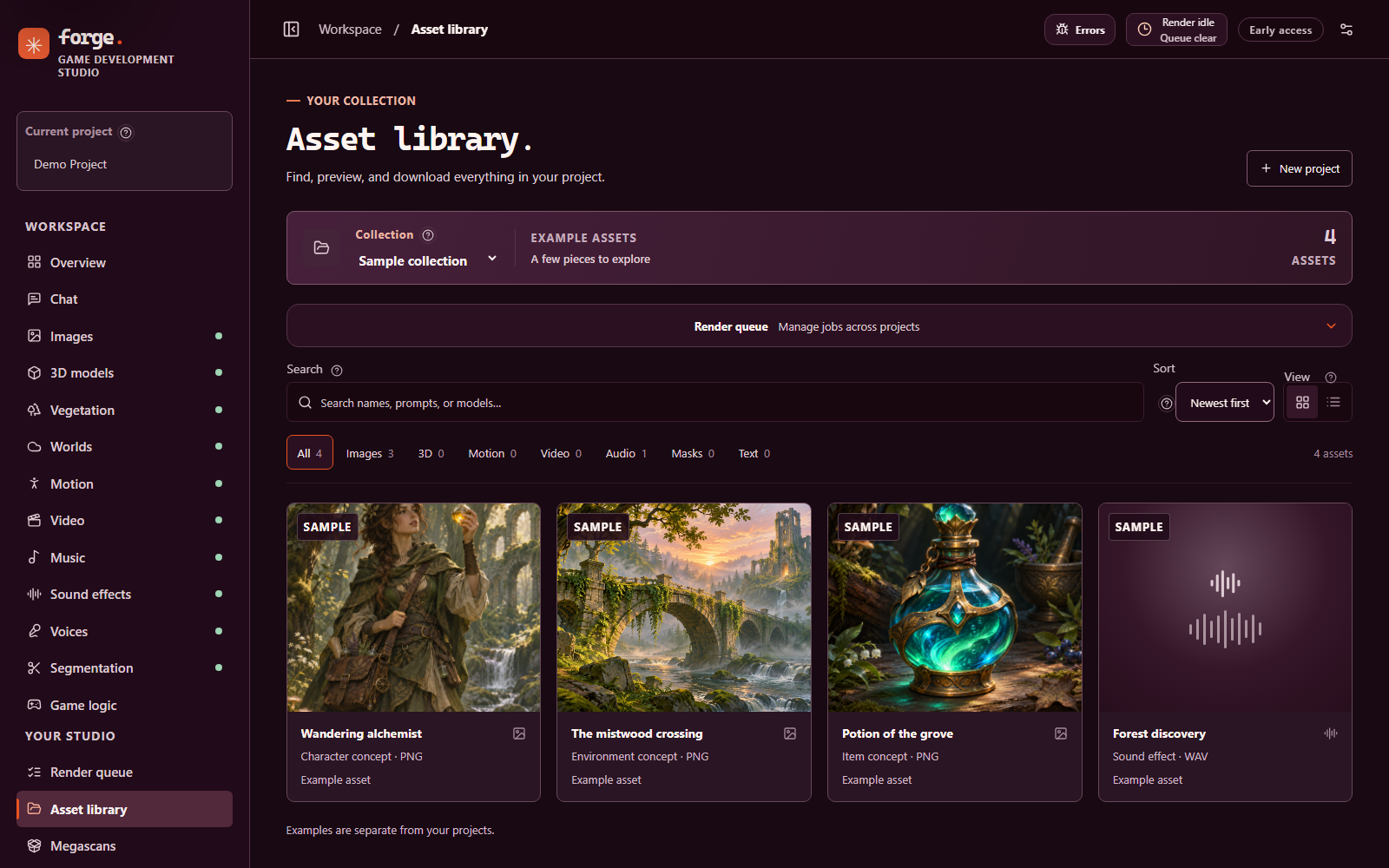
Search, filter and preview assets in the library; the screenshot shows the bundled sample collection.
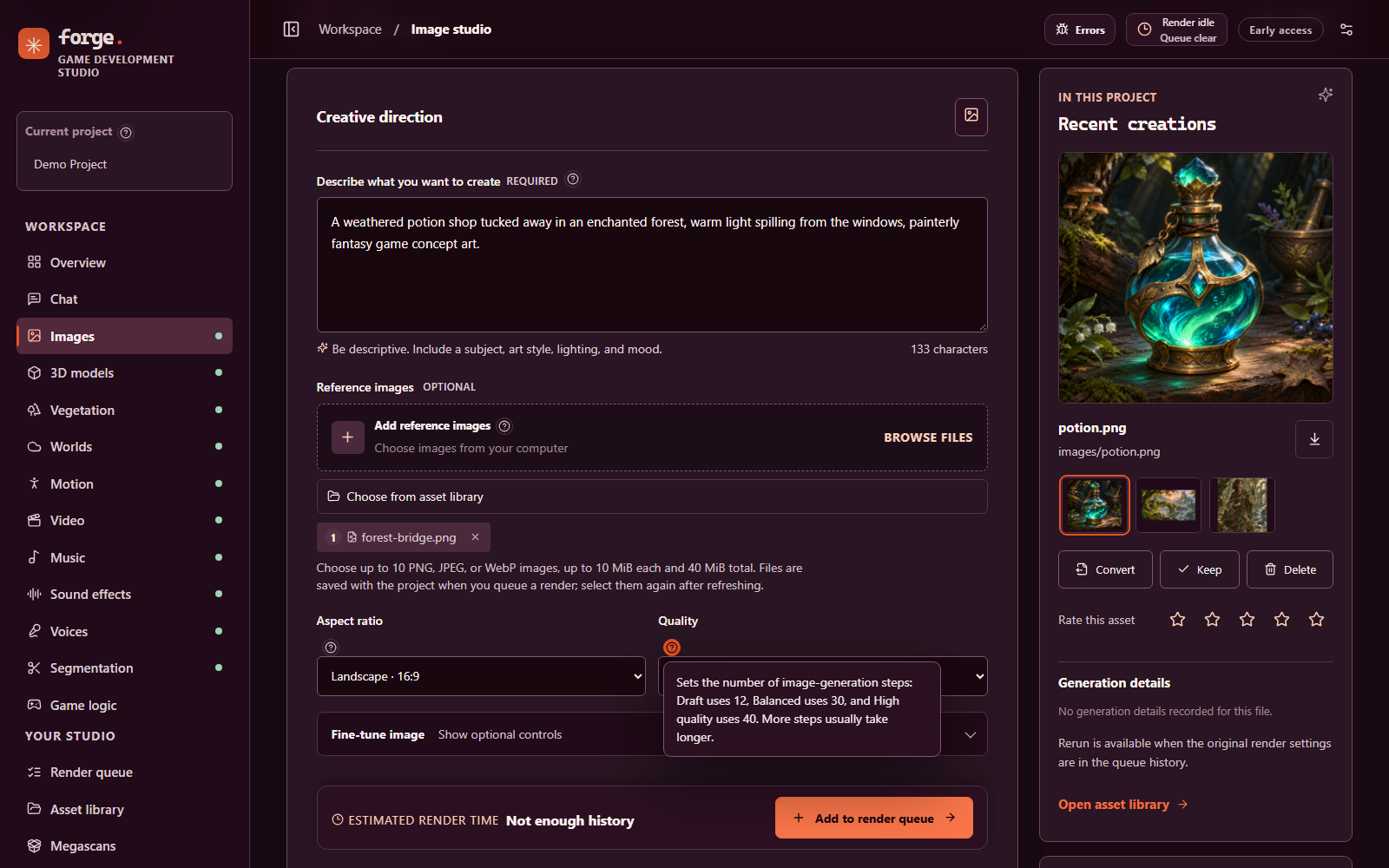
Create images with project context and a reference image. Field help opens inline, and the estimate bar reports "Not enough history" until the project has completed renders to compare.
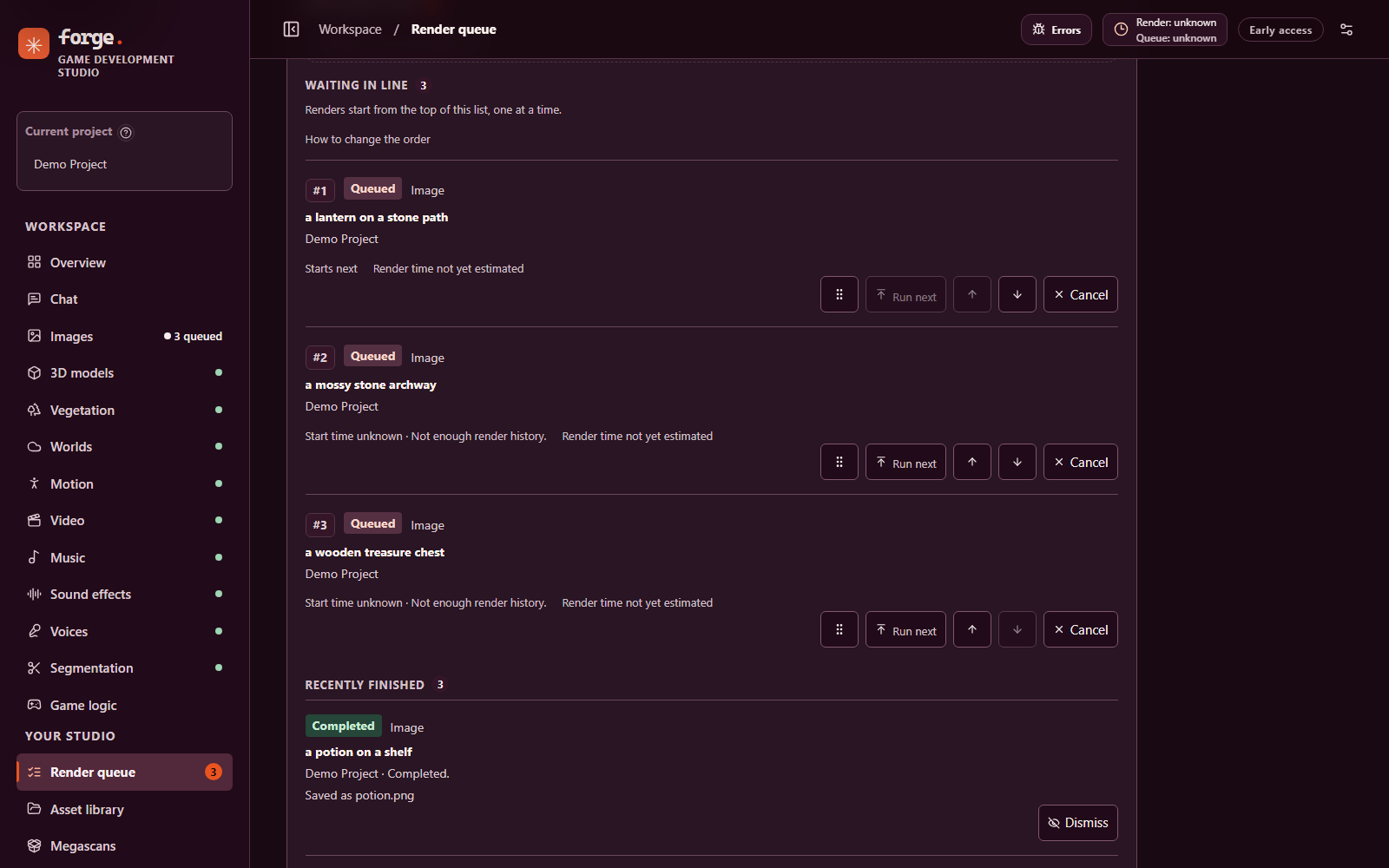
The render queue lists waiting renders in order, with controls to reorder or cancel each one, above recently finished renders. The rows are demo entries; no engine was running, so nothing was rendered.
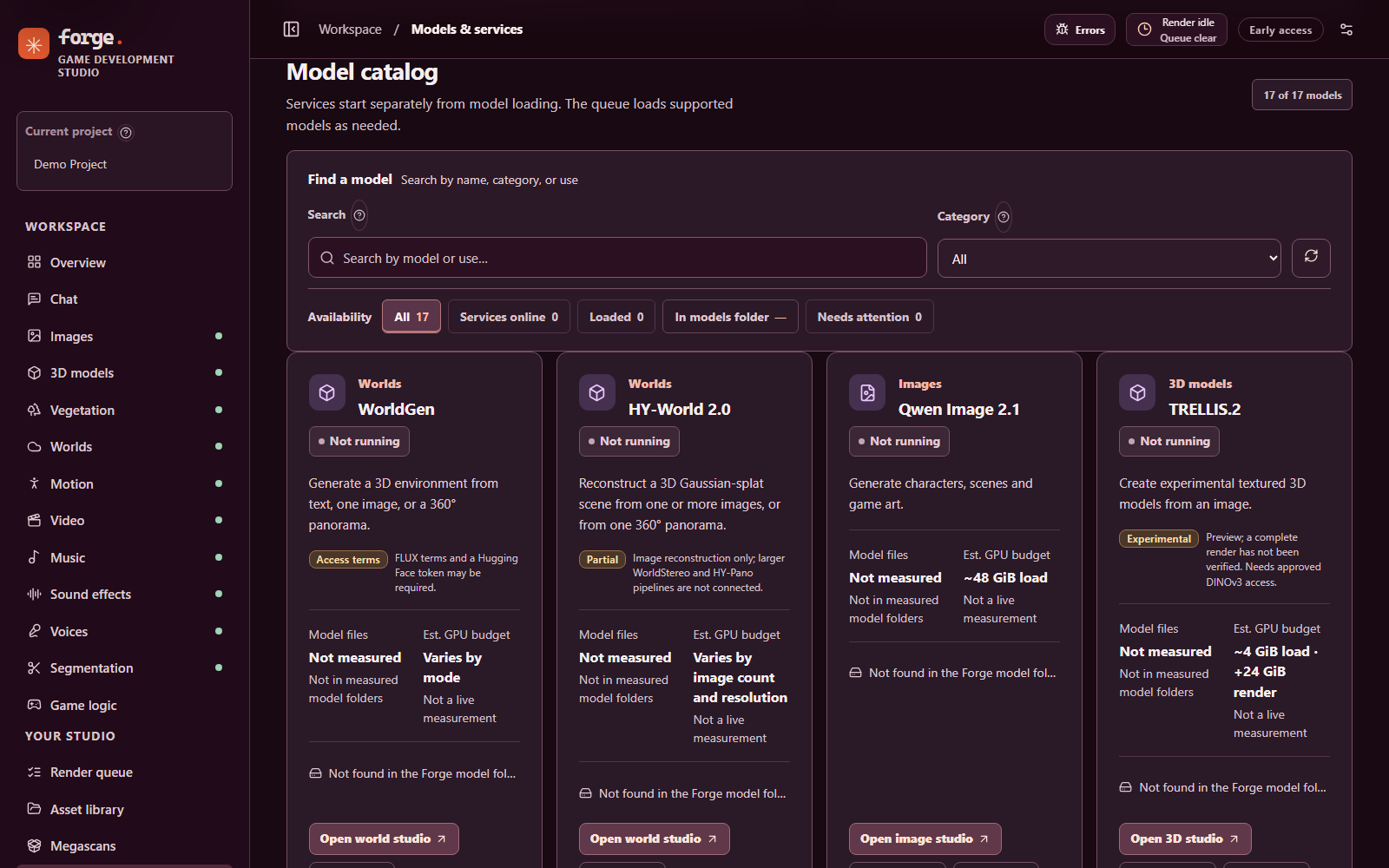
The Models and services catalog on a source checkout with no model weights installed: every card reports its model files as not found, with the estimated GPU budget and any access or preview notes. Installing models is covered in the installation guide.
Models and engines
| Workspace | Integrated models or services | Notes |
|---|---|---|
| Images | Qwen Image 2.1 | Local image generation, supported image references and LoRA files. |
| Music and sound | YuE2, Stable Audio 3 | Stable Audio is gated and requires approved access. |
| Voice | Qwen3-TTS, Fish Audio Drama 3 Q4, NVIDIA Nemotron Speech Streaming | Qwen3-TTS offers preset, cloned and designed voices; cloning needs a reference clip, transcript and consent confirmation. Drama 3's queue produced audio on the reference Windows CUDA machine; subjective quality is unverified. Speech recognition supports realtime and file workflows. |
| Video | MiniMax H3 Ref2VA | Uses the separately installed H3 application and native renderer. |
| 3D and worlds | Hunyuan3D 2.1, TRELLIS.2, WorldGen, HY-World 2.0 | TRELLIS.2 remains experimental; a complete render has not been verified. World output may need cleanup before use in a game. |
| Vegetation | SeedThree (linked repository, alpha) | Runs on the CPU in a separate Node process; no model or GPU. Flat materials, no textures or wind animation. |
| Segmentation and motion | SAM 3.1, HY-Motion 1.0, NVIDIA MotionBricks | Motion workflows are experimental and do not provide automatic character rigging or retargeting. |
| Chat and game logic | Qwen3.8-27B, Mammoth-1, compatible chat APIs | Local chat uses a native CUDA llama.cpp server; MTP speculative decoding is configurable but needs verification on the target installation. |
Availability varies by model, platform, installed dependencies and granted access. A present file or reachable service does not establish a working GPU render. The model source guide records sources, restore steps, compatibility work and known verification limits. Integrations that are planned but not built are listed in the roadmap. ACE-Step 1.5 is being investigated but is not integrated or tested for inference.
Drama 3 uses a community Q4 checkpoint
derived from Fish Audio Drama 3 and
requires a separately built audio.cpp
CUDA engine. The weights use the Fish Audio Community License,
which has conditions for commercial use and hosted services. To stage the pinned,
checksum-verified weights, run .\install.ps1 -Models drama3; installing the model
files alone does not install its native engine. On the reference Windows ARM64
machine, an isolated Studio queue test ran the native Q4 CUDA worker with
disk-backed experts and saved a 4.23-second mono 44.1 kHz WAV in 79.8 seconds.
The completed queue entry persisted after reopening its database. The file was
non-silent, but subjective audio quality has not yet been evaluated. See the
model source guide for the pinned
revision and setup notes.
Data and model storage
The Studio uses models/ for local model files and projects/ for project
assets. .forge-runtime/ holds runtime state, the structured log, database
backups and the durable queue. These directories, installed dependencies and
native binaries are ignored by Git. Back up projects and any needed runtime state
separately from the source repository; the automatic database backups in
.forge-runtime/backups/ are on the same drive and do not replace an off-machine
copy. Some standalone apps use compatibility
links to the same model files; shared models are protected from Studio removal
when their consumers cannot yet be safely coordinated.
On the reference machine (NVIDIA RTX Spark N1X, 96 GiB of GPU memory), the 16 models and 6 supporting checkpoint and cache entries total 363.70 GiB (390.52 GB) of files in models/, measured 2026-11-08; the model weights alone are 298.39 GiB. These are on-disk file sizes, not parameter counts or loaded GPU memory. See Refreshing the capacity figures for the method.
On Windows, API keys saved through Studio settings are encrypted with the current user's Windows Data Protection API before storage in a local SQLite database. Saved keys are not returned to the browser. See the studio guide for credential and fallback behavior. The local server binds to loopback by default; review the security implications before exposing it to another machine.
API and MCP
Forge provides local HTTP APIs and MCP tools for model discovery, project and
asset operations, queue control, and supported creation workflows. For example,
GET /api/models returns the model catalog, and forge_queue_drama3 queues a
Drama 3 speech render with the selected project and voice settings. The same
surface covers Studio settings, the Studio log, the recovery report and error review, and the MCP tools
can start a single engine, change the queue and engine toggles, and read logs
and the recovery report. With the Studio service running, the MCP bridge can also
be started over stdio:
npm run mcp
See the MCP guide for connection details, available controls and the protocol version. API calls and tests using substitute workers do not prove that a real model can render on a particular machine.
Development
npm ci
npm run dev                 # Vite development server
npm test                    # JavaScript tests
npm run build               # Production frontend build
npm run lint                # ESLint
npm run format:check        # Prettier
npm run log:check -- <file> # Structured-logging coverage for a file
npm run i18n:extract        # Refresh the interface string catalogs
Python checks use a separate development environment; see the code quality guide. Existing repository-wide lint and formatting debt is documented there. The test guide explains which checks use isolated workers and which load real GPU models. Follow AGENTS.md when changing the project; the code style guide, adding a model and adding a feature explain the conventions.
Documentation
The documentation index lists every guide. The main ones:
- Installation and model prerequisites
- Model sources, downloads and licensing
- Studio operations and detailed local setup notes
- MCP and agent controls
- Studio behaviour settings, Studio log and Resilience
- Error review, Megascans, Vegetation and Interface translation
- Roadmap and to-do list
- Agent setup and runtime map
- Windows ARM64 build notes and tests
- Private remote access with Tailscale and SSH
- Code style guide, adding a model and adding a feature
License
Forge source code is available under the MIT License. Model weights, companion applications, third-party dependencies and their example assets have their own licenses and access terms; the MIT license does not replace them.
Forge MCP questions
Is Forge a complete AI environment out of the box?
No, a fresh clone is not a complete one-command AI environment; it requires separately installed models, native engines, and potentially companion applications.
What hardware is Forge optimized for?
The current local setup targets native Windows ARM64 and NVIDIA GPU inference.
Can I manage my game assets within Forge?
Yes, you can create project folders, search, filter, preview, download, rename, rate, and manage assets, with a recoverable trash system.
Does Forge support local model inference?
Yes, it supports local model inference using an NVIDIA GPU and compatible drivers, though memory and storage needs vary by model.