
git-qa MCP server
Commit Nov 13, 2026An AI-driven human-in-the-loop QA runner that automates test sheet execution across Android, iPhone, web, and desktop apps.
Also known as meta-taro/git-qa
- Stars
- 1
- Tools
- —
- Downloads, 30 days
- —
- Latest version
- 0.2.0
- Last commit
- Nov 13, 2026
- License
- MIT
What is git-qa MCP?
git-qa is an AI-driven human-in-the-loop QA runner that automates test sheet execution across Android, iPhone, web, and desktop apps.
Summary generated from the project's README
About git-qa MCP server
Automating regression testing across Android, iPhone, web, and desktop applications is what git-qa enables through a human-in-the-loop approach. Instead of relying solely on autonomous AI, this tool allows an AI agent to drive the interface while a human operator watches a live screen and provides a verdict with a single keystroke. This ensures that every pass is personally verified and recorded with a specific user handle for accountability.
Developers can use this server locally by downloading the application and installing Node 22 or newer. It supports various targets including adb devices, web URLs, and desktop apps via macOS Accessibility or Windows UI Automation. When used via MCP, an AI agent like Claude Code can perform actions such as taking screenshots, reading the screen, and tapping elements. The system generates detailed evidence folders containing verdicts, timestamps, and screenshots to distinguish between human-verified results and automatic passes.
What you can do with it
- 1Verify regression test sheetsA developer can watch an AI agent execute a multi-row TSV test sheet across different platforms while manually signing off on each case.
- 2Audit testing accountabilityTeams can use the generated evidence to prove exactly which person verified a specific test case and when it occurred.
- 3Autonomous overnight testingAn AI agent can run through a test sheet unattended using the no-ui flag so that failures are ready for review in the morning.
- 4Remote device interaction via MCPAn AI client can interact with mobile or desktop interfaces by listing clickable elements and performing taps.
Written from the project's README. Every use case is checked against a quote from it.
Automated checks
Ran Nov 15, 2026Full report →Not verified yet. A server needs a score of 80, no serious finding, and enough data for us to check. How checks work · What to fix for more points

- Source repository linked and reachablemeta-taro/git-qa is public and reachablegithub.com/meta-taro/git-qa ↗Pass
- Package names this repository as its sourceNot checked
- Build provenance (Sigstore attestation)Not checked
- Open source license (OSI)MITspdx.org/licenses/MIT.html ↗Pass
- Commit or release in the last yearLast commit or release 2026-11-13github.com/meta-taro/git-qa ↗Pass
- OpenSSF ScorecardNot checked
- Package name not close to a popular packageNot checked
- No critical advisory in the package or its dependenciesNot checked
- No hidden instructions to the model0 tool descriptions and the README read; no override phrases, credential paths or hidden charactersPass
- Destructive tools are labelledNot checked
- Remote endpoint answers the MCP handshakeNot checked
README
View on GitHubgit-qa
Your test sheet runs itself. You watch, and sign off each case with one key.
git-qa is an open-source human-in-the-loop QA runner. An AI agent works through your test sheet on Android, iPhone, web and desktop apps; you watch the live screen and sign off each case, and the evidence records who verified what. AI agents can also drive it over MCP.
日本語版はこちら / Japanese · Download
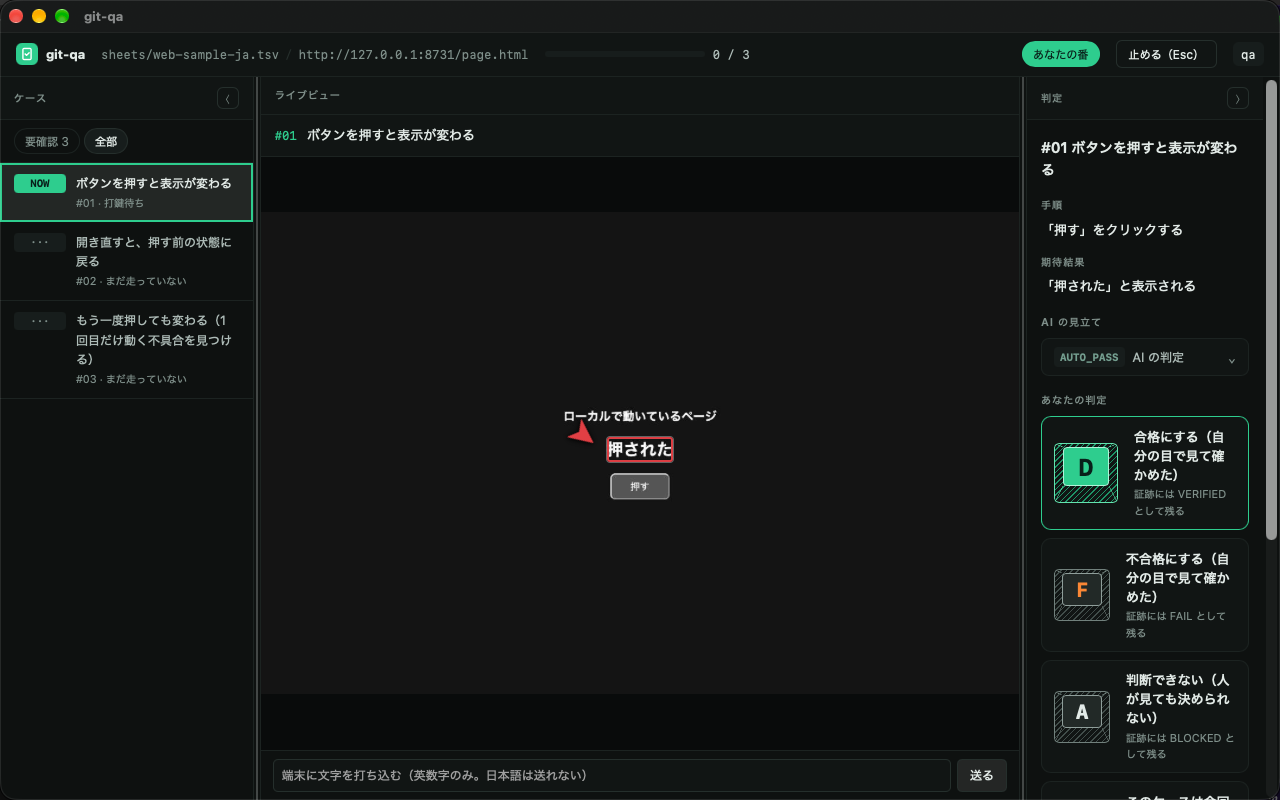
Left: the cases in your test sheet. Middle: the page, device or app, live, while the AI drives it —
the red marker is where it found the expected text. Right: one key per verdict — D pass, F fail.
Your handle goes into the evidence when you press it. (The UI is shown in Japanese; it also speaks English.)
When you would reach for it
The release check nobody wants to click through again. You have a 30-row regression sheet for an Android app, a web page and a desktop app. Instead of tapping through it by hand, the AI follows the sheet while you watch the live view and press a key per case. You only stop to look closely where something changed or failed.
"Who actually checked this?"
A client, an auditor or your own team asks after an incident. The evidence answers:
each case says VERIFIED (a person looked and signed) or AUTO_PASS (the AI passed it, nobody looked),
with the name, the time, and the screen at that moment.
An AI agent built the feature — now it should check it, on a real device.
Over MCP, Claude Code (or any agent) can screenshot, read the screen, list what can be pressed and tap it,
on Android, web, desktop or iPhone. It can run the sheet unattended overnight (--no-ui);
in the morning you review the failures. The pass is still yours to give.
The server is listed in the official MCP registry as io.github.meta-taro/git-qa; it runs from this clone (there is no npm package).
Try it
- Download the app from the distribution page (macOS, Windows x64 / ARM64) and install Node 22+
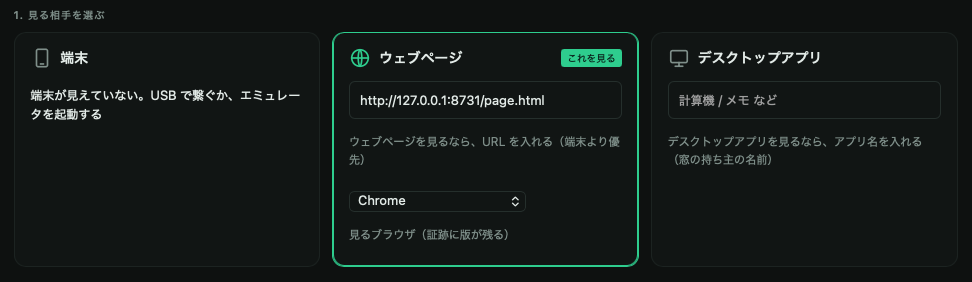
- Open git-qa. Enter a handle (it goes into the evidence as "who looked"), pick what to look at —
an
adbdevice, a web page URL, or a desktop app by name — and a test sheet - Start, watch, and press
D/Fper case
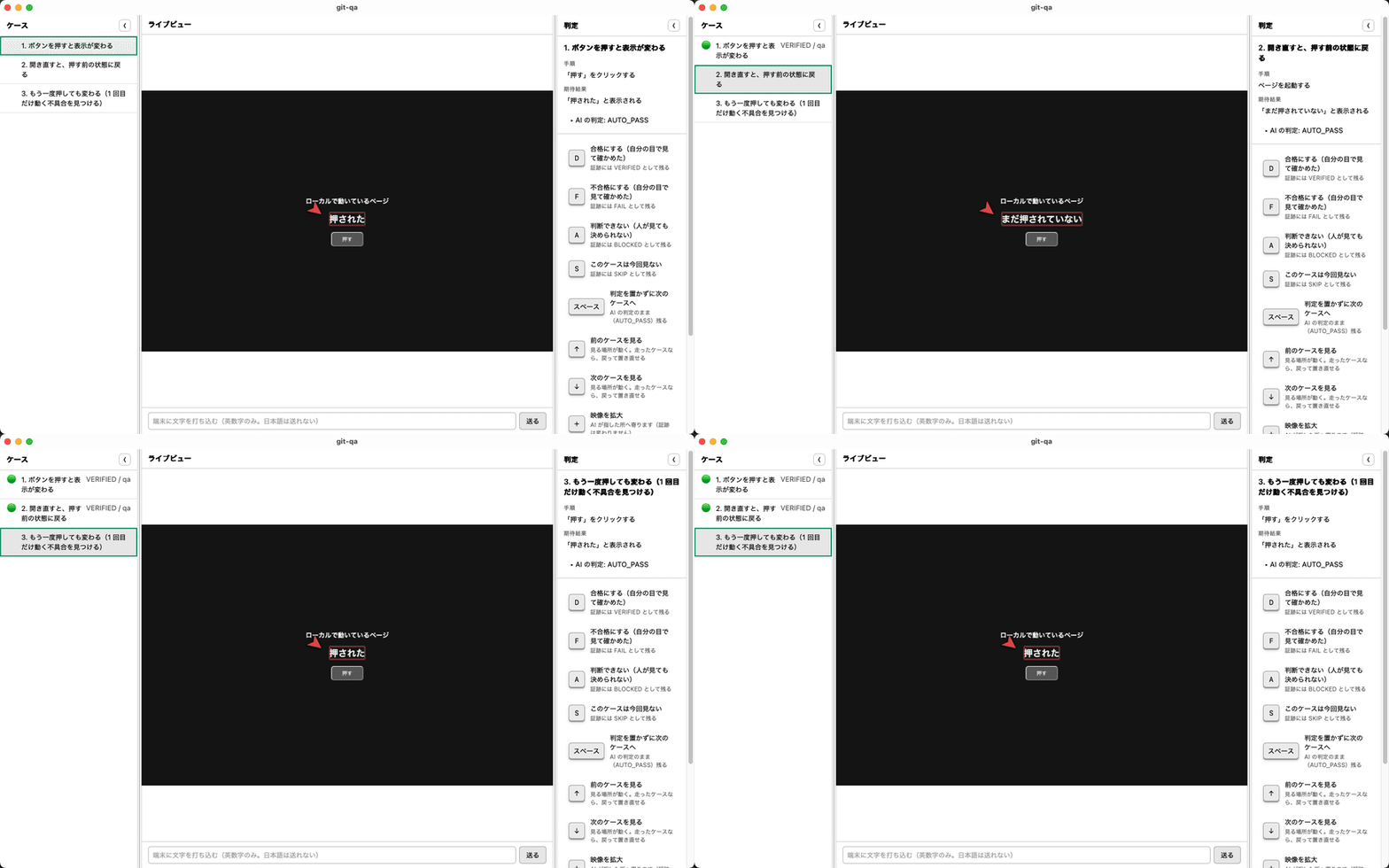
A run, case by case — the AI runs each step (press the button, reopen the page, press it again), you press D, the case turns VERIFIED / qa and the next one starts:
A test sheet is a TSV you can write in any spreadsheet — samples are in sheets/.
From source instead: git clone … && pnpm install && pnpm app (see Install).
Launch from another tool
Another tool (a traceability ledger, for instance) can open git-qa on a given sheet and case:
git-qa://run?sheet=<absolute path to the TSV>&case=<No.>&target=<what to look at>
case runs that one case only and sets finishedAt in run.json when it is done. target is a URL,
app:<name> for a desktop app, or an adb serial. With both present and a handle already entered, the run
starts without a click; if git-qa is already open, that window takes it. Installed app only (not pnpm app).
Why it is built this way
This is not a tool for handing verification to an AI and letting it say "everything passed." When something ships broken, the person is accountable — "the AI did it" is not an answer anyone accepts.
So git-qa splits the work:
- The AI operates the device, the browser, or the desktop app, following a test sheet
- The human watches, and places the verdict with a single keystroke
- The evidence records who saw what, and when
The vocabulary is the point
| Value | Meaning |
|---|---|
VERIFIED |
A person put their name on it |
AUTO_PASS |
The AI passed it. Nobody looked |
FAIL |
It failed |
BLOCKED |
Could not run — a precondition was not met |
SKIP |
Not run |
A plain PASS would collapse the first two into one value. That collapse is
exactly what this tool exists to prevent.
You can place VERIFIED without looking. That is a feature, not a hole.
The moment you press the key, your handle goes into the evidence. It is a
signature, not a lock. There is no anti-cheat machinery — adding it would make a
tool that exists to save effort expensive to use.
What it can drive
| Android devices | Real devices and emulators over adb — tap, swipe, type |
| Web pages | Chrome / Edge / Firefox / Safari. Same viewport every run, so you can compare |
| Desktop apps | macOS (Accessibility + Vision OCR) and Windows (UI Automation) |
| iPhone / iPad | Watch, read and record over USB. Tap, type, swipe and launch apps through WebDriverAgent, which you sign and install on the device yourself (guide). Tried on a real iPhone (iOS 17.5.1) |
| Mobile browsers | Android Chrome over adb forward + CDP — tried on a real phone (Android 15, Chrome 156): open, type, tap, screenshot and read all work; text inside input fields is not part of what it reads. iOS Safari through the iPhone path above (not yet tried) |
| From an AI agent | Over MCP — screenshot, read the screen, list the names you can press, tap by name. Android, web, desktop, or iPhone / iPad |
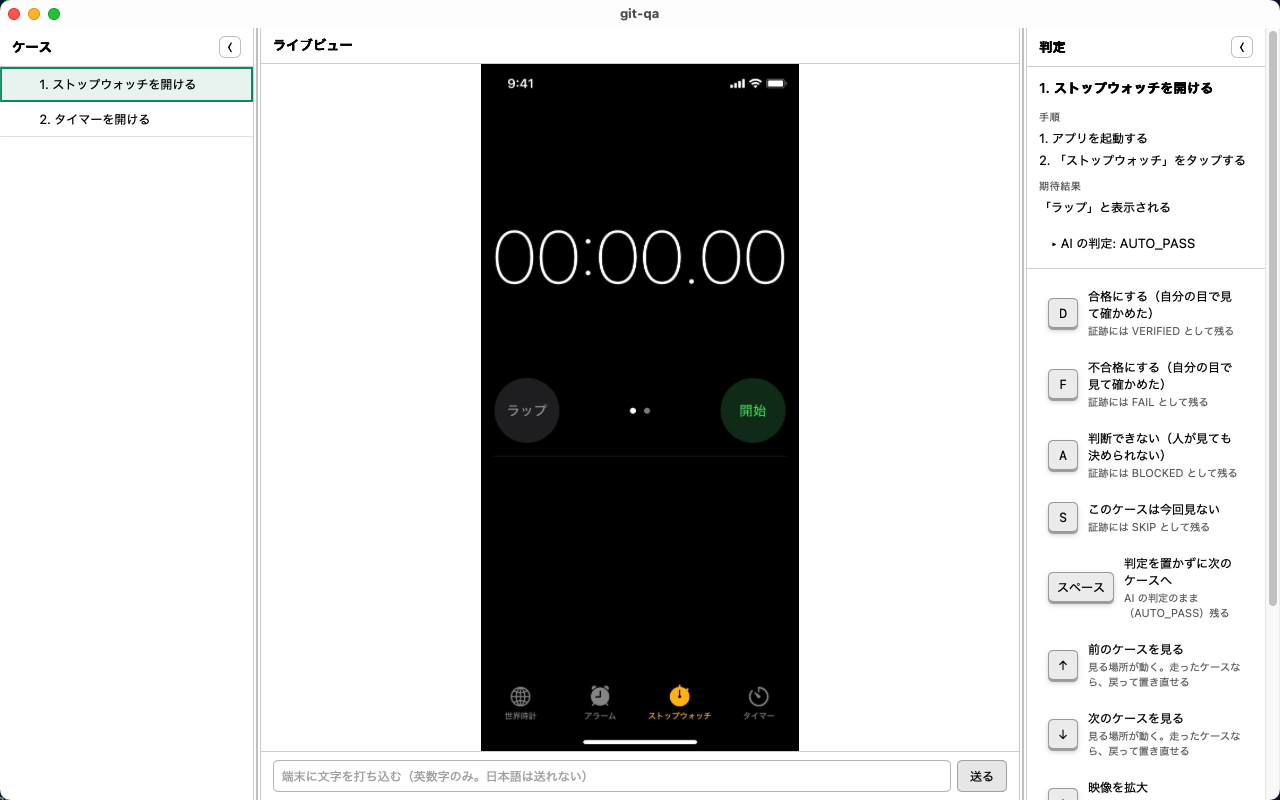
A real iPhone, driven through WebDriverAgent: git-qa launched the Clock app and tapped "Stopwatch". The case waits for a person's verdict.
What evidence looks like
One folder per test run. Commit the whole folder if you want the test itself under version control.
<workspace>/
  git-qa.json        marks this folder as one test project
  sheet.tsv          the test sheet
  runs/
    20260914-100000/
      run.json       verdicts, steps, who placed them and when
      case-001/
        screen.webp  the screen at the moment the verdict was placed
        screen.webm  video of the run — **only when asked for** (`--record`,
                     or "Record video" on the app's start screen)
After a verdict is placed, the app shows "Open the evidence folder" under the path it wrote to, so the screenshot and video of each case are one click away.
Nothing about your machine goes into the evidence: paths are relative to the workspace, so the same run reads the same way on anyone's machine.
Requirements
-
Node 22 or newer — required. The app starts a runner process Node managed by fnm / nvm is only on your terminal's PATH — an app launched from an icon or the Start menu does not see it, so install Node 22+ system-wide (the app tells you when the node it found is too old)
-
adbfor Android, a browser for web — only if you use them -
ffmpeg/cwebp— optional. Without them, evidence is kept in the format it was captured in, uncompressed
Install
Download from the distribution page, or run it from source:
git clone https://github.com/meta-taro/git-qa.git
cd git-qa
pnpm install
pnpm app
macOS builds are signed and notarized. Windows builds are not signed — you will see "Windows protected your PC"; check the source before choosing Run.
To see what this machine can actually do — measured, not guessed:
pnpm doctor
The app also states its own version on the start screen ("This git-qa is v0.2.0"). Paste that line into bug reports — it decides which build you are talking about. When a newer build exists, the same place says so; git-qa never replaces itself.
Status
Stable since v0.2.0 (2026-11-11). Three products use it in real verification work on Windows and macOS, against web, desktop, Android and iPhone targets. Rough edges are listed in each release's notes, and nothing fails silently — where a step cannot run, it is recorded as "a person needs to do this," not as a pass.
Bug reports and requests: Issues. Please write them in your own words, right after you hit the problem. Summarizing loses the part that actually hurt.
License
MIT — see LICENSE.
git-qa MCP questions
What platforms can git-qa test?
It supports Android devices and emulators, web pages (Chrome, Edge, Firefox, Safari), desktop apps on macOS and Windows, and iPhone/iPad via WebDriverAgent.
How does the human-in-the-loop verification work?
The AI operates the device or app following a test sheet, while the human watches the live view and presses a key (D for pass, F for fail) to sign off each case.
Can I run tests unattended?
Yes, AI agents can run the test sheet unattended overnight using the --no-ui flag, allowing you to review failures in the morning.
What kind of evidence is recorded?
The tool records verdicts, steps, the person who placed the verdict, the time, and screenshots (and optionally videos) of the screen at that moment.