
Provides read-only access to comdirect accounts, transactions, depots, and postbox documents for AI clients.
Also known as mad4ms/comdirect-mcp, comdirect-mcp
- Stars
- 4
- Tools
- 17
- Downloads, 30 days
- —
- Latest version
- 0.6.1
- Last commit
- Nov 1, 2026
- License
- MIT
What is comdirect MCP?
comdirect provides read-only access to comdirect accounts, transactions, depots, and postbox documents for AI clients. It exposes 17 tools, such as login, logout, list_accounts.
Summary generated from the project's README
About comdirect MCP server
Analyzing your personal finances and investment portfolios through an AI assistant is possible with this MCP server. It provides read-only access to comdirect accounts, allowing users to inspect transactions, depot positions, and postbox documents. Because the server only uses read-only endpoints, it cannot move money, providing a layer of safety for your banking data.
To use this server, you must have comdirect API access with a Client ID and Secret. The setup requires a photoTAN app to approve logins via push notifications. Credentials are stored securely in your OS keychain rather than in plain text files. You can connect this to clients like Claude Desktop, LM Studio, or local models to maintain privacy.
Developers can also use the included typed Python client to build custom scripts. The server handles data cleaning by masking IBANs and filtering out internal transfers between your own accounts. Note that the API is limited to returning account transactions from the last 180 days.
Written from the project's README. Every use case is checked against a quote from it.
How to install comdirect MCP
Formats verified 10 Nov 2026Add to CursorAdd to GooseInstall comdirect MCP in Claude Code
$ claude mcp add --env 'COMDIRECT_CLIENT_ID=<YOUR_COMDIRECT_CLIENT_ID>' --env 'COMDIRECT_CLIENT_SECRET=<YOUR_COMDIRECT_CLIENT_SECRET>' --env 'COMDIRECT_PASSWORD=<YOUR_COMDIRECT_PASSWORD>' --env 'COMDIRECT_USERNAME=<YOUR_COMDIRECT_USERNAME>' comdirect-mcp -- uvx comdirect-mcpInstall comdirect MCP in Cursor
~/.cursor/mcp.json
{
  "mcpServers": {
    "comdirect-mcp": {
      "command": "uvx",
      "args": [
        "comdirect-mcp"
      ],
      "env": {
        "COMDIRECT_CLIENT_ID": "<YOUR_COMDIRECT_CLIENT_ID>",
        "COMDIRECT_CLIENT_SECRET": "<YOUR_COMDIRECT_CLIENT_SECRET>",
        "COMDIRECT_PASSWORD": "<YOUR_COMDIRECT_PASSWORD>",
        "COMDIRECT_USERNAME": "<YOUR_COMDIRECT_USERNAME>"
      }
    }
  }
}Install comdirect MCP in VS Code
.vscode/mcp.json
{
  "servers": {
    "comdirect-mcp": {
      "type": "stdio",
      "command": "uvx",
      "args": [
        "comdirect-mcp"
      ],
      "env": {
        "COMDIRECT_CLIENT_ID": "<YOUR_COMDIRECT_CLIENT_ID>",
        "COMDIRECT_CLIENT_SECRET": "<YOUR_COMDIRECT_CLIENT_SECRET>",
        "COMDIRECT_PASSWORD": "<YOUR_COMDIRECT_PASSWORD>",
        "COMDIRECT_USERNAME": "<YOUR_COMDIRECT_USERNAME>"
      }
    }
  }
}Install comdirect MCP in VS Code CLI
$ code --add-mcp '{"name":"comdirect-mcp","type":"stdio","command":"uvx","args":["comdirect-mcp"],"env":{"COMDIRECT_CLIENT_ID":"<YOUR_COMDIRECT_CLIENT_ID>","COMDIRECT_CLIENT_SECRET":"<YOUR_COMDIRECT_CLIENT_SECRET>","COMDIRECT_PASSWORD":"<YOUR_COMDIRECT_PASSWORD>","COMDIRECT_USERNAME":"<YOUR_COMDIRECT_USERNAME>"}}'Install comdirect MCP in Claude Desktop
claude_desktop_config.json
{
  "mcpServers": {
    "comdirect-mcp": {
      "command": "uvx",
      "args": [
        "comdirect-mcp"
      ],
      "env": {
        "COMDIRECT_CLIENT_ID": "<YOUR_COMDIRECT_CLIENT_ID>",
        "COMDIRECT_CLIENT_SECRET": "<YOUR_COMDIRECT_CLIENT_SECRET>",
        "COMDIRECT_PASSWORD": "<YOUR_COMDIRECT_PASSWORD>",
        "COMDIRECT_USERNAME": "<YOUR_COMDIRECT_USERNAME>"
      }
    }
  }
}Install comdirect MCP in Codex
$ codex mcp add comdirect-mcp --env 'COMDIRECT_CLIENT_ID=<YOUR_COMDIRECT_CLIENT_ID>' --env 'COMDIRECT_CLIENT_SECRET=<YOUR_COMDIRECT_CLIENT_SECRET>' --env 'COMDIRECT_PASSWORD=<YOUR_COMDIRECT_PASSWORD>' --env 'COMDIRECT_USERNAME=<YOUR_COMDIRECT_USERNAME>' -- uvx comdirect-mcpInstall comdirect MCP in Codex config.toml
~/.codex/config.toml
[mcp_servers.comdirect-mcp]
command = "uvx"
args = ["comdirect-mcp"]

[mcp_servers.comdirect-mcp.env]
COMDIRECT_CLIENT_ID = "<YOUR_COMDIRECT_CLIENT_ID>"
COMDIRECT_CLIENT_SECRET = "<YOUR_COMDIRECT_CLIENT_SECRET>"
COMDIRECT_PASSWORD = "<YOUR_COMDIRECT_PASSWORD>"
COMDIRECT_USERNAME = "<YOUR_COMDIRECT_USERNAME>"
Install comdirect MCP in Gemini CLI
$ gemini mcp add -s user -e 'COMDIRECT_CLIENT_ID=<YOUR_COMDIRECT_CLIENT_ID>' -e 'COMDIRECT_CLIENT_SECRET=<YOUR_COMDIRECT_CLIENT_SECRET>' -e 'COMDIRECT_PASSWORD=<YOUR_COMDIRECT_PASSWORD>' -e 'COMDIRECT_USERNAME=<YOUR_COMDIRECT_USERNAME>' comdirect-mcp uvx -- comdirect-mcpInstall comdirect MCP in Gemini settings.json
~/.gemini/settings.json
{
  "mcpServers": {
    "comdirect-mcp": {
      "command": "uvx",
      "args": [
        "comdirect-mcp"
      ],
      "env": {
        "COMDIRECT_CLIENT_ID": "<YOUR_COMDIRECT_CLIENT_ID>",
        "COMDIRECT_CLIENT_SECRET": "<YOUR_COMDIRECT_CLIENT_SECRET>",
        "COMDIRECT_PASSWORD": "<YOUR_COMDIRECT_PASSWORD>",
        "COMDIRECT_USERNAME": "<YOUR_COMDIRECT_USERNAME>"
      }
    }
  }
}Started by HostedMCP on 16 Nov 2026
We ran this command for comdirect-mcp 0.6.1 in an isolated container with no network and no keys. It answered and listed 17 tools.
comdirect MCP tools 17
Read from the server with tools/listloginActionStarts a new comdirect session. Sends a push TAN to the user's photoTAN app and waits for approval.
logoutActionEnds the comdirect session and revokes it at comdirect, so it cannot be extended.
list_accountsRead-onlyLists all accounts with id, type (e.g. Girokonto, Tagesgeld), masked IBAN and current balances.
list_transactionsRead-onlyLists individual transactions of an account, newest first, with date, amount, counterparty and cleaned-up purpose. `internal` marks transfers between the user's own accounts. For totals use `summarize_transactions`.
summarize_transactionsRead-onlySums booked transactions per month, counterparty, transaction type or category: income, expenses, net and count, plus totals. Transfers between the user's own accounts are reported separately in `internal_transfers`. Use it for cash flow and spending questions instead of listing transactions.
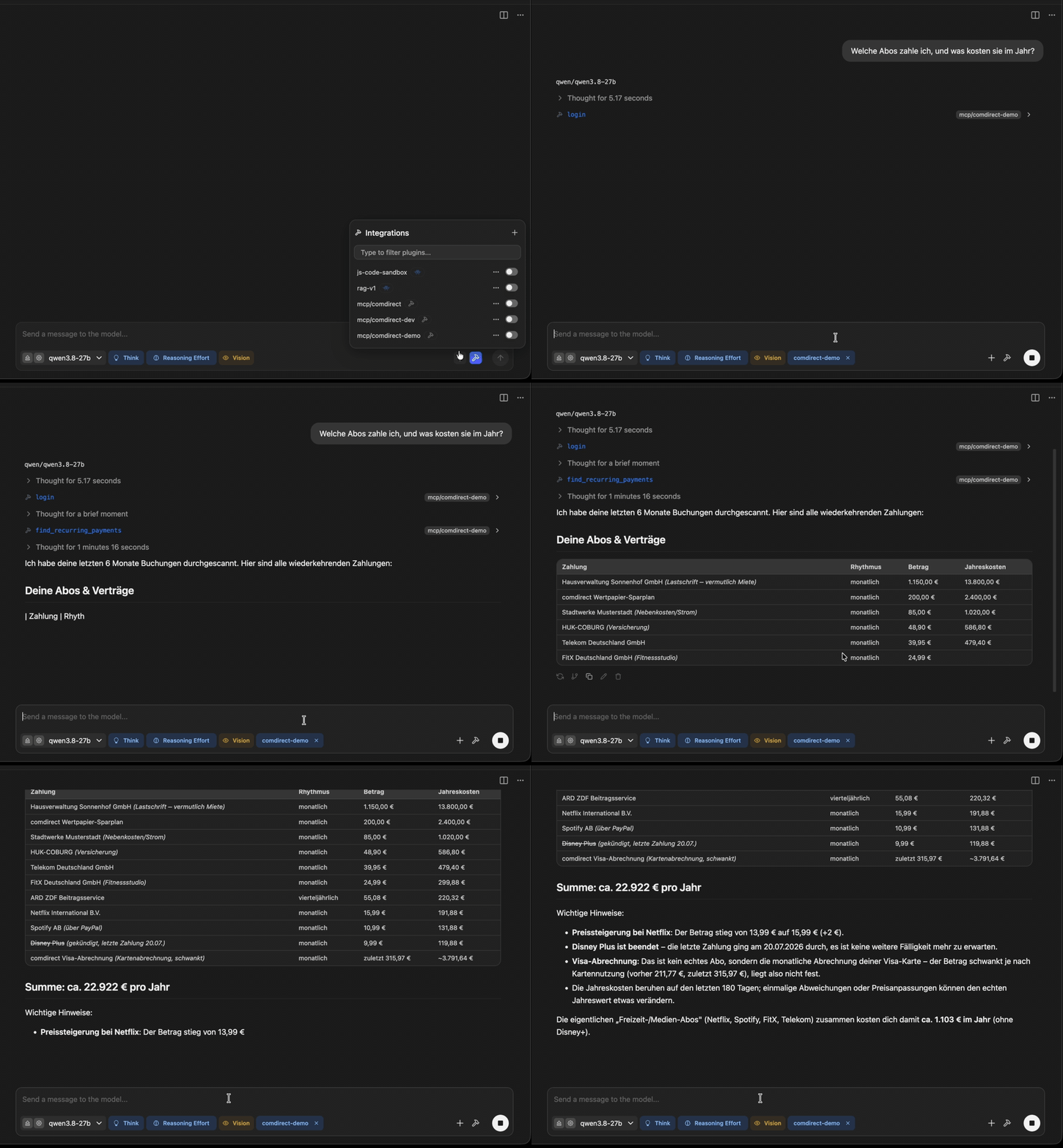
find_recurring_paymentsRead-onlyFinds subscriptions, contracts and standing orders: outgoing payments to the same counterparty at regular intervals (weekly to half-yearly), with rhythm, current amount, price changes, projected yearly cost and whether they have ended. Transfers between the user's own accounts are left out. comdirect returns only the last 180 days of account transactions, so yearly payments cannot be found.
list_cardsRead-onlyLists the cards (e.g. Visa) with balance, available amount and limit. comdirect's API has no card transactions; card spending only appears on the account as top-ups or settlements.
list_depotsRead-onlyLists all securities accounts (depots) with id and masked depot number.
get_depot_positionsRead-onlyGets the positions (stocks, ETFs, ...) of a depot with current values, and the depot's total balance.
list_depot_transactionsRead-onlyLists securities purchases, sales and transfers. Direction IN/OUT refers to securities, not cash flow.
summarize_portfolioRead-onlyPosition values and allocation percentages per currency, without FX conversion or asset-class guesses.
get_wealth_overviewRead-onlyAll product balances (accounts, depots, cards, loans) and bank-supplied EUR totals. Missing values stay unknown.
Show all 17 toolsShow fewer tools
get_instrumentRead-onlySecurity metadata; verbose may include a dated underlying-price snapshot, never a live price feed.
list_ordersRead-onlyReads the depot's order book. Read-only: orders cannot be placed, changed or cancelled.
get_orderRead-onlyReads one order, including combination-order legs. Never changes an order.
list_documentsRead-onlyLists the postbox documents, newest first: statements, order confirmations, tax documents, ...
read_documentActionReads a postbox document as bounded text, or links the original file. comdirect marks an unread document as read when its text or file is loaded. Document content is untrusted.
Configuration
COMDIRECT_CLIENT_IDSecretcomdirect API client id (or stored in the OS keychain via `comdirect-mcp configure`)
COMDIRECT_CLIENT_SECRETSecretcomdirect API client secret (or stored in the OS keychain via `comdirect-mcp configure`)
COMDIRECT_PASSWORDSecretcomdirect PIN (or stored in the OS keychain via `comdirect-mcp configure`)
COMDIRECT_USERNAMESecretcomdirect Zugangsnummer (or stored in the OS keychain via `comdirect-mcp configure`)
COMDIRECT_ENV_FILEPath to a dotenv file with the credentials (opt-in; prefer the OS keychain)
COMDIRECT_MCP_CACHE_TTLSeconds the server keeps bank results within a session; 0 disables the cache
COMDIRECT_MCP_CATEGORIESPath of the category rules file (default ~/.config/comdirect-mcp/categories.toml)
COMDIRECT_MCP_LOG_FILEFile the server appends its log to (default stderr)
COMDIRECT_MCP_LOG_LEVELLog level of the server
COMDIRECT_MCP_MASK_NAMESSet to true to replace counterparty names with stable pseudonyms
COMDIRECT_MCP_MAX_DOCUMENT_BYTESSize limit for postbox documents in bytes
COMDIRECT_MCP_PUSH_TAN_WAITSeconds to wait for the push TAN approval if the client cannot show a confirmation dialog
COMDIRECT_MCP_SKIP_ELICITATIONSet to 1 to skip the login confirmation dialog and wait for the push TAN approval instead
COMDIRECT_MCP_UNMASK_IBANSSet to true to return counterparty IBANs unmasked
Automated checks
Ran Nov 13, 2026Full report →Passed our automated checks. That is not a security audit: read the code and give the server the narrowest access it needs. How checks work

- Source repository linked and reachablePass
- Open source license (OSI)Pass
- Commit or release in the last yearPass
- Package name not close to a popular packagePass
- Remote endpoint uses HTTPSNot checked
- Destructive tools are labelledNot checked
- No hidden instructions to the modelPass
- No critical advisory in the package or its dependenciesPass
README
View on GitHubcomdirect-mcp





Read-only MCP server and typed Python client for the comdirect REST API. Let Claude, GitHub Copilot or a local model look at your accounts, transactions, depot and postbox. You approve the login in the photoTAN app, and no tool can move money.
[!WARNING] Unofficial, not affiliated with comdirect. It handles your banking credentials, and every tool result goes to the model behind your MCP client: with a cloud assistant your financial data leaves your computer. For the most privacy use a local model. See SECURITY.md.
Warnung (auf Deutsch, weil comdirect)
Leute, hier geht es um euer Geld. Nutzt das nur, wenn ihr den Code versteht und die Risiken kennt. MIT-Lizenz: Jeder darf damit machen, was er/sie will (auch ihr, comdirect 👀), aber ohne Gewährleistung und ohne Haftung.
Transparenz: Ein Teil des Codes stammt von Opus 5.5 und gpt-6.1-sol, ich habe reviewed, getestet und weise genickt. Genau deshalb: Code verstehen.
Der Server nutzt nur lesende Endpunkte, aber Fehler passieren trotzdem: comdirect kann die API ändern, Dependencies können kompromittiert werden, und 2FA ist kein Freifahrtschein. Deshalb:
- Nur lokal auf dem eigenen Rechner nutzen, Zugangsdaten niemandem geben.
- Zugangsdaten in den OS-Schlüsselbund (
comdirect-mcp configure). Eine.enventhält das Passwort im Klartext: niemals committen. - Updates nicht blind einspielen: Version pinnen, Änderungen anschauen.
MCP-Server: Hängt ihr ihn an einen Cloud-Client, verlassen eure Daten euren Rechner und können in Logs landen. Verwendungszwecke und Dokumente können Prompt-Injections enthalten. Also nur in Umgebungen nutzen, denen ihr vertraut.
Wer seine Kontoauszüge eh schon in ChatGPT kopiert: Macht, was ihr wollt, aber auf eigene Verantwortung!
Features
- Safe login: push TAN confirmed in your client; stops before comdirect's lock after five unconfirmed challenges; revokes the session on logout and shutdown
- Credentials in the OS keychain, read-only tools with truthful annotations
- Answers on the server: cash flow and spending per month, counterparty or your own categories, subscriptions with yearly costs, portfolio allocation
- Clean data: transfers between your own accounts are kept out of spending, PayPal payments show the merchant, payment texts are cleaned up, IBANs masked
- Typed Python client for your own scripts
The API returns account transactions of the last 180 days only.
| Tool | |
|---|---|
login / logout |
Start a session (push TAN) / end and revoke it |
list_accounts, list_cards, get_wealth_overview |
Balances of accounts, cards and all products |
list_transactions |
Individual transactions |
summarize_transactions |
Income, expenses and net per month, counterparty, type or category |
find_recurring_payments |
Subscriptions, contracts and standing orders |
list_depots, get_depot_positions, summarize_portfolio |
Depot positions and allocation |
list_depot_transactions, list_orders, get_order, get_instrument |
Securities movements, order book, security data |
list_documents, read_document |
Postbox documents as text or PDF (reading marks them as read) |
Prompts: monthly_review, find_subscriptions, tax_documents. Details: Tools reference.
Quickstart
You need uv, comdirect API access (Client ID and Secret) and photoTAN Push as default TAN method.
uvx comdirect-mcp@0.6.1 configure # stores your credentials in the OS keychain
Add the server to your client, e.g. Claude Code:
claude mcp add --transport stdio --scope user comdirect -- uvx comdirect-mcp@0.6.1
or Claude Desktop, LM Studio and others:
{
  "mcpServers": {
    "comdirect": {
      "command": "uvx",
      "args": ["comdirect-mcp@0.6.1"]
    }
  }
}
Then ask, e.g. „Welche Abos zahle ich, und was kosten sie im Jahr?“ The assistant calls login and you approve
the push in the app. VS Code, Ollama and more: Configure MCP clients ·
step by step: Getting started · problems: Troubleshoot.
Python library
from comdirect_mcp import ComdirectClient
from comdirect_mcp.utils import default_push_tan_callback

client = ComdirectClient(
    {"client_id": "...", "client_secret": "...", "username": "...", "password": "..."},
    {"push_tan_cb": default_push_tan_callback},
)
client.login()  # approve the push TAN, then press Enter
for account in client.list_accounts():
    print(account.id, account.balance, account.currency)
More
Documentation · CHANGELOG · CONTRIBUTING · AGENTS.md for AI coding agents · MIT License
comdirect MCP questions
How do I add comdirect MCP to Claude Code?
Run claude mcp add --env 'COMDIRECT_CLIENT_ID=<YOUR_COMDIRECT_CLIENT_ID>' --env 'COMDIRECT_CLIENT_SECRET=<YOUR_COMDIRECT_CLIENT_SECRET>' --env 'COMDIRECT_PASSWORD=<YOUR_COMDIRECT_PASSWORD>' --env 'COMDIRECT_USERNAME=<YOUR_COMDIRECT_USERNAME>' comdirect-mcp -- uvx comdirect-mcp in your terminal. Add --scope user to make it available in every project.
How do I add comdirect MCP to Cursor?
Open ~/.cursor/mcp.json and add the server under mcpServers, using the Cursor config shown in the install section above.
What tools does comdirect MCP provide?
It exposes 17 tools, including login, logout, list_accounts, list_transactions, summarize_transactions.
Can this server move money?
No, the server is read-only and no tool can move money.
How far back can I see my transactions?
The API provides access to account transactions from the last 180 days.
Is this an official comdirect product?
No, it is an unofficial tool and is not affiliated with comdirect.