
studylife MCP server
Commit Nov 15, 2026Lets an AI client manage study schedules, focus timers, notes, and learning goals through a self-hosted organization hub.
Also known as lukislp/studylife
- Stars
- 7
- Tools
- —
- Downloads, 30 days
- —
- Latest version
- —
- Last commit
- Nov 15, 2026
- License
- AGPL-3.0
What is studylife MCP?
studylife lets an AI client manage study schedules, focus timers, notes, and learning goals through a self-hosted organization hub.
Summary generated from the project's README
About studylife MCP server
Managing study schedules, focus timers, and learning goals through a self-hosted organization hub is what studylife enables for students and educators. This MCP server acts as an interface for AI clients to interact with a centralized personal study system. The system is designed to run on your own hardware using a single-container deployment, supporting SQLite or PostgreSQL databases.
Users interact with the hub through various clients, including a Blazor WebAssembly app and a MAUI native mobile shell. The MCP server specifically uses a long-lived, per-user API key obtained through a consent flow to communicate with the central API. This setup allows an AI assistant to manage specific academic tasks like creating study sessions, organizing notes, and tracking progress within a secure, self-hosted environment. It functions as part of a larger ecosystem of add-ons that includes browser extensions, a CLI, and even Home Assistant integration.
Written from the project's README. Every use case is checked against a quote from it.
Automated checks
Ran Nov 15, 2026Full report →Not verified yet. A server needs a score of 80, no serious finding, and enough data for us to check. How checks work · What to fix for more points

- Source repository linked and reachablelukislp/studylife is public and reachablegithub.com/lukislp/studylife ↗Pass
- Package names this repository as its sourceNot checked
- Build provenance (Sigstore attestation)Not checked
- Open source license (OSI)AGPL-3.0spdx.org/licenses/AGPL-3.0.html ↗Pass
- Commit or release in the last yearLast commit or release 2026-11-13github.com/lukislp/studylife ↗Pass
- OpenSSF ScorecardOpenSSF Scorecard 8.7 / 10; weakest: Code-Review 0, Contributors 3scorecard.dev/viewer/?uri=github.com/lukislp/studylife ↗Pass
- Package name not close to a popular packageNot checked
- No critical advisory in the package or its dependenciesNot checked
- No hidden instructions to the model0 tool descriptions and the README read; no override phrases, credential paths or hidden charactersPass
- Destructive tools are labelledNot checked
- Remote endpoint answers the MCP handshakeNot checked
README
View on GitHubStudyLife






Personal study organization - calendar, focus timer, notes, and learning goals in one Blazor WebAssembly app. Multi-user with passkey login, designed to run on your own hardware, and the hub of a family of add-ons (native app, Home Assistant, AI assistant, MCP server, browser extensions, CLI, VS Code, Telegram, Alexa, an e-paper display, webhooks) that all talk to this one API.
https://github.com/user-attachments/assets/629aa127-8794-4bbb-89ac-f55b7af93165
Live demo — read-only, running the actual
ghcr.io/lukislp/studylife-server:latest image published by this repo's own CI/CD pipeline
(DEMO_MODE=true plus the explicit DEMO_MODE_CONFIRM_DATA_LOSS confirmation, see
Services/DemoModeGuard.cs): signs you in automatically as a demo student mid-way through the
built-in study program, with weeks of study history, a live streak, and planned sessions ahead.
Edits apply locally but are never saved; the dataset reseeds itself relative to "today" on every
container restart.
Architecture
flowchart LR
    subgraph Clients["Clients"]
        BlazorUI["Blazor WASM UI\n(StudyLife.Client, PWA)"]
        MauiApp["studylife-app\nMAUI native shell\niOS / Android / Windows / macOS"]
    end

    subgraph StudyLife["StudyLife (this repo, one image)"]
        API["ASP.NET Core REST API\n(StudyLife.Server, Worker:Enabled=false)\nTTS (Piper) + STT (Whisper) in-process"]
        AiProxy["AiProxyController\n(mints short-lived proxy tokens)"]
        Worker["Worker\n(reminders, reports, nudges,\nachievements, APNs, capture enrichment)\nWorker:Enabled=true"]
        DB[("SQLite / PostgreSQL\n(CloudNativePG)")]
        Cache[("In-memory / Redis")]
    end

    subgraph Platform["Platform services"]
        WebPush["Web Push\n(browser notifications)"]
        APNs["Apple Push Notification service\n(Live Activity)"]
        Telemetry["Prometheus scrape (/metrics)\nOTLP traces to the collector\n(opt-in, Telemetry:*)"]
    end

    subgraph AddOns["Add-ons (separate repos)"]
        HomeAssistant["studylife-hacs\n(Home Assistant)"]
        Mcp["studylife-mcp\n(MCP server)"]
        StudyLifeAI["studylife-ai\n(RAG assistant + agent)"]
        Capture["studylife-capture\n(browser extension)"]
        StudyLifeFocus["studylife-focus\n(browser extension:\nGuard + Tune)"]
        Cli["studylife-cli\n(terminal client)"]
        VsCode["studylife-vscode\n(editor extension)"]
        Telegram["studylife-telegram\n(bot)"]
        Alexa["studylife-alexa\n(voice skill)"]
        Display["studylife-display\n(e-paper dashboard)"]
        Webhooks["studylife-webhooks\n(outbound fan-out)"]
        Developers["studylife-developers\n(add-on registration portal)"]
        Marketplace["studylife-marketplace\n(public catalog on GitHub)"]
    end

    MauiApp -- "BlazorWebView\n(project reference, no copy)" --> BlazorUI
    BlazorUI -- "passkey session\n(X-Session-Token)" --> API
    BlazorUI -- "passkey session\n(X-Session-Token)" --> AiProxy
    BlazorUI -- "fetches listings\n(read-only)" --> Marketplace
    AiProxy -- "signed proxy token" --> StudyLifeAI
    API --> DB
    API --> Cache
    Worker --> DB
    Worker -- "shard coordination" --> Cache
    Worker -- "reminders, reports" --> WebPush
    Worker -- "Live Activity updates" --> APNs
    Worker -- "shared secret\n(capture enrichment)" --> StudyLifeAI
    API -- "GET /metrics, OTLP" --> Telemetry
    Worker -- "GET /metrics, OTLP" --> Telemetry
    API -- "shared secret\n(publishes 21 event types)" --> Webhooks
    Webhooks -- "signed webhooks (outbound)" --> Telegram
    API -- "shared secret\n(registers portal key)" --> Developers
    Developers -- "X-Api-Key\n(fixed slot: registrations only)" --> API
    StudyLifeAI -- "X-Api-Key\n(fixed slot, registered on toggle)" --> API
    HomeAssistant -- "X-Api-Key\n(fixed slot, key from Setup page)" --> API
    Mcp -- "X-Api-Key\n(fixed slot via consent flow)" --> API
    Capture -- "X-Api-Key\n(fixed slot via consent flow)" --> API
    StudyLifeFocus -- "X-Api-Key\n(read-only, 2 fixed slots)" --> API
    Cli -- "X-Api-Key\n(dynamic OAuth client)" --> API
    VsCode -- "X-Api-Key\n(dynamic OAuth client)" --> API
    Telegram -- "X-Api-Key\n(dynamic OAuth client, per chat)" --> API
    Alexa -- "account linking\n(dynamic OAuth client)" --> API
    Display -- "X-Api-Key\n(dynamic OAuth client, read-only)" --> API
API and Worker are the same container image, just started with a different Worker:Enabled
flag — a single-container deployment (docker run/dotnet run, Worker:Enabled defaulting to
true) runs both roles combined in one process; production and the horizontally-scalable setup
(Kubernetes/K3s via GitOps, see docs/SCALING.md; docker-compose.scale.yml for
local testing of that same split) run them as separately scaled replicas instead, so that N web
replicas never fire the same push reminder N times — the worker replicas claim shards via Redis
and each user is handled by exactly one worker per 5-second tick (Worker:ReplicaCountSource=Kubernetes
reads the live replica count, so the worker can sit behind a HorizontalPodAutoscaler too).
The browser client and the native app authenticate exclusively via a passkey session (the MAUI
shell logs in through the system browser and receives its token via a PKCE-style handoff, never
in the redirect URL itself). Every add-on instead holds a long-lived, revocable, per-user API
key (X-Api-Key) that is scoped to exactly the endpoints that add-on's real client code calls
(Auth/ApiKeyScopes.cs, one auditable map). Those keys come in two shapes: a fixed slot per
first-party add-on (Home Assistant, studylife-ai, studylife-mcp, studylife-capture, the two
studylife-focus features, studylife-webhooks, studylife-developers) whose scope is hardcoded and
code-reviewed here, and a dynamic OAuth client registered through studylife-developers, which
gets an OAuth-style consent screen listing the scopes it asked for (studylife-cli, studylife-vscode,
studylife-telegram, studylife-alexa, studylife-display, and any third-party add-on from the
marketplace). AiProxyController mints a short-lived, HMAC-signed token per chat request instead
of forwarding a stored key (which only ever exists as a hash server-side, see
Security) — studylife-ai verifies that signature locally against a shared secret, no
round-trip back here. Worker reaches studylife-ai the same way for capture enrichment
(POST /internal/enrich-capture), authenticated with a shared secret rather than a per-request
user token, since it runs outside any user's live session. studylife-app
(the native iOS/Android/Windows/macOS shell) is a separate repo that pulls in this repo's entire
Blazor UI via a project reference — no copy, so the native app and the browser/PWA client are
always pixel-identical.
Features
Product tour (1 min): focus timer, exam planner, dashboard, notes with dictation and read-aloud, the AI assistant, the command palette and passkey sign-in.
https://github.com/user-attachments/assets/0498d54b-f7e3-4854-b7cf-8eea538dd112
Accounts & Login
- Passwordless login via passkey (WebAuthn) - no password to remember or leak
- Multiple users (e.g. family members): each has their own courses, sessions, notes, and settings, completely separated; self-registration is gated by the instance owner (
Registration__Mode:open/invite/closed, defaultinvite) with invite links created and managed on the Setup page - Add another device of your own either directly on the device itself or via a linking code from an already logged-in device (no cross-device Bluetooth fumbling needed)
- New devices/additional passkeys must first be approved from an already logged-in device before they can be used
- Device management: rename passkeys, view the list, remove individually, and "sign out everywhere else" (removing a passkey or using a recovery code revokes every other session automatically)
- Emergency access via recovery codes: generate 8 one-time codes in Setup (shown only once) to sign in if the only registered device/passkey is ever lost
- Delete your own account from inside the app (Setup, also in the native apps): everything the account owns is removed, after a fresh passkey or recovery-code confirmation and an optional data export first; the owner administers the installation and can leave only as its last account (the installation then returns to first run), or remove other users. Backups made earlier keep a copy until they rotate out (built-in weekly copies: four weeks; further backups as long as the operator configured, 30 days in the supplied Kubernetes setup); restoring an older backup brings a deleted account back, so the operator re-applies the deletion first - see docs/ARCHITECTURE.md "Account deletion"
- Native app sign-in through the system browser with a PKCE-style token handoff (the bearer token never travels in the app's redirect URL)
Language
- Fully usable in 26 languages: all 24 official EU languages (English, German, French, Spanish, Italian, Portuguese, Dutch, Danish, Swedish, Finnish, Greek, Polish, Czech, Slovak, Hungarian, Romanian, Bulgarian, Croatian, Slovenian, Estonian, Latvian, Lithuanian, Maltese, Irish) plus Ukrainian and Russian
- First start: the app opens in the language of your browser or device (the best match of your preferred languages,
pt-BRcounts as Portuguese), English when none of them is one of the 26; no choice is ever forced. A language you choose yourself always wins and is remembered. Users who already had a session but never stored a choice keep German, which is what they had been shown - Switcher in the top right (positioned the same way on desktop and mobile): click the current flag, choose a language from the popup; the selection persists across restarts/browser sessions
- Localized weekday and month names everywhere, 12-hour clock for English and 24-hour clock for every other language
Calendar
- Week view with a full 24-hour timeline, with an optional day view on mobile devices
- Create, edit, and delete study sessions
- Course, topic, start and end time per session
- Create recurring appointments (e.g. lectures) up to an end date in a single step - selectable interval (weekly/every 2/3/4 weeks) and multiple weekdays at once (e.g. Mon+Wed+Fri)
- Session templates (quick-add): save frequently recurring appointments (e.g. "Calculus lecture, 90 min, Mondays 10:00") as a template and apply it to the calendar with a click
- Import an
.icsfile (e.g. a university timetable export): the appointments are parsed server-side and shown for review, you pick the course per appointment, and only confirmed ones become sessions - Current-time indicator
- Horizontally scrollable on mobile devices - times stay fixed
- Subscribable iCalendar feed for external calendar apps (Google/Apple Calendar, see Setup)
- Search (course/topic) and course filter (show/hide by clicking course pills)
- Warning for time-overlapping sessions (can still be saved)
- Delete confirmation for sessions (two clicks instead of immediate deletion)
- For recurring appointments: selectively delete "just this session", "this and all following", or "the entire series"
- Print the weekly schedule/export as PDF
- Automatic topic suggestion when creating a new session (from the course's still-open topics)
- Swipe gesture on mobile devices (swipe the header or calendar grid left/right) for quick week/day switching
Study Planner
- Exam planner: choose a course and exam date - automatically distributes the still-open topics as study sessions across free time slots in the calendar up to the date (session length and total hours configurable, suggestion editable/removable before acceptance)
- Weekly plan assistant: suggests study sessions for the current week to fill the weekly quota - weighted toward courses that haven't been studied for the longest or whose exam is approaching soonest
- Both suggestions respect existing calendar appointments and the study windows set in Setup, and are only created as actual sessions after confirmation
Focus Timer
- Six built-in modes (Pomodoro Classic, Flow State, Ultradian Rhythm, Steady Focus, Sprint Bursts, Micro Focus) plus your own custom modes (focus/break length and rounds, defined in Setup)
- Animated timer with progress ring
- Keeps running in the background when switching pages (singleton service)
- The timer state lives on the server: a session started in the browser, the native app, VS Code, or Telegram is the same session everywhere, and the worker keeps the iOS Live Activity in step with it while the app is closed
- Automatic switching between focus and break phases; optional automatic switch to the Focus page when a planned session starts
- Browser tab title shows the remaining time while the timer is running
- Sound and vibration feedback when a session completes
- Reflection prompt after a session ends ("What did you learn?"), saved directly as a linked note
- Movement-break reminder (native app only): after ~25 minutes of continuous, uninterrupted focus, a dismissible banner + notification suggests a short break if Apple HealthKit step data shows barely any movement
- Distraction blocking and automatic Spotify playlist switching while a session runs (via the studylife-focus browser extension's independently-toggleable Guard and Tune features): allowlist or blocklist specific sites with automatic tab redirect on session start and restore on session end, and/or switch to a focus/break Spotify playlist
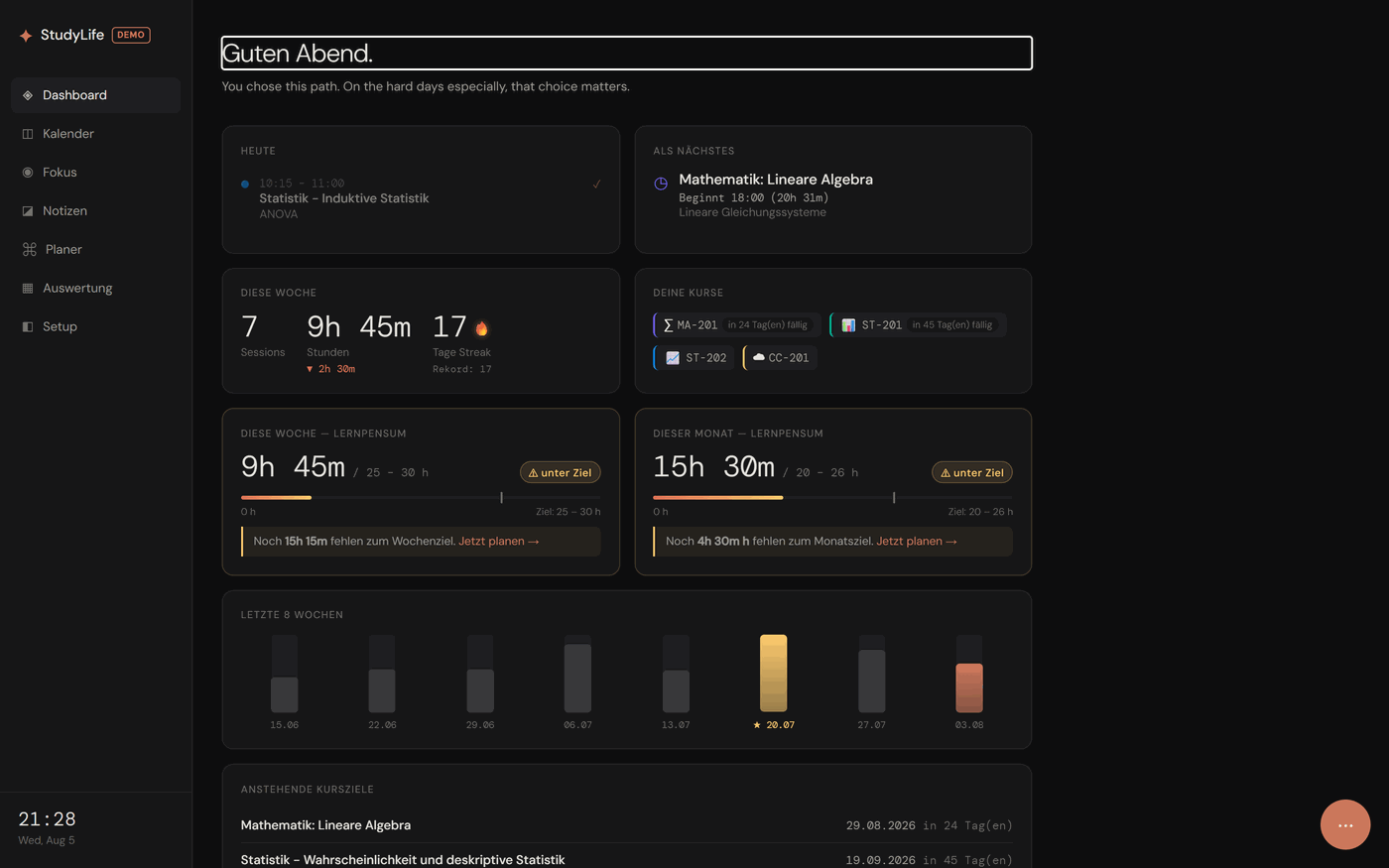
Dashboard
- Live updates: sessions, notes, settings, and every other change appear across your devices within a second, pushed by the server (Server-Sent Events) — no fixed polling interval to wait out; the summary itself is computed server-side (
GET /api/dashboard/summary) and renders progressively - Daily overview with active/next session
- Weekly statistics (sessions, hours, streak)
- Weekly quota (default 25-30 h, configurable) with progress bar and warning if falling short
- Monthly quota (default 100-130 h, configurable independently of the weekly goal)
- Course overview as pills
- Weekly trend of the last 8 weeks as a bar chart
- Upcoming course goals: the next 5 open goals with countdown or overdue notice
- Study progress tile: ECTS progress and weighted grade average at a glance
- Mini donut chart: course time distribution over the last 30 days
- Today tile: progress ring (hours today vs. daily goal) and 7-day streak bar
- Weekly comparison: delta in study hours versus the previous week
- Most recently completed sessions as a mini list
- Preview of the most recently edited note
- Balance check: which active course hasn't been studied for the longest
- Achievements: permanent milestone badges (total hours, longest streak, sessions, completed courses, all courses completed)
- Topic progress: checked-off course topics across all courses
- Inactivity notice directly in the dashboard (visible even without push notifications enabled)
- Series icon on today's sessions that are part of a recurring series
- ECTS forecast: expected completion date at the current study pace
- Target-completion tile: given a self-set target date, how many hours/week are needed for it
- Productivity hint: suggests the best time of day for the next session based on your study rhythm so far
- Month/year comparison: study hours versus the previous month and (if enough data is available) the same month in the previous year
- Course tags as small badges on the course pills (e.g. "exam soon")
- Global search / command palette (Ctrl+K / Cmd+K, or the speed-dial button on mobile) across courses, notes (full-text), and upcoming sessions
- Study readiness score (native app only): a personal Heart Rate Variability baseline comparison via Apple HealthKit - today's HRV against your own 30-day rolling average, with the raw values shown alongside the score
- Sleep consistency tile (native app only): how variable your bedtime has been over the last 30 nights, via Apple HealthKit sleep data
Notes
- Free-text notes, optionally assigned to a course
- Togglable Markdown mode per note (headings, bold/italic, lists, quotes, code, tables, links) with a live preview — plain text stays the default, nothing changes for existing notes
- Read a note aloud: natively synthesized (German/English) via a self-hosted Piper voice running inside the server (
StudyLife.Tts, ONNX Runtime + espeak-ng), no cloud TTS service involved — every other language falls back to the browser's own built-in speech synthesis, so it works everywhere, just with native voice quality only for the two baked-in languages (see docs/TTS-VOICES.md for the full coverage matrix and voice licenses) - Dictate a note instead of typing it: the recording is transcribed on your own server by a self-hosted Whisper model (
StudyLife.Stt, the multilingualbasemodel baked into the image) — audio never leaves your instance - Automatic saving while typing; the open editor refreshes when another device changed the same note
- Full-text search (SQLite FTS5 / PostgreSQL tsvector, server-side) and course filter
- Delete confirmation (two clicks instead of immediate deletion)
- Link to the triggering focus session visible (🔗), if created from the reflection prompt
- Web capture (via the studylife-capture browser extension): save a selection or a whole article from any page as a note, auto-enriched in the background with a course match, tags, a one-sentence summary, and related-notes links
- AI study assistant (via studylife-ai, opened from the speed dial): questions over your own notes/courses/sessions with source citations, and an agent that can create sessions or summarize-and-save notes after an explicit confirmation step. Before anything is sent to an external AI provider the user has to agree explicitly (a dialog names the provider and models and what is shared; it can be withdrawn under Setup, which also deletes the indexed data) - see docs/ARCHITECTURE.md "AI consent"
Evaluation
- Hours studied and sessions per course
- ECTS-weighted grade average
- Study progress (achieved / total ECTS)
- Study heatmap: year view of daily study intensity (GitHub-style)
- Course time distribution as a donut chart
- Study rhythm: distribution by weekday and time of day
- Monthly course history (last 6 months) as a stacked bar chart
- Year in review: "Wrapped"-style summary (total hours, strongest course, most productive day/time, longest streak, total sessions)
- ECTS forecast and month comparison (previous month) in the study progress tile
- Study report as a printable PDF: total hours, hours per course, ECTS progress including grade average, course goal status - for scholarship applications or academic advising
- Cardio fitness (VO2max) trend (native app only): chart of Apple Watch-measured cardio fitness over the last year, via Apple HealthKit
- All of these numbers come from one shared metrics implementation (
StudyLife.Shared/StudyMetrics.cs) that the dashboard, the evaluation page, the report, and theGET /api/metrics/*API used by Home Assistant and other add-ons all share
Share Progress
- Optional, public read-only link (no login) with a compact progress snapshot (ECTS, grade average, topic progress of active courses) - for sharing with parents or a mentor
- Deliberately shows no notes, calendar details, or settings
- Can be disabled at any time or reissued with a new link
Backup & Export
- JSON export of your own data (sessions, notes, course goals, settings) and re-import
- Full database download, optionally encrypted with a self-chosen password (AES-256)
- Restore from a previously downloaded backup, including the encrypted variant
- Weekly automatic background backup (the last 4 weeks are retained; SQLite deployments)
- Database download/restore is reserved for the account's original setup user; the JSON export is available to every account
Notifications
- Session reminders at configurable lead times before a planned study phase (default 60/30/10/5/3/2/1 minutes)
- Permission is requested on the first app start
- Each reminder is sent only once (duplicate protection)
- Reminders before a course's target date (default 14/7/3/1/0 days ahead)
- Motivating reminder if no study session has taken place for several days (default 5 days), optionally per course
- Weekly review via push (Sunday evening) and a monthly report on the 1st
- Achievement push when a new milestone badge is unlocked
- Opt-in nudges: streak at risk, weekly goal falling behind, a course that is almost done, your historically best study time, a gentle comeback nudge after one idle day, and a daily motivational quote
- All reminder thresholds and every nudge individually configurable in Setup
- Native app: local notifications, home screen widgets, and an iOS Live Activity kept up to date by the server via APNs
- Notifications come in your language: the app tells the server which of the 26 languages it shows (on start and when you switch), and every push text - reminders, reports, nudges, achievements, Live Activity alerts - is sent in it, with dates, times and numbers in that language's format. Until the app has reported a language the server keeps sending German, as before
studylife MCP questions
What can I do with the StudyLife MCP server?
The MCP server acts as an add-on that communicates with the StudyLife API to integrate study organization into your AI workflows.
How do I authenticate with the StudyLife API?
The browser and native apps use passkey sessions, while add-ons like the MCP server use a long-lived, revocable, per-user API key.