
aichivist MCP server
Commit Nov 7, 2026An AI-powered file management tool that renames, sorts, and de-duplicates documents based on user-approved plans and archival principles.
Also known as luftphilipp/aichivist
- Stars
- 3
- Tools
- —
- Downloads, 30 days
- —
- Latest version
- 0.1.1
- Last commit
- Nov 7, 2026
- License
- MIT
What is aichivist MCP?
aichivist is an AI-powered file management tool that renames, sorts, and de-duplicates documents based on user-approved plans and archival principles.
Summary generated from the project's README
About aichivist MCP server
Organizing messy document collections using professional archival principles is what aichivist enables for users with local file systems. It allows an AI client to rename, sort, and de-duplicate files based on specific filing rules that you approve before any changes occur. This tool is designed for people who want to tidy up Downloads or large document sets without the risk of an AI moving critical program files or losing data through unguided automation.
Users can set this up locally via Claude Desktop by downloading an MCPB file, or through command-line tools like Claude Code, Cursor, and VS Code. It runs on your own machine using uv or pipx, ensuring your files stay on your computer rather than being uploaded to a central server. The system provides a safety net by recording every action, allowing you to undo steps, and only moving duplicates to the trash after your explicit consent. It supports multiple languages for messages and rule templates, including English, German, French, Italian, and Spanish.
What you can do with it
- 1Tidy up messy DownloadsAsk your AI client to organize a cluttered folder using a structured plan that you can review and edit.
- 2De-duplicate files by contentIdentify and remove redundant documents by analyzing their actual content rather than just their filenames.
- 3Audit storage and backupsRun a survey to check for wasted space, meaningless filenames, and the health of your hard drive.
- 4Automate photo organizationSort through large collections of images by organizing them according to the year they were taken.
Written from the project's README. Every use case is checked against a quote from it.
Automated checks
Ran Nov 14, 2026Full report →Not verified yet. A server needs a score of 80, no serious finding, and enough data for us to check. How checks work · What to fix for more points

- Source repository linked and reachableluftphilipp/aichivist is public and reachablegithub.com/luftphilipp/aichivist ↗Pass
- Package names this repository as its sourceNot checked
- Build provenance (Sigstore attestation)Not checked
- Open source license (OSI)MITspdx.org/licenses/MIT.html ↗Pass
- Commit or release in the last yearLast commit or release 2026-11-07github.com/luftphilipp/aichivist ↗Pass
- OpenSSF ScorecardNot checked
- Package name not close to a popular packageNot checked
- No critical advisory in the package or its dependenciesNot checked
- No hidden instructions to the model0 tool descriptions and the README read; no override phrases, credential paths or hidden charactersPass
- Destructive tools are labelledNot checked
- Remote endpoint answers the MCP handshakeNot checked
README
View on GitHubaichivist
Clean up your files – like an archivist.
Your AI renames, sorts and de-duplicates your documents.You approve every step, and everything can be undone.



Get started · Why not just ask an AI? · What it can do
Why not just ask an AI?
Tell ChatGPT or Claude "tidy up my documents" and you usually get a quick job: folders by file type
(PDFs, Images, Misc), the same cryptic names, duplicates left where they were – and sometimes a game or program
that no longer starts because its files were moved. It happens all at once, with no plan to check and no way back.
Next time, the AI invents a different system.
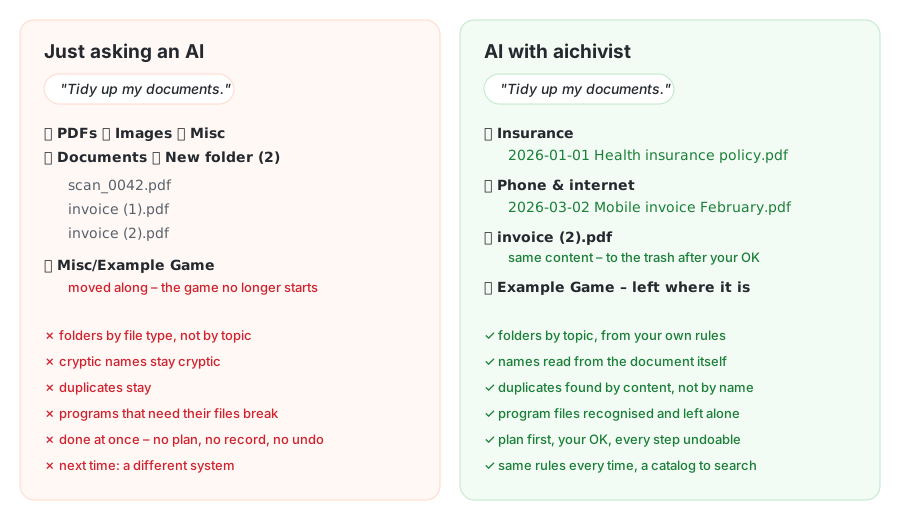
aichivist gives your AI what a professional archivist works with: your own filing rules, a plan you approve, names read from the document itself, duplicates found by content, programs that keep working, and a record of every step that can be undone. Tried in real use on 25,000 photos and 1,500 documents.
How it works
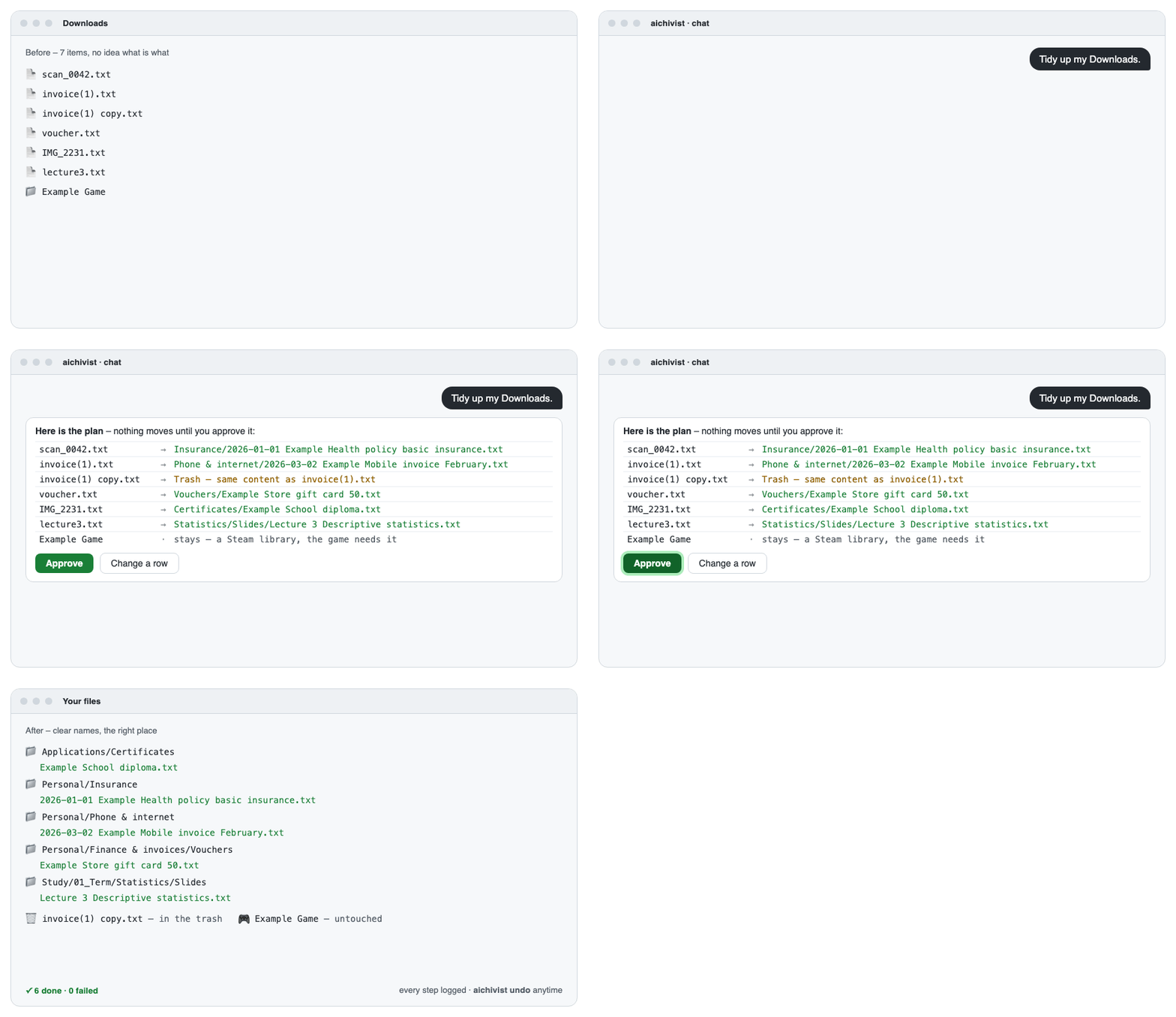
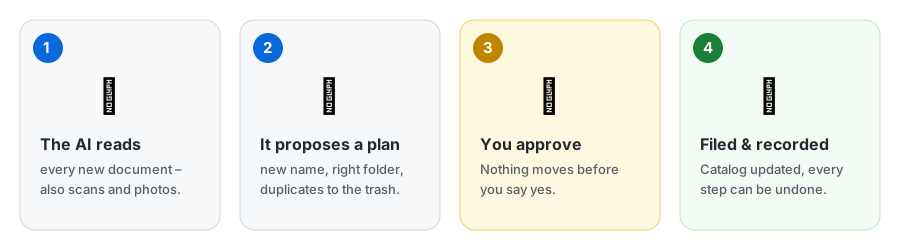
- Nothing happens without your OK. You see the plan first and can change or strike any line.
- Nothing gets lost. Every step is recorded and can be undone; duplicates go to the trash only after you agree.
- Your files stay yours. Normal folders, your own cloud, no account, no server.
- Speaks your language. Messages in English or German; rule templates in English, German, French, Italian and Spanish.
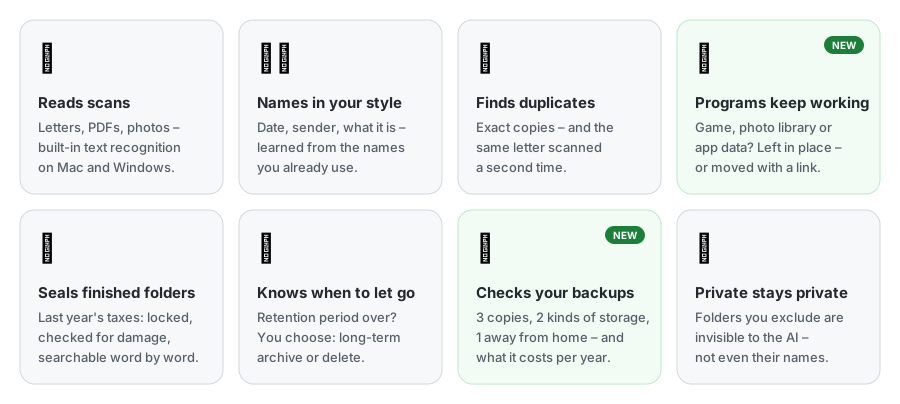
What it can do
Get started
Claude Desktop – the easiest way, no technical knowledge needed
- Click Download for Claude Desktop above (no Claude Desktop yet? claude.ai/download).
- Double-click the downloaded file and choose the folders Claude may organize. If Windows asks which app to use, open Claude Desktop instead: Settings → Extensions → Advanced settings → Install Extension… and pick the file.
- Ask Claude: "Tidy up my Downloads."
Claude Code – type /plugin install aichivist --marketplace luftphilipp/aichivist, then say "Set up
aichivist." The setup installs the command-line tool if it is missing (it asks first).
Codex, Gemini CLI, Cursor – pipx install aichivist (or uv tool install aichivist), then copy
templates/AGENTS.md to where your agent reads instructions.
Other AI apps – aichivist's MCP server runs locally with uv installed:
- Cursor: one-click install (organizes the open project folder).
- VS Code / GitHub Copilot: one-click install (organizes the open folder).
- Codex (OpenAI) – add to
~/.codex/config.toml, with the folders it may organize:[mcp_servers.aichivist] command = "uvx" args = ["--from", "aichivist[mcp]", "aichivist", "mcp", "--root", "~/Downloads", "--root", "~/Documents"] - Antigravity CLI (Google) – the same server in
~/.gemini/config/mcp_config.jsonundermcpServers; Gemini CLI (paid plans):gemini extensions install https://github.com/luftphilipp/aichivist. - ChatGPT connects only to servers on the internet, not to local ones – aichivist keeps your files on your computer, so it does not offer that. Use Codex instead.
Downloaded the ZIP? Unpack it and double-click Start (Mac).command or Start (Windows).bat
(Linux: start.sh). A simple menu opens – look at your Downloads, check your backups, and see which AI app on your
computer can tidy up. No installation needed, only Python 3 (a new Mac offers to install it by itself).
The first time, your computer warns because the file comes from the internet:
- Mac: click Done, open System Settings → Privacy & Security, scroll down and click Open Anyway next to "Start (Mac).command", then confirm.
- Windows: click More info → Run anyway.
Just curious? See what's going on in your folders – no AI, nothing is changed:
pipx install aichivist
aichivist survey ~/Downloads
It shows how many files you have, duplicates that waste space, files with meaningless names, folders that slow down
your cloud, program folders to leave alone, and whether your hard drive is healthy. aichivist storage storage.md
checks whether your backups are safe and what your storage costs per year (it shows the table format on first run).
aichivist catalog-page <folder> --open turns your catalogs into a searchable page, aichivist photos sorts photos
by year, and aichivist watch ~/Downloads --install reminds you once 25 files have piled up.
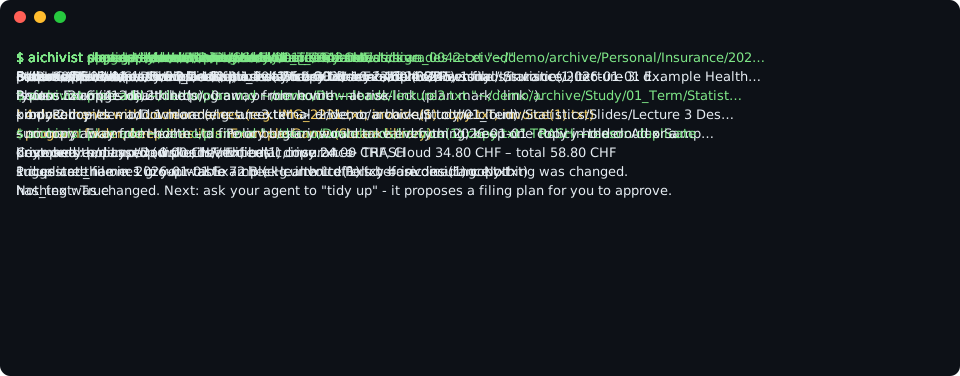
Built on real archive practice
Archives have organized documents reliably for centuries. aichivist brings their rules to your computer:
| In an archive | In aichivist |
|---|---|
| A filing plan says where everything belongs | Your rules say which documents go where – the AI follows them |
| Nothing is thrown away without a decision | Duplicates and old files are only removed after your OK |
| Every document is described in a catalog | Each folder gets a list of what is in it, so you find things later |
| Finished collections are sealed | A completed folder (e.g. last year's taxes) is locked, checked and searchable |
| Records are kept for a set time, then archived or destroyed | Old records come up when their time is over – you choose |
| Copies are kept in separate places | It checks the 3-2-1 rule: 3 copies, 2 kinds of storage, 1 away from home |
Privacy Policy
aichivist itself works only on your computer: no account, no server, no telemetry. The AI that reads your documents (e.g. Claude) receives the content of the documents it reads – so you decide which folders it may open, and can exclude private ones completely. Full text: PRIVACY.md.
How this was built
aichivist was designed by Philipp Luft, a trained archivist and information professional (Fachmann Information & Dokumentation) studying Business AI, who brought the archival principles and the requirements. The code was written with Claude Code – every commit lists Claude as co-author.
More
aichivist MCP questions
How does aichivist ensure my files are safe?
The tool requires you to approve every step of the plan before any changes are made, and every action can be undone.
Is my data private?
Yes, aichivist runs locally on your computer with no accounts, no external servers, and no telemetry.
Can I use it with Claude Desktop?
Yes, Claude Desktop is described as the easiest way to get started by downloading the provided file.
Does it work on Windows and Mac?
Yes, it is compatible with Windows, macOS, and Linux.