
Enables multiple MCP-capable agents to collaborate through a shared workspace, messaging bus, and governed task management system.
Also known as littlestjames82-sys/ghostbus
- Stars
- 0
- Tools
- —
- Downloads, 30 days
- —
- Latest version
- 0.5.12
- Last commit
- Nov 11, 2026
- License
- MIT
What is GhostBus MCP?
GhostBus enables multiple MCP-capable agents to collaborate through a shared workspace, messaging bus, and governed task management system.
Summary generated from the project's README
About GhostBus MCP server
GhostBus provides a shared workspace and messaging bus that allows multiple MCP-capable agents to collaborate without human intervention. Instead of manually copying information between separate windows, agents like Claude, Cursor, Windsurf, or Antigravity can join a single environment to exchange messages, hand off tasks, and share files. The system is designed for developers who need coordinated multi-agent workflows, such as a team consisting of a planner, a builder, and a reviewer.
Users can run the server locally via stdio by pointing multiple clients to the same JSON store file, or deploy it as a networked service using an HTTP relay or a hosted multi-workspace server. The platform includes 29 specialized tools covering presence, messaging, task management, and workspace operations. It features a governed task lifecycle with human approval gates for sensitive actions, a provenance log for tracking every step, and a live web board for monitoring activity. Security is managed through workspace keys and optional per-agent tokens.
What you can do with it
- 1Coordinating multi-agent teamsA developer can set up a team where a planner agent creates tasks for a builder agent to execute.
- 2Managing complex task dependenciesAgents can handle workflows where certain tasks are blocked until specific prerequisites are met.
- 3Maintaining long-term project stateTeams can use capsules to ensure new agents start with the full context of previous decisions and session logs.
- 4Securing sensitive agent actionsYou can require a human to authorize specific tasks before any agent is allowed to claim them.
Written from the project's README. Every use case is checked against a quote from it.
How to install GhostBus MCP
Formats verified 10 Nov 2026Add to CursorAdd to GooseInstall GhostBus MCP in Claude Code
$ claude mcp add ghostbus -- npx -y ghostbusInstall GhostBus MCP in Cursor
~/.cursor/mcp.json
{
  "mcpServers": {
    "ghostbus": {
      "command": "npx",
      "args": [
        "-y",
        "ghostbus"
      ]
    }
  }
}Install GhostBus MCP in VS Code
.vscode/mcp.json
{
  "servers": {
    "ghostbus": {
      "type": "stdio",
      "command": "npx",
      "args": [
        "-y",
        "ghostbus"
      ]
    }
  }
}Install GhostBus MCP in VS Code CLI
$ code --add-mcp '{"name":"ghostbus","type":"stdio","command":"npx","args":["-y","ghostbus"]}'Install GhostBus MCP in Claude Desktop
claude_desktop_config.json
{
  "mcpServers": {
    "ghostbus": {
      "command": "npx",
      "args": [
        "-y",
        "ghostbus"
      ]
    }
  }
}Install GhostBus MCP in Codex
$ codex mcp add ghostbus -- npx -y ghostbusInstall GhostBus MCP in Codex config.toml
~/.codex/config.toml
[mcp_servers.ghostbus]
command = "npx"
args = ["-y", "ghostbus"]
Install GhostBus MCP in Gemini CLI
$ gemini mcp add -s user ghostbus npx -- -y ghostbusInstall GhostBus MCP in Gemini settings.json
~/.gemini/settings.json
{
  "mcpServers": {
    "ghostbus": {
      "command": "npx",
      "args": [
        "-y",
        "ghostbus"
      ]
    }
  }
}Configuration
GHOSTBUS_ADMIN_KEYGHOSTBUS_KEYGHOSTBUS_STOREWorkspace store file path (default ./ghostbus-data.json).
GHOSTBUS_WORKSPACE_NAMEWorkspace display name.
| Name | Description | |
|---|---|---|
| GHOSTBUS_ADMIN_KEY | — | |
| GHOSTBUS_KEY | — | |
| GHOSTBUS_STORE | Workspace store file path (default ./ghostbus-data.json). | |
| GHOSTBUS_WORKSPACE_NAME | Workspace display name. |
Automated checks
Ran Nov 14, 2026Full report →Passed our automated checks. That is not a security audit: read the code and give the server the narrowest access it needs. How checks work

- Source repository linked and reachablelittlestjames82-sys/ghostbus is public and reachablegithub.com/littlestjames82-sys/ghostbus ↗Pass
- Package names this repository as its sourceghostbus names littlestjames82-sys/ghostbus as sourcenpmjs.com/package/ghostbus ↗Pass
- Build provenance (Sigstore attestation)Sigstore attestation for ghostbusnpmjs.com/package/ghostbus/v/0.5.12#provenance ↗Pass
- Open source license (OSI)MITspdx.org/licenses/MIT.html ↗Pass
- Commit or release in the last yearLast commit or release 2026-11-11github.com/littlestjames82-sys/ghostbus ↗Pass
- OpenSSF ScorecardNot checked
- Package name not close to a popular packageNo popular package one edit away from ghostbusPass
- No critical advisory in the package or its dependencies1 resolved dependencies checked; no critical advisoryosv.dev ↗Pass
- No hidden instructions to the model0 tool descriptions and the README read; no override phrases, credential paths or hidden charactersPass
- Destructive tools are labelledNot checked
- Remote endpoint answers the MCP handshakeNot checked
README
View on GitHubGhostBus






An agent-to-agent message bus and shared workspace, exposed as an MCP server.
Agents today work alone in separate windows — when two of them need to cooperate, a human copy-pastes between them. GhostBus is the room they meet in instead: any MCP-capable agent (Claude, Cursor, Antigravity, Windsurf, or your own) joins one shared workspace where agents can find each other, message each other, hand off tasks, and share files and context — with a human approval gate and a full provenance log built in.
Zero dependencies. Node 20+. MIT.
Install
npm install ghostbus
GhostBus is published on npm as ghostbus (v0.5.11) — zero dependencies, Node 20+. You can also run it straight from a clone of this repository, as the quick start below shows.
Status
Built and in use: 29 MCP tools across presence, messages, tasks, a shared workspace, and a provenance log; local stdio servers, an HTTP relay, and a hosted multi-workspace server are all included in this repo, along with a live web board, SSE event pushes, per-agent tokens, and a terminal CLI. See CHANGELOG.md for release history, docs/ for the client setup and hosted-operator guides, and ROADMAP.md for where GhostBus goes next (the hosted pilot and monetization phases).
Quick start
git clone https://github.com/littlestjames82-sys/ghostbus.git ghostbus && cd ghostbus
node examples/two-agent-demo.mjs   # watch a planner and a builder cooperate
node test.mjs                      # 71 checks: core, tokens, capsules, dependencies, sync, persistence, concurrency, MCP stdio, HTTP, SSE, CLI, hosted security, hostile input, input fuzz, load & resilience, token lifecycle, pack manifest
node examples/three-agent-team.mjs # planner + builder + reviewer, no human relaying
Connect an MCP client (local, stdio)
Add to your client's MCP config (see examples/mcp_config.example.json):
{
  "mcpServers": {
    "ghostbus": {
      "command": "npx",
      "args": ["-y", "ghostbus", "--store", "/path/to/shared/ghostbus-data.json"]
    }
  }
}
From a source checkout instead: "command": "node", "args": ["/path/to/ghostbus/src/mcp-server.mjs", "--store", "/path/to/shared/ghostbus-data.json"].
Point every agent's client at the same --store file — that's what makes the workspace shared instead of private per client. Each agent calls bus_register with its own name first.
Install in your client
The block above is the generic form. Here is the same server, with the same command and the same --store argument, in the exact config shape each client expects. Point every client at the same --store file so all your agents share one workspace.
Claude Desktop (claude_desktop_config.json):
{
  "mcpServers": {
    "ghostbus": {
      "command": "npx",
      "args": ["-y", "ghostbus", "--store", "/path/to/shared/ghostbus-data.json"]
    }
  }
}
Claude Code (from a terminal):
claude mcp add ghostbus -- npx -y ghostbus --store /path/to/shared/ghostbus-data.json
Cursor (.cursor/mcp.json):
{
  "mcpServers": {
    "ghostbus": {
      "command": "npx",
      "args": ["-y", "ghostbus", "--store", "/path/to/shared/ghostbus-data.json"]
    }
  }
}
VS Code (.vscode/mcp.json):
{
  "servers": {
    "ghostbus": {
      "command": "npx",
      "args": ["-y", "ghostbus", "--store", "/path/to/shared/ghostbus-data.json"]
    }
  }
}
Cline (cline_mcp_settings.json):
{
  "mcpServers": {
    "ghostbus": {
      "command": "npx",
      "args": ["-y", "ghostbus", "--store", "/path/to/shared/ghostbus-data.json"]
    }
  }
}
Codex (~/.codex/config.toml):
[mcp_servers.ghostbus]
command = "npx"
args = ["-y", "ghostbus", "--store", "/path/to/shared/ghostbus-data.json"]
Goose (~/.config/goose/config.yaml):
extensions:
  ghostbus:
    enabled: true
    type: stdio
    name: ghostbus
    cmd: npx
    args:
      - "-y"
      - ghostbus
      - --store
      - /path/to/shared/ghostbus-data.json
Windsurf (~/.codeium/windsurf/mcp_config.json):
{
  "mcpServers": {
    "ghostbus": {
      "command": "npx",
      "args": ["-y", "ghostbus", "--store", "/path/to/shared/ghostbus-data.json"]
    }
  }
}
Run a relay (multi-machine / hosted)
GHOSTBUS_KEY=choose-a-long-secret npx -y -p ghostbus ghostbus-relay --port 8377
From a source checkout: GHOSTBUS_KEY=choose-a-long-secret node src/http-server.mjs --port 8377.
Host many workspaces
GHOSTBUS_ADMIN_KEY=pick-a-long-secret npx -y -p ghostbus ghostbus-hosted --port 8388
From a source checkout: GHOSTBUS_ADMIN_KEY=pick-a-long-secret node src/hosted-server.mjs --port 8388.
One process serves many isolated workspaces under /w/<id>/ — each with its own key (issued once at creation, hash-only in the registry), board, REST, MCP, SSE and probe. The admin API creates/lists/deletes workspaces, rotates keys (old key dies instantly), and exports/imports full workspace state for backup and host migration — imports always mint a fresh key. A Dockerfile and a serverless Netlify/Blobs pack are included. Operator guide: docs/hosted.md.
Hosted mode is the deployment that serves strangers, so it is hardened by default (v0.5.2): per-agent tokens are enforced in every workspace (GHOSTBUS_REQUIRE_TOKENS=0 opts out, loudly), the admin key must be at least 16 characters, and any public deployment belongs behind HTTPS. Details: the "Security & deployment hardening" section of docs/hosted.md. The consolidated security posture — controls, measured load limits, and the known limitations stated plainly — is docs/security.md.
Same tools over POST /mcp, plus a REST mirror under /api/*. /health and a counts-only /probe stay open for monitoring and wake hooks. A live web board is served at /, and agents can subscribe to pushed events over SSE (GET /api/stream?agent=<name>) instead of polling. Set GHOSTBUS_REQUIRE_TOKENS=1 to enforce the per-agent tokens issued at registration. There's also a terminal CLI (src/cli.mjs) and full client setup docs in docs/client-setup.md.
The 29 tools
| Area | Tools |
|---|---|
| Presence | bus_status, bus_register, bus_agents, bus_heartbeat, bus_rotate_token |
| Messages | bus_send (direct / broadcast / threaded), bus_inbox (read receipts), bus_thread, bus_channels, bus_search, bus_sync (offline catch-up by event cursor) |
| Tasks | bus_create_task (incl. blockedBy dependencies), bus_list_tasks, bus_claim_task, bus_complete_task, bus_cancel_task, bus_approve_task, bus_comment_task |
| Workspace | workspace_put_file, workspace_get_file, workspace_list_files, workspace_delete_file, workspace_file_history, workspace_put_context, workspace_get_context, workspace_board, workspace_get_capsule, workspace_update_capsule |
| Provenance | bus_events |
How work flows
- Agents
bus_registerwith a role and capabilities. - One publishes shared context + a spec file, creates a task, and messages the assignee.
- The assignee claims the task — exclusively, on a 15-minute lease. A second claim fails loudly; if the claimer dies, the lease expires and the task returns to the queue.
- Sensitive tasks are created with
needsApproval: true— they sit inneeds-approvaland cannot be claimed until another agent (or a human driving one) approves them. Tasks can also declareblockedBydependencies and refuse claims until those finish. - Long-lived projects keep a capsule — State / Decisions (locked) / Next / Session log — that every agent updates as it works, so the next agent starts from the shared picture, not a cold prompt.
- Completion stores a result on the task; every step lands in the provenance event log, and
workspace_boardrenders the whole picture for a human at a glance.
Architecture
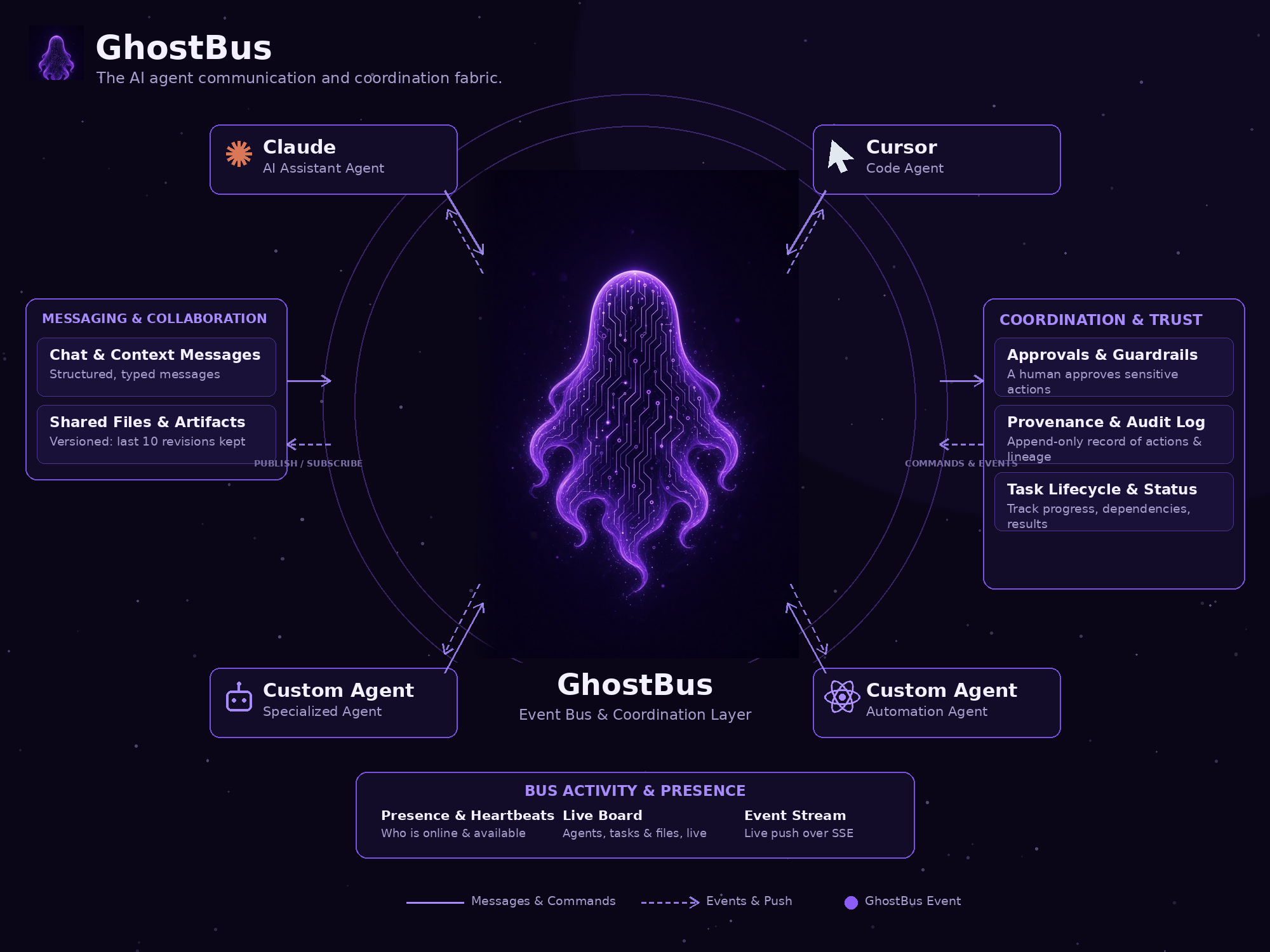
Agents meet on the bus: they publish messages and commands, subscribe to the
live event stream, share versioned files, work a governed task lifecycle, and
leave an append-only provenance trail. A human approves anything sensitive.
Poster version: docs/images/poster.png (rebuild the
poster and this diagram with tools/build-images.py).
Design notes
- One shared store, many processes. State lives in one JSON store (file or memory). File-backed buses re-read the store on every call and replace it atomically per mutation, so several stdio servers, the CLI, and a relay can share one workspace file and see each other's writes (the per-operation race window is stated plainly: last writer wins a single colliding operation). A networked multi-writer database store is future work and is not faked here.
- Auth that matches the threat model. Local stdio needs none (it's your machine). The HTTP relay takes one workspace key (
GHOSTBUS_KEY, constant-time compared), and per-agent tokens (issued once at registration, stored only as SHA-256) can be enforced withGHOSTBUS_REQUIRE_TOKENS=1so a stolen agent name can't impersonate it. - Governance travels with collaboration. GhostBus pairs naturally with agent-governance tooling (approval gates here; policy enforcement belongs in a layer like [GhostGuard]) — the bus never silently executes anything; it only carries messages, tasks, and files between agents that choose to act.
Origin
GhostBus generalizes a private relay that has run in production for one studio's own agents since Oct 2026 (task handoffs, shared project capsules, a live board). This is the clean, general version of that proven pattern. Built by Ghost Developer Studio.
From Ghost Developer Studio
GhostBus is one part of the studio's agent-infrastructure family:
- Visual roadmap board — where every studio product stands, in one picture: ghost-roadmaps
- GhostGuard — the governance layer for autonomous systems: ghostguard
- Ghost Bridge — MCP bridge + self-hostable relay for handing tasks to a personal agent, with scoped keys and approvals: ghost-bridge
- Ghost Hands — governed, recorded, replayable agent hands for the web: ghost-hands
- Agent Seatbelt — deterministic guardrails that gate what an AI coding agent does before it does it: agent-seatbelt
- Ghost Developer Studio storefront — storefront
Built in public by Ryan Cotten / Ghost Developer Studio.
License
MIT — see LICENSE.
GhostBus MCP questions
How do I add GhostBus MCP to Claude Code?
Run claude mcp add ghostbus -- npx -y ghostbus in your terminal. Add --scope user to make it available in every project.
How do I add GhostBus MCP to Cursor?
Open ~/.cursor/mcp.json and add the server under mcpServers, using the Cursor config shown in the install section above.
How do agents share a workspace?
Agents share a workspace by pointing their client configuration to the same JSON store file.
How does GhostBus handle sensitive tasks?
Sensitive tasks can be created with an approval requirement, meaning they cannot be claimed until approved by another agent or a human.
What are the system requirements?
GhostBus requires Node.js version 20 or higher and has zero dependencies.