
openclaWP MCP server
Commit Oct 27, 2026Turns a WordPress site into an AI agent hub with chat blocks, REST endpoints, and automated workflows.
Also known as lezama/openclawp
- Stars
- 1
- Tools
- —
- Downloads, 30 days
- —
- Latest version
- —
- Last commit
- Oct 27, 2026
- License
- GPL-2.0
What is openclaWP MCP?
openclaWP turns a WordPress site into an AI agent hub with chat blocks, REST endpoints, and automated workflows.
Summary generated from the project's README
About openclaWP MCP server
Transforming a WordPress site into a central hub for AI agents is what openclawp enables for developers and site owners. It turns a standard website into an interactive environment where agents can read content, respond via chat blocks, and execute automated workflows. The system is built on the agents-api and the WordPress 7.0 AI Client, allowing for a deep integration with site data and tools.
Users can deploy this locally using Studio and Ollama for a private setup that requires no API keys, or connect to cloud providers like Anthropic, OpenAI, or Gemini by configuring provider plugins. The server supports multi-turn sessions stored as custom post types and provides REST endpoints for external browser interfaces. It also features an agent mesh for agent-to-agent communication and various connectors, including the WhatsApp Cloud API, to extend agent reach beyond the website.
What you can do with it
- 1Deploy interactive chat interfacesA developer can drop a chat UI directly into any post, page, or admin screen using a specific Gutenberg block.
- 2Automate content management tasksYou can instruct an agent to create, update, or delete posts and pages while using snapshots to roll back changes if needed.
- 3Execute deterministic agent workflowsUsers can compose agents and abilities into recipes that follow a specific sequence of steps and bindings.
- 4Monitor AI usage and costsAdministrators can set daily or monthly spending limits and track the number of tool calls made per turn.
Written from the project's README. Every use case is checked against a quote from it.
Configuration
SITE_PATH
Automated checks
Ran Nov 15, 2026Full report →Not verified yet. A server needs a score of 80, no serious finding, and enough data for us to check. How checks work · What to fix for more points

- Source repository linked and reachablelezama/openclawp is public and reachablegithub.com/lezama/openclawp ↗Pass
- Package names this repository as its sourceNot checked
- Build provenance (Sigstore attestation)Not checked
- Open source license (OSI)GPL-2.0spdx.org/licenses/GPL-2.0.html ↗Pass
- Commit or release in the last yearLast commit or release 2026-10-27github.com/lezama/openclawp ↗Pass
- OpenSSF ScorecardNot checked
- Package name not close to a popular packageNot checked
- No critical advisory in the package or its dependenciesNot checked
- No hidden instructions to the model0 tool descriptions and the README read; no override phrases, credential paths or hidden charactersPass
- Destructive tools are labelledNot checked
- Remote endpoint answers the MCP handshakeNot checked
README
View on GitHubopenclaWP




An agent that lives inside your WordPress site. Reads your content, talks back through chat, and can be reached from outside WordPress through pluggable connectors.
Built on top of Automattic/agents-api and the AI Client / Connectors API bundled with WordPress 7.0. Other plugins register agents (with their own tools, system prompts, and personas); openclaWP turns the site itself into a place to use them.
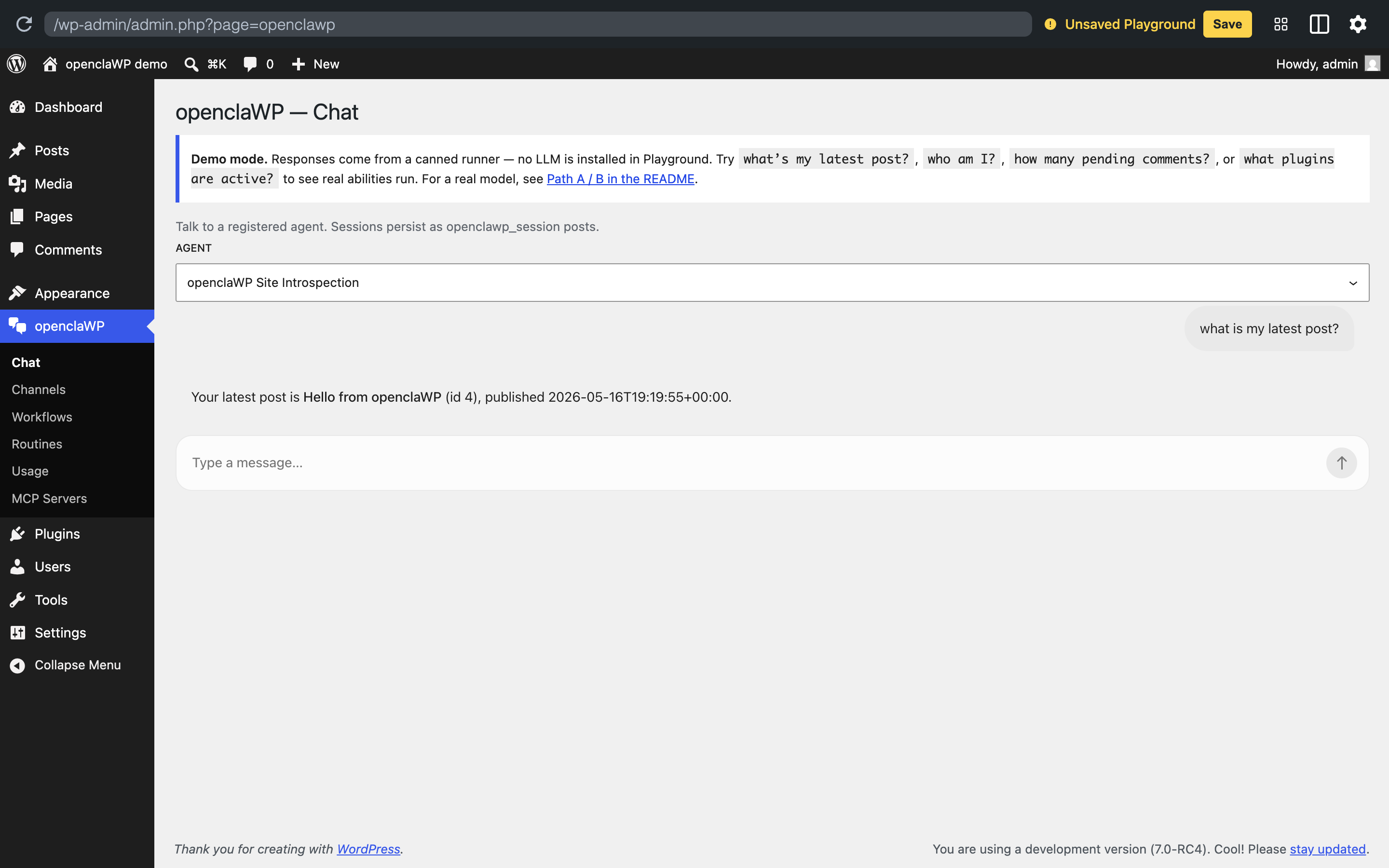 The bundled demo running entirely in your browser — no install, no API key. The agent calls the real
openclawp/get-recent-posts ability and quotes the seeded post back.
⚠️ Spike-stage software
This is a research spike, not a product. Expect breakage. Don't run it on a production site, and ideally not on a computer or WhatsApp account you care about — it shells out to OS binaries, writes session data to disk, and pairs as a linked device on whichever WhatsApp account you sign in with. Use a throwaway / sandbox account when you can.
What openclaWP does today
| Capability | What it means | Status |
|---|---|---|
Chat block (wp:openclawp/chat) |
Drop the agent UI into any post, page, template, or wp-admin screen | ✅ |
Chat ability (openclawp/chat) |
Callable from MCP servers, Studio Code skills, WP-CLI, other plugins — no HTTP needed | ✅ |
Canonical dispatcher (agents/chat) |
Per agents-api#100; the runtime-agnostic contract for "chat with an agent" | ✅ |
| Agent mesh (A2A) | Every agent can publish an A2A agent card at …/agenttic/<slug>/.well-known/agent-card.json (discovery; gated to manage_options by default, open it via filter), and any agent can call a remote peer as a tool. Peer calls carry the agents-api caller-chain headers (#81) and are tagged peer-agent on receipt (#180). See docs/a2a-studio-proposal.md. |
✅ |
| REST endpoints | POST /openclawp/v1/chat for browser UIs, GET /openclawp/v1/chat/{session} for transcripts |
✅ |
| Multi-turn sessions | Each conversation is a CPT (openclawp_session); history follows the user across requests |
✅ |
| Tool use | Agents can call read-only abilities — recent posts, comment counts, active plugins, who-am-I — bundled with the example agent |
✅ |
| Content abilities | Built-in post/page abilities for list/get/create/update/delete, with capability checks and explicit effect metadata for confirmation gates | ✅ |
| Diff, snapshots, rollback | Mutating content abilities create openclawp_snapshot before-images; agents can preview diffs and restore a prior snapshot |
✅ |
| Channels admin | wp-admin Channels list view (openclaWP → Channels) for managing connectors per-site |
✅ |
| Workflows | Compose agents and abilities into deterministic recipes with ${inputs.x} / ${steps.y.output.z} bindings. CPT-backed Store + Run Recorder; runs hit agents/run-workflow (canonical dispatcher) and the openclaWP-shipped runtime persists every run for later inspection. wp-admin → openclaWP → Workflows lists registered workflows, has a Run now form per workflow, and a recent-runs list with per-step trace. Built on the agents-api workflow substrate. |
✅ |
| Local-first inference | Default Quick Start runs against Ollama on localhost. No API key, no external service. Swap in Anthropic / OpenAI / Gemini when you want. |
✅ |
| AI provider routing | Per-agent provider + model selection via the standard WordPress AI client | ✅ |
| Budgets + usage guardrails | Per-turn usage recording plus optional daily/monthly cost/turn caps and max tool calls per turn | ✅ |
| Memory + KB hooks | Explicit, consented memory abilities and KB storage with optional embedding/vector search extension points | ✅ |
| Agency automation factory | Blueprints for client use cases, workspace store, site automation audit, connector plans, and generated demo packages | ✅ |
| Connector: WhatsApp via wacli | Pair as a WhatsApp linked device using openclaw/wacli's whatsmeow protocol |
⚠️ unofficial |
| Connector: WhatsApp Cloud API | Meta's official Graph API, requires Business account + access token | ✅ alternative |
| More connectors (Telegram, Slack, Email, …) | Telegram and generic external WhatsApp gateways are available behind opt-in filters; Slack/Email remain follow-ups | 🚧 |
How openclaWP compares
The WordPress AI agent space has several plugins now. They overlap in the obvious places (chat in wp-admin, tool calling, multi-provider) but differ in how they sit relative to the new WordPress AI building blocks.
| openclaWP | sd-ai-agent | ClawWP | AI Engine | AI Services | WordPress/ai | |
|---|---|---|---|---|---|---|
| Substrate | agents-api + WP 7.0 AI Client |
WP 7.0 AI Client | self | self | self | WP 7.0 AI Client + Abilities API |
| Provider | any Connectors API plugin | any Connectors API plugin | Anthropic-first | OpenAI/Anthropic/Google | multi-provider | multi-provider |
| Per-agent MCP server | ✅ scoped to one agent's tools | via WP MCP Adapter (site-wide) | — | ✅ site-wide | via WP MCP Adapter | — |
| MCP client | ✅ bridged into Abilities API | — | ✅ HTTP+stdio | ✅ | — | — |
| Workflows | ✅ deterministic, CPT-backed, run recorder | — | — | — | — | (on roadmap) |
| Per-turn cost dashboard | ✅ | — (tracks tokens) | ✅ | — | — | (on roadmap) |
| WordPress Playground demo | ✅ | ✅ | — | — | ✅ | ✅ |
| Chat block (Gutenberg) | ✅ | three chat UIs | sidebar | UI Builder | — | (Gutenberg blocks) |
| Concrete channel connectors | WhatsApp Cloud API | — | Telegram / Slack / Discord | — | — | — |
Where openclaWP fits: if you're already using (or planning to use) the agents-api substrate or the WordPress AI Client, openclaWP is the thinnest consumer that gives you a chat UI, REST surface, workflows, and an MCP endpoint. If you want a closed, "install one plugin and you're done" experience, sd-ai-agent or AI Engine are heavier-but-more-batteries-included.
Quick start
The default path is the Studio Mac app for the WordPress side, and Ollama for the model. Both run locally — no Docker, no API keys, no external service. Once you can talk to the agent in wp-admin → openclaWP → Chat, swap in a cloud provider or wire up a connector when the spike calls for it.
If you're an LLM coding agent (Claude / Codex / …): each shell block below is self-contained. Pick the path that matches the user's environment and run it. No human-in-the-loop steps unless explicitly noted.
Path A — Studio + local Ollama (default)
Requires the Studio app and its CLI (studio on PATH), plus Ollama running locally. macOS.
# 1. Local model. gemma4:e2b is the smallest Gemma with native function
#    calling — the bundled openclawp-example agent calls tools to read
#    posts / count comments / list plugins, so you need tool support
#    or those questions get hand-wavy guesses. Bigger picks for better
#    quality: gemma4:e4b (9.6 GB), gemma4:26b (18 GB). Sizing guide:
#    docs/local-ollama.md.
#
#    Not sure what fits? `llmfit` (https://github.com/AlexsJones/llmfit)
#    scans your CPU / RAM / GPU and scores ~150 models for fit + speed +
#    quality across providers — a faster way to pick than trial-and-error.
ollama serve >/dev/null 2>&1 &     # no-op if already running
ollama pull gemma4:e2b

# 2. WordPress site
studio site create \
	--name openclawp-demo \
	--wp latest --php 8.4 \
	--skip-browser
SITE_PATH="$HOME/Studio/openclawp-demo"

# 3. Drop in the plugins (openclawp + agents-api substrate + Ollama provider)
mkdir -p "$SITE_PATH/wp-content/plugins"
cd "$SITE_PATH/wp-content/plugins"
git clone https://github.com/Automattic/agents-api.git
git clone https://github.com/lezama/openclawp.git
git clone https://github.com/Fueled/ai-provider-for-ollama.git
( cd openclawp && composer install --no-dev )
( cd ai-provider-for-ollama && composer install --no-dev )

# 4. Activate + point WP at the local Ollama daemon
studio --path "$SITE_PATH" wp plugin activate \
	agents-api openclawp ai-provider-for-ollama
studio --path "$SITE_PATH" wp option update \
	ai_provider_for_ollama_settings \
	'{"host":"http://localhost:11434","model":"gemma4:e2b"}' \
	--format=json
Visit wp-admin → openclaWP → Chat. Try a tool-using prompt to confirm the wiring — "what's my latest post?" should make the agent call the get-recent-posts tool and quote the title back. "who am I?" exercises get-current-user. "how many pending comments?" exercises count-comments. If the answers are vague hand-waves, the model isn't actually invoking tools — bump up to gemma4:e4b or check that the Ollama provider is the active one (wp eval 'print_r(WordPress\AiClient\AiClient::defaultRegistry()->getRegisteredProviderIds());').
First reply takes 10–30s while Ollama loads the model into RAM; subsequent turns are interactive. Full Ollama runbook (sizing, troubleshooting, rollback):
docs/local-ollama.md.
Prefer a cloud provider?
Skip step 1 and the Ollama clone in step 3. After step 4 (activating openclawp), drop in any WordPress/ai-provider-for-* plugin and configure its key via Settings → Connectors in wp-admin, or directly:
studio --path "$SITE_PATH" wp option update \
	connectors_ai_anthropic_api_key "$ANTHROPIC_API_KEY"
Cost note. The bundled demo agents use
model: auto, so the active provider picks the model — which on a cloud provider is its default, often the priciest (e.g. Opus). To control spend, set each agent'sdefault_config['model']to a specific id the provider exposes (e.g. a dated Anthropic Haiku id). If a configured model id doesn't resolve, wp-ai-client silently falls back to the provider default; openclaWP logs that substitution as[openclawp] model_substitution …so you can catch it. Pair with the per-site budget caps (budget_daily_usd,budget_daily_turns).
Path B — an existing WordPress site
If a site already exists (Pressable, a VPS, Local, your own Docker, …), drop the plugins in. Anthropic shown to keep the block short — the Ollama recipe in Path A applies verbatim, just call wp instead of studio --path … wp.
# Inside any site's plugins directory:
git clone https://github.com/Automattic/agents-api.git
git clone https://github.com/lezama/openclawp.git
( cd openclawp && composer install --no-dev )
wp plugin activate agents-api openclawp
wp option update connectors_ai_anthropic_api_key "$ANTHROPIC_API_KEY"
(Same caveat as above: don't aim this at a real production site yet.)
Register an agent
Agent registration is not an openclaWP API. It's the substrate's API — Automattic/agents-api — so any plugin or mu-plugin can register an agent and every consumer (openclaWP, Data Machine, future others) picks it up.
add_action( 'wp_agents_api_init', function () {
    wp_register_agent( 'my-agent', array(
        'label'          => __( 'My Agent', 'my-plugin' ),
        'description'    => 'You are a helpful assistant. Be concise.',
        'default_config' => array(
            'provider' => 'auto',
            'model'    => 'claude-haiku-4-5',
        ),
    ) );
} );
For a working tool-using example, set add_filter( 'openclawp_register_example_agent', '__return_true' ) and the bundled openclawp-example agent registers itself with four read-only abilities (get-recent-posts, count-comments, get-active-plugins, get-current-user).
Surfaces
The agent loop is the same regardless of surface; pick whichever fits the caller.
| Surface | What to use it for |
|---|---|
<!-- wp:openclawp/chat /--> block |
Embedding chat in a post / template / wp-admin screen |
wp_get_ability( 'openclawp/chat' )->execute( … ) |
MCP servers, Studio Code skills, WP-CLI, other plugins |
wp_get_ability( 'agents/chat' )->execute( … ) |
Same as above, but via the runtime-agnostic dispatcher (preferred for cross-consumer code) |
wp_get_ability( 'agents/run-workflow' )->execute( … ) |
Run a registered workflow (id) or an inline spec; openclaWP persists the run via the bundled CPT recorder |
wp_get_ability( 'agents/validate-workflow' )->execute( … ) |
Lint a workflow spec; pure substrate, no runtime touch |
POST /openclawp/v1/chat |
Browser-driven UIs |
| Channels (e.g., WhatsApp) | Reaching the agent from outside WordPress entirely |
REST chat routes default to manage_options; gate with openclawp_rest_permission_callback. Channel webhooks are HMAC-gated.
Bundled ability packs
The production ability pack is intentionally WordPress-core first. It ships content tools for posts/pages (openclawp/list-content, get-content, create-content, preview-content-update, update-content, delete-content) plus snapshot tools (list-content-snapshots, restore-content-snapshot). Writes are capability-checked and tagged with meta.effect so the confirmation gate can pause them before execution.
openclawp/remember and openclawp/search-memory store explicit memories with scope, provenance, confidence, consent, and expiry metadata. The knowledge-base table keeps full-text retrieval as the default path and exposes openclawp_kb_vector_search_results for embedding-backed retrieval without tying the plugin to one provider.
Elementor-specific abilities are deliberately not included.
Agency automation factory
openclaWP can generate client-specific automation packages from reusable agency blueprints. The agency flow is:
- Run
openclawp/audit-automation-opportunitiesorGET /wp-json/openclawp/v1/agency/audit. - Pick a blueprint such as
lead-concierge,support-kb,booking-agent,quote-agent,form-followup, orecommerce-recovery. - Create a client workspace with goals, channels, and available connectors.
- Call
openclawp/generate-client-agent-packageorPOST /wp-json/openclawp/v1/agency/generate. - Review the generated agent registration args, workflow spec, connector plan, KB plan, approval policy, and demo script.
The wp-admin surface lives at openclaWP → Agency. Full runbook: docs/agency-automation.md.
For a WordPress.com Atomic staging/demo install, use docs/atomic-demo.md.
Connectors / Channels
Channels live at wp-admin → openclaWP → Channels. Each one is a small adapter that subclasses \AgentsAPI\AI\Channels\WP_Agent_Channel — extract the inbound message, validate it, hand it to agents/chat, deliver the reply. New channels (Telegram, Slack, Email, …) implement the same five hooks.
Today, two WhatsApp transports ship. Both are off by default; opt in to the one that matches your account type.
WhatsApp Cloud API (Meta — official)
Use this when you have or want a real WhatsApp Business account, a verified phone number ID, and a permanent access token — the standard path for production-grade business deployments.
Opt in: add_filter( 'openclawp_register_whatsapp', '__return_true' );. Configure credentials at wp-admin → openclaWP → WhatsApp, point Meta's webhook at /openclawp/v1/whatsapp/webhook. Inbound text is signature-verified (X-Hub-Signature-256), dispatched to the configured agent, and the reply is posted back via the Graph API.
Full Meta-side runbook: docs/whatsapp-setup.md.
WhatsApp via wacli (unofficial — research only)
This is the experimental path. It pairs the site as a linked device on a normal WhatsApp account using openclaw/wacli's whatsmeow-based protocol — no Meta Business account, no Cloud API, no permanent access token. It is not sanctioned by Meta and your account could be flagged or banned for using it. Don't pair an account you can't afford to lose.
WhatsApp pairing needs proc_open to spawn the wacli binary, which means real Linux PHP. Studio's PHP-WASM sandbox can't run host binaries, so for this connector use the bundled wp-env stack:
git clone https://github.com/Automattic/agents-api.git
git clone https://github.com/lezama/openclawp.git
cd openclawp/tools/wp-env
npm install && npm start

# Provider — Anthropic shown for brevity. Ollama works too: clone
# Fueled/ai-provider-for-ollama into the wp-env's plugins dir, activate
# it, and set host to "http://host.docker.internal:11434" so the container
# reaches the host's Ollama daemon.
npx wp-env run cli wp option update \
	connectors_ai_anthropic_api_key "$ANTHROPIC_API_KEY"

# Test mode: the agent ONLY responds in your "Message yourself" chat.
# Anything you type to family / coworkers / groups is silent-skipped.
# Set this when pairing a personal account — see the Self-message modes
# section below for the full set of options.
npx wp-env run cli wp option update openclawp_wacli_self_message_mode only
Then http://localhost:8888/wp-admin/admin.php?page=openclawp-channels&channel=wacli, click Connect WhatsApp, scan the QR.
| Option | What it controls | Default |
|---|---|---|
openclawp_wacli_agent |
Slug of the agent that receives messages. Required. | '' |
openclawp_wacli_secret |
HMAC-SHA256 secret for inbound webhook. Auto-generated. | auto |
openclawp_wacli_binary |
Path to the wacli executable. |
resolved from PATH / Homebrew |
openclawp_wacli_allowed_jids |
Comma-separated JID allowlist. Empty = allow every chat. | '' |
openclawp_wacli_self_message_mode |
One of block / allow / only. Surfaced as a dropdown in the admin. |
block |
openclawp_wacli_workflow_id |
Route inbound WhatsApp messages to this workflow id instead of the configured agent. The workflow receives text / chat_jid / sender_jid / push_name / room_kind as inputs; its last step's reply / message / text / value field becomes the WhatsApp reply. Empty = chat-with-agent (default). |
'' |
Self-message modes
The bot is paired as a linked device on a real WhatsApp account, so what counts as "addressed to the agent" matters:
| Mode | What reaches the agent | What's silent-skipped | When to use |
|---|---|---|---|
block (default) |
every message from other contacts | every message you send | Production / shared bot account |
allow |
every message, regardless of sender | nothing (only the outbound msg_id echo) |
Dedicated bot account, no humans on it |
only |
only messages you send in your own Message yourself chat (sender == recipient == you) | DMs to other contacts, group chats, messages from others | Solo testing on a personal account — the safest demo loop |
Loop prevention runs in every mode: each outbound msg_id lives in a 5-minute transient, so wacli's reflection of the bot's own replies never re-triggers the agent.
Full troubleshooting + advanced flags: tools/wp-env/README.md.
Filters reference
| Filter | What it changes |
|---|---|
openclawp_register_example_agent |
Register the bundled openclawp-example agent. Default false. |
openclawp_register_whatsapp |
Register the WhatsApp Cloud API ingress. Default false. |
openclawp_conversation_store |
Swap the default CPT-backed store for another WP_Agent_Conversation_Store impl. |
openclawp_turn_runner_factory |
Replace the wp-ai-client turn runner with a custom one. |
openclawp_rest_permission_callback |
Override the default manage_options REST gate. |
openclawp_chat_ability_permission |
Override the default manage_options gate on openclawp/chat. |
openclawp_wacli_skip_self_messages |
Per-request override of the from_me skip in the wacli channel. |
openclawp_wacli_binary_candidates |
Add custom paths to wacli auto-discovery. |
openclawp_channels |
Register additional Channels in the wp-admin Channels list view. |
openclawp_a2a_peers |
Register remote A2A peer agents. Each becomes an a2a/<slug> tool any local agent can call. Default []. |
openclawp_a2a_client_permission |
Override the default manage_options gate on invoking A2A peer tools. |
openclawp_agent_card_permission |
Who can read an agent card. Default manage_options (the card exposes the system prompt + tools); return true for public A2A discovery. |
Wire two sites into a mesh — on the orchestrator site, point an a2a/<slug> tool at a peer's bridge endpoint, then add that tool to an agent:
add_filter( 'openclawp_a2a_peers', function ( $peers ) {
    $peers['site-b'] = array(
        'label'       => 'Client Site B',
        'endpoint'    => 'https://site-b.test/wp-json/openclawp/v1/agenttic/openclawp-site-introspection',
        'headers'     => array( 'Authorization' => 'Bearer …' ), // optional
        'local_agent' => 'openclawp-coordinator',                 // caller-context attribution
    );
    return $peers;
} );
// Then add 'a2a/site-b' to an agent's default_config['tools'] — the loop calls it like any tool.
openclawp_chat_turn_completed fires after every chat turn with provider, model, token usage, and wall duration — grep error_log for [openclawp] chat_turn=….
Testing
composer install
vendor/bin/phpunit                                     # pure-PHP unit tests
Plus a smoke test that needs a running WP (any of the install paths above):
wp eval-file tests/smoke.php # or studio --path … wp eval-file
End-to-end (REST → ability → proc_open → real WhatsApp) is exercised manually in the wp-env stack — it depends on a paired account.
Documentation
tools/wp-env/README.md— wp-env scaffold troubleshooting + advanced flagsdocs/whatsapp-setup.md— Meta-side runbook for the official Cloud API channeldocs/local-ollama.md— agent runbook for routing chat to a local Gemma via Ollamadocs/atomic-demo.md— WordPress.com Atomic deployment and agency demo runbookdocs/provider-precedence.md— recorded design for per-agent / per-site provider routingdocs/a2a-studio-proposal.md— design for the agent mesh (A2A cards + peer client) and an A2A version of Studio
openclaWP MCP questions
Is openclaWP safe for production sites?
No, it is currently a research spike and should not be run on a production site.
What kind of content abilities does it have?
It includes built-in abilities for listing, getting, creating, updating, and deleting posts and pages.
How can I control my AI spending?
You can set per-turn usage recording and optional daily or monthly cost caps.