
Salvor MCP server
Commit Nov 13, 2026An event-sourced runtime for AI agents that enables crash-exact resumption and prevents duplicate side effects during execution.
Also known as joseym/salvor
- Stars
- 3
- Tools
- —
- Downloads, 30 days
- —
- Latest version
- —
- Last commit
- Nov 13, 2026
- License
- Apache-2.0
What is Salvor MCP?
Salvor is an event-sourced runtime for AI agents that enables crash-exact resumption and prevents duplicate side effects during execution.
Summary generated from the project's README
About Salvor MCP server
Developers building autonomous AI agents can use Salvor to ensure long-running tasks survive unexpected interruptions. This event-sourced runtime allows you to kill a process mid-flight and resume it from the exact point of failure without repeating side effects like duplicate writes or API calls. It manages state by treating the execution log as the source of truth, meaning a resume simply replays existing events rather than re-executing completed actions.
To use Salvor, you can install the CLI via npm, cargo, or a shell installer. It runs locally as a single static binary that includes the event store and a web UI. When configuring agents, you provide an LLM API key through environment variables like ANTHROPIC_API_KEY. The system supports complex workflows through JSON-based graphs containing agents, tools, and gates. It also enforces strict execution budgets for tokens, dollars, steps, and wall time to prevent runaway costs.
What you can do with it
- 1Resume interrupted agent runsRestart a crashed research agent from its last successful step without duplicating any tool outputs.
- 2Prevent duplicate side effectsEnsure that a tool performing a write operation is not executed twice if the system crashes during the process.
- 3Enforce strict execution budgetsSet hard limits on the amount of money or time an agent is allowed to spend on a task.
- 4Manage complex agent workflowsDefine and execute multi-step workflows using a document-based graph structure.
Written from the project's README. Every use case is checked against a quote from it.
Configuration
ANTHROPIC_API_KEYSALVOR_DEMO_BASE_URL
Automated checks
Ran Nov 14, 2026Full report →Not verified yet. A server needs a score of 80, no serious finding, and enough data for us to check. How checks work · What to fix for more points

- Source repository linked and reachablejoseym/salvor is public and reachablegithub.com/joseym/salvor ↗Pass
- Package names this repository as its sourceNot checked
- Build provenance (Sigstore attestation)Not checked
- Open source license (OSI)Apache-2.0spdx.org/licenses/Apache-2.0.html ↗Pass
- Commit or release in the last yearLast commit or release 2026-11-13github.com/joseym/salvor ↗Pass
- OpenSSF ScorecardNot checked
- Package name not close to a popular packageNot checked
- No critical advisory in the package or its dependenciesNot checked
- No hidden instructions to the model0 tool descriptions and the README read; no override phrases, credential paths or hidden charactersPass
- Destructive tools are labelledNot checked
- Remote endpoint answers the MCP handshakeNot checked
README
View on GitHubSalvor
A durable execution runtime for AI agents, in Rust. kill -9 a run mid-flight, resume it, and nothing happens twice.
A salvor is whoever goes out after the wreck and brings the ship back, which is roughly the job here: a dead run comes back and finishes from exactly where it stopped.
Try it in your browser at salvor.run. The demo terminal there runs the real CLI and the real replay fold, compiled to wasm from a tagged release of this repository.

- Crash-exact resume. Every event is written before the runtime acts on it, so a resume replays what already happened and re-executes none of it.
- No duplicate side effects. Tools declare an effect (read, write, or idempotent) and a write is never replayed blind. A write left dangling by a crash blocks the resume until a human reconciles it. Within one run this holds always; across separate runs it holds for a call whose tool declares an idempotency key, which the store then lets exactly one run execute. Declare it as
idempotency_keyson an[[mcp_servers]]entry, a map from tool name to the input field that names the operation:idempotency_keys = { pay_claim = "claim_id" }. That guarantee does not cover a model call: one still in flight at the moment of a kill is re-issued live on resume, and the provider may have billed the interrupted attempt, while a completed call replays from the log and is never re-paid. - The log is the run. State is a pure fold over events: the same code in the runtime, in
salvor replay, and in the browser via wasm. - Hard budgets. Ceilings on steps, tokens, dollars, and wall time, enforced by the runtime rather than suggested to the model. Wall time is measured between recorded clock observations, never against the ambient clock.
- One static binary. The event store and the web UI ship inside it.
- Graphs are documents. A workflow is a JSON document: nodes are agents, tools, gates, branches, maps and folds, edges are the topology. The engine walks it over the same store, so a graph run resumes after a kill the way a single run does.
Status: published on crates.io, PyPI and npm; see the releases for the current version. Rust 1.95 or newer.
Quickstart
npm install -g @salvor-run/cli # prebuilt binary, no Rust toolchain
cargo install salvor-cli      # builds from source, needs Rust 1.95+
Or take the binary straight from the release page, which also has a shell installer:
curl -LsSf https://github.com/joseym/salvor/releases/latest/download/salvor-cli-installer.sh | sh
Linux builds come in both glibc and static musl flavours, so the same binary runs on Alpine and in slim containers. There is also a container image: see docs/CONTAINER.md.
All routes install the same salvor, and the npm route installs the real,
killable binary rather than a Node wrapper: kill or Ctrl-C on the process
you launched stops the run immediately. Examples below call it by name; from
a checkout it is ./target/debug/salvor.
Bring a key
An agent talks to the Messages API, and Salvor never invents or stores a key
for you. Each agent's [llm] block names the environment variable the key is
read from via api_key_env; when the file does not set it, the default is
ANTHROPIC_API_KEY. Export it before running:
export ANTHROPIC_API_KEY=sk-ant-...
A run that gets HTTP 401 back from the Messages API prints which variable it read from, so a missing or wrong key is never a guessing game.
An agent is a TOML file. Save this as hello-agent.toml:
model = "claude-opus-4-8"
system_prompt = "You are a concise assistant. Answer in one or two sentences."
export ANTHROPIC_API_KEY=sk-ant-...

salvor run --agent hello-agent.toml \
    --input '"What does it mean for a program to be durable?"'
That prints a run id and the model's answer. salvor history <run-id> prints what actually happened:
   0  2026-07-14 02:44:30Z  RunStarted           agent sha256:abd8d6f… input "What does it mean for a program to be durable?"
   1  2026-07-14 02:44:30Z  NowObserved          2026-07-14 02:44:30Z
   2  2026-07-14 02:44:30Z  ModelCallRequested   request sha256:ff62b65…
   3  2026-07-14 02:44:30Z  ModelCallCompleted   usage in 24 out 41
   4  2026-07-14 02:44:30Z  RunCompleted         output "Durability means the run's state survives a crash: every event is written befor…
Five events, each written before the run moved past it. Even the clock reading is recorded, because a replay has to read the same now() the first run recorded.
An agent answers in prose unless it says otherwise. Give the file an [output_schema] table and it answers in that shape instead: the runtime offers the model a salvor_answer tool carrying the schema, requires the call, and validates the answer before recording it, so the run's output is an object a caller reads a field from rather than a sentence it has to parse. output_schema_path = "answer.json" keeps a growing schema in its own file. A graph's agent node can declare a schema too, and for that node it wins; the agent file's is what every other run of that agent uses. The declaration is part of what the agent produces, so it is hashed into the agent's identity: adding it to an existing file mints a new salvor agent hash, and any graph pinning the old one needs repinning.
Now kill it
salvor run --agent demo/agent.toml --input @demo/input.json &
sleep 6                  # the run prints its id, then findings start landing
kill -9 $!
salvor resume <run-id> --agent demo/agent.toml
The sleep is load-bearing: the run id you paste into resume is the run <uuid> line the backgrounded process printed, and killing instantly would beat it to the terminal. Killing a few seconds in also lands the crash mid-work, which is the point.
That block sends model calls to the public Anthropic endpoint and needs ANTHROPIC_API_KEY. With no key, run these two lines first, then the block above works the same, with no network:
salvor-demo-model --port 18900 --delay-ms 1000 &   # from a checkout: ./target/debug/salvor-demo-model
export SALVOR_DEMO_BASE_URL=http://127.0.0.1:18900
The delay paces the scripted turns like a real endpoint; without it the whole run finishes inside the sleep and the kill lands after the work instead of during it.
demo/agent.toml routes its model calls through SALVOR_DEMO_BASE_URL (its base_url_env hook), so the run reaches the scripted server instead of the network. This is the offline mock-model mode that records the GIF above. One honest limit: the scripted server replays a fixed conversation written for demo/agent.toml, so an agent of your own gets the demo's answers, not a model. salvor-demo-model --script <FILE> serves a conversation you script instead; its --help documents the format.
The demo's MCP server appends one line per real write to a findings file (findings.txt in the working directory, or the path SALVOR_DEMO_FINDINGS names), so wc -l on that file before the kill and after the resume is the zero-duplicate proof. demo/README.md has the full walkthrough.
For the same story against real tools, examples/web-research/ runs an agent over the official fetch and filesystem MCP servers, killing it between real HTTP fetches and a real file write.
The smallest version of all of this is examples/hero/, the run behind the terminal on salvor.run: ten events, exactly one write, and no key or network needed.
salvor run --fixture examples/hero
The hero agent's one tool, salvor-hero-tools, is a prebuilt Rust binary, but an agent's tools are MCP servers, not Rust code, and a tool written in Python or TypeScript works identically for everything a tool returns, with the one limit the next paragraph names. examples/python-tools/ and examples/typescript-tools/ build one in each language: an MCP server of a few lines of Python or Node, wired into an agent the same way.
An MCP server can park the run that called it too, with no native Rust code involved: a tool result carrying {"_meta": {"salvor": {"suspend": {"reason": "...", "input_schema": {...}, "kind": "signal"}}}} waits for an input, and one carrying {"_meta": {"salvor": {"sleep_until": "2026-08-14T09:00:00Z"}}} waits until an instant. _meta is the extension point the MCP specification reserves on every result, so a host that is not salvor reads an ordinary result with an unfamiliar key. A native Rust tool reaches the same two outcomes through ToolOutcome::Suspend (adding .on_signal() for the signal case) and ToolOutcome::Sleep, and a graph's delay node is a third way to park a run that needs no tool call at all.
Shell completion
There are two kinds, and they compose. The static one prints a script that knows every verb, flag, and fixed value set:
salvor completions zsh > ~/.zfunc/_salvor # or bash, fish, elvish, powershell
The dynamic one adds the values only your store holds: the run ids for
history, replay, resume, abandon, resolve and fork, and the agent
identities for salvor list --agent. It works by calling salvor back on each
Tab, so add one line to your shell's rc file rather than writing a script to disk:
# ~/.zshrc, after compinit
eval "$(COMPLETE=zsh salvor)"

# ~/.bashrc
eval "$(COMPLETE=bash salvor)"
Then salvor history <TAB> offers the run ids actually in your store, newest
first, narrowing as you type; salvor list --agent <TAB> offers the agent
hashes present, plus graph run if you have run a graph. The store it reads is
the one the command would use: a --store already typed on the line, else
SALVOR_STORE, else ./salvor.db.
It is deliberately unable to interrupt you. No store, an unreadable store, or a store busy under another writer all produce no candidates and no message, never an error in your prompt, and every lookup runs under a 150 ms deadline with a cap of 50 runs inspected, so Tab never blocks on a database. Enable both: the static script covers five shells and needs no store, and the dynamic one adds the values to it for zsh and bash.
The Bridge
salvor serve puts the runtime on a network and serves a web UI from the same binary, on the same origin. No separate deploy, no CORS.
salvor serve --bind 127.0.0.1:8080
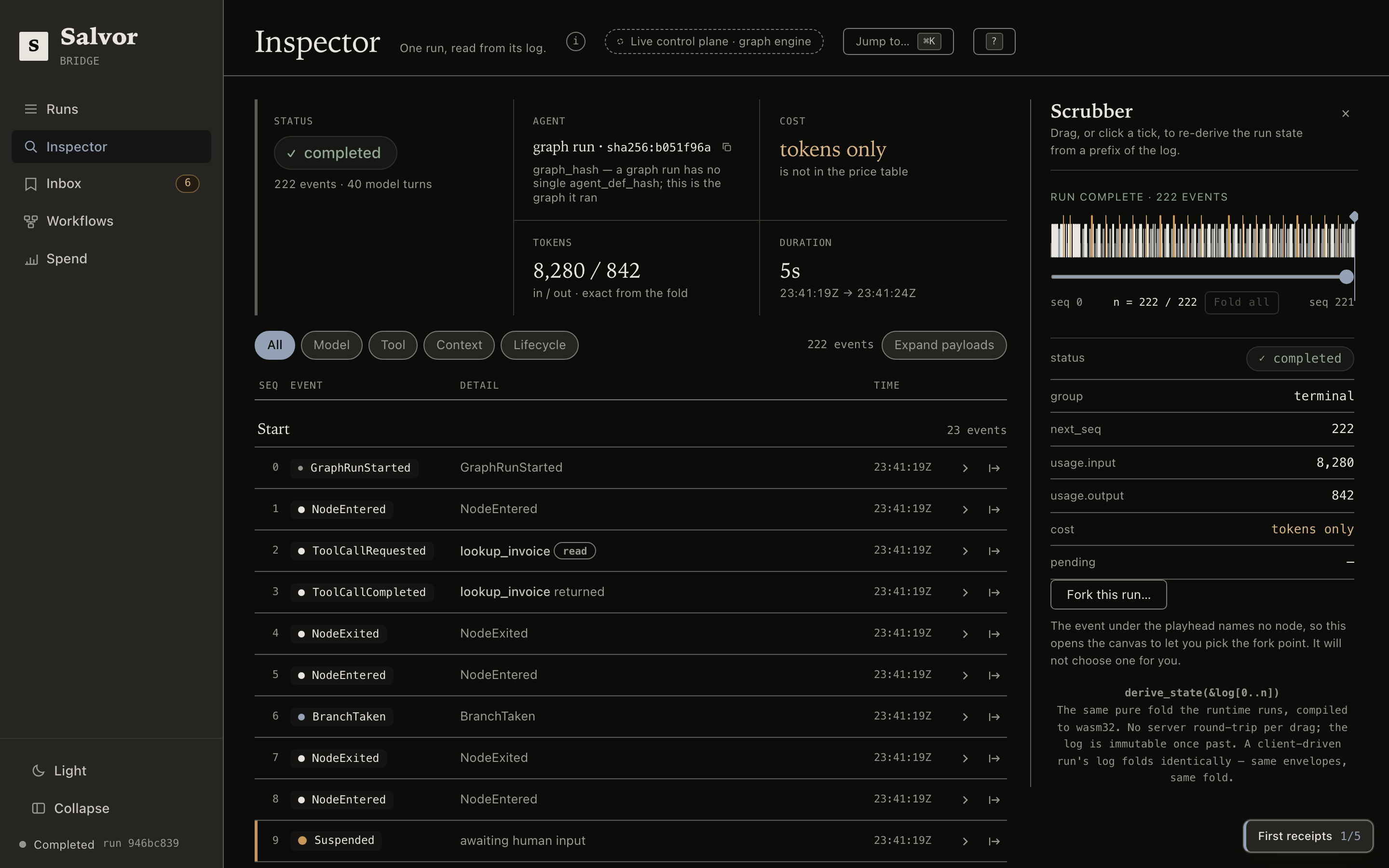
The inspector reads one run from its log. Drag the scrubber and the state re-derives in the browser from a prefix of the log. That is the real salvor-replay crate compiled to wasm, the same fold the runtime runs, not a JavaScript reimplementation of it.
The ledger sorts runs that need a human to the top, and the inbox states the one action that unblocks each one: raise a budget ceiling, answer a gate, reconcile a write the crash left dangling.
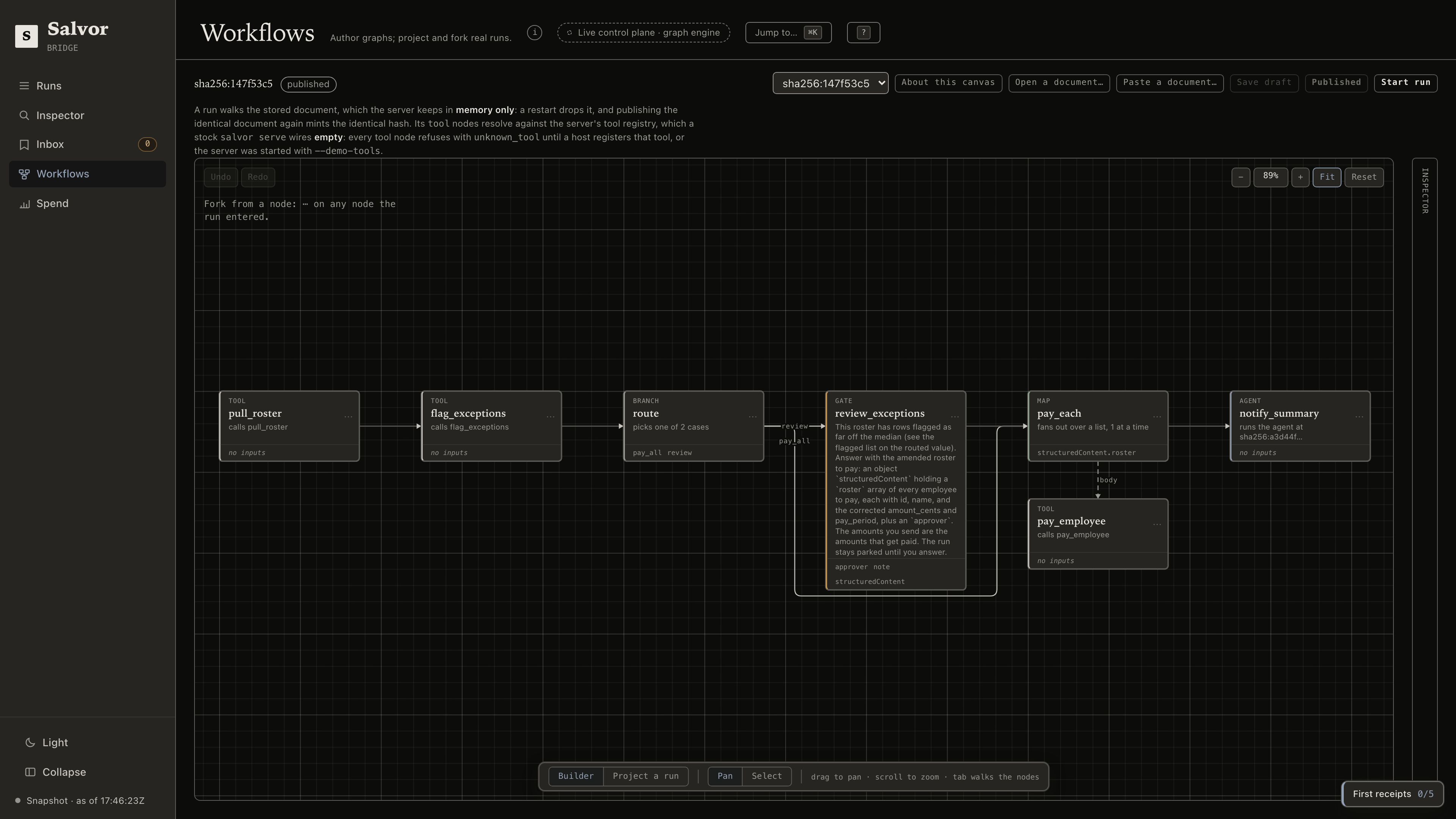
A graph is a document: nodes are agents, tools, gates and branches, and the canvas authors them and forks real runs from any node a run entered.
There is also a spend view.
Working on the UI from a checkout? salvor serve --dev runs the API and the Angular dev server together with hot reload, and Ctrl-C stops both.
Graphs
A graph is a JSON document: nodes are agents (referenced by content hash), tools, gates, branches, maps and folds, and edges are the topology. Validation is strict, an unknown key is rejected, and an error names the node or edge at fault.

salvor graph validate examples/graphs/invalid-dangling-edge.json
names the dangling edge: edge `research` -> `aprove` references unknown node id `aprove` (did you mean `approve`?)
Every branch case must label at least one outbound edge out of that node; a case that should end the run points at a terminal node rather than being left unrouted. Validation refuses the graph otherwise, naming the node and the case. The mirror image is refused too: an outbound edge from a branch node labeled with a name none of its cases declare is dead (it can never fire), and validation names the node and the label. An outbound edge from a branch node with no label at all can never fire either, for the same reason, and is refused just as precisely, naming the node and the edge's target.
salvor graph run drives a document over the store exactly as salvor run drives an agent run: each walked node is recorded, a branch records BranchTaken while the losing arm records NodeSkipped, a gate parks the run durably until a human answers, a delay node parks the run durably for a declared number of seconds and holds nothing while it sleeps, and a fold runs its body up to a declared bound, each pass folding over the last, until its stop condition holds and its join rule picks the winner, all of it recorded pass by pass. The kill-and-resume guarantee is the one from the top of this file, unchanged. Typed builders exist in Rust, TypeScript and Python, each reducing to the same document, and salvor graph schema emits the JSON Schema checked in at docs/graph-schema.json for editor completion.
Over HTTP the durability has one edge: a run's events are in the store, but the submitted document is not. salvor serve keeps it in a process-local memory registry, so a restart drops it and it has to be resubmitted before a run or fork references it again (see Operating it).
An agent node references its agent by content hash, and salvor agent hash <FILE> prints the hash that node's agent_hash field carries; the example READMEs walk that loop from an agent file to a graph. With no SDK installed, salvor graph edit builds a document at a prompt with no Python at all: add agent <ID> --file <FILE> resolves the hash itself, and help prints the grammar. In Python the builder reads as one chain, each call adding a node or an edge, and build() freezes the document:
from salvor import GraphBuilder

# research_hash = salvor agent hash research-agent.toml
graph = (
    GraphBuilder()
    .agent("research", research_hash, output_schema={"type": "object"})
    .gate(
        "approve",
        {"type": "object", "properties": {"approved": {"type": "boolean"}}, "required": ["approved"]},
        prompt="Publish this draft?",
    )
    .edge("research", "approve")
    .build()
)
print(graph.to_json(indent=2))     # the same JSON a hand-written file would parse to
The showcase is examples/payroll/: a payroll run that fans a map out over twelve employees, parks at a human gate when the batch looks wrong, gets kill -9ed mid-batch with four paid, and recovers with every employee paid exactly once at the amounts the approver signed. bash examples/payroll/run.sh proves it offline, no key and no network. Four more carry the detail: examples/graphs/ is the documents and the builders, examples/graph-service/ drives a refund dispute end to end from the CLI with a mid-run kill, examples/graph-clients/ drives that same desk from Python, TypeScript and Rust application code over a stock salvor serve, and examples/follow-up/ is a graph with a delay node, driven back to completion offline by bash examples/follow-up/run.sh, no key needed.
Control plane
An agent is data: POST /v1/agents hashes the definition and returns the hash, and every call after that references it by hash.
POST /v1/runs |
start a run |
GET /v1/runs/{id}/events |
stream it over SSE, with resumable cursors |
POST /v1/runs/{id}/resume |
continue a parked or crashed run |
POST /v1/runs/{id}/resolve |
record a dangling write a human verified by hand |
Every guarantee the CLI has holds over HTTP, because the same runtime enforces it. A second surface under /v1/client-runs inverts ownership: your client drives the agent loop and appends its own events, and the server re-folds the log on each append to confirm the event is a legal next one. Model and tool calls stay server-side, since the server holds the key and the binaries.
Full contract, every route, status code, and event shape, in crates/salvor-server/API.md. Prompt recording is off by default and writes request bodies to the durable log when enabled; see the API doc before turning it on.
A container image is published to ghcr.io/joseym/salvor on tagged releases, API-only with no bundled UI. See docs/CONTAINER.md for the docker run command and why the store volume is mandatory.
Putting it in front of real traffic means TLS through a reverse proxy, a backup you have restored at least once, and a retention plan for a log that only grows: docs/OPERATIONS.md covers all three.
Operating it
The durable state is one SQLite file, at the path --store names (plus its -wal and -shm side files while a writer holds it open). Runs and their event logs live there and survive a restart, the same store whether the process is driving salvor run or salvor serve. A submitted graph document is the exception: salvor serve holds it in a process-local, in-memory registry, so a restart drops it and it has to be resubmitted before a run or fork can reference it again (see examples/graph-clients/README.md). Auth is an optional shared-secret bearer token: pass serve --auth-token <ENV_VAR> naming an environment variable that holds it, and every /v1 route then requires Authorization: Bearer <token>; the named variable must be set and non-empty, or the server refuses to start. Omit the flag entirely and the server trusts its caller, expecting a reverse proxy to guard it. Until a token or a proxy sits in front of it, anyone who can reach the port can start runs and read every log, so an unauthenticated server belongs on loopback or behind that proxy, never on an open interface. Backing it up is copying the store file, safest with the server stopped so the -wal and -shm side files are quiescent. Against a live store, sqlite3's .backup command does the same job without stopping anything. A backup carries the runs and their logs, not the in-memory graph registry: a client that submits a graph document keeps the ability to resubmit it, because no store restore brings it back.
salvor serve also sweeps for due timers every 60 seconds by default (--wake-interval in seconds, 0 turns the sweep off), but by the hash a run recorded: an agent run wakes once that agent is registered with POST /v1/agents, MCP tools and all, and a graph run wakes once its document is submitted with POST /v1/graphs and every tool node in it names a tool this server's own registry holds (empty by default). A run whose hash is not registered here, typically one started from the CLI against a store this server never saw, or a graph run with a tool node this registry does not hold, stays asleep until salvor wake drives it with the same --agent/--graph files (see docs/OPERATIONS.md#waking-sleeping-runs). Resuming a sleeping run before its wake_at is refused with the time remaining, on the CLI and as 409 still_sleeping over HTTP, rather than silently doing nothing.
Clients
Thin clients over the control plane: register an agent, start a run, stream events, resume. A few hundred lines each, and the durability stays in the one Rust process.
npm install @salvor-run/client     # TypeScript
pip install salvor                 # Python
The Python client registers an agent, starts a run, and reads the state the run settled into:
from salvor import Client

with Client("http://127.0.0.1:8080") as client:
    agent = client.register_agent(open("agent.toml").read())
    run_id = client.start_run(agent, {"question": "..."})
    for event in client.stream_events(run_id):
        print(event.seq, event.kind)
    print(client.get_run(run_id).status.state)
The TypeScript client mirrors this surface call for call. Both also drive the client-owned mode above. See sdks/typescript and sdks/python.
Both also carry a LangChain adapter that makes an existing createAgent / create_agent app durable with one middleware: salvor[langchain] in Python, @salvor-run/client/langchain in TypeScript. See examples/langchain/.
Salvor MCP questions
How does Salvor handle crashes?
Salvor uses an event-sourced runtime where every event is written before the runtime acts on it, allowing a run to resume from exactly where it stopped without re-executing completed steps.
Does Salvor prevent duplicate side effects?
Yes, tools can declare effects as read, write, or idempotent. For writes, a dangling write left by a crash will block the resume until a human reconciles it.
How do I provide API keys to my agents?
Salvor does not store keys; instead, you specify the environment variable name in the agent's TOML configuration via the api_key_env field.
Can I run Salvor offline?
Yes, you can use the salvor-demo-model to run in an offline mock-model mode that records interactions without needing a network connection.