
LinkDing MCP server
Commit Nov 14, 2026Lets an AI client search, add, and manage bookmarks in a self-hosted LinkDing instance.
Also known as jon-the-dev/linkding-mcp-server
- Stars
- 1
- Tools
- —
- Downloads, 30 days
- —
- Latest version
- —
- Last commit
- Nov 14, 2026
- License
- AGPL-3.0
What is LinkDing MCP?
LinkDing lets an AI client search, add, and manage bookmarks in a self-hosted LinkDing instance.
Summary generated from the project's README
About LinkDing MCP server
Managing your self-hosted LinkDing bookmarks directly from an AI client is what this MCP server enables. It acts as a typed bridge between your research tools and your personal bookmark collection, removing the need for an AI to interact with the LinkDing REST API or handle raw credentials manually. Users can connect via stdio using Python 3.12 and uv, providing a LinkDing URL and an API token through environment variables.
Developers can choose between a read-only setup or full management capabilities. By default, write operations are disabled to ensure safety. When the LINKDING_ENABLE_DESTRUCTIVE_ACTIONS setting is set to true, the server exposes ten specific tools including add_bookmark, delete_bookmark, archive_bookmark, and search_bookmarks. This allows for sophisticated workflows like checking if a URL is already saved, browsing tags, or updating existing entries without leaving your chat interface.
What you can do with it
- 1Search existing bookmarksFind specific links within your collection using natural language queries and tags.
- 2Verify URL statusCheck if a specific web address is already present in your LinkDing instance.
- 3Organize collections with tagsRetrieve a list of all available tags or find bookmarks associated with a specific tag.
- 4Perform bookmark maintenanceAdd new links to your library or archive old ones to keep your collection clean.
Written from the project's README. Every use case is checked against a quote from it.
Configuration
LINKDING_API_TOKENLINKDING_ENABLE_DESTRUCTIVE_ACTIONSLINKDING_URL
Automated checks
Ran Nov 15, 2026Full report →Not verified yet. A server needs a score of 80, no serious finding, and enough data for us to check. How checks work · What to fix for more points

- Source repository linked and reachablejon-the-dev/linkding-mcp-server is public and reachablegithub.com/jon-the-dev/linkding-mcp-server ↗Pass
- Package names this repository as its sourceNot checked
- Build provenance (Sigstore attestation)Not checked
- Open source license (OSI)AGPL-3.0spdx.org/licenses/AGPL-3.0.html ↗Pass
- Commit or release in the last yearLast commit or release 2026-11-14github.com/jon-the-dev/linkding-mcp-server ↗Pass
- OpenSSF ScorecardNot checked
- Package name not close to a popular packageNot checked
- No critical advisory in the package or its dependenciesNot checked
- No hidden instructions to the model0 tool descriptions and the README read; no override phrases, credential paths or hidden charactersPass
- Destructive tools are labelledNot checked
- Remote endpoint answers the MCP handshakeNot checked
README
View on GitHubLinkDing MCP Server


A Model Context Protocol (MCP) server that lets compatible AI clients search and manage bookmarks in a self-hosted LinkDing instance.
Why this exists
LinkDing is a useful home for durable, self-hosted bookmarks, but bookmarks are most valuable when they are available inside the tools where research happens. This server provides a small, typed MCP bridge instead of requiring an AI client to know LinkDing's REST API or handle credentials directly.
It supports search, lookup, creation, updates, deletion, archive operations, URL checks, and tag browsing. Write operations are disabled by default.
Quickstart
You need Python 3.12+, uv, a running LinkDing instance, and a LinkDing API token.
git clone https://github.com/jon-the-dev/linkding-mcp-server.git
cd linkding-mcp-server
uv sync
cp .env.sample .env
Set these values in .env:
LINKDING_URL=https://links.example.com
LINKDING_API_TOKEN=replace-with-your-token
LINKDING_ENABLE_DESTRUCTIVE_ACTIONS=false
Start the stdio MCP server:
uv run linkding-mcp
The package has not been published to PyPI yet. GitHub/source installation is the supported path until the first release is published.
Client configuration
For Claude Desktop, add an entry like this to its MCP configuration. Replace the repository path and credential values with your own:
{
  "mcpServers": {
    "linkding": {
      "command": "uv",
      "args": [
        "--directory",
        "/absolute/path/to/linkding-mcp-server",
        "run",
        "linkding-mcp"
      ],
      "env": {
        "LINKDING_URL": "https://links.example.com",
        "LINKDING_API_TOKEN": "replace-with-your-token",
        "LINKDING_ENABLE_DESTRUCTIVE_ACTIONS": "false"
      }
    }
  }
}
Restart the client after changing its configuration. Other clients can launch
the same uv run linkding-mcp command over stdio.
Examples
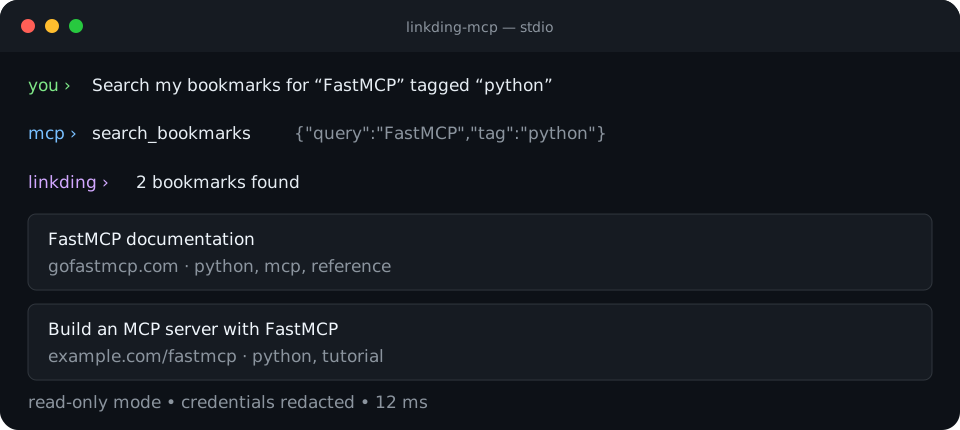
Once connected, natural-language requests map to the server's MCP tools:
Search my bookmarks for "FastMCP" tagged "python".
Check whether https://modelcontextprotocol.io is already bookmarked.
List my LinkDing tags.
Write requests require LINKDING_ENABLE_DESTRUCTIVE_ACTIONS=true:
Save https://example.com with tags "reference" and "demo".
Archive bookmark 42.
The ten exposed tools are:
search_bookmarksadd_bookmarkget_bookmarkupdate_bookmarkdelete_bookmarkarchive_bookmarkunarchive_bookmarkcheck_urllist_tagslist_bookmarks_by_tag
See the full documentation for parameters, configuration, and client-specific setup.
Security and credentials
- Create a dedicated LinkDing token when possible and store it only in
.envor your MCP client's local secret/configuration store. - Never commit
.env, tokens, or client-local settings..envand.claude/settings.local.jsonare ignored by this repository. - Keep
LINKDING_ENABLE_DESTRUCTIVE_ACTIONS=falsefor read-only use. Enabling it permits add, update, delete, archive, and unarchive operations. - Leave TLS verification enabled in production. A custom CA bundle is supported for private certificate authorities.
- Tokens are masked in logs and structured telemetry is disabled by default.
Report vulnerabilities privately through GitHub Security Advisories. Do not include credentials in reports.
Configuration
| Variable | Default | Description |
|---|---|---|
LINKDING_URL |
http://127.0.0.1:9090 |
LinkDing base URL |
LINKDING_API_TOKEN |
required | LinkDing API token |
LINKDING_ENABLE_DESTRUCTIVE_ACTIONS |
false |
Permit write and delete tools |
LINKDING_VERIFY_SSL |
true |
Verify TLS certificates |
LINKDING_SSL_CERT_PATH |
unset | Optional custom CA bundle |
LINKDING_REQUEST_TIMEOUT |
30 |
Request timeout in seconds |
LINKDING_MAX_RETRIES |
3 |
Retry attempts |
LINKDING_CACHE_TTL |
300 |
Cache lifetime in seconds |
LINKDING_CACHE_MAX_SIZE |
100 |
Maximum LRU cache entries |
LINKDING_OBSERVABILITY_ENABLED |
false |
Emit redacted metric events |
LINKDING_LOG_LEVEL |
INFO |
Python log level |
See .env.sample for every option.
Known limitations
- The first PyPI release is not published yet; install from source.
- A running LinkDing instance and API token are required for real operations.
- Rate limiting and in-memory caching are process-local, so replicas do not share limits or cache state.
- The server targets LinkDing API v1 and does not provide a hosted LinkDing service.
- Destructive actions are a single configuration gate, not per-tool policy.
Development
uv sync --extra dev
uv run ruff check linkding_mcp_server tests
uv run mypy linkding_mcp_server
uv run pytest -m "not performance" \
  --cov=linkding_mcp_server \
  --cov-report=term-missing \
  --cov-fail-under=90
uv run pytest -m performance --durations=10
The integration suite uses an injected httpx.MockTransport, so it exercises
all ten MCP tools without requiring a live LinkDing server.
Contributions and bug reports are welcome. Please add tests for behavior changes and never include live credentials or private bookmark data in fixtures.
License
Copyright © 2024–2026 Jon Price and contributors.
Licensed under the GNU Affero General Public License v3.0 only. The software is provided without warranty; see the license for the complete terms and limitation of liability.
LinkDing MCP questions
How do I install the server?
Since it is not yet on PyPI, you should install it from source using git clone and uv sync.