
LinkedIn Posts API MCP server
Commit Nov 15, 2026Scrape and analyze public LinkedIn posts as structured JSON using profile URLs or specific post links.
Also known as johnisanerd/Apify-LinkedIn-Posts-API, apify-linkedin-posts-api
- Stars
- 0
- Tools
- 5
- Downloads, 30 days
- —
- Latest version
- 1.0.0
- Last commit
- Nov 15, 2026
- License
- —
What is LinkedIn Posts API MCP?
LinkedIn Posts API is an MCP server. Scrape and analyze public LinkedIn posts as structured JSON using profile URLs or specific post links. It exposes 5 tools, such as get-actor-run, get-dataset-items, get-key-value-store-record.
Summary generated from the project's README
About LinkedIn Posts API MCP server
Extracting structured engagement data from public LinkedIn profiles is what this tool enables for developers and AI agents. By providing a profile URL or specific post links, users receive clean JSON containing post text, hashtags, media, reactions, comments, and shares. It is designed to work with AI clients like Claude, Cursor, and ChatGPT, as well as command-line tools like Claude Code.
Users can choose between discovering recent posts from a profile or fetching a specific set of up to 1000 posts via direct URLs. The server requires an Apify account and API key to function. It operates by reading public pages only, meaning it does not require LinkedIn login credentials or session cookies, ensuring that your personal accounts remain untouched during data collection.
This tool is particularly useful for building social listening or content research workflows. It provides a consistent field shape for every post and includes a plain-language summary field to help AI models scan content quickly. You can also filter discovery by specific start and end dates to target particular timeframes.
What you can do with it
- 1Analyze profile engagement trendsRequest a summary of recent posts from a specific LinkedIn profile to understand their content strategy.
- 2Batch scrape specific contentProvide a list of individual post URLs to extract detailed metrics like likes and shares.
- 3Automate social listening workflowsFeed structured post data into a database or BI tool for long-term monitoring.
- 4Filter content by dateRetrieve only the posts published within a specific calendar range.
Written from the project's README. Every use case is checked against a quote from it.
How to install LinkedIn Posts API MCP
Formats verified 10 Nov 2026Add to CursorAdd to GooseInstall LinkedIn Posts API MCP in Claude Code
$ claude mcp add --transport http apify-linkedin-posts-api 'https://mcp.apify.com/?tools=johnvc/linkedin-posts-api'Install LinkedIn Posts API MCP in Cursor
~/.cursor/mcp.json
{
  "mcpServers": {
    "apify-linkedin-posts-api": {
      "url": "https://mcp.apify.com/?tools=johnvc/linkedin-posts-api"
    }
  }
}Install LinkedIn Posts API MCP in VS Code
.vscode/mcp.json
{
  "servers": {
    "apify-linkedin-posts-api": {
      "type": "http",
      "url": "https://mcp.apify.com/?tools=johnvc/linkedin-posts-api"
    }
  }
}Install LinkedIn Posts API MCP in VS Code CLI
$ code --add-mcp '{"name":"apify-linkedin-posts-api","type":"http","url":"https://mcp.apify.com/?tools=johnvc/linkedin-posts-api"}'Install LinkedIn Posts API MCP in Codex
$ codex mcp add apify-linkedin-posts-api --url 'https://mcp.apify.com/?tools=johnvc/linkedin-posts-api'Install LinkedIn Posts API MCP in Codex config.toml
~/.codex/config.toml
[mcp_servers.apify-linkedin-posts-api]
url = "https://mcp.apify.com/?tools=johnvc/linkedin-posts-api"
Install LinkedIn Posts API MCP in Gemini CLI
$ gemini mcp add -s user --transport http apify-linkedin-posts-api 'https://mcp.apify.com/?tools=johnvc/linkedin-posts-api'Install LinkedIn Posts API MCP in Gemini settings.json
~/.gemini/settings.json
{
  "mcpServers": {
    "apify-linkedin-posts-api": {
      "url": "https://mcp.apify.com/?tools=johnvc/linkedin-posts-api",
      "type": "http"
    }
  }
}LinkedIn Posts API MCP tools 5
Read from the server with tools/listget-actor-runRead-onlyGet detailed information about a specific Actor run. Returns run result: status, storages (datasets/keyValueStores alias map), stats, summary, nextStep. - summary describes the past (e.g. "SUCCEEDED in 22s. 47 items; 3 fields available."). - nextStep prescribes one primary follow-up action with identifiers interpolated (e.g. "Use get-dataset-items with datasetId=..."). - waitSecs (0–45, default 30) waits up to that many seconds for terminal status before returning. USAGE: - Use to check the status of a run started by any Actor-running tool. - Pass waitSecs > 0 to block until terminal (or until the cap elapses). USAGE EXAMPLES: - user_input: Show details of run y2h7sK3Wc - user_input: Wait for run y2h7sK3Wc to finish
get-dataset-itemsRead-onlyGet items (rows) from a dataset — the output/results produced by an Actor run. Returns the rows themselves, not dataset metadata, counts, or a schema. When the user provides a datasetId and asks to retrieve results, output, data, or rows, call this tool directly. Default limit is 20. Use clean=true to skip empty items and hidden fields. USAGE: - Use when you need to read data from a dataset (all items or only selected fields). USAGE EXAMPLES: - user_input: Retrieve results from dataset abc123 - user_input: Get only metadata.url and title from dataset username~my-dataset
get-key-value-store-recordRead-onlyGet the value stored under a specific key in a key-value store — a single record, not a listing of all keys. Requires the exact key name. The response preserves the original Content-Encoding; most clients handle decompression automatically. A record over 262144 bytes is returned as a link to download it, not as its value. USAGE: - Use when you need to retrieve a specific record (JSON, text, or binary) from a store. USAGE EXAMPLES: - user_input: Get record INPUT from store abc123 - user_input: Get record data.json from store username~my-store
abort-actor-runActionAbort an Actor run that is currently starting or running. For runs with status SUCCEEDED, FAILED, ABORTING, ABORTED, or TIMED-OUT, this call has no effect. The results will include the updated run details after the abort request. USAGE: - Use when you need to stop a run that is taking too long or misconfigured. USAGE EXAMPLES: - user_input: Abort run y2h7sK3Wc - user_input: Gracefully abort run y2h7sK3Wc
johnvc--linkedin-posts-apiActionThis tool calls the Actor "johnvc/linkedin-posts-api" and retrieves its output results. Actor description: Collect public LinkedIn posts as clean, structured JSON. Discover every post from a profile URL, or fetch specific post URLs, with text, reactions, comments, shares, media, hashtags, and author details. Pay per post, MCP-ready for Claude and AI agents.
| get-actor-run | Get detailed information about a specific Actor run. Returns run result: status, storages (datasets/keyValueStores alias map), stats, summary, nextStep. - summary describes the past (e.g. "SUCCEEDED in 22s. 47 items; 3 fields available."). - nextStep prescribes one primary follow-up action with identifiers interpolated (e.g. "Use get-dataset-items with datasetId=..."). - waitSecs (0–45, default 30) waits up to that many seconds for terminal status before returning. USAGE: - Use to check the status of a run started by any Actor-running tool. - Pass waitSecs > 0 to block until terminal (or until the cap elapses). USAGE EXAMPLES: - user_input: Show details of run y2h7sK3Wc - user_input: Wait for run y2h7sK3Wc to finish | Read-only |
| get-dataset-items | Get items (rows) from a dataset — the output/results produced by an Actor run. Returns the rows themselves, not dataset metadata, counts, or a schema. When the user provides a datasetId and asks to retrieve results, output, data, or rows, call this tool directly. Default limit is 20. Use clean=true to skip empty items and hidden fields. USAGE: - Use when you need to read data from a dataset (all items or only selected fields). USAGE EXAMPLES: - user_input: Retrieve results from dataset abc123 - user_input: Get only metadata.url and title from dataset username~my-dataset | Read-only |
| get-key-value-store-record | Get the value stored under a specific key in a key-value store — a single record, not a listing of all keys. Requires the exact key name. The response preserves the original Content-Encoding; most clients handle decompression automatically. A record over 262144 bytes is returned as a link to download it, not as its value. USAGE: - Use when you need to retrieve a specific record (JSON, text, or binary) from a store. USAGE EXAMPLES: - user_input: Get record INPUT from store abc123 - user_input: Get record data.json from store username~my-store | Read-only |
| abort-actor-run | Abort an Actor run that is currently starting or running. For runs with status SUCCEEDED, FAILED, ABORTING, ABORTED, or TIMED-OUT, this call has no effect. The results will include the updated run details after the abort request. USAGE: - Use when you need to stop a run that is taking too long or misconfigured. USAGE EXAMPLES: - user_input: Abort run y2h7sK3Wc - user_input: Gracefully abort run y2h7sK3Wc | Action |
| johnvc--linkedin-posts-api | This tool calls the Actor "johnvc/linkedin-posts-api" and retrieves its output results. Actor description: Collect public LinkedIn posts as clean, structured JSON. Discover every post from a profile URL, or fetch specific post URLs, with text, reactions, comments, shares, media, hashtags, and author details. Pay per post, MCP-ready for Claude and AI agents. | Action |
Configuration
APIFY_API_TOKEN
| Name | Description | |
|---|---|---|
| APIFY_API_TOKEN | — |
Automated checks
Ran Nov 16, 2026Full report →Not verified yet. A server needs a score of 80, no serious finding, and enough data for us to check. How checks work · What to fix for more points

- Source repository linked and reachablejohnisanerd/apify-linkedin-posts-api is public and reachablegithub.com/johnisanerd/apify-linkedin-posts-api ↗Pass
- Package names this repository as its sourceNot checked
- Build provenance (Sigstore attestation)Not checked
- Open source license (OSI)No licenseFinding
- Commit or release in the last yearLast commit or release 2026-11-15github.com/johnisanerd/apify-linkedin-posts-api ↗Pass
- OpenSSF ScorecardNot checked
- Package name not close to a popular packageNot checked
- No critical advisory in the package or its dependenciesNot checked
- No hidden instructions to the model5 tool descriptions and the README read; no override phrases, credential paths or hidden charactersPass
- Destructive tools are labelledNo tool named like delete, drop or execPass
- Remote endpoint answers the MCP handshakeinitialize answered with protocol 2025-11-25 in 354 ms; tools/list returned 5 tools (HostedMCP test account)Pass
README
View on GitHub📝 LinkedIn Posts API: Posts & Engagement to Structured JSON
The most efficient, reliable, and developer-friendly way to use the LinkedIn Posts API.
Actor page: apify.com/johnvc/linkedin-posts-api Input schema: apify.com/johnvc/linkedin-posts-api/input-schema
Give it a public LinkedIn profile URL and it discovers that person's recent posts, or pass specific post URLs to fetch directly. You get back one clean JSON row per post: text, reactions, comments, shares, hashtags, media, and author details. It is built API-first and MCP-ready, so you can call it from Python or drive it as a tool from an AI agent.
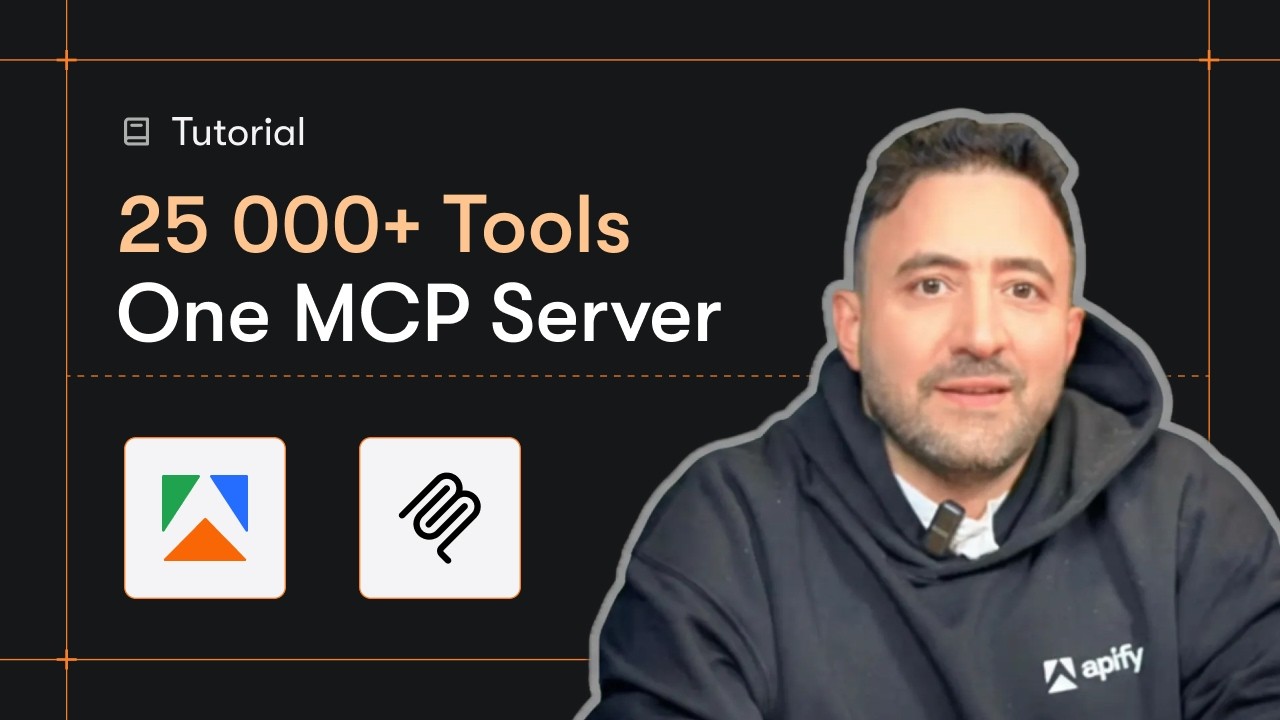
Video Walkthrough
Quick Start
Prerequisites
- Python 3.11 or higher
- An Apify account and API key (get a free key here)
-
Clone the repository
git clone https://github.com/johnisanerd/Apify-LinkedIn-Posts-API.git cd Apify-LinkedIn-Posts-API -
Install dependencies with UV
# Install UV if you do not have it: curl -LsSf https://astral.sh/uv/install.sh | sh # Install project dependencies: uv sync -
Configure your API key
cp .env.example .env # Edit .env and add your Apify API key # Get your free API key at: https://apify.com?fpr=9n7kx3 -
Run the example
uv run python linkedin-posts-api-example.py
Alternative: set the API key directly
export APIFY_API_TOKEN="your_api_key_here"
uv run python linkedin-posts-api-example.py
Why Use This LinkedIn Posts API?
A URL in, structured data out. You never touch collection infrastructure. Pass a profile URL (or specific post URLs) and get flat, predictable fields you can load straight into a sheet, a database, or a BI tool.
Two ways to collect. Discover a profile's recent posts (newest first, capped and optionally date-filtered), or fetch a known set of posts by URL, up to 1000 per run.
Pay per post. Billing is per post returned, with no per-run setup fee, so you only pay for what is delivered.
Reliable and predictable. Every post comes back with the same field shape, and a profile with no public posts returns a clear error row instead of failing the whole run.
MCP-ready. Call it as a tool from Claude, Cursor, and other AI agents (see the install sections below).
Features
Core Capabilities
- Discover a profile's recent posts by profile URL, or fetch specific posts by URL
- Post text, hashtags, media, and links, plus post type and date
- Reactions, comments, and shares on every post
- Author name, headline, follower count, and a sample of top comments
Data Quality
- One consistent JSON row per post, every time
- A plain-language
summaryfield on every row for quick scanning and AI use - A clear error row for a profile with no public posts, so one empty profile never sinks the batch
Usage Examples
Discover a profile's posts
{
  "profileUrls": ["https://www.linkedin.com/in/williamhgates"],
  "maxPostsPerProfile": 5
}
Limit discovery to a date range
{
  "profileUrls": ["https://www.linkedin.com/in/williamhgates"],
  "maxPostsPerProfile": 50,
  "startDate": "2025-01-01",
  "endDate": "2025-12-31"
}
Fetch specific posts by URL
{
  "postUrls": [
    "https://www.linkedin.com/posts/williamhgates_activity-7446904645010210816"
  ]
}
Input Parameters
| Parameter | Type | Required | Default | Description |
|---|---|---|---|---|
profileUrls |
list[str] |
one of these | - | Public LinkedIn /in/ profile URLs to discover posts from. Up to 25 per run. |
postUrls |
list[str] |
one of these | - | Specific LinkedIn post URLs to fetch directly. Up to 1000 per run. |
maxPostsPerProfile |
int |
No | 20 |
Max posts per profile in discover mode (max 200). Caps cost. Ignored for post URLs. |
startDate |
str |
No | - | Only discover posts on or after this date (YYYY-MM-DD). Discover mode only. |
endDate |
str |
No | - | Only discover posts on or before this date (YYYY-MM-DD). Discover mode only. |
Supply at least one of profileUrls or postUrls.
Output Format
Each post is returned as one JSON row:
{
  "result_type": "post",
  "postId": "7446904645010210816",
  "postUrl": "https://www.linkedin.com/posts/williamhgates_activity-7446904645010210816",
  "postType": "post",
  "datePosted": "2025-06-01T12:00:00.000Z",
  "text": "A few books shaped how I think about clean energy this year...",
  "hashtags": ["cleanenergy", "books"],
  "authorName": "williamhgates",
  "authorHeadline": "Co-chair, Bill & Melinda Gates Foundation",
  "authorUrl": "https://www.linkedin.com/in/williamhgates",
  "authorFollowers": 37000000,
  "numLikes": 12045,
  "numComments": 843,
  "numShares": 210,
  "summary": "Post by williamhgates, 12,045 reactions, 843 comments, posted 2025-06-01"
}
The numShares field is returned when the post has shares.
FAQ
Will this put my LinkedIn or LinkedIn Recruiter account at risk?
No. It reads public LinkedIn pages only, the ones anyone can open while signed out. It never logs in and never asks for your cookies: there is no input for an account, a password or an li_at session cookie. Nothing it does is tied to your LinkedIn account, your LinkedIn Recruiter seat or your Sales Navigator license. The requests run on Apify's servers, not in your browser, so nothing connects them to you, and you can keep working in Recruiter while a run is going.
Install in Claude Cowork Desktop
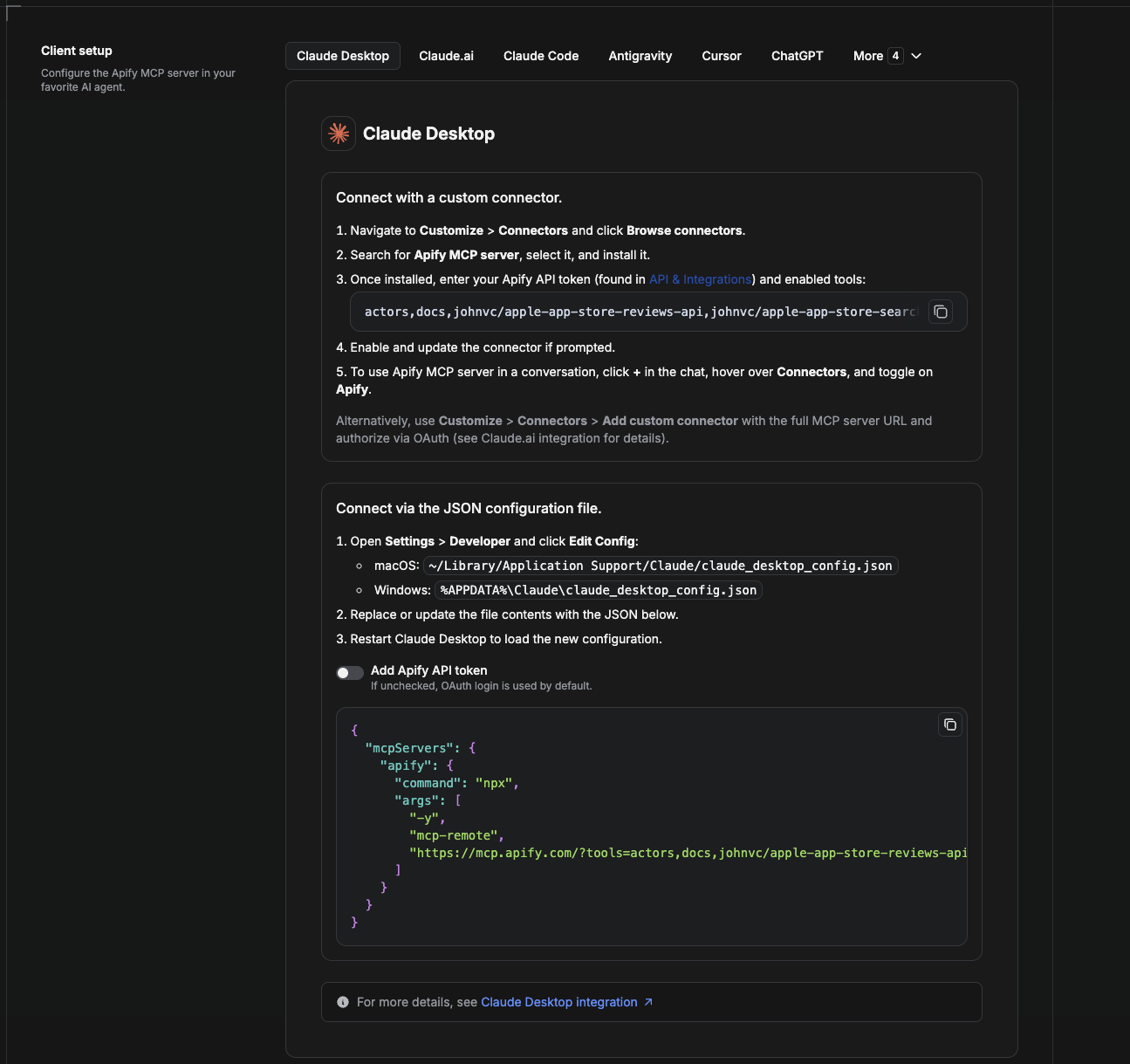
Cowork is the desktop app's automation mode. To give it the LinkedIn Posts API as a tool, add the Apify MCP server as a connector.
- Open the Claude desktop app and go to Settings → Connectors (or Settings → Developer → Edit Config to edit
claude_desktop_config.jsondirectly).- macOS:
~/Library/Application Support/Claude/claude_desktop_config.json - Windows:
%APPDATA%\Claude\claude_desktop_config.json
- macOS:
- Add the Apify MCP server, preloaded with only this Actor:
{
  "mcpServers": {
    "apify": {
      "command": "npx",
      "args": [
        "-y",
        "mcp-remote",
        "https://mcp.apify.com/?tools=actors,docs,johnvc/linkedin-posts-api"
      ]
    }
  }
}
- Restart the app. When Cowork first calls the tool, complete the OAuth prompt in your browser, or add your Apify API token in the connector settings to skip OAuth.
- In a Cowork chat, confirm the tool is available and ask it to run the LinkedIn Posts API.
Download the desktop app and start a free trial: https://claude.ai/referral/uIlpa7nPLg More help: https://docs.apify.com/platform/integrations/claude-desktop
Install in Claude Code
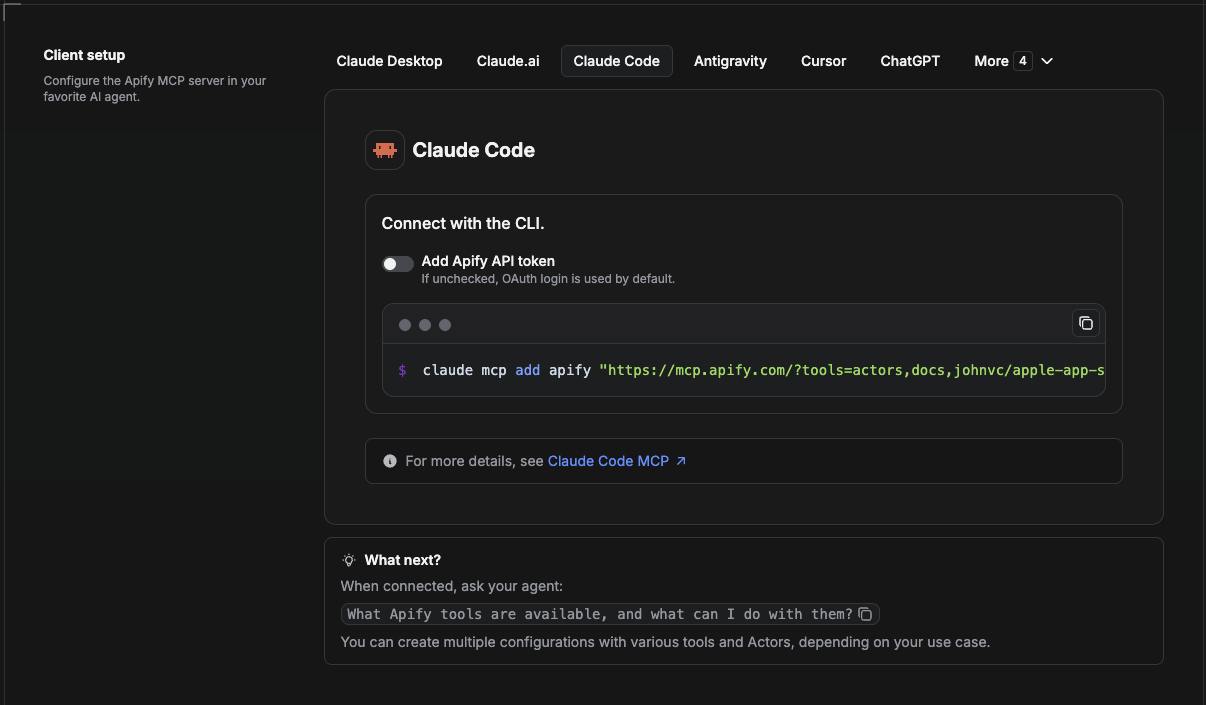
Claude Code is the command-line tool. Add the Actor's MCP server with one command:
claude mcp add --transport http apify \
  "https://mcp.apify.com/?tools=actors,docs,johnvc/linkedin-posts-api"
To use a token instead of browser OAuth:
claude mcp add --transport http apify \
  "https://mcp.apify.com/?tools=actors,docs,johnvc/linkedin-posts-api" \
  --header "Authorization: Bearer YOUR_APIFY_TOKEN"
Then verify with claude mcp list, or run /mcp inside a session. Ask Claude Code to call the LinkedIn Posts API.
Try Claude Code free: https://claude.ai/referral/uIlpa7nPLg Claude Code MCP docs: https://code.claude.com/docs/en/mcp
Install in Claude (website)
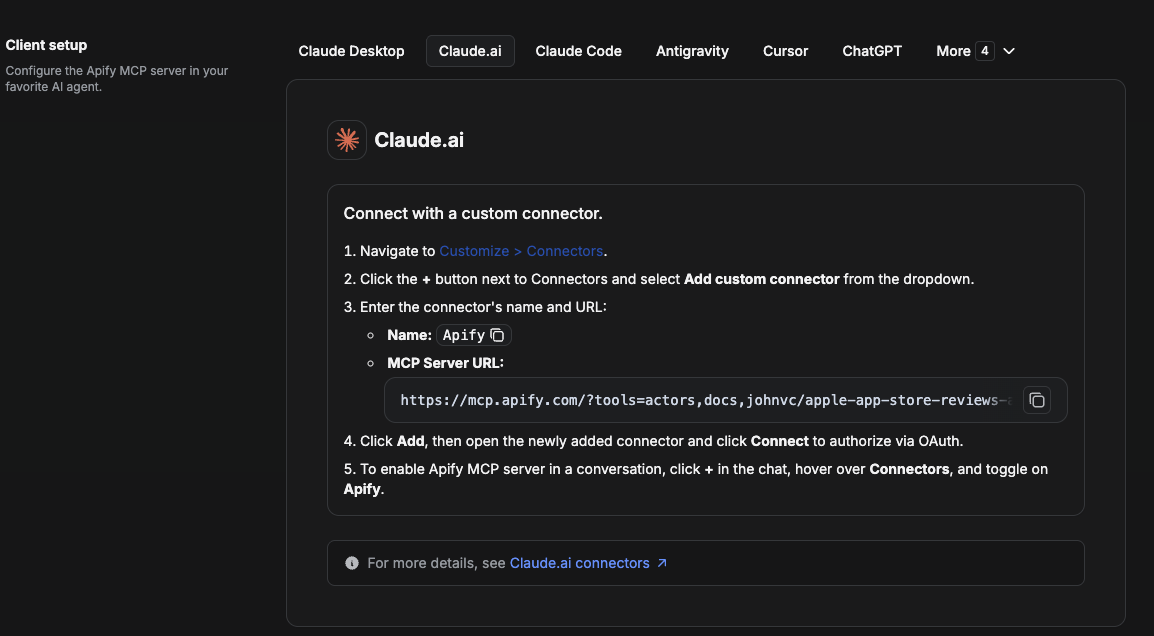
On claude.ai you add Apify as a connector, then enable just this Actor's tool.
- Go to Settings → Connectors → Browse connectors and search for Apify MCP server. Install it (enable or update if prompted).
- When connecting, authenticate with your Apify API token, and enable the tool
johnvc/linkedin-posts-api. - In any chat, open + → Connectors and turn on Apify.
- Alternatively, choose Add custom connector and paste the full MCP URL
https://mcp.apify.com/?tools=actors,docs,johnvc/linkedin-posts-api, using OAuth when prompted. - Ask Claude to run the LinkedIn Posts API.
Open Claude on the web: https://claude.ai/referral/uIlpa7nPLg
Install in Cursor
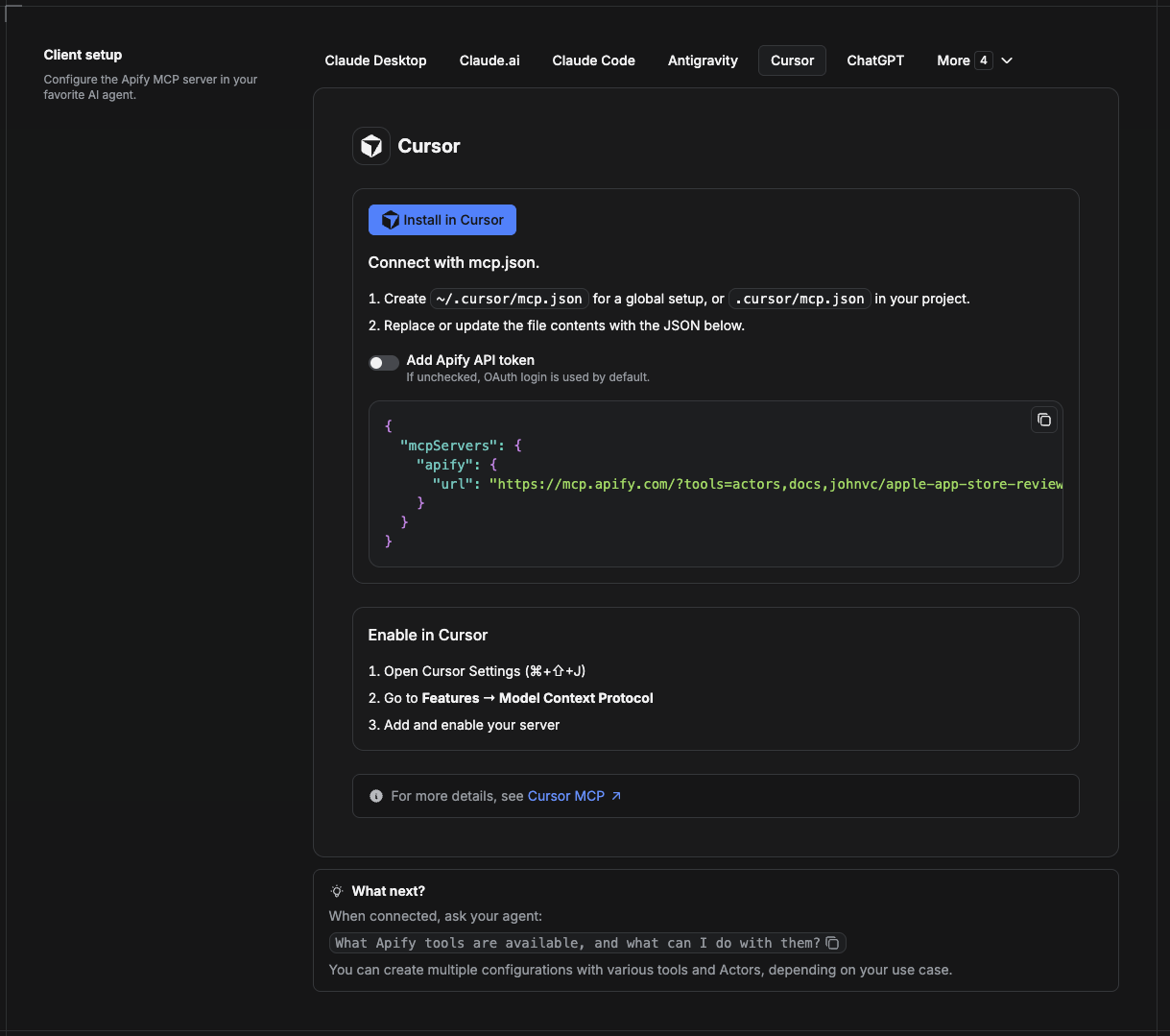
Cursor reads MCP servers from a project file at .cursor/mcp.json.
- In your project, create
.cursor/mcp.json:
{
  "mcpServers": {
    "apify": {
      "url": "https://mcp.apify.com/?tools=actors,docs,johnvc/linkedin-posts-api"
    }
  }
}
- If you prefer token auth over browser OAuth, add a header:
{
  "mcpServers": {
    "apify": {
      "url": "https://mcp.apify.com/?tools=actors,docs,johnvc/linkedin-posts-api",
      "headers": { "Authorization": "Bearer YOUR_APIFY_TOKEN" }
    }
  }
}
- Open Cursor → Settings → MCP and confirm the apify server is connected (green dot).
- In Composer or Chat, ask Cursor to call the LinkedIn Posts API.
New to Cursor? Get it here: https://cursor.com/referral?code=XQP4VBLI3NNX
Install in ChatGPT
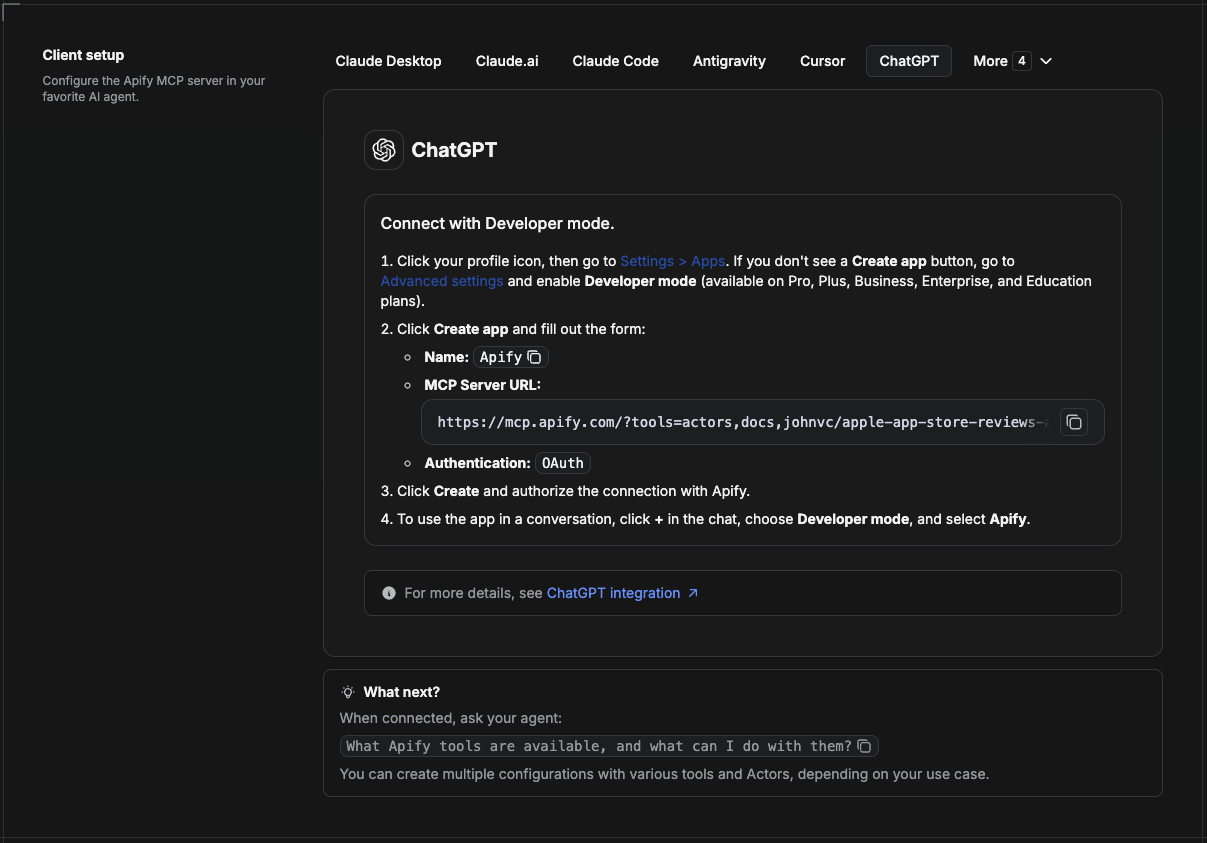
ChatGPT connects to the Apify MCP server through Developer mode (available on ChatGPT Pro, Plus, Business, Enterprise, and Education plans).
- Click your profile icon, then go to Settings > Apps. If you do not see a Create app button, open Advanced settings and enable Developer mode.
- Click Create app and fill out the form:
- Name: Apify
- MCP Server URL:
https://mcp.apify.com/?tools=actors,docs,johnvc/linkedin-posts-api - Authentication: OAuth
- Click Create and authorize the connection with Apify.
- To use the app in a conversation, click + in the chat, choose Developer mode, and select Apify.
More help: https://docs.apify.com/platform/integrations/mcp
Use the LinkedIn Posts API to power your content research, social listening, and engagement analytics with reliable, structured results.
🤖 Ask an AI assistant about this Actor
Open a ready-to-send prompt about the LinkedIn Posts API in the AI of your choice:
- 💬 ChatGPT
- 🧠 Claude
- 🔍 Perplexity
- 🅒 Copilot
Last Updated: 2026.10.27
LinkedIn Posts API MCP questions
How do I add LinkedIn Posts API MCP to Claude Code?
Run claude mcp add --transport http apify-linkedin-posts-api 'https://mcp.apify.com/?tools=johnvc/linkedin-posts-api' in your terminal. Add --scope user to make it available in every project.
How do I add LinkedIn Posts API MCP to Cursor?
Open ~/.cursor/mcp.json and add the server under mcpServers, using the Cursor config shown in the install section above.
What tools does LinkedIn Posts API MCP provide?
It exposes 5 tools, including get-actor-run, get-dataset-items, get-key-value-store-record, abort-actor-run, johnvc--linkedin-posts-api.
Will this put my LinkedIn or LinkedIn Recruiter account at risk?
No, it only reads public LinkedIn pages that are accessible without logging in. It does not use your account, password, or session cookies.
How can I limit the posts discovered to a specific timeframe?
You can use the startDate and endDate parameters to only discover posts on or after a specific date or on or before a specific date.
What kind of data is returned for each post?
The API returns structured JSON containing post text, hashtags, media, reactions, comments, shares, and author details.