
Enforces penetration testing engagement scope for AI agents by validating MCP tool calls against approved targets, techniques, and time windows.
Also known as IntegSec/agentic-pentest-proxy, @integsec/agentic-pentest-proxy
- Stars
- 9
- Tools
- —
- Downloads, 30 days
- 6,447
- Latest version
- —
- Last commit
- Nov 10, 2026
- License
- Apache-2.0
What is agentic-pentest-proxy MCP?
agentic-pentest-proxy enforces penetration testing engagement scope for AI agents by validating MCP tool calls against approved targets, techniques, and time windows.
Summary generated from the project's README
About agentic-pentest-proxy MCP server
This MCP proxy acts as a security gateway for penetration testing engagements involving AI agents. It sits between an MCP client, such as Claude Desktop or Claude Code, and your existing tools to ensure every tool call adheres to a predefined scope manifest. By validating arguments against approved targets, specific techniques, and authorized time windows, the proxy prevents agents from performing unauthorized actions during a test.
Developers can deploy this using Node.js 22 or newer via npm, Docker, or GHCR images. The system supports various connection types including stdio for local commands, SSE for upstreams like Burp Suite, and HTTP services. It includes a managed gateway with a browser UI for team administration and an MCP workbench that allows users to intercept, edit, or drop requests in real time. All decisions are recorded in a local audit log, which can be monitored through a dedicated terminal user interface.
What you can do with it
- 1Enforce engagement boundariesPrevent an AI agent from attacking targets or using techniques that fall outside the approved penetration testing scope.
- 2Manually inspect and modify requestsUse a workbench to intercept tool calls and change their arguments before they reach the upstream MCP server.
Written from the project's README. Every use case is checked against a quote from it.
How to install agentic-pentest-proxy MCP
Formats verified 10 Nov 2026Add to CursorAdd to GooseInstall agentic-pentest-proxy MCP in Claude Code
$ claude mcp add agentic-pentest-proxy -- npx -y @integsec/agentic-pentest-proxyInstall agentic-pentest-proxy MCP in Cursor
~/.cursor/mcp.json
{
  "mcpServers": {
    "agentic-pentest-proxy": {
      "command": "npx",
      "args": [
        "-y",
        "@integsec/agentic-pentest-proxy"
      ]
    }
  }
}Install agentic-pentest-proxy MCP in VS Code
.vscode/mcp.json
{
  "servers": {
    "agentic-pentest-proxy": {
      "type": "stdio",
      "command": "npx",
      "args": [
        "-y",
        "@integsec/agentic-pentest-proxy"
      ]
    }
  }
}Install agentic-pentest-proxy MCP in VS Code CLI
$ code --add-mcp '{"name":"agentic-pentest-proxy","type":"stdio","command":"npx","args":["-y","@integsec/agentic-pentest-proxy"]}'Install agentic-pentest-proxy MCP in Claude Desktop
claude_desktop_config.json
{
  "mcpServers": {
    "agentic-pentest-proxy": {
      "command": "npx",
      "args": [
        "-y",
        "@integsec/agentic-pentest-proxy"
      ]
    }
  }
}Install agentic-pentest-proxy MCP in Codex
$ codex mcp add agentic-pentest-proxy -- npx -y @integsec/agentic-pentest-proxyInstall agentic-pentest-proxy MCP in Codex config.toml
~/.codex/config.toml
[mcp_servers.agentic-pentest-proxy]
command = "npx"
args = ["-y", "@integsec/agentic-pentest-proxy"]
Install agentic-pentest-proxy MCP in Gemini CLI
$ gemini mcp add -s user agentic-pentest-proxy npx -- -y @integsec/agentic-pentest-proxyInstall agentic-pentest-proxy MCP in Gemini settings.json
~/.gemini/settings.json
{
  "mcpServers": {
    "agentic-pentest-proxy": {
      "command": "npx",
      "args": [
        "-y",
        "@integsec/agentic-pentest-proxy"
      ]
    }
  }
}Configuration
AUDIT_LOG_PATHMCP_TRANSPORTSCOPE_MANIFEST_PATHUPSTREAM_MCP_ARGS_JSONUPSTREAM_MCP_COMMAND
| Name | Description | |
|---|---|---|
| AUDIT_LOG_PATH | — | |
| MCP_TRANSPORT | — | |
| SCOPE_MANIFEST_PATH | — | |
| UPSTREAM_MCP_ARGS_JSON | — | |
| UPSTREAM_MCP_COMMAND | — |
Automated checks
Ran Nov 13, 2026Full report →Passed our automated checks. That is not a security audit: read the code and give the server the narrowest access it needs. How checks work

- Source repository linked and reachableintegsec/agentic-pentest-proxy is public and reachablegithub.com/integsec/agentic-pentest-proxy ↗Pass
- Package names this repository as its source@integsec/agentic-pentest-proxy names integsec/agentic-pentest-proxy as sourcenpmjs.com/package/@integsec/agentic-pentest-proxy ↗Pass
- Build provenance (Sigstore attestation)Sigstore attestation for @integsec/agentic-pentest-proxynpmjs.com/package/@integsec/agentic-pentest-proxy/v/0.4.12#p ↗Pass
- Open source license (OSI)Apache-2.0spdx.org/licenses/Apache-2.0.html ↗Pass
- Commit or release in the last yearLast commit or release 2026-11-10github.com/integsec/agentic-pentest-proxy ↗Pass
- OpenSSF ScorecardNot checked
- Package name not close to a popular packageNo popular package one edit away from @integsec/agentic-pentest-proxyPass
- No critical advisory in the package or its dependenciesNot checked
- No hidden instructions to the model0 tool descriptions and the README read; no override phrases, credential paths or hidden charactersPass
- Destructive tools are labelledNot checked
- Remote endpoint answers the MCP handshakeNot checked
README
View on GitHubAgentic Pentesting MCP Gateway
New to the gateway? The documentation site shows the local and hosted paths side by side, including where test traffic comes from. The full guides below are also available there after team sign-in.
An MCP proxy that checks tool calls against a pentest scope manifest before forwarding them to your MCP tools. It blocks calls it can identify as outside the targets, techniques, or time window you approved, and records decisions in a local audit log.
Requires Node.js 22 or newer. The proxy supports stdio tools, SSE upstreams such as Burp Suite, and HTTP upstreams.
Managing several tools? The managed gateway adds a browser UI with local MCP server presets, scope templates and technique checkboxes, JSON policy import and download, administrator approval and assignment, and a separate engagement choice for each user. It exposes scoped tools, an active engagement resource, PlexTrac reference resources, a TurboPentest knowledge-base catalog with search and controlled live reads, and guided pentest prompts. It supports one hosted MCP URL for ChatGPT and Claude and a local Burp route.
The MCP workbench shows your live tool calls and background jobs. Intercept requests, edit arguments before forwarding, or drop a call. Long calls return a job ID that you can inspect or cancel without waiting for one MCP request to stay open. The gateway checks scope again after any edit.
To keep the local gateway running after sign-in, use pentest-gateway service install; use pentest-gateway service remove to undo it. It binds to loopback only. See the local startup guide. The gateway cannot prevent an agent with a separate shell or network path from bypassing MCP checks; see the secure deployment guide.
Quick start: add an MCP tool
-
Install the proxy:
npm install -g @integsec/agentic-pentest-proxy -
Create a scope manifest with the guided wizard:
pentest-manifest new -o scope.jsonSet the real engagement targets and time window. Review the generated file with the engagement owner before using it.
-
Generate a client entry for each MCP tool. Put the tool's normal launch command after
--:pentest-setup --name scanner-scoped --manifest ./scope.json -- npx -y @example/scanner-mcpReplace
npx -y @example/scanner-mcpwith the command from your tool's own setup instructions. The command prints anmcpServersentry. Paste that entry into your MCP client's configuration and restart the client. To add another tool, run setup again with a new--name, then add its entry under the samemcpServersobject.For example, the generated entry has this shape (the setup command fills in your actual manifest and audit paths):
{
  "mcpServers": {
    "scanner-scoped": {
      "command": "pentest-proxy",
      "env": {
        "SCOPE_MANIFEST_PATH": "/path/to/scope.json",
        "MCP_TRANSPORT": "stdio",
        "AUDIT_LOG_PATH": "/path/to/audit",
        "UPSTREAM_MCP_COMMAND": "npx",
        "UPSTREAM_MCP_ARGS_JSON": "[\"-y\",\"@example/scanner-mcp\"]"
      }
    }
  }
}
Use the
mcpServersblock in Claude Desktop's MCP configuration or in your Claude Code project's.mcp.json. Other MCP clients may label the server settings differently; use the generated command and environment variables in their equivalent fields. The proxy starts when the client launches the tool. -
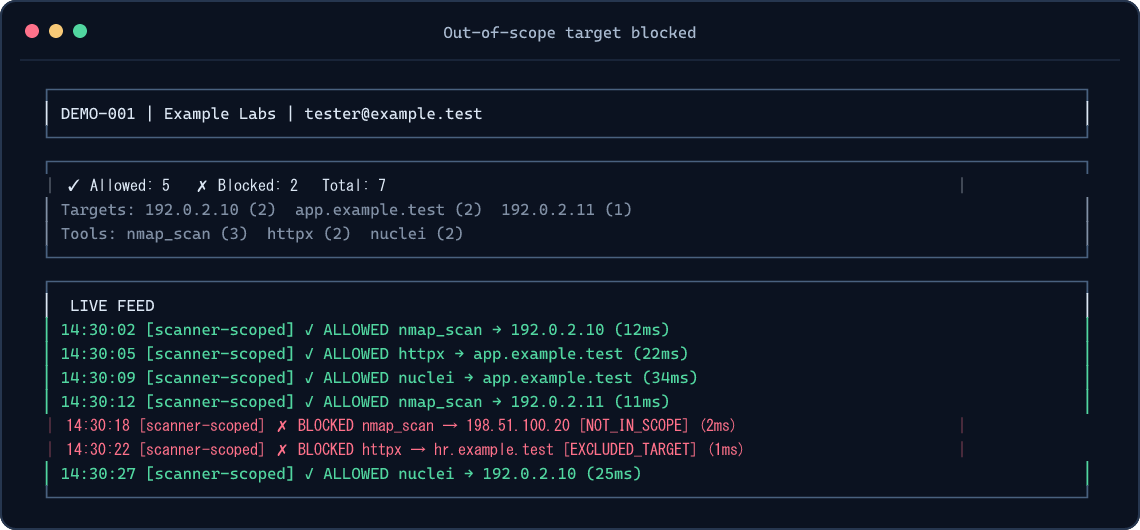
Watch decisions in another terminal:
pentest-tui --audit-path ./auditSetup prints the exact audit path to use. If your shell is in another directory, use that printed path. For a one-off TUI without a global install:
npm exec --yes --package=@integsec/agentic-pentest-proxy -- pentest-tui --audit-path ./auditThe TUI reads local audit files; it does not start the proxy. See TUI screenshots.
Other MCP tool types
| Tool connection | What to do |
|---|---|
| stdio tool launched by a command | Use the setup command above with -- <command> [args...]. |
| SSE upstream already listening, such as Burp Suite | Use pentest-setup --name burp-scoped --manifest ./scope.json --sse http://127.0.0.1:9876. |
| HTTP upstream | Run the proxy as an HTTP service and point your MCP client at it. HTTP and Docker guide. |
Use one generated client entry per upstream tool. A single scope manifest can be shared by several entries; each call still gets checked. More client examples.
What gets checked
The proxy checks MCP tools/call arguments it can inspect. It blocks unknown target-bearing arguments, out-of-scope targets, explicit exclusions, restricted techniques, expired engagement windows, and free-form commands by default. DNS names authorized through IP ranges must resolve entirely inside the allowed ranges. Local JSONL auditing is always on; cloud logging is optional.
The proxy cannot control destinations selected inside an upstream tool, HTTP redirects, targets read from files or encoded payloads, DNS changes after validation, or traffic that bypasses MCP. Use network egress controls and review each upstream tool's schema before relying on the proxy for an engagement. Security model.
Install and release options
| Option | Command or image |
|---|---|
| Global npm install | npm install -g @integsec/agentic-pentest-proxy |
| Project install | npm install @integsec/agentic-pentest-proxy |
| GHCR image | ghcr.io/integsec/agentic-pentest-proxy:latest |
| Docker Hub image | integsec/agentic-pentest-mcp-proxy:latest |
The npm package includes the gateway, proxy, manifest builder, setup helper, TUI, bridge, and scanner adapter. Run pentest-gateway version or pentest-gateway --version to check the installed release. The older integsec- command names still work for existing client configurations. To see the optional install welcome banner, add --foreground-scripts; npm hides package install-script output by default. You can always run pentest-gateway --help for the same next steps. The welcome script does not access the network or modify files.
Google Cloud logging and Secret Manager SDKs are opt-in to keep the default install lean and free of their deprecated transitive package. If you use either GCP backend, install the SDKs alongside the proxy:
npm install -g @integsec/agentic-pentest-proxy @google-cloud/logging @google-cloud/secret-manager
AWS and Azure SDKs are included as optional dependencies. See configuration and cloud setup for the required environment variables and Docker notes. If you use GCP and are upgrading from 0.2.6, install the GCP SDKs before restarting the proxy; it now reports a missing Cloud Logging SDK at startup.
Troubleshooting
| Symptom | Check |
|---|---|
| Tool does not appear in your MCP client | Paste the generated entry inside one mcpServers object, restart the client, and confirm the client can run pentest-proxy. |
| TUI shows no decisions | Start a tool call, then use the exact audit path printed by setup. The TUI and client may have different working directories. |
| Call is blocked | Check the decision and reason in the TUI or audit JSONL. Confirm the target, exclusions, technique, and window in your manifest. |
| GCP backend says its SDK is missing | Install the two GCP packages shown above alongside the proxy. |
| Need all CLI options | Run pentest-gateway --help, pentest-proxy --help, pentest-setup --help, pentest-manifest --help, or pentest-tui --help. |
Reference
- Configuration and manifest fields
- Client integrations, HTTP, and Docker
- TUI usage and screenshots
- Security model and limitations
- Contributing and development
License
Apache-2.0. See LICENSE.
agentic-pentest-proxy MCP questions
How do I add agentic-pentest-proxy MCP to Claude Code?
Run claude mcp add agentic-pentest-proxy -- npx -y @integsec/agentic-pentest-proxy in your terminal. Add --scope user to make it available in every project.
How do I add agentic-pentest-proxy MCP to Cursor?
Open ~/.cursor/mcp.json and add the server under mcpServers, using the Cursor config shown in the install section above.
What does the proxy actually check?
It inspects MCP tool call arguments to block unknown target-bearing arguments, out-of-scope targets, restricted techniques, and expired engagement windows.
Can the proxy prevent an agent from bypassing checks via a separate shell?
No, the gateway cannot prevent an agent with a separate shell or network path from bypassing the MCP checks.
What types of MCP tool connections are supported?
The proxy supports stdio tools, SSE upstreams (like Burp Suite), and HTTP upstreams.