
Fetchira MCP server
Commit Nov 12, 2026Enables AI agents to perform web searches, read web pages, conduct deep research, and generate images through a single unified router.
Also known as ImmuneFOMO/fetchira
- Stars
- 10
- Tools
- —
- Downloads, 30 days
- —
- Latest version
- —
- Last commit
- Nov 12, 2026
- License
- Apache-2.0
What is Fetchira MCP?
Fetchira enables AI agents to perform web searches, read web pages, conduct deep research, and generate images through a single unified router.
Summary generated from the project's README
About Fetchira MCP server
Fetchira acts as a unified router that allows AI agents to perform web searches, read web pages, conduct deep research, and generate images. It manages 24 different providers through six MCP tools, combining 21 API-based services and three browser sessions. This approach prevents the massive token bloat that occurs when connecting many individual MCP servers, as the entire tool list is approximately 2.7k tokens compared to the 95k tokens required by connecting providers one by one.
Developers can use this server locally via the CLI or connect an agent through MCP. Setup requires an API key or a supported web session for the chosen providers. The system automatically selects accounts with remaining quota, handles error failovers, and centralizes provider limits in one place. Users can install it using npx, Homebrew, or a shell script on macOS and Linux. For remote use, you can connect to a hosted server using a specific URL and API key provided by an administrator.
What you can do with it
- 1Consolidated web researchAsk an AI agent to search for information and read specific websites using a single interface.
- 2Efficient tool managementReduce the token overhead sent to an AI model by using a router instead of many individual servers.
- 3Automated quota handlingInstruct an agent to perform tasks while the router automatically manages API limits and errors.
- 4Remote agent connectionConnect an AI agent to a pre-configured hosted Fetchira server using a URL and key.
Written from the project's README. Every use case is checked against a quote from it.
Automated checks
Ran Nov 14, 2026Full report →Not verified yet. A server needs a score of 80, no serious finding, and enough data for us to check. How checks work · What to fix for more points

- Source repository linked and reachableimmunefomo/fetchira is public and reachablegithub.com/immunefomo/fetchira ↗Pass
- Package names this repository as its sourceNot checked
- Build provenance (Sigstore attestation)Not checked
- Open source license (OSI)Apache-2.0spdx.org/licenses/Apache-2.0.html ↗Pass
- Commit or release in the last yearLast commit or release 2026-11-12github.com/immunefomo/fetchira ↗Pass
- OpenSSF ScorecardNot checked
- Package name not close to a popular packageNot checked
- No critical advisory in the package or its dependenciesNot checked
- No hidden instructions to the model0 tool descriptions and the README read; no override phrases, credential paths or hidden charactersPass
- Destructive tools are labelledNot checked
- Remote endpoint answers the MCP handshakeNot checked
README
View on GitHub
Fetchira
Website and docs: fetchira.dev
Web search, page reading, deep research and image generation through one router. Use the CLI or connect your agent through MCP. Bring an API key or a supported web session; Fetchira routes requests across your configured accounts and providers.
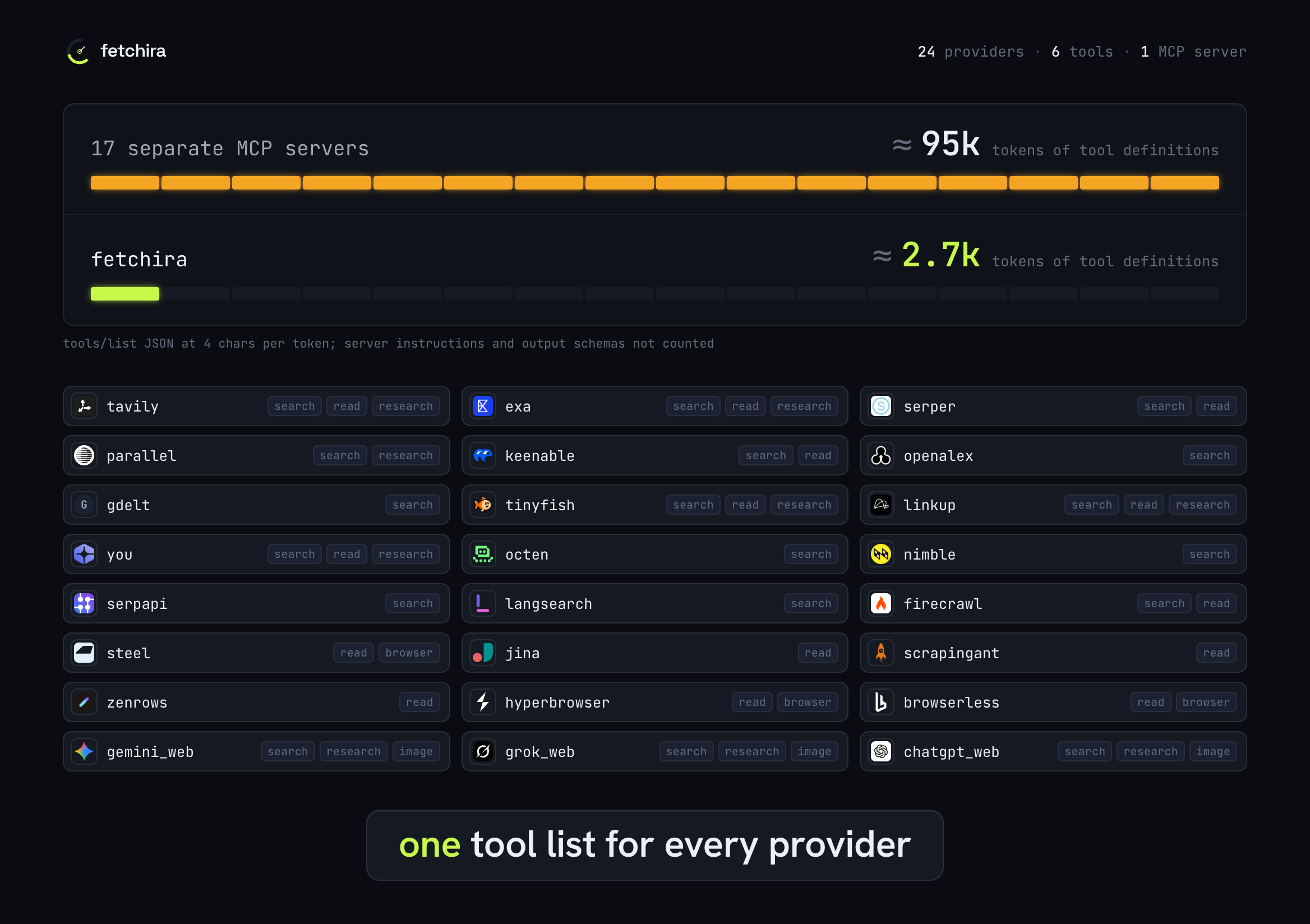
Fetchira covers 24 providers, 21 through APIs and 3 through browser sessions, behind six MCP tools. Connected one by one, the 17 providers that publish an official MCP server add about 95k tokens of tool definitions to every request, a median of 3.7k per server; the whole Fetchira tool list is about 2.7k. One router picks the account with quota left, fails over on errors and keeps every provider's limit in one place. Provider names and logos belong to their respective owners.
Start locally
Install and open the dashboard with one command (macOS or Linux, needs Node.js):
npx -y fetchira
Or install on macOS with Homebrew:
brew install ImmuneFOMO/tap/fetchira
On Linux or macOS without Homebrew:
curl -fsSL https://raw.githubusercontent.com/ImmuneFOMO/fetchira/main/install.sh | sh
See installation for Linux arm64, building from source and PATH setup.
Add a provider and make a request:
fetchira add serper --key 'YOUR_SERPER_KEY'
fetchira search "latest Rust release"
fetchira read "https://example.com"
Get a Serper key at serper.dev, or run fetchira providers to choose
another provider. Each provider has its own plan and quota; paid features can consume a
paid balance. For browser login instead of an API key, run fetchira add gemini_web.
MCP is optional. Run fetchira setup to choose local accounts or an existing hosted server.
For an agent, fetchira install offers CLI only, MCP, or MCP with CLI fallback, then installs
the matching skill in your selected agents. Restart the agent after installation.
fetchira ui opens the local dashboard.
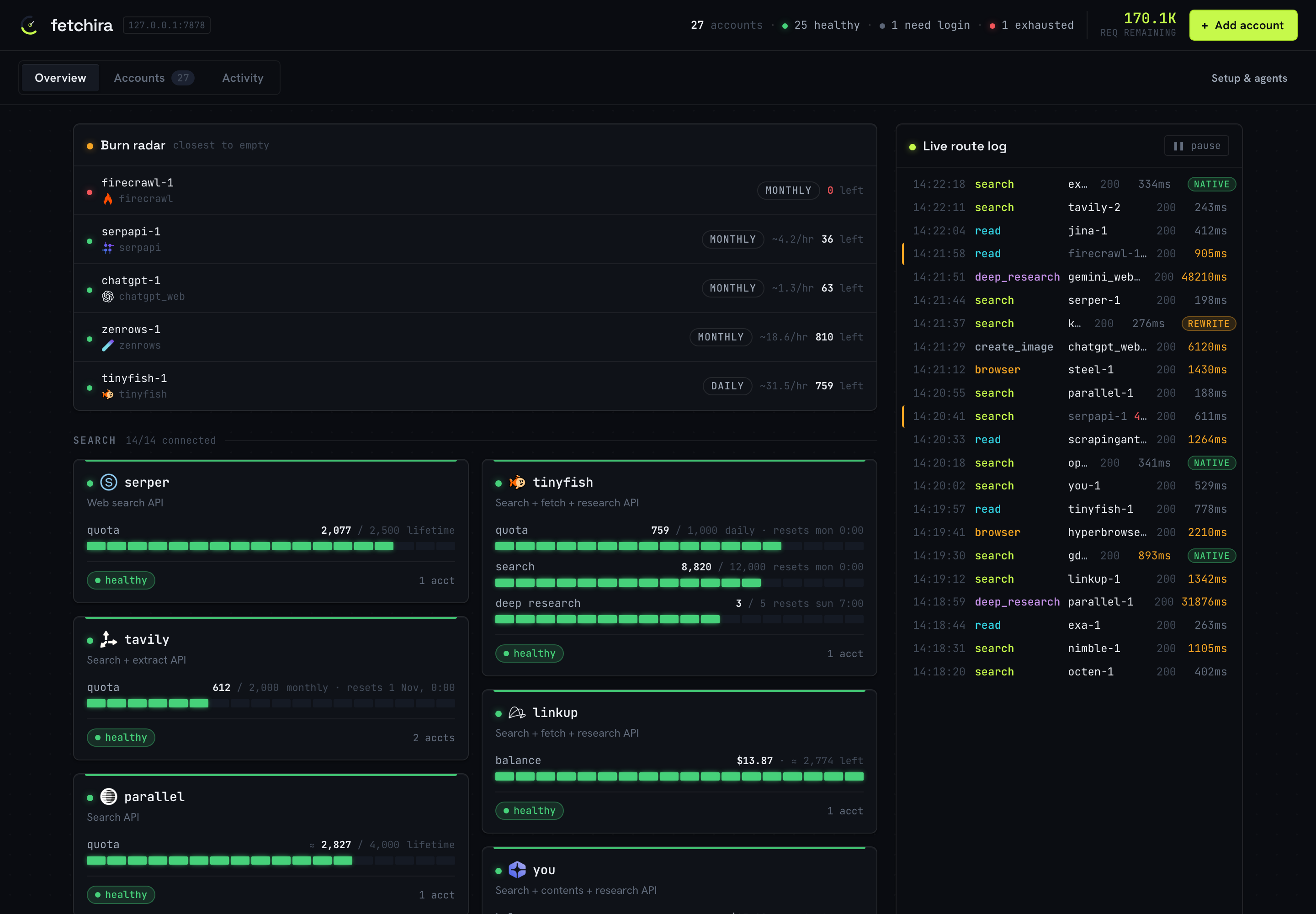
Choose a guide
| I want to… | Guide |
|---|---|
| Install, connect an agent, or choose a skill | Setup |
| Search, research, generate images, or continue a session from a shell | CLI |
| Manage accounts, quotas, proxies, or troubleshoot a failure | Configuration |
| Share one private server through CLI or MCP | Hosted deployment |
| Build, test, contribute, or release | Contributing · Releasing |
Hosted
To use an existing server, get its URL and API key from the administrator. Run
fetchira setup and choose Connect to a server to verify access before saving.
For scripted setup, save the connection and check it:
fetchira remote set https://fetchira.example.com/mcp --key 'fk_live_...'
fetchira remote check
CLI and MCP both use the configured server; generated images and PDFs are saved on your computer. Laptop file attachments require local mode through either interface. See hosted deployment to run your own server.
Fetchira MCP questions
Can I use Fetchira without an API key?
Yes, you can use browser sessions for certain providers instead of an API key, such as using fetchira add gemini_web for browser login.
Where are generated images and PDFs saved?
Generated images and PDFs are saved directly to your computer.
Does Fetchira support hosted servers?
Yes, you can connect to an existing hosted server by providing its URL and API key.