
Allows an AI agent to publish tracked web pages, control recipient access, monitor reading engagement, and update content via a single link.
Also known as htmlradar/htmlradar-mcp, htmlradar-mcp
- Stars
- 0
- Tools
- 16
- Downloads, 30 days
- 1,044
- Latest version
- 0.9.0
- Last commit
- Nov 11, 2026
- License
- —
What is HTMLRadar MCP?
HTMLRadar allows an AI agent to publish tracked web pages, control recipient access, monitor reading engagement, and update content via a single link. It exposes 16 tools, such as share_html, create_share, list_shares.
Summary generated from the project's README
About HTMLRadar MCP server
HTMLRadar provides a way for AI agents to transform web documents into controlled, tracked links. This service allows developers to publish HTML content that remains current on the same URL even after updates. Users can manage recipient access, monitor how long readers stay on specific sections, and see exactly how far they scroll. It is designed for use with clients like Claude Desktop, Cursor, and Claude Code.
Setup depends on the client being used. For most desktop clients, you connect to the remote server at mcp.htmlradar.com and sign in via a browser using Google, Microsoft, or email. This OAuth process handles permissions without needing to copy manual keys. For clients that do not support browser-based sign-in, you can use the htmlradar-mcp npm package by providing an API key through an environment variable.
The server includes sixteen tools for managing content. These include share_html for publishing new links, get_share_activity to monitor engagement, and replace_document to update existing pages. While read-only connections can view activity, publishing and updating content requires a read-and-publish permission level.
What you can do with it
- 1Publish tracked web documentsAn agent can turn an HTML page into a unique link that tracks reader engagement.
- 2Monitor reader engagementA developer can ask an AI to report how long people spent reading specific sections of a document.
- 3Update live contentYou can instruct an agent to change the content of a page without changing the URL sent to recipients.
- 4Manage recipient accessAn AI can adjust the settings of a shared link to control who is allowed to view it.
Written from the project's README. Every use case is checked against a quote from it.
How to install HTMLRadar MCP
Formats verified 10 Nov 2026Add to CursorAdd to GooseInstall HTMLRadar MCP in Claude Code
$ claude mcp add --env 'HTMLRADAR_API_KEY=<YOUR_HTMLRADAR_API_KEY>' htmlradar-mcp -- npx -y htmlradar-mcpInstall HTMLRadar MCP in Cursor
~/.cursor/mcp.json
{
  "mcpServers": {
    "htmlradar-mcp": {
      "command": "npx",
      "args": [
        "-y",
        "htmlradar-mcp"
      ],
      "env": {
        "HTMLRADAR_API_KEY": "<YOUR_HTMLRADAR_API_KEY>"
      }
    }
  }
}Install HTMLRadar MCP in VS Code
.vscode/mcp.json
{
  "servers": {
    "htmlradar-mcp": {
      "type": "stdio",
      "command": "npx",
      "args": [
        "-y",
        "htmlradar-mcp"
      ],
      "env": {
        "HTMLRADAR_API_KEY": "<YOUR_HTMLRADAR_API_KEY>"
      }
    }
  }
}Install HTMLRadar MCP in VS Code CLI
$ code --add-mcp '{"name":"htmlradar-mcp","type":"stdio","command":"npx","args":["-y","htmlradar-mcp"],"env":{"HTMLRADAR_API_KEY":"<YOUR_HTMLRADAR_API_KEY>"}}'Install HTMLRadar MCP in Claude Desktop
claude_desktop_config.json
{
  "mcpServers": {
    "htmlradar-mcp": {
      "command": "npx",
      "args": [
        "-y",
        "htmlradar-mcp"
      ],
      "env": {
        "HTMLRADAR_API_KEY": "<YOUR_HTMLRADAR_API_KEY>"
      }
    }
  }
}Install HTMLRadar MCP in Codex
$ codex mcp add htmlradar-mcp --env 'HTMLRADAR_API_KEY=<YOUR_HTMLRADAR_API_KEY>' -- npx -y htmlradar-mcpInstall HTMLRadar MCP in Codex config.toml
~/.codex/config.toml
[mcp_servers.htmlradar-mcp]
command = "npx"
args = ["-y", "htmlradar-mcp"]

[mcp_servers.htmlradar-mcp.env]
HTMLRADAR_API_KEY = "<YOUR_HTMLRADAR_API_KEY>"
Install HTMLRadar MCP in Gemini CLI
$ gemini mcp add -s user -e 'HTMLRADAR_API_KEY=<YOUR_HTMLRADAR_API_KEY>' htmlradar-mcp npx -- -y htmlradar-mcpInstall HTMLRadar MCP in Gemini settings.json
~/.gemini/settings.json
{
  "mcpServers": {
    "htmlradar-mcp": {
      "command": "npx",
      "args": [
        "-y",
        "htmlradar-mcp"
      ],
      "env": {
        "HTMLRADAR_API_KEY": "<YOUR_HTMLRADAR_API_KEY>"
      }
    }
  }
}HTMLRadar MCP tools 16
Detected from the READMEshare_htmlcreate_sharelist_shareslist_documentsget_share_activityget_reading_recordsget_shareupdate_sharerevoke_shareget_documentreplace_documentlist_attachments
| share_html | — | |
| create_share | — | |
| list_shares | — | |
| list_documents | — | |
| get_share_activity | — | |
| get_reading_records | — | |
| get_share | — | |
| update_share | — | |
| revoke_share | — | |
| get_document | — | |
| replace_document | — | |
| list_attachments | — |
Show all 16 toolsShow fewer tools
add_attachmentremove_attachmentwhoamiget_page_guidelines
| add_attachment | — | |
| remove_attachment | — | |
| whoami | — | |
| get_page_guidelines | — |
Configuration
HTMLRADAR_API_KEYRequiredSecretHTMLRadar API key, created at https://htmlradar.com/settings under "API keys". Starts with hr_live_.
| Name | Description | |
|---|---|---|
| HTMLRADAR_API_KEY | HTMLRadar API key, created at https://htmlradar.com/settings under "API keys". Starts with hr_live_. | RequiredSecret |
Automated checks
Ran Nov 12, 2026Full report →Passed our automated checks. That is not a security audit: read the code and give the server the narrowest access it needs. How checks work · What to fix for more points

- Source repository linked and reachablePass
- Open source license (OSI)No licenseFinding
- Commit or release in the last yearPass
- Package name not close to a popular packagePass
- Remote endpoint uses HTTPSPass
- Destructive tools are labelledNot checked
- No hidden instructions to the modelPass
- No critical advisory in the package or its dependenciesPass
README
View on GitHubHTMLRadar for Claude, Cursor and any MCP client
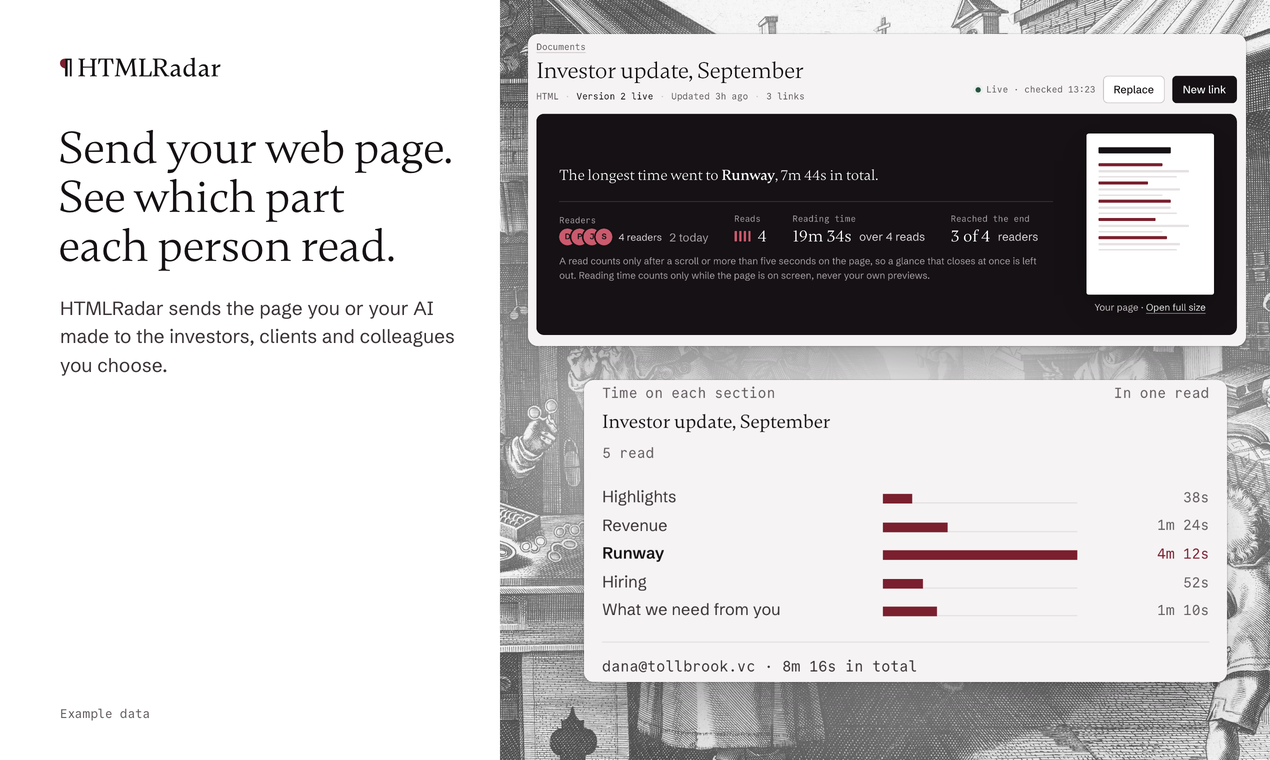
HTMLRadar turns a web-page document into a link you control: only the people you choose can open it, you see who read it and which sections they stayed on, and it stays current on the same link.
This repository holds what you need to connect HTMLRadar to your agent: the Claude Code plugin, a skill that teaches your agent when to offer a tracked link, and the description of the connector for the MCP Registry. HTMLRadar itself is a hosted service at htmlradar.com.
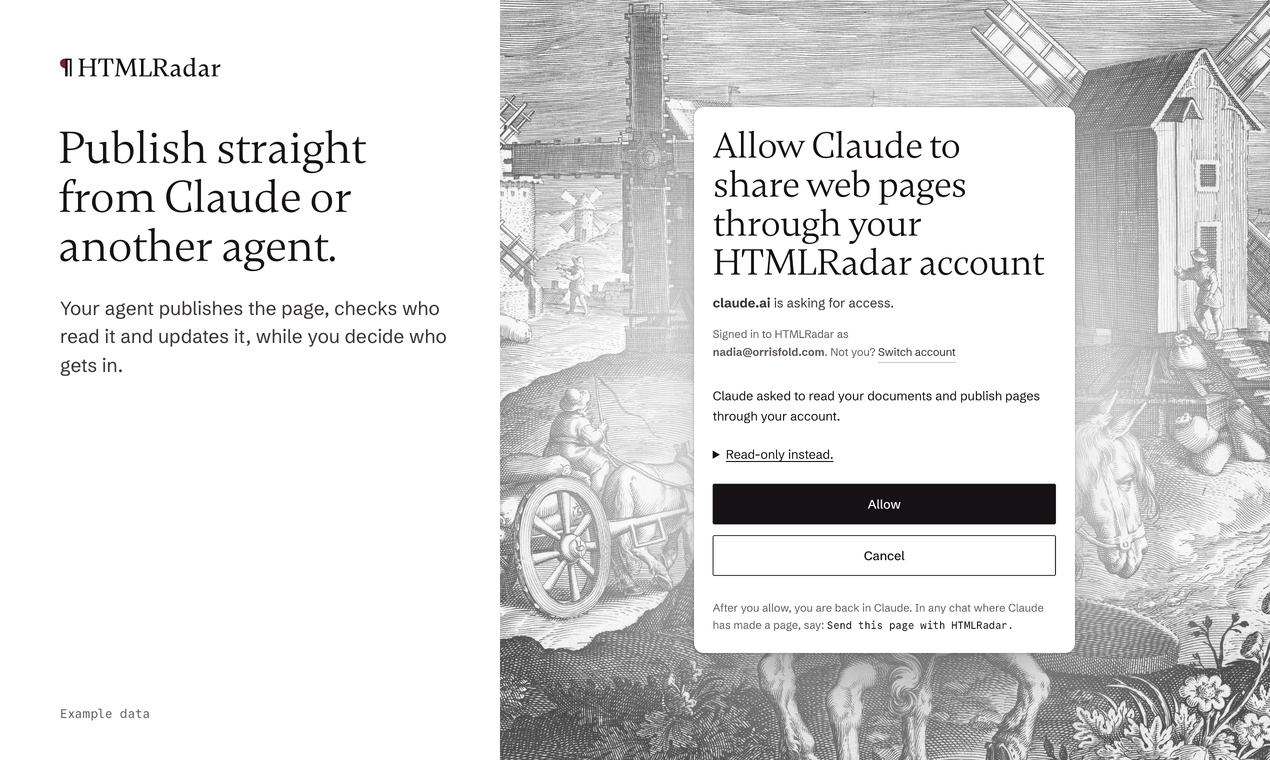
Your agent publishes the page, checks who read it and updates it, while you decide who gets in. Readers need no account and nothing to install.
Install
Every client below connects to the same server, https://mcp.htmlradar.com/mcp. The first time your agent uses it, a browser page opens: you sign in to HTMLRadar (with Google, Microsoft or your e-mail address) and choose read-only or read-and-publish. There is no key to copy. You can end a connection at any time under Connected apps in Settings.
Claude Code
/plugin marketplace add htmlradar/htmlradar-mcp
/plugin install htmlradar@htmlradar
Then run /mcp, choose htmlradar and sign in.
Prefer not to use the plugin? This adds the same tools on their own:
claude mcp add --transport http --scope user htmlradar https://mcp.htmlradar.com/mcp
Claude Desktop and claude.ai
Open Settings, then Connectors, then Add custom connector, and paste:
https://mcp.htmlradar.com/mcp
The first time Claude reaches for a tool, it shows a Connect card that opens the sign-in.
On Claude Team and Enterprise, an Owner adds the connector for the organization first; see htmlradar.com/mcp.
Cursor
Put this in ~/.cursor/mcp.json:
{
  "mcpServers": {
    "htmlradar": { "url": "https://mcp.htmlradar.com/mcp" }
  }
}
Then log in to HTMLRadar from Cursor's MCP settings. From the command line, cursor-agent mcp login htmlradar starts the same sign-in.
Any other MCP client
-
Remote, with sign-in: if your client supports remote MCP servers with OAuth sign-in, point it at
https://mcp.htmlradar.com/mcp. The server publishes standard OAuth discovery and accepts both client metadata documents and client registration. -
Package, with an API key: for a client without OAuth sign-in, create an API key at htmlradar.com/settings under API keys and run
npx -y htmlradar-mcp(Node.js 20 or newer) withHTMLRADAR_API_KEYset in its environment. The package ishtmlradar-mcpon npm. In Cursor, for example:{ "mcpServers": { "htmlradar": { "command": "npx", "args": ["-y", "htmlradar-mcp"], "env": { "HTMLRADAR_API_KEY": "${env:HTMLRADAR_API_KEY}" } } } }
The server is listed in the MCP Registry as com.htmlradar/share; server.json here is its description.
The 16 tools
Every tool is visible to every connection. A read-only connection can use the reading tools; the others need read-and-publish.
| Tool | What it does | Changes anything |
|---|---|---|
share_html |
Publishes an HTML page as a new tracked link and returns the link for the reader and a dashboard address for you. | Yes |
create_share |
Makes another tracked link for a document already on HTMLRadar, so each recipient has their own. | Yes |
list_shares |
Lists your tracked links, newest first, with the ids the other tools take. | No |
list_documents |
Lists your documents, including ones never sent. | No |
get_share_activity |
Reports who opened a link, how long they read, how far they scrolled and which sections held them. | No |
get_reading_records |
Returns the reading records, one row per section per read, as CSV text. | No |
get_share |
Reads a link's settings: who can open it, the e-mail gate, the end date and the copy lock. | No |
update_share |
Changes those settings on the same link. | Yes, ask first |
revoke_share |
Switches a link off, or back on. | Yes, ask first |
get_document |
Reads a document's current contents so they can be changed. | No |
replace_document |
Puts new contents behind links already sent, on the same addresses. | Yes, ask first |
list_attachments |
Lists the files attached to a document. | No |
add_attachment |
Attaches a file for readers to download beside the page. | Yes |
remove_attachment |
Removes an attached file. | Yes, ask first |
whoami |
Shows which account the connection belongs to, its plan and how many free tracked links are used. | No |
get_page_guidelines |
Returns HTMLRadar's guidelines for pages that read well on phones and give accurate section reading. | No |
"Ask first" marks the tools that change what someone who already holds a link sees. The share-html skill in the plugin tells your agent to name the recipient and the document and get a yes before using them.
Plans
Free accounts can send two tracked links. Plans and prices are at htmlradar.com/pricing.
Support
Write to hello@htmlradar.com.
What is in this repository
| Path | What it is |
|---|---|
.claude-plugin/marketplace.json |
The Claude Code marketplace that makes the install commands above work. |
plugins/htmlradar/ |
The plugin: its manifest, .mcp.json and the share-html skill. |
server.json |
The connector's description for the MCP Registry. |
LICENSE |
Copyright notice. |
Licence
Copyright 2026 HTMLRadar. All rights reserved. The files here are provided to install the HTMLRadar plugin and connector.
HTMLRadar MCP questions
How do I add HTMLRadar MCP to Claude Code?
Run claude mcp add --env 'HTMLRADAR_API_KEY=<YOUR_HTMLRADAR_API_KEY>' htmlradar-mcp -- npx -y htmlradar-mcp in your terminal. Add --scope user to make it available in every project.
How do I add HTMLRadar MCP to Cursor?
Open ~/.cursor/mcp.json and add the server under mcpServers, using the Cursor config shown in the install section above.
What tools does HTMLRadar MCP provide?
It exposes 16 tools, including share_html, create_share, list_shares, list_documents, get_share_activity.
How do I connect HTMLRadar to my agent?
You can connect via the Claude Code plugin, by adding the remote MCP URL to Claude Desktop or Cursor, or by using an API key with the npx htmlradar-mcp package.
Do readers need an account to view my shared pages?
No, readers do not need to create an account or install any software to view the content.
Can I update a document without changing the link?
Yes, you can use the replace_document tool to put new content behind existing links.
What kind of reading data can I track?
You can see who opened a link, how long they read, how far they scrolled, and which specific sections they spent time on.