
Deploy static sites and files to live HTTPS URLs directly from an AI agent without repositories or build steps.
Also known as hostsmith/mcp-server, @hostsmith/mcp-server
- Stars
- 0
- Tools
- 16
- Downloads, 30 days
- 1,637
- Latest version
- 1.8.0
- Last commit
- Nov 14, 2026
- License
- MIT
What is Hostsmith MCP?
Hostsmith deploys static sites and files to live HTTPS URLs directly from an AI agent without repositories or build steps. It exposes 16 tools, such as list_sites, get_site, create_site.
Summary generated from the project's README
About Hostsmith MCP server
Deploying static websites and files to live HTTPS URLs directly from an AI agent is what this server enables. It allows developers to turn generated files into public web pages in seconds without managing repositories, build configurations, or CI pipelines. The server is designed for artifact-first workflows where an agent can immediately host an HTML report, a demo, or a one-pager.
Users can connect via Claude Desktop, Claude.ai, Cursor, or through stdio for tools like Claude Code and Windsurf. Authentication is handled through OAuth 2.0, requiring a browser-based authorization flow rather than static tokens. The server supports both local installation via npx and remote connections through a hosted URL. It provides granular control over site management, including tools to create, delete, and list sites, as well as managing redirects and file deployments. Users can also choose between US or EU data residency to meet specific architectural requirements.
What you can do with it
- 1Publishing generated web demosAn AI agent can take a generated HTML file and host it on a live URL for immediate previewing.
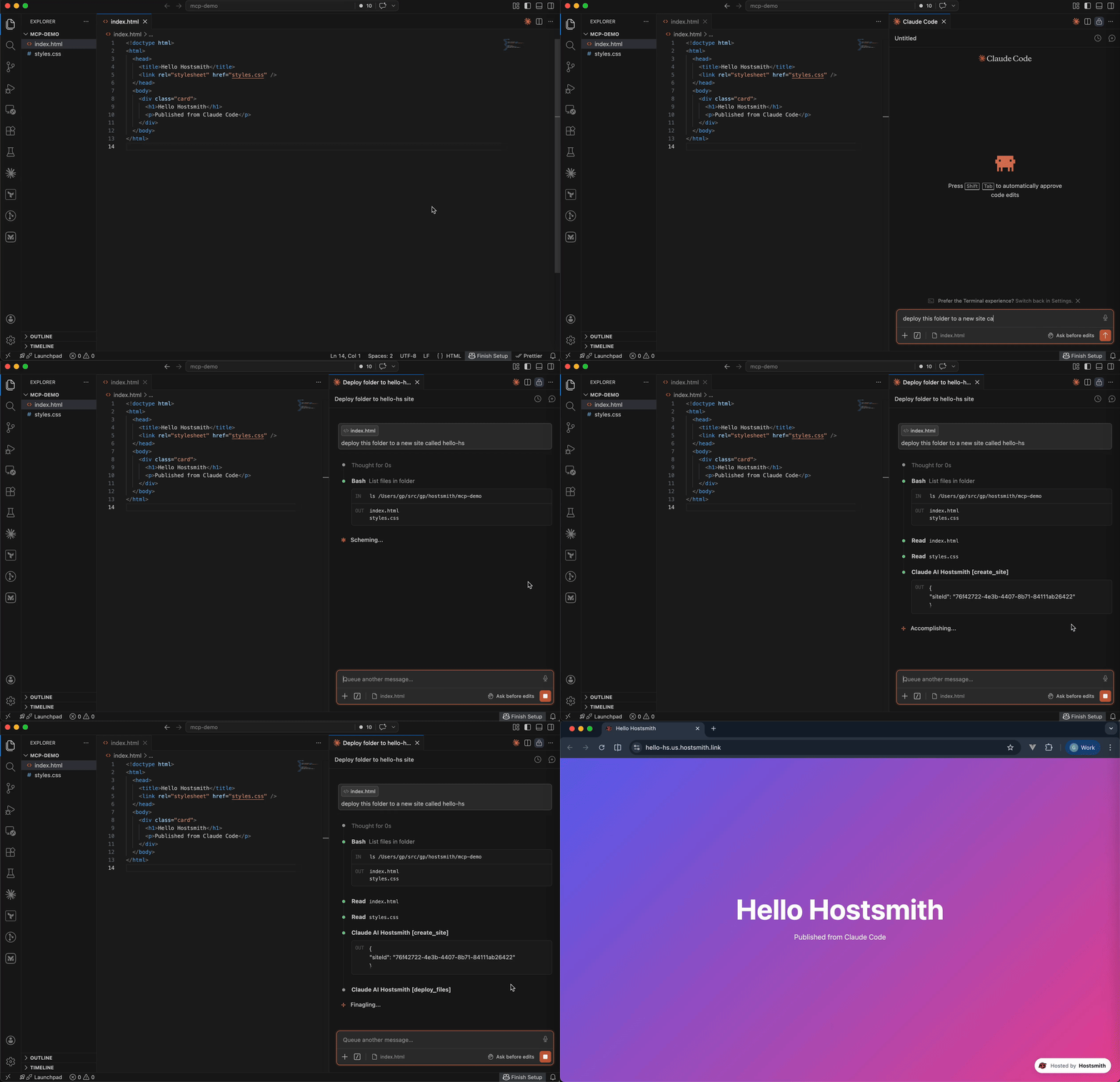
- 2Deploying instant HTML reportsDevelopers can use Claude Code to ship data reports directly to a public HTTPS address.
- 3Managing site redirect rulesYou can instruct an agent to add, update, or delete specific URL redirect rules for your custom domains.
- 4Handling large binary uploadsThe server provides specific tools to manage direct uploads for large files or binaries.
Written from the project's README. Every use case is checked against a quote from it.
How to install Hostsmith MCP
Formats verified 10 Nov 2026Add to CursorAdd to GooseInstall Hostsmith MCP in Claude Code
$ claude mcp add mcp-server -- npx -y @hostsmith/mcp-serverInstall Hostsmith MCP in Cursor
~/.cursor/mcp.json
{
  "mcpServers": {
    "mcp-server": {
      "command": "npx",
      "args": [
        "-y",
        "@hostsmith/mcp-server"
      ]
    }
  }
}Install Hostsmith MCP in VS Code
.vscode/mcp.json
{
  "servers": {
    "mcp-server": {
      "type": "stdio",
      "command": "npx",
      "args": [
        "-y",
        "@hostsmith/mcp-server"
      ]
    }
  }
}Install Hostsmith MCP in VS Code CLI
$ code --add-mcp '{"name":"mcp-server","type":"stdio","command":"npx","args":["-y","@hostsmith/mcp-server"]}'Install Hostsmith MCP in Claude Desktop
claude_desktop_config.json
{
  "mcpServers": {
    "mcp-server": {
      "command": "npx",
      "args": [
        "-y",
        "@hostsmith/mcp-server"
      ]
    }
  }
}Install Hostsmith MCP in Codex
$ codex mcp add mcp-server -- npx -y @hostsmith/mcp-serverInstall Hostsmith MCP in Codex config.toml
~/.codex/config.toml
[mcp_servers.mcp-server]
command = "npx"
args = ["-y", "@hostsmith/mcp-server"]
Install Hostsmith MCP in Gemini CLI
$ gemini mcp add -s user mcp-server npx -- -y @hostsmith/mcp-serverInstall Hostsmith MCP in Gemini settings.json
~/.gemini/settings.json
{
  "mcpServers": {
    "mcp-server": {
      "command": "npx",
      "args": [
        "-y",
        "@hostsmith/mcp-server"
      ]
    }
  }
}Hostsmith MCP tools 16
Detected from the READMElist_sitesget_sitecreate_sitedelete_sitelist_domainsget_accountdeploy_filesdeploy_create_uploaddeploy_finalizelist_redirectsset_redirectsedit_redirects
| list_sites | — | |
| get_site | — | |
| create_site | — | |
| delete_site | — | |
| list_domains | — | |
| get_account | — | |
| deploy_files | — | |
| deploy_create_upload | — | |
| deploy_finalize | — | |
| list_redirects | — | |
| set_redirects | — | |
| edit_redirects | — |
Show all 16 toolsShow fewer tools
add_redirectdelete_redirectswitch_file_redirectstest_redirect
| add_redirect | — | |
| delete_redirect | — | |
| switch_file_redirects | — | |
| test_redirect | — |
Configuration
HOSTSMITH_API_DOMAINOverride the upstream API domain across both partitions; 'us.api.' and 'eu.api.' are prepended to this value.
HOSTSMITH_BASE_URLOverride the API base URL with a single fixed value, bypassing partition selection entirely.
HOSTSMITH_URLHostsmith app URL (OAuth endpoints).
| Name | Description | |
|---|---|---|
| HOSTSMITH_API_DOMAIN | Override the upstream API domain across both partitions; 'us.api.' and 'eu.api.' are prepended to this value. | |
| HOSTSMITH_BASE_URL | Override the API base URL with a single fixed value, bypassing partition selection entirely. | |
| HOSTSMITH_URL | Hostsmith app URL (OAuth endpoints). |
Automated checks
Ran Nov 13, 2026Full report →Passed our automated checks. That is not a security audit: read the code and give the server the narrowest access it needs. How checks work

- Source repository linked and reachablePass
- Open source license (OSI)Pass
- Commit or release in the last yearPass
- Package name not close to a popular packagePass
- Remote endpoint uses HTTPSPass
- Destructive tools are labelledNot checked
- No hidden instructions to the modelPass
- No critical advisory in the package or its dependenciesPass
README
View on GitHub@hostsmith/mcp-server



Official Model Context Protocol server for the Hostsmith hosting platform.
Static hosting for agents - give it a file, get a live URL. Claude Code shipping an HTML report. Cursor previewing a generated demo. Claude publishing a one-pager from claude.ai or Desktop. One MCP call → public HTTPS URL in seconds. No repo, no CI, no build step. Custom domains, private sites, EU or US data residency.
Why Hostsmith
- Artifact-first. No repo, no build config - drop a file (or have the agent generate one), get a URL.
- Built for agents. MCP-native, OAuth-scoped, structured tool descriptions agents can chain.
- EU or US data residency. Pick where the user's data lives, architecturally - not via a checkbox.
Tools
| Tool | Description |
|---|---|
list_sites |
List all sites in your account for a given data partition |
get_site |
Get details of a specific site |
create_site |
Create a new site, or a redirect host |
delete_site |
Delete a site |
list_domains |
List available domains (shared and custom) |
get_account |
Get account info, subscription plan, and usage |
deploy_files |
Deploy inline file contents to a site |
deploy_create_upload |
Start a direct upload for binaries / large files |
deploy_finalize |
Commit a deploy started with deploy_create_upload |
list_redirects |
List a site's redirect rules, in the order they are checked |
set_redirects |
Replace a site's user redirect rules, from rules or _redirects text |
edit_redirects |
Add, update and delete user redirect rules in one batch |
add_redirect |
Add one user redirect rule |
delete_redirect |
Delete one user redirect rule |
switch_file_redirects |
Switch the live deploy's _redirects rules off or back on |
test_redirect |
Test a path against the live or draft redirect rules |
Redirects apply only on your organization's own custom domains. User rules, kept on the hostname and changed through these tools, are checked before the live deploy's _redirects.
To forward a hostname with no content of its own, such as a retired domain or a campaign link, create a redirect host: create_site with kind: "redirect", then add its rules. A redirect host serves only its rules and takes no deploys. It doesn't count toward your plan's site limit; an organization can have up to 50.
Usage
Authentication is via OAuth 2.0. Static access tokens are not supported.
Claude (claude.ai, Desktop, Cowork, mobile)
Add Hostsmith once as a custom connector and it works in every Claude app on your account.
-
In Claude, open Customize > Connectors, click + Add, then Add custom connector.
-
Enter
Hostsmithas the name and paste the MCP server URL:https://mcp.hostsmith.net/mcp -
Click Continue, finish adding the connector, then connect it. Claude opens Hostsmith in your browser to authorize the connector against your Hostsmith account.
Free Claude plans allow one custom connector. On Team and Enterprise plans, an owner adds the connector under Organization settings > Connectors, and each member then clicks Connect next to Hostsmith under Customize > Connectors to sign in with their own Hostsmith account.
Claude asks for your approval before each tool call. To change that, open Hostsmith under Customize > Connectors and set its Tool permissions.
To revoke, open Hostsmith under Customize > Connectors, click ⋯, then Remove (Team and Enterprise owners: Organization settings > Connectors). To force a re-auth, click Disconnect, then Connect.
Stdio (Claude Code, Cursor, Cline, Windsurf, Zed)
Add this entry to your MCP client's config:
{
  "mcpServers": {
    "hostsmith": {
      "command": "npx",
      "args": ["-y", "@hostsmith/mcp-server"]
    }
  }
}
The first tool call triggers an OAuth flow in your browser to authorize the server against your Hostsmith account.
Remote URL (other clients)
Any MCP client that supports remote Streamable HTTP transport can point directly at the hosted server:
{
  "mcpServers": {
    "hostsmith": {
      "url": "https://mcp.hostsmith.net/mcp"
    }
  }
}
The client handles the OAuth flow automatically - you'll be redirected to Hostsmith to authorize access.
Claude Code can use the hosted server directly too:
claude mcp add --transport http hostsmith https://mcp.hostsmith.net/mcp
Cursor (one-click install)

Click the badge to add the remote Hostsmith server (https://mcp.hostsmith.net/mcp) to Cursor. The first tool call triggers OAuth in your browser.
Local HTTP (self-hosted)
Run the server in HTTP mode and have your MCP client perform OAuth against it:
npx @hostsmith/mcp-server http
{
  "mcpServers": {
    "hostsmith": {
      "url": "http://localhost:3100/mcp"
    }
  }
}
Embedding the HTTP handler
createFetchHandler returns a Web-Standard (req: Request) => Promise<Response> handler, for hosting the server in your own runtime (a Lambda, an edge worker, a Node server). It reads no environment variables; pass the configuration:
import { createFetchHandler } from "@hostsmith/mcp-server";

const handler = createFetchHandler({
  hostsmithUrl: "https://hostsmith.net",
  mcpBaseUrl: "https://mcp.example.com",
  // Optional: called for every authenticated MCP request with that
  // request's new McpServer and the access token's decoded claims,
  // before the server handles the request.
  onServer: async (server, { claims }) => {
    // e.g. attach your own instrumentation to `server`
  },
});
onServer is awaited. If it throws, the error is logged and the request is handled as if there were no hook. The claims are decoded, not verified; the Hostsmith API verifies the token on every tool call. Hostsmith's hosted server at mcp.hostsmith.net uses this hook for its usage analytics. The package itself contains no analytics client and sends no telemetry, and the CLI passes no hook.
Environment variables
| Variable | Default | Description |
|---|---|---|
HOSTSMITH_URL |
https://hostsmith.net |
Hostsmith app URL (OAuth endpoints). |
HOSTSMITH_API_DOMAIN |
- | Override the upstream API domain across both partitions. The server prepends us.api. and eu.api. to the value you set. Example: HOSTSMITH_API_DOMAIN=staging.example.com routes calls to https://us.api.staging.example.com and https://eu.api.staging.example.com. Use this to point at a staging or proxied API host. |
HOSTSMITH_BASE_URL |
- | Override the API base URL with a single fixed value, bypassing partition selection entirely. |
PORT |
3100 |
HTTP server port. |
MCP_BASE_URL |
http://localhost:$PORT |
Public URL of the MCP server, used in OAuth metadata. |
Network access
The MCP transport and OAuth flow run in your client's app process and need no agent-sandbox configuration - if your MCP client connected, those paths are working.
The one place sandboxed agents commonly fail is the upload PUT during deploy_create_upload + deploy_finalize: the bytes go from the agent's shell to the partition API host. From the agent terminal, allow outbound HTTPS (port 443) to:
us.api.hostsmith.net(for sites in theuspartition)eu.api.hostsmith.net(for sites in theeupartition)
Sandbox-specific snippets (Cursor sandbox.json, Claude Code settings.json, Codex config.toml, generic firewall guidance) live in the Network access docs.
The server's own calls to the Hostsmith API identify themselves with User-Agent: hostsmith-mcp-server/<version> hostsmith-js-sdk/<version>.
Troubleshooting
- Tool calls return 401: the OAuth session expired. Reconnect from your MCP client to re-authorize.
- OAuth redirect loops: confirm
MCP_BASE_URLmatches the URL your MCP client uses to reach the server. - Wrong partition: tool calls accept an explicit
partitionarg; if you omit it, the partition is inferred from your access token. - Upload PUT fails (DNS, refused, proxy, timeout): the agent's shell can't reach the partition API host. See Network access.
- Inspect the install:
npx @modelcontextprotocol/inspector npx -y @hostsmith/mcp-server httpto browse tools interactively.
Documentation
Deeper material lives at hostsmith.net/docs/mcp.
Contributing
See CONTRIBUTING.md (including the Releases section for the version-stamping flow). Security issues: see SECURITY.md.
License
Hostsmith MCP questions
How do I add Hostsmith MCP to Claude Code?
Run claude mcp add mcp-server -- npx -y @hostsmith/mcp-server in your terminal. Add --scope user to make it available in every project.
How do I add Hostsmith MCP to Cursor?
Open ~/.cursor/mcp.json and add the server under mcpServers, using the Cursor config shown in the install section above.
What tools does Hostsmith MCP provide?
It exposes 16 tools, including list_sites, get_site, create_site, delete_site, list_domains.
Can I choose where my data is stored?
Yes, you can choose between EU or US data residency for your sites.