
Deploys and operates fleets of AI agents as production services with durable Postgres state, sandboxed execution, channels, and scheduled jobs.
Also known as HCF-STUDIOS/openhermit
- Stars
- 90
- Tools
- —
- Downloads, 30 days
- —
- Latest version
- —
- Last commit
- Nov 12, 2026
- License
- MIT
What is OpenHermit MCP?
OpenHermit deploys and operates fleets of AI agents as production services with durable Postgres state, sandboxed execution, channels, and scheduled jobs.
Summary generated from the project's README
About OpenHermit MCP server
Operating a group of AI agents as a shared service is what OpenHermit handles: it keeps every agent's sessions, memories, instructions, skills, MCP servers, schedules, secrets and users in PostgreSQL, scoped by agent_id, while the files an agent works on stay in a per-agent sandbox backed by Docker, E2B, Daytona or Tenki. A gateway control plane built on Hono starts, attaches and detaches agents without extra orchestration and serves an admin UI at /admin/.
The platform installs through npm, then `hermit setup` configures DATABASE_URL, GATEWAY_ADMIN_TOKEN and GATEWAY_JWT_SECRET; `hermit gateway start` and `hermit web start` bring up the gateway on port 4000 and the end-user web app on port 4310. Agents are created and started with `hermit agents create main` and `hermit agents start main`, and fleet changes roll out with flags such as `hermit skills enable standup-digest --all` or `hermit config secrets set OPENROUTER_API_KEY sk-... --agent main`.
Channels include Telegram, Discord and Slack adapters plus package-installed Signal, WeChat and WhatsApp, alongside CLI and Web UI. Schedules support cron and one-shot jobs with timeout, concurrency policy and error backoff, and roles are owner, user and guest. Deep Research adds durable, session-attached runs with a plan you approve and cited evidence, limited to HTML/text web sources and needing a configured web provider.
What you can do with it
- 1Roll a skill out fleet-wideGive every agent the same standup-digest skill with one command instead of editing each agent's files.
- 2Rotate one agent's API keyReplace an agent's provider secret without touching the others or exposing dotfiles.
- 3Push a rule to all agentsAppend a data-handling instruction across the whole fleet in a single admin fan-out.
- 4Run a cited research reportHave an agent plan a research run, search the web under fixed budgets and produce a report citing verified excerpts.
- 5Schedule recurring agent jobsSet a cron job for an agent with timeout, concurrency policy and error backoff.
Written from the project's README. Every use case is checked against a quote from it.
Configuration
OLLAMA_CONTEXT_LENGTH
Automated checks
Ran Nov 13, 2026Full report →Not verified yet. A server needs a score of 80, no serious finding, and enough data for us to check. How checks work · What to fix for more points

- Source repository linked and reachablehcf-studios/openhermit is public and reachablegithub.com/hcf-studios/openhermit ↗Pass
- Package names this repository as its sourceNot checked
- Build provenance (Sigstore attestation)Not checked
- Open source license (OSI)MITspdx.org/licenses/MIT.html ↗Pass
- Commit or release in the last yearLast commit or release 2026-11-12github.com/hcf-studios/openhermit ↗Pass
- OpenSSF ScorecardNot checked
- Package name not close to a popular packageNot checked
- No critical advisory in the package or its dependenciesNot checked
- No hidden instructions to the model0 tool descriptions and the README read; no override phrases, credential paths or hidden charactersPass
- Destructive tools are labelledNot checked
- Remote endpoint answers the MCP handshakeNot checked
README
View on GitHubOpenHermit
Agents, but operable.
Open-source platform for deploying fleets of AI agents as production services — durable state, sandboxed execution, managed at scale, and the channels you already use.
Built by Amiko — an agent-agnostic infrastructure platform for the AI era.



Website · Why OpenHermit · Docs · npm
Why OpenHermit
Most CLI-based agents (Claude Code, OpenClaw, Hermes, …) keep their state in files: memories as markdown, sessions as JSONL, skills as folders, secrets as dotfiles. That's perfect for one human at one machine — but it falls apart the moment you stop being one human. Running an internal agent platform for your team, a SaaS where every customer gets their own agent, or a swarm of specialized roles? Files scatter, secrets leak, fleet operations turn into SSH-and-pray.
OpenHermit makes one core design choice: separate internal state from external state.
- Internal state — sessions, memories, instructions, skills, MCP servers, schedules, secrets, users — lives in shared PostgreSQL, scoped by
agent_id. - External state — the workspace files an agent is currently working on — lives in a per-agent sandbox. Pick the backend that fits your deployment: a self-hosted Docker container, or a cloud sandbox provider like E2B or Daytona.
Once internal state is centralized, fleet operations become trivial:
hermit skills enable standup-digest --all                       # roll a skill out to every agent
hermit mcp enable mcp_github --all                              # add an MCP server to every agent
hermit instructions append rules "Never share PII." --all       # push a rule to every agent
hermit config secrets set OPENROUTER_API_KEY sk-... --agent main  # rotate a secret
Features
- 🚪 Gateway control plane — single Hono server. Agents start, attach, detach without orchestration. Admin UI at
/admin/. - 🐘 Postgres-backed state — sessions, memories, instructions, skills, MCP, schedules, secrets — durable behind Drizzle.
- 🐳 Sandboxed execution — per-agent sandbox: self-hosted Docker, E2B, Daytona, or Tenki. Code runs isolated from the gateway, with the same exec interface across backends.
- 💬 Channels included — Telegram, Discord, Slack adapters, package-installed Signal / WeChat / WhatsApp, plus CLI and Web UI. Enable, disable, reconfigure at runtime.
- 🛠 Skills & MCP servers — install centrally, enable per-agent or fleet-wide, audit from one place.
- ⏱ Schedules & automation — cron and one-shot jobs with timeout, concurrency policy, and error backoff.
- 👥 Multi-user with roles — owner / user / guest. Identity reconciliation across CLI, web, and channels.
- 🔌 Multi-protocol transport — HTTP sync, inline SSE streaming, durable SSE, WebSocket RPC.
- 🔬 Deep Research — durable, session-attached research runs: an LLM-drafted plan you review and approve, a bounded search/read/extract loop with hard budgets, and a final report whose every finding cites server-verified evidence excerpts. Pause, refine, resume; runs survive restarts. Requires a configured web provider (Tavily or Exa recommended; the default Defuddle provider works but scrapes Google results). Current limitations: HTML/text sources only (PDFs are reported as unsupported), web-only sources (no uploaded files or MCP yet), manual resume after an unclean restart. Note: research runs are model-intensive — see cost and model selection before your first run. Design: Deep Research Design.
Deep Research: cost and model selection
A research run is a pipeline of model calls — planner, per-iteration action decisions, one evidence extraction per source read (these are the big ones: each carries up to a 200 KB page snapshot ≈ 50k input tokens), and synthesis. Budgets are hard caps per depth; typical runs land well under them, but plan for the worst case:
| Depth | Model calls | Input tokens | Output tokens | e.g. gpt-5-mini | e.g. gemini-3-flash | e.g. claude-sonnet-4-5 |
|---|---|---|---|---|---|---|
quick |
≤ 22 | ≤ 250k | ≤ 40k | ~$0.14 | ~$0.25 | ~$1.35 |
standard |
≤ 40 | ≤ 500k | ≤ 80k | ~$0.29 | ~$0.49 | ~$2.70 |
thorough |
≤ 72 | ≤ 900k | ≤ 120k | ~$0.47 | ~$0.81 | ~$4.50 |
Dollar figures are worst-case at list prices. Search costs are separate but small (Tavily's free tier of ~1,000 credits/month easily covers testing).
Free model tiers are usually not enough. The binding constraint is
per-minute/per-day token quotas, not intelligence — a single extraction call
can be 50k input tokens, which blows through e.g. Google AI Studio's free
tier mid-run (you'll see a 429 quota error surfaced on the run). Use a paid
key, or a topped-up OpenRouter account ($5 covers many standard runs).
What a model needs to handle research well: disciplined JSON output
(every phase is validated, with one repair attempt), a context window of
64k+ tokens for extraction, and model.max_tokens of at least ~16k so long
extraction/synthesis answers don't truncate. Suggested configurations
(verified registry ids; prices per Mtok in/out):
| Provider / model | Price | Notes |
|---|---|---|
openai / gpt-5-mini |
$0.25 / $2 | Best price/reliability balance for research phases |
google / gemini-3-flash-preview |
$0.50 / $3 | Fast; needs a paid-tier key; keep thinking low |
anthropic / claude-haiku-4-5 |
$1 / $5 | Very reliable JSON discipline |
anthropic / claude-sonnet-4-5 |
$3 / $15 | Highest report quality; use for runs that matter |
openrouter / deepseek/deepseek-chat-v3.1 |
$0.15 / $0.75 | Cheapest credible option; 32k context is tight for big pages |
Set with:
hermit config set model.provider openai
hermit config set model.model gpt-5-mini
hermit config set model.max_tokens 16384
hermit config secrets set OPENAI_API_KEY sk-...
Local models (no subscription)
Any OpenAI-compatible local server works — Ollama, LM Studio, llama.cpp
--server, vLLM — via a custom endpoint:
# Ollama example. Research needs long context: raise it from Ollama's default.
OLLAMA_CONTEXT_LENGTH=65536 ollama serve   # in another terminal: ollama pull qwen3:32b

hermit config set model.provider ollama
hermit config set model.model qwen3:32b
hermit config set model.base_url http://127.0.0.1:11434/v1
hermit config set model.api openai-completions
hermit config set model.max_tokens 16384
hermit config secrets set OLLAMA_API_KEY ollama   # any non-empty value; local servers ignore it
Honest expectations for local runs:
- Model size matters. The phases demand strict JSON against non-trivial
schemas. 27B+ models (
qwen3:32b,gemma3:27b,llama3.3:70b) are workable; 7–8B models fail validation often enough to be frustrating even with the built-in repair attempt and advisory-field tolerance. - Context is the hard requirement. Extraction feeds up to ~50k tokens of
page snapshot; with a small context window the page gets cut and evidence
quality drops. Configure 64k+ (
OLLAMA_CONTEXT_LENGTH,--ctx-size, …). - Time adds up. A quick-depth run is ~15–25 sequential-ish calls, several with huge prompts. On CPU-only or modest-GPU hardware expect a run to take an hour or more where a hosted model takes minutes.
- Web search is unaffected — pair a local model with Tavily's free tier (or the keyless default provider) for a fully subscription-free setup.
Architecture
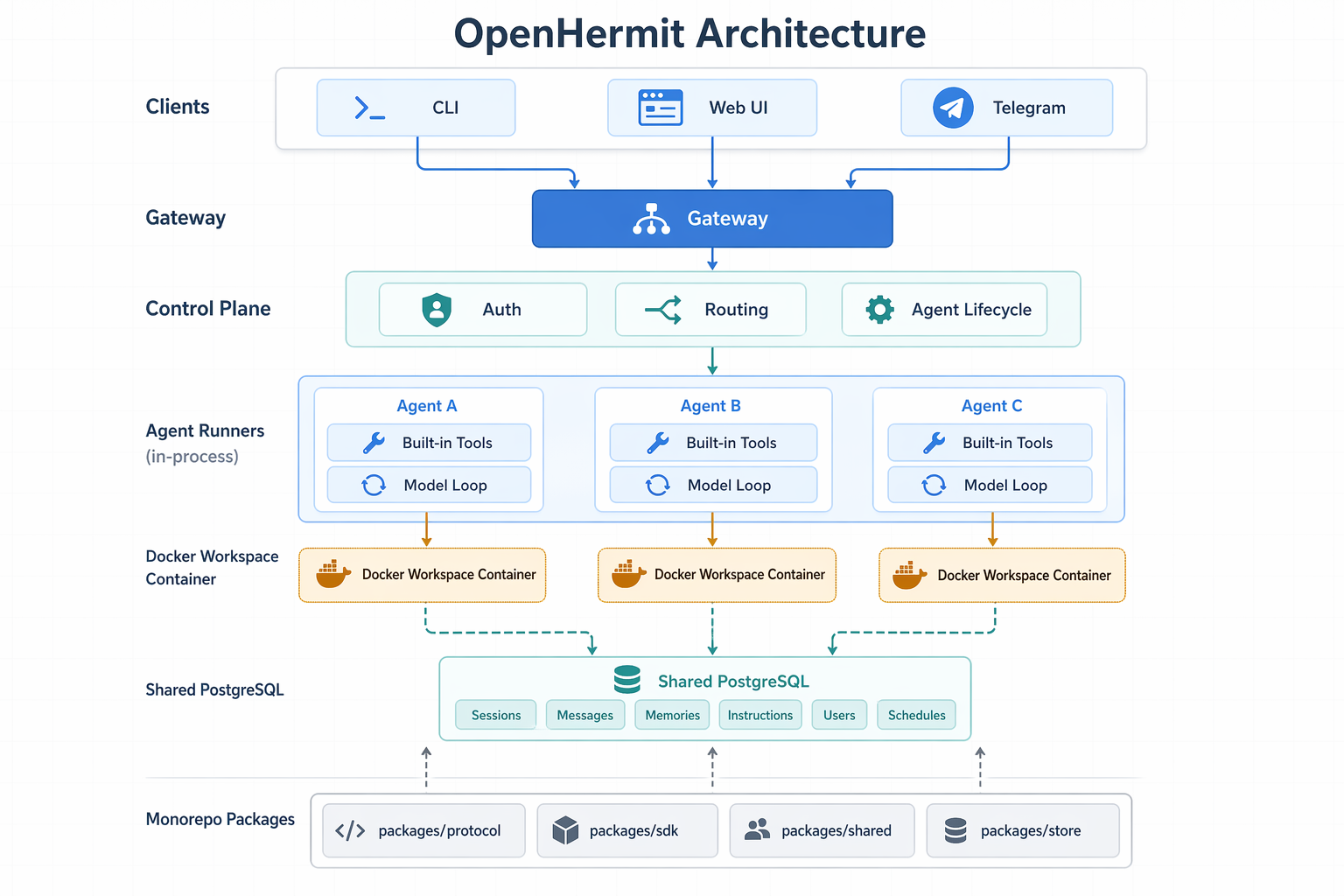
- Admin — CLI + Web UI for deploying and operating agents.
- Client — Web and CLI for end-users to chat with agents.
- Channels — Telegram, Discord, Slack, and package-installed adapters such as Signal, WeChat, and WhatsApp wired into any agent.
- Gateway — API, auth, routing, agent lifecycle, schedules.
- Agent — Model loop, tools / skills / MCP, sandboxed workspace (Docker / E2B / Daytona).
- Storage — PostgreSQL for every kind of internal state.
Installation
npm install -g openhermit
This installs both hermit and openhermit.
For local development:
git clone https://github.com/HCF-S/openhermit.git
cd openhermit
npm install
Quick Start
# Configure DATABASE_URL, GATEWAY_ADMIN_TOKEN, GATEWAY_JWT_SECRET.
hermit setup

# Start the gateway and the end-user web app.
hermit gateway start
hermit web start

# Check platform health.
hermit status
hermit doctor

# Create and start an agent.
hermit agents create main
hermit agents start main

# Chat through the CLI.
hermit chat --agent main
The gateway defaults to http://127.0.0.1:4000 and serves the admin UI at /admin/. The end-user web app runs on http://127.0.0.1:4310.
CLI Reference
| Area | Commands |
|---|---|
| Setup | hermit setup |
| Gateway | hermit gateway start, stop, run, status |
| Web | hermit web start, stop, run, status |
| Agents | hermit agents list, create, start, stop, restart, delete |
| Chat | hermit chat, --agent <id>, --resume, --session <sessionId> |
| Config | hermit config show, get, set |
| Secrets | hermit config secrets list, set, remove |
| Instructions | hermit instructions list, get, set, append, remove — single-agent (--agent <id>) or admin fan-out (--all) |
| Skills | hermit skills list, assignments, scan, register, delete, enable, disable |
| MCP | hermit mcp list, assignments, enable, disable |
| Schedules | hermit schedules list, create, pause, resume, delete, runs |
| Operations | hermit status, hermit stats, hermit doctor, hermit logs [-f] [-n N] |
Agent-scoped commands accept --agent <id> and default to OPENHERMIT_AGENT_ID or main. Full reference: docs/cli.md.
API Overview
Agent execution routes are exposed under /api/agents/{agentId}:
POST /api/agents/{id}/sessionsGET /api/agents/{id}/sessionsPOST /api/agents/{id}/sessions/{sessionId}/messagesPOST /api/agents/{id}/sessions/{sessionId}/messages?wait=truePOST /api/agents/{id}/sessions/{sessionId}/messages?stream=trueGET /api/agents/{id}/sessions/{sessionId}/eventsPOST /api/agents/{id}/sessions/{sessionId}/approvePOST /api/agents/{id}/sessions/{sessionId}/checkpointDELETE /api/agents/{id}/sessions/{sessionId}ws://host/api/agents/{id}/ws
Admin and owner-facing management endpoints live under /api/admin/... and /api/agents/{agentId}/.... Channel webhooks land at POST /api/agents/{id}/channels/{namespace}/webhook.
See docs/transport-protocol.md, docs/skills.md, docs/mcp-servers.md, and docs/channel-adapter.md.
Internal State
All durable internal state is scoped by agent_id where applicable:
| Store | Contents |
|---|---|
| Agents | Registered agents, runtime config, security policy, workspace dirs |
| Sessions | Metadata, status, participants, working memory, descriptions |
| Session events | User, assistant, tool, error, channel, and introspection events |
| Memories | Long-term memory with PostgreSQL FTS plus ILIKE fallback |
| Instructions | Agent identity, behavior, and rules included in prompts |
| Users | Users, identities, roles, and merge links |
| Sandboxes | Per-agent sandbox rows (docker / e2b / daytona) with lifecycle and runtime state |
| Skills | Skill library and per-agent/global assignments |
| MCP servers | External MCP server definitions and assignments |
| Channels | Built-in and external channel rows with encrypted tokens |
| Channel credentials | Encrypted channel-owned auth state such as WhatsApp Web / Baileys credentials |
| Secrets | Per-agent provider/integration secrets, encrypted at rest |
| Schedules | Cron/once jobs and run history |
Secrets and channel-owned credentials are encrypted with OPENHERMIT_SECRETS_KEY (AES-256-GCM); without that key the gateway falls back to per-agent secrets.json for local dev secrets, but DB-backed channel credentials are unavailable. The only per-agent files on disk are the workspace at ~/.openhermit/workspaces/{agentId}/; enabled skills are synced into each backend's own <agent_home>/.openhermit/skills/system/ (bind-mounted for docker, uploaded via SDK for e2b/daytona).
Repository Structure
openhermit/
├── apps/
│   ├── agent/                # AgentRunner, tools, runtime, scheduler, channels
│   ├── gateway/              # Control plane, auth, admin API, admin UI
│   ├── cli/                  # Published `hermit` / `openhermit` CLI
│   ├── web/                  # End-user browser chat app
│   └── channels/
│       ├── telegram/         # Telegram adapter
│       ├── discord/          # Discord adapter
│       └── slack/            # Slack adapter
├── packages/
│   ├── protocol/             # Shared protocol types and route builders
│   ├── sdk/                  # HTTP/SSE/WebSocket clients
│   ├── shared/               # Common env, errors, URL helpers
│   └── store/                # Drizzle schema and PostgreSQL store implementations
├── skills/                   # Built-in OpenHermit skills registered by the gateway
└── docs/                     # Architecture and operation docs
Development
npm run dev:gateway          # Gateway and admin UI API at http://127.0.0.1:4000
npm run dev:web              # End-user web app at http://127.0.0.1:4310
npm run dev:cli              # CLI from source
npm run dev:studio           # Drizzle Studio for the configured database
npm run typecheck            # Type-check all workspaces
npm test                     # Build and run test suites
Important environment variables:
| Variable | Description |
|---|---|
DATABASE_URL |
PostgreSQL connection string |
DATABASE_URL_TEST |
Test PostgreSQL connection string used by npm test |
GATEWAY_ADMIN_TOKEN |
Bearer token for admin APIs and CLI management |
GATEWAY_JWT_SECRET |
JWT signing secret for user/device tokens |
GATEWAY_HOST |
Gateway listen host, default 127.0.0.1 |
GATEWAY_PORT / PORT |
Gateway port, default 4000 |
OPENHERMIT_SECRETS_KEY |
AES-256-GCM key used to encrypt agent_secrets and channel tokens at rest |
OPENHERMIT_TOKEN |
CLI token, usually the admin token |
OPENHERMIT_GATEWAY_URL |
Gateway URL, default http://127.0.0.1:4000 |
OPENHERMIT_AGENT_ID |
Default CLI agent ID, default main |
OPENHERMIT_WEB_PORT |
End-user web app port, default 4310 |
AWS_ACCESS_KEY_ID / AWS_SECRET_ACCESS_KEY / AWS_REGION |
Standard AWS credential chain — used when attachments.storage.provider = s3 |
SUPABASE_URL |
Supabase project URL (e.g. https://xyz.supabase.co) — required when attachments.storage.provider = supabase. Treated as part of the credential bundle since it embeds the project ID |
SUPABASE_SERVICE_ROLE_KEY or OPENHERMIT_ATTACHMENT_SUPABASE_SECRET_KEY |
Supabase secret API key (sb_secret_…) — required when attachments.storage.provider = supabase. Never stored in gateway config. The legacy service-role JWT still works. (OPENHERMIT_ATTACHMENT_SUPABASE_SERVICE_KEY is deprecated) |
Attachment storage backends
The gateway supports three storage providers. The provider is selected in the gateway config (DB-backed, edited via the admin UI at /admin/config — JSON tab — or seeded from gateway.json on first boot), and credentials live in env, not config — only secrets go in env; non-secret pointers (provider, bucket, region, prefix, endpoint, root) live in the gateway config.
Local disk (default)
No config block needed; defaults to ~/.openhermit/attachments. To override the root, set this under attachments.storage:
{
  "attachments": { "storage": { "provider": "local", "root": "/srv/openhermit/attachments" } }
}
S3 (or any S3-compatible service: R2, MinIO, B2)
Install the SDK on the gateway: npm install @aws-sdk/client-s3 @aws-sdk/s3-request-presigner. Credentials come from the AWS default chain (env vars / IAM role / IRSA).
{
  "attachments": {
    "storage": {
      "provider": "s3",
      "bucket": "oh-attachments",
      "region": "us-east-1",
      "prefix": "prod",
      "endpoint": "https://abc.r2.cloudflarestorage.com",
      "forcePathStyle": false
    }
  }
}
Supabase Storage
Install the SDK on the gateway: npm install @supabase/supabase-js. Set SUPABASE_URL and a Supabase secret API key (sb_secret_…) in env as SUPABASE_SERVICE_ROLE_KEY (or OPENHERMIT_ATTACHMENT_SUPABASE_SECRET_KEY) — the project URL embeds the project ID and is treated as part of the credential bundle. The legacy service-role JWT still works; the older OPENHERMIT_ATTACHMENT_SUPABASE_SERVICE_KEY var is deprecated.
{
  "attachments": {
    "storage": {
      "provider": "supabase",
      "bucket": "attachments",
      "prefix": "agents"
    }
  }
}
Optional attachments.limits.maxBytes overrides the default 25 MB cap. Every successful upload is materialized into the sandbox; if the sandbox is down the row is marked failed and attachment_fetch re-materializes on first read.
Documentation
- CLI Reference
- Architecture
- Plugins & Hooks (design draft)
- Storage Model
- Session Model
- User Model
- Memory Model
- Sandbox Model
- Transport Protocol
- Access Policy
- Tools
- Skills
- MCP Servers
- Channel Adapters
- Introspection Design
- Deep Research Design
- Architecture Decisions
- Shipped Features
- Roadmap
- Open Questions
About Amiko
OpenHermit is the open-source agent infrastructure layer of Amiko — an agent-agnostic platform that integrates identity, productivity, social, and economic infrastructure into one coherent system where humans and AI agents coexist.
Amiko is organized around four connected layers:
- Identity — persistent, evolving user representation that powers personalization across all agents
- Productivity — agent capability integration across tools, services, and environments
- Social — 24/7 social continuity through AI twins, personality-driven matching, and agent-curated feeds
- Economy — native wallet infrastructure, token utility, and agent-mediated value exchange
OpenHermit provides the production runtime that makes this possible: durable state, sandboxed execution, multi-channel delivery, fleet management, and the access policy system that governs how agents act on behalf of users.
Amiko is agent-agnostic by design — bring your own agent or create one on the platform. Both paths lead to the same social graph, the same identity layer, and the same economic rails.
Learn more at heyamiko.com.
Contributing
OpenHermit is open source (MIT) and very much a work in progress. If the internal/external state split, the fleet operations model, or agents-as-services resonates with you — we'd love your help.
Issues, PRs, design discussions, channel adapters, skills, MCP integrations, docs, and war stories from running it in your own setup are all welcome.
- Open an issue: github.com/HCF-S/openhermit/issues
- Start a discussion: github.com/HCF-S/openhermit/discussions
- Or just star the repo if you'd like to see where this goes
License
MIT © Amiko
OpenHermit MCP questions
How do I install OpenHermit?
Install it globally with npm, which provides both the hermit and openhermit commands.
Where does OpenHermit store agent state?
Internal state such as sessions, memories, instructions, skills, MCP servers, and secrets lives in shared PostgreSQL, scoped by agent_id.
What sandbox backends can OpenHermit use for agent workspaces?
Each agent's workspace runs in a sandbox that can be self-hosted Docker, E2B, Daytona, or Tenki, with the same exec interface across backends.
Which chat channels does OpenHermit support?
OpenHermit includes Telegram, Discord, and Slack adapters, package-installed Signal, WeChat, and WhatsApp, plus CLI and Web UI, all reconfigurable at runtime.
Can I roll out a skill or MCP server to all agents at once?
Yes, admin commands with the --all flag enable skills, MCP servers, or instructions across every agent.